Ищете руководство по созданию автоматических рассылок для увеличения продаж?
Маркетинг сегодня немыслим без автоматизации. Конечно, вы можете собирать подписчиков и отправлять им push-уведомления и электронные письма. А дальше что? Продолжать продавать им свой бизнес в каждой рассылке и надеяться, что ваши подписчики совершат покупку?
Нет возможности:
- Персонализировать ваши кампании
- Привлекать новых клиентов в автоматическом режиме
- Удерживать существующих клиентов с помощью вашего контента
- Предлагать дополнительные или сопутствующие товары
- Возвращать потерянные продажи
Если только… вы не используете автоматические рассылки, которые конвертируют.
В этой статье мы покажем вам, как настроить автоматические рассылки и получить от них максимум пользы. Самое приятное? Вам не потребуется никакого предварительного опыта.
Звучит неплохо? Давайте погрузимся.
Что такое автоматические рассылки?
Представьте автоматические рассылки как набор электронных писем или даже push-уведомлений, которые отправляются автоматически, подобно системе полива вашего сада. Вместо полива растений вы отправляете сообщения людям, которые заинтересованы в том, что вы говорите или продаете.
Вот как это работает:
- Это не магия, это автоматизация: После настройки эти сообщения будут отправляться сами по себе. Вам не придется отправлять их вручную.
- Вы можете общаться с нужными людьми: Вы можете отправлять разные сообщения разным группам людей. Например, тот, кто только что зарегистрировался, может получить дружеское приветствие, а тот, кто давно с вами, может получить специальные предложения или обновления.
- Это персонально: Эти сообщения могут содержать имя человека или упоминать то, что его заинтересовало. Это создает ощущение, что вы обращаетесь лично к нему, а не отправляете одно и то же всем.
- Время — это всё: Сообщения отправляются в наиболее подходящее время — например, сразу после регистрации или когда кто-то просматривает что-то на вашем сайте.
- У каждого сообщения есть своя задача: Каждое письмо или уведомление предназначено для выполнения конкретной цели, например, чтобы помочь людям лучше узнать ваш продукт или напомнить им о чем-то, что они просматривали, но не купили.
- Вы можете отслеживать результаты: Вы можете проверять такие показатели, как количество людей, открывших сообщения, или перешедших по ссылкам внутри них. Это поможет вам понять, насколько хорошо работают ваши сообщения.
Автоматические рассылки — это не только электронные письма, они работают также для push-уведомлений в приложениях и web push-уведомлений. Они отлично подходят для поддержания связи с людьми, которые заинтересованы в ваших товарах, не перегружая их. Это умный способ поддерживать вовлеченность и интерес к тому, что вы делаете.
Типы автоматических рассылок
Давайте рассмотрим различные типы автоматических рассылок. Подобно тому, как мороженое бывает разных сортов, автоматические рассылки тоже имеют разные типы. Каждый вид предназначен для определенной цели или аудитории. Вот некоторые из наиболее распространенных:
- Приветственная серия: Это как сказать «Привет!» новому знакомому. Когда кто-то подписывается на ваши электронные письма или уведомления, вы отправляете ему несколько дружеских сообщений, чтобы познакомить его с вашим брендом или услугой. Это как расстелить красную ковровую дорожку для новых гостей.
- Кампании по онбордингу: Думайте об этом как о полезном руководстве. Когда кто-то покупает продукт или подписывается на услугу, эти сообщения помогают ему разобраться, как им пользоваться, предлагают полезные советы или показывают то, о чем он мог не знать. Это как провести экскурсию для новичка в городе.
- Напоминания о брошенной корзине: Вы когда-нибудь клали что-то в корзину онлайн-магазина, а потом забывали об этом? Эти кампании — небольшие толчки, чтобы напомнить людям о вещах, которыми они интересовались, но не купили. Это как легкое похлопывание по плечу со словами: «Эй, ты не забыл об этом?»
- Кампании по повторному вовлечению: Они предназначены для связи с людьми, которые раньше взаимодействовали с вашим брендом, но давно этого не делали. Это как позвонить старому другу и сказать: «Эй, давай наверстаем упущенное!» Вы можете предложить им специальную скидку или просто напомнить о своем бренде.
- Образовательный контент: Здесь цель — научить вашу аудиторию чему-то ценному, связанному с вашим продуктом или отраслью. Это как мини-курс, представленный в виде небольших, легко усваиваемых сообщений. Думайте об этом как о серии увлекательных и информативных уроков.
- Обновления продуктов: Есть что-то новое или улучшенное? Этот тип кампании информирует вашу аудиторию о новых функциях, продуктах или услугах. Это как показать друзьям свой последний гаджет.
- Приглашения на мероприятия: Проводите вебинар, мастер-класс или другое мероприятие? Эти кампании направлены на то, чтобы вызвать у людей интерес и побудить их зарегистрироваться на ваши мероприятия. Это как рассылка классных приглашений на вечеринку.
- Сезонные кампании: Они привязаны к определенному времени года, например, к праздникам, сезонам или особым событиям. Это как украсить свой магазин к Рождеству или провести летнюю распродажу.
Каждый тип drip-кампании имеет свое очарование и назначение. Сопоставляя правильный тип кампании с вашей аудиторией и целями, вы можете создавать значимые связи и поддерживать вовлеченность вашей аудитории таким образом, чтобы это ощущалось естественно и не слишком навязчиво.
Как создавать drip-кампании push-уведомлений
Установка push-уведомлений на веб-сайт несложна. Но это требует нескольких шагов, и вам нужно будет следовать этому руководству шаг за шагом.
Не торопитесь, и все будет хорошо.
Прежде чем создавать приветственную кампанию push-уведомлений, вам необходимо выбрать сервис push-уведомлений. Сервис push-уведомлений — это программное обеспечение, которое позволяет создавать push-кампании без какого-либо кодирования.
Мы рекомендуем использовать PushEngage.

PushEngage — это плагин для push-уведомлений № 1 в мире.
Push-уведомления помогают вам автоматически увеличивать трафик вашего сайта и вовлеченность. И если вы управляете интернет-магазином, PushEngage также помогает вам увеличить продажи, помогая создавать автоматические push-уведомления для электронной коммерции.
Вы можете начать бесплатно, но если вы серьезно относитесь к развитию своего бизнеса, вам следует приобрести платный план. Кроме того, прежде чем покупать какую-либо службу push-уведомлений, ознакомьтесь с этим руководством по стоимости push-уведомлений.
Вот краткий обзор того, что вы получаете с PushEngage:
- Высококонверсионные автоматизированные кампании
- Множеством вариантов таргетинга и планирования кампаний
- Отслеживанием целей и расширенной аналитикой
- Интеллектуальным A/B-тестированием
- Выделенный менеджер по успеху
Вы увидите, что PushEngage — это, без сомнения, лучший выбор, если вы хотите увеличить трафик, вовлеченность и продажи для своего бизнеса. И если у вас ограничен бюджет, вы всегда можете немного проявить креативность с вашими push-уведомлениями.
ПРИМЕЧАНИЕ: Если у вас сайт на WordPress, вам следует установить и активировать плагин PushEngage для WordPress.
Поехали!
Шаг № 1: Создайте бесплатную учетную запись PushEngage
Перейдите на PushEngage и нажмите Начать бесплатно прямо сейчас:
Вы можете начать с бесплатного плана. Но если вы хотите отправлять целевые push-уведомления, вам следует выбрать План Роста. Как только вы определитесь с нужным планом, нажмите «Начать», чтобы создать свою учетную запись PushEngage.
Шаг № 2: Зарегистрируйтесь в PushEngage
Теперь пришло время создать вашу учетную запись PushEngage. Начните с регистрации по адресу электронной почты или идентификатору Gmail:

Затем заполните данные вашей учетной записи:

И добавьте информацию о вашей кредитной карте, чтобы купить ваш план:

Если вы выбрали бесплатную учетную запись, с вашей кредитной карты никогда не будет взиматься плата, пока вы не решите обновить свой план. И теперь вы готовы получить доступ к вашей панели управления PushEngage. Просто нажмите Завершить регистрацию и получить мгновенный доступ.
Если вы раньше использовали OneSignal или PushAlert, вы увидите, что PushEngage предоставляет вам гораздо более удобный интерфейс панели управления. Панель управления OneSignal не предназначена для расширенных кампаний. Для этого вам понадобится API больше, чем плагин OneSignal.
Шаг № 3: Установите плагин WordPress для веб-уведомлений
ПРИМЕЧАНИЕ: Если вы не используете сайт на WordPress, ознакомьтесь с нашими руководствами по установке, чтобы начать работу.
Вы закончили создание учетной записи. Теперь перейдите в панель управления PushEngage и следуйте инструкциям:

Нажмите на Настройки сайта » Детали сайта и нажмите кнопку Нажмите здесь для инструкций по настройке:

Нажмите на вкладку WordPress и нажмите кнопку Установить плагин PushEngage для WordPress , чтобы установить плагин на ваш веб-сайт.

Вот что самое интересное: При создании учетной записи PushEngage вы уже синхронизировали свой веб-сайт с учетной записью PushEngage. Поэтому нажмите на ссылку установки на панели управления PushEngage, чтобы автоматически установить плагин PushEngage для WordPress на ваш веб-сайт.
Шаг № 4: Подключите ваш веб-сайт WordPress к PushEngage
Когда вы закончите установку и активацию плагина WordPress PushEngage, вы увидите мастер начальной настройки PushEngage:

Мастер настройки довольно прост. Если вы новый пользователь, нажмите Новый? Получите бесплатную учетную запись. А если вы уже зарегистрировались, нажмите Подключить существующую учетную запись.
Далее вы можете выбрать свой сайт из выпадающего списка Выберите сайт в разделе Подключить зарегистрированный сайт, если вы уже регистрировали сайт во время регистрации:

Или вы можете нажать Зарегистрировать новый сайт, чтобы добавить новый сайт, если у вас есть премиум-тарифный план или выше. На следующем шаге мастер онбординга предложит вам установить другие обязательные плагины WordPress.

Если вы выполнили каждый шаг правильно, вы увидите это сообщение об успехе от мастера:

Теперь вы готовы создавать кампании и всплывающие окна для push-уведомлений.
Шаг № 4: Отправляйте персонализированные drip-кампании
Прежде чем создавать кампанию, вам следует настроить сегменты и группы аудиторий для отправки персонализированных push-сообщений.
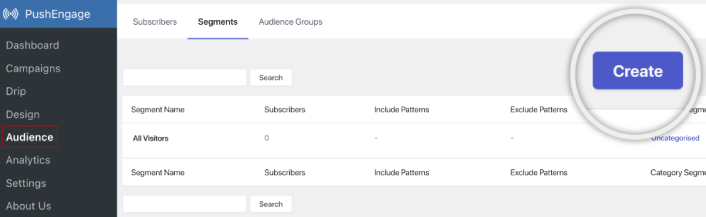
Ничто не сравнится с уровнем персонализации, которого вы можете достичь, создавая сегменты и группы аудиторий для подписчиков ваших push-уведомлений. Перейдите в раздел PushEngage » Аудитория и немедленно начните создавать сегменты и группы аудиторий.
На вкладке Сегменты вы можете создавать новые сегменты или редактировать существующие:
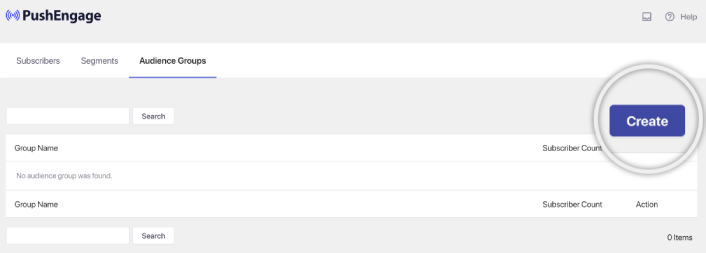
А если вам нужна еще более глубокая персонализация, создайте группу аудиторий на вкладке Группы аудиторий:
Если вы новичок в сегментах push-уведомлений и персонализированных push-уведомлениях, вам следует ознакомиться с нашей статьей о создании сегментов и нашим анонсом расширенного группирования аудиторий.
Шаг №5: Создайте свою кампанию push-уведомлений Drip
Перейдите на панель управления PushEngage и выберите Campaign » Drip Autoresponders, затем нажмите Create New Drip Autoresponder:

Затем назовите свою кампанию (мы предлагаем что-то вроде "Welcome Drip") и в разделе Content выберите опцию "Send notification immediately after user subscribes“):

На этом этапе вы можете нажать на стрелку рядом с уведомлением, чтобы отредактировать его содержимое.
Если у вас есть план Premium или Enterprise от PushEngage, вы сможете добавить более одного уведомления для создания последовательности автоматических приветственных сообщений. Просто нажмите Add New Notification и отредактируйте контент.
Когда закончите, нажмите Drip Settings и выберите опцию отправки вашей приветственной кампании всем подписчикам:

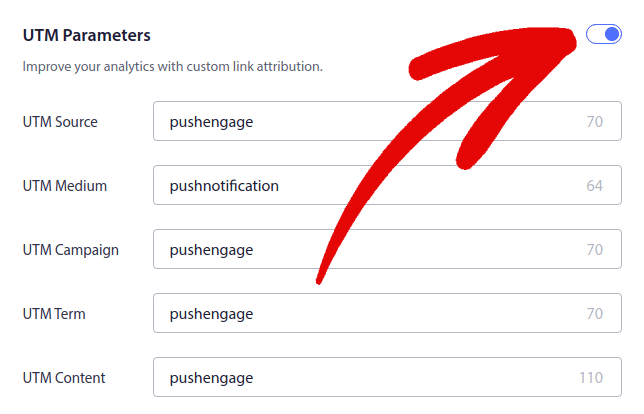
Затем прокрутите вниз, чтобы установить собственные UTM-параметры для отслеживания push-уведомлений:
И когда закончите, прокрутите вверх и нажмите кнопку Activate Autoresponder:

И вы закончили!
Как создавать email-кампании Drip
Настраиваете эти удобные автоматические кампании Drip в WordPress? Вы можете легко сделать это с помощью инструмента email-маркетинга. Следуйте этому руководству, и все будет готово!
Шаг №1: Выберите сервис email-рассылок Drip
Мы предлагаем попробовать Constant Contact. Это как суперзвезда сервисов email-маркетинга. Очень прост в использовании и имеет удобную функцию перетаскивания для создания писем.

Constant Contact — лучшая служба email-маркетинга для настройки автоответчиков для вашего бизнеса. Она очень проста в использовании и предлагает множество функций автоматизации для улучшения ваших email-кампаний.
Вот что делает Constant Contact таким отличным выбором для настройки кампаний email-маркетинга:
- Простой конструктор drag-and-drop для создания писем
- Сотни готовых шаблонов писем
- Приветственные сообщения, предложения на день рождения и автоответчики для брошенных корзин
- Инструменты для создания списков и формы подписки для роста вашей аудитории
- Сплит-тестирование для целевых писем
- Интеграция с CRM и сторонними сервисами
- Отличная поддержка через чат и телефон
Не говоря уже о том, что Constant Contact имеет плагин форм для WordPress, который вы можете использовать для генерации лидов. Вы также можете развивать и закрывать свои лиды с помощью автоответчиков.
Но, эй, это не единственный вариант. Большинство крупных сервисов email-маркетинга, таких как Brevo (возможно, вы знаете его как Sendinblue), HubSpot и другие, также предлагают эту магию email-рассылок.
Несколькими кликами вы можете запустить эти автоматические письма для ваших подписчиков. Кроме того, Constant Contact хорошо интегрируется с плагинами WordPress, такими как WPForms и OptinMonster. А если вы занимаетесь электронной коммерцией, используя WooCommerce или Shopify, он поможет вам связаться с новыми клиентами или напомнить о товарах, оставленных в корзине.
Готовы попробовать? Зайдите на веб-сайт Constant Contact, зарегистрируйтесь, и угадайте что? Вы можете попробовать его с 60-дневной бесплатной пробной версией. Это как тест-драйв автомобиля, но для email-маркетинга. Таким образом, вы сможете понять, подходит ли он вам, прежде чем перейти на платный план.
Шаг №2: Создайте список рассылки
После создания учетной записи вы можете перейти на панель управления Constant Contact, чтобы создать список контактов.
Constant Contact уже создаст для вас список по умолчанию. Однако вы можете создать свой собственный список, перейдя на вкладку Contacts в верхнем меню, а затем нажав кнопку Create List.

Вы можете подключить свою форму подписки WordPress к Constant Contact и начать создавать список рассылки. Вам также стоит ознакомиться с нашей статьей в блоге о том, как добавить виджет подписки на блог WordPress.
Шаг №3: Создайте маркетинговые кампании Drip
Теперь, когда вы добавили подписчиков в свой список Constant Contact, следующим шагом будет создание автоматической серии писем. Перейдите на вкладку Маркетинговые кампании, а затем нажмите кнопку Создать.

Constant Contact предложит вам несколько вариантов создания кампании. Выберите кампанию Автоматизация.

Отсюда вы можете выбрать один из нескольких готовых шаблонов кампаний для настройки серии писем. Вы можете создать Пользовательскую автоматизацию, чтобы начать с нуля, или быстро начать работу, используя любой из шаблонов кампаний.
В этом руководстве мы выберем шаблон Создать пользовательский путь, чтобы начать. Выберите опцию Подписчики для электронной почты, а затем нажмите кнопку Далее.

Присвойте вашему пользовательскому пути имя, и готово! Этот шаблон будет запускать серию писем всякий раз, когда кто-то новый подписывается на вашу рассылку. Так что он идеально подходит для приветственной кампании. Если вы хотите создать онбординговую кампанию, вы можете использовать теги, чтобы поместить их в отдельную серию писем.
Шаг № 4: Создание потока кампании
Однако вы можете просто перетаскивать действия и правила из меню слева на путь. Например, вы можете добавлять различные действия, такие как отправка электронного письма или отправка SMS, в ваш рабочий процесс.
Существуют также различные правила, которые помогают настраивать автоматизацию. Вы можете добавить задержку по времени и указать, когда должно быть отправлено следующее письмо. Аналогично, есть опция условного разделения, которая позволяет настроить условия «Да» и «Нет» и разделить путь.

Настройка вашего автоматизированного рабочего процесса также очень проста. Просто найдите значок с тремя точками и нажмите на него. Выберите Редактировать, чтобы внести изменения. Допустим, вы хотите изменить действие Отправить электронное письмо.
Как только вы это сделаете, появится всплывающее окно. Здесь вы можете либо создать совершенно новое письмо, либо использовать уже готовое.
Поскольку вы настраиваете этот рабочий процесс впервые, выберите Создать новое письмо. Введите интересное название для вашего письма, затем нажмите Продолжить. И вот так вы на пути к настройке вашего рабочего процесса электронной почты!
Шаг № 5: Создание вашей кампании по электронной почте
Вы можете найти шаблон по случаю или использовать пустой шаблон для создания письма с нуля.

Как только вы выберете шаблон, запустится редактор электронной почты.

Когда закончите, нажмите кнопку Сохранить и закрыть вверху. Это вернет вас в Конструктор путей в Constant Contact. Продолжайте и завершите свой путь автоматизации, добавляя столько действий и правил, сколько вам нужно, и редактируя каждое из них.

После создания автоматизированного рабочего процесса вы можете просто нажать кнопку Активировать вверху. И готово!
Что делать после создания серии писем
На этом всё, друзья!
Если эта статья оказалась полезной, обязательно оставьте комментарий ниже.
Начать работу с автоматическими email-рассылками может показаться сложным. Но если вы будете следить за отслеживанием целей и аналитикой, все будет в порядке. Что еще важнее, вы получите гораздо большую прибыль с помощью кампаний push-уведомлений. Вот несколько полезных ресурсов, которые помогут вам начать:
- Как использовать ретаргетинговые push-уведомления для увеличения дохода в 2 раза
- Как сортировать push-уведомления и находить выигрышные кампании
- Как очистить списки подписчиков push-уведомлений (легко)
- Как автоматически отправлять RSS-push-уведомления
- Как использовать push-уведомления для продвижения новостного сайта
- Как использовать push-уведомления для перекрестных продаж, чтобы удвоить продажи
- Как использовать push-уведомления об отказе от просмотра (4 шага)
Если вы новичок в push-уведомлениях, вам стоит попробовать PushEngage. PushEngage — это программное обеспечение для push-уведомлений № 1 на рынке. И ваши кампании будут в надежных руках.
Так что, если вы еще этого не сделали, начните использовать PushEngage сегодня!


