Ищете подробное пошаговое руководство по созданию push-уведомлений для Черной пятницы, которые конвертируют?
Конечно, вы можете отправить простое массовое push-уведомление. Но будет ли это работать? Мы разработали надежный процесс, который поможет вам увеличить продажи в праздничный сезон. И мы многократно тестировали его с различными брендами.
В этой статье мы расскажем, как мы создаем push-уведомления для распродажи PushEngage в Черную пятницу. И как вы можете сделать то же самое. Мы рассмотрим, что вам нужно для начала, как создавать кампании и как будет выглядеть идеальный график.
Звучит неплохо? Давайте погрузимся.
Прежде чем начать работу с push-уведомлениями для Черной пятницы
Push-уведомления — это маркетинговый инструмент, который помогает вам связываться с посетителями сайта даже после того, как они покинули ваш сайт. Вы можете отправлять целевые уведомления своим подписчикам push-уведомлений и даже персонализировать уведомления для различных сегментов клиентов. Но какую службу push-уведомлений выбрать?
Мы рекомендуем использовать PushEngage для отправки кампаний push-уведомлений.

PushEngage — лучший сервис push-уведомлений в мире. И мы говорим не только о бесплатной версии. Он позволяет вам связываться с посетителями после того, как они покинут ваш сайт, с помощью целевых push-сообщений.
PushEngage — наш первый выбор среди сервисов и инструментов для push-уведомлений, потому что он:
- Очень прост в использовании
- Эффективен на HTTP и HTTPS сайтах
- Поставляется с визуальным конструктором, который требует минимального или нулевого кодирования для настройки
- Легко настраивайте полностью автоматизированные кампании push-уведомлений для любого типа сайта
- Имеет множество опций для отправки персонализированных push-уведомлений для более высоких показателей кликабельности
- Оснащен отслеживанием пользовательских целей, UTM-параметрами и расширенной аналитикой
И это только верхушка айсберга. Ознакомьтесь с полным списком функций PushEngage, прежде чем двигаться дальше. Самое невероятное в PushEngage — это то, что у него есть бесплатный тариф, который вы можете попробовать, прежде чем принимать решение о покупке.
Совет: Ознакомьтесь с нашим анализом стоимости push-уведомлений перед покупкой любой услуги.
После создания учетной записи перейдите на панель управления PushEngage и следуйте инструкциям:

Нажмите Настройки сайта » Детали сайта и нажмите кнопку Нажмите здесь для инструкций по настройке:

Нажмите на вкладку WordPress и нажмите кнопку Установить плагин WordPress PushEngage, чтобы установить плагин на ваш веб-сайт.

Вот что здорово: Когда вы создали свою учетную запись PushEngage, вы уже синхронизировали свой веб-сайт с учетной записью PushEngage. Итак, нажмите на ссылку установки в панели управления PushEngage, чтобы автоматически установить плагин PushEngage WordPress на ваш веб-сайт.
И вы закончили! Вы успешно установили плагин WordPress для веб-уведомлений на своем сайте. Вам не нужно входить в панель администратора WordPress. Для более подробного руководства ознакомьтесь с нашей статьей о том, как установить веб-уведомления на WordPress.
Прежде чем начать создавать push-уведомления для Черной пятницы, вам также следует ознакомиться с этими ресурсами, которые помогут вам начать работу.
- Как добавить плагин WordPress для веб-уведомлений на ваш сайт
- Как добавить значок push-уведомления (простой способ)
- 7 лучших практик push-уведомлений для мгновенного трафика
- Как включить одношаговый сбор подписок для push-уведомлений
- [Объявление] В PushEngage теперь есть расширенная группировка аудитории
Я настоятельно рекомендую использовать эти ресурсы, чтобы быстро начать работу с PushEngage.
Как создать кампанию push-уведомлений
Теперь, когда у нас есть базовое понимание того, как работает PushEngage, давайте создадим нашу кампанию. В настоящее время PushEngage предлагает функцию Группировка аудитории только для Массовых рассылок.
Итак, в вашей панели PushEngage перейдите в раздел Кампания » Массовые рассылки, чтобы создать свои push-уведомления.

Далее следуйте нашему пошаговому процессу, чтобы создать мощную распродажу в Черную пятницу. Если вы выполните каждый шаг, у вас будут мощные push-уведомления, подобные этому:

Шаг № 1: Составьте текст вашего push-уведомления
Текст вашего push-уведомления будет включать:
- Заголовок уведомления
- Сообщение уведомления
- URL для перенаправления
- Большое изображение для уведомления
- Кнопки призыва к действию
- Ограничение срока действия уведомления
Начните с основного текста вашего уведомления:
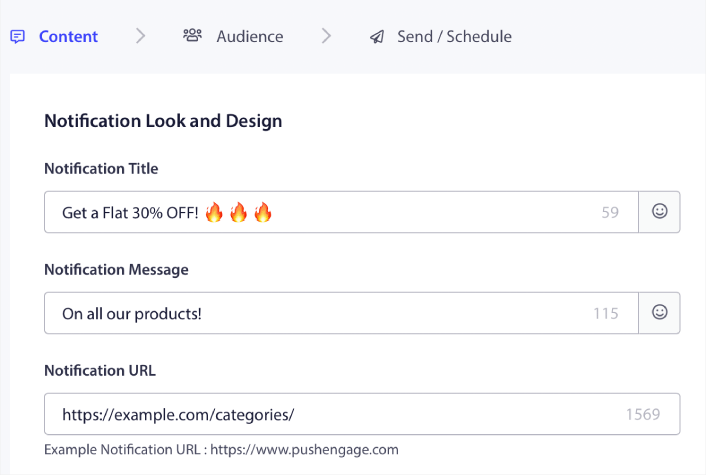
Обратите внимание на использование эмодзи в Заголовке уведомления. Мы рекомендуем использовать эмодзи в заголовке и сообщении для всех ваших push-уведомлений для повышения коэффициента открытий. Вы также можете провести A/B-тестирование уведомлений для лучшей производительности.
Шаг № 2: Добавьте большое изображение к вашему уведомлению
Трудно выделиться среди множества уведомлений в Центре уведомлений. Вот почему вам нужно большое изображение, чтобы ваши уведомления выделялись:
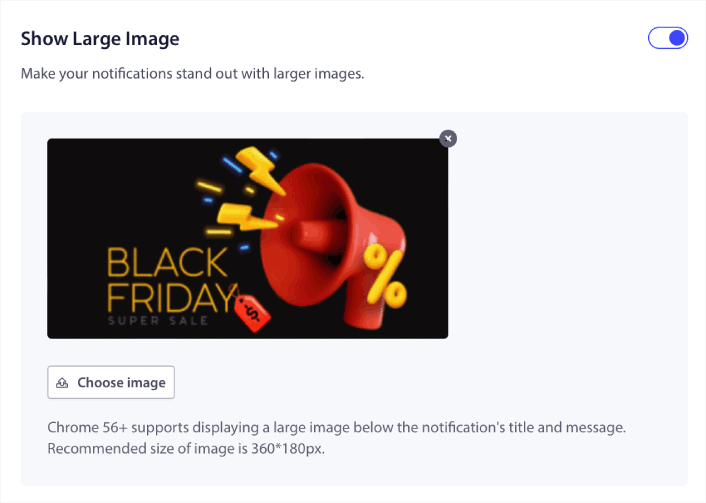
Вы можете использовать форматы PNG и JPEG для изображений.
Если вы хотите нацелиться на подписчиков, которые кликнули на ваше последнее уведомление, вы можете создать другую группу аудитории.
Мы заметили, что использование пользовательских кнопок призыва к действию увеличивает коэффициент кликов по вашим уведомлениям. Поэтому мы настоятельно рекомендуем использовать опцию Multi Action Notification для создания пользовательского призыва к действию:
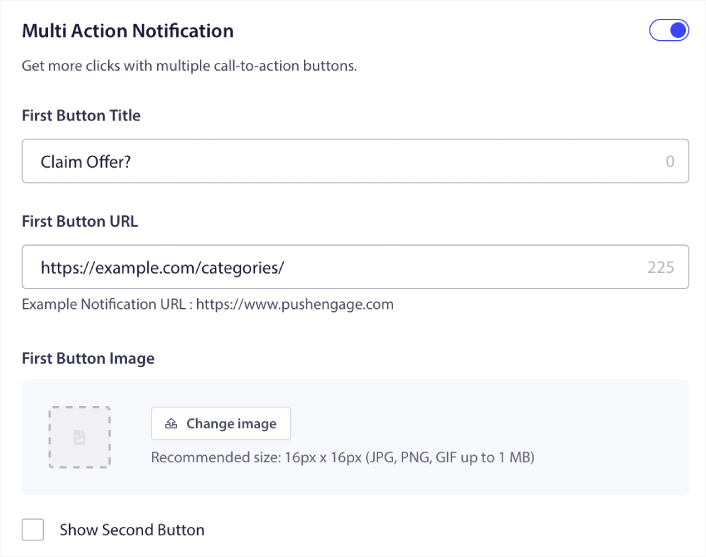
Вы можете добавить максимум два призыва к действию. При желании вы можете создать сплит-тест с одним или двумя призывами к действию. По нашему опыту, обычно лучше использовать несколько призывов к действию, если вы не сосредоточены ТОЛЬКО на одном действии.
Одна вещь, о которой вы хотите позаботиться, — это ограничения на количество символов в push-уведомлениях. Все в push-уведомлениях имеет ограничение по количеству символов в зависимости от браузера и устройства вашего подписчика. Если ваши уведомления слишком многословны, они просто не отобразятся должным образом.
Шаг № 4: Установите продолжительность уведомления
Notification Duration (Продолжительность уведомления) — это временной лимит, после которого ваше push-уведомление истекает. После истечения срока действия ваш подписчик не сможет увидеть уведомление, даже если оно было доставлено ему.
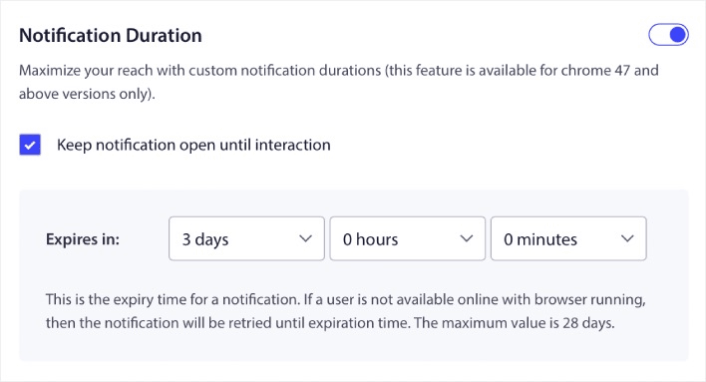
Установка Notification Duration (Продолжительность уведомления) — отличная практика для всех распродаж. Таким образом, ваши подписчики не будут завалены кучей уведомлений.
Совет: Убедитесь, что вы установили правильную продолжительность для распродажи. Если ваши подписчики перейдут по ссылке на предложение, которое уже истекло, они будут очень недовольны.
Шаг № 5: Выберите группу аудитории
Теперь, когда у вас готов контент, пришло время найти подходящую аудиторию для ваших уведомлений.
Как отправить уведомление всем подписчикам
Мы хотим максимального охвата для 3 уведомлений:
- Раннее объявление о Черной пятнице
- Распродажа в Черную пятницу
- Киберпонедельник
Итак, мы отправляем эти 3 уведомления всем. На вкладке Аудитория выберите Отправить всем подписчикам:

Как перенацелить подписчиков, которые не нажали на широковещательное сообщение для всех
Если вы не отправляете уведомление всем подписчикам, вам нужно будет создать Audience Group (Группу аудитории).
Перейдите в Audience » Audience Groups (Аудитория » Группы аудитории) и нажмите Create New Audience Group (Создать новую группу аудитории):
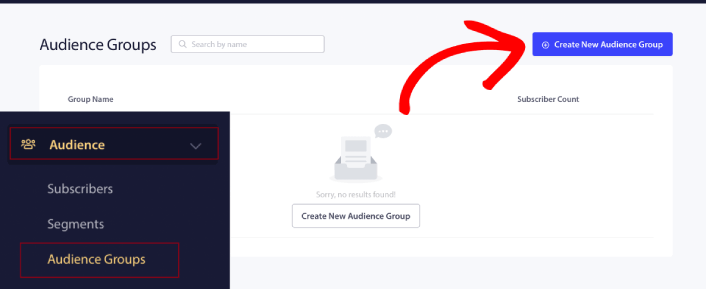
Чтобы нацелиться на подписчиков, которые не нажали на последнее уведомление, вам нужно будет отфильтровать по Дате последнего клика:
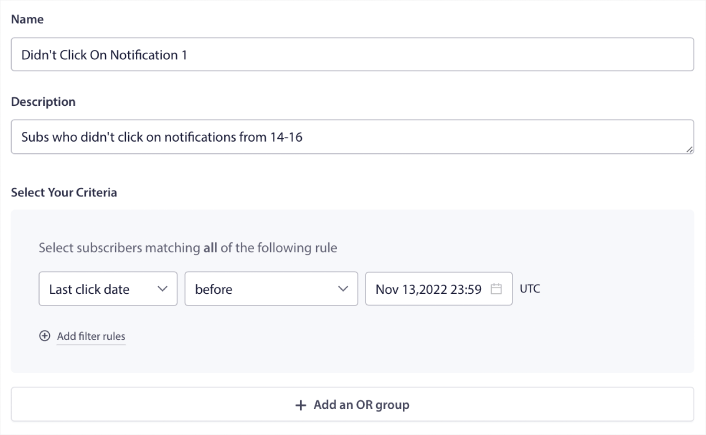
Фильтруйте по дате последнего клика до даты отправки предыдущего уведомления. Итак, если вы отправили последнее push-уведомление 14 ноября, фильтруйте подписчиков, которые кликнули на уведомления только до полуночи 13 ноября.
ПРИМЕЧАНИЕ: В отличие от кампании по электронной почте, вы не можете фактически фильтровать по коэффициенту кликов последнего уведомления. Наиболее близкое приближение — это фильтрация по кликам в диапазоне дат.
Когда закончите, нажмите Сохранить уведомление.
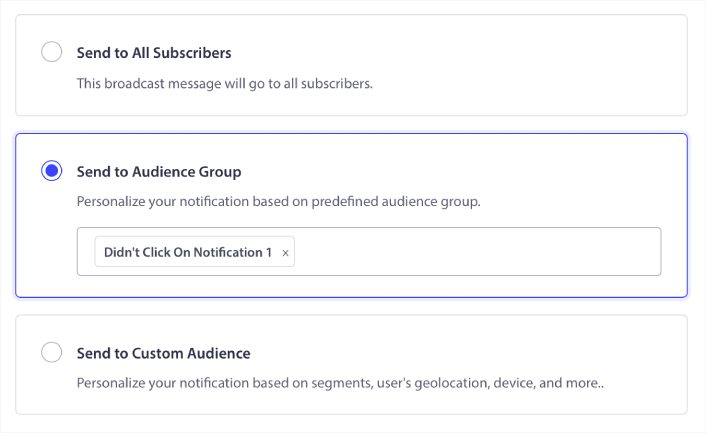
Затем вернитесь к широковещательному уведомлению и выберите Отправить группе аудитории. Из выпадающего списка выберите вашу Группу:
Как перенацелить подписчиков, которые нажали на широковещательное сообщение для всех
Если вы хотите нацелиться на подписчиков, которые нажали на ваше последнее уведомление, вы можете создать другую группу аудитории.
Отфильтруйте подписчиков по Дате последнего клика после даты отправки предыдущего уведомления И до даты отправки следующего уведомления:
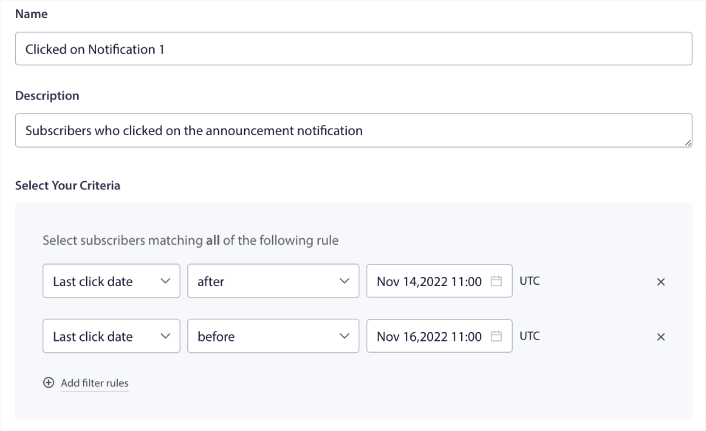
Вы можете добавить критерии И к вашему фильтру, нажав Добавить правила фильтра. Такой фильтр отлично подходит для перекрестных продаж push-уведомлений.
Шаг № 6: Запланируйте ваше push-уведомление
На вкладке Schedule (Расписание) выберите Begin sending at particular day and time (Начать отправку в определенный день и время) для детальных параметров планирования.
Мы отправляем уведомление в 11:00 утра. Поскольку push-уведомления в браузере показываются независимо от того, когда вы фактически отправили уведомление, вы можете отправить его даже раньше, если хотите.
Поскольку моя настройка часового пояса по умолчанию не EST, я использую опцию Send Notifications in Subscribers timezone (Отправлять уведомления в часовом поясе подписчиков):
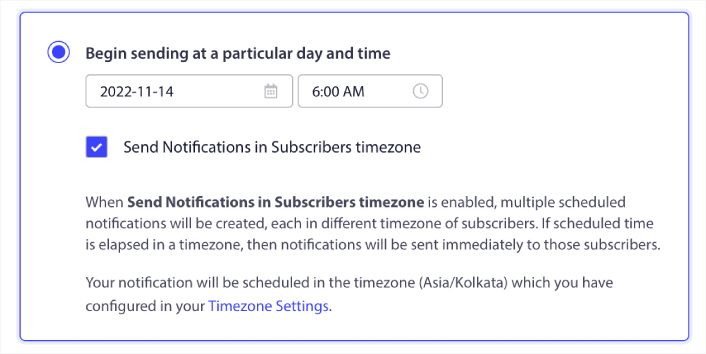
Не забудьте протестировать свои уведомления, нажав кнопку Test Notification (Тестовое уведомление). Когда закончите, нажмите Schedule Notification (Запланировать уведомление).
Каково идеальное расписание push-уведомлений на Черную пятницу
Нет единственно правильного или неправильного расписания для праздничных кампаний. Но мы следуем очень строгому расписанию, и оно работает:
- 3 уведомления для ранней распродажи в Черную пятницу
- 1 уведомление для Черной пятницы
- 1 уведомление для Субботы малого бизнеса
- 1 уведомление для Киберпонедельника
- 1 уведомление для продленной распродажи в Киберпонедельник
И ретаргетинговые push-уведомления для таргетинга подписчиков, которые кликнули на них или нет. Дайте нам знать, как это работает для вас. А пока ознакомьтесь с этими ресурсами:
- Как увеличить количество кликов по вашим push-уведомлениям с помощью любопытства
- Как персонализировать каждое push-уведомление
- Как выделиться с помощью медиафайлов в ваших push-уведомлениях
- Как реактивировать неактивных подписчиков push-уведомлений
- Как использовать push-уведомления для информирования клиентов
- Как использовать эмодзи в ваших push-уведомлениях для увеличения количества кликов
- Как увеличить конверсию, создавая ощущение срочности
И если вы еще этого не сделали, начните работу с PushEngage сегодня.


