ボタンクリックで購読者を収集する方法

You can collect subscribers on page load by displaying the subscription/permission Opt-in, but there is also an option available to collect subscribers over an element click. The HTML element could also be a button/link or an image. The good part is you only need to know the ID of the element, but you do not have to add any code.

In this guide, you can learn how to do it from the dashboard itself.

Adding Subscription Opt-in Trigger

Navigate to the Design » Popup Modal, and click on the Edit Popup button.

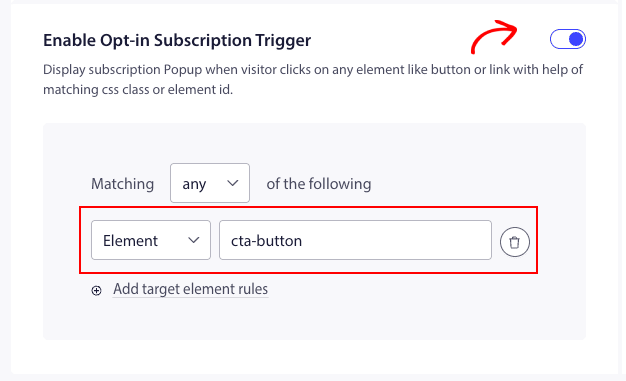
You can scroll to Enable Subscription Opt-in Trigger and toggle it on.

Now you need to fetch the ID of the element and add it to the matching criteria filter.

Once it is added, you can click Save and Enable Popup.

This is going to show the Optin on the click of an element or a button after the page load.

This is it, you can now test by clicking on that element on your website if the Popup shows up.

問題が発生した場合は、ここをクリックして お問い合わせ ください。サポートチームがお手伝いします。

最終更新日:2026年3月9日

ウェブサイトを離れた後も訪問者をエンゲージし、維持する

見逃せないプッシュ通知で、すべてのウェブ訪問の価値を高めましょう。

  • 永久無料プラン
  • 簡単なセットアップ
  • 5つ星サポート