
Looking for secret tips on how to get Facebook reviews?
You’re not the only one. Facebook reviews are a great way to showcase what your brand can do for your customers. Not to mention, they bring in even more business because most buyers trust businesses with great reviews.
But how do you get a Facebook review from one of your customers? Do you have to manually email each of them? Or can you automate the process? Do you need paid software to get more reviews? Or can you do it for free?
In this article, we’re going to show you how to get Facebook reviews in multiple ways. We’ll also answer all your questions and more!
Ça vous dit ? Plongeons directement.
Why Should You Get More Facebook Page Reviews?
Getting more Facebook Page reviews can be beneficial for several reasons:
- Increased Visibility: Facebook Page reviews are public and can be seen by anyone visiting your page, which can help increase visibility for your business and attract new customers.
- Improved Trust: Positive reviews can help build trust with potential customers and show that your business is reputable and trustworthy.
- Improved Search Rankings: Facebook Page reviews can impact your search rankings, making it easier for people to find your business when they search for keywords related to your products or services.
- Increased Engagement: Encouraging customers to leave reviews can also increase engagement on your Facebook Page, which can help you reach a wider audience and improve your overall online presence.
But of course, there are rules and guidelines for your Facebook reviews.
Guidelines for Facebook Business Page Reviews
Before gathering reviews on your Facebook business page, it’s important to check out Facebook’s guidelines for business recommendations. According to these recommendations, Facebook reviews should:
- Focus on the product or service offered by the business
- Be based on the user’s personal experience
- Not be from anyone who manages the page for that business
If your reviews don’t meet these guidelines, you can request them to be removed.
With that, let’s take a look at the easiest way to get Facebook reviews and boost your sales.
How to Get Facebook Reviews (11 Proven Ways)
Let’s go ahead and look at our tried-and-tested methods that you can use to get more Facebook reviews for your brand.
#1. Enable Reviews for Your Facebook Page
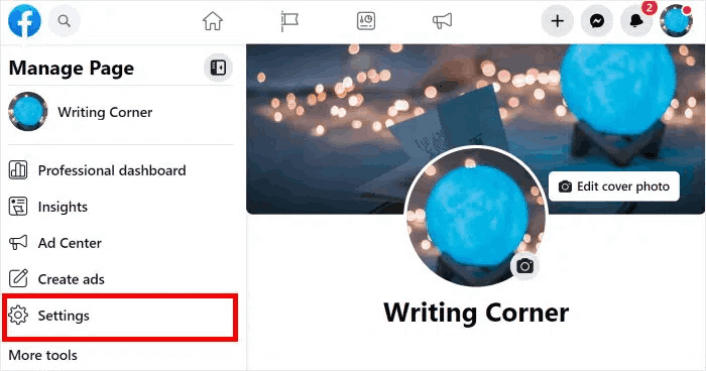
The first thing to do is make sure you’re allowing visitors to see and leave Facebook reviews. Go to your Facebook business page and click on the Settings option on the left.
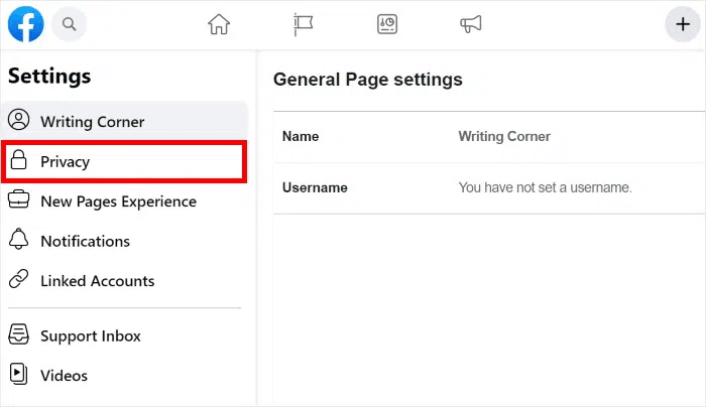
Next, click on Privacy to change your page’s privacy settings.
Go to Page and tagging and enable the option labeled Allow others to view and leave reviews on your Page?
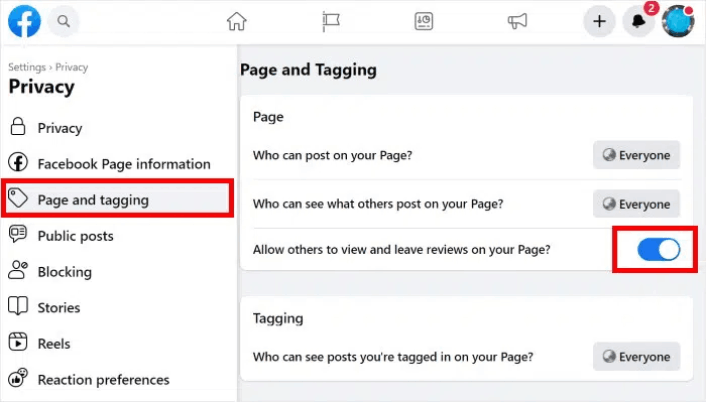
You can now start collecting reviews and recommendations from your customers. And if you like, you can also add a short call-to-action that encourages people to leave reviews.
#2. Send Push Notifications to Ask for Reviews
It can be a real pain to go around asking manually if you have a bunch of new customers every day. That’s exactly why a product feedback push notification campaign is so useful. We recommend using PushEngage for all your push notification campaigns.

PushEngage vous aide à augmenter le trafic de votre site Web et l'engagement en mode automatique. Et si vous gérez une boutique en ligne, PushEngage vous aide également à augmenter vos ventes en vous aidant à créer des notifications push e-commerce automatisées.
Here’s what you can get from PushEngage:
- High-converting campaigns including Drip Autoresponders, Cart Abandonment Campaigns, Price Drop Alerts, and Inventory Alerts
- Powerful targeting options such as Timezone Scheduling, Triggered Campaigns, and Personalized Smart Tags
- Goal tracking and advanced analytics to always keep improving the ROI on your push notifications
- Split testing which allows you to A/B test your copy, images, or display rules to see which converts the best
If you’re not sure if it’s the right push notification software for you, you should check out our full review of PushEngage.
Depuis votre tableau de bord PushEngage, allez dans Campagne » Campagnes de déclenchement et cliquez sur Créer une nouvelle campagne de déclenchement :

Select the Custom Trigger Campaign:

Donnez un nom à votre campagne que vous pourrez reconnaître. Ensuite, créez le contenu de votre campagne de notification push :
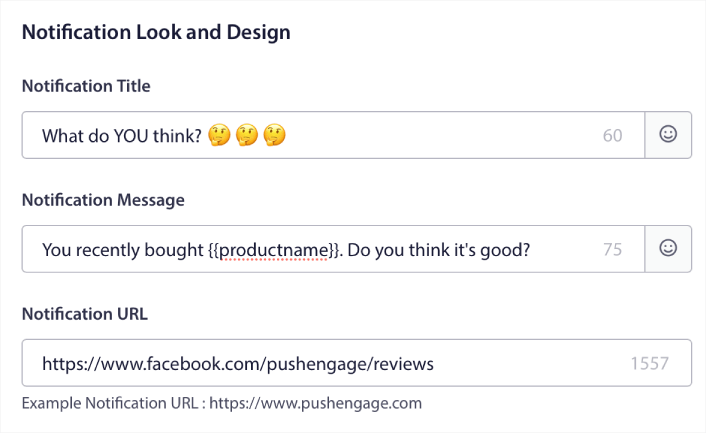
Since it’s a triggered campaign, you can create as many follow-ups as you like until you get a review from your customers. Then, go to the Trigger Settings tab to set up the campaign triggers:
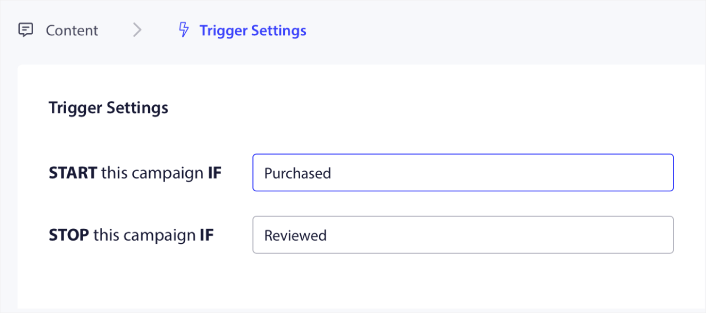
Set the campaign to start when the customer purchases your product and stop when they leave a review. You’ll need to use the PushEngage API to define the Purchase and Review events. Finally, integrate the code with your website. You can get the code for Start campaign event, Stop campaign event, and Goal tracking by click on the Integration Code button.
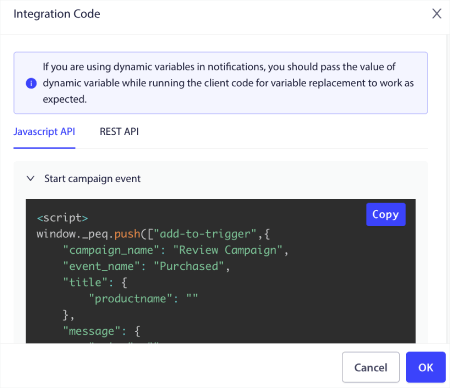
C'est tout ! Chaque fois que quelqu'un achète un produit sur votre site web, une campagne automatisée demandant des avis sera déclenchée.
#3. Embed Your Reviews on Your Website
One simple way to get more reviews on your Facebook Business page is to embed your reviews on your site. This way, you can encourage your website visitors to also leave reviews.
The easiest way to do it is to use the Reviews Feed Pro WordPress plugin.
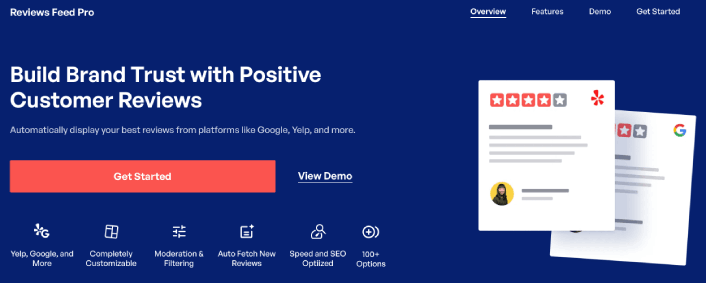
Reviews Feed Pro allows you to create, customize, and embed review feeds on your website in just a few simple clicks without any coding. The plugin is not limited to just Facebook reviews either. You can display custom feeds with reviews from highly trusted platforms, like Tripadvisor, Yelp, and Google Reviews.
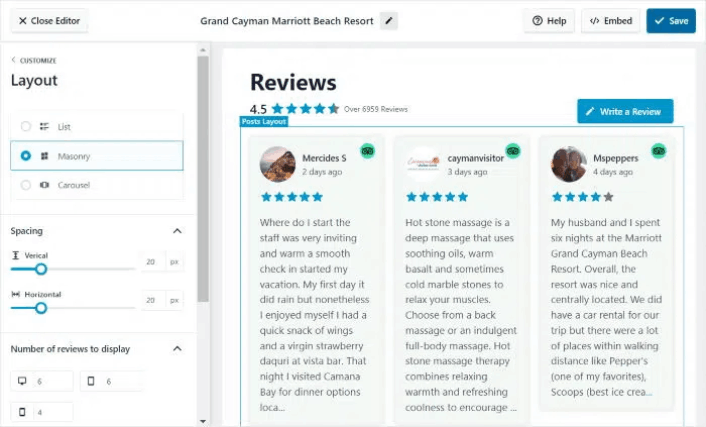
You can use the visual editor to create custom review feeds that fetch social media reviews directly to your site. The plugin also uses your site’s design automatically to style the review feeds. So, there’s absolutely no need to use any code to embed your Facebook reviews.
#4. Cross-Promote on Other Social Media
Another simple way to get reviews on your Facebook page is to promote your Facebook page on other social media sites. Just in case your customers are on other platforms and haven’t started following your Facebook page yet, you can create a simple post like this one:
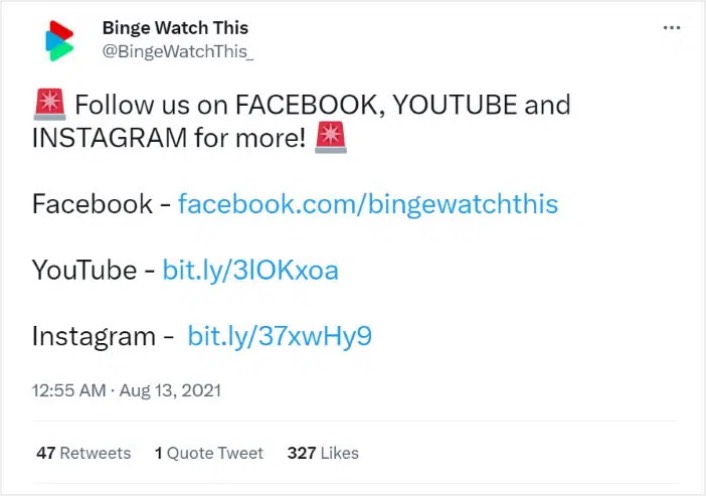
That way, interested people can follow your brand on Facebook, where they can leave reviews and testimonials. And as we’ve already seen, you can embed your reviews on your site for an added boost. You can also embed your:
And more on your site to get even more people to leave reviews on your Facebook page.
#5. Add a Facebook Review Widget
You can add a Facebook review widget to get more Facebook reviews from your WordPress site. That means anyone browsing your feed only needs a click to visit your Facebook business page and leave a review.
We’ve already seen that you can use Reviews Feed Pro to embed Facebook reviews on your site. All you have to do to create a review widget is to use the heading for your review feed to invite more people to leave reviews.
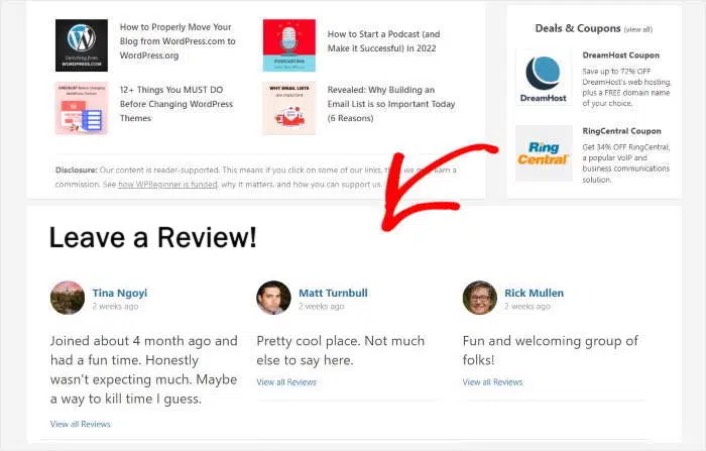
Using Reviews Feed Pro, you can even create widgets to show reviews from other major platforms like Tripadvisor, Yelp, and Google Reviews.
#6. Send Email Invitations to Recent Customers
Email marketing can be a fantastic way to promote your brand, convert visitors, and get reviews. You’ll want to automate the entire process and you’ll need an email service provider with workflow automation to send out product review email campaigns.
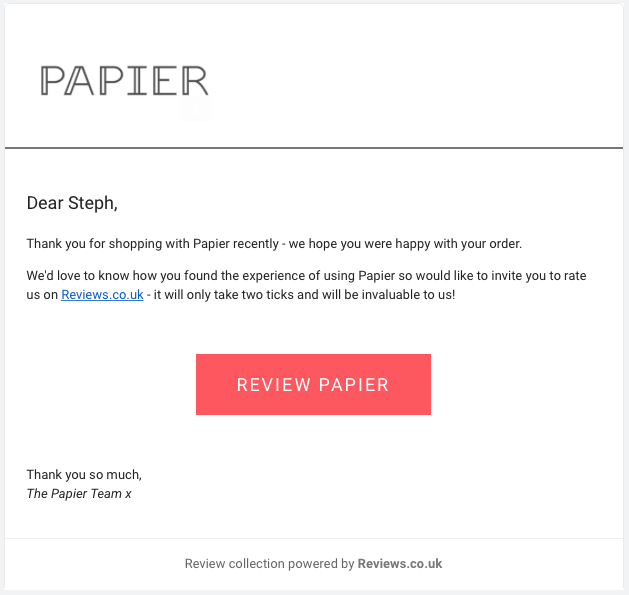
We recommend using Drip to send out product feedback emails.
Head over to Drip to create a new campaign. After you draft your emails requesting a review, you’ll need to create a workflow automation:
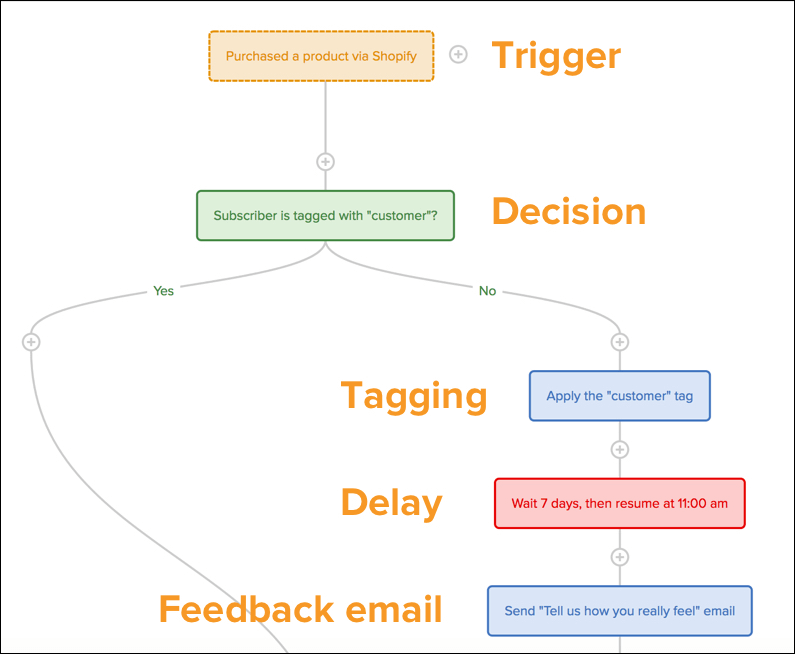
Check out this article if you need help setting up your product review campaign on Drip.
#7. Write a Facebook Post Asking for Reviews
You might have a bunch of satisfied customers who follow your Facebook business page, but simply forgot to leave a review. And it’s super easy to get reviews from these customers. All you need to do is create a Facebook post asking for reviews.
Botanical Beauty does a great job of this:
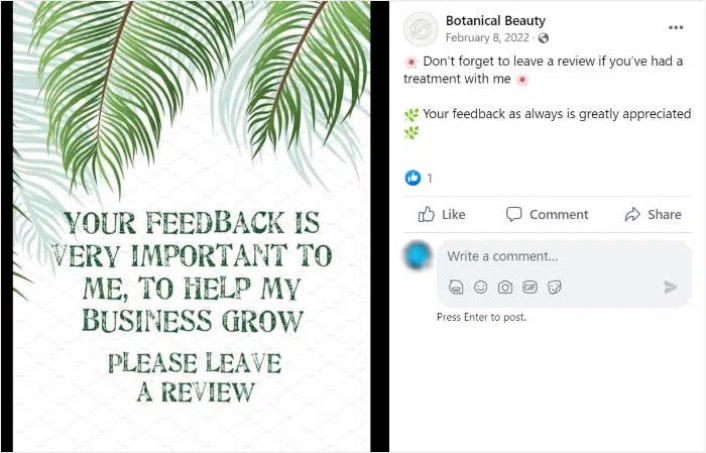
Of course, you can increase the reach of your post by cross posting on Instagram and boosting it as a paid ad as well.
What to do Now That You Know How to Get Facebook Reviews
That’s all for this one, folks! By now, you know how to get Facebook reviews for your business. Next, you should set up a viral giveaway to supercharge your social media following.
After that, all that’s left is generating traffic to your site so that your contact forms can get to work. A simple way to do that is to start using push notifications. Sending push notifications is a great way to generate repeat traffic for your site. If that’s something you’re interested in, you should check out these articles as well:
- Coût des notifications push : Est-ce vraiment gratuit ? (Analyse des prix)
- Comment obtenir plus de trafic vers votre blog WordPress (9 méthodes faciles)
- Comment augmenter votre taux d'opt-in pour les notifications push Web (7 méthodes)
- Comment ajouter un plugin WordPress de notifications Web à votre site
Nous vous recommandons d'utiliser PushEngage pour envoyer vos notifications push. PushEngage est le logiciel de notification push n°1 au monde. Donc, si ce n'est pas déjà fait, commencez dès aujourd'hui avec PushEngage.


