Silence is a signal.
Answer it
automatically.
Re-engagement drips watch for inactivity — no visit in 30 days, no login in a week — and run a win-back sequence tuned to how long someone’s been gone. Set the thresholds; the drip does the rest.

“The ability to tailor your target audience is particularly impressive as you are able to increase your engagement rates as you use the software.” Alex Avery · Database Marketing Executive
75,000+ businesses Set up in minutes, no engineering ticket 14-day money-back guarantee

Trusted by 75,000+ businesses in 150+ countries








Why it works
Win-backs work when the timing is personal.
A 7-day-quiet user needs a nudge; a 90-day-quiet one needs a reason. Segment by inactivity period and say the right thing to each.
Fires on the decay signal
Inactivity thresholds trigger the drip per subscriber, the day they cross the line, not whenever the monthly win-back blast goes out.
Escalates with absence
Gentle reminder, then value, then incentive. Each step personalized by what the subscriber used to do, via smart tags and attributes.
Stops when they return
One visit ends the sequence automatically. Nobody gets a ‘we miss you’ the day after they came back.
How it works
From quiet subscriber to active again.

Built in the same visual builder
Win-back drips are Workflows: drag steps, set waits, branch on behavior. The builder ships on every plan, including Free.
- Multi-step sequences with wait and decision nodes
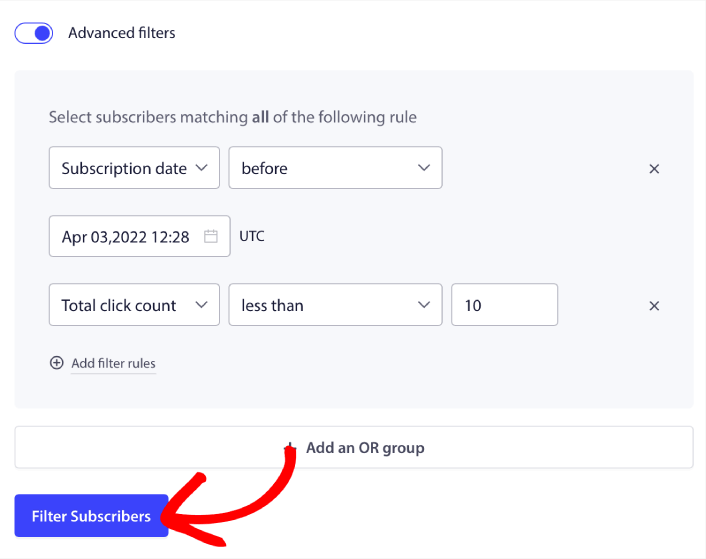
- Inactivity segments update themselves
- Templates for 7, 30, and 90-day win-backs
Count the resurrected revenue
Goal tracking attributes returns and conversions to the drip that earned them, so you know what a reactivated subscriber is worth.
- Reactivation attribution per drip step
- A/B test win-back copy, Premium and up
- Works for stores, SaaS, and publishers alike
What’s included
Exactly what you’re buying, on one dashboard.
Dormant users do not open email. Win them back on channels that land in seconds, from the platform that already knows who went quiet.
Inactivity-triggered drips
Set a trigger for seven_days_inactive or any custom inactivity window. The sequence fires automatically when users cross the threshold.
Triggered notificationsDormancy segments
Cohorts that update themselves as users go quiet and re-activate. See exactly how many are in each dormancy band.
Dynamic segmentationPersonalization
Reference the user’s actual last action, not a generic “we miss you.” Attributes pull from the last event on record.
PersonalizationVisual Workflows
Drag-and-drop re-engagement journeys with branching logic. Available on every plan, including Free.
Explore WorkflowsA/B win-back angles
Test discount vs. value-reminder vs. urgency copy on the same dormant cohort and let smart mode route traffic to the winner.
A/B testingGoal tracking
Recovered-cohort revenue attribution so the win-back program has a number attached to it.
See goal trackingWeb and app push together
The lock screen reaches who the browser cannot. Win back users in whichever channel they still check.
App push overviewIntegrations & developers
Re-engage on every channel. From HubSpot lists to mobile lock screens.
HubSpot lifecycle stages, REST webhooks, and SDK custom events all plug into the same re-engagement trigger engine.

HubSpot
Trigger push from HubSpot lists and lifecycle events without an engineering ticket. Contact state in HubSpot maps directly to push cohorts.
HubSpot integrationREST API & webhooks
Every console operation available as a documented endpoint. Webhooks fire on events so no polling is needed.
API documentationTriggered events
Bind any product event to a push: signup, activation, seven_days_inactive, trial_expiring. Growth plan for custom events.
Triggered notificationsMobile app push
iOS, Android, React Native, and Flutter SDKs on the same account. One subscriber engine, one dashboard.
App push overviewThe numbers
Dormant isn’t dead. Prove it.
“PushEngage is quick and easy to implement. The ability to tailor your target audience is particularly impressive as you are able to increase your engagement rates as you use the software.”
Alex Avery
Database Marketing Executive
Related
More from the retention toolkit.
Web and app engagement
One subscriber engine re-engages users in the browser and on the lock screen.
Web and app engagementTriggered notifications
Inactivity events fire the re-engagement sequence at the right threshold.
Triggered notificationsBehavior segments
Dormancy cohorts that update themselves as users go quiet.
Behavior segmentsSaaS solutions
The full activation and retention loop for SaaS products.
SaaS solutionsFAQ
Questions, answered.
Our win-back emails get ignored. Why would push work?
An inactive user has usually stopped opening your emails too. Push reaches them on the lock screen or browser without needing an open, which is why triggered re-engagement holds a 22% click-through.
How do we avoid annoying lapsed users?
Sequences stop on return, frequency caps limit sends, and inactivity tiers mean long-dormant subscribers get fewer, better messages, not more.
Can it use our product’s own signals?
Yes. Custom events like usage_below_threshold trigger drips the same way site inactivity does. One API call per event from your existing stack.
Which plan do I need?
The workflow builder ships on every plan including Free; deeper drips and A/B testing arrive at Premium, and webhook-driven triggers at Growth. Paid plans carry a 14-day money-back guarantee.
Bring back the users you already earned.
Set up in minutes. If PushEngage isn’t the best fit within 14 days, we refund 100%. No questions asked.
Free plan available Set up in minutes Pay only for active subscribers