
هل تبحث عن أفضل إضافة خرائط ووردبريس لموقعك؟
باستخدام إضافة خرائط جوجل قوية، يمكنك تغيير سمات الخرائط، وإضافة مواقع متعددة، وإنشاء علامات مخصصة، وغير ذلك الكثير. بالطبع، يمكنك استخدام HTML لتضمين خريطة على موقعك. ولكن هذا يأتي مع قيوده الخاصة.
لذلك، السؤال حقًا هو، ما هي إضافة الخرائط المناسبة لووردبريس لموقعك؟ هل تحتاج إلى إضافة مدفوعة؟ هل الإضافات المجانية كافية؟ وكيف تختار واحدة من قائمة تضم مئات إضافات ووردبريس في السوق؟
في هذه المقالة، سنقدم لك أفضل الإضافات لتضمين الخرائط على موقع ووردبريس الخاص بك. سنقدم لك حتى اختيارنا الأفضل.
يبدو جيدًا؟ دعنا نتعمق.
أفضل إضافات الخرائط لـ WordPress
لقد قمنا بتضمين إضافات خرائط مجانية ومدفوعة هنا حتى تتمكن من اختيار الأنسب لعملك. دعنا نلقي نظرة على أفضل إضافات خرائط ووردبريس في السوق. بعض هذه الإضافات شائعة للغاية وهي جزء من قائمتنا لأفضل إضافات ووردبريس.
رقم 1. WPForms
WPForms هو أفضل إضافة لبناء نماذج WordPress. لقد اختبرنا مجموعة من إضافات النماذج لـ WordPress ولم يقترب أي منها من وظائف أو سهولة استخدام WPForms.
يمكنك استخدام منشئ نماذج بالسحب والإفلات في WPForms لإنشاء ونشر:
- استطلاعات الرأي
- نماذج متعددة الخطوات
- نماذج منطقية شرطية
- حملات التخلي عن النموذج
- صفحات هبوط للنماذج
- قوالب نماذج
- نماذج غير متصلة بالإنترنت
- نماذج محادثة
تأتي النسخة الاحترافية من WPForms مع ملحق تحديد الموقع الجغرافي قوي يسمح لك بـ إضافة خريطة إلى نماذج الاتصال الخاصة بموقعك دون أي كود HTML مخصص. كل ما عليك فعله هو ربطه إما بـ Google Places أو Mapbox.
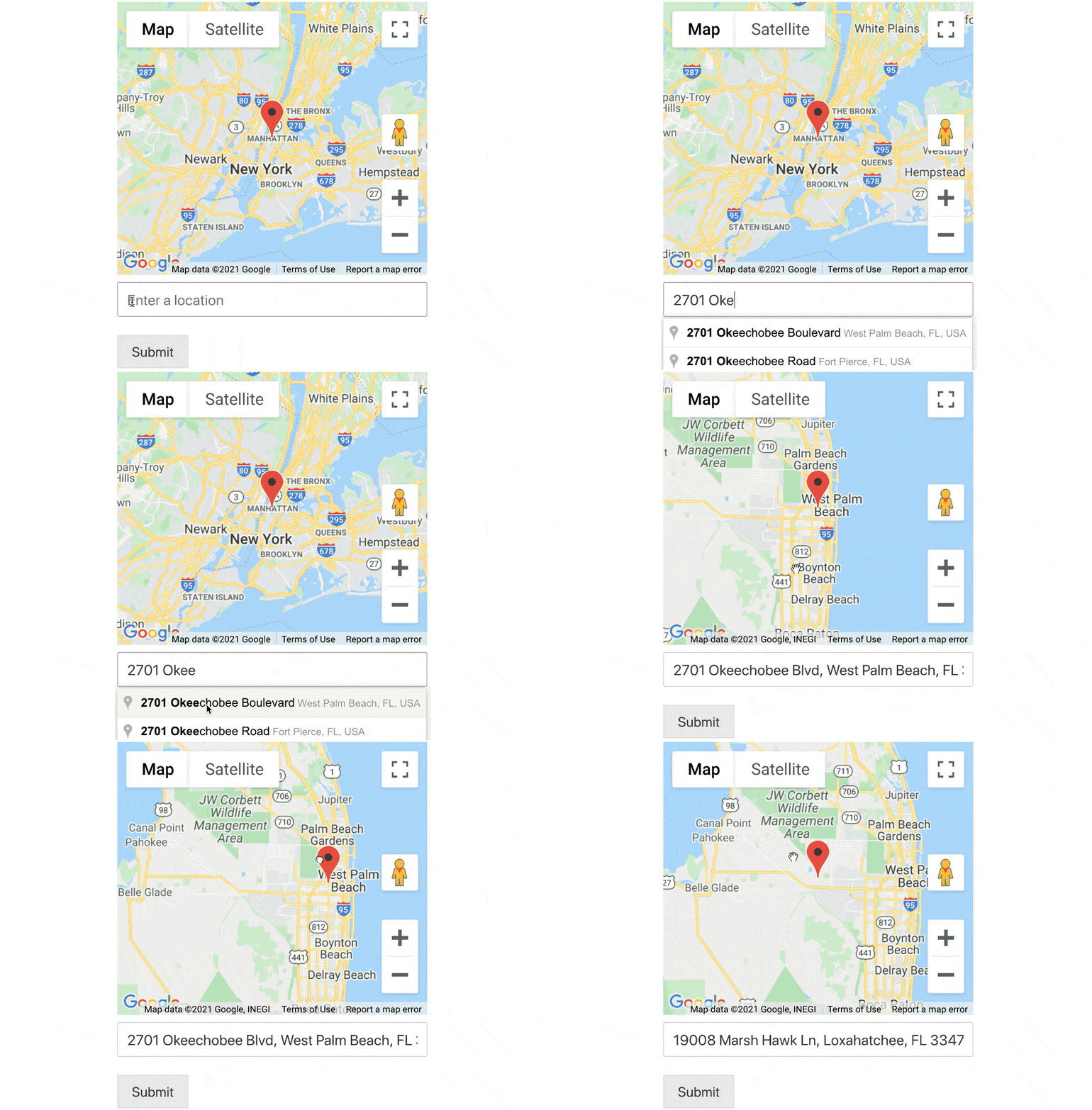
يمكنك حتى إنشاء نماذج عناوين الإكمال التلقائي في ووردبريس. تفضل بإنشاء نموذج ووردبريس باستخدام WPForms وستفهم على الفور سبب حبنا لهذه الإضافة كثيرًا.
#2. SeedProd
SeedProd هو أفضل إضافة ووردبريس لإنشاء صفحات هبوط تحقق التحويلات.
تحصل على منشئ صفحات هبوط بالسحب والإفلات مليء بالخيارات لبناء صفحات التجارة الإلكترونية وصفحات الهبوط. على عكس منشئي مواقع ووردبريس، يمكنك تخصيص كل شبر من صفحة الهبوط الخاصة بك بما في ذلك قوائم التنقل، والتذييلات، والأنماط. يعمل SeedProd أيضًا مع أي سمة ووردبريس وينشئ صفحات هبوط متوافقة مع الجوّال.
مع SeedProd، تحصل على قوالب جاهزة لصفحات هبوط عالية التحويل يمكنك نشرها على الفور. وهذا يشمل قوالب لـ:
- صفحات المبيعات
- صفحات قريباً
- صفحات 404
- صفحات الصيانة
- صفحات الضغط
- صفحات تسجيل الدخول
- صفحات الشكر
- صفحات الندوات عبر الإنترنت
- صفحات الفيديو
والمزيد الكثير! الفائدة الرئيسية لاستخدام كتلة خرائط جوجل SeedProd هي أنك لا تحتاج إلى نسخ ولصق أي رمز قصير لعرض الخرائط على صفحات الويب الخاصة بك. يمكنك ببساطة سحب وإفلات كتلة خرائط جوجل، وإضافة موقعك، وتخصيص إعدادات الخريطة، وقد انتهيت!
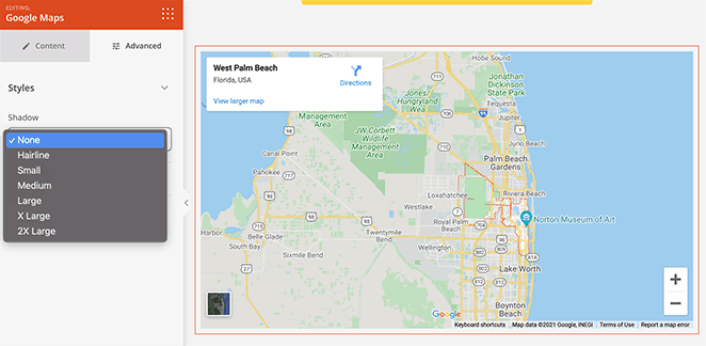
نحن نحب استخدام SeedProd وكتبنا حتى مراجعة متعمقة لـ SeedProd. تفضل بالاطلاع عليها!
#3. خرائط ماركر برو

Maps Marker Pro هي إضافة خرائط جوجل مدفوعة لووردبريس. تسمح لك بإنشاء خريطة بمواقع متعددة وعلامات مخصصة. إذا لم تكن خرائط جوجل هي خيارك، يمكنك أيضًا استخدام Bing Mapbox و OpenStreetMap.
تأتي الإضافة مع بعض الميزات القوية للغاية بما في ذلك:
- أنواع متعددة من الخرائط
- أنواع مختلفة من دعم تحديد المواقع الجغرافية
- مرشحات سهلة للتنقل في الخريطة
- تجمعات علامات متحركة لكل خريطة
- تتبع GPX
- فرز العلامات حسب التاريخ والاسم والمسافة
- خيارات لمشاركة الخرائط دون اتصال عبر رموز QR
وهي متوافقة أيضًا مع ترجمة WPML وإضافات ترجمة ووردبريس الأخرى. لذلك، يمكنك بسهولة إنشاء خرائط بلغات متعددة.
#4. ووردبريس جو مابس

WP Go Maps هي إضافة شائعة لإضافة خرائط جوجل إلى ووردبريس. إنها إضافة مجانية مع العديد من الميزات القوية لإنشاء خرائط جوجل مخصصة على مواقعك.
يمكنك إنشاء خريطة جوجل بعلامات متعددة باستخدام نسختها المجانية. لكننا نوصي باستخدام النسخة الاحترافية التي تأتي مع ميزات أكثر تقدمًا مثل:
- خرائط التضاريس، وخريطة الطريق، والهجين، والفضائية
- إعدادات لتخصيص لون الخريطة وارتفاعها وعرضها ومحاذاتها ومستوى التكبير
- قوالب خرائط معدة مسبقًا لمحددات المتاجر والخرائط الاتجاهية
- كتلة الخريطة لمنشئ صفحات Elementor
- خيارات لإضافة سمة خريطة خاصة بك
- إعدادات لإضافة أوصاف وروابط وصور إلى علامات الخريطة
- إعدادات الفئة مع تصفية متقدمة لتصنيف خرائطك
- استيراد وتصدير CSV لجميع علامات الخريطة
ولكن حتى المكون الإضافي المجاني هو خيار رائع لك إذا كنت تتطلع فقط إلى تضمين خريطة في صفحة الاتصال بموقعك.
#5. مابيفاي برو
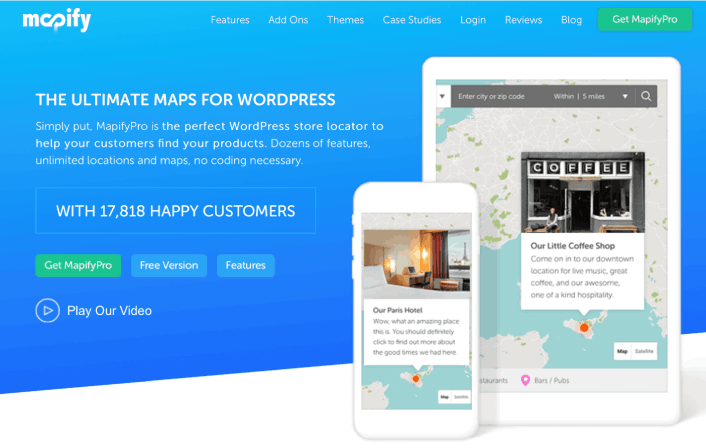
يُعد Mapify Pro، وفقًا لأحد عملائهم، برنامج الخرائط "الأكثر جاذبية" في العالم. لا نعرف عن الجاذبية، لكنه بالتأكيد قوي. يأتي المكون الإضافي مع إصدارات Lite و Pro.
باستخدام MapifyLite، يمكنك إنشاء خرائط قياسية مع الصور ومقاطع الفيديو وعلامات الخرائط المخصصة، وللحصول على ميزات خرائط أكثر تقدمًا، يمكنك تجربة استخدام إصداره Pro. إليك نظرة سريعة على ما يمكن توقعه من الإصدار المدفوع:
- إضافة معرض فيديو وصور إلى أي خريطة
- ميزة التجميع لمواقع متعددة
- عرض تلميحات أدوات الخريطة المخصصة
- يوفر خيارًا لمشاركة مواقع الخريطة على وسائل التواصل الاجتماعي
- إضافة دليل مواقع أسفل الخريطة لتحسين التفاعل
- خيار التصميم لتلميحات الأدوات والنوافذ المنبثقة
- خرائط متجاوبة بنسبة 100٪
يستخدم MapifyPro واجهة برمجة تطبيقات رسم الخرائط الفريدة الخاصة به. بمعنى آخر، لا يعتمد على واجهة برمجة تطبيقات خرائط Google لعرض الخرائط على WordPress. ونتيجة لذلك، فإنه لا يتأثر بتغييرات سياسة Google المتكررة وتستمر الخرائط على موقعك في العمل بغض النظر عن أي شيء.
أي منها هو أفضل مكون إضافي لخرائط WordPress؟
بلا شك، SeedProd هو أفضل مكون إضافي لـ Instagram على WordPress. إذا كنت تفكر في التوازن بين السعر والأداء والميزات، فلا يوجد حقًا منافسة. نوصي بالمضي قدمًا والبدء في تضمين الخرائط على موقعك على الفور.
بمجرد الانتهاء من ذلك، كل ما عليك فعله هو جذب الزيارات إلى موقعك.
إحدى الطرق البسيطة للقيام بذلك هي البدء في استخدام إشعارات الدفع. يعد إرسال إشعارات الدفع طريقة رائعة لتوليد حركة مرور متكررة لموقعك. إذا كان هذا شيئًا تهتم به، فيجب عليك أيضًا الاطلاع على هذه المقالات:
- تكلفة إشعارات الدفع: هل هي مجانية حقًا؟ (تحليل الأسعار)
- كيفية الحصول على المزيد من حركة المرور إلى مدونة ووردبريس الخاصة بك (9 طرق سهلة)
- كيفية زيادة معدل الاشتراك في إشعارات الدفع على الويب (7 طرق)
- كيفية إضافة إضافة إشعارات الويب لـ WordPress إلى موقعك
نوصي باستخدام PushEngage لإرسال إشعارات الدفع الخاصة بك. PushEngage هو البرنامج رقم 1 لإشعارات الدفع في العالم. لذا، إذا لم تكن قد قمت بذلك بالفعل، ابدأ مع PushEngage اليوم.


