حملة التنقيط هي طريقة لرعاية العملاء المحتملين من خلال مشاركة المعلومات مع العميل المحتمل. في التسويق عبر البريد الإلكتروني، يعد الرد الآلي بالتنقيط شائعًا جدًا ويستخدم لإرسال رسائل بريد إلكتروني آلية. يمكنك الآن إرسال إشعارات الدفع بنفس الطريقة. إنها تحل مشكلة الشخص الجديد الذي ينضم إلى موقعك على الويب أو يسجل. عند التسجيل، يمكنك الترحيب بهم برسالة بريد إلكتروني ترحيبية. يمكنك الآن استخدام إشعارات الدفع عبر الويب لإنشاء رد آلي بالتنقيط. قم بإنشاء حملة مشغل إشعارات التنقيط الترحيبي لتأهيل جميع عملائك الجدد وسيحصل جميع المستخدمين على تجربة متسقة. اعتمادًا على احتياجات عملك، قم بإنشاء حملات متعددة لإشعارات الدفع بالتنقيط. يمكنها أيضًا زيادة نسبة النقر إلى الظهور لإشعارات الدفع الخاصة بك بنسبة 312٪. اتبع أفضل الممارسات لحملة إشعارات الدفع بالتنقيط لزيادة نسبة النقر إلى الظهور لإشعارات الدفع.
- منتج/خدمة تقنية – يمكنك إنشاء سلسلة من الإشعارات لتعليم العميل عن منتجك
- التجارة الإلكترونية – قم بإنشاء سلسلة من الإشعارات لشرائح متعددة من المستخدمين
- السفر – يمكنك إنشاء حملات تنقيط بناءً على شريحة المستخدم. على سبيل المثال، إنه موسم الصيف والمستخدم مهتم بفندق. قم بإنشاء سلسلة من إشعارات التنقيط التي تعرض أفضل الأماكن للزيارة في الصيف وأيضًا أفضل الفنادق.
إشعار التنقيط قوي جدًا ويمكنك الحصول على تفاعل أعلى مع المشتركين لديك.
شريحة تلقائية + ردود آلية = إشعارات دفع مخصصة على الطيار الآلي
كيفية استخدام حملات التنقيط فيإشعارات الويب?
يُعرف التنقيط بالعديد من الأسماء وهو شائع في التسويق عبر البريد الإلكتروني – رسائل البريد الإلكتروني الآلية، ورسائل البريد الإلكتروني لدورة الحياة، والردود الآلية، وأتمتة التسويق، أو حملات التسويق بالتنقيط هي الأسماء المختلفة التي يستخدمها الناس. نحن نجلب الفكرة إلى عالم إشعارات الدفع عبر الويب. يمكنك الآن جدولة سلسلة من إشعارات دفع الموقع بعد اشتراك المستخدمين، على فترات زمنية ثابتة – مثال في غضون 30 دقيقة بعد الاشتراك، وآخر بعد يوم واحد.
مع PushEngage، يمكنك تشغيل حملات إشعارات دفع بالتنقيط. استخدمها لرعاية ودفع عملائك قليلاً في كل مرة، وتحويلهم إلى عميل بمرور الوقت. يمكنك أيضًا تخصيص حملات التنقيط بناءً على البلد والمدينة ديناميكيًا.
يسمح لك PushEngage بتقسيم المستخدمين تلقائيًا بناءً على مكان اشتراكهم أو بناءً على ما يتصفحونه على موقعك. بناءً على إجراءات الموقع المختلفة، مثل مشاهدة مقطع فيديو، أو تنزيل كتاب إلكتروني، يمكنك إرسال سلسلة من إشعارات الدفع الآلية إليهم وتنفيذ حملات إشعارات دفع بالتنقيط عبر الويب. يمكنك تخصيص حملات التنقيط باستخدام السمات مثل الاسم والهوايات والمزيد.
باستخدام هذا، يمكنك تحديد مجموعات مختلفة من حملات دفع التنقيط لشرائح المشتركين المختلفة. والأفضل من ذلك، يمكنك إدارة شرائح المستخدم ديناميكيًا. لذلك إذا تم نقل مستخدم من مجموعة، فسيتم إلغاء اشتراكه في أي رسائل لاحقة في هذا التنقيط.
انظر المثال أدناه، حيث بمجرد اشتراك المستخدم يمكننا رعايته بأنواع مختلفة من المحتوى، في أيام مختلفة.
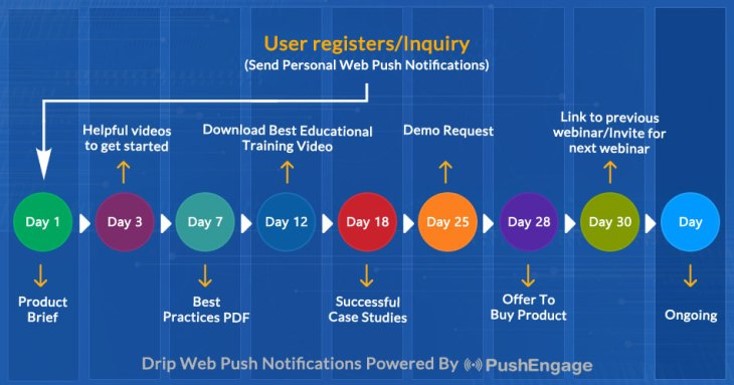
كيفية تكوين حملة إشعارات الويب التلقائية المتسلسلة في PushEngage
الحملات المتسلسلة أو الردود التلقائية المتسلسلة هي مفهوم جديد في إشعارات الويب. سنحاول تسهيل المهمة ووصف خطوات محددة لتشغيلها في PushEngage.
يمكنك تمكين حملة إشعارات الويب التلقائية المتسلسلة وإرسالها إلى جميع المستخدمين المشتركين أو إلى قائمة/شريحة من المستخدمين في PushEngage. لتقسيم المستخدمين إلى قوائم محددة، يمكن أن يحدث هذا في صفحات معينة، أو عندما يشترك المستخدم خصيصًا في منهج إشعارات - مثل - 7 أيام من نصائح التدوين.
كيفية إنشاء حملة إشعارات الويب التلقائية المتسلسلة في 5 دقائق
إذا قمنا بتعريف شرائح المشتركين إما من خلال التقسيم التلقائي أو باستخدام كود جافا سكريبت، يمكننا تعريف حملة تلقائية متسلسلة محددة لتلك الشريحة. انظر القسم أدناه حول كيفية القيام بذلك، إذا لم يكن لديك شرائح بالفعل.
بينما الشرائح ليست إلزامية، فإننا نوصي بها للتخصيص.
فكرة حملة الرد التلقائي المتسلسل 1: لجميع المشتركين الذين تتم إضافتهم تلقائيًا إلى شريحة مقاطع الفيديو، سيتم إرسال رابط إلى مقطع فيديو جديد تلقائيًا بناءً على منهج GATE وسنقوم في النهاية بإرسال مقطع فيديو واحد يوميًا، لتغطية جميع مقاطع الفيديو في 30 يومًا.
كيفية تنفيذ الحملة المتسلسلة باستخدام PushEngage:
- إنشاء رد تلقائي متسلسل - انتقل إلى الرد التلقائي المتسلسل، ضمن الأتمتة.
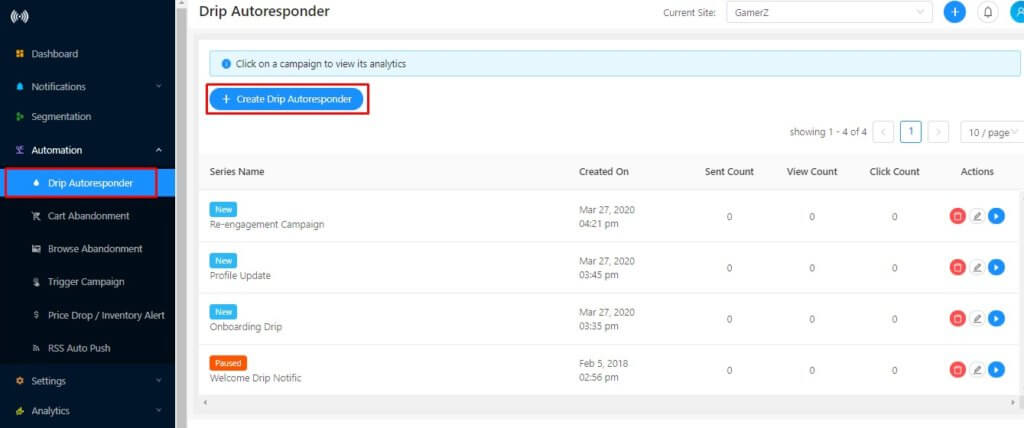
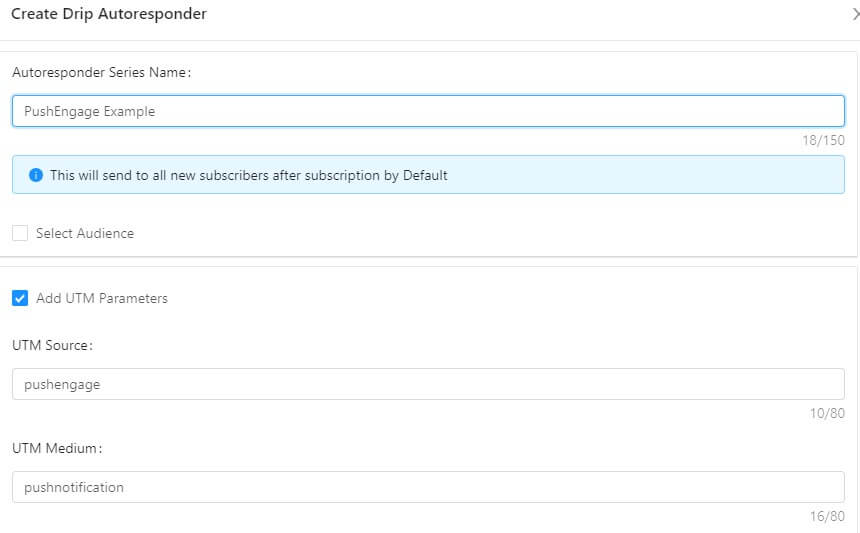
- إنشاء سلسلة ردود تلقائية - الآن قم بإنشاء سلسلة الردود التلقائية وقم بتكوين متغيرات UTM للتتبع
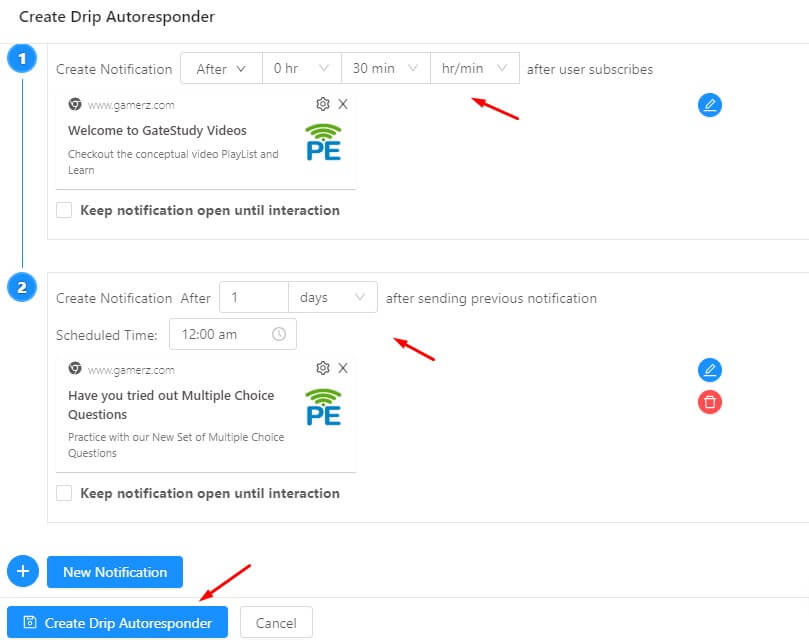
- تعيين التأخير - الآن قم بإنشاء سلسلة من الإشعارات ليتم إرسالها بعد 10 دقائق وبعد يوم واحد كمثال
قياس نتائج الحملات المتسلسلة
بمجرد الانتهاء من هذه الحملات المتسلسلة، سترغب في رؤية كيفية أداء كل مرحلة من مراحل الإشعارات. لهذا، قم بزيارة تحليلات الرد التلقائي وانقر على الحملة المتسلسلة التي تم إنشاؤها للتو
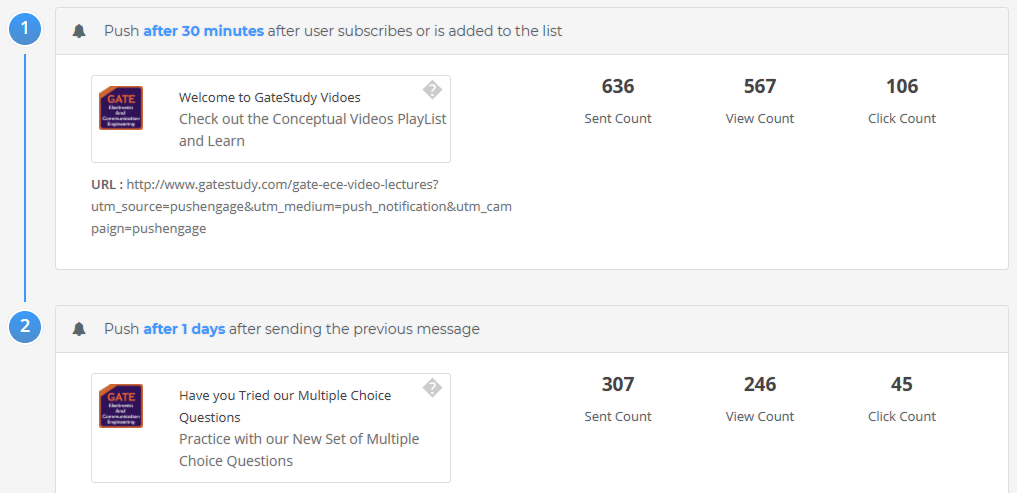
لرؤية تفاصيل كل مرحلة، يرجى النقر على اسم الحملة المتسلسلة وسترى تحليلات مفصلة. لقد تم إعداد الرد التلقائي المتسلسل الخاص بك الآن. هذا كل شيء، اجلس وشاهد حركة المرور تزداد والزوار يتفاعلون ويعودون إلى موقعك مع الحملات المتسلسلة.
فكرة حملة الرد التلقائي المتسلسل 2: حالة استخدام أخرى لحملة الرد التلقائي المتسلسل ستكون لإعادة المشتركين الباردين. إذا كان لديك عملاء لم يقوموا بأي عملية شراء خلال الشهرين الماضيين، يمكنك إنشاء حملة إشعارات دفع متسلسلة منفصلة لإعادتهم وإجراء عملية شراء. يمكنك إما تقديم بعض العروض الحصرية أو أي استراتيجية أخرى لإغرائهم بالتحويل.
كيفية تقسيم المستخدمين أو تقسيمهم تلقائيًا
يمكنك الحصول على صفحة هبوط منفصلة أو تقسيم مشترك بناءً على إجراء على موقعك، أو عند الاشتراك من صفحة معينة.
الطريقة 1 - التقسيم التلقائي
في مثالنا السابق للتقسيم التلقائي لموقع GateStudy.com، كان لدينا تقسيم تلقائي ممكّن، والمشتركون الذين وصلوا إلى
- http://www.gatestudy.com/multiple-choice-questions واشتركوا => تم نقلهم إلى شريحة MCQ
- http://www.gatestudy.com/gate-ece-video-lectures وتم الاشتراك => تم نقله إلى المقطع مقاطع الفيديو
إليك الخطوات التي يجب اتباعها –
- إدارة المقاطع
انتقل إلى التقسيم. انقر فوق إنشاء مقاطع جديدة
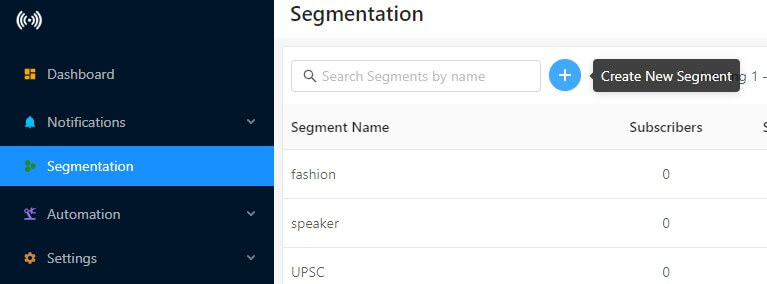
- مقطع جديد
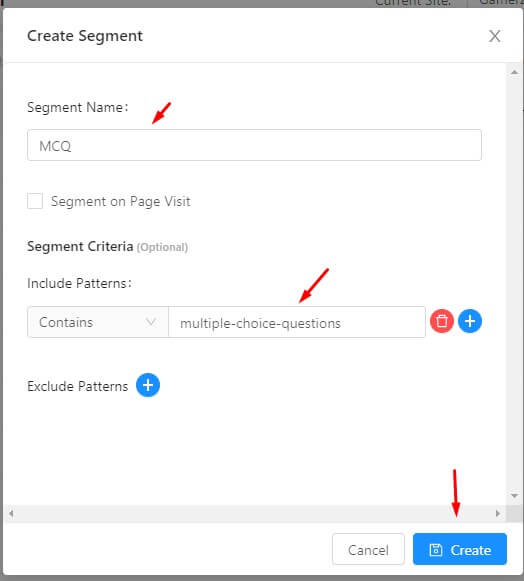
إنشاء اسم مقطع MCQ.
- تحديد نمط التضمين
نحدد القاعدة على أنها عنوان URL وقت الاشتراك يحتوي على أسئلة الاختيار من متعدد.
- اختبار القاعدة
تحقق مما إذا كانت هذه القاعدة تعمل بشكل جيد، وخذ مثالاً لعنوان URL حيث يشترك العميل
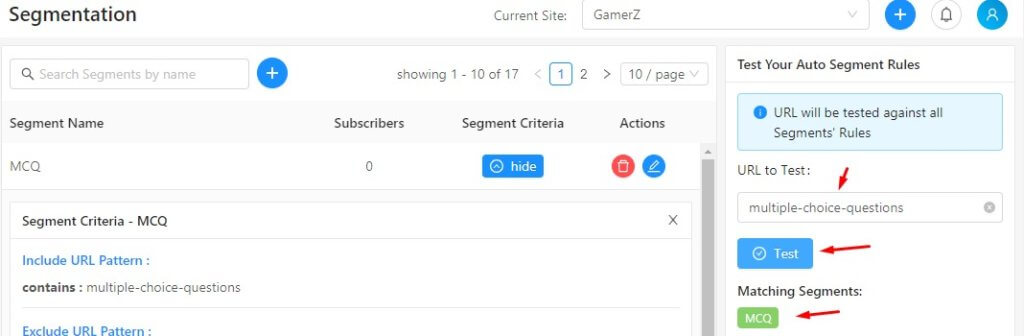
- تحليلات المقطع
بعد بضعة أيام، سترى البيانات المباشرة لعدد المشتركين في كل مقطع
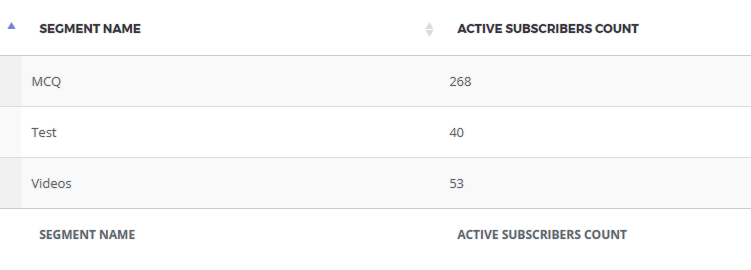
الطريقة 2 – استخدام جافا سكريبت مخصص بناءً على إجراءات الموقع
لاستخدام هذه الطريقة في التقسيم، فقط أضف السطر التالي من التعليمات البرمجية حيث تريد إضافة العميل إلى مقطع. يمكن أن يكون هذا عندما يتصفح الزائر الصفحة، أو في بعض الشروط، أو يشاهد مقطع فيديو، أو ينقر على مقطع فيديو.
<script> _pe.addSubscriberToSegment('segmentname'); </script>
نصيحة إضافية: إذا كنت ترغب في إزالة عميل من مقطع، استخدم الاستدعاء أدناه. باستخدام مزيج من إضافة عميل إلى مقطع وإزالته، يمكنك إدارة سياق العميل بدقة، وبالتالي يمكنك تخصيص الإشعارات.
<script> _pe.removeSubscriberFromSegment('segmentname'); </script>
لمزيد من التفاصيل، تحقق من واجهة برمجة تطبيقات إشعارات الويب الخاصة بنا.
التشغيل الآلي للتنقيط متاح من الخطة المميزة. لا يوجد تسعير منفصل فقط لمستجيب تلقائي للتنقيط. يمكنك الحصول على مستجيب تلقائي للتنقيط كجزء من حزمة الأتمتة. اسأل فريقنا للحصول على مزيد من التفاصيل حول هذا. انطلق وسجل وجربها. لمزيد من الأسئلة، راسلنا عبر البريد الإلكتروني على [email protected] أو يمكنك التحقق من الدعم للاستفسارات الإضافية.


جينا - حملة التنقيط تغذي العميل وتدفعه ببطء لاتخاذ إجراء. يمكن أن يساعدك هذا بعد ذلك في زيادة معدل التحويل على العملاء المحتملين/المستهلكين الذين يزورون موقعك.
آمل أن يساعد هذا.
مع خالص التقدير
رافي
ما هي المزايا والعيوب المختلفة لحملة التنقيط؟ كيف يمكن أن تكون مفيدة للشركة؟ وهل ميزة التسويق بالتنقيط لـ Aritic Pin Point استثمار جيد؟