ビジネスを成長させるSafariプッシュ通知の送信方法ガイドをお探しですか?
自動通知は、バックグラウンドで機能し続ける単一または一連のプッシュ通知です。プッシュ通知のブロードキャストとは異なり、手動での操作なしで機能します。一度設定すれば、永久に機能し続けます。
しかし、どのような通知を送信すべきでしょうか?ビジネスに効果があるかどうかをどのように判断しますか?そして、どのように始めればよいのでしょうか?
この記事では、Safariプッシュ通知を使用して、簡単な実践的なトリックで自動的にトラフィックと売上を促進する方法を紹介します。
よろしいですか?早速始めましょう。
Safariプッシュ通知の内訳
広義には、Safariプッシュ通知には3つのタイプがあります。
- ブロードキャスト通知
- 段階的プッシュ通知キャンペーン
- トリガー型プッシュ通知キャンペーン
ブロードキャストは、単一の通知として送信されるプッシュ通知です。スケジュール設定は可能ですが、一度しか送信されません。トリガー型キャンペーンは、プッシュ通知を設定し、それをトリガーするトリガーを定義し、そのスケジュールを制御するワークフローを設定することを含みます。自動段階的通知は、特定の時間または特定の条件が満たされたときに自動的にトリガーされる一連の通知です。
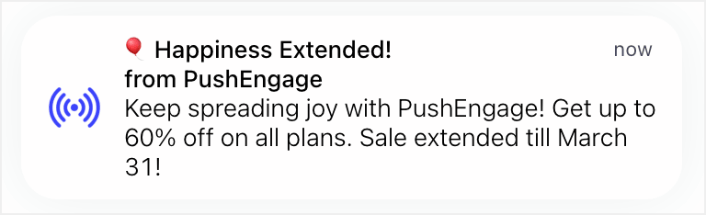
実質的に、トリガーキャンペーンと自動ドリップキャンペーンは外部からは同じように見えます。決定的な違いは、トリガーキャンペーンの方がはるかに柔軟でカスタマイズ可能であるということです。プッシュ通知のコストが他のほとんどのチャネルよりもはるかに低いことを考えると、これら3つすべてを組み合わせてビジネスを成長させることは理にかなっています。
プッシュ通知が初めての場合は、実績のあるテンプレートを使用してジャーニーを開始することを強くお勧めします。
注意:ほとんどのトリガー型キャンペーンには、開発に関するある程度の経験が必要です。トリガー型通知を最大限に活用するには、APIを使用する必要があります。ただし、すぐに使用できるトリガー型通知もいくつかあります。興味がある場合は、eコマースプッシュ通知に関する記事を確認して、詳細を確認してください。
Safariプッシュ通知を送信するための最良のサービス
まず、多くの「無料プッシュ通知サービス」は実際には無料トライアルであることをお伝えします。ここにリストされているプロバイダーのいくつかはトライアルソフトウェアですが、他のいくつかは永久無料プランを提供しています。
Firebase Cloud Messaging (FCM) のようなフリーミアムオプションもありますが、それは実際には良い選択肢ではありません。なぜFCMがPushEngageのようなサービスプロバイダーに勝てないのかについては、こちらで詳しく読むことができます。しかし、今は私たちの言葉を信じて、より良い選択肢に進んでください。
PushEngageの使用をお勧めします。

PushEngage は世界No.1のプッシュ通知プラグインです。
プッシュ通知は、ウェブサイトのトラフィックとエンゲージメントを自動で増やすのに役立ちます。オンラインストアを運営している場合は、PushEngageが自動eコマースプッシュ通知の作成を支援することで、売上を伸ばすのにも役立ちます。
無料で開始できますが、ビジネスの成長に真剣に取り組んでいる場合は、有料プランを購入する必要があります。また、プッシュ通知サービスを購入する前に、プッシュ通知のコストに関するこのガイドを確認してください。
PushEngageで得られるものを簡単に見てみましょう。
- コンバージョン率の高い自動キャンペーン
- 複数のターゲティングおよびキャンペーンスケジュールオプション
- 目標追跡と高度な分析
- スマートA/Bテスト
- プッシュキャンペーンテンプレート
- 強力なセグメンテーションオプション
- 専任のサクセスマネージャー
そして、これはほんの一部です。さらに進む前に、PushEngageの全機能リストを確認してください。
しかし、PushEngageの最も魅力的な点は、永久無料プランで始めることができることです。そして、複数のカスタマイズオプションを使用して、実際にビジネスを成長させるためにそれを使用できます。
ビジネスのトラフィック、エンゲージメント、売上を伸ばしたいのであれば、PushEngageが断然最良の選択肢であることがわかるでしょう。予算が限られている場合は、プッシュ通知で少しクリエイティブになることもできます。
注意: WordPressサイトを実行している場合は、 PushEngage WordPressプラグインをインストールして有効化する必要があります。
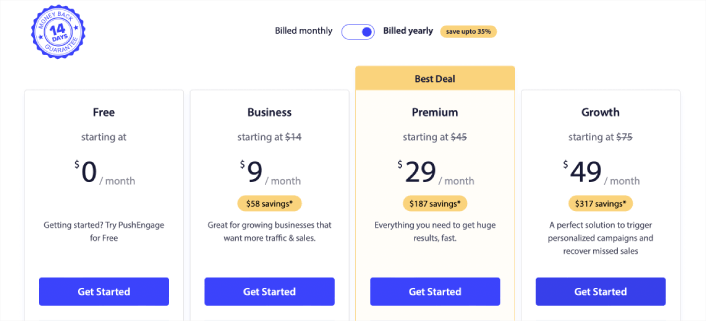
無料版では、最大200人の購読者と30件の生涯通知が許可されます。これは、ビジネスを簡単に有料プランを購入できるレベルまで引き上げるのに十分です。有料プランは、初年度は月額9ドルから(1,000人の購読者、年払い)で、購読者数に応じてスケールします。100,000人の購読者はプレミアムプランとなり、現在の料金は価格ページに記載されています。
コーディングの知識が全くなくても心配いりません。あらゆるウェブサイトやCMSに対応した多数のインストールガイドのいずれかを使用して、PushEngageをインストールできます。
Safariプッシュ通知の送信方法
Safariプッシュ通知とは何か、そしてそれを送信するために必要なサービスがわかったところで、さまざまな通知を送信する方法を確認しましょう。実際的な目的のために、ここではAPIサービスを使用して作成できるカスタムトリガー型キャンペーンについては説明しません。カスタム通知に興味がある場合は、ドキュメントを確認してください。
#1。ウェルカムキャンペーンのためのSafariプッシュ通知
ウェルカムプッシュ通知キャンペーンは、新しい購読者を歓迎するためのシンプルなプッシュ通知です。
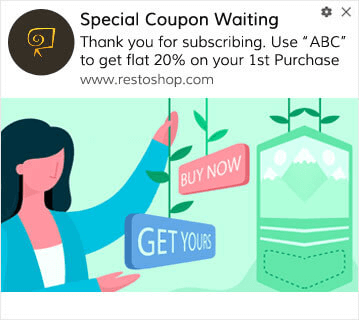
プッシュ通知を購読してくれたお客様にオファーやギフトを提供することもできます。これは多くのお客様にとって非常に一般的です。ウェルカムプッシュ通知を使用して、次のことができます。
- ウェルカムクーポンを共有する
- プレミアム機能を提供する
- 送料無料を提供する
- 無料ギフトを提供する
- ウォークスルーで購読者をオンボーディングする
それでは、PushEngageを使用して最初のウェルカムプッシュ通知を設定しましょう。
PushEngageでウェルカム通知を有効にする方法は次のとおりです。PushEngageダッシュボードに移動し、Campaign » Drip Autorespondersに移動して、Create New Drip Autoresponderをクリックします。

次に、キャンペーンに名前を付け(「ウェルカムドリップ」のような名前をお勧めします)、コンテンツの下で、「ユーザー登録直後に通知を送信」というオプションを選択します。

この時点で、通知の横にある矢印をクリックして、通知のコンテンツを編集できます。PushEngageのPremiumまたはEnterpriseプランをお持ちの場合は、複数の通知を追加して自動ウェルカムメッセージのシーケンスを作成できます。Add New Notificationをクリックして、コンテンツを編集するだけです。
完了したら、ドリップ設定をクリックし、ウェルカムキャンペーンをすべての購読者に送信するオプションを選択します。

次に、下にスクロールして独自のUTMパラメータを設定し、プッシュ通知を追跡します。
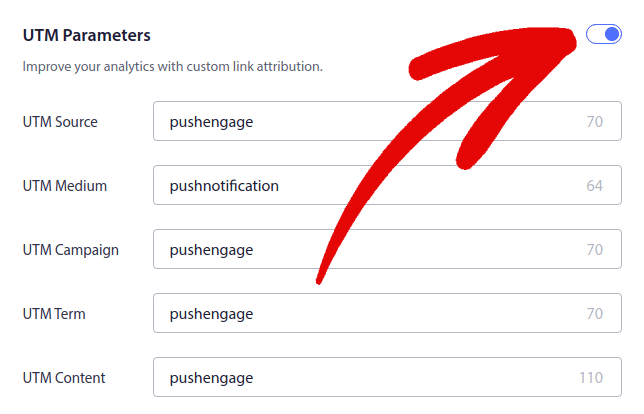
完了したら、上にスクロールして戻り、自動応答を有効にするボタンをクリックします。

これで、ウェルカムプッシュ通知がなぜ重要なのかがわかりました。設定方法もわかりました。新しい購読者を再エンゲージするためにウェルカムプッシュ通知を有効にするか、インスピレーションを得るためにウェブサイトのウェルカムメッセージに関するこの記事を確認してください。
#2。カート放棄Safariプッシュ通知
ショッピングカート放棄とは、潜在顧客が商品をショッピングカートに追加しても、チェックアウトプロセスを完了しないことです。
あなたの仕事は、カート放棄を可能な限り減らすことです。
失われた売上を回復する1つの方法は、カート放棄Safariプッシュ通知を使用することです。カート放棄リカバリキャンペーンは、カートを放棄した購読者をターゲットにし、フォローアップ、リマインダー、オファー、クーポン、割引を送信します。
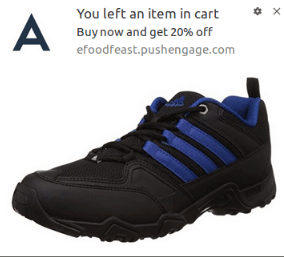
シンプルなアイデアです:できるだけ多くの人に何かを購入してもらうこと。
カート放棄プッシュ通知は、あなたの収益に非常に現実的な影響を与えます。例えば、WickedWeasel は、カート放棄プッシュキャンペーンから毎週 $2,000 ~ $4,000 の追加売上を得ています。
それでは、最初のカート放棄キャンペーンを PushEngage で設定しましょう。
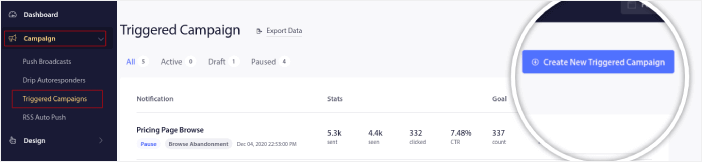
PushEngageダッシュボードにアクセスし、「キャンペーン」→「トリガーキャンペーン」に移動して、「新しいトリガーキャンペーンを作成」をクリックします。
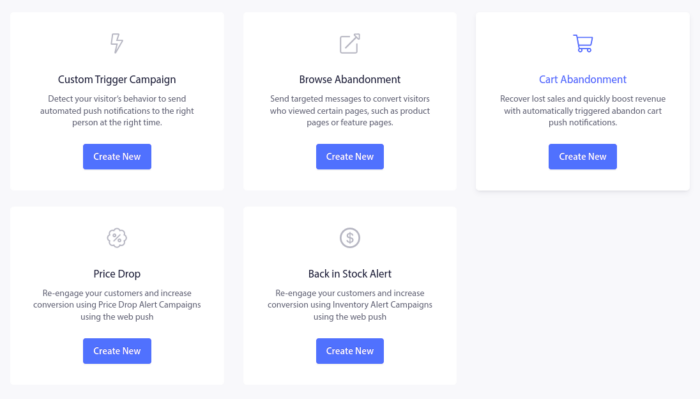
次に、「カート放棄」テンプレートを選択し、「新規作成」をクリックします。
そして、カート放棄自動応答の作成を開始できます。コンテンツタブの下で、一連のプッシュ通知を作成できます。
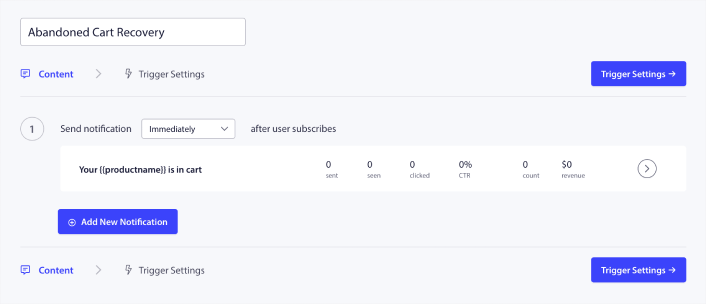
通知を編集するには、横にある矢印をクリックするだけで、プッシュ通知をカスタマイズできます。
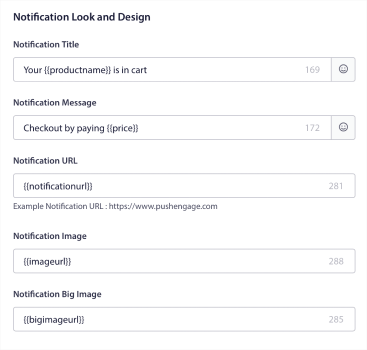
より詳しいチュートリアルについては、カート放棄プッシュ通知の設定方法に関するこの記事を確認してください。
#3。ブラウズ放棄Safariプッシュ通知
閲覧放棄は、まさにその名の通りです。ウェブサイトの訪問者があなたのウェブサイトを閲覧していて、突然離れることを決定した場合です。これらのインシデントは、他のベンダーからはファネル放棄とも呼ばれます。
閲覧放棄は、ほぼすべての業界で非常に一般的な発生状況です。
そして、ランダムなユーザーにウェブサイトに滞在してもらうためのインセンティブを与える方法がないため、これを削減または制御することは非常に困難です。ここで閲覧放棄キャンペーンが非常に強力になります。
これは、パブリッシャー向けの閲覧放棄プッシュ通知の例です。
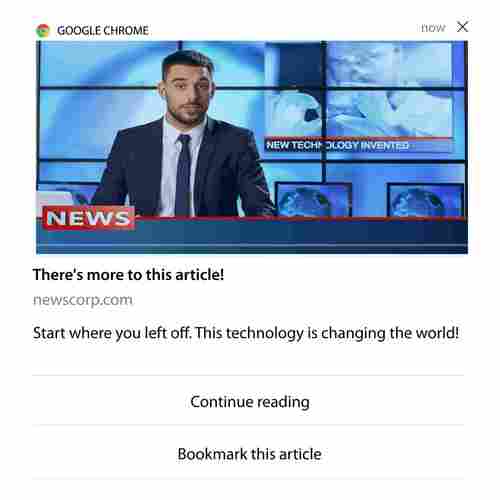
PushEngage の素晴らしい点は、ほぼすべての業界でキャンペーンを設定できることです。したがって、SaaS および旅行ウェブサイト向けの閲覧放棄プッシュ通知を送信することもできます。
では、閲覧放棄キャンペーンをどのように設定するのでしょうか?
カート放棄では、プッシュ通知をトリガーするための非常に明確なパラメータがあります。閲覧放棄の場合、次のようなパラメータを検討するとよいでしょう。
- ウィッシュリストに商品を追加した
- 同じ商品を X 回以上見た
- 同じカテゴリで X 個以上の商品を見た
- サイトで特定の商品を検索した
- 離脱する前に少なくとも X 分間サイトに滞在した
eコマースサイト向けのこのキャンペーンの背後にある考え方は、購読者に商品をカートに追加してもらうことです。パブリッシャーの場合は、閲覧していた記事のクリックまたはダウンロードになる可能性があります。
再度PushEngageダッシュボードにアクセスし、[Campaign] » [Triggered Campaigns]に移動して新しいトリガーキャンペーンを作成します。

次に、[Create New]ボタンをクリックして、新しい閲覧放棄キャンペーンを作成します。

次に、各通知の間に遅延を設定して、プッシュ通知のシーケンス全体を設定できるようになります。
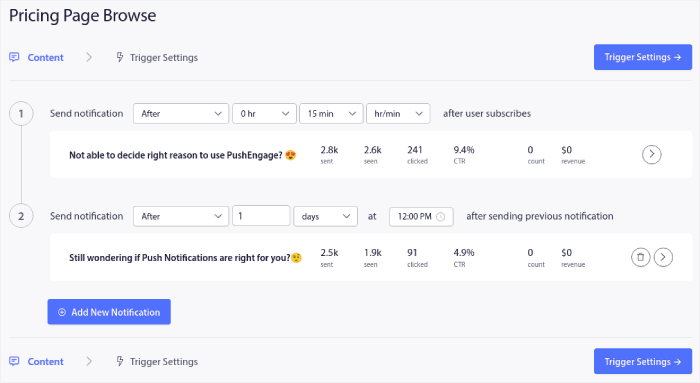
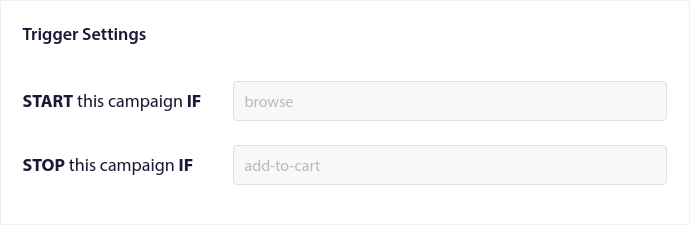
プッシュ通知に慣れていない場合は、プッシュ通知のベストプラクティスに関する記事を確認してください。プッシュ通知コンテンツに満足したら、[Trigger Settings]をクリックします。閲覧放棄キャンペーンの条件がシーケンスに事前設定されていることがわかります。
閲覧放棄キャンペーンをサイトに埋め込むために必要なコードスニペットを取得するには、[Integration Code]ボタンをクリックします。
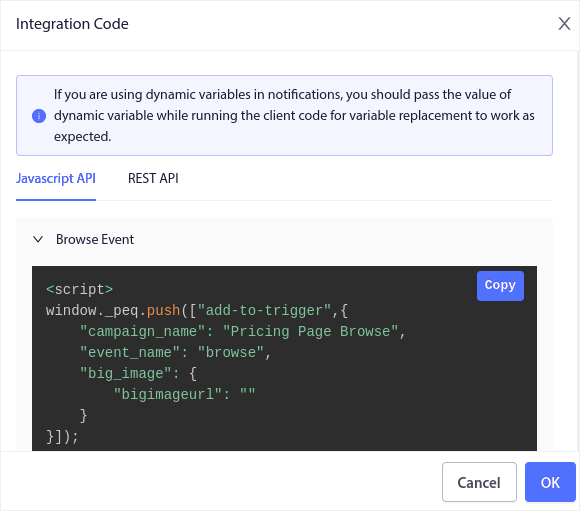
次に、コードをコピーしてサイトに貼り付けます。そのコードを追跡したいページのHTML セクションに貼り付けます。最後に、[Activate Triggered Campaign]ボタンをクリックします。
これで完了です!
#4。RSSフィードプッシュキャンペーン
RSS Auto Push を使用すると、RSS を介して通知を自動化できます。
PushEngage は 10 分ごとに RSS フィードに追加された新しい投稿をチェックします。新しい投稿が見つかった場合、PushEngage はそれをプッシュ通知に変換し、すべての購読者に送信します。最も良い点は、それが完全に自動で行われることです。
RSS フィードキャンペーンは、パブリッシャーやニュースサイトに最適です。
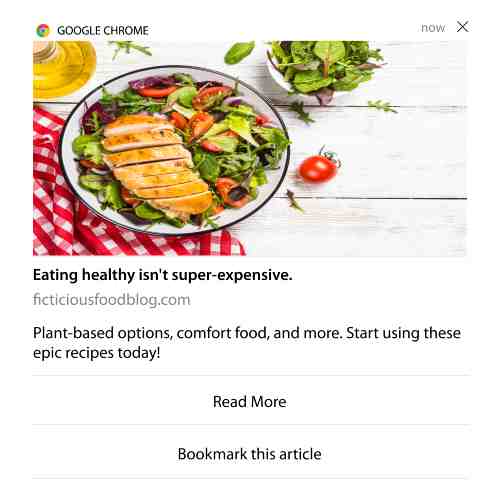
あなたが大手パブリッシャーで、30分に1回以上の投稿を行う場合、PushEngageは2つの投稿通知の間に5分間の遅延を維持します。
さらに進む前に、より多くの素晴らしいヒントやコツについては、RSSフィードの使用方法に関するこの記事をご覧ください。
それでは、PushEngageでRSSプッシュ通知を設定しましょう。
キャンペーン » RSS自動プッシュに移動して、オンにするだけです。
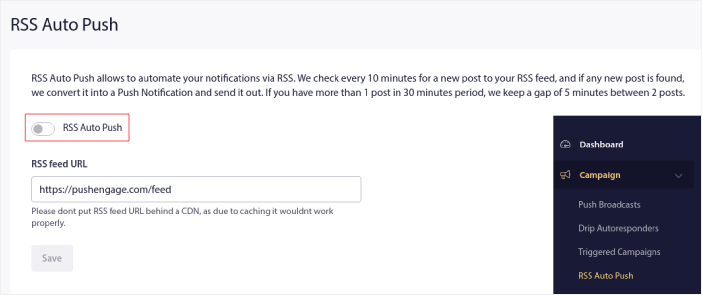
RSSフィードのURLを貼り付ける必要があります。WordPressサイトの場合、通常は次の形式になります。
次に、RSSの検証をクリックします。そして最後に、保存をクリックします。
これで完了です。設定はすべて完了しました。新しい投稿を公開するたびに、すべての購読者に自動的に送信されます。
#5. 自動再エンゲージメント通知
しばらくの間、コンテンツにエンゲージしていない購読者に対して、自動再エンゲージメントキャンペーンを設定できます。
しかし、そもそもなぜそれを行うのでしょうか?
例えば、どうでしょうか?
- 新規顧客獲得コストは、既存顧客維持コストの5倍です。
- 個人の好みをすでに理解している既知のオーディエンスをターゲットにし、リマーケティングするのは簡単です。
- 長期的には、エンゲージした顧客は、ブランドとほとんど接続しない人よりも会社により多くのビジネスをもたらします。
Ofertiaは、パーソナライズされた取引を提供するプッシュ通知を使用して、リピートユーザーを39%増加させることに成功しました。彼らだけではありません。これをeコマースウェブサイトに効果的に使用できます。
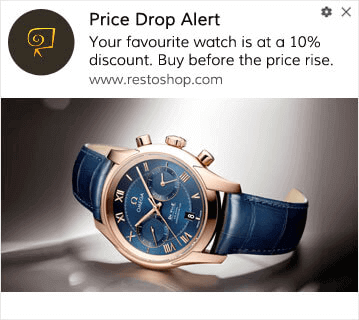
購読者を再エンゲージさせるための方法はたくさんあります。
しかし、最も効果的な方法の1つはセグメンテーションを使用することです。動的セグメントを使用すると、購読者について多くのことを把握し、彼らが気に入るパーソナライズされたコンテンツを送信できます。
PushEngageダッシュボードで、Segmentationに移動し、新しいセグメントを作成します。
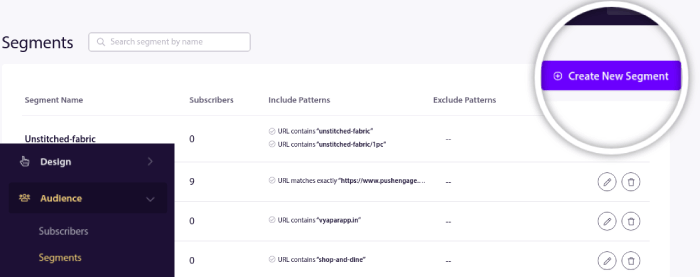
これにより、行動や閲覧パターンに基づいたセグメントを作成できます。特定のセグメントが自動プッシュ通知を受信するタイミングを決定するAND/OR操作のシーケンスを設定することも可能です。
プッシュ通知を購読する際にユーザーをセグメント化することもできます。Design » Popup Modalsに移動し、Large Safari Style with Segmentを選択してください。
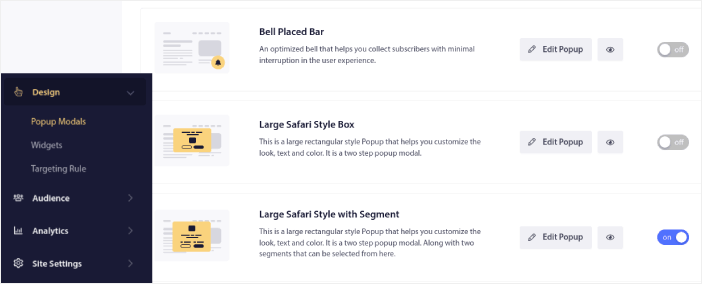
ユーザーをセグメント化するさらに多くの方法が必要な場合は、PushEngage Javascript APIを使用して、ユーザーのアクションに基づいてカスタムセグメントを作成できます。
#6. ページ訪問トリガーキャンペーン
ページ訪問トリガーは、プッシュ通知セグメントの拡張機能です。ウェブ訪問者が特定のフレーズまたはパターンを含むURLを閲覧したときにセグメントを作成するだけです。
次に、Audience » Segmentsに移動し、オーディエンスを特定のセグメントに設定するだけです。
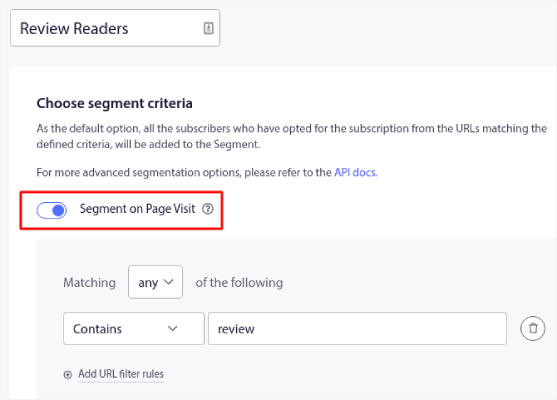
これにより、非常にパーソナライズされた自動プッシュ通知を作成できます。
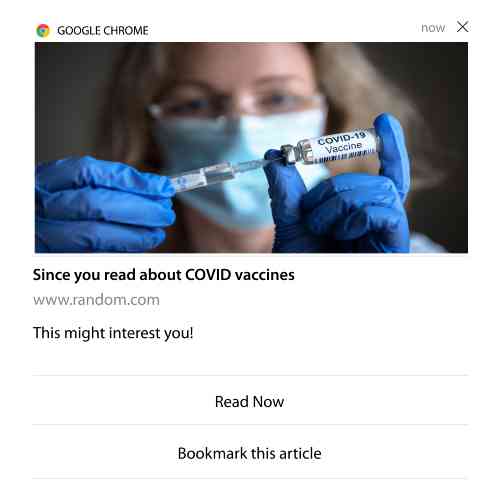
そして、最も良い点は、PushEngageでカスタムセグメントを数分で作成できることです。
#7. クリックからの自動プッシュ通知
PushEngageでは、配信された通知をクリックしたときにトリガーされるプッシュ通知を作成することはできません。
しかし、非常に巧妙な回避策があります。
特定の通知が誘導するURLに基づいてセグメントを作成できます。誰かがこのURLにアクセスするたびに、その人はセグメントに追加され、このセグメントを使用してターゲット通知を送信できます。
プッシュ通知クリックキャンペーンは、基本的にドリップキャンペーンの標準オーディエンスセグメンテーションの拡張機能です。
クリックして購読するボタンの作成方法に関するチュートリアルをご覧ください。
#8. 反復自動プッシュ通知
たとえば、次のようなものがあると想像してください…
- フリーマーケットの週次セール、
- または週末セール;
- または在庫一掃セール;
- または月次フラッシュセール。
すべてのイベントに対して手動でプッシュ通知を作成するのは、どれほど不便でしょうか?
幸いなことに、PushEngageで繰り返し通知を設定できます。
繰り返し通知は、定期的なイベントのためのスケジュールされた自動プッシュ通知です。一度設定し、スケジュールを指定すれば完了です。
これは、MyDealがプッシュ通知を使用している方法の1つにすぎません。ぜひケーススタディ全体をお読みください!
Campaignに移動し、PushEngageダッシュボードに自動通知を追加します。次に、スケジューリングセクションまでスクロールダウンし、Send/Scheduleタブに移動します。

タイミングを設定するだけで完了です!
#9. 購読者タイムゾーン通知
購読者タイムゾーン通知は、その名の通りのものです。購読者のタイムゾーンに自動プッシュ通知を送信します。
なぜこれがそれほど重要なのでしょうか?
購読者のタイムゾーン通知 は開封率が高くなります。通常、購読者がオフラインであっても、プッシュ通知は配信されます。購読者が最終的にオンラインになったときに、これらの通知は積み重なって無視される可能性があります。
一方、購読者のタイムゾーンのSafariプッシュ通知は、購読者がオンラインである可能性が最も高いとわかっているときに配信されます。
プロのヒント: A/Bテストを使用して、購読者にプッシュ通知を送信するのに最適な時間を見つけてください。
購読者タイムゾーン通知は、はるかにパーソナライズされたように感じられます。そして、賢く行えば、ジオロケーションデータと組み合わせて通知をさらにパーソナライズできます。これはまさにPhootoがローカル言語を使用したときに開封率を急上昇させた方法です。
では、PushEngageで購読者タイムゾーン通知を設定しましょう。
新しい通知を作成する際に、スケジューリングオプションに移動し、Send Notifications in Subscriber Timezoneというチェックボックスをクリックします。
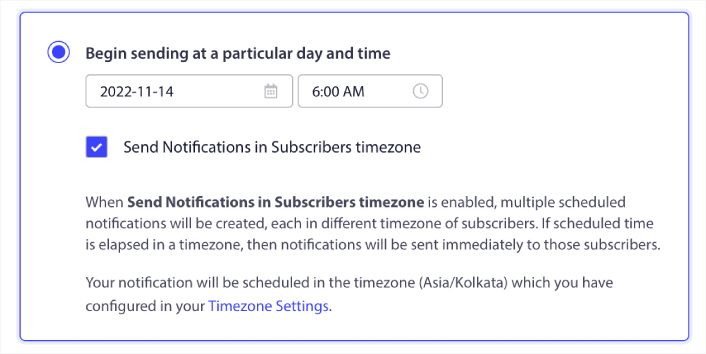
以上です!ドリップキャンペーンについても同様に行う必要がありますが、結果は各キャンペーンのボタンを1回クリックする労力に見合う価値があります。
プロのヒント: 前述の2つの戦術は、プッシュ通知のスケジュール設定に関するものでした。しかし、これらだけが自動プッシュ通知をスケジュールする方法ではありません。より多くの素晴らしいトリックについては、プッシュ通知をスケジュールする方法に関する記事をご覧ください。また、Safariプッシュ通知を送信するのに最適な時間も確認してください。
#10. Eメールオプトイン通知
Eメールマーケティングは、リードを生成し育成するための最良の方法として長い間考えられてきました。自動プッシュ通知の最も良い点は、それらを使用してより多くのメール購読者を生成できることです。
設定は非常に簡単で、メールとSafariプッシュ通知を組み合わせて使用すると、どちらか一方を使用するよりもはるかに効果的です。
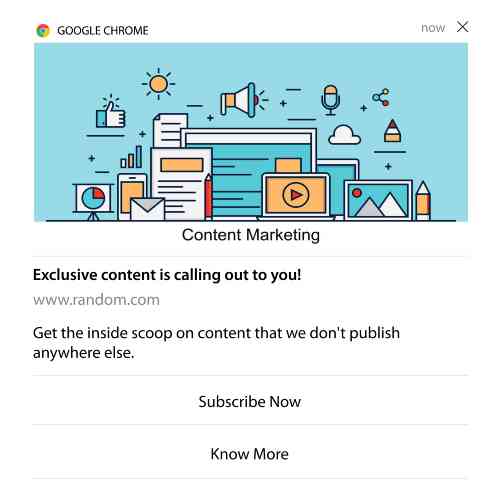
ユーザーにメール通知をオプトインするように求めるトリガー通知を送信するだけです。
カスタムCTA(コールトゥアクション)ボタンを作成し、ボタンのURLとして購読リンクを挿入するだけです。本当に必要なのはそれだけです。購読ボタンの取得方法がわからない場合は、そのまま続けてください。
どの通知でも、下にスクロールしてマルチアクションボタンをオンにすることができます。
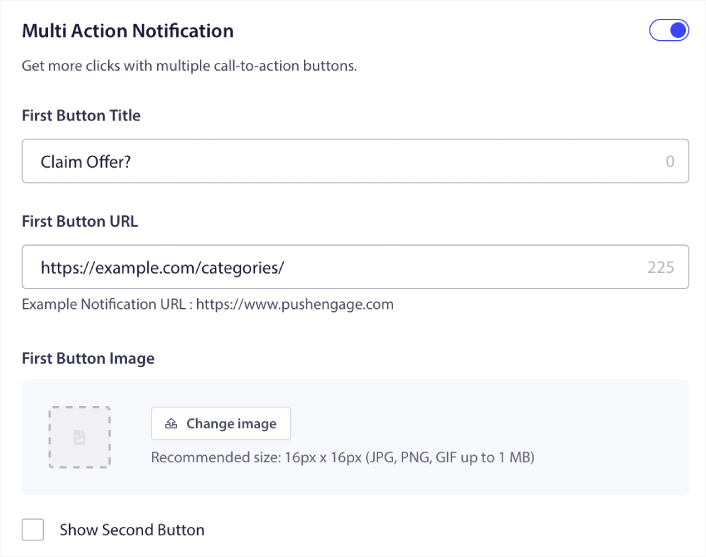
URLは、メールサインアップフォームへのリンクである必要があります。Dripのようなほとんどのメールサービスプロバイダーを使用して作成できます。サインアップフォームの共有オプションをクリックして、そのURLをコピーするだけです。次に、プッシュ通知のボタンURLに貼り付けます。
詳細については、マルチアクションボタンのチュートリアルをご覧ください。Eメールアイコンをボタンに追加して、Eメール通知の購読を求めていることを非常に明確にすることもできます。
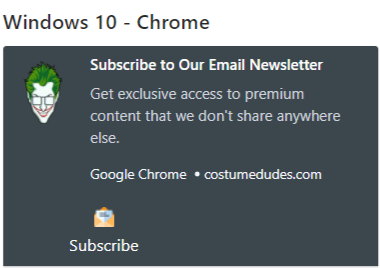
プロのヒント: 同じアイデアを使用して、YouTubeチャンネルを成長させることもできます。チャンネルURLの末尾に「?sub_confirmation=1」を追加し、プッシュ通知ボタンのURLに貼り付けるだけです。
プッシュ通知の購読ボタンをクリックするたびに、YouTubeチャンネルにリダイレクトされ、購読するように求められます。
Safariプッシュ通知を設定した後の対処法
Safariプッシュ通知は、ビジネスの成功を保証するものではありません。他のマーケティングツールと同様に、メッセージとセグメントをテストして改善する必要があります。残念ながら、自動通知を直接A/Bテストすることはできません。しかし、これらのリソースは、あなたが迅速に進むのに役立ちます。
- Web通知WordPressプラグインをサイトにインストールする方法
- プッシュ通知のA/Bテストの実施方法(ベストプラクティス)
- 即時トラフィックを獲得するための7つのプッシュ通知のベストプラクティス
- 2022年の最高のeコマースWordPressプラグイン21選(無料および有料)
- 2022年の最高のWordPressニュースプラグイン7選(比較)
また、PushEngageには、かなりの数のインテグレーションが用意されています。Zapierを使用してカスタムトリガーを設定することもできます。これらはかなり高度なキャンペーンであり、組み込みの自動化に慣れてから設定することをお勧めします。
また、PushEngage Javascript APIは非常に柔軟であり、ウェブサイト上のほぼすべての操作に対してカスタムトリガーを設定できることも知っておくべきです。
これらのすべてのリソースを確認すると、PushEngageが市場でナンバーワンのプッシュ通知ソフトウェアであることがわかるでしょう。
まだお済みでない場合は、今日からPushEngageを始めましょう!


