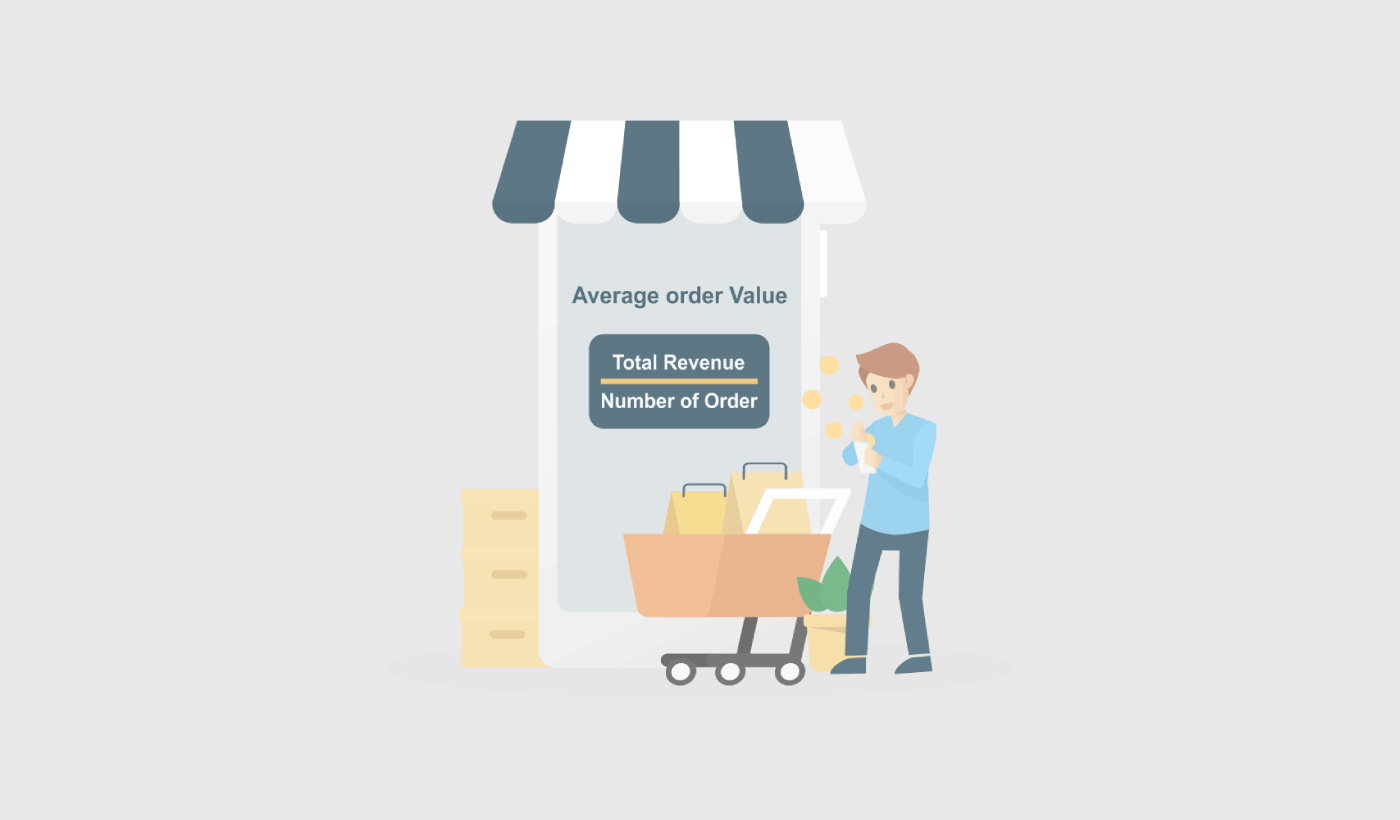
平均注文額を増やす方法をお探しですか?
平均注文額(AOV)は、ビジネスの成長を分析する上で最も簡単なeコマース指標の1つです。しかし、それを増やすにはどうすればよいでしょうか?AOVを増やすことは、実際にあなたのビジネスに役立つのでしょうか?
この記事では、平均注文額とは何か、なぜ最適化すべきなのか、そしてAOVを増やすための非常に簡単な方法について詳しく見ていきます。
よさそうですね?さあ、始めましょう。
PushEngageは世界No.1のプッシュ通知プラグインです。無料で入手!
平均注文額とは?
平均注文額(AOV)は、ウェブサイトまたはeコマースストアでの注文あたりの平均支出額を測定する指標です。総収益を注文数で割ることで計算できます。
たとえば、ストアが100件の注文で総収益10,000ドルを上げた場合、AOVは100ドル(10,000ドル/ 100件の注文)になります。
AOVは、顧客ベースの価値を理解し、売上増加の機会を特定するのに役立つため、ビジネスにとって重要な指標です。AOVを増やすことで、ビジネスは各顧客からより多くの収益を生み出すことができ、全体的な売上と収益性を向上させることができます。
バンドル割引の提供、関連商品のアップセル、バンドル価格の設定など、AOVを増やすために使用できる戦略はいくつかあります。これらの戦略を効果的に実装することで、より多くの売上を促進し、時間の経過とともにAOVを増やすことができます。すぐに詳細を説明します。
平均注文額は最高のeコマース指標か?
平均注文額(AOV)を増やすことはビジネスを成長させるための有用な方法ですが、考慮すべき潜在的な欠点がいくつかあります。AOVを増やすと、次のようになる可能性があります。
- 顧客獲得コストの増加につながる:AOVを増やすには、マーケティングや顧客獲得の取り組みにもっと投資する必要があるかもしれません。これにより、新規顧客を獲得するためのコストが増加し、ビジネス全体の収益性に影響を与える可能性があります。
- 長期的に持続可能ではない:顧客は最終的に各注文でそれ以上支出したくないという点に達する可能性があるため、AOVを増やすことは長期的に持続可能な戦略ではないかもしれません。したがって、季節的なセールを実行しているときはAOVに焦点を当てるのが最善です。
- 顧客満足度の低下につながる:AOVの増加に過度に焦点を当てすぎると、顧客が必要または望んでいる以上の製品を購入するように促すことで、顧客を悩ませる可能性があります。これは顧客満足度の低下につながり、ビジネスの評判を損なう可能性があります。
- すべてのビジネスで実現可能とは限りません。ビジネスとその製品の性質によっては、AOVを増やすことが現実的でない場合があります。たとえば、低価格の商品を販売している場合、高価格の商品を販売しているビジネスよりもAOVを増やすのが難しい可能性があります。
全体として、AOVの増加に伴う潜在的な欠点を慎重に検討し、バランスの取れたアプローチを取ることが重要です。短期的な成長は、ビジネスに永続的な影響を与えたであろう忠実な顧客を失うことを余儀なくさせる可能性があります。
ストアの平均注文額を増やす方法
平均注文額(AOV)とは何か、そしてなぜ気にかけるべきかを理解したところで、AOVを増やす方法を見ていきましょう。私たちのヒントのほとんどは、何らかのマーケティングツールを必要とすることを覚えておいてください。AOVの最適化を開始する前に、それに集中する必要があるかどうかを100%確信する必要があります。
#1。送料無料の最低注文額を設定する
送料無料は多くの売上をもたらす可能性があります。しかし、平均注文額を増やしたい場合は、安価な商品については無料提供をやめる必要があります。そのための1つの方法は、送料無料の最低注文額を設定することです。

送料無料の最低注文額(MOV)とは、顧客が注文に対して送料無料を得るためにストアで費やす必要がある最低金額です。このマーケティング戦略を使用して、顧客がウェブサイトでより多くのお金を使うように促すことができます。
最低注文額を設定すると、配送および取り扱いにかかる注文ごとの費用が削減されます。コストの削減により、収益性を維持しやすくなります。
送料無料の最低注文額を実装するもう1つの理由は、顧客が1回の注文でより多くのアイテムを購入するように促すことです。これにより、平均注文額を非常に簡単に増やすことができます。
#2。商品をバンドルしてパッケージを作成する
商品のバンドルは、ビジネスの平均注文額(AOV)を増やすための一般的な戦略です。商品をバンドルしてパッケージとして販売することにより、個別に販売する場合よりも高い価格でより多くの商品を販売できることがよくあります。
AOVを増やすための製品バンドルの使用に関するヒントをいくつかご紹介します。
- 補完的な商品を選択してください。
- バンドル割引を提供する。
- バンドル価格を使用する。
これら3つの基本的な原則に従えば、飛ぶように売れるパッケージを作成できます。平均注文額を増やすための優れた方法です。
#3。補完的な商品をアップセルおよびクロスセルする
Amazonによると、売上の35%はクロスセルから来ています。クロスセルプッシュ通知は、顧客に自動的に商品をクロスセルするキャンペーンです。既存の顧客に販売する可能性が60〜70%高いため、クロスセルプッシュ通知は売上を増やすのに役立ちます。
アップセルとは、ユーザーがすでに購入している商品のより高価な製品またはより良いバージョンにアップグレードさせる方法です。クロスセルとは、顧客に関連商品または補完商品を販売することです。
クロスセルとアップセルは、最も効果的なマーケティング方法です。クロスセルおよびアップセルキャンペーンを使用して、平均注文額(AOV)を簡単に増やすことができます。簡単な方法の1つは、次のようなクロスセルプッシュ通知を作成することです。
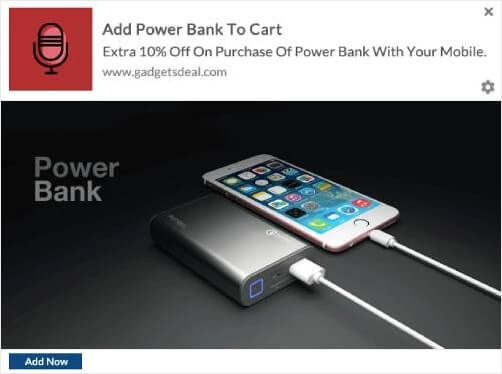
クロスセルプッシュ通知の作成方法に関するステップバイステップガイドについては、この記事をご覧ください。アップセル通知を作成するためにも同じテクニックを使用できます。
#4。ロイヤルティプログラムを使用して平均注文額を増やす
現実確認: 既存顧客を維持する方が、新規顧客を獲得してオンボーディングするよりも安価です。常に新規顧客の獲得に注力している場合、予算と時間の一部を既存顧客の維持に費やすことも良い考えかもしれません。
では、どうすればよいでしょうか?顧客に重要で大切にされていると感じてもらうための非常に簡単な方法の1つは、ロイヤルティプログラムを作成することです。そして、いいえ、ロイヤルティプログラムは航空会社のためだけのものではありません。現在、ほぼすべての有名ブランドが報酬プログラムを持っています。簡単な方法の1つは、これのようなプッシュ通知を使用することです。
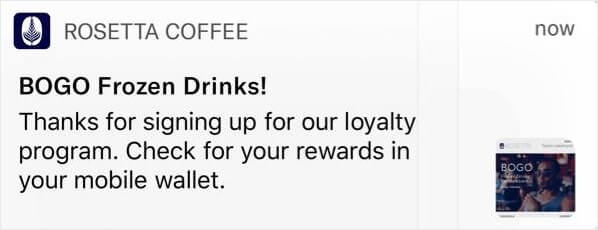
そして、さらに一歩進みたい場合は、ロイヤルな顧客にさまざまな方法で報酬を与えることができます。
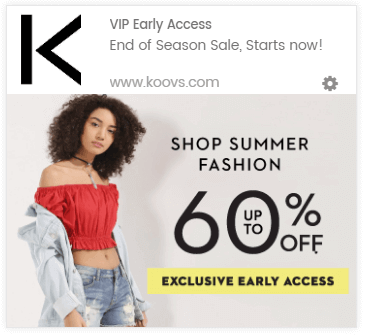
ロイヤルティプログラムに慣れておらず、以前に設定したことがない場合は、Yotpoを試してみてください。Yotpoは、ウェブサイト用のインスタントロイヤルティプログラムの作成を支援します。そして、それを実装するためにコードを知る必要はまったくありません。
#5。サイトにライブチャットを追加する
サイトにライブチャットボックスを設置することは、ウェブサイトのエンゲージメントにとって非常に効果的な ツールになり得ます。サイトでライブチャットツールを使用すると、次のようなチャットボックスのトリガーを簡単に設定できます。
- 顧客が商品ページやチェックアウトページに多くの時間を費やしている場合
- 顧客が商品をカートに追加したが、支払いができない場合
- カートの価値が高い顧客にクーポンや割引を提供する場合
これらはすべて自動トリガーであり、多くの潜在顧客を非常に迅速にコンバージョンさせるのに役立ちます。LiveChatの使用をお勧めします。
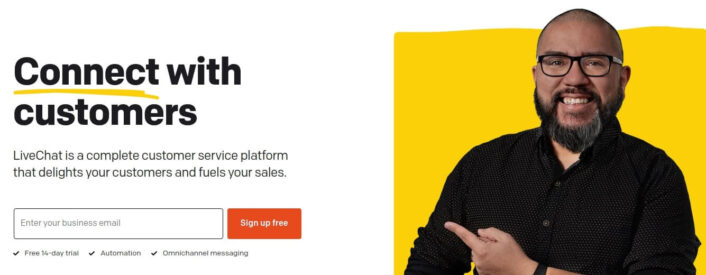
LiveChat は、会話型マーケティングおよびセールス向けのライブチャットツールです。オンラインで製品を販売している場合や、代理店向けのリードを収集している場合は、このプラグインの使用を強くお勧めします。
チャットボックスは、自動トリガーのいずれかが起動すると、顧客に通知します。そこから、カスタマーサービス担当者が引き継ぎ、顧客が購入を決定するのを支援できます。
#6。オーディエンスセグメンテーションを使用してコンバージョンを増やす
興味や行動によってオーディエンスをセグメント化すると、キャンペーンのクリック率が向上します。オーディエンスにより関連性の高いオファーやプロモーションを送信すると、コンバージョンが急増します。
たとえば、プッシュ通知購読者をセグメント化すると、それらに対するクリック率がはるかに向上します。
購読者を自動的にセグメント化すると、パーソナライズされたプッシュ通知キャンペーンを非常に簡単に送信できます。そうすることで、プッシュ通知のクリック率を向上させ、サイトへのリピートトラフィックを増やすことができます。
そして、これはPushEngageで設定するのが非常に簡単です。通常、セグメントを作成するにはJavaScript APIを使用する必要があります。PushEngageを使用すると、そのオプションも引き続き利用できますが、最も簡単な方法はPushEngageダッシュボードから行うことです。Audience » Segmentsに移動し、Create a New Segmentをクリックします。
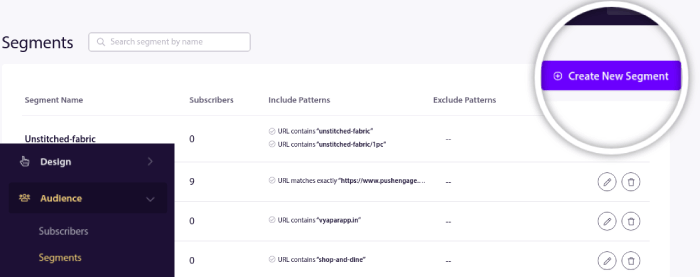
そして、閲覧しているURLに基づいて購読者を自動的にセグメント化するルールを作成します。
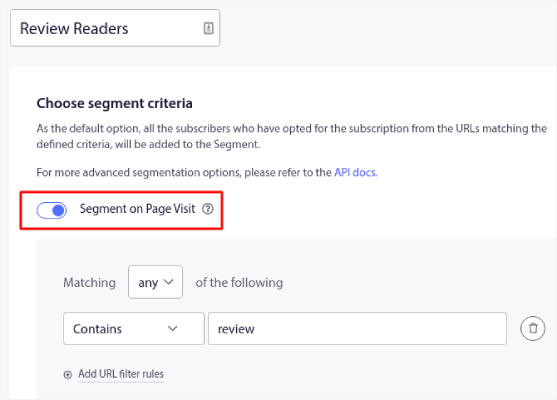
この例では、「Sample Segment」という名前のセグメントを作成しました。これは、サイトのURLに「examples」という単語が含まれている場合に購読者を自動的にセグメント化します。ここでは、好きなキーワードをほぼすべて使用できます。
ルールに満足したら、Createをクリックします。
#7。アドオンのダウングレード
ダウンセリングとは、顧客が最初に希望した製品やサービスではなく、より安価な製品やサービスを購入するように説得しようとする販売テクニックです。これは、顧客がより高価なオプションの予算を持っていない場合や、より安価なオプションがニーズを同様に満たす場合など、さまざまな理由で行うことができます。
レジ横にキャンディーとタバコを置いている店を想像してみてください。ダウンセリングは、衝動買いやアドオンに最も効果的です。アドオンをダウンセリングする際に使用できる戦略がいくつかあります。
- より安価なオプションの価値を説明する:より安価なアドオンが顧客のニーズをどのように満たし、価値を提供するかを説明します。
- より高価なオプションの欠点を強調する:顧客が不要かもしれない、より高価なアドオンの欠点や不要な機能に言及します。
- 代替案を提供する:顧客のニーズと予算により適した他のオプションやアドオンを提案します。
- 希少性や緊急性を利用する:より安価なオプションの利用可能な在庫が限られている、または期間限定のオファーであることを言及して、緊急性を生み出します。
顧客に対して正直かつ透明性を持って接し、決して意思決定を急かさないことが重要です。代わりに、顧客のニーズと予算に最も合った、情報に基づいた選択ができるよう支援することに集中してください。
#8。出口インテントポップアップを使用して売上を伸ばす
離脱防止ポップアップは、サイトを離れようとしているウェブサイト訪問者の注意を引くように設計されたマーケティングツールの1種です。これらのポップアップは通常、訪問者がブラウザウィンドウの外にカーソルを移動したとき、またはページの下部までスクロールしたときに表示され、離脱しようとしていることを示します。
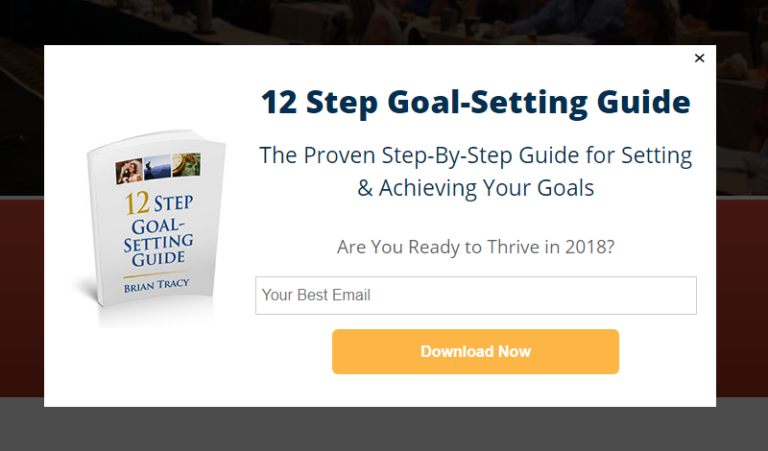
離脱防止ポップアップは、サイトを離れようとしているウェブサイト訪問者の注意を引くように設計されたマーケティングツールの1種です。これらのポップアップは通常、訪問者がブラウザウィンドウの外にカーソルを移動したとき、またはページの下部までスクロールしたときに表示され、離脱しようとしていることを示します。
離脱防止ポップアップは、訪問者にサイトに留まってもらい、購入やその他の希望する行動を取ってもらうために使用できます。離脱防止ポップアップは控えめに、訪問者の体験を尊重する方法で使用することが重要です。ポップアップを使いすぎたり、侵入的または迷惑な方法で使用したりすると、ネガティブなユーザーエクスペリエンスにつながり、最終的には販売努力を損なう可能性があります。
#9。ポップアップに購読ボタンを追加する
プッシュ通知は、ウェブサイトのトラフィックとエンゲージメントを自動で増やすのに役立ちます。オンラインストアを運営している場合は、PushEngageが自動eコマースプッシュ通知の作成を支援することで、売上を伸ばすのにも役立ちます。
無料で開始できますが、ビジネスの成長に真剣に取り組んでいる場合は、有料プランを購入する必要があります。また、プッシュ通知サービスを購入する前に、プッシュ通知のコストに関するこのガイドを確認してください。
PushEngageで得られるものを簡単に見てみましょう。
- コンバージョン率の高い自動キャンペーン
- 複数のターゲティングおよびキャンペーンスケジュールオプション
- 目標追跡と高度な分析
- スマートA/Bテスト
- 専任のサクセスマネージャー
ビジネスのトラフィック、エンゲージメント、売上を伸ばしたいのであれば、PushEngageが断然最良の選択肢であることがわかるでしょう。予算が限られている場合は、プッシュ通知で少しクリエイティブになることもできます。
まず、OptinMonsterのサイドバーからポップアップにHTMLブロックを追加します。
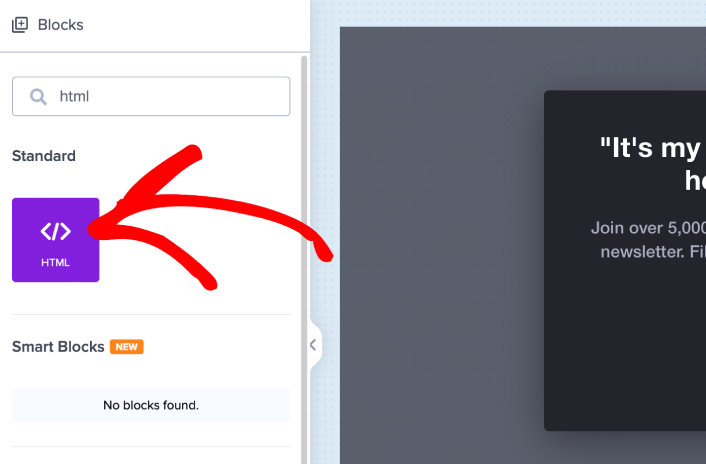
ここで、プッシュ通知購読者を収集するためのコードを追加します。まず、クリック可能なボタンを作成するために、次のコードを貼り付けます。
<button onclick="subscribeOnClickButton()" style="border: none; width: 100%; padding-left: 15%; padding-right:15%; text-align: center; display: inline-block; color: white;">Get Updates via Push Notifications</button>HTMLを追加できる場所にコードを貼り付けます。
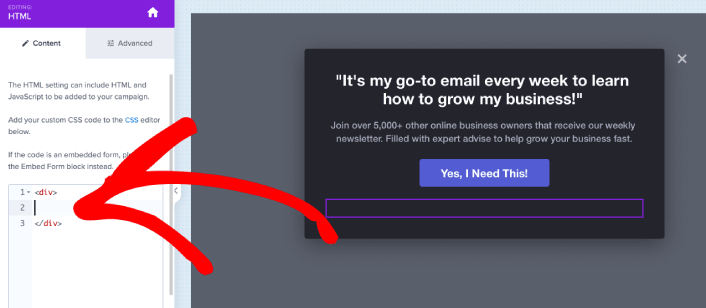
もちろん、スタイルを調整して、より魅力的に見せることもできます。次に、ボタンをクリックしたときにプッシュ通知購読者を収集するようにします。
PushEngageのホームページにアクセスし、開始するボタンをクリックします。

次に、PushEngage を試すために無料プランを選択するか、ビジネスの成長に真剣に取り組んでいる場合は有料プランを選択します。有料プランには、より多くのキャンペーンオプションと、さらに大きな購読者リストを構築する機能が付属しています。
あなたのPushEngageダッシュボードで、サイト設定 »サイト詳細に移動し、セットアップ手順を表示するにはここをクリックボタンをクリックします。「任意のサイト」の下に、インストールコードが表示されます。
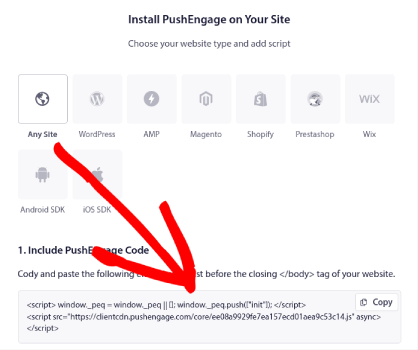
警告:ダッシュボードから取得したコードをコピーする必要があります。コードはPushEngageユーザーごとに固有です。画像内のコードをコピーしてプッシュ通知購読者を収集することはできません。
PushEngageダッシュボードにコードが表示されたら、2番目のスクリプトを取得し、追加のコードをいくつか追加します。最終的なコードは次のようになります。
<script src="https://clientcdn.pushengage.com/core/02a6e92667ae2279fcba8932356c1d93.js" async></script>
<script> window._peq = window._peq || [];
function subscribeOnClickButton(){
window._peq.push(['subscribe',{}.pe,function(res){
console.log(res);
}]);
}
</script>
このコードを OptinMonster のHTML ブロックに、ボタンのコードの直後、<div></div> コードブロックの間に挿入すれば完了です!
#10。ウェルカムキャンペーンを作成する
ウェブサイトのウェルカムメッセージは、邪魔することなくオーディエンスと再エンゲージするための完璧な方法です。購読者は、自分が本当にメールやプッシュ通知に登録していることを確認する方法を「望む」でしょう。自動化された一連の ウェルカムプッシュ通知を作成することは、ウェブサイト訪問者をオンボーディングするための完璧な方法です。
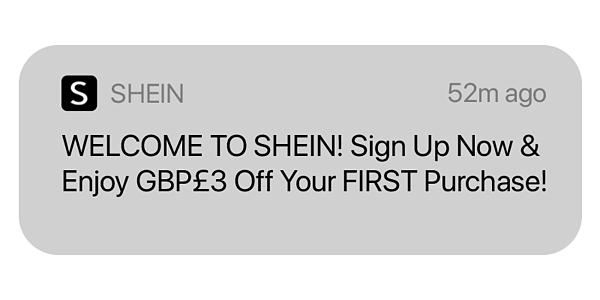
例を見ていく中で、このシンプルなキャンペーンでどれだけ多くのことができるかを正確に探っていきます。
しかし、今のところ、ウェブサイトのウェルカムメッセージを作成していない場合は、今すぐ始める必要があることを知っておいてください。メールやプッシュ通知しか使用できないわけではありません。ウェブサイトでポップアップを使用している場合は、 ウェルカムマットをチェックする必要があります。
素晴らしいウェルカムメッセージ付きのポップアップを作成しようとしている場合は、 OptinMonsterで始めるべきです。OptinMonsterは世界最高のコンバージョン最適化ツールキットであり、ウェブサイト訪問者をより多くメール購読者に転換させるポップアップを簡単に作成できます。
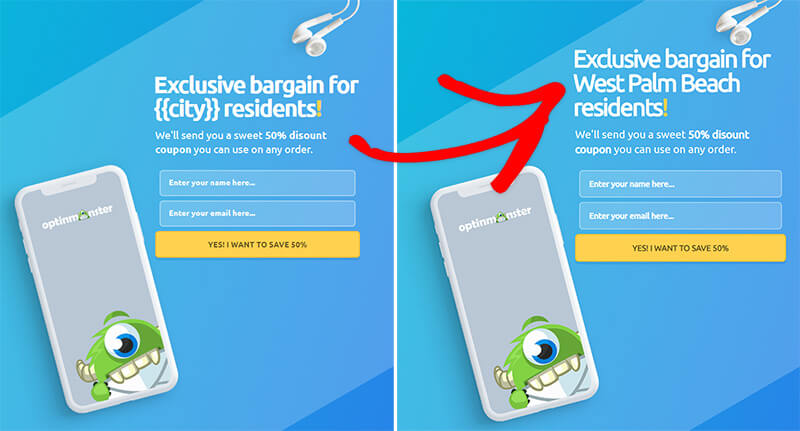
訪問者のユーザー名、場所、日付などを使用して ウェルカムポップアップをパーソナライズするための多くの高度なオプションが用意されています。そして最も良い点は、よりオーガニックな方法でそれらを転換するために、新しい訪問者とリピーターの両方に異なるキャンペーンを ターゲット設定できることです。
#11。期間限定オファーを作成する
セールプロモーションが近づいている場合は、必ずサイトにカウントダウンタイマーを追加してください。私たちは、自身の売上を伸ばすためにアニメーションタイマーをテストしましたが、その結果は驚くべきものでした。
カウントダウンタイマーを使用することは、緊急性を生み出し、タイマーが切れる前に顧客に購入を促すことで、売上を増やす効果的な方法となり得ます。
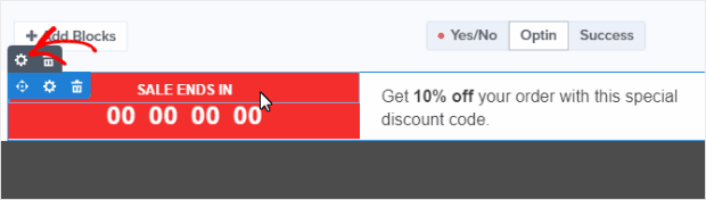
カウントダウンタイマーの期間は、オファーの性質に適している必要があります。期間限定の割引を提供している場合は、数時間または1日からカウントダウンするタイマーが適切かもしれません。より重要なオファーの場合は、1週間以上からカウントダウンするタイマーを使用したい場合があります。
#12。チェックアウトフローでソーシャルプルーフを提供する
ソーシャルプルーフとは、他の人があなたのビジネスを信頼し、あなたから購入していることをウェブサイト訪問者に伝えることです。ウェブサイトに含めることができるソーシャルプルーフには、次のようなさまざまな形式があります。
- ケーススタディ
- お客様の声
- レビュー
- Instagramフィード
- Twitterの言及
- YouTube動画
など。ソーシャルプルーフを作成するために、このようなポップアップを作成するにはTrustPulseを使用することをお勧めします。
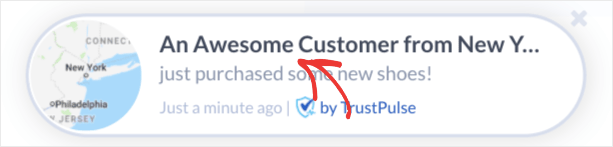
TrustPulseが何であるかを初めて知る方のために、要点をまとめました…
TrustPulseは、あらゆるサイトに追加できるソーシャルプルーフソフトウェアです。ソーシャルプルーフのポップアップを作成し、サイトのコンバージョンを即座に向上させます。TrustPulseはオンラインで商品を販売するサイトに最適です。しかし、非常にシンプルで強力、かつ使いやすいので、ブログサイトにTrustPulseをインストールしてエンゲージメントを高めることもできます。
サイトのソーシャルプルーフを作成するために、どのように使用できるかをよりよく理解するために、TrustPulseのレビュー全体をご覧ください。
#13。複数の支払いオプションを追加する
Stripeを使用すると、WordPressサイトでクレジットカード決済が可能になります。さらに、この決済ゲートウェイは、定期的な支払いを含む複数の支払い形式をサポートしています。
明確にするために: お客様はクレジットカードで支払うためにStripeアカウントを必要としません。他のクレジットカード処理業者と同様に、サイトから簡単に購入できます。
Target、Lyft、UNICEFなど、世界中の大企業でも使用されています。そのため、常に決済が処理されることを信頼できることがわかります。
しかし、私たちがStripeをこれほど気に入っている最大の理由は、その透明性です。隠れた手数料はありません。以前にPayPalを使用して決済を受け付けたことがある場合は、他の決済処理業者やゲートウェイで隠れた手数料がどれほど問題になるかを知っているでしょう。決済処理にはWP Simple Payを使用することをお勧めします。
WP Simple Payは、その名の通りです。WordPressサイトでのオンライン決済を簡単にします。使いやすく、非常に信頼性が高く、セットアップにコーディングは一切不要です。
一番良いところは?WP Simple Payは、世界中からの決済を受け付けることを心配することなく、製品を作成して販売することに集中するのに役立ちます。また、世界で最高のWordPress Stripeプラグインの1つでもあります。
すべての顧客情報と支払い情報は、WordPressウェブサイトではなく、Stripeアカウントに保存されます。その結果、プラグインは他の代替手段のようにサイトを肥大化させません。WP Simple Payは、WordPressサイトにStripe支払いを追加する最も簡単な方法を提供します。
そして、WP Simple Payのセットアップは非常に簡単です。
WP Simple Pay Proの主な機能をご覧ください:
- 決済フォームビルダー
- Stripe Checkout決済ページビルダー
- カスタム金額決済
- カスタムサブスクリプションオプション
- クーポンコードによる割引
- 代替決済方法
- カスタマイズされた決済確認フロー
その他多数! WP Simple Pay Proのレビューで、機能の詳細をご覧ください。
平均注文額を増やした後にやること
これで平均注文額を増やす方法がわかったので、他の重要なeコマース指標も検討する必要があります。eコマースビジネスを成長させる最も簡単な方法の1つは、プッシュ通知を使用することです。この記事の戦術を実装した後、eコマースプッシュ通知に関する記事をご覧ください。
プッシュ通知は、より多くのトラフィック、エンゲージメント、および売上を促進するのに役立つ強力なマーケティングツールです。納得できませんか?始めるためのこれらの壮大なリソースをチェックしてください:
- 放棄されたカートのプッシュ通知を設定する方法(簡単なチュートリアル)
- Web通知WordPressプラグインをサイトにインストールする方法
- プッシュ通知のA/Bテストの実施方法(ベストプラクティス)
- 即時トラフィックを獲得するための7つのプッシュ通知のベストプラクティス
- 21の最高のeコマースWordPressプラグイン(無料および有料)
プッシュ通知の送信にはPushEngageの使用をお勧めします。これらのすべてのリソースを確認すると、PushEngageが市場でナンバーワンのプッシュ通知ソフトウェアであることがわかるでしょう。したがって、まだの場合は、今日PushEngageを使い始めましょう!


