ウォーターフォールプッシュキャンペーンを作成するためのガイドをお探しですか?
ウォーターフォール通知は最近非常に人気が高まっています。長らく、ウォーターフォールメールキャンペーンしか送信できませんでした。しかし今では、同じ効果的なキャンペーンを再現し、プッシュ通知ソフトウェアのターゲティングオプションを使用してウォーターフォールプッシュ通知を送信できます。
しかし、どのように始めればよいのでしょうか?ウォーターフォールキャンペーンの経験が必要ですか?プッシュ通知キャンペーンの設定経験は必要ですか?
この記事では、例を使用してウォーターフォールプッシュキャンペーンを作成するお手伝いをします。また、ウォーターフォールプッシュ通知に関するすべての質問にお答えします。
よさそうですね?さあ、始めましょう。
ウォーターフォールプッシュキャンペーンとは?
ウォーターフォールプッシュキャンペーンは、モバイルデバイス向けの広告キャンペーンの一種です。仕組みは次のとおりです。グループの人々にプッシュ通知を送信しますが、一度にすべてを送信するわけではありません。代わりに、通知に最も反応し、あなたが望む行動をとる可能性が高い人々に最初に通知を送信します。
それらの人々が反応しない場合は、次のグループの人々に進みます。そして、そのように続きます。
アイデアは、できるだけ多くの人々に通知に反応してもらいながら、できるだけ少ない費用で済ませることです。「ウォーターフォール」と呼ばれるのは、ネットワークが各ステップで異なるグループの人々をターゲットにする一連のステップのようなものだからです。
説明させてください。
どのようなビジネスであっても、非常にエンゲージメントの高い購読者のグループが表示されます。彼らはあなたが販売するものをすべて購入し、喜んで証言やレビューを提供し、新しい顧客を紹介してくれます。
そして再び、あなたのビジネスにはまったく興味のない購読者のグループが表示されます。
プッシュ通知キャンペーンには詳細な分析が付属しています。そのため、購読者リストで両方のグループをかなり明確に見ることができます。そして素晴らしいのは、PushEngageでオーディエンスグループを作成することで、両方のタイプの購読者をリターゲティングできることです。
次に、送信する各通知で特定の行動を再ターゲットするために、プッシュ通知のターゲティングオプションを作成できます。例に入ると、行動ターゲティングがウォーターフォールプッシュキャンペーンにどのように影響するかをより明確に理解できるでしょう。今のところ、すべてのプッシュウォーターフォールキャンペーンには2つのコアコンポーネントがあることを知っておくべきです。
- 共通の目標を持つ一連のプッシュ通知
- さまざまなタイプの購読者をリターゲティングするためのオーディエンスグループ
次に、ウォーターフォールプッシュキャンペーンがなぜそれほど効果的なのかを見てみましょう。
ウォーターフォールプッシュキャンペーンを送信する理由
ブランドを成長させるためにウォーターフォールプッシュキャンペーンを使用することには、いくつかの利点があります。
- 広告予算の効率的な使用:最も価値の高いユーザーを最初にターゲットにし、次に優先順位リストを下っていくことで、ウォーターフォールプッシュキャンペーンは広告費の投資収益率(ROI)を最大化するのに役立ちます。これにより、広告予算が可能な限り効果的に使用されることが保証されます。
- より高いエンゲージメント率:広告に反応する可能性が高いユーザーをターゲットにすることで、クリック率とコンバージョン率が高くなる可能性が高まり、収益の増加につながる可能性があります。
- カスタマイズ可能なターゲティング:ウォーターフォールプッシュキャンペーンを使用すると、人口統計、行動、その他の要因に基づいてユーザーのさまざまなセグメントを作成できます。これにより、各グループに合わせてメッセージを調整し、成功の可能性を高めることができます。
- リアルタイム最適化:ウォーターフォールプッシュキャンペーンを使用すると、各セグメントのパフォーマンスをリアルタイムで追跡し、それに応じてターゲティング戦略を調整できます。これにより、常に最良の結果が得られるように最適化されます。
全体として、ウォーターフォールプッシュキャンペーンは、ターゲットオーディエンスにリーチし、エンゲージメントとコンバージョンを促進しながら、広告費の無駄を最小限に抑える効果的な方法となり得ます。
ウォーターフォールプッシュ通知の送信方法
ウォーターフォールプッシュキャンペーンとは何か、そしてなぜそれを作成すべきかを知ったところで、実際の例を見て、作成するためのステップバイステップの手順を見ていきましょう。
ウォーターフォールプッシュ通知の送信を開始する前に、プッシュ通知サービスを選択する必要があります。私たちはPushEngageの使用をお勧めします。
ステップ#1:無料のPushEngageアカウントを作成する
PushEngageにアクセスし、今すぐ無料で始める:をクリックしてください。

無料プランで始めることができます。しかし、最も強力なブラウザ通知を探している場合は、ビジネスニーズに基づいて有料プランを選択する必要があります。
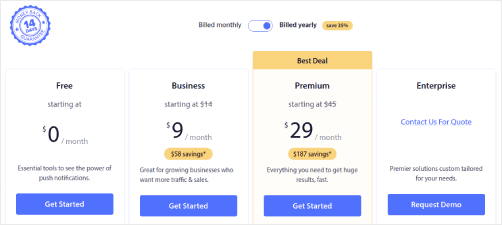
必要なプランがわかったら、始めるをクリックしてPushEngageアカウントを作成してください。
ステップ#2:PushEngageにサインアップする
次に、PushEngageアカウントを作成します。メールアドレスまたはGmail IDでサインアップすることから始めます。

次に、アカウントの詳細を入力します。

そして、プランを購入するためにクレジットカード情報を追加します。

無料アカウントを選択した場合、プランのアップグレードを選択するまで、クレジットカードに請求されることはありません。これで、PushEngageダッシュボードにアクセスする準備が整いました。登録を完了して即時アクセスを取得をクリックするだけです。
以前にOneSignalやPushAlertを使用したことがある場合、PushEngageはダッシュボードからよりクリーンなエクスペリエンスを提供することがわかります。OneSignalダッシュボードは高度なキャンペーン向けではありません。そのためには、OneSignalプラグインよりもAPIが必要になります。
ステップ#3:Webプッシュ通知WordPressプラグインをインストールする
アカウントの作成が完了しました。したがって、PushEngageダッシュボードにアクセスし、手順に従ってください。

サイト設定 » サイト詳細をクリックし、セットアップ手順はこちらをクリックボタンをクリックしてください。

WordPressタブをクリックし、PushEngage WordPressプラグインをインストールボタンをクリックして、ウェブサイトにプラグインをインストールします。

素晴らしい点: PushEngageアカウントを作成したときに、すでにウェブサイトとPushEngageアカウントを同期しています。したがって、PushEngageダッシュボードのインストールリンクをクリックして、PushEngage WordPressプラグインをウェブサイトに自動的にインストールします。
ステップ#4:WordPressウェブサイトをPushEngageに接続する
PushEngage WordPressプラグインのインストールと有効化が完了すると、PushEngageのオンボーディングウィザードが表示されます。

ウィザードは非常に簡単です。新規ユーザーの場合は、新規?無料アカウントを請求するをクリックします。すでにサインアップ済みの場合は、既存のアカウントを接続をクリックします。
次に、サインアップ中にサイトを登録した場合、登録済みサイトを接続の下にあるサイトを選択ドロップダウンからサイトを選択できます。

または、プレミアム以上の料金プランをお持ちの場合は、新しいサイトを登録をクリックして新しいサイトを追加できます。次のステップでは、オンボーディングウィザードが他の必須のWordPressプラグインをインストールするように促します。

各ステップを正しく実行すると、ウィザードからこの成功メッセージが表示されます。

これでキャンペーンを作成する準備ができました。
ステップ5:ウォーターフォールプッシュキャンペーンの作成
最後に、例の時間です。ウォーターフォールプッシュキャンペーンの実際のユースケースを示すために、ブラックフライデープロモーションの例を使用します。私たちの目標は、ブラックフライデーオファーでのコンバージョンを最大化することです。
購読者をエンゲージメントレベルに基づいて再ターゲティングするために、すべての購読者に一斉送信を行います。その後、エンゲージメントレベルに基づいて、再ターゲティング用の異なるオーディエンスグループを作成します。
すべての購読者に通知を送信する方法
3つの通知で最大のリーチを獲得したいと考えています:
- 早期ブラックフライデーのお知らせ
- ブラックフライデーフラッシュセール
- サイバーマンデーセール
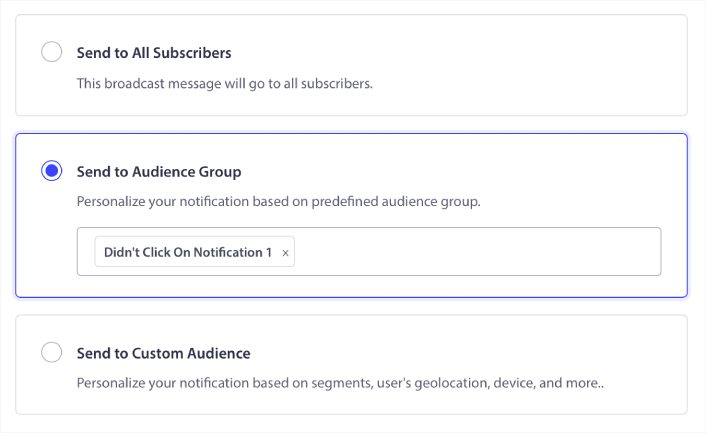
そのため、これらの3つの通知を全員に送信します。「オーディエンス」タブで、「すべての購読者に送信」を選択します。

全員への一斉送信をクリックしなかった購読者を再ターゲティングする方法
通知をすべての購読者に送信しない場合は、オーディエンスグループを作成する必要があります。たとえば、全員への一斉送信をクリックしなかった購読者をターゲットにしたい場合は、新しいオーディエンスグループを作成する必要があります。
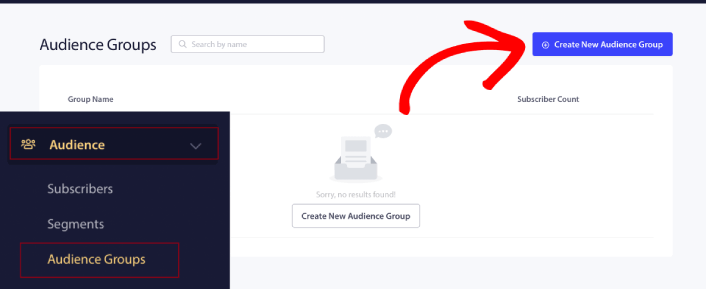
WordPressダッシュボードで、オーディエンス » オーディエンスグループに移動し、「新しいオーディエンスグループを作成」をクリックします。
前回の通知をクリックしなかった購読者をターゲットにするには、最後のクリック日時でフィルタリングする必要があります。
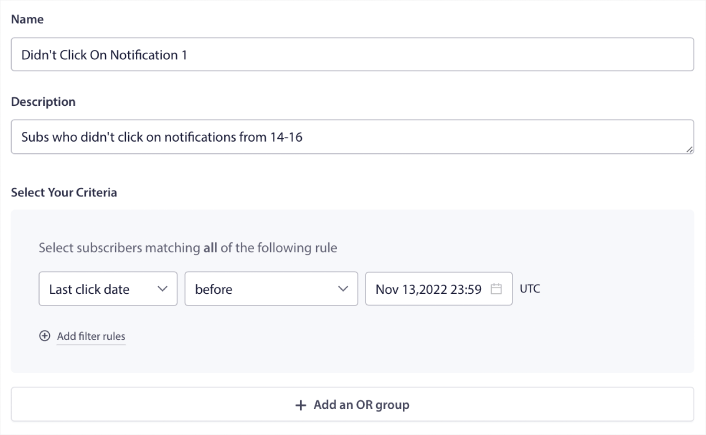
前回の通知を送信した日時より前の「最後のクリック日時」でフィルタリングします。たとえば、11月14日に最後のプッシュ通知を送信した場合、11月13日の深夜より前に通知をクリックした購読者をフィルタリングします。
注意:メールキャンペーンとは異なり、最後の通知のクリック率で実際にフィルタリングすることはできません。最も近い近似値は、日付範囲でのクリックをフィルタリングすることです。
完了したら、「通知を保存」をクリックします。
次に、プッシュ通知の一斉送信に戻り、「オーディエンスグループに送信」を選択します。ドロップダウンからグループを選択します。
全員への一斉送信をクリックした購読者を再ターゲティングする方法
最後の通知をクリックした購読者をターゲットにしたい場合は、別のオーディエンスグループを作成できます。
前回の通知を送信した日時より「後」であり、次の通知を送信したい日時より「前」の「最後のクリック日時」で購読者をフィルタリングします。
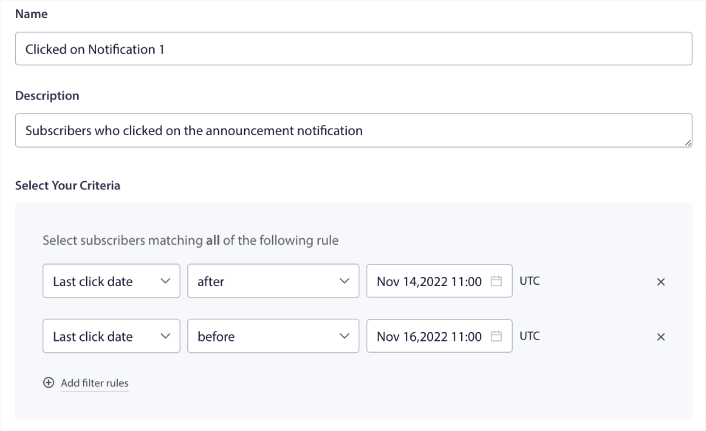
「フィルター条件を追加」をクリックすることで、フィルターに「AND」条件を追加できます。このようなフィルターは、クロスセルプッシュ通知に最適です。
これらのオーディエンスグループの結果は、より詳細なターゲティングです。そのため、毎回異なるオファーを送信してコンバージョン率を向上させることができます。
ウォーターフォールプッシュキャンペーンを作成した後にやること
ウォーターフォールプッシュキャンペーンについて覚えておくべき最も重要なことの1つは、この方法論はブロードキャストプッシュ通知にのみ使用できるということです。プッシュ通知のドリップキャンペーンは、まだそれほど詳細なターゲティングオプションを備えていません。
そのため、プッシュ通知のA/Bテストを必ず実施してください。また、記事を読んで、自動プッシュ通知を強化する方法を学ぶ時間を取ってください。まずはプッシュ通知のベストプラクティスに関する記事から始めましょう。
プッシュ通知が初めての場合は、公開する前に完全なプッシュ通知テストプロセスに従う必要があります。これにより、訪問者が問題に気づいてユーザーエクスペリエンスの低下を訴える前に、一般的な問題をトラブルシューティングできます。そして、間違いなくGoogleアナリティクスを設定してプッシュ通知を追跡する必要があります。
クリックした購読者またはクリックしなかった購読者を対象としたリターゲティングプッシュ通知。それがどのように機能するかお知らせください。それまでの間、これらのリソースを確認してください。
- 好奇心を刺激してプッシュ通知のクリックを増やす方法
- 各プッシュ通知をパーソナライズする方法
- リッチメディアでプッシュ通知を目立たせる方法
- 休眠中のプッシュ購読者を再エンゲージさせる方法
- 顧客に情報を提供するためにプッシュ通知を使用する方法
- クリック率を高めるためにプッシュ通知で絵文字を使用する方法
- 緊急性を醸成してコンバージョンを増やす方法
まだの場合は、PushEngage を使い始める。


