このガイドを使用すると、PushEngageを使用してWeeblyウェブサイトにブラウザプッシュ通知を統合できます。
PushEngageダッシュボードにログインし、ウェブサイトに追加する必要があるPushEngageのインストールコードを取得します。以下は、Weeblyサイトに追加する必要があるPushEngageのJavaScriptコードです。サイト設定 » インストールに移動してください。
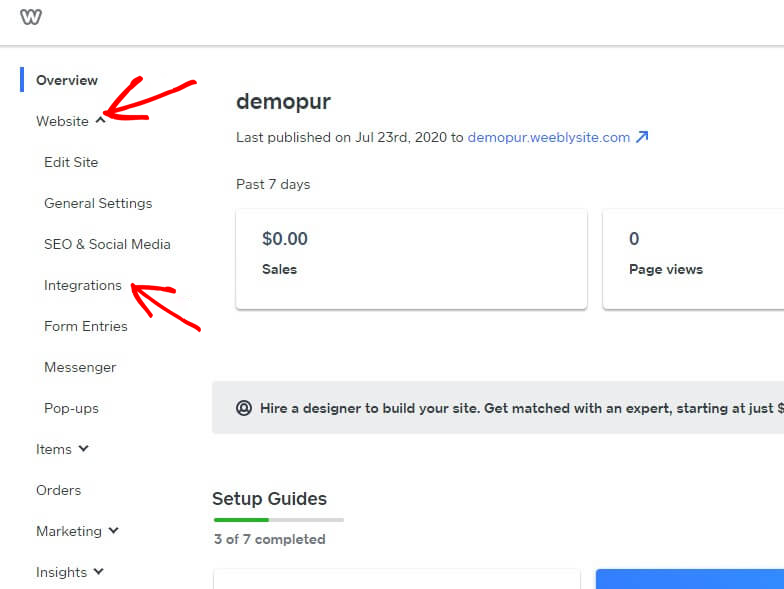
Weeblyダッシュボードにログインし、ウェブサイト » 統合を選択します。
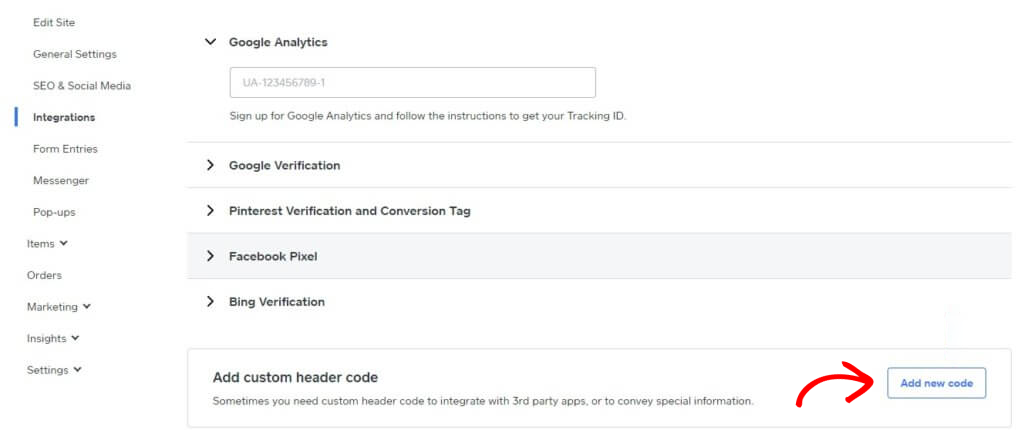
統合ページの最下部にあるカスタムヘッダーコードを追加します。新しいコードを追加をクリックします。
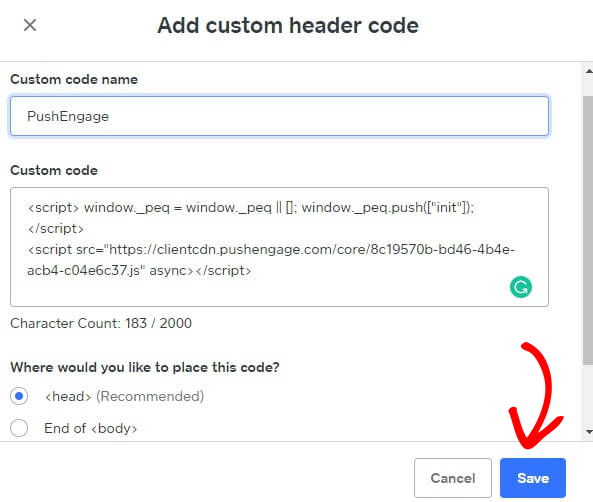
ヘッダーにPushEngageコードを貼り付けます。コードを貼り付けるために</body>の末尾を選択することもできます。以下の画面では、フッターセクションにPushEngage JavaScriptコードを貼り付けました。完了したら、保存をクリックします。
これでWeeblyウェブサイトでのPushEngage統合が完了しました。これで、Weeblyウェブサイトから購読者を取得し、プッシュ通知を送信できるようになります。
万が一問題が発生した場合は、ここをクリックしてお問い合わせください。サポートチームがお手伝いします。