遅延後にサブスクリプションオプトインを表示できますか?

Your website can collect more number of subscribers if they have glanced through your website, before subscribing to your notifications. This will reduce the number of unsubscribes later on, which may occur if the visitor had subscribed without knowing the potential of your product.

There are two ways of showing a delayed Opt-in. One is by showing a delay, another when the visitor scrolls a certain percentage in the webpage. Navigate to Designs » Popup Modals » click on Edit of the selected Opt-in style like shown below :

Click on Options.

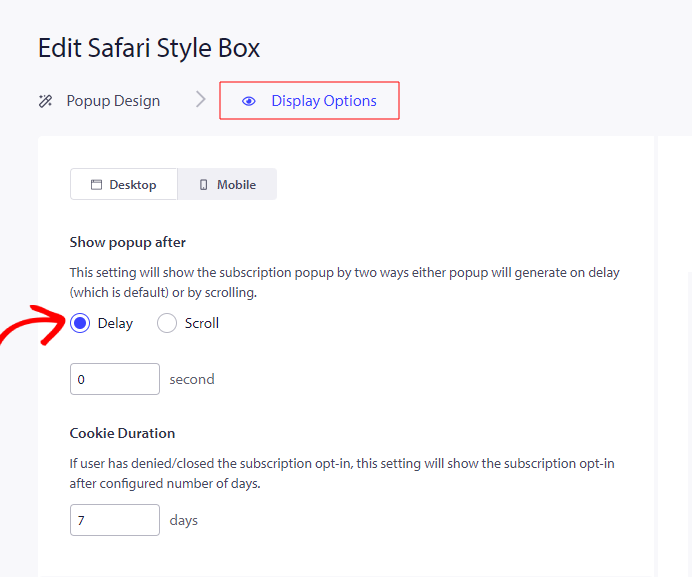
Select Delay & you can set the duration after which you want to show the Opt-in when the visitor visits your website.

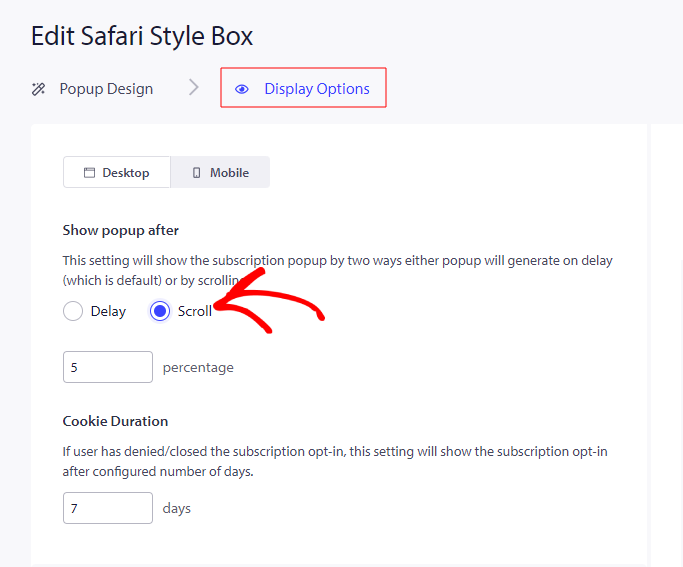
Similarly, select Scroll & set the percentage of scrolling on the page, after which the Opt-in should be shown.

万が一問題が発生した場合は、ここをクリックしてお問い合わせください。サポートチームがお手伝いします。

最終更新日:2026年3月9日

ウェブサイトを離れた後も訪問者をエンゲージし、維持する

見逃せないプッシュ通知で、すべてのウェブ訪問の価値を高めましょう。

  • 永久無料プラン
  • 簡単なセットアップ
  • 5つ星サポート