Sold out isn’t lost demand.
Unless you stay
silent.
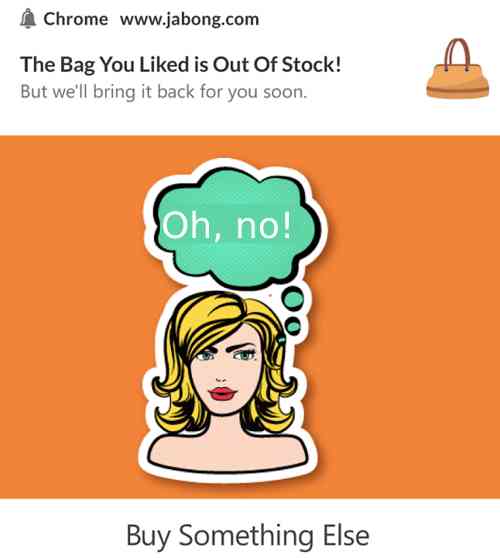
When inventory returns, back-in-stock alerts notify every shopper who wanted the product while it was gone, before they buy it somewhere else.

“We are able to reach our customer base in almost an instant. Email would have been too slow to put together in an emergency.” John Smith · CEO
75,000+ businesses Set up in minutes, no engineering ticket 14-day money-back guarantee
Trusted by 75,000+ businesses in 150+ countries








Why it works
The restock is the campaign. Automate the announcement.
Out-of-stock pages collect intent every day. Alerts turn that intent into orders the hour inventory lands.
Inventory-aware triggers
The store integration watches stock levels. The moment a product returns, its interested audience hears about it, automatically.
A waitlist without friction
No email form on the product page. Anyone who clicked Allow and engaged with the product is on the list already.
First-mover advantage
Push lands in seconds, so your restock reaches interested shoppers before a competitor’s ad does, and before the product sells out again.
How it works
From restock event to recovered order.
Configure once, cover the catalog
One campaign covers every product. Each restock notifies its own audience with the product’s name and image via smart tags.
- Catalog-wide coverage from one campaign
- Product name and image via smart tags
- Works with WooCommerce, Shopify, and Shopify Plus

Measure the demand you saved
Goal tracking attributes every restock-driven order, so merchandising sees exactly how much demand the alerts recovered.
- Revenue attribution per restock campaign
- Pairs with price-drop alerts for full objection coverage
- Part of the Growth-tier recovery stack
What’s included
Exactly what you’re buying, on one dashboard.
Inventory returns and the demand you already captured converts itself, no ad retargeting bill, just the channel you own doing its job.
Auto-alert on restock
When inventory comes back, the subscriber list is notified automatically. No manual send, no delay, no missed window. Growth tier.
How restocks triggerPrice drop alerts
The sibling automation: when price falls instead of inventory returning, the watcher gets alerted first. Same plan, same dashboard.
See price drop alertsCart abandonment
Back-in-stock builds the intent list; cart recovery closes the loop if the customer carts but does not check out.
Cart recovery overviewBrowse abandonment
The browse campaign captures intent before the customer even knows the item is out of stock. That same list powers the restock alert.
See browse abandonmentTriggered notifications
Restock is one trigger. Custom events, order updates, and inactivity signals plug into the same trigger engine.
See triggered notificationsGoal tracking
Revenue per restock campaign so you can prove the list converted, not just clicked. Owned-channel attribution.
See goal trackingBridge: Personalization
The exact product the subscriber viewed, back in their preferred size or variant, goes into the notification automatically. Growth tier.
See personalizationIntegrations
Plugin-deep into the stores you already run. No engineering ticket required.
Native plugins for Shopify and WooCommerce connect store events directly to campaigns. Every feature also runs through the REST API for custom builds.

Shopify & Shopify Plus
The native app for high-volume stores: cart and browse recovery, back-in-stock and price-drop alerts, and revenue attribution. Installed in an afternoon, not a 12-week integration cycle.
Explore the Shopify Plus app
WooCommerce
Launch cart recovery and order campaigns directly from your WordPress admin. Two clicks, same-hour first campaign.
WooCommerce setupDeep eCommerce integrations
Store events map directly to campaigns with no custom middleware. Carts, views, orders, and restocks all covered.
See all integrations
HubSpot
Trigger push from HubSpot lists and lifecycle events alongside your existing CRM workflows.
HubSpot integrationREST API & webhooks
Every console operation available as a documented endpoint. No dashboard lock-in for custom store stacks.
API documentationThe numbers
Demand has a shelf life. Beat it.
“We are able to reach our customer base in almost an instant. Email would have been too slow to put together in an emergency, and social media organic posts only reach a fraction of the following.”
John Smith
CEO
FAQ
Questions, answered.
How do shoppers get on the restock list?
By behavior. Subscribers who viewed or carted the product while it was out of stock qualify automatically. No email capture form required, though it works alongside one if you run it.
What if only some variants restock?
Alerts follow your store’s inventory events, so a restock of specific variants notifies the audience that engaged with the product.
Can alerts oversell limited inventory?
You control the audience size and timing per campaign, and frequency caps prevent pile-on sends. Many stores stagger alerts for scarce restocks.
Which plan includes it?
Back-in-stock alerts ship with the Growth tier alongside price-drop alerts and the full recovery stack. Paid plans carry a 14-day money-back guarantee.
Never let a restock go unannounced.
Set up in minutes. If PushEngage isn’t the best fit within 14 days, we refund 100%. No questions asked.
Free plan available Set up in minutes Pay only for active subscribers