Leder du efter en nem måde at sende en Shopify-undersøgelse efter køb til din e-handelsbutik?
Det er super nemt at sende en undersøgelse ved hjælp af push-meddelelser, og du behøver ingen kodning eller komplicerede trin. Det bedste? Du kan oprette en kampagne én gang og automatisere den, så den sendes, hver gang nogen køber et produkt på dit websted.
I denne artikel vil jeg vise dig præcis, hvordan du sender en Shopify-undersøgelse efter køb ved hjælp af automatiserede push-meddelelser.
Lyder godt?
Lad os dykke ned.
Send Shopify Push-meddelelser efter køb!
Push-notifikationer er et supereffektivt, billigt marketingværktøj, der hjælper dig med at øge din gentagne trafik, engagement og salg automatisk.
Sådan opretter du en Shopify-kampagne til undersøgelse efter køb
Lad os komme i gang med, hvordan du kan oprette en Shopify-undersøgelse efter køb ved hjælp af push-meddelelser. Jeg anbefaler at bruge PushEngage til dine push-meddelelseskampagner.

PushEngage er den eneste Shopify-app, der lader dig engagere kunder på tværs af web push, app push og WhatsApp — hvilket hjælper dig med at genvinde flere salg, drive gentagne køb og øge omsætningen uden kun at stole på e-mail eller SMS.
Med en enkelt, nem at installere integration kan du opsætte automatiserede kampagner, der når kunder på det rigtige tidspunkt, uanset om de browser på desktop, mobil eller chatter på WhatsApp.
Her er, hvad du kan gøre med PushEngage på Shopify:
- Genvind forladte indkøbskurve automatisk med både push-notifikationer og WhatsApp-påmindelser (fungerer med WhatsApp Business API).
- Send personlige produktadvarsler som prisfald, notifikationer om lager igen, og hurtig udsalgsopdateringer for at få shoppere tilbage, når de er mest klar til at købe.
- Kør dryp-kampagner & opfølgninger efter køb for at få flere anmeldelser, kryds-salg af produkter, og drive gentagne ordrer.
- Engager app-brugere øjeblikkeligt med native Android og iOS app push-notifikationer.
- Konverter afslappede besøgende til abonnenter med et-klik tilmelding til push eller en gratis "Click to Chat" WhatsApp-widget (ingen Business API nødvendig).
- Målret kampagner intelligent med kundesegmentering, tidszoneafsendelse, og personlige smarte tags.
- Spor ROI med lethed ved hjælp af indbygget målsporing, A/B-test, og avanceret analyse.
Hvorfor Shopify-handlende vælger PushEngage:
- Problemfri et-klik Shopify-integration, der automatisk synkroniserer dine produkter, ordrer og kundeaktivitet.
- Fungerer på tværs af web, app og WhatsApp — så du behøver ikke flere værktøjer.
- Bevist at øge engagement og genvinde tabt omsætning til en brøkdel af prisen for e-mail eller SMS.
- Dedikeret onboarding og succes support, især for Shopify Plus-handlende.
👉 Hvis du leder efter en smartere måde at få kunder tilbage på, øge LTV og øge salget med mindre indsats, er PushEngage dit bedste bud. Du kan komme i gang gratis og opgradere for at låse op for avanceret automatisering, når du er klar til at skalere.
Og hvis du driver en online butik, hjælper PushEngage dig også med at øge dit salg ved at hjælpe dig med at oprette automatiserede eCommerce push-notifikationer. Du kan komme i gang gratis, men hvis du er seriøs omkring at vækste din virksomhed, bør du købe en betalt plan. Det fede er, at push-notifikationer koster meget lidt at komme i gang med.
Trin #1: Opret en ny Shopify-kampagne til push-meddelelser til undersøgelse efter køb
Før du opretter Shopify-kampagnen til undersøgelse efter køb, lad os forstå det grundlæggende i, hvordan den vil fungere.
Du vil oprette et simpelt dynamisk segment, der fanger enhver abonnent, der lige har købt et produkt og er gået videre til din checkout-side. Hvis du har en takkeside på dit websted, kan du også opsætte denne kampagne ved hjælp af enhver post-køb takkeside. Derefter opretter du en simpel drip autoresponder-sekvens for at bede om anmeldelser eller omdirigere din kunde til en NPS-undersøgelsesside.
Bare rolig. Det er utroligt nemt at få alt dette gjort.
Gå til PushEngage-dashboardet og gå til Audience » Segments og klik på Create a New Segment. Her kan du oprette et brugerdefineret segment, der fanger enhver abonnent, der rammer din takkeside:
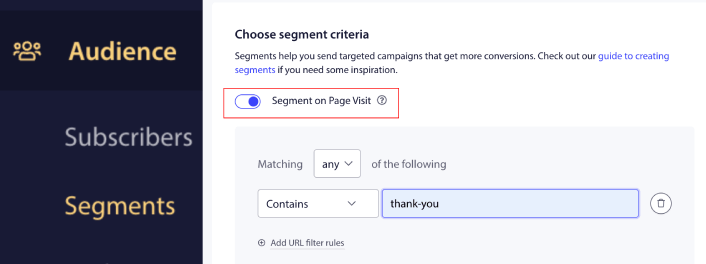
I URL-matchningsreglerne kan du tilføje Contains "thank-you" eller hvad end URL-sluggen for din takkeside er. Hvis du har flere takkesider, kan du bruge Exact Match i stedet for Contains som segmenteringsregel.
Trin #2: Udarbejd en kampagne til undersøgelse efter køb
Dernæst skal du udarbejde kampagnen inde i PushEngage-dashboardet. Gå til Campaign » Drip Autoresponders og klik på Create New Drip Autoresponder:

Navngiv derefter din kampagne (vi foreslår noget som Velkomst Drip), og under Indhold, vælg muligheden, der siger: “Send notifikation umiddelbart efter brugeren abonnerer“):

På dette tidspunkt kan du klikke på pilen ved siden af notifikationen for at redigere indholdet af din notifikation.
Her kan du enten tilføje et link til en undersøgelsesside i din push-meddelelse, eller hvis du har en Shopify-app, der giver dig mulighed for direkte at indsamle anmeldelser, kan du også sende dem et anmeldelseslink.
Hvis du har en Premium- eller Enterprise-plan med PushEngage, vil du kunne tilføje mere end én notifikation for at oprette en sekvens af automatiserede velkomstbeskeder. Klik blot på Tilføj ny notifikation og rediger indholdet.
Når du er færdig, skal du klikke på Drip Settings og vælge muligheden for at sende din Shopify-kampagne til undersøgelse efter køb til dit takkeside-segment:
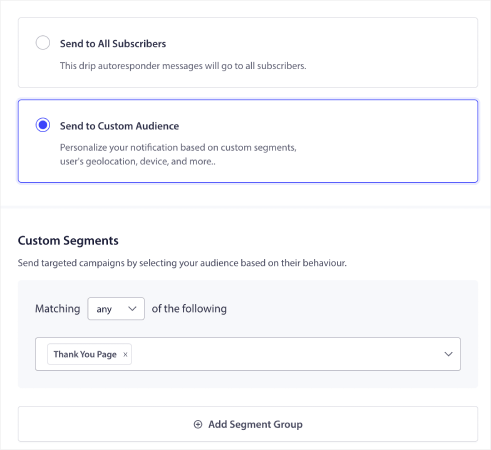
Hver gang en abonnent køber et af dine produkter, modtager de automatisk undersøgelsen efter køb.
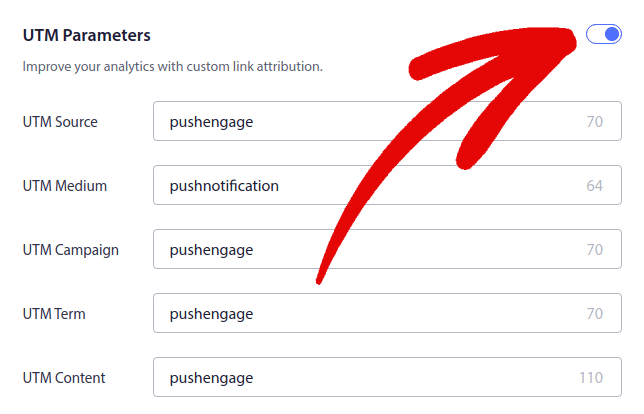
Rul derefter ned for at indstille dine egne UTM-parametre for at spore push-notifikationerne:
Du er næsten færdig.
Trin #3: Gem og start kampagnen
Det var det!
Tryk bare på knappen Aktivér autosvar:

Og du er færdig.
Hvad du skal gøre efter at have lanceret en Shopify-undersøgelse efter køb
Det var alt for denne gang, folkens! Hvis du fandt dette nyttigt, bør du også tjekke vores artikel om hvordan man reducerer forladte indkøbskurve. Der er nogle virkelig nyttige ideer der.
Og hvis du lige er startet med push-notifikationer, bør du prøve PushEngage. Tjek disse fantastiske ressourcer for at komme i gang:
- Sådan tilføjer du Shopify Push-meddelelser til dit websted
- Bedste Shopify-apps til en tøjbutik
- Bedste Shopify Trust Badges til at øge konverteringsrater
- Sådan sender du automatiserede e-mails i Shopify (den nemme måde)
PushEngage er den #1 push-notifikationssoftware i verden, og du kan oprette en hel række push-notifikationskampagner ved hjælp af PushEngage.
Så hvis du ikke allerede har gjort det, kom i gang med PushEngage i dag.


