Bruger du velkomst-push-notifikationer? Vil du vide, hvorfor en velkomst-push-notifikation er vigtig? I denne artikel vil vi vise, hvorfor velkomst-push-notifikation er et must. Det vil også hjælpe dig med at øge webtrafikken.
Push-notifikationer i browsere er en relativt ny marketingkanal, og brugeroplevelserne for denne kanal er stadig under udvikling. Når en webtrafik på dit website abonnerer på e-mail, er han vant til at modtage en bekræftelses-e-mail og/eller en velkomst-e-mail.
Med push-notifikationer giver brugeren dog ingen personlige ID'er. Så du kan ikke sende e-mails eller chatte med dem. Som en bekræftelse til brugeren om, at de har tilmeldt sig med succes, kan du sende en velkomst-push-notifikation.
To vigtige fordele ved velkomst-push-notifikation:
- Bekræftelse: Når brugere klikker på "Tillad" i opt-in, ved de ikke, om abonnementet var vellykket eller ej. En velkomst-notifikation sendes kun, når abonnementet var vellykket. Dette er en måde at bekræfte over for brugeren, at de nu er tilmeldt push-notifikationer.
- Genaktivering: Mange websteder tilbyder en velkomstkupon til enhver ny abonnent. Når brugeren abonnerer, del en rabatkupon i velkomst-notifikationen. Det vil øge brugerens genaktivering med dit brand.
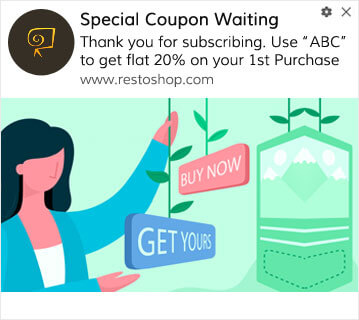
Hvis du bruger web push, skal du tjekke med push-tjenesteudbyderen, om de har funktionen til velkomst-notifikationer eller ej.
Med PushEngage kan du begynde at sende gratis push-notifikationer til dine abonnenter. Når en bruger abonnerer på Web Push Notification på dit websted, er det en god idé at sende en velkomst-notifikation. Dette hjælper på mange måder – For det første bekræfter det over for brugeren, at han nu er tilmeldt. Dette er vigtigt, da opt-in sker via pop-up(s), hvilket kan være forvirrende for brugerne. For det andet opretholder det en lignende oplevelse som e-mail-abonnement, som brugeren er vant til for push-notifikationer.
Her er, hvordan du aktiverer velkomstnotifikationer i PushEngage. Gå til PushEngage-dashboard og gå til Kampagne » Drip Autoresponders og klik på Opret ny Drip Autoresponder:

Navngiv derefter din kampagne (vi foreslår noget som "Velkomst Drip"), og under Content, vælg muligheden "Send notification immediately after user subscribes“:

På dette tidspunkt kan du klikke på pilen ud for notifikationen for at redigere indholdet af din notifikation. Hvis du har en Premium- eller Enterprise-plan med PushEngage, vil du kunne tilføje mere end én notifikation for at oprette en sekvens af automatiserede velkomstbeskeder. Klik blot på Tilføj ny notifikation og rediger indholdet.
Når du er færdig, skal du klikke på Drip Settings og vælge muligheden for at sende din velkomstkampagne til alle abonnenter:

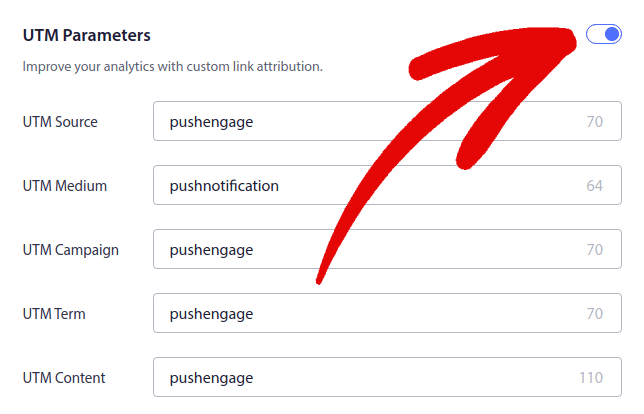
Rul derefter ned for at indstille dine egne UTM-parametre for at spore push-notifikationerne:
Og når du er færdig, rul op igen og klik på knappen Activate Autoresponder:

Nu ved du, hvorfor velkomst-push-notifikation er vigtig. Du ved også, hvordan du opsætter den. Gå videre og aktiver velkomst-push-notifikationer for at genaktivere nye abonnenter.


Virkelig god måde, jeg har ikke brugt push engage før, men jeg vil helt sikkert bruge det på min blog, og det vil i høj grad forbedre mine blogabonnementer. Tak for at udvikle denne app.