
Hvilke performance-målinger for push-notifikationer skal du bruge til at måle succes?
Kigger du overhovedet på de rigtige tal? Og hvordan benchmarkerer du din performance for push-notifikationskampagner?
At bruge data til at træffe marketingbeslutninger er en fantastisk måde at fortsætte med at vækste din forretning på.
Men der er så meget data at kigge på.
Hvor starter du overhovedet?
Bare rolig, du er ikke den eneste, der stiller disse spørgsmål. I denne artikel vil vi hjælpe dig med at indsnævre dine data ved hjælp af 5 konkrete performance-målinger for push-notifikationer at kigge på.
Lyder godt? Fantastisk.
Lad os dykke ned i det!
5 KPI'er for push-notifikationer til at hjælpe din forretning med at vokse
Det første skridt til at fastsætte performance-målinger for push-notifikationer er at have reelle mål. Ellers betyder intet af dette noget.
For e-handels push-notifikationer kan dit mål være at generere mere omsætning. I så fald bør du nok tjekke vores artikel om eksempler på push-notifikationer til e-handel.
Igen, det hele afhænger af, hvad du forventer at opnå med dine push-notifikationer.
Måske vil du gerne optimere en bestemt indtægtsstrøm som f.eks. genopretning af forladte indkøbskurve.
I sådanne tilfælde er en specifik månedlig omsætning helt sikkert et godt mål at have. Men det er ikke alt, hvad du kan gøre med dine push-notifikationer.
Hvis du for eksempel driver en hjemmeside, der ikke direkte sælger ting, vil du måske overveje andre mål som at få nye brugere eller få mere månedlig trafik. Den gode nyhed er, at push-notifikationer koster meget lidt.
I denne artikel vil vi endda vise dig, hvordan du tjekker disse KPI'er på PushEngage. PushEngage er den #1 push-notifikationssoftware på markedet. Men disse KPI'er vil fungere, uanset hvilken leverandør du bruger.
Pro-tip: Tildel et tal til alle dine mål. Hvis dit mål er at få mere trafik, så prøv at have et specifikt tal som f.eks. "Jeg vil have 1.000 flere månedlige besøg på min hjemmeside fra push-notifikationer".
Nu hvor du har et specifikt mål for øje, lad os tjekke de performance-målinger for push-notifikationer, du skal kigge på.
#1. Opt-in-rate for push-notifikationer
Opt-in-raten for dine kampagner er antallet af personer, der har valgt push-notifikationer ud af alle de personer, der så din opt-in-popup.
Med enklere ord:
Opt-in-rate = antal abonnenter/antal unikke besøgende
Hvis din opt-in-rate er lav, er det en god indikator på, at der måske er noget galt med din opt-in-popup. Her er et godt eksempel på en opt-in med høj konvertering til dine push-notifikationer:

Men det større spørgsmål lige nu er...
Hvad er en lav opt-in-rate?
Hvis din opt-in-rate er under 5%, skal du begynde at optimere din abonnements-opt-in med det samme.
For push-notifikationer til Android- eller iOS-apps er 60% opt-in-rater ret standard. Selvom du vil få en højere opt-in-rate for Android end for iOS.
Web push er en anden sag. Alt over 6% er godt. Dette er mere end 3 gange den typiske e-mail-abonnementsrate.
Så, hvad kan du gøre?
Gå til dit PushEngage-dashboard og derefter til Analytics » Subscription Opt-in Analytics:
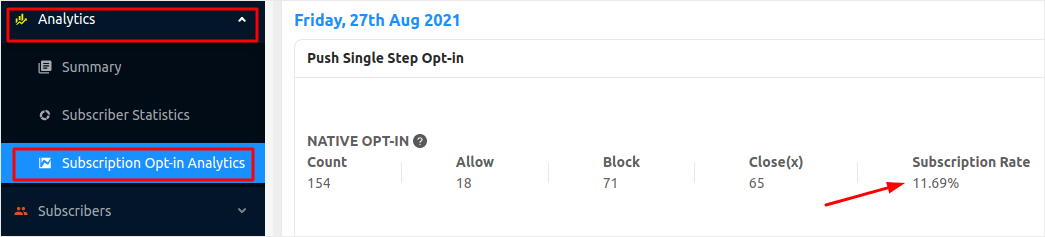
Når du kender din tilmeldingsrate, kan du se vores liste over opt-ins med høj konvertering for at optimere dine abonnements-tilmeldinger.
#2. Push-notifikationsvisningsrate
Visningsrate er antallet af personer, der så din notifikation ud af det samlede antal personer, der modtog din push-notifikation. Visning betyder at bemærke, at du har modtaget en push-notifikation. Det er ikke det samme som at klikke på push-notifikationen.
Alligevel er visningsraten en ret vigtig metrik for push-notifikationsydelse at overveje.
Den simple version er:
Visningsrate = antal personer, der så notifikationen / antal personer, der modtog notifikationen
En god visningsrate for push-notifikationer er et sted mellem 45% – 90%. En tilsvarende metrik for e-mails er åbningsraten, hvor 15% – 30% er ret standard.
Du kan tjekke dine push-notifikationsvisningsrater direkte fra PushEngage-dashboardet:

Hvis du får visningsrater under 45% på dine push-notifikationer, skal du virkelig tjekke vores guide til bedste praksis for push-notifikationer.
#3. Push-notifikationsklikrate
Push-notifikationsklikrate eller klikrate er procentdelen af personer, der så OG klikkede på din push-notifikation for at se dit indhold.
For de fleste websteder er dette en af de vigtigste metrikker for push-notifikationsydelse.
En god klikrate (CTR) for web push-kampagner er 12%. Hvis du inkluderer automatiserede push-notifikationer, kan du øge klikraten op til 15%. I bedste fald kan du muligvis opnå yderligere 3% på din CTR, hvis du bruger rich push-notifikationer.
Igen vil dette variere afhængigt af den branche, du er i. Meget målrettede og transaktionelle kampagner kan have en CTR på op til 30%. Men dette er utroligt sjældent for næsten alle brancher.
Mest af alt bør du sigte efter en CTR på mindst 5% på tværs af alle dine push-notifikationskampagner.
Og hvis du klarer dig dårligere end det, er det tid til et par hurtige tricks.
Start med at bruge dette cheat sheet for tegnbegrænsning af push-notifikationer. Ved at sende push-notifikationer, der er inden for et optimalt tegntal, kan du dramatisk øge effekten af hver notifikation.
Det er også tid til at genoverveje, hvornår du sender dine notifikationer. Tjek denne guide om det bedste tidspunkt at sende dine push-notifikationer.
#4. Push-notifikationsindtægter
Ja, indtægter er primært et mål.
Men det kan også være en god KPI at se på. Især i betragtning af at push-notifikationsanalyser kan vise dig, hvor mange indtægter hver notifikation genererede.
Og hvis du driver en e-handelsvirksomhed, er indtægter dit sande nord.
I PushEngage skal du blot gå til Dashboard » Notifications » Sent Notifications for at tjekke indtægter:
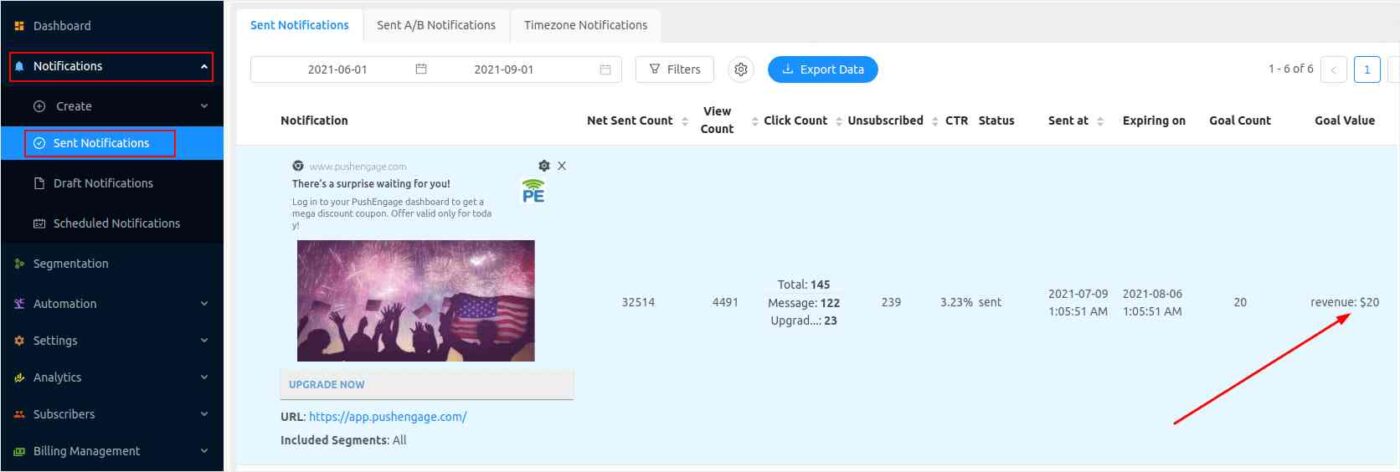
Og du kan altid få flere indtægter ved at bruge salgsfremmende idéer.
#5. Aktive abonnenter på push-notifikationer
Aktive abonnenter er antallet af push-notifikationsabonnenter, der aktivt tjekker og/eller åbner dine notifikationer. Selvfølgelig vil 100% af dine abonnenter ikke åbne absolut hver notifikation, du sender ud.
Men du bør holde øje med dine abonnenter.
I PushEngage skal du blot logge ind på dit dashboard for at se, hvor mange aktive abonnenter du har:

Husk: Det er ubrugeligt at have en kæmpe liste af abonnenter, hvis de ikke rigtig ønsker at se dine notifikationer.
En af de største faktorer, der bidrager til at udvikle en aktiv abonnentbase, er engagement. Hvis du kæmper med dette, bør du tjekke vores liste over værktøjer til websiteengagement.
Samtidig bør du også slette inaktive abonnenter fra din liste. Heldigvis giver PushEngage dig mulighed for at gøre dette med blot et par klik. Her er, hvordan du kan fjerne inaktive abonnenter og holde din liste sund.
Afslutning
Det var alt for denne gang, folkens.
Hvis du kæmper med at få mest muligt ud af dine push-notifikationer, bør du kontakte vores Customer Success-team. Vi kan hjælpe dig med alt relateret til push-notifikationer.
Vi vil endda hjælpe dig med at opsætte dine kampagner.
PushEngage er den bedste push-notifikationssoftware i verden. Så det passer perfekt til både erfarne marketingfolk og komplette begyndere.
Og hvis du ikke allerede har gjort det, kom i gang med PushEngage i dag!


