
هل تبحث عن مراجعة لـ WP Mail SMTP لتقرر أمر الإضافة؟
أنت في المكان الصحيح بالتأكيد.
يمكن لـ WP Mail SMTP مساعدتك في تقليل رسائل البريد الإلكتروني العشوائي من موقع ووردبريس الخاص بك.
ولكن هل هي حقًا إضافة ووردبريس SMTP رقم 1؟ لماذا تحتاج إلى إضافة SMTP في المقام الأول؟ لدى ووردبريس مُرسل PHP الخاص به. لماذا تستثمر في شراء إضافة SMTP تساعدك أيضًا في إرسال رسائل البريد الإلكتروني؟
في هذه المقالة، سنجيب على كل هذه الأسئلة وأكثر.
والأهم من ذلك، سنقوم باختبار WP Mail SMTP لمعرفة ما إذا كانت تستحق الشراء حقًا.
دعنا نتعمق في الأمر.
ما هو WP Mail SMTP؟
WP Mail SMTP هي إضافة تساعدك على تحسين قابلية تسليم رسائل البريد الإلكتروني الخاصة بووردبريس. تتجاوز الإضافة وظيفة wp_mail() الافتراضية وتجبر موقعك على استخدام إعدادات SMTP بدلاً من ذلك.
ببساطة: يمكنك استخدام أي مزود خدمة تسليم بريد إلكتروني بما في ذلك Gmail لإرسال رسائل البريد الإلكتروني. ولكن المزيد عن ذلك لاحقًا.
يزيل استخدام WP Mail SMTP بعضًا من أكبر مشكلات قابلية تسليم البريد الإلكتروني في ووردبريس. يمكن اعتبار الطريقة الافتراضية لمواقع ووردبريس لإرسال البريد الإلكتروني بريدًا عشوائيًا. وهذا إذا تم تسليمها في المقام الأول.
يمكن أن تكون WP Mail SMTP مفيدة أيضًا عندما:
- لا يدعم الاستضافة الخاصة بك وظيفة mail() ولا يمكن لووردبريس إرسال البريد الإلكتروني
- لم يتم تكوين الخادم الخاص بك بشكل صحيح لتسليم البريد من موقع ووردبريس الخاص بك
- تريد إرسال رسائل البريد الإلكتروني الخاصة بعملك عبر Gmail أو Google Apps
- رسائل الاستفسار من نماذج ووردبريس الخاصة بك لا تصل أبدًا إلى صندوق الوارد الخاص بك
وهذه هي الحقيقة: تعاني جميع مواقع ووردبريس تقريبًا من نفس المشكلة.
لذلك، حتى لو كنت تدير مدونة شخصية وتجمع رسائل البريد الإلكتروني لإرسال نشرة إخبارية أو إذا كنت سباكًا يقبل الحجوزات على موقع عمل صغير، فستواجه نفس المشكلة بالضبط مع رسائل البريد الإلكتروني على ووردبريس.
إذا كنت تعاني بالفعل من مشكلات قابلية تسليم البريد الإلكتروني من ووردبريس أو WooCommerce وتعرف ما نتحدث عنه، فيجب عليك بالتأكيد البدء باستخدام WP Mail SMTP اليوم.
لا تفكر في الأمر. فقط احصل على الإضافة الآن.
ولكن إذا كنت ترغب في فهم المشكلة بعمق أكبر والحصول على صورة أوضح لما تقدمه WP Mail SMTP، فاستمر في القراءة.
لماذا استخدام WP Mail SMTP؟
معظم مزودي استضافة ووردبريس غير مُعدين بشكل صحيح لإرسال رسائل البريد الإلكتروني. ونتيجة لذلك، قد لا تتلقى إشعارًا بإرسالات نماذج الاتصال. يتيح لك استخدام WP Mail SMTP تجاوز وظيفة wp_mail() الافتراضية ويجبر موقعك على استخدام إعدادات SMTP بدلاً من ذلك.
بهذه الطريقة، حتى لو لم تكن استضافة الويب الخاصة بك مُعدة بشكل صحيح لإرسال رسائل البريد الإلكتروني، ستظل قادرًا على إرسال رسائل البريد الإلكتروني الآلية والإشعارات عبر البريد الإلكتروني من موقعك.
لا تدعنا نبدأ بما هو كابوس لمتاجر WooCommerce!
يتعامل ووردبريس مع رسائل البريد الإلكتروني لتسجيل المستخدمين باستخدام كود PHP مدمج يسمى الدالة wp_mail():

هذه مشكلة كبيرة لأن ليس كل مضيفي ووردبريس يقدمون خوادم مُعدة بشكل صحيح لاستخدام PHP mail.
وحتى لو كانت الخوادم مُعدة بشكل صحيح، فإن Gmail وموفري خدمة البريد الإلكتروني الآخرين يستخدمون مرشحات بريد عشوائي صارمة. تحاول مرشحات البريد العشوائي هذه المصادقة على أن بريدك الإلكتروني قادم من عملك وليس من طرف ثالث محتال. هناك تحصل معظم رسائل البريد الإلكتروني الخاصة بك على حظر أو تصنيف كبريد عشوائي.
يمكنك تجاوز هذه المشكلة باستخدام WP Mail SMTP.
كيفية إعداد WP Mail SMTP على موقعك
في هذا القسم، سنوضح لك كيفية استخدام خدمة SMTP لضمان تسليم بريدك الإلكتروني. سنوضح لك أيضًا خدمة SMTP التي نستخدمها، ولكن بغض النظر عن خدمة SMTP التي تختارها، تحتاج إلى تثبيت المكون الإضافي WP Mail SMTP.
لذا، قم بتثبيت المكون الإضافي وتفعيله. إذا لم تكن متأكدًا من كيفية القيام بذلك، فسيوضح لك هذا البرنامج التعليمي كيفية تثبيت مكون إضافي لـ WordPress.
الخطوة رقم 1: تكوين المكون الإضافي
بمجرد الانتهاء من تثبيت الإضافة، انتقل إلى لوحة تحكم ووردبريس الخاصة بك وانقر على WP Mail SMTP لتهيئة الإضافة:
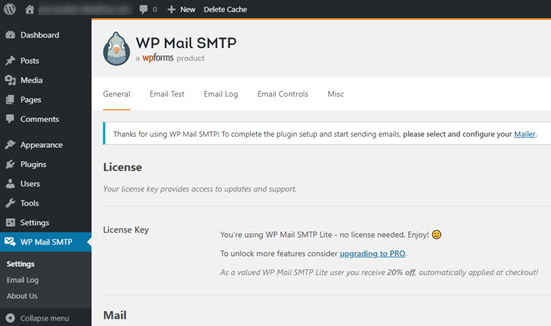
بعد إدخال مفتاح الترخيص الخاص بك، ابدأ في ملء قسم البريد:
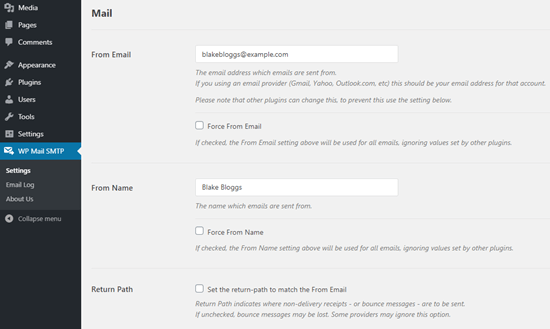
ملاحظة: تأكد من إدخال نفس عنوان البريد الإلكتروني الذي ستستخدمه لخدمة SMTP الخاصة بك. إذا كانت هناك رسائل بريد إلكتروني متعارضة، فستستمر في تلقي أخطاء من لوحة تحكم خدمة SMTP.
أفضل ما في هذا المكون الإضافي هو أنه حتى لو استخدمت المكونات الإضافية الأخرى في ووردبريس مثل WP Forms عناوين بريد إلكتروني أخرى، يمكن لـ WP Mail SMTP إجبارها على استخدام عنوان البريد الإلكتروني هذا.
هذا كل شيء في الوقت الحالي.
بعد ذلك، ستحتاج إلى اختيار خدمة بريد SMTP لموقعك. نوصي باستخدام SMTP.com. ولكن يمكنك العثور على الكثير من الخدمات المختلفة هناك.
لإنهاء إعداد المكون الإضافي WP Mail SMTP، سيتعين عليك إنشاء حساب مع SMTP.com بعد ذلك. إنها خدمة SMTP شائعة جدًا تسمح لك بإرسال رسائل بريد إلكتروني بكميات كبيرة بمعدلات تسليم عالية.
الخطوة رقم 2: تحديث المكون الإضافي WP Mail SMTP
انتقل إلى المكون الإضافي WP Mail SMTP وانقر على WP Mail SMTP » الإعدادات.
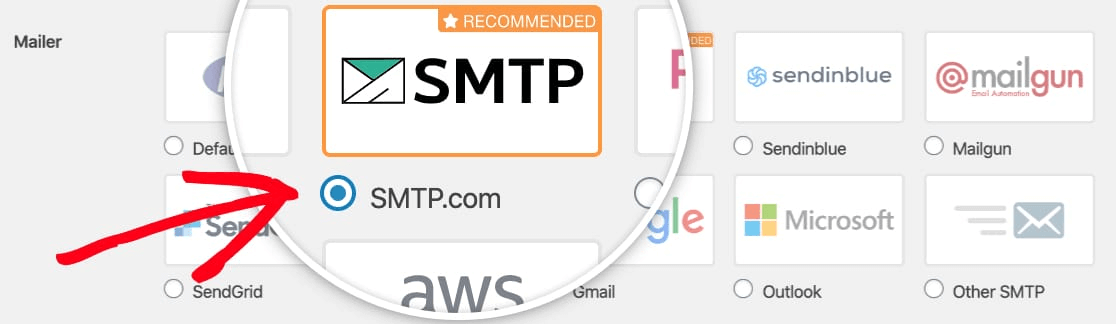
ثم، ضمن المرسل، حدد مزود خدمة. يمكنك الاختيار من بين مجموعة كبيرة من الخيارات:
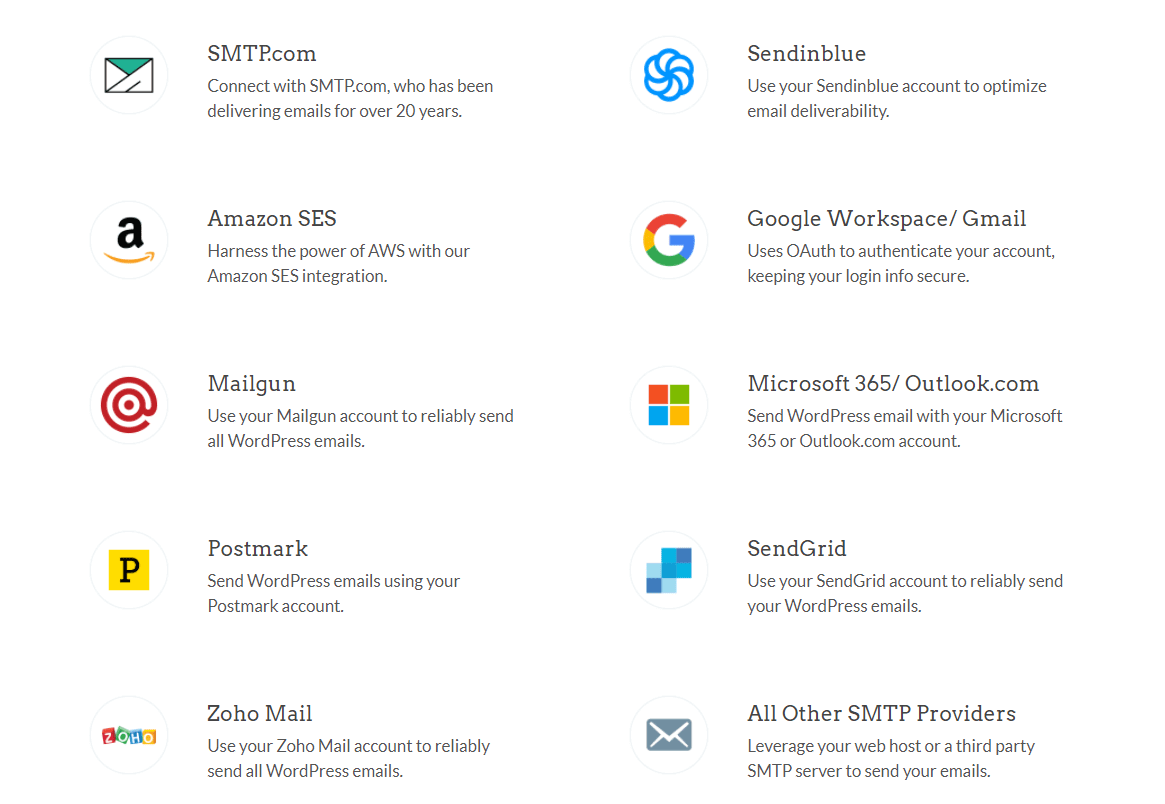
نوصي باستخدام SMTP.com:
الخطوة #3: إنشاء حساب SMTP
تابع وأنشئ حسابًا جديدًا:

بمجرد التسجيل، سيُطلب منك النقر على رابط تفعيل عبر البريد الإلكتروني وتأكيد هويتك. لذا، ترقب رسائل بريد إلكتروني متعددة.
ثم، عد إلى إضافة WP Mail SMTP لربط حساب SMTP الخاص بك بالإضافة.
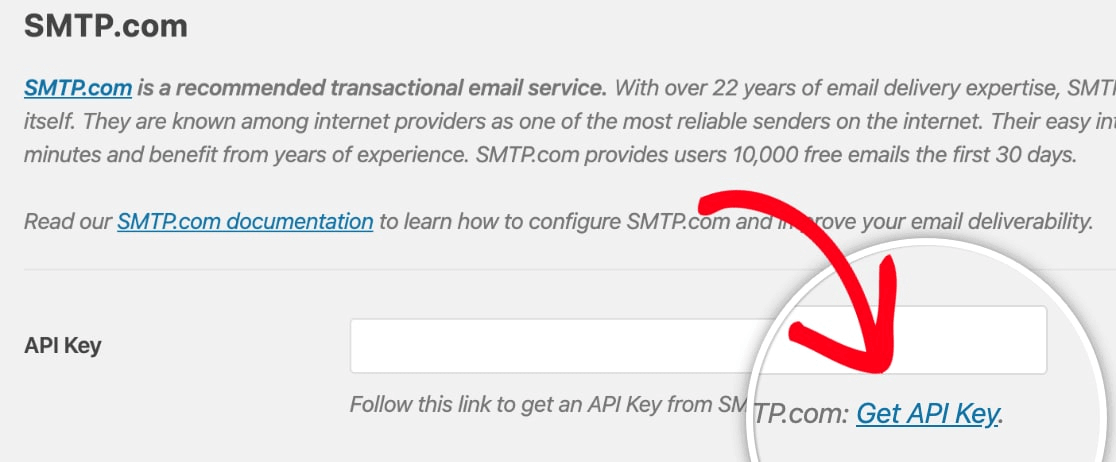
سيطلب منك مربع الحوار مفتاح API يمكنك الحصول عليه من لوحة تحكم SMTP.com الخاصة بك. انقر على رابط الحصول على مفتاح API (انقر على هذا الرابط للوصول إليه مباشرة):
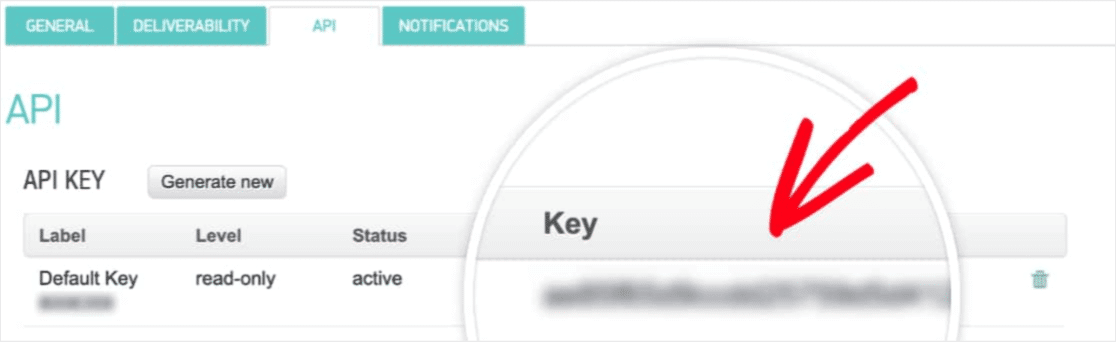
يجب أن ترى جدولًا في هذه الصفحة. انسخ مفتاح API في عمود المفتاح:
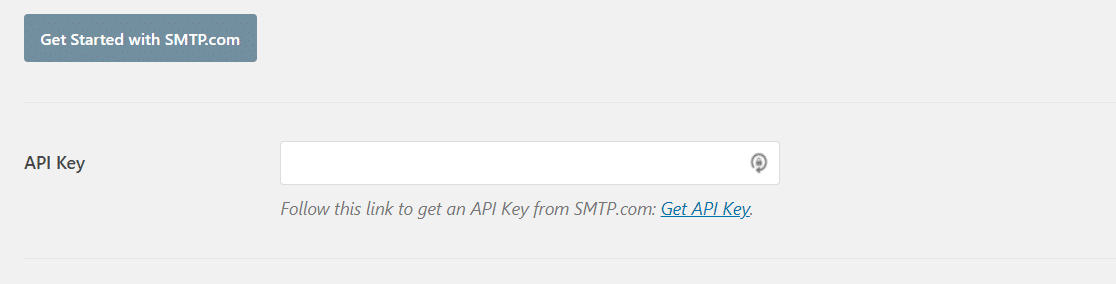
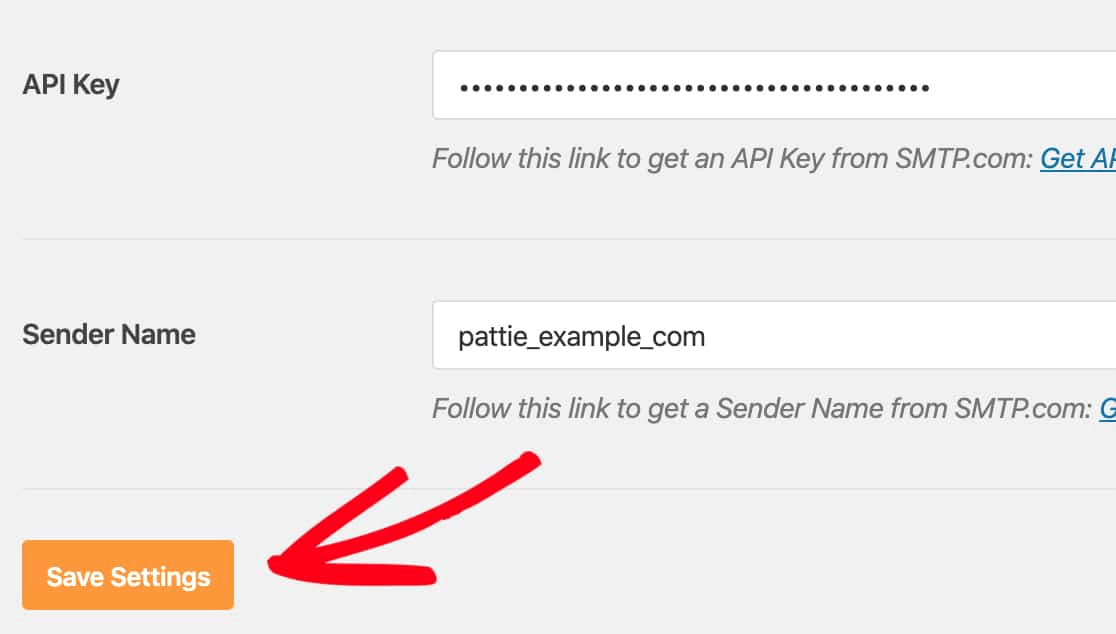
ثم الصق مفتاح API هذا في WP Mail SMTP:
أخيرًا، في حقل اسم المرسل، انقر على رابط الحصول على اسم المرسل:

انسخ الاسم في عمود الاسم:
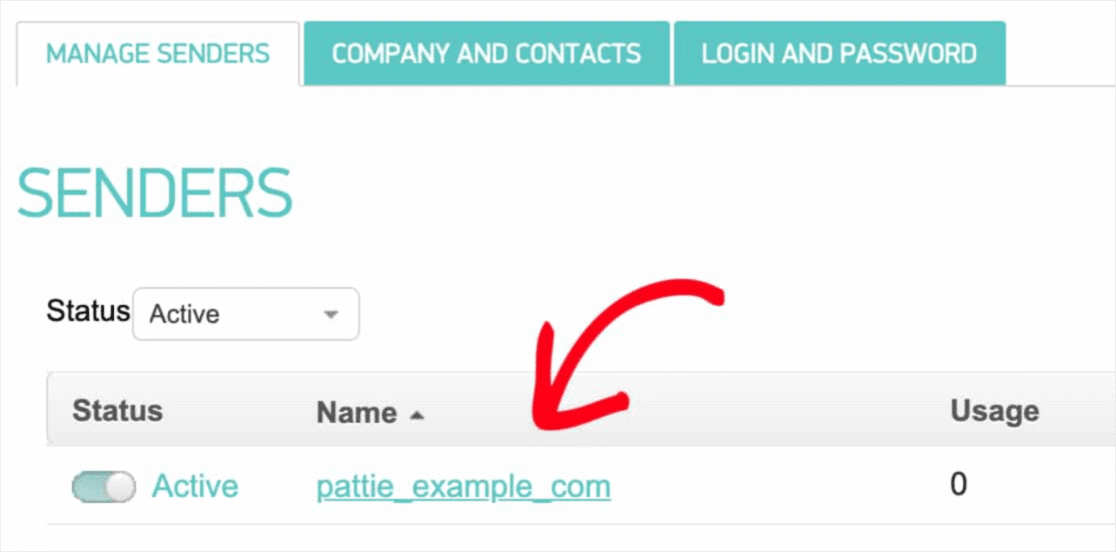
والصقه في WP Mail SMTP.
ثم اضغط على حفظ الإعدادات:
الخطوة #4: إضافة سجل SPF إلى DNS الخاص بك
بعد المصادقة، ستبدأ مهمتك الأكثر أهمية: إضافة سجل SPF إلى سجلات DNS الخاصة بك. إذا أصبحت الأمور تقنية للغاية بالنسبة لك بسرعة كبيرة، فلا تقلق. إنها عملية بسيطة.
إطار سياسة المرسل (SPF) هو كيفية مصادقة SMTP.com لرسائل البريد الإلكتروني الخاصة بك. يضمن تضمين هذه الخطوة عدم وصول رسائل البريد الإلكتروني الخاصة بك إلى مجلد البريد العشوائي.
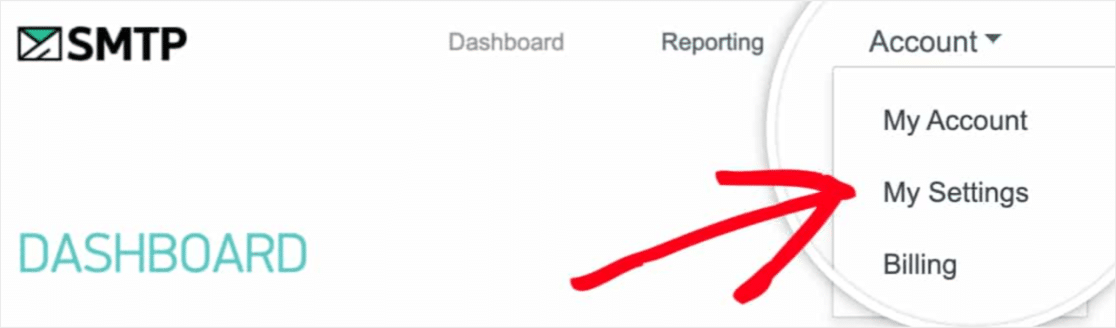
انتقل إلى قائمة التنقل في حساب SMTP.com الخاص بك وانقر على الحساب » إعداداتي:
توجه إلى الإعدادات العامة وابحث تحت سجل SPF:
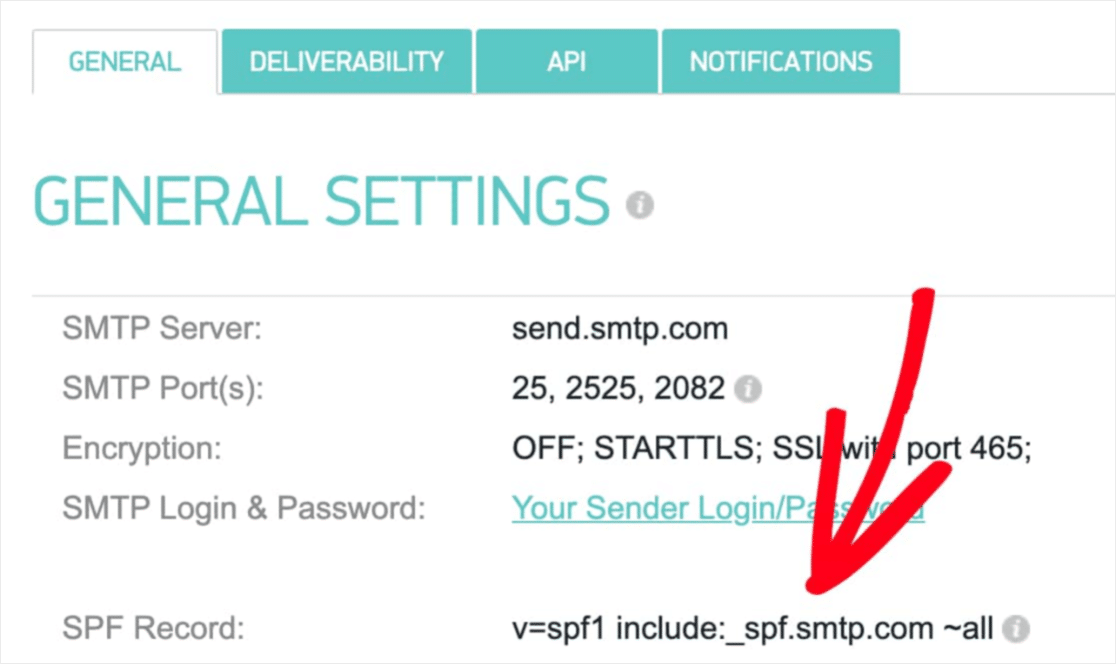
ستحتاج إلى إضافة سجل SPF هذا إلى إعدادات DNS لموقعك. إذا كنت لا تعرف كيفية القيام بذلك، فراجع هذه المقالة حول كيفية إضافة سجلات SPF.
ملاحظة: في إعدادات DNS، سترى حقلاً يسمى TTL (الوقت المباشر). القيمة الافتراضية عادة ما تكون ساعة واحدة. إذا كان بإمكانك تغيير هذا السجل، فنحن نوصي بتغييره إلى يوم واحد أو 86400 ثانية. سيسمح هذا للخادم بتخزين هذه المعلومات مؤقتًا ليوم كامل.
الخطوة رقم 5: التحقق من صحة سجلات SPF الخاصة بك
إذا قمت بإضافة سجل SPF، فقد حان الوقت للتحقق من تحديث التغييرات. قد يستغرق الأمر ما يصل إلى 48 ساعة حتى تنعكس التغييرات. لذا، فإن التحقق من النتائج قبل الانتقال إلى الخطوة التالية فكرة جيدة.
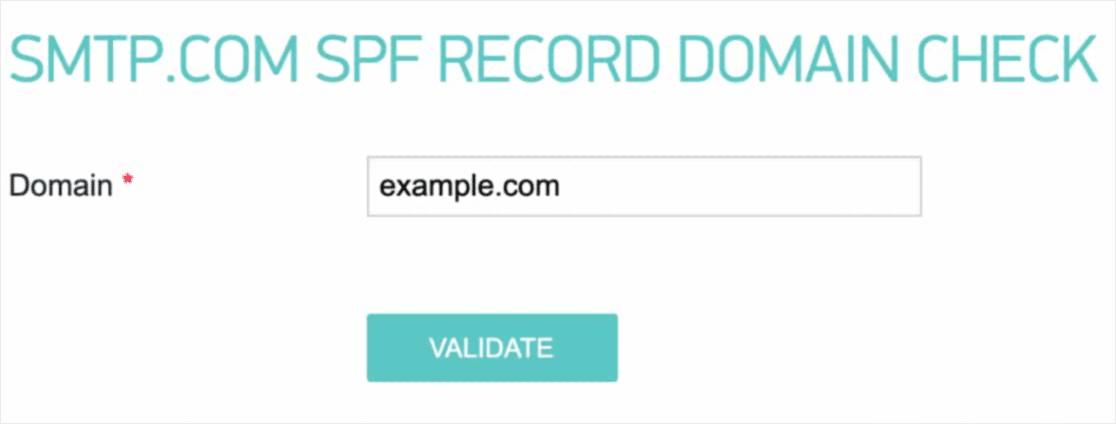
انقر على هذا الرابط وانتقل إلى القسم الذي يقول فحص سجل SPF الخاص بـ SMTP.com.
في حقل النطاق، أرسل عنوان URL لموقعك وانقر على تحقق:
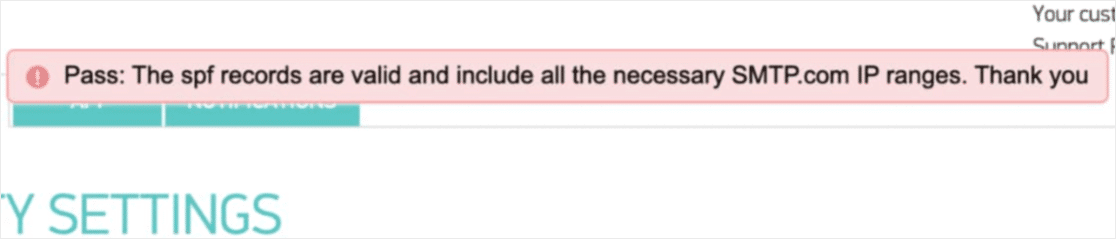
إذا سارت الأمور على ما يرام، يجب أن ترى هذه الرسالة نجاح:
وأنت انتهيت!
الخطوة رقم 6: إرسال بريد إلكتروني تجريبي
لقد انتهيت. هذه هي الخطوة الأخيرة حيث تتحقق من أن كل شيء يعمل كما ينبغي. لحسن الحظ، يحتوي WP Mail SMTP على وظيفة 'بريد إلكتروني تجريبي' مدمجة.
توجه إلى WP Mail SMTP وانقر على علامة التبويب اختبار البريد الإلكتروني:
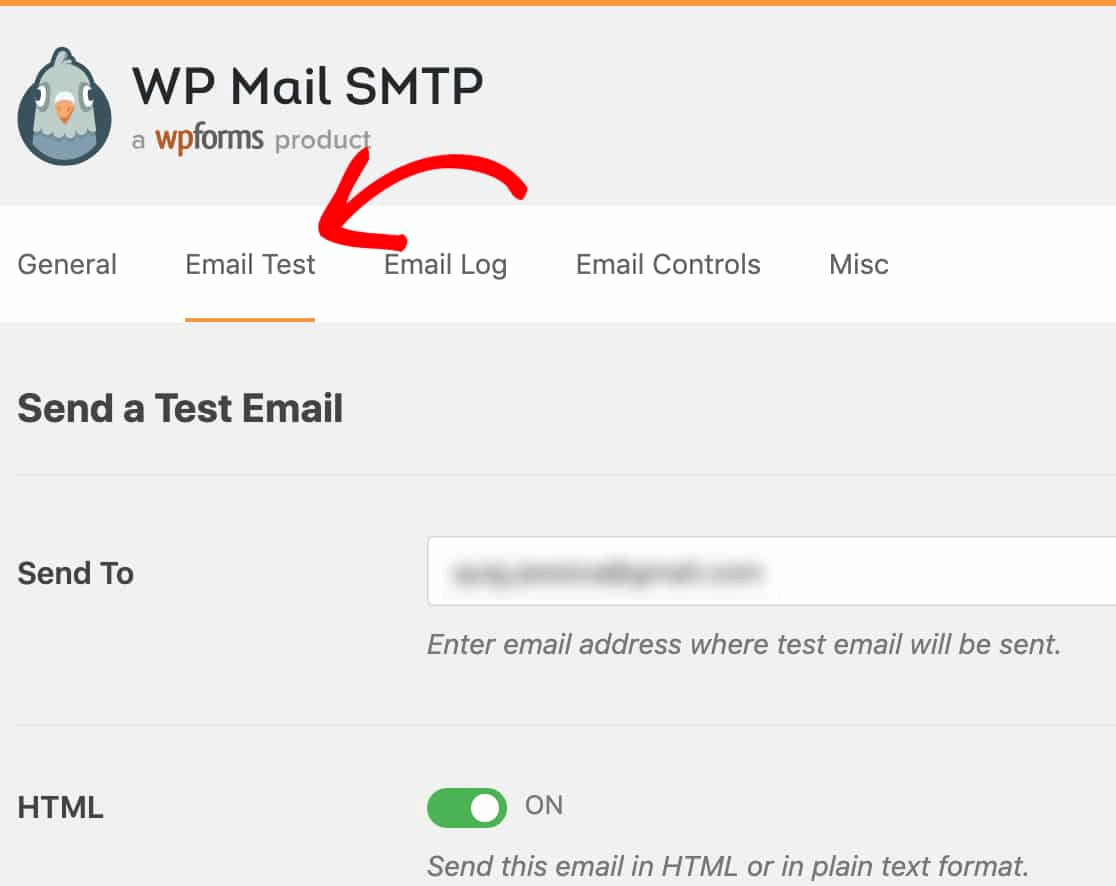
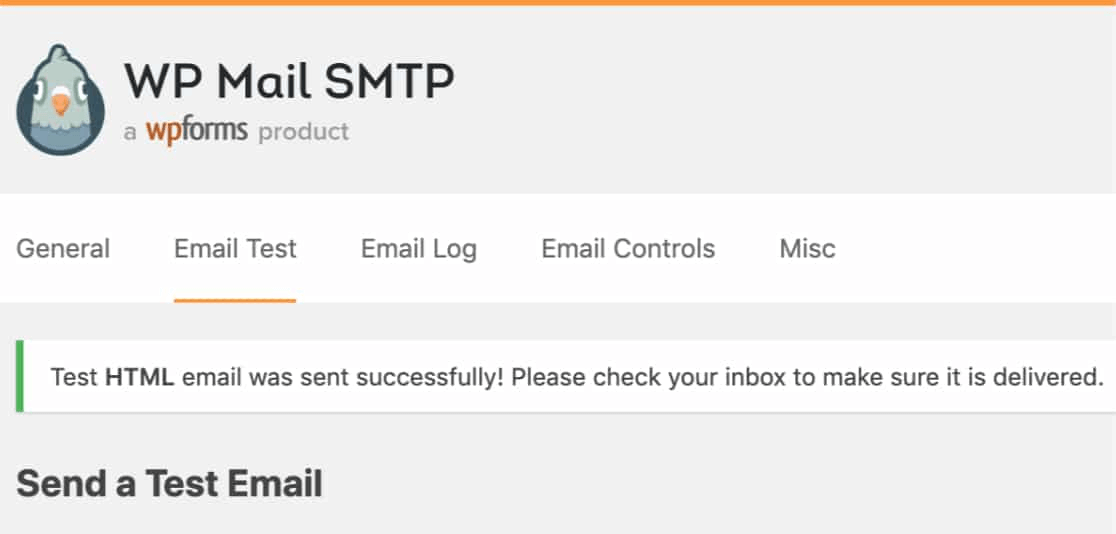
أدخل أي عنوان بريد إلكتروني يمكنك الوصول إليه وأرسل بريدًا إلكترونيًا تجريبيًا. إذا سار كل شيء على ما يرام، يجب أن ترى رسالة النجاح هذه:
الآن، تحقق من صندوق الوارد الخاص بك وتأكد من أنك تلقيت البريد الإلكتروني في صندوق الوارد الأساسي الخاص بك. نحن واثقون جدًا من أنك ستجده هناك.
أخيرًا، كل ما عليك فعله هو التحقق من أن البريد الإلكتروني قد تم إرساله عبر حساب SMTP.com الخاص بك. انقر فوق هذا الرابط للانتقال إلى صفحة إعدادات قابلية التسليم. إذا رأيت إشعار "نجاح" مثل هذا، فقد قمت بعمل رائع:
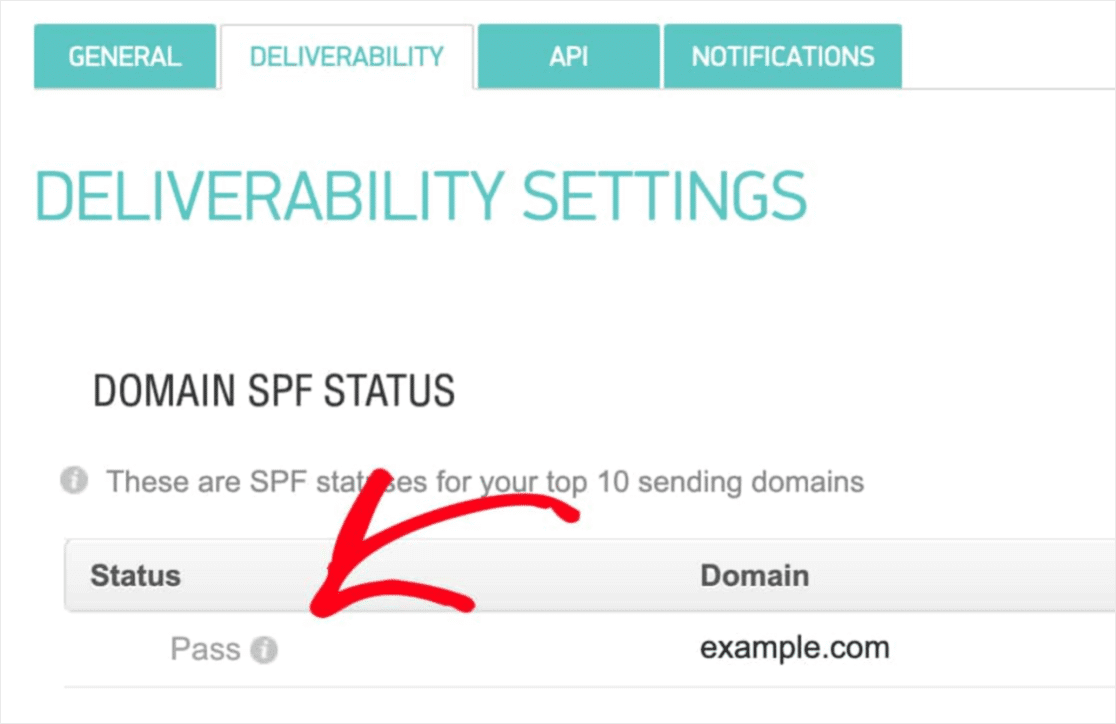
إذا لم تر حالة 'نجاح'، فقد ارتكبت خطأ. عد إلى القسم السابق وراجع الخطوات من 1 إلى 4 وتأكد من أنك لم تفوت أي شيء.
التسعير
الاعتبار النهائي هنا هو التسعير.
من الواضح جدًا أن WP Mail SMTP موجه بشكل أكبر نحو حل مشكلة شائعة دون أي برمجة.
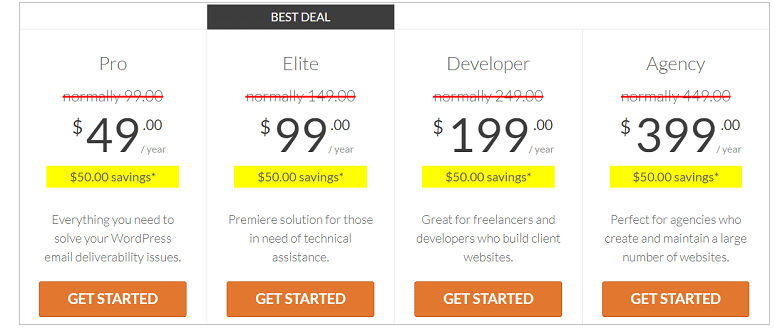
كلما اخترت الباقات الأعلى، تحصل على قيمة أكبر بكثير من WP Mail SMTP.
يأتي WP Mail SMTP ضمن 4 شرائح تسعير مختلفة:
- خطة المحترفين: متوفرة بسعر 49 دولارًا سنويًا. توفر عامًا من التنزيلات والدعم والتحديثات المجانية.
- خطة النخبة: متوفرة بسعر 99 دولارًا سنويًا. تأتي هذه الخطة مع إعداد مجاني متكامل ودعم ذي أولوية.
- خطة المطور: متوفرة بسعر 199 دولارًا سنويًا. تحصل على عام من التنزيلات والدعم والتحديثات المجانية. يمكنك إضافة ما يصل إلى 20 موقعًا مختلفًا.
- خطة الوكالة: متوفرة بسعر 399 دولارًا سنويًا. تتضمن هذه الرخصة كل ما في خطة المطور ويمكنك إضافة ما يصل إلى 100 موقع.
أي خطة هي الأنسب لاحتياجاتك؟ اترك تعليقًا وأخبرنا.
خاتمة
هذا كل شيء لهذا اليوم أيها الأصدقاء!
حكمنا؟ WP Mail SMTP هو بالتأكيد استثمار جيد للشركات النامية.
كما ذكرنا، يمكن لأي موقع ووردبريس أن يعاني من نفس المشكلة بالضبط مع رسائل البريد الإلكتروني. حتى لو كنت تدير عملًا تجاريًا صغيرًا جدًا، فقد ينتهي بك الأمر إلى تدمير إيراداتك لأن موقعك لم يبلغك عندما استفسر عميل ما.
لا تخطئ، فإن مستوى السهولة الذي يمكنك به حل مشكلات تسليم البريد الإلكتروني باستخدام WP Mail SMTP لا مثيل له. وإذا نظرت إلى التسعير، فهو أكثر جاذبية.
في رأينا، WP Mail SMTP هو بالتأكيد أفضل إضافة SMTP لووردبريس. وإذا كنت مستعدًا لحل المشكلة، يجب عليك الحصول على الإضافة الآن.
إذا لم تكن مستعدًا لحل مثل هذه المشكلات بعد، فيجب عليك التركيز أكثر على التسويق. طريقة جيدة للحصول على المزيد من الزيارات والتفاعل والتحويلات هي استخدام إشعارات الدفع لموقعك. نوصي باستخدام PushEngage لإنشاء حملات إشعارات الدفع الخاصة بك.
PushEngage هو البرنامج رقم 1 لإشعارات الدفع في العالم. لذا، إذا لم تكن قد فعلت ذلك بالفعل، ابدأ مع PushEngage اليوم!


