هل تبحث عن طريقة سهلة لإرسال استبيان ما بعد الشراء من Shopify لمتجر التجارة الإلكترونية الخاص بك؟
من السهل جدًا إرسال استبيان باستخدام الإشعارات الفورية ولا تحتاج إلى أي ترميز أو خطوات معقدة. أفضل جزء؟ يمكنك إنشاء حملة مرة واحدة فقط وأتمتتها بحيث يتم إرسالها في كل مرة يشتري فيها شخص ما منتجًا على موقعك.
في هذه المقالة، سأوضح لك بالضبط كيفية إرسال استبيان ما بعد الشراء من Shopify باستخدام الإشعارات الفورية الآلية.
يبدو جيدًا؟
دعنا نتعمق.
أرسل إشعارات فورية لاستبيان ما بعد الشراء من Shopify!
تعد إشعارات الدفع أداة تسويقية فعالة للغاية ومنخفضة التكلفة لمساعدتك على زيادة حركة المرور المتكررة والمشاركة والمبيعات تلقائيًا.
كيفية إنشاء حملة استبيان ما بعد الشراء من Shopify
لنبدأ بكيفية إنشاء استبيان ما بعد الشراء من Shopify باستخدام الإشعارات الفورية. أوصي باستخدام PushEngage لحملات الإشعارات الفورية الخاصة بك.

PushEngage هو تطبيق شوبيفاي الوحيد الذي يتيح لك التفاعل مع العملاء عبر إشعارات الدفع للويب، وإشعارات الدفع للتطبيقات، وواتساب — مما يساعدك على استعادة المزيد من المبيعات، وزيادة عمليات الشراء المتكررة، وتنمية الإيرادات دون الاعتماد فقط على البريد الإلكتروني أو الرسائل القصيرة.
من خلال تكامل واحد سهل التثبيت، يمكنك إعداد حملات آلية تصل إلى العملاء في اللحظة المناسبة، سواء كانوا يتصفحون على سطح المكتب أو الهاتف المحمول أو يدردشون على واتساب.
إليك ما يمكنك فعله باستخدام PushEngage على شوبيفاي:
- استعادة عربات التسوق المهجورة تلقائيًا باستخدام إشعارات الدفع وتذكيرات واتساب (يعمل مع واجهة برمجة تطبيقات واتساب للأعمال).
- إرسال تنبيهات منتجات مخصصة مثل انخفاض الأسعار، إشعارات العودة إلى المخزون، و تحديثات العروض السريعة لإعادة المتسوقين عندما يكونون أكثر استعدادًا للشراء.
- تشغيل حملات متسلسلة ومتابعات ما بعد الشراء لـ الحصول على المزيد من المراجعات، بيع منتجات إضافية، و زيادة الطلبات المتكررة.
- التفاعل مع مستخدمي التطبيق فورًا باستخدام إشعارات الدفع الأصلية لتطبيقات أندرويد و آي أو إس.
- تحويل الزوار العاديين إلى مشتركين باستخدام خيار الاشتراك بنقرة واحدة لإشعارات الدفع أو أداة "انقر للدردشة" المجانية لواتساب (لا حاجة لواجهة برمجة تطبيقات الأعمال).
- استهداف الحملات بذكاء باستخدام تقسيم العملاء، الإرسال حسب المنطقة الزمنية، و علامات ذكية مخصصة.
- تتبع عائد الاستثمار بسهولة باستخدام تتبع الأهداف المدمج، اختبار A/B، و تحليلات متقدمة.
لماذا يختار تجار شوبيفاي PushEngage:
- تكامل سلس بنقرة واحدة مع شوبيفاي يقوم بمزامنة منتجاتك وطلباتك ونشاط العملاء تلقائيًا.
- يعمل عبر الويب والتطبيقات وواتساب — لذلك لا تحتاج إلى أدوات متعددة.
- ثبت أنه يعزز التفاعل ويستعيد الإيرادات المفقودة بتكلفة أقل بكثير من البريد الإلكتروني أو الرسائل القصيرة.
- دعم مخصص للإعداد والنجاح، خاصة لتجار شوبيفاي بلس.
👉 إذا كنت تبحث عن طريقة أذكى لإعادة العملاء وزيادة القيمة الدائمة للعميل (LTV) وتنمية المبيعات بجهد أقل، فإن PushEngage هو خيارك الأفضل. يمكنك البدء مجانًا، والترقية لفتح الأتمتة المتقدمة عندما تكون مستعدًا للتوسع.
وإذا كنت تدير متجرًا عبر الإنترنت، فإن PushEngage يساعدك أيضًا على تنمية مبيعاتك من خلال مساعدتك في إنشاء إشعارات دفع آلية للتجارة الإلكترونية. يمكنك البدء مجانًا، ولكن إذا كنت جادًا بشأن تنمية عملك، فيجب عليك شراء خطة مدفوعة. الجزء الرائع هو أن تكلفة إشعارات الدفع قليلة جدًا للبدء.
الخطوة #1: إنشاء حملة إشعارات فورية جديدة لاستبيان ما بعد الشراء من Shopify
قبل إنشاء حملة استبيان ما بعد الشراء من Shopify، دعنا نفهم أساسيات كيفية عملها.
ستقوم بإنشاء شريحة ديناميكية بسيطة تلتقط أي مشترك قام للتو بشراء منتج ومر عبر صفحة الدفع الخاصة بك. إذا كان لديك صفحة شكر على موقعك، يمكنك إعداد هذه الحملة باستخدام أي صفحة شكر ما بعد الشراء أيضًا. بعد ذلك، ستقوم بإنشاء تسلسل بسيط للرد الآلي لتطلب مراجعات أو تعيد توجيه عميلك إلى صفحة استبيان NPS.
لا تقلق. من السهل جدًا إنجاز كل هذا.
انتقل إلى لوحة تحكم PushEngage وتوجه إلى الجمهور » الشرائح وانقر على إنشاء شريحة جديدة. هنا، يمكنك إنشاء شريحة مخصصة تلتقط أي مشترك يصل إلى صفحة الشكر الخاصة بك:
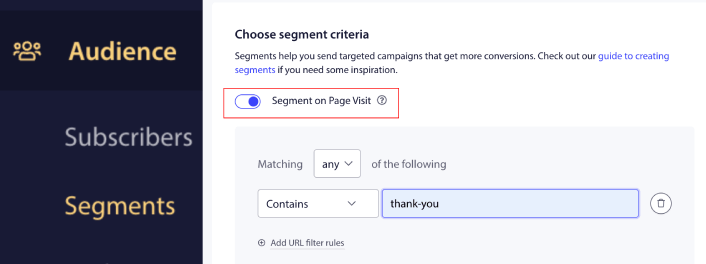
في قواعد مطابقة عنوان URL، يمكنك إضافة يحتوي على "thank-you" أو أي كان جزء عنوان URL لصفحة الشكر الخاصة بك. إذا كان لديك صفحات شكر متعددة، يمكنك استخدام مطابقة تامة بدلاً من يحتوي على كقاعدة تقسيم.
الخطوة #2: صياغة حملة استبيان ما بعد الشراء
بعد ذلك، ستحتاج إلى صياغة الحملة داخل لوحة تحكم PushEngage. توجه إلى الحملة » الردود الآلية المتسلسلة وانقر على إنشاء رد آلي متسلسل جديد:

بعد ذلك، قم بتسمية حملتك (نقترح شيئًا مثل Welcome Drip)، وتحت Content، حدد الخيار الذي يقول “Send notification immediately after user subscribes“):

في هذه المرحلة، يمكنك النقر على السهم بجوار الإشعار لتعديل محتوى إشعارك.
هنا يمكنك إما إضافة رابط إلى صفحة استبيان في إشعارك الفوري أو إذا كان لديك تطبيق Shopify يسمح لك بجمع المراجعات مباشرة، يمكنك إرسال رابط مراجعة لهم أيضًا.
إذا كان لديك خطة Premium أو Enterprise مع PushEngage، فستتمكن من إضافة أكثر من إشعار واحد لإنشاء سلسلة من رسائل الترحيب الآلية. فقط انقر على Add New Notification وقم بتحرير المحتوى.
بمجرد الانتهاء، انقر على إعدادات الرد الآلي المتسلسل واختر خيار إرسال حملة استبيان ما بعد الشراء من Shopify إلى شريحة صفحة الشكر الخاصة بك:
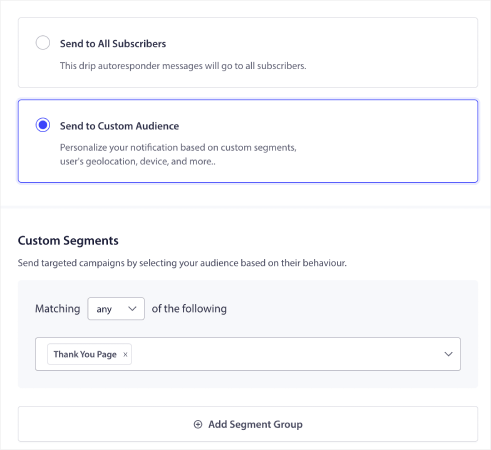
في كل مرة يشتري فيها مشترك أحد منتجاتك، يتلقى استبيان ما بعد الشراء تلقائيًا.
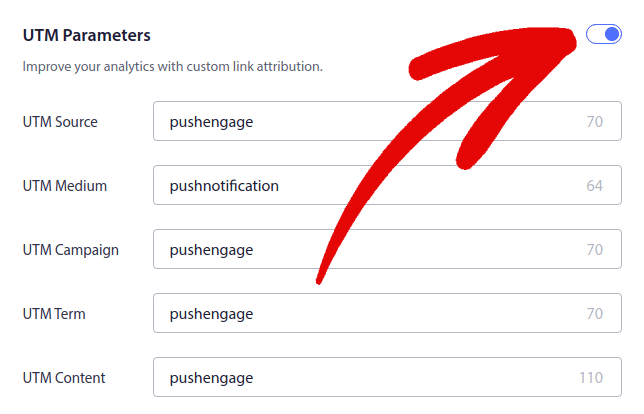
بعد ذلك، قم بالتمرير لأسفل لتعيين معلمات UTM الخاصة بك لتتبع إشعارات الدفع:
لقد أوشكت على الانتهاء.
الخطوة #3: حفظ وإطلاق الحملة
هذا كل شيء!
فقط اضغط على زر تفعيل الرد الآلي:

وأنت انتهيت.
ماذا تفعل بعد إطلاق استبيان ما بعد الشراء من Shopify
هذا كل شيء لهذا اليوم أيها الأصدقاء! إذا وجدت هذا مفيدًا، يجب عليك أيضًا الاطلاع على مقالنا حول كيفية تقليل التخلي عن سلة التسوق. هناك بعض الأفكار المفيدة حقًا هناك.
وإذا كنت قد بدأت للتو في استخدام إشعارات الدفع، فيجب عليك تجربة PushEngage. تحقق من هذه الموارد المذهلة لمساعدتك على البدء:
- كيفية إضافة إشعارات Shopify الفورية إلى موقعك
- أفضل تطبيقات Shopify لمتجر ملابس
- أفضل شارات الثقة في Shopify لزيادة معدلات التحويل
- كيفية إرسال رسائل بريد إلكتروني آلية في Shopify (الطريقة السهلة)
PushEngage هو البرنامج رقم 1 لإشعارات الدفع في العالم ويمكنك إنشاء مجموعة كاملة من حملات إشعارات الدفع باستخدام PushEngage.
لذا، إذا لم تكن قد فعلت ذلك بالفعل، ابدأ مع PushEngage اليوم.


