
الإشعارات الفورية بالصور تحصل على تفاعل أكبر بكثير.
الأمر بهذه البساطة. السؤال الحقيقي الآن هو…
كيف ترسل إشعارات فورية بالصور؟ الأمر سهل حقًا. وهذا هو موضوع هذا المقال.
كل إشعار فوري له نوعان من الصور:
- صورة الموقع
- الصورة الكبيرة
صورة الموقع هي عادةً علامة علامتك التجارية. إنها تساعد المشتركين لديك على التعرف على علامتك التجارية عند تلقي إشعاراتك الفورية. أما الصورة الكبيرة، فهي مصممة لجعل إشعاراتك أكثر "جاذبية للنقر".
في هذا المقال، سنوضح لك كيفية إضافة كلا النوعين من الصور إلى إشعاراتك الفورية. سنقوم بذلك باستخدام PushEngage في هذا المقال. PushEngage هو البرنامج رقم 1 للإشعارات الفورية في السوق. ولكن الأمر متشابه تقريبًا مع أي بائع تستخدمه.
دعنا نتعمق.
كيفية إضافة صورة كبيرة إلى إشعاراتك الفورية
كما قلنا، الصورة الكبيرة مصممة لتحسين الجودة الإجمالية لإشعارك الفوري.
لذا، دعنا نلقي نظرة على كيفية إضافة صورة كبيرة إلى إشعاراتك الفورية.
توجه إلى PushEngage واضغط على زر ابدأ:

واختر خطة. يمكنك البدء مجانًا، أو يمكنك الاشتراك في خطة مدفوعة لفتح المزيد من الميزات القوية وحملات الإشعارات الفورية. إذا كنت بحاجة إلى مساعدة في هذا، يجب عليك الاطلاع على هذا المقال حول كيفية تثبيت إشعارات WordPress الفورية.
بعد ذلك، توجه إلى الحملات » بث الإشعارات » بث إشعار جديد:

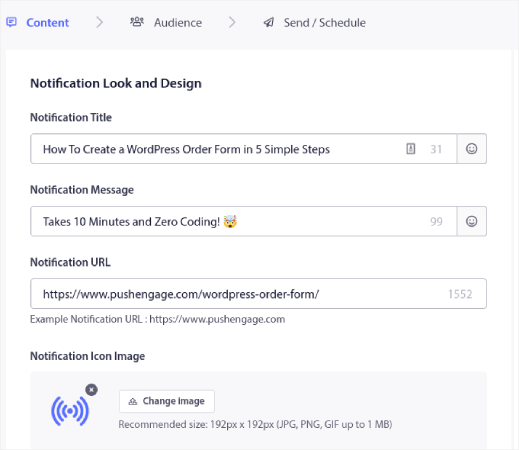
ضمن المحتوى، أضف محتوى إشعارك الفوري:
بعد ذلك، تحتاج إلى التمرير لأسفل إلى إظهار صورة كبيرة وتمكينها لتحميل صورة:
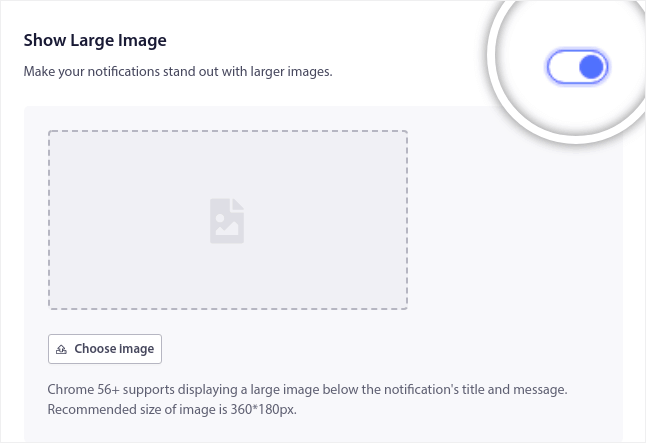
انقر فوق الزر اختيار صورة لتحميل صورتك. هذا كل شيء حقًا. بعد ذلك، ما عليك سوى إضافة أي صورة تريدها طالما أنها بتنسيق PNG أو JPEG.
يمكنك القيام بذلك من أجل…
خصومات المسابقات والعروض؛

وصفات، كتب إلكترونية، وهدايا قابلة للتنزيل؛

وحتى لمنشورات مدونتك وإشعارات الاشتراك في النشرة الإخبارية:

نصيحة احترافية: استخدم صورًا بعرض 360 بكسل وارتفاع 180 بكسل. هذه هي أفضل دقة لإشعاراتك الفورية. يمكنك تحميل صور أكبر بنفس نسبة العرض إلى الارتفاع، ولكن قد يتسبب ذلك في بعض التشوهات عند إرسالها عبر متصفحات مختلفة.
كيفية إضافة صورة موقع إلى إشعاراتك الفورية
انتقل إلى لوحة تحكم PushEngage وانتقل إلى الإعدادات » إعدادات الموقع » إعدادات التثبيت:
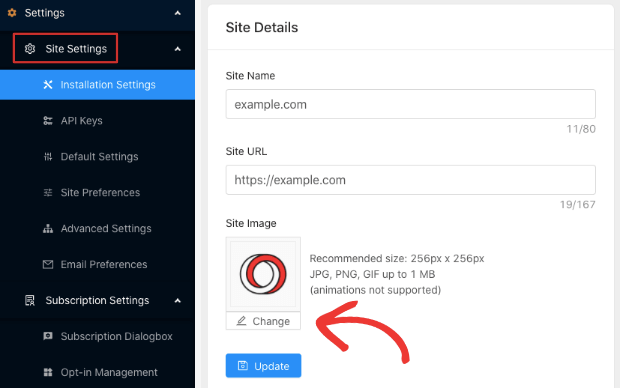
وهنا يمكنك تغيير صورة موقعك. استخدم نسخة عالية الدقة من أيقونة موقعك.
مثل هذا:
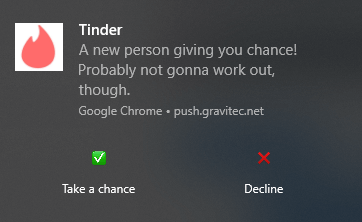
ولكن يمكنك القيام بشيء مختلف تمامًا وتخصيصه لإشعار معين:
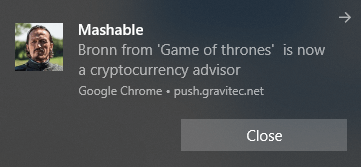
إذا كنت تريد أن تكون مبدعًا، يمكنك تحميل شعار متحرك طالما أنه بتنسيق GIF.
وهذا كل شيء حقًا. يمكنك تخصيص علامة إشعارك الفوري مباشرة من لوحة تحكم PushEngage.
ماذا تفعل بعد إرسال إشعارات فورية بالصور
هذا كل شيء لهذا اليوم أيها الأصدقاء!
يُعرف دفع الإشعارات بالوسائط الغنية باسم الإشعارات الغنية. الصور ليست النوع الوحيد من الوسائط الغنية التي يمكنك استخدامها في صورتك. هناك بعض الاختلافات الطفيفة بين أنواع الوسائط الغنية التي يمكنك استخدامها لإشعارات دفع التطبيقات وإشعارات دفع الويب.
ولكن الهدف العام هو الحصول على المزيد من التفاعل والنقرات من كل إشعار.
يمكنك استخدام الوسائط الغنية لأي نوع من حملات دفع الإشعارات. لذا، تحقق من هذه المقالات المذهلة حول كيفية إنشاء إشعارات دفع آلية:
- تنبيه انخفاض السعر
- إشعارات دفع التخلي عن سلة التسوق
- إشعارات فورية للتخلي عن التصفح
- رسائل ترحيب بالموقع
- تنبيه العودة إلى المخزون
وإذا كنت قد بدأت للتو في استخدام دفع الإشعارات، فيجب عليك تجربة استخدام PushEngage. PushEngage هو الحل الشامل لحملات دفع الإشعارات. لذا، إذا لم تكن قد فعلت ذلك بالفعل، ابدأ مع PushEngage اليوم!


