هل تبحث عن طريقة لإرسال إشعارات فورية عندما يكون جمهورك المستهدف غير متصل بالإنترنت؟
هناك أخبار جيدة وأخبار سيئة. ثم المزيد من الأخبار الجيدة!
أخبار جيدة: يمكنك إرسال إشعارات الويب الفورية لمشتركيك حتى لو كانوا غير متصلين بالإنترنت. لا يزال بإمكانهم رؤية إشعاراتك عند عودتهم عبر الإنترنت.
أخبار سيئة: يمكن لمشتركيك رؤية جميع إشعاراتك الفورية عند عودتهم عبر الإنترنت. يشمل ذلك أي عروض ربما انتهت صلاحيتها. وهذا يشمل بالتأكيد إشعارات فورية متعددة إذا أرسلت لهم إشعارات فورية متعددة.
لذلك، يمكنك إرسال إشعارات الويب الفورية غير المتصلة بالإنترنت. ولكنك إما ستغمر مشتركيك بالكثير من الإشعارات. أو، سينقرون على أشياء لم تعد ذات صلة.
ليس رائعًا!
المزيد من الأخبار الجيدة: هناك طريقة سهلة لإصلاح هذه المشكلة.
هذا صحيح، يمكنك بالفعل إرسال إشعارات فورية غير متصلة بالإنترنت دون أن تكون عبئًا على مشتركيك. وفي هذه المقالة، سنوضح لك كيفية القيام بذلك.
دعنا نتعمق!
ما هي بالضبط الإشعارات الفورية غير المتصلة بالإنترنت؟
الإشعارات الفورية غير المتصلة بالإنترنت ليست نوعًا خاصًا من الحملات. إنها أشبه بطريقة ذكية لإدارة إشعاراتك حتى لا تفرط في الإشعارات وتزعج مشتركيك. إنها أيضًا طريقة رائعة لضمان تسليم جميع إشعاراتك.
تعمل هذه الطريقة بحيث يمكنك إرسال إشعار فوري لمشتركيك في أي وقت. يمكنك جدولته في منطقتك الزمنية أو منطقة المستخدمين الزمنية أو في منطقتك الزمنية الخاصة. وحتى إذا لم يكن مشتركوك متصلين بالإنترنت، فإن PushEngage يضمن استلامهم له عند استعادة اتصالهم بالإنترنت.
بشكل افتراضي، تظل جميع إشعارات PushEngage غير متصلة بالإنترنت حتى يتمكن المشترك من رؤيتها. PushEngage هو البرنامج رقم 1 للإشعارات الفورية في العالم. لذلك، سنستخدم PushEngage لتوضيح كل شيء في هذه المقالة.
أكبر ميزة للإشعارات غير المتصلة بالإنترنت هي أنك تحصل على معدلات تسليم مذهلة. لا يمكن تسليم إشعار دفع ويب إلا أثناء تشغيل متصفح المشترك، لذا فإن الإشعار الذي ينتظر المشترك بدلاً من انتهاء صلاحيته هو الفرق بين الإرسال والتسليم.
قارن ذلك بحملة بريد إلكتروني حيث لا يصل بريد إلكتروني واحد من كل 5 رسائل بريد إلكتروني أبدًا إلى صندوق الوارد الخاص بك.
لذلك، نوصي بشدة بأن تبدأ في استخدام الإشعارات الفورية على الفور.
كيف تبدو الإشعارات غير المتصلة بالإنترنت
تبدو الإشعارات الفورية غير المتصلة بالإنترنت مثل أي إشعار فوري آخر:
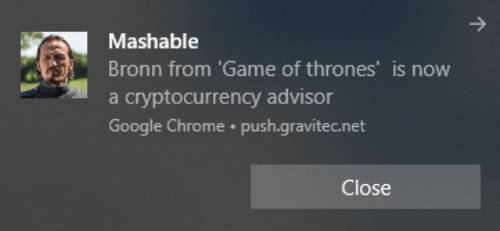
هذه ليست المشكلة حقًا.
المشكلة هي أنه بينما تم تصميم الإشعارات غير المتصلة بالإنترنت ليتم إرسالها بطريقة لا تزعج مشتركيك، فهذا عادة ما يحدث:
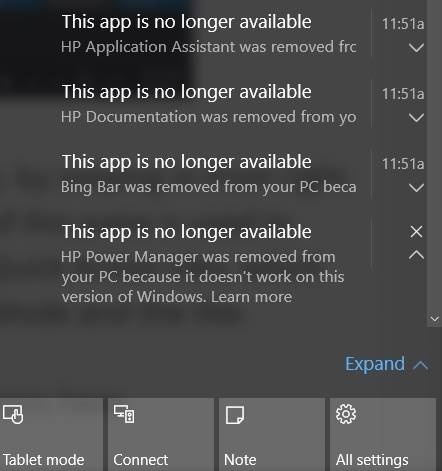
هذا عدد كبير جدًا من إشعارات الدفع التي يمكن لأي شخص رؤيتها عند الاتصال بالإنترنت.
لماذا يحدث هذا؟
الأمر بسيط: لقد نسي المرسل إنشاء خيار انتهاء صلاحية.
يضمن تعيين خيار انتهاء الصلاحية أن يرى المشتركون لديك فقط الإشعارات التي تريد منهم رؤيتها. بعبارة أخرى، يمكنك تعيين حد زمني تنتهي بعده صلاحية إشعارات الدفع الخاصة بك ولن تكون مرئية في درج الإشعارات حتى لو تم تسليمها.
دعنا نلقي نظرة سريعة على كيفية إرسال إشعارات الدفع غير المتصلة بالإنترنت مع حد انتهاء صلاحية.
كيفية إرسال إشعارات الدفع غير المتصلة بالإنترنت بالطريقة الصحيحة
الآن بعد أن فهمنا القليل عن كيفية عمل إشعارات الدفع غير المتصلة بالإنترنت وما هي، دعنا ننتقل إلى إنشاء واحدة بالطريقة الصحيحة.
الخطوة #1: إعداد حساب PushEngage الخاص بك
توجه إلى الصفحة الرئيسية لـ PushEngage وانقر على زر ابدأ:

يمكنك اختيار الخطة المجانية لتجربة PushEngage، أو اختيار خطة مدفوعة إذا كنت جادًا في تنمية عملك. تأتي الخطط المدفوعة مع المزيد من خيارات الحملات والقدرة على بناء قوائم مشتركين أكبر.
بمجرد التسجيل للحصول على حساب، توجه إلى لوحة تحكم PushEngage وانتقل إلى الإعدادات » إعدادات الموقع » إعدادات التثبيت:
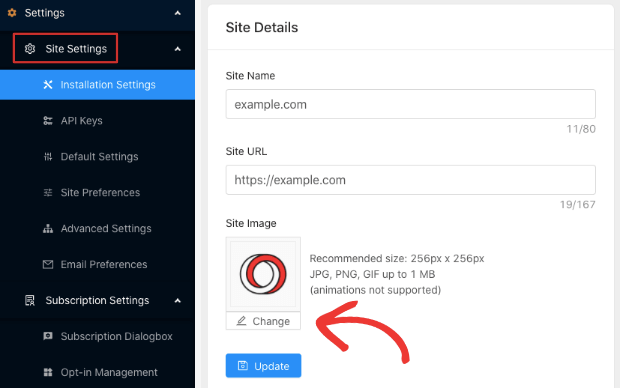
هنا تقوم بتكوين تفاصيل موقعك والعلامة التجارية. قم بتعيين شعار وعنوان URL للموقع لإشعارات الدفع الخاصة بك. يجب عليك القيام بذلك الآن حتى تتمكن من اختبار إشعارات الدفع الخاصة بك بشكل صحيح.
الخطوة #2: إنشاء إشعار دفع جديد
توجه إلى لوحة تحكم PushEngage وانتقل إلى الإشعارات » إنشاء » إشعار جديد:
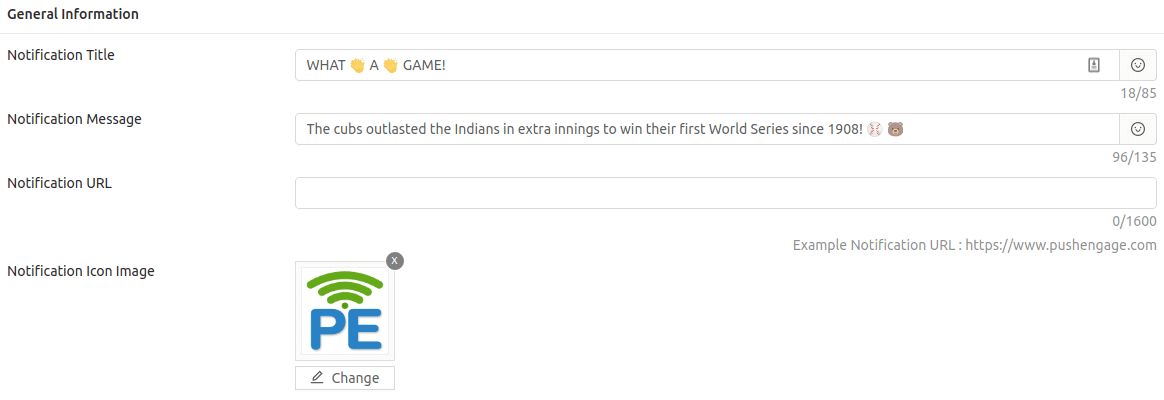
كما ترى، هذا هو المكان الذي تقوم فيه بصياغة العنوان والنص لإشعارك، ويمكنك أيضًا استخدام الرموز التعبيرية في إشعارات الدفع الخاصة بك.
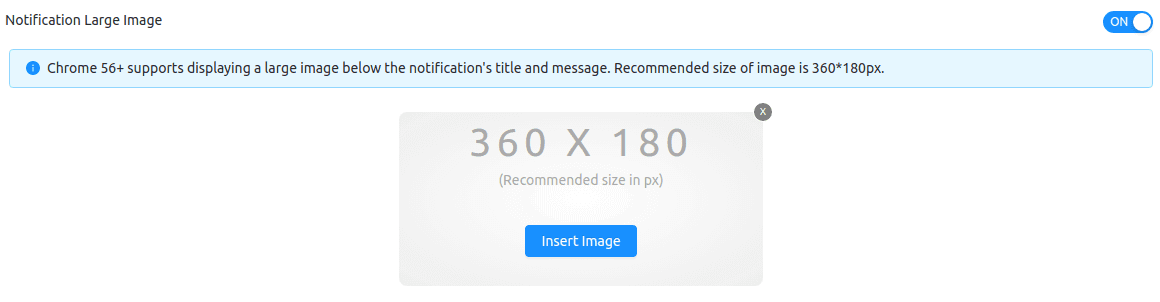
بعد ذلك، توجه إلى صورة الإشعار الكبيرة وأضف صورة هنا:
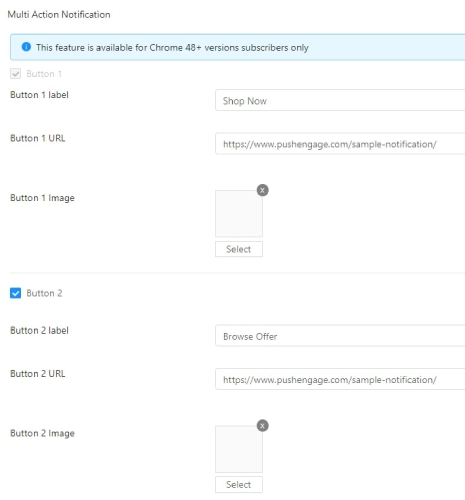
يمكنك أيضًا إضافة بعض الأزرار في قسم إشعار الإجراءات المتعددة:
بعد ذلك، سترغب في التمرير لأسفل و جدولة إشعار الدفع الخاص بك:
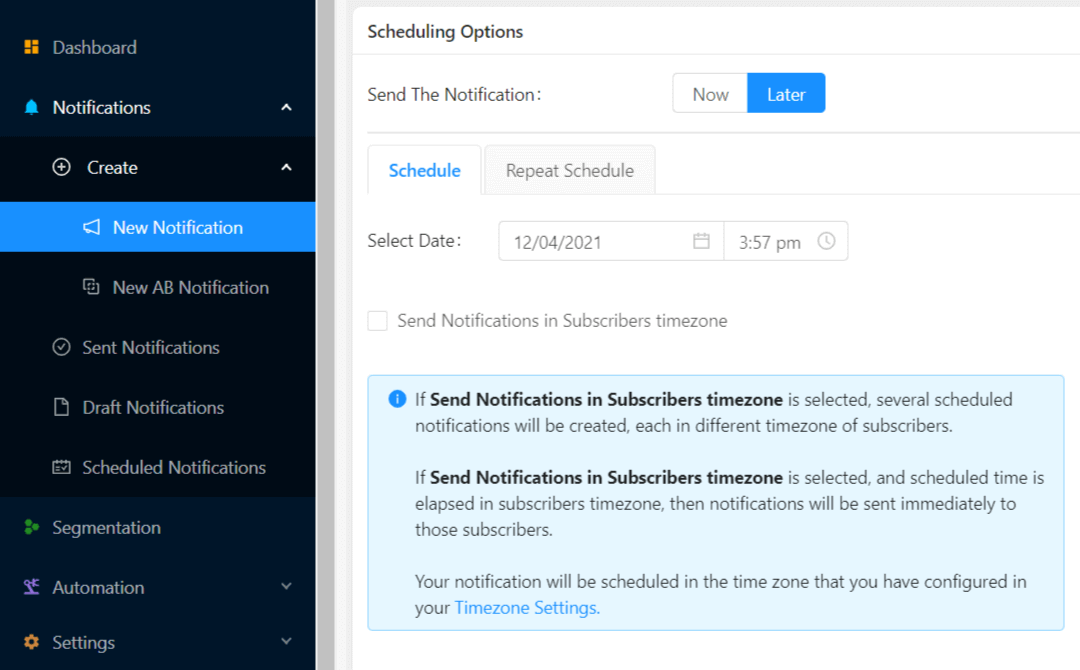
عند إنشاء إشعار جديد، توجه إلى قسم خيارات الجدولة وانقر على مربع الاختيار الذي يقول إرسال الإشعارات في المنطقة الزمنية للمشترك إذا كنت ترغب في إرسال الإشعار في وقت تعرف فيه أنهم سيكونون متصلين بالإنترنت.
ولكن مهلاً، لا تقلق حتى لو لم يكونوا متصلين بالإنترنت! إشعارات الدفع غير المتصلة بالإنترنت، هل تتذكر؟
وبالحديث عن ذلك، دعنا نحدد حد انتهاء صلاحية لإشعار الدفع الخاص بك وستكون جاهزًا.
الخطوة #3: تعيين مدة الإشعار
في نفس العرض، انتقل إلى مدة الإشعار:
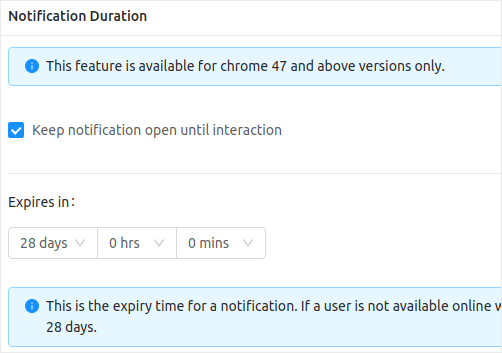
وحدد حدًا زمنيًا تنتهي بعده صلاحية إشعار الدفع الخاص بك. القيمة الافتراضية لهذا هي 28 يومًا، ولكن هذا غير مستحسن، خاصة إذا كنت تروج لعرض محدود المدة.
لكنك انتهيت بالفعل الآن! لقد قمت للتو بإنشاء إشعار دفع غير متصل بالإنترنت مع حد انتهاء صلاحية.
خاتمة
هذا كل شيء لهذا الموضوع، أيها الأصدقاء.
إذا كنت جديدًا في مجال إشعارات الدفع، فيجب عليك الاطلاع على بعض إشعارات الدفع الإبداعية للإلهام والبدء في إرسال إشعارات الدفع الخاصة بك. إشعارات الدفع غير مكلفة للغاية وتمكنك من إرسال حملات تسويقية قوية للغاية.
وإذا كنت تبدأ في استخدام إشعارات الدفع، فلا يوجد برنامج أفضل لاستخدامه من PushEngage. PushEngage هو البرنامج رقم 1 لإشعارات الدفع في العالم. لذا، إذا لم تكن قد فعلت ذلك بالفعل، ابدأ مع PushEngage اليوم!


