
هل تريد تقسيم مشتركين الإشعارات الفورية عبر الويب في وقت الاشتراك؟
يؤدي تقسيم المشتركين تلقائيًا إلى تسهيل إرسال حملات إشعارات مخصصة للغاية. بهذه الطريقة، يمكنك تحسين النقرات على الإشعارات، مما يؤدي بدوره إلى زيادة حركة المرور العائدة إلى موقعك.
ولكن كيف تفعل ذلك؟
في هذه المقالة، سنوضح لك الخطوات الدقيقة لتقسيم المشتركين فورًا في وقت الاشتراك.
سنوضح لك كيفية القيام بذلك باستخدام PushEngage. PushEngage هو البرنامج رقم 1 للإشعارات الفورية في العالم، وتحصل على خيارات تقسيم متقدمة جدًا مباشرة من لوحة التحكم الخاصة بك.
دعنا نتعمق.
كيفية تقسيم المشتركين بناءً على عناوين URL
إحدى أبسط الطرق لإنشاء شرائح للمشتركين هي تنظيم العملاء المحتملين بناءً على نوع المحتوى الذي يتصفحونه.
وهذا سهل الإعداد للغاية باستخدام PushEngage. عادةً، ستحتاج إلى استخدام واجهة برمجة تطبيقات Javascript لإنشاء شرائح. مع PushEngage، لا يزال لديك هذا الخيار، ولكن أسهل طريقة للقيام بذلك هي من لوحة تحكم PushEngage الخاصة بك. انتقل إلى الجمهور » الشرائح وانقر على إنشاء شريحة جديدة:
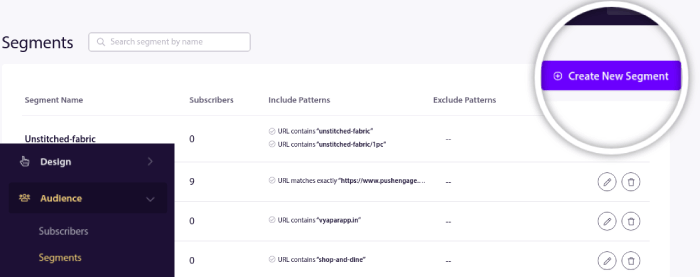
وأنشئ قاعدة تقسم المشتركين تلقائيًا بناءً على عناوين URL التي يتصفحونها:
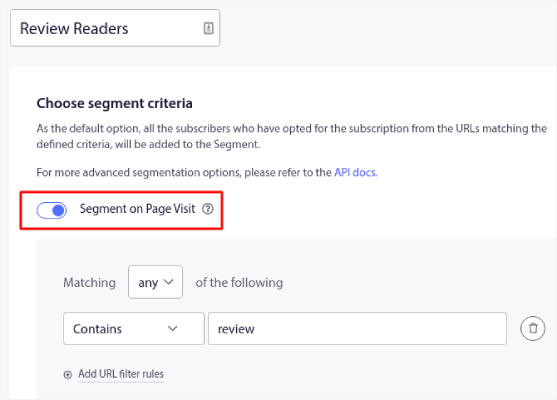
في المثال، أنشأنا شريحة تسمى "شريحة نموذجية" تقوم بتقسيم المشتركين تلقائيًا عند زيارتهم لعناوين URL على موقعك تحتوي على الكلمة "أمثلة" فيها. يمكنك استخدام أي كلمة رئيسية تفضلها هنا.
عندما تكون راضيًا عن القاعدة، انقر على إنشاء.
وبهذه البساطة، تكون قد انتهيت!
كيفية تقسيم المشتركين باستخدام موافقات الإشعارات الفورية
يمكنك أيضًا تقسيم المشتركين لديك عند اشتراكهم في الإشعارات الفورية عن طريق تخصيص خيار الاشتراك في الإشعارات الفورية.
هذا نوع من التقسيم المستند إلى تفضيلات المستخدم الذي يمكنك القيام به باستخدام PushEngage. يمكنك أيضًا تسميته التقسيم المدفوع من قبل المستخدم. هنا، يحصل المشترك على اختيار أحد الخيارين المقدمين له:
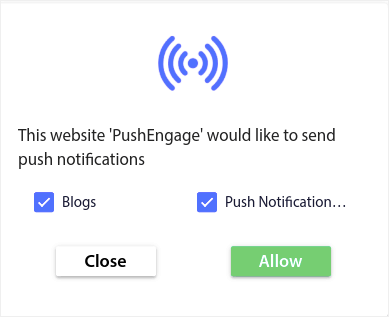
إليك كيفية عمل ذلك:
- عندما يشترك أي مستخدم، يحصل PushEngage على معرف جهاز الاشتراك، والموقع الجغرافي، ونوع الجهاز
- في هذه الحالة، يجمع PushEngage أيضًا تفضيلات المستخدم وقت الاشتراك، ويخزنها في شريحة مخصصة
لنبدأ في تشغيل هذا الآن.
الجزء الأول هو نفسه الطريقة السابقة. تذهب إلى التقسيم وتنقر على إنشاء شريحة جديدة.
ملاحظة: لا تنقر على التقسيم عند زيارة الصفحة لهذا النوع من التقسيم.
بعد إنشاء الشرائح، انتقل إلى التصميم » نوافذ منبثقة وأنشئ خيار اشتراك جديد بحجم كبير بنمط سفاري مع شريحة:
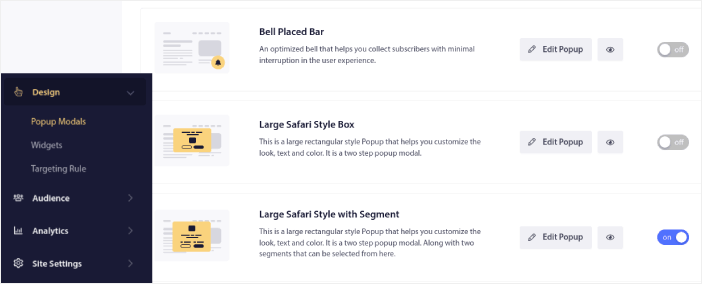
انقر على تعديل النافذة المنبثقة وتحت علامة التبويب تصميم النافذة المنبثقة، صمم خيار الاشتراك الخاص بك:
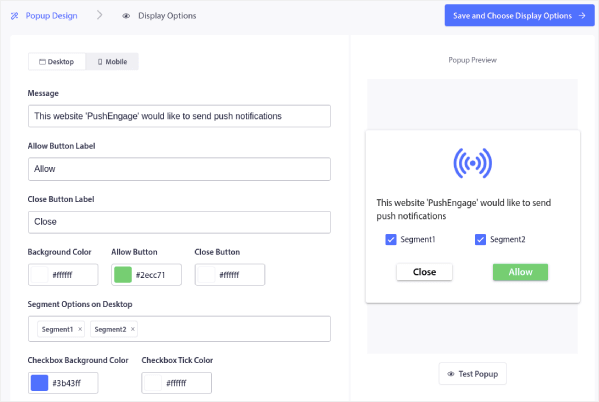
يمكنك تخصيص كل شيء تقريبًا في خيار الاشتراك الخاص بك هنا بدءًا من النص وحتى استخدام ألوان علامتك التجارية على خيار الاشتراك. في حقل خيارات الشريحة على سطح المكتب، يمكنك تحديد الشرائح التي تريد أن يشترك فيها زوارك.
جمال خيار الاشتراك هذا هو أن نفس المشترك يمكنه اختيار الاشتراك في شرائح متعددة مباشرة من النافذة المنبثقة.
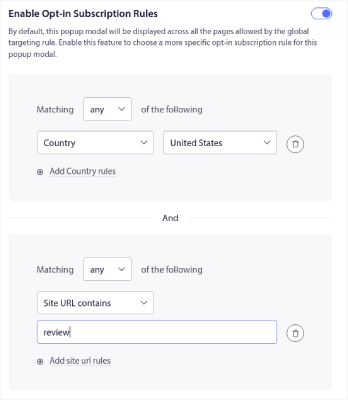
مرر لأسفل إلى تمكين قواعد اشتراك خيار الاشتراك ويمكنك تكوين وقت ظهور خيار الاشتراك في الإشعارات الفورية الخاصة بك.
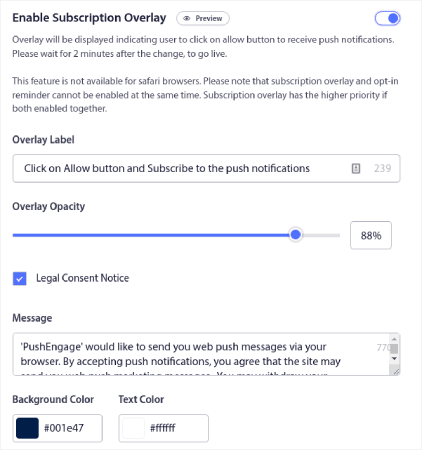
يمكنك أيضًا إنشاء تراكب اشتراك مع إشعار موافقة قانونية:
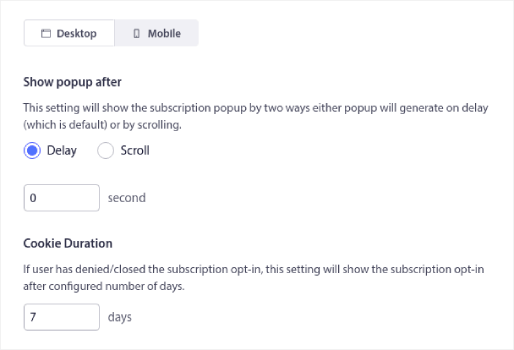
عند الانتهاء، انقر على زر حفظ واختيار خيارات العرض. هناك، يمكنك إعداد وقت ظهور خيار الاشتراك عن طريق إنشاء تأخير بعد وصول الزائر إلى صفحة مستهدفة.
عند الانتهاء، فقط اضغط على حفظ وتمكين النافذة المنبثقة:

هذا كل شيء حقًا! لا حاجة لأي كود. إذا اتبعت كل خطوة بدقة، فيجب أن ترى نافذة موافقة الإشعارات الفورية مع الشرائح على موقعك.
ماذا تفعل بعد تقسيم مشتركي الإشعارات الفورية الخاصة بك
هذا كل شيء لهذا اليوم أيها الأصدقاء!
التقسيم هو استراتيجية رائعة للإشعارات الفورية. قبل الاشتراك في أي خدمة إشعارات فورية، تأكد من التحقق من ميزات تقسيم الجمهور الخاصة بهم.
وبينما أنت في ذلك، يجب عليك أيضًا الاطلاع على هذه الموارد الرائعة أيضًا:
- كيفية إعداد إشعارات الدفع للسلات المتروكة (دليل سهل)
- كيفية جدولة إشعارات الدفع بالطريقة السهلة [دليل 5 دقائق]
- كيفية إنشاء حملات إشعارات انخفاض الأسعار في < 10 دقائق.
نوصي بالبدء بـ PushEngage. PushEngage هو البرنامج رقم 1 للإشعارات الفورية في العالم، وتحصل على ميزات تقسيم قوية للغاية جاهزة للاستخدام.
لذا، إذا لم تكن قد فعلت ذلك بالفعل، ابدأ مع PushEngage اليوم.


كانت هذه مقالة مفيدة جدًا. سأطبق التعليمات التي قدمتها على موقعي في إعدادات PushEngage.
شكرًا لك.