هل تبحث عن طريقة بسيطة لإضافة إشعارات الدفع إلى صفحتك على ClickFunnels؟
هذه فكرة رائعة حقًا. ClickFunnels هو منشئ مسار مبيعات يتيح لك إنشاء صفحات ويب فورية لعرض خدمتك أو منتجك وبيعها لعملائك.
فحص الواقع: لن يشتري كل من يصل إلى موقعك منتجك عند رؤيته لأول مرة. لذلك، ستحتاج إلى طريقة لإعادة استهداف حركة المرور الخاصة بك.
إشعارات الدفع رائعة جدًا لأنها يمكن أن تولد حركة مرور ومبيعات متكررة دون الحاجة إلى تشغيل إعلانات مدفوعة. ويستغرق الأمر حوالي 10 دقائق لإضافة إشعارات الدفع إلى ClickFunnels.
في هذه المقالة، سنوضح لك خطوة بخطوة كيفية إضافة إشعارات الدفع إلى صفحة Clickfunnels.
نحن نستخدم PushEngage لنوضح لك كيفية إعداد الأمور في هذه المقالة. PushEngage هو البرنامج رقم 1 للإشعارات الفورية في العالم. لذلك، نوصي بشدة باستخدامه أيضًا. ولكنها نفس العملية لأي بائع آخر.
دعنا نتعمق.
كيفية تثبيت إشعارات الدفع على ClickFunnels
إضافة إشعارات الدفع إلى صفحة هبوط ClickFunnels بسيطة للغاية. فقط اتبع الخطوات في هذه المقالة.
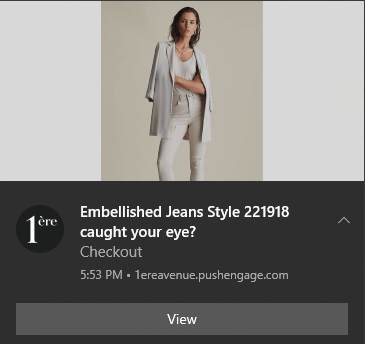
إذا اتبعت كل خطوة، فبحلول نهاية هذا المقال، يجب أن تكون قادرًا على إرسال إشعارات دفع مثل هذا:
هيا بنا!
الخطوة #1: إعداد حساب PushEngage الخاص بك
توجه إلى الصفحة الرئيسية لـ PushEngage وانقر على زر البدء:

يمكنك تجربة PushEngage مجانًا. وهذا على الأرجح كافٍ إذا كنت تدير مدونة صغيرة تحتاج إلى حركة مرور وتفاعل متكرر.
ولكن إذا كنت جادًا بشأن المبيعات، فيجب عليك الحصول على حزمة Enterprise وفتح الحملات الآلية.
بمجرد التسجيل في حساب PushEngage الخاص بك، توجه إلى لوحة تحكم PushEngage وانتقل إلى الإعدادات » إعدادات الموقع » إعدادات التثبيت:
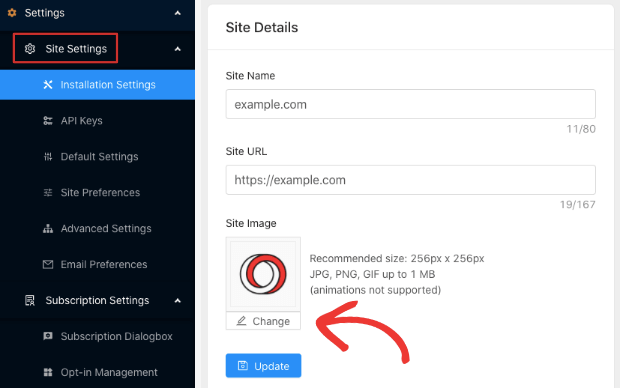
يمكنك تعيين شعارك واسم موقعك وعنوان URL لموقعك هنا. من المهم جدًا ترتيب هذه الأمور الآن حتى تتمكن من اختبار الإعداد بالكامل لاحقًا.
الخطوة #2: الحصول على رمز التثبيت من PushEngage
لتثبيت إشعارات الدفع، ستحتاج إلى الحصول على رمز تثبيت من لوحة تحكم PushEngage الخاصة بك. توجه إلى الإعدادات » إعدادات الموقع » إعدادات التثبيت:
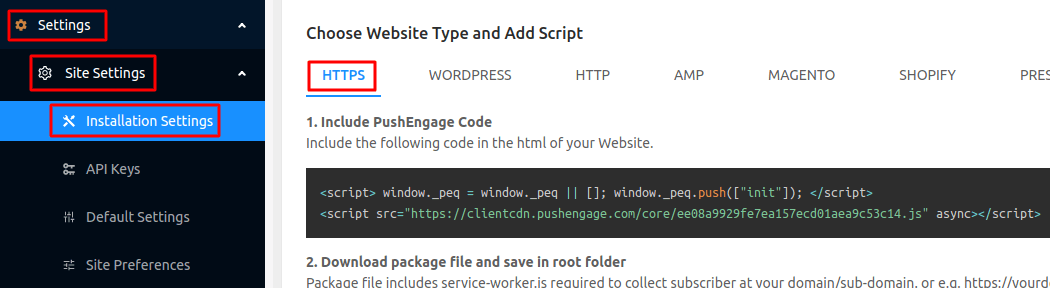
اعتمادًا على ما إذا كان موقعك يحتوي على شهادة SSL مثبتة، انتقل إلى علامة التبويب HTTP أو علامة التبويب HTTPS للحصول على رمز التثبيت الخاص بك.
انسخ مقتطف رمز جافا سكريبت هذا. ستحتاجه قريبًا.
الخطوة #3: ضع رمز التثبيت في صفحتك على ClickFunnels
قم بتسجيل الدخول إلى لوحة تحكم ClickFunnels وانتقل إلى Themes وانقر على Edit Page:
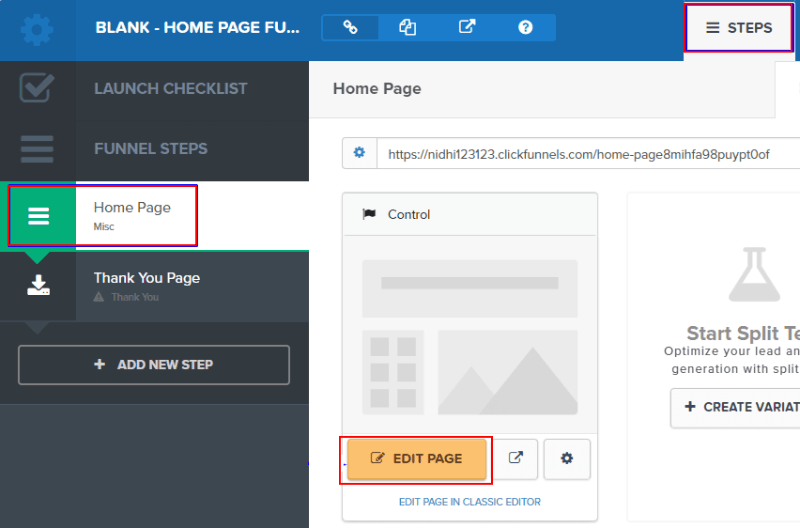
بعد ذلك، انتقل إلى Settings » Tracking Code:
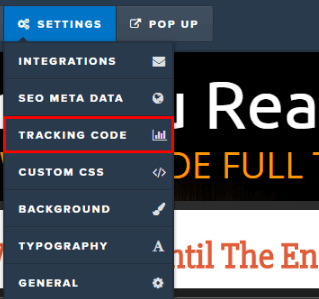
هذا هو المكان الذي تضع فيه عادةً رمز Google Analytics الخاص بك، Facebook Pixel، ورمز التتبع الآخر. الصق مقتطف الرمز الذي حصلت عليه من لوحة تحكم PushEngage في نافذة المنبثقة:
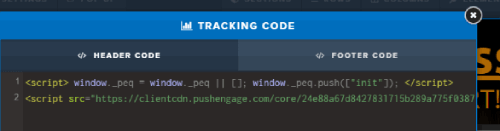
واضغط على Save.
الخطوة #4: تكوين موافقة PushEngage
الآن، عد إلى لوحة تحكم PushEngage الخاصة بك. انتقل إلى الإعدادات » إعدادات الاشتراك » مربع حوار الاشتراك » تحرير:
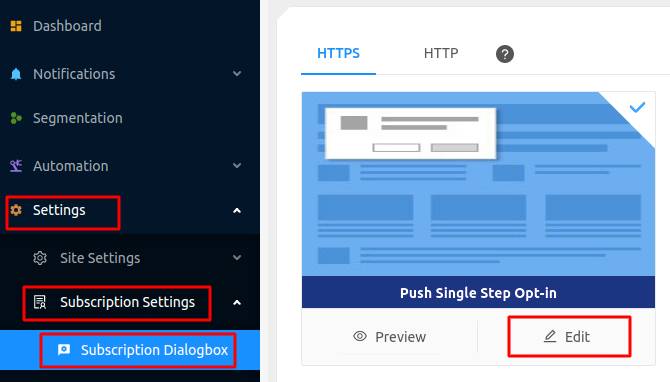
الفكرة هنا هي منح زوارك سببًا وجيهًا للاشتراك. إذا كنت بحاجة إلى بعض المساعدة في ذلك، فراجع مقالتنا حول كيفية إنشاء خيار اشتراك مخصص للإشعارات الفورية.
وإذا كنت ترغب في الحصول على بعض القوالب للبدء، يجب عليك الاطلاع على هذا المقال حول نماذج الاشتراك في الإشعارات الفورية عالية التحويل.
الخطوة #5: إنشاء حملتك الأولى
الآن بعد أن أصبحت صفحتك على ClickFunnels قادرة على إرسال إشعارات الدفع، يجب عليك إنشاء حملة فعلية.
نظرًا لأنك من المحتمل أن تبيع منتجًا على صفحة الهبوط الخاصة بك، فلنقم بإعداد تذكير سلة التسوق المهجورة لمتجرك.
تساعد حملة سلة التسوق المهجورة في تحقيق إيرادات إضافية عن طريق تحويل السلات المهجورة. إنها مجرد تذكير يبيع الكثير من المنتجات تلقائيًا. لذا، فهي حملة رائعة لدعم أي صفحة هبوط تحقق مبيعات مباشرة.
ما عليك سوى التوجه إلى لوحة تحكم PushEngage الخاصة بك والانتقال إلى الأتمتة » التخلي عن سلة التسوق » إنشاء رد تلقائي لسلة التسوق:
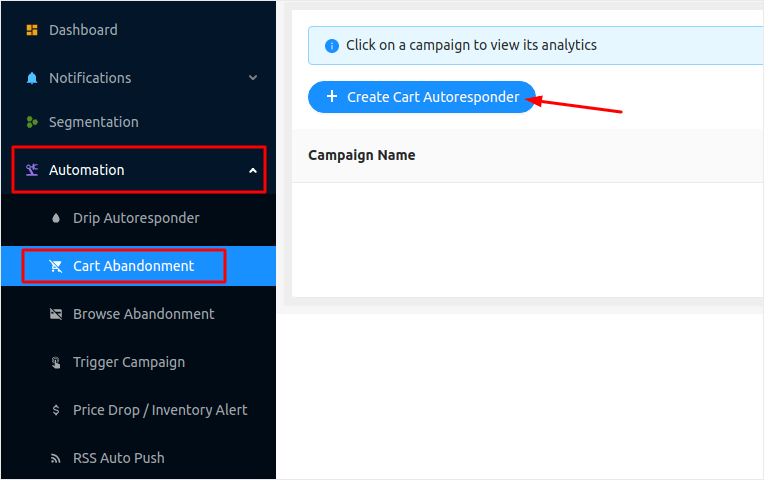
إذا كنت جديدًا في إنشاء حملات تسويق آلية، يمكنك ببساطة متابعة مقالتنا حول كيفية إعداد حملة إشعارات دفع لسلة التسوق المهجورة. اتبع كل خطوة، ويمكنك إعداد إشعارات دفع مثل هذه:
فقط في حال كنت تتساءل، لا تحتاج إلى أن تكون علامة تجارية مشهورة لكي تكون حملات إشعارات الدفع الخاصة بك فعالة. في الواقع، تم بناء PushEngage لمساعدة الشركات الصغيرة على النمو باستخدام إشعارات الدفع.
ولكن قبل أن تبدأ في تسويق صفحة الهبوط الخاصة بك، يجب عليك إصلاح أي مشاكل في عملية اشتراك إشعارات الدفع الخاصة بك. تحقق من هذه المقالة حول اختبار إشعارات الدفع الخاصة بك. إذا كان كل شيء يعمل بشكل مثالي، فقد انتهيت!
خاتمة
هذا كل شيء لهذا اليوم أيها الأصدقاء!
لقد أضفت للتو إشعارات الدفع إلى صفحتك على ClickFunnels وأنشأت حملة إشعارات دفع قوية لتعزيز نموك في أقل من 10 دقائق!
تحقق من كيفية إعداد تنبيهات المخزون لمتجركم أيضًا. معظم حملات دفع التجارة الإلكترونية بسيطة وفعالة. لذلك، نوصي بإعداد حملات متعددة لمتجركم.
وإذا لم تكن قد فعلت ذلك بالفعل، فابدأ باستخدام PushEngage. PushEngage هو البرنامج رقم 1 للإشعارات الفورية في العالم. لذا، فإن حملاتك في أيد أمينة.


