
هل تبحث عن مصدر حول كيفية الحصول على المزيد من المشتركين على يوتيوب باستخدام الإشعارات الفورية؟
قد يكون تنمية عدد المشتركين على يوتيوب أمرًا صعبًا. تتمثل إحدى أكبر المشكلات التي تواجه نمو قناتك في وجود عدد قليل جدًا من الطرق للتحكم في قائمة المشتركين لديك. وذلك لأنك لا تملك وصولاً أو تحكمًا في قائمة المشتركين الخاصة بك.
لهذا السبب ننصح كل صانع محتوى على يوتيوب أو تويتش أو أي منصة تواصل اجتماعي بأن يكون لديه أيضًا موقع ويب لجمع قائمة مشتركين بشكل منفصل. أي قائمة بريد إلكتروني أو قائمة مشتركين بالإشعارات الفورية تجمعها على موقعك الإلكتروني هي ملك لك.
في هذا المقال، سنوضح لك خطوة بخطوة كيفية الحصول على المزيد من المشتركين على يوتيوب باستخدام موقع ووردبريس والإشعارات الفورية. أفضل جزء؟ الأمر سهل للغاية.
دعنا نتعمق.
- لماذا الإشعارات الفورية ضرورية لقنوات يوتيوب
- إعداد PushEngage لقناتك على يوتيوب
- تصميم إشعارات فورية فعالة
- رقم 1. تنبيهات الفيديو الجديد
- رقم 2. معاينات المحتوى الحصري
- رقم 3. الاحتفال بمعالم المشتركين
- رقم 4. إعلانات البث المباشر
- رقم 5. أبرز التعاونات
- رقم 6. استطلاعات الرأي وتفاعل الجمهور
- رقم 7. عروض خاصة للمشتركين
- رقم 8. إشعارات الملخص
- رقم 9. لمحات من وراء الكواليس (BTS)
- رقم 10. الترويج للمحتوى الذي ينشئه المستخدم
- تحسين توقيت وتكرار الإشعارات
- استهداف وتقسيم جمهورك
- تتبع وتحليل حملات الإشعارات الفورية الخاصة بك
- كيفية زيادة مشتركي يوتيوب بشكل أسرع
لماذا الإشعارات الفورية ضرورية لقنوات يوتيوب
الإشعارات الفورية هي طريقة ذكية للحفاظ على نمو قناتك على يوتيوب. إنها تضمن أن يعرف معجبوك عن مقاطع الفيديو الخاصة بك وتساعد في بناء مجتمع حول قناتك.
إليك سبب حاجتك لبدء إرسال حملات الإشعارات الفورية لقناتك على يوتيوب:
- احصل على الانتباه بسرعة: عندما تنشر مقطع فيديو، تخبر الإشعارات الفورية معجبيك على الفور. هذا يعني أن المزيد من الأشخاص يشاهدون مقطع الفيديو الخاص بك بسرعة.
- كن مرئيًا بين الكثيرين: يوتيوب مزدحم جدًا بالعديد من مقاطع الفيديو. تضمن الإشعارات الفورية ألا يفوت معجبوك مقاطع الفيديو الخاصة بك.
- حافظ على عودة المعجبين: تساعد الرسائل المنتظمة لمشاهديك على تذكر مشاهدة مقاطع الفيديو الخاصة بك.
- تحدث إلى الأشخاص المناسبين: يمكنك إرسال رسائل تتناسب مع ما يحبه كل معجب. هذا يجعلهم أكثر اهتمامًا بمشاهدة مقاطع الفيديو الخاصة بك.
- مثالي للأشياء المهمة: إذا كان لديك شيء مميز يحدث، مثل بث مباشر، فإن الإشعارات الفورية تجعل متابعيك يشاهدون في تلك اللحظة.
- شاهد ما ينجح: يمكنك التحقق من الرسائل التي تحصل على أفضل استجابة ومعرفة ما يحبه المشاهدون.
- وفر المال: الإشعارات الفورية هي طريقة رخيصة لإخبار الناس عن مقاطع الفيديو الخاصة بك.
- ابنِ مجتمعًا للمعجبين: يمكن لهذه الرسائل أن تساعد في جعل المشاهدين يشعرون بأنهم جزء من مجموعة.
يمكن أن تلعب الإشعارات الفورية دورًا داعمًا في معالجة قضايا مثل الحظر الظلي، وإلغاء تحقيق الدخل، وحظر القنوات على منصات مثل يوتيوب. إليك كيف:
- ضد الحظر الظلي: يمكن للحظر الظلي أن يجعل المحتوى الخاص بك غير مرئي لجمهور أكبر دون إشعار. تُعلم الإشعارات الفورية المشتركين لديك مباشرةً بالمحتوى الجديد، مما يضمن وصول مقاطع الفيديو الخاصة بك إلى جمهورك حتى لو تم حظرها ظليًا.
- تأمين ضد إلغاء تحقيق الدخل: إذا تم إلغاء تحقيق الدخل من مقاطع الفيديو الخاصة بك، فقد يؤدي ذلك إلى تدمير مصدر دخلك الوحيد. يمكن للإشعارات الفورية المساعدة في الحفاظ على تفاعل المشاهدين وزيادة حركة المرور، مما يوفر قاعدة مشاهدة مستقرة مستقلة عن حالة تحقيق الدخل.
- حماية ضد حظر القنوات: في حالة حظر القناة المؤسف، يمكن أن يساعدك وجود خط اتصال مباشر عبر الإشعارات الفورية في توجيه جمهورك إلى منصات أو محتوى بديل، مما يضمن استمرارية قاعدة المشاهدين لديك.
هذه ليست مشاكل افتراضية.
يتم حظر مقدمي البث المباشر ظليًا طوال الوقت. يحصل مستخدمو يوتيوب القدامى مثل MxR Plays على إلغاء تحقيق الدخل بشكل جماعي ويقتربون من إغلاق قنواتهم طوال الوقت.
هذا هو الجانب المظلم ليوتيوب ومن المحزن رؤية مستخدمي يوتيوب القدامى يتعرضون للإفلاس المالي. خاصة بالنظر إلى أن إرشادات يوتيوب غامضة للغاية ومن الصعب حقًا فهم المنطق وراء إلغاء تحقيق الدخل.
يستخدم بعض المبدعين مثل MxR Plays منصة Patreon وموقع تجارة إلكترونية للبقاء على اتصال مع أقدم معجبيهم. ولكن وجود موقع ويب أفضل دائمًا. إذا كانت وظيفتك بدوام كامل، فلا يوجد ما هو أسوأ من أن يتم سلبها منك. في الواقع، قام MxR بعمل فيديو يتحدث فيه عن مدى تدميره لهم بعد أن تم إلغاء تحقيق الدخل من 279 مقطع فيديو في غضون أسبوعين.
يمكن أن يوفر استخدام الإشعارات الفورية مقياسًا للأمان والاستقرار لمنشئي المحتوى ضد بعض التحديات المتعلقة بالمنصة. ناهيك عن أنه يمكنك إرسال حملات دفع رائعة للتفاعل مع معجبيك.
بالطبع، قبل أن تتمكن من البدء في إرسال الإشعارات الفورية، ستحتاج إلى تطبيق أو موقع ويب لجمع المشتركين. إذا كان لديك بالفعل تطبيق أو موقع ويب، فهذا رائع. ولكن إذا لم يكن الأمر كذلك، فيجب عليك حقًا إنشاء موقع ويب لقناتك اليوم.
إعداد PushEngage لقناتك على يوتيوب
قبل إنشاء حملة إشعارات فورية، تحتاج إلى اختيار خدمة اشتراك في الإشعارات الفورية. خدمة الإشعارات الفورية هي برنامج يسمح لك بإنشاء حملات فورية دون أي ترميز.
نوصي باستخدام PushEngage للحصول على مشتركين في الإشعارات الفورية.

PushEngage هو المكون الإضافي رقم 1 لإشعارات الدفع في العالم.
تساعدك إشعارات الدفع على زيادة حركة مرور موقعك الإلكتروني ومشاركتك تلقائيًا. وإذا كنت تدير متجرًا عبر الإنترنت، فإن PushEngage يساعدك أيضًا على زيادة مبيعاتك من خلال مساعدتك في إنشاء إشعارات دفع آلية للتجارة الإلكترونية.
يمكنك البدء مجانًا، ولكن إذا كنت جادًا بشأن تنمية عملك، فيجب عليك شراء خطة مدفوعة. أيضًا، قبل شراء أي خدمة إشعارات دفع، يجب عليك الاطلاع على هذا الدليل حول تكاليف إشعارات الدفع.
إليك نظرة سريعة على ما تحصل عليه مع PushEngage:
- حملات آلية عالية التحويل
- خيارات متعددة لاستهداف الإشعارات الفورية وجدولة الحملات
- تتبع الأهداف والتحليلات المتقدمة
- اختبار A/B ذكي
- قوالب الإشعارات الفورية
- أنماط متعددة للنوافذ المنبثقة للإشعارات الفورية
- مدير نجاح مخصص
وأكثر من ذلك بكثير!
سترى أن PushEngage هو الخيار الأفضل بلا منازع إذا كنت ترغب في زيادة حركة المرور والمشاركة والمبيعات لعملك. وإذا كانت ميزانيتك محدودة، يمكنك دائمًا أن تكون مبدعًا بعض الشيء مع إشعارات الدفع الخاصة بك.
ملاحظة: إذا كنت تدير موقع WordPress، فيجب عليك تثبيت وتفعيل المكون الإضافي لـ PushEngage لـ WordPress.
هيا بنا!
الخطوة رقم 1: إنشاء حساب PushEngage مجاني
توجه إلى PushEngage وانقر على ابدأ الآن مجانًا.
يمكنك البدء بالخطة المجانية. ولكن إذا كنت تتطلع إلى إرسال إشعارات فورية مستهدفة، فيجب عليك اختيار خطة النمو (Growth Plan). بمجرد معرفة الخطة التي تريدها، انقر على ابدأ لإنشاء حساب PushEngage الخاص بك.
الخطوة رقم 2: التسجيل في PushEngage
الآن، حان وقت إنشاء حساب PushEngage الخاص بك. ابدأ بالتسجيل باستخدام عنوان بريد إلكتروني أو معرف Gmail:

ثم، املأ تفاصيل حسابك:

وأضف معلومات بطاقتك الائتمانية لشراء خطتك:

إذا اخترت الحساب المجاني، فلن يتم خصم أي أموال من بطاقتك الائتمانية حتى تختار ترقية خطتك. والآن، أنت جاهز للوصول إلى لوحة تحكم PushEngage الخاصة بك. فقط انقر على إكمال التسجيل والحصول على وصول فوري.
إذا كنت قد استخدمت OneSignal أو PushAlert من قبل، فسترى أن PushEngage يمنحك تجربة أنظف بكثير من لوحة التحكم. لوحة تحكم OneSignal ليست مخصصة للحملات المتقدمة. لهذا الغرض، ستحتاج إلى واجهة برمجة التطبيقات (API) أكثر من إضافة OneSignal.
الخطوة رقم 3: تثبيت إضافة إشعارات فورية للاشتراك على ووردبريس
ملاحظة: إذا كنت لا تدير موقع WordPress، فيجب عليك الاطلاع على أدلة التثبيت الخاصة بنا للبدء.
لقد انتهيت من إنشاء حسابك. لذا، توجه إلى لوحة تحكم PushEngage حيث يمكنك تتبع معدلات التفاعل مع الإشعارات الفورية واتبع معنا:

انقر على إعدادات الموقع » تفاصيل الموقع وانقر على الزر انقر هنا للحصول على تعليمات الإعداد:

انقر على علامة التبويب WordPress وانقر على الزر تثبيت المكون الإضافي لـ PushEngage لـ WordPress لتثبيت المكون الإضافي على موقعك.

الجزء الرائع هنا: عندما أنشأت حساب PushEngage الخاص بك، قمت بالفعل بمزامنة موقعك مع حساب PushEngage الخاص بك. لذا، انقر على رابط التثبيت في لوحة تحكم PushEngage لتثبيت إضافة PushEngage WordPress تلقائيًا على موقعك.
الخطوة رقم 4: ربط موقع WordPress الخاص بك بـ PushEngage
عند الانتهاء من تثبيت وتفعيل إضافة PushEngage لـ WordPress، سترى معالج الإعداد لـ PushEngage:

المعالج سهل الاستخدام للغاية. إذا كنت مستخدمًا جديدًا، فانقر على جديد؟ احصل على حسابك المجاني. وإذا كنت قد سجلت بالفعل، فانقر على ربط حسابك الحالي.
بعد ذلك، يمكنك تحديد موقعك من القائمة المنسدلة تحديد موقع ضمن ربط موقع مسجل إذا كنت قد سجلت موقعًا بالفعل أثناء التسجيل:

أو، يمكنك النقر على تسجيل موقع جديد لإضافة موقع جديد إذا كان لديك خطة تسعير مميزة أو أعلى. في الخطوة التالية، سيطلب منك معالج الإعداد تثبيت إضافات WordPress الضرورية الأخرى.

إذا اتبعت كل خطوة بشكل صحيح، فسترى رسالة النجاح هذه من المعالج:

أنت الآن جاهز لإنشاء الحملات ونوافذ المنبثقة للإشعارات الفورية.
تصميم إشعارات فورية فعالة
إذا كنت تدير قناة يوتيوب ناجحة، فأنت تدرك بالفعل ما يريد جمهورك رؤيته منك. أنت تعرف بالفعل كيفية إرسال إشعارات دفع مخصصة لجعل مشتركيك يشعرون بأنها مصممة خصيصًا لهم. أفضل جزء؟ يحصل عملاؤنا على معدلات تحويل تبلغ حوالي 8٪ للحملات المخصصة.
الآن، لنبدأ بأبسط شيء يمكنك القيام به للحصول على المزيد من المشتركين. وهذا هو أن تطلب من الناس الاشتراك في قناتك. بعد ذلك، سنوضح لك بعض الطرق الرائعة لتعزيز نمو قناتك من حيث:
- وقت المشاهدة
- زيارات متكررة
- مبيعات التسويق بالعمولة
- مبيعات البضائع
والمزيد!
أبسط شيء يمكنك القيام به هو إضافة زر "انقر للاشتراك" لجميع إشعارات الدفع الخاصة بك. انتقل إلى قناة يوتيوب الخاصة بك وانسخ عنوان URL. بالنسبة لنا، هو https://www.youtube.com/@Pushengage.
في نهاية عنوان URL، فقط أضف "?sub_confirmation=1". لذا، لقناتنا، سيكون: https://www.youtube.com/@PushEngage?sub_confirmation=1.
بعد ذلك، استخدم هذا الرابط كعنوان URL لزر إشعار الدفع الخاص بك:
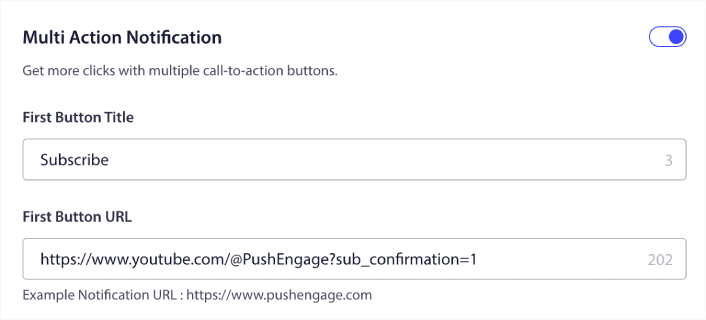
إذا لم تكن متأكدًا من كيفية القيام بذلك، فراجع هذا الدليل حول كيفية إضافة زر إلى إشعار دفع.
بعد ذلك، دعنا نتحقق من بعض أفكار الحملات الرائعة لإشعارات الدفع التي يمكنك استخدامها لتنمية قناة يوتيوب الخاصة بك.
رقم 1. تنبيهات الفيديو الجديد
في كل مرة تقوم فيها بتحميل فيديو جديد، يمكنك إرسال تنبيه فيديو جديد لمشتركي إشعارات الدفع الخاصة بك.
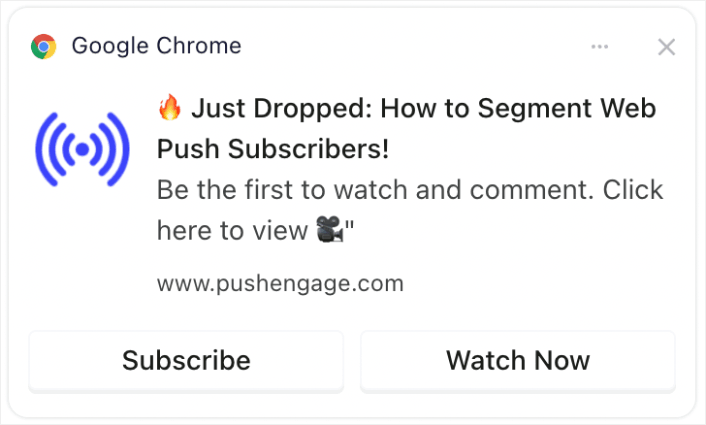
يمكن للتنبيهات في الوقت المناسب حول مقاطع الفيديو الجديدة أن تزيد بشكل كبير من المشاهدات الأولية، وهو أمر بالغ الأهمية لخوارزمية يوتيوب. يساعد ذلك في جذب الانتباه الفوري، مما يعزز فرصة التوصية بالفيديو للآخرين.
نصيحة احترافية: كلما قمت بتحميل مقاطع قصيرة أو مقاطع فيديو جديدة على يوتيوب، لا تستخدم أبدًا ميزة "إعلام المشتركين" في يوتيوب. إذا فعلت ذلك، سيرسل يوتيوب الفيديو حصريًا إلى المشتركين الأكثر نشاطًا لديك أولاً. بناءً على الاستجابة ومعدلات النقر، قد تقلل الخوارزمية من حركة المرور العضوية الخاصة بك إذا لم تحصل على استجابة رائعة في الساعات القليلة الأولى.
باستخدام مشتركي إشعارات الدفع عبر الويب والتطبيق، لا يزال بإمكانك إرسال حركة مرور إلى الفيديو الخاص بك وبهذه الطريقة، لا يؤثر ذلك على قرار الخوارزمية بنشر الفيديو الخاص بك لأشخاص جدد.
رقم 2. معاينات المحتوى الحصري
شارك مقتطفات أو معاينات لمقاطع الفيديو القادمة حصريًا لمشتركي إشعارات الدفع.
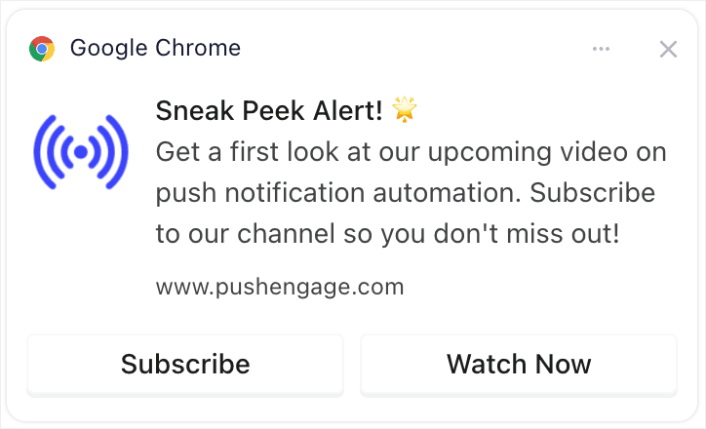
يمكن أن يؤدي مشاركة المعاينات أو المقتطفات الحصرية إلى بناء الترقب والإثارة. يمكن أن يؤدي هذا التفاعل إلى زيادة المشاركة والمناقشات حول المحتوى الخاص بك، مما يوسع نطاق وصولك.
رقم 3. الاحتفال بمعالم المشتركين
خلق الإثارة حول معالم القناة مثل الوصول إلى عدد معين من المشتركين.
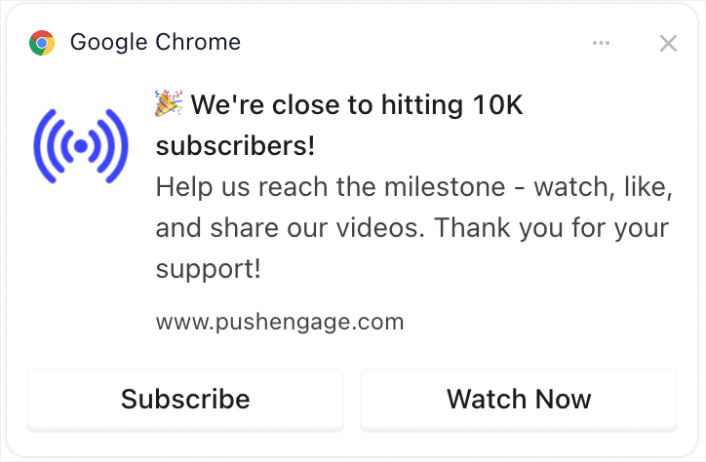
إشراك جمهورك في احتفالات المعالم يخلق شعورًا بالمجتمع. يمكن أن يشجع المزيد من الاشتراكات حيث يحب المشاهدون أن يكونوا جزءًا من قناة ناجحة ومتنامية.
رقم 4. إعلانات البث المباشر
إعلام المشتركين بالبث المباشر القادم أو جلسات الأسئلة والأجوبة.
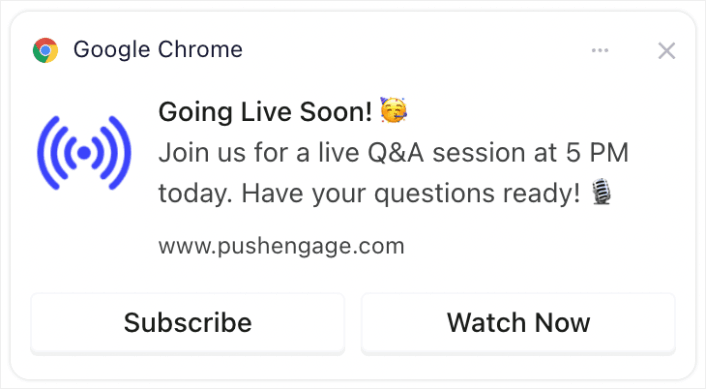
يضمن الإبلاغ عن البث المباشر تفاعلًا أعلى في الوقت الفعلي، وهو ما تقدره يوتيوب. يمكن أن يزيد من مشاهدات البث المباشر والتعليقات والتفاعلات.
رقم 5. أبرز التعاونات
الإعلان عن التعاون مع مستخدمي يوتيوب الآخرين أو العلامات التجارية أو المؤثرين.
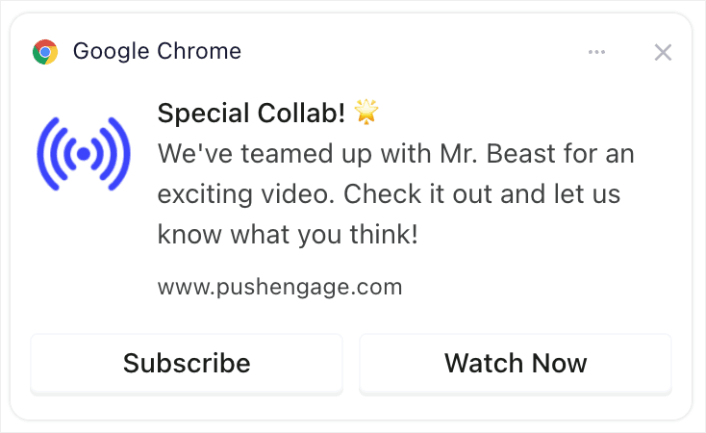
يمكن أن يستفيد الإعلان عن التعاون من قاعدة جماهير المعاونين، مما قد يجلب مشتركين جددًا إلى قناتك.
رقم 6. استطلاعات الرأي وتفاعل الجمهور
تفاعل مع المشتركين من خلال طلب مدخلاتهم حول مواضيع الفيديو المستقبلية أو ملاحظاتهم على المحتوى السابق.
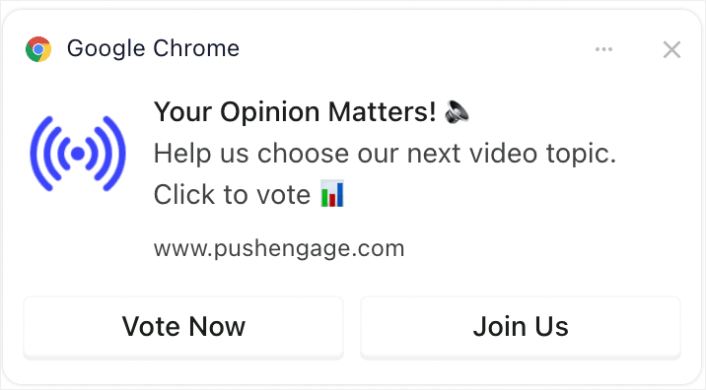
المحتوى التفاعلي مثل الاستطلاعات يبقي جمهورك منخرطًا ويمنحهم صوتًا، مما يعزز الولاء والمشاهدة المنتظمة. وإذا لم تقم بإجراء استطلاع من قبل، يمكنك الاطلاع على هذا الدليل لـ إنشاء استطلاع على ووردبريس.
رقم 7. عروض خاصة للمشتركين
قدم عروضًا خاصة أو مكافآت (مثل المحتوى القابل للتنزيل أو الوصول الحصري) للمشتركين.
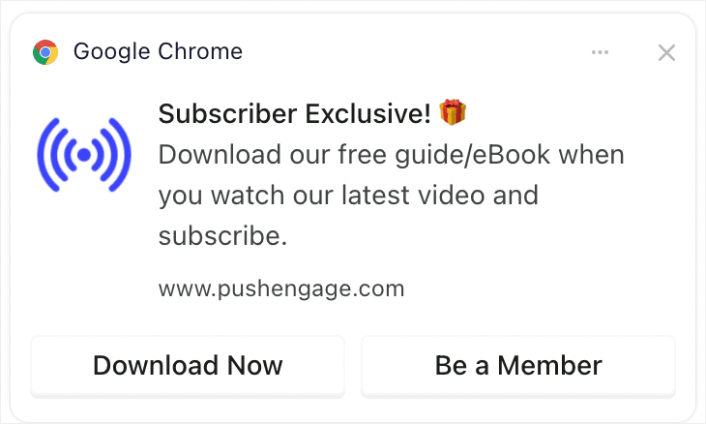
يمكن أن يكون تقديم عروض أو محتوى حصري حافزًا قويًا للمشاهدين للاشتراك والبقاء متفاعلين مع قناتك.
رقم 8. إشعارات الملخص
أرسل ملخصات أسبوعية أو شهرية لأكثر مقاطع الفيديو شيوعًا.
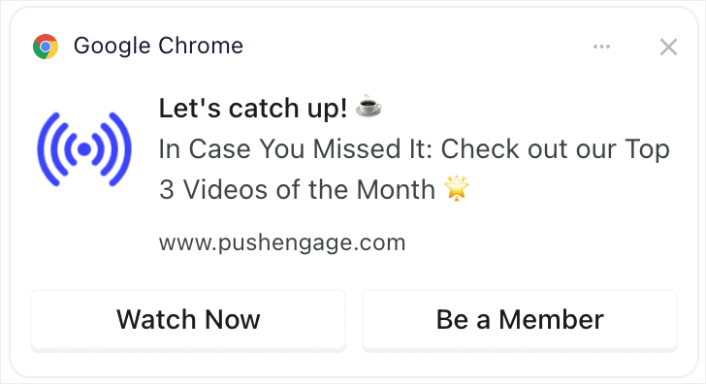
تذكير المشاهدين بأكثر محتوياتك شيوعًا أو حداثة يمكن أن يلفت انتباه أولئك الذين فاتهم، مما يزيد المشاهدات والتفاعل.
إذا كنت لا ترغب في إنشاء فيديو ملخص، فيمكنك ببساطة إنشاء منشور يسرد كل المحتوى الخاص بك الأخير وإرسال رابط إلى المنشور. أو، يمكنك إنشاء رابط على Linktree لإنشاء صفحة هبوط مؤقتة مع قائمة بجميع مقاطع الفيديو الأخيرة الخاصة بك.
رقم 9. لمحات من وراء الكواليس (BTS)
شارك محتوى من وراء الكواليس أو عملية إنشاء الفيديو.
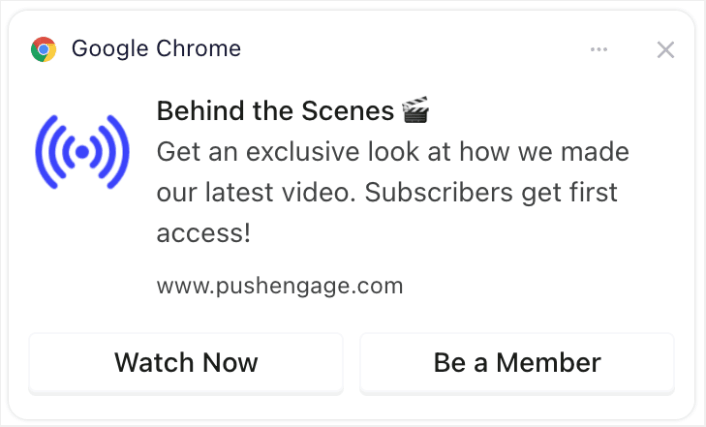
يمكن أن يؤدي تقديم لمحة من وراء الكواليس إلى تعميق اتصال المشاهدين بقناتك، مما يجعلهم أكثر عرضة للتفاعل مع محتواك ومشاركته.
رقم 10. الترويج للمحتوى الذي ينشئه المستخدم
شجع المشتركين على إنشاء محتوى خاص بهم متعلق بقناتك وقم بعرضه.
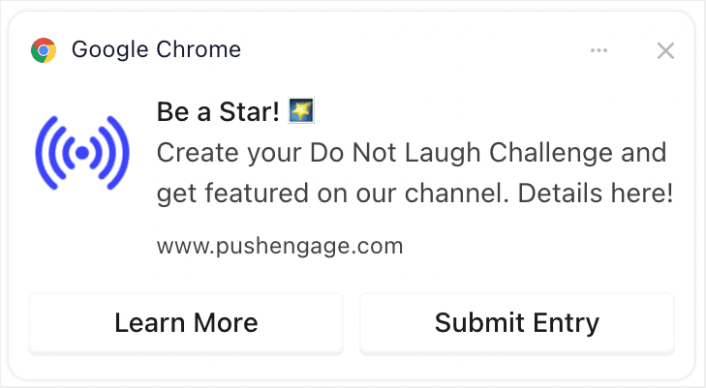
يمكن أن يؤدي تشجيع المشاهدين على إنشاء محتوى ذي صلة إلى بناء مجتمع وزيادة التفاعل، حيث يشعر المشاهدون بمزيد من الارتباط والتقدير. ومن السهل جدًا إنشاء نموذج في ووردبريس لجمع المشاركات من المشتركين لديك.
تحسين توقيت وتكرار الإشعارات
هناك شيء يسمى الكثير جدًا من الإشعارات الفورية.
يعتمد عدد الإشعارات الفورية التي يجب عليك إرسالها على مجال عملك. ومع ذلك، فإن أفضل ما يمكنك فعله هو إرسال إشعارين لعملائك كحد أقصى في اليوم. ولا يزيد عن 5 في الأسبوع.
متوسط إشعار واحد يوميًا يعمل بشكل أفضل.
ما لم يكن لديك شيء مهم حقًا لإخبار مشتركيك به، بالطبع:
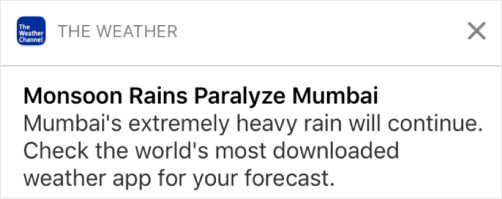
يمكن أن تبدو عدوانيًا للغاية وتزعج المشتركين لديك. هذه طريقة رائعة لخسارة مشتركي الإشعارات الفورية. لكن سيتعين عليك التواصل مع عملائك. وتحتاج إلى إرسال إشعارات ترويجية ومعاملات لهم.
تحقق من هذه المقالة حول عدد الإشعارات الفورية التي يجب عليك إرسالها للحصول على المزيد من النصائح.
يمكنك أيضًا جدولة إشعاراتك الفورية بطرق مختلفة.

من السهل جدًا جدولة الإشعارات الفورية لإرسالها:
- فورًا
- في تاريخ ووقت معينين
- كحدث متكرر
معرفة عدد الإشعارات التي يجب إرسالها ومتى يتم إرسال الإشعارات الفورية سيقلل من معدلات إلغاء الاشتراك لديك بشكل كبير.
نصيحة احترافية: إذا وصلت إلى نقطة لا يتفاعل فيها مشتركوك عبر الإشعارات الفورية معك، يمكنك إطلاق حملة إعادة استهداف لإعادة التفاعل معهم. إذا لم ينجح ذلك، يمكنك دائمًا تنظيف قائمة المشتركين لديك.
استهداف وتقسيم جمهورك
تؤدي الإشعارات الفورية المستهدفة إلى معدلات نقر أعلى ومعدلات إلغاء اشتراك أقل. يتيح لك التقسيم تقديم تجربة مخصصة لمشتركي الإشعارات الفورية على الويب. مع معظم خدمات وأدوات الإشعارات الفورية، تحتاج إلى كود مخصص لإنشاء شرائح.
الشرائح هي طريقة رائعة حقًا لإرسال حملات دفع مستهدفة. ويجب أن تكون جزءًا كبيرًا من استراتيجية التسويق عبر الإشعارات الفورية الخاصة بك. ولكن كيف تبدأ؟ ما أنواع الشرائح التي يجب أن تنشئها؟
كتبنا شرحًا مفصلاً في مقالتنا حول طرق تقسيم مشتركي إشعارات الدفع.
بشكل عام، هناك عدة أنواع مختلفة من الشرائح التي يمكنك إنشاؤها:
- الشرائح القائمة على المناسبات
- الشرائح السلوكية
- الشرائح الديناميكية
- الشرائح الجغرافية
- الشرائح الديموغرافية
... على سبيل المثال لا الحصر.
يمكنك أيضًا استخدام التقسيم بناءً على المناسبات لإرسال أنواع مختلفة من حملات الدفع المستهدفة. والأفضل من ذلك، يمكنك استخدام هذه الشرائح لإنشاء أدوات اشتراك على موقعك:

تسمح لك أداة إدارة الاشتراكات للزوار باختيار نوع إشعارات الدفع التي يرغبون في تلقيها منك.

ويمكنك حتى إنشاء نوافذ منبثقة لإشعارات الدفع تقوم تلقائيًا بتقسيم المشتركين لديك عند الاشتراك.
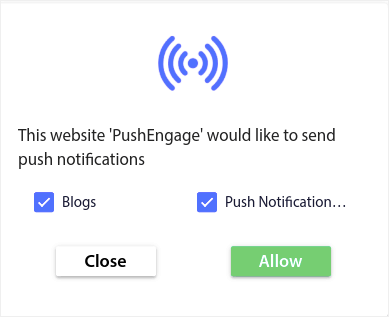
تسمح لك سمات المحتوى بإرسال محتوى ذي صلة فقط إلى المشتركين لديك. سيساعدك هذا على زيادة معدلات اشتراكك وحتى معدلات تفاعلك.
نصيحة احترافية: تذكر تنويع مواضيع المحتوى الخاص بك. يمكنك إنشاء خيارات متعددة للاشتراك في الإشعارات لاستهداف أنواع مختلفة من المستخدمين. يعد إنشاء خيارات مخصصة متعددة طريقة رائعة لزيادة مشتركي الإشعارات من المحتوى الحالي الخاص بك.
تتبع وتحليل حملات الإشعارات الفورية الخاصة بك
يعد اختبار التقسيم طريقة جيدة لجعل المشتركين في الإشعارات الفورية يبقون مشتركين. ولكن ما الذي يمكنك اختباره في الإشعارات الفورية؟
مقاييس الأداء الأكثر شيوعًا للإشعارات الفورية هي:
- معدل النقر: معدل النقر على إشعار فوري هو عدد المرات التي شاهد فيها المشتركون إشعارك الفوري ثم نقروا عليه.
- معدل المشاهدة: معدل مشاهدة الإشعار الفوري هو عدد المرات التي تلقى فيها المشترك إشعارك الفوري وشاهده قبل انتهاء صلاحيته.
- تحويلات الهدف: يمكنك تعيين أهداف لحملتك وإعداد تتبع الأهداف لحملاتك. تحويلات الهدف هي مقياس لعدد المرات التي حققت فيها هدفك.
لزيادة معدلات المشاهدة لديك، تريد استخدام صورة كبيرة في إشعاراتك الفورية. استخدام الصور في إشعاراتك يجعله جذابًا على الفور.

يمكنك أيضًا التجربة مع الكلمات القوية في عنوان إشعارك الفوري.
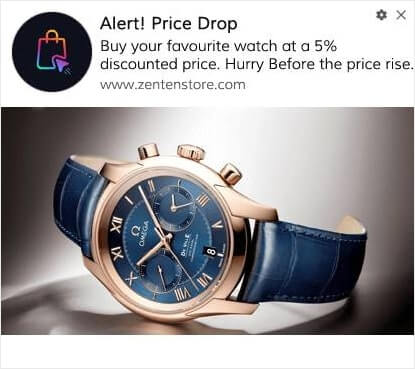
لذلك، يمكنك اختبار A/B للإشعارات بصور وبدون صور. يمكنك أيضًا اختبار معدلات المشاهدة عن طريق اختبار الإشعارات الفورية مع وبدون كلمات قوية في العنوان.
إذا كنت تتطلع إلى تحسين معدل النقر لديك، فأنت تريد التركيز على الرسالة الأساسية والعمل على جعلها ذات صلة فائقة. في الغالب، يتعلق هذا بأحد أمرين:
ولا يوجد شيء لاختبار A/B في هذا المجال. ولكن يمكنك اختبار معدلات النقر الخاصة بك باستخدام أزرار الدعوة إلى اتخاذ إجراء (CTA) في إشعاراتك الفورية. جرب اختبار A/B للإشعارات الفورية مع زر دعوة واحد أو بدون أزرار مقابل زرين للدعوة.
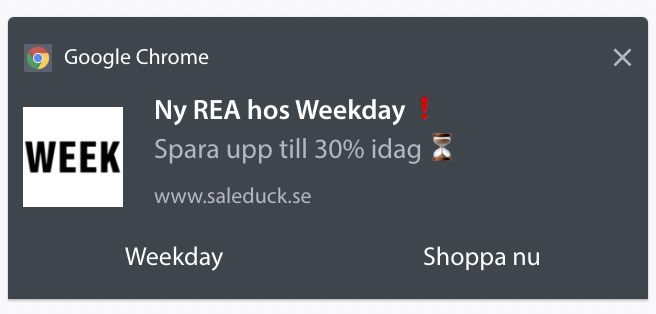
إذا لم تكن متأكدًا من كيفية إنشاء أزرار دعوة متعددة، فتحقق من هذه المقالة حول كيفية إضافة أزرار إلى إشعاراتك الفورية.
مع تحويلات الأهداف، فإن الأمر يتعلق في الغالب بإعداد إشعارات دفع التجارة الإلكترونية ذات الصلة. لذا، مرة أخرى، لا يوجد الكثير لاختبار الانقسام هنا. ومع ذلك، إذا كان بإمكانك تحسين إشعاراتك الفورية للحصول على نقرات أفضل لعرض جيد حقًا، فستزداد تحويلات أهدافك.
بمرور الوقت، يمكنك تحسين معدلات الاشتراك للنوافذ المنبثقة للإشعارات الفورية الخاصة بك. مع أي خدمة إشعارات فورية جيدة، تحصل على تحليلات اشتراك مفصلة.
كل مجموعة أدوات تحويل تحت الشمس تأتي مع تحليلات النوافذ المنبثقة الخاصة بها. لذا، لماذا يجب أن تكون النوافذ المنبثقة للإشعارات الفورية مختلفة؟
إليك ما هو ملحمي...
يمكنك الحصول على تحليلات ليس فقط لحملات الإشعارات الفورية الخاصة بك ولكن أيضًا لخيارات الاشتراك الخاصة بك!
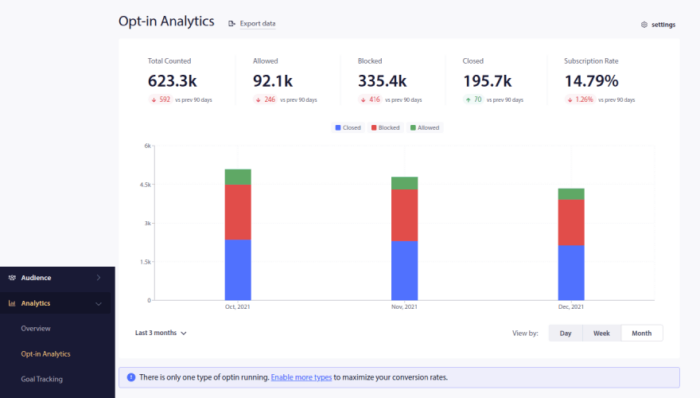
يعد الانتباه إلى تحليلات خيارات الاشتراك طريقة جيدة للحصول على اشتراكات إشعارات الدفع. يجب عليك أيضًا تنظيف قوائم المشتركين من وقت لآخر وإزالة أي مشترك يرفض ببساطة التفاعل مع حملاتك. بهذه الطريقة، تحصل على أرقام التفاعل الفعلية وتقوم فقط بإرسال إشعارات الدفع للمشتركين الذين يرغبون في سماع أخبارك.
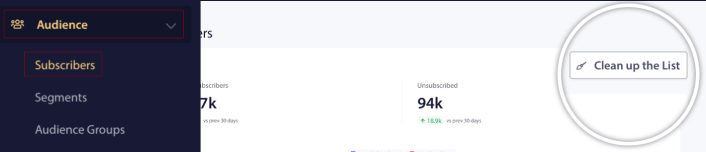
في الوقت نفسه، نوصي أيضًا بالحصول على ملاحظات من المشتركين حول حملات الإشعارات الفورية الخاصة بك.
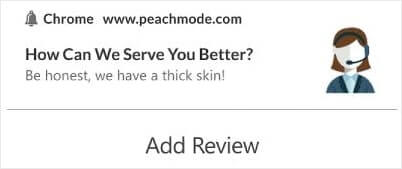
يمكنك إنشاء صفحة هبوط بسيطة مع نموذج لجمع المراجعات والملاحظات حول حملاتك.
كيفية زيادة مشتركي يوتيوب بشكل أسرع
الآن بعد أن عرفت كيفية الحصول على اشتراكات الإشعارات الفورية، فقد حان الوقت لتبدأ في بناء حملاتك. ابدأ بالاطلاع على المزيد من الأمثلة حول كيفية استخدام الإشعارات الفورية بفعالية:
- 21 أفضل أمثلة لرسائل الترحيب بالموقع يمكنك استخدامها
- 75 مثالاً ملحمياً لإشعارات الدفع يمكنك سرقتها الآن
- 15 مثالاً لنص إشعار فوري لإلهامك
- 7 أمثلة على نماذج اشتراك إشعارات الدفع ذات التحويل العالي (2022)
- 11 مثالاً إبداعياً لإشعارات الدفع يمكنك سرقتها الآن!
- كيفية إضافة إضافة إشعارات الويب لـ WordPress إلى موقعك
يجب عليك أيضًا الاطلاع على مقالتنا حول أفضل ممارسات إشعارات الدفع لتحقيق أقصى استفادة من حملات إشعارات الدفع الخاصة بك.
لكن لن يؤثر أي من هذا على علامتك التجارية ما لم تبدأ في إرسال إشعارات الدفع.
لذا، إذا لم تكن قد فعلت ذلك بالفعل، ابدأ مع PushEngage اليوم!


