هل تبحث عن طريقة بسيطة لتمكين وتعطيل إشعارات فايرفوكس؟
تساعدك إشعارات الدفع من المتصفح على البقاء على اتصال بالعلامات التجارية التي تحبها. ويمكنك اختيار تلقي إشعارات الدفع بسهولة تامة. ولكن كيف تبدأ في تلقي إشعارات الدفع من المتصفح؟
في هذا المقال، سنوضح لك خطوة بخطوة كيفية تمكين أو تعطيل إشعارات فايرفوكس.
يبدو جيدًا؟ دعنا نتعمق.
كيفية الحصول على إشعارات فايرفوكس من أي موقع
لنبدأ بالتحقق من كيفية تلقي إشعارات فايرفوكس من أي موقع.
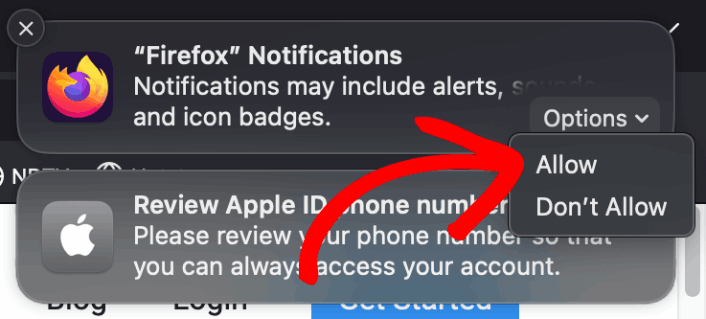
عند تثبيت فايرفوكس لأول مرة، ستظهر لك نافذة منبثقة للسماح أو رفض إشعارات الدفع عبر الويب على فايرفوكس. فقط انقر على Options » Allow لتلقي إشعارات فايرفوكس:
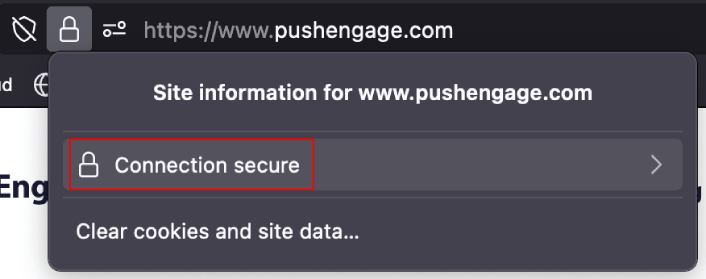
بشكل افتراضي، يقوم فايرفوكس بحظر خيارات إشعارات الدفع. لذلك، إذا كنت ترغب في الحصول على إشعارات فايرفوكس من موقع ما، فانتقل إلى شريط عنوان URL وانقر على رمز القفل. في القائمة المنسدلة، انقر على Connection Secure:
هنا، يمكنك تعيين الأذونات للموقع. انتقل إلى Permissions، ثم قم بالتمرير لأسفل إلى Send notifications، قم بإلغاء تحديد مربع Default، وانقر على Allow:
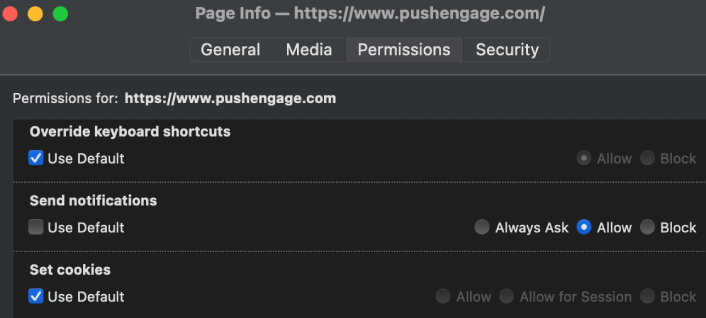
الآن، يمكنك الحصول على إشعارات فايرفوكس من هذا الموقع.
كيفية تمكين أو تعطيل إشعارات فايرفوكس
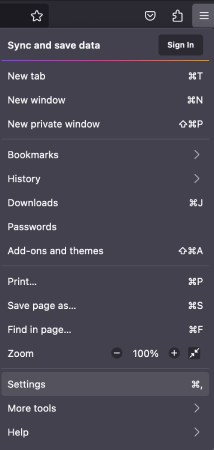
يحتوي فايرفوكس على إعدادات وتفضيلات مدمجة يمكنها تمكين أو تعطيل إشعارات الدفع. أسهل طريقة لتمكين أو تعطيل إشعارات فايرفوكس هي التوجه إلى شريط القائمة والانتقال إلى Settings:
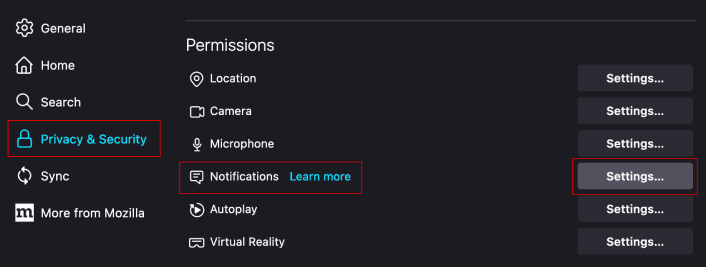
ثم، انتقل إلى Privacy & Security » Notifications » Settings:
هنا، يمكنك السماح أو رفض إشعارات الدفع من أي موقع ببساطة عن طريق تغيير الإذن بجوار اسم الموقع.
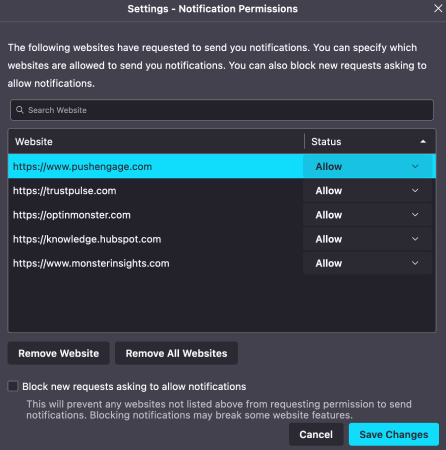
إذا كنت ترغب في تمكين إشعارات الدفع من فايرفوكس لموقع ما، فقم بتعيينه على Allow. إذا كنت لا تريد إشعارات من موقع ما، فقم بتعيين الإذن على Block.
يمكنك إزالة جميع الأذونات بالنقر على Remove All Websites. أو، إذا كنت ترغب في إزالة موقع واحد فقط من قائمة المواقع المعتمدة التي يمكنها إرسال إشعارات إليك، يمكنك أيضًا النقر على Remove Website.
ماذا تفعل بعد تمكين إشعارات الدفع من فايرفوكس
لمجرد أنك تحب المحتوى في إشعارات الدفع التي تتلقاها لا يعني أنه يجب عليك الاشتراك فيها. قبل الاشتراك في أي إشعارات دفع أخرى، يجب عليك مراجعة قواعد الامتثال للائحة العامة لحماية البيانات (GDPR) ومعرفة ما إذا كانت إشعارات الدفع الخاصة بك آمنة.
وإذا كنت تعتقد أن إشعارات Safari الفورية رائعة، فيجب عليك أيضًا الاطلاع على كيفية البدء في استخدام الإشعارات الفورية لعملك.
تعد إشعارات الدفع طريقة رائعة لزيادة قاعدة المعجبين الخاصة بك بشكل عضوي. ومن السهل حقاً إعداد حملات الدفع. أيضاً، إذا كنت جديداً في إشعارات الدفع، فيجب عليك الاطلاع على هذه الموارد الرائعة:
- كيفية إضافة أداة اشتراك في المدونة في ووردبريس
- كيفية الحصول على المزيد من حركة المرور إلى مدونة ووردبريس الخاصة بك (9 طرق سهلة)
- تكلفة إشعارات الدفع: هل هي مجانية حقًا؟ (تحليل الأسعار)
- كيفية زيادة معدل الاشتراك في إشعارات الدفع على الويب (7 طرق)
- كيفية استخدام أزرار الإجراءات في الإشعارات الفورية لمضاعفة النقرات
نوصي باستخدام PushEngage لإنشاء حملات إشعارات الدفع الخاصة بك. PushEngage هو البرنامج رقم 1 لإشعارات الدفع في السوق وستكون حملاتك في أيد أمينة.
لذا، إذا لم تكن قد فعلت ذلك بالفعل، فـابدأ مع PushEngage اليوم.


