
هل تريد أن تبدو إشعارات الدفع الخاصة بك جيدة مثل أدائها؟ تخصيص لون إشعار Android هو مكسب سريع يساعد علامتك التجارية على التميز في كل مرة تصل فيها إلى جمهورك، خاصة على الأجهزة المحمولة. إنها واحدة من تلك التفاصيل الصغيرة التي تحدث تأثيرًا كبيرًا عبر جميع جهودك في التفاعل.
أفضل جزء؟ يستغرق إعداده بضع دقائق فقط.
في هذا الدليل السريع، سنوضح لك كيفية تغيير لون إشعار Android لتطبيقك ببضع خطوات بسيطة فقط.
لنبدأ.
إرسال حملات إشعارات الدفع لتطبيقات Android للجوال الآن!
تعد إشعارات الدفع أداة تسويقية فعالة للغاية ومنخفضة التكلفة لمساعدتك على زيادة حركة المرور المتكررة والمشاركة والمبيعات تلقائيًا.
لماذا إضافة لون إشعار Android مخصص للتطبيقات
بالتأكيد! دعنا نقسمها بعبارات أبسط:
تخيل تطبيقك كشخصية في قصة. الآن، فكر في كيفية رغبتك في أن يتعرف الناس على هذه الشخصية في حشد. هذا هو المكان الذي تكون فيه ألوان إشعارات Android المخصصة مفيدة!
- مظهر العلامة التجارية: عندما تتطابق إشعارات تطبيقك مع ألوانه، فهذا يشبه ارتداء شخصيتك لزيها المميز. يجعلها قابلة للتعرف على الفور، مما يبني الثقة والولاء مع المستخدمين.
- التميز: في عالم مليء بالإشعارات، يجب أن تبرز إشعاراتك. تساعد الألوان المخصصة رسائلك على جذب الانتباه، مما يضمن ملاحظة المستخدمين لها بين بحر التحديثات.
- إسعاد المستخدمين: يحب الناس عندما تبدو الأشياء وكأنها صُنعت خصيصًا لهم. يمنح السماح للمستخدمين باختيار ألوان الإشعارات شعورًا بالتحكم والتخصيص. المستخدمون السعداء يعني المزيد من التفاعل مع تطبيقك.
- مساعدة الجميع: لا يرى الجميع الألوان بنفس الطريقة. من خلال تقديم خيارات ألوان مختلفة، فإنك تضمن أن يتمكن الجميع من اكتشاف وفهم إشعاراتك بسهولة، بغض النظر عن كيفية رؤيتهم للعالم.
- إرسال رسالة: يمكن للألوان أن تقول الكثير دون كلمات. على سبيل المثال، قد يشير اللون الأزرق الهادئ إلى شيء إعلامي، بينما قد يعني اللون الأحمر الجريء الحاجة إلى اتخاذ إجراء عاجل. الأمر أشبه بأن إشعاراتك تتحدث لغة يفهمها الجميع.
- البقاء في المقدمة: في متجر تطبيقات مزدحم، كل تفصيل صغير مهم. يوفر تقديم ألوان إشعارات مخصصة دليلًا على أنك تهتم بما يريده المستخدمون. يساعد تطبيقك على التألق أكثر من البقية.
لذلك، من خلال إضافة ألوان إشعارات مخصصة إلى تطبيق Android الخاص بك، فإنك لا تجعله يبدو جميلًا فحسب. أنت تنشئ اتصالًا أقوى مع المستخدمين، وتجعل تطبيقك أسهل في اكتشافه، وتمنحه تلك الميزة الإضافية في عالم التطبيقات التنافسي. بالإضافة إلى ذلك، فهو أسهل مما تعتقد في الإعداد ويمكن أن يحدث فرقًا كبيرًا في كيفية تفاعل الأشخاص مع تطبيقك.
كيفية إضافة لون إشعار دفع مخصص لنظام Android
هل تتكامل مع مساعد ترميز ذكاء اصطناعي؟ تعلم مهارات وكيل PushEngage مفتوحة المصدر Claude Code و Cursor وأي وكيل متوافق مع SKILL.md للاندماج وتصحيح هذا SDK. وبمجرد الشحن، يتيح خادم PushEngage MCP لنفس المساعد تشغيل حملاتك - الشرائح، والإرسالات، واختبارات A/B، والتقارير. هل تبني في Replit أو Lovable أو Bolt؟ تتضمن مجموعات ترميز الاهتزازات مفتوحة المصدر متجر عرض تجريبي جاهز، وبادئ Flutter، وعروض توضيحية بطلب واحد مع PushEngage مسبق التوصيل.
الآن بعد أن فهمنا ما يعنيه لون إشعار Android لتطبيقاتك ولماذا يجب عليك إضافته، دعنا نتحقق من كيفية إضافته بسهولة دون أي ترميز على الإطلاق.
الخطوة #1: اختيار خدمة إشعارات الدفع لتطبيق Android
إشعارات الدفع هي أداة تسويقية تساعدك على التواصل مع زوار الويب حتى بعد مغادرتهم لموقعك. يمكنك إرسال إشعارات مستهدفة لمشتركي الدفع الخاصين بك وحتى تخصيص إشعاراتك لشرائح عملاء مختلفة. ولكن أي خدمة إشعارات دفع لنظام أندرويد يجب أن تختار؟
نوصي باستخدام PushEngage لإرسال حملات إشعارات الدفع.

PushEngage هي أفضل خدمة إشعارات دفع في العالم. ونحن لا نتحدث فقط عن النسخة المجانية. إنها تتيح لك التواصل مع الزوار بعد مغادرتهم موقعك برسائل دفع مستهدفة.
PushEngage هو خيارنا الأول لخدمات وأدوات إشعارات الدفع لأنه:
- سهلة الاستخدام للغاية
- تحتوي على منشئ حملات مرئي مع قوالب معدة مسبقًا تتطلب القليل من الترميز أو لا تتطلب أي ترميز على الإطلاق للإعداد
- سهلة الإعداد بالكامل لـ حملات الإشعارات الفورية الآلية لأي نوع من المواقع
- مجهزة بالكامل بـ SDK لنظامي Android و iOS لتطوير ونشر وتحليل وإدارة حملات الإشعارات الفورية بسرعة
- مصممة بخيارات متعددة لإرسال إشعارات فورية مخصصة لمعدلات نقر أعلى
- مجهزة بـ تتبع الأهداف المخصص ومعلمات UTM والتحليلات المتقدمة
- تحتوي على خيارات قوية لـ اختبار A/B للإشعارات الفورية
وهذا بالكاد يخدش السطح. تحقق من القائمة الكاملة لـ ميزات PushEngage قبل المتابعة. الجزء الأكثر روعة في PushEngage هو أنها تحتوي على خطة مجانية دائمة يمكنك تجربتها قبل اتخاذ قرار الشراء.
نصيحة احترافية: تحقق من مقالتنا حول تحليل تكلفة الإشعارات الفورية قبل شراء أي خدمة.
الخطوة #2: إعداد إشعارات الدفع لتطبيق Android من PushEngage
حتى الآن، كان عليك استخدام SDKs هيكلية لإرسال إشعارات فورية للتطبيقات. المشكلة في استخدام هذه الـ SDKs هي أنها بسيطة للغاية.
نظريًا، يمكنك إرسال أي نوع من حملات الدفع لتطبيقات الهاتف المحمول بها. ولكن بعد ذلك، يتعين عليك أيضًا بناء:
- واجهة لإدارة حملاتك
- مجموعة أدوات تحليلية لتتبع أداء حملتك
- دعم أفضل للوسائط الغنية وروابط إعادة التوجيه داخل التطبيق (أو الروابط العميقة)
- عمليات للتنسيق بين فريقي التسويق والتطوير
كل ذلك من أجل إدخال قناة نمو واحدة. استخدام الأدوات القديمة لإرسال إشعارات الدفع لتطبيقات الهاتف المحمول أمر مرهق ومكلف ويستهلك الموارد ويستغرق وقتًا طويلاً. وبالطبع، يتطلب مهارات ترميز عميقة في فريقك لتطوير وإدارة كل ما تبنيه.
مع حزمة تطوير البرامج (SDK) الجديدة من PushEngage لنظام Android، يمكنك إرسال إشعارات تطبيقات الجوال باستخدام نفس البرنامج الموثوق به للحصول على معدلات تسليم رائعة. ولكننا قمنا ببناء عدة طبقات إضافية تجعل من السهل جدًا بناء عمليات تكامل مخصصة مع تطبيقك. ويدير PushEngage حزمة تطوير البرامج (SDK) بأكملها. لذلك، لن تضطر حتى إلى قضاء الكثير من الوقت والمال لإدارة عمليات التكامل الخاصة بك.
كل ما عليك فعله هو البناء!
يمكنك إرسال إشعارات البث مباشرة من لوحة تحكم PushEngage الخاصة بك بمجرد إعداد تطبيقك لإرسال إشعارات الدفع لتطبيقات الهاتف المحمول باستخدام حزمة تطوير البرامج (SDK) الخاصة بـ PushEngage. نعم، لا يزال يتعين عليك إضافة كود إلى تطبيقك وتطوير الموصلات بين تطبيقك وواجهة برمجة تطبيقات PushEngage. ولكن بمجرد الانتهاء من ذلك، يمكنك بسهولة إنشاء حملات دفع لتطبيقات الهاتف المحمول من واجهة برنامج مُعدة مسبقًا تأتي أيضًا مع:
- أنواع حملات دفع جذابة للغاية
- قوالب حملات مثبتة ذات معدلات تحويل عالية
- حملات آلية للترويج لمحتواك كلما نشرت
- خيارات استهداف وجدولة حملات متعددة
- حملات الدفع عبر الويب كقناة نمو تكميلية
- زيادة الاحتفاظ بالجمهور باستخدام التخصيص القائم على البيانات
- تتبع الأهداف وتحليلات متقدمة
- اختبار A/B ذكي
- مدير نجاح مخصص
وغيرها الكثير. لقد أزلنا للتو عبء تطوير حملات إشعارات تطبيقات الجوال لنظام Android لتطبيقك.
الخطوة #3: إضافة أو تعديل لون إشعار Android الخاص بك
يمكنك بسهولة تعيين لون مخصص لإشعارات الدفع لتطبيقات أندرويد للجوال. ارجع إلى لوحة تحكم PushEngage وانتقل إلى الحملات » البث وانقر على إنشاء بث دفع جديد.

ضمن خيارات أندرويد، انتقل إلى لون التمييز:
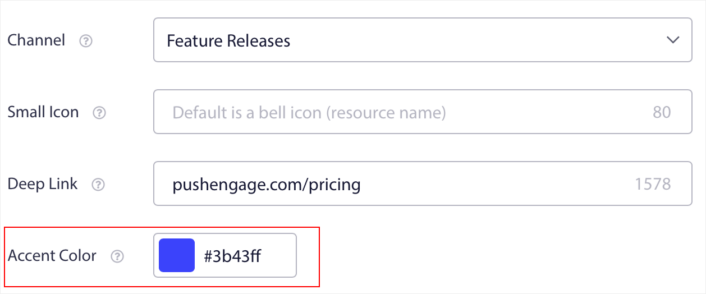
يمكنك استخدام رمز RGB أو Hex لأي لون تمييز تريده. في كل مرة ترسل فيها إشعارًا، سيظهر لون إشعار أندرويد الذي تحدده هنا في النص الخاص بـ أزرار الدعوة إلى اتخاذ إجراء والأيقونة الصغيرة.
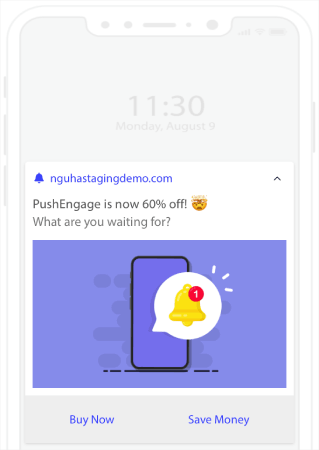
بمعنى آخر، يمكنك الحفاظ على إرشادات تصميم علامتك التجارية بسهولة تامة عندما ترسل إشعارات دفع لنظام أندرويد. وكل ذلك، من واجهة سهلة الاستخدام لن تضطر إلى إدارتها أبدًا!
والجزء الأروع هو أن حتى مستخدمينا المجانيين سيحصلون على وصول إلى بعض القوالب المجانية. بالطبع، يمكنك دائمًا ترقية حساب PushEngage الخاص بك
لنقم بإنشاء حملة إشعارات دفع ترحيبية الآن. توجه إلى لوحة تحكم PushEngage الخاصة بك وانتقل إلى الحملة »
ماذا تفعل بعد إضافة لون إشعار Android
الآن بعد أن عرفت كيفية إضافة لون إشعار أندرويد، فقد حان الوقت لتبدأ في إنشاء حملاتك الخاصة. ولكن قبل أن تبدأ بالحملات، يجب عليك دراسة بعض أمثلة إشعارات الدفع الرائعة أولاً.
وإذا كنت جديدًا على إشعارات الدفع، فيجب عليك الاطلاع على مقالتنا حول أفضل ممارسات إشعارات الدفع قبل البدء في إنشاء الحملات. تتضمن بعض أفضل الممارسات التي نوصي بها بنشاط ما يلي:
- عزز النقرات بالفضول
- خصص كل إشعار دفع
- تميز بالوسائط الغنية
- أعد تنشيط المشتركين الخاملين في الإشعارات
- أبقِ العملاء على اطلاع
- استخدم الرموز التعبيرية أينما استطعت
- اخلق شعوراً بالإلحاح
نوصي باستخدام PushEngage لإنشاء حملات إشعارات الدفع الخاصة بك. PushEngage هو البرنامج رقم 1 لإشعارات الدفع في السوق وستكون حملاتك في أيد أمينة.
لذا، إذا لم تكن قد فعلت ذلك بالفعل، فـابدأ مع PushEngage اليوم.


