هل تبحث عن دليل مفصل خطوة بخطوة لإنشاء إشعارات دفع خاصة بالجمعة السوداء تحقق التحويلات؟
بالتأكيد، يمكنك إرسال بث إشعارات دفع بسيط. ولكن هل سينجح ذلك؟ لقد توصلنا إلى عملية قوية لمساعدتك في تحقيق المزيد من المبيعات خلال موسم الأعياد. وقد اختبرناها عدة مرات مع علامات تجارية متعددة.
في هذه المقالة، سنغطي كيفية إنشاء إشعارات دفع لبيع الجمعة السوداء من PushEngage. وكيف يمكنك فعل الشيء نفسه أيضًا. سنتحقق مما تحتاجه للبدء، وكيف ستنشئ الحملات، وما سيبدو عليه الجدول الزمني المثالي.
يبدو جيدًا؟ دعنا نتعمق.
قبل البدء بإشعارات دفع الجمعة السوداء
إشعارات الدفع هي أداة تسويقية تساعدك على التواصل مع زوار الويب حتى بعد مغادرتهم لموقعك. يمكنك إرسال إشعارات مستهدفة لمشتركي الدفع الخاص بك وحتى تخصيص إشعاراتك لشرائح عملاء مختلفة. ولكن أي خدمة إشعارات دفع يجب أن تختار؟
نوصي باستخدام PushEngage لإرسال حملات إشعارات الدفع.

PushEngage هي أفضل خدمة إشعارات دفع في العالم. ونحن لا نتحدث فقط عن النسخة المجانية. إنها تتيح لك التواصل مع الزوار بعد مغادرتهم موقعك برسائل دفع مستهدفة.
PushEngage هو خيارنا الأول لخدمات وأدوات إشعارات الدفع لأنه:
- سهل الاستخدام للغاية
- فعال على مواقع HTTP و HTTPS
- يأتي مع مُنشئ مرئي يتطلب القليل من الترميز أو لا يتطلب أي ترميز للإعداد
- قم بإعداد حملات إشعارات الدفع الآلية بالكامل بسهولة لأي نوع من المواقع
- يحتوي على خيارات متعددة لإرسال إشعارات دفع مخصصة لمعدلات نقر أعلى
- مجهز بتتبع الأهداف المخصصة ومعلمات UTM والتحليلات المتقدمة
وهذا بالكاد يخدش السطح. تحقق من القائمة الكاملة لـ ميزات PushEngage قبل المتابعة. الجزء الأكثر روعة في PushEngage هو أنها تحتوي على خطة مجانية دائمة يمكنك تجربتها قبل اتخاذ قرار الشراء.
نصيحة احترافية: اطلع على مقالتنا حول تحليل تكلفة إشعارات الدفع قبل شراء أي خدمة.
بمجرد الانتهاء من إنشاء حسابك، توجه إلى لوحة تحكم PushEngage واتبع الخطوات:

انقر على إعدادات الموقع » تفاصيل الموقع وانقر على زر انقر هنا للحصول على تعليمات الإعداد:

انقر على علامة التبويب WordPress وانقر على زر تثبيت إضافة PushEngage لـ WordPress لتثبيت الإضافة على موقعك.

الجزء الرائع هنا: عندما أنشأت حساب PushEngage الخاص بك، قمت بالفعل بمزامنة موقعك مع حساب PushEngage الخاص بك. لذا، انقر على رابط التثبيت في لوحة تحكم PushEngage لتثبيت إضافة PushEngage WordPress تلقائيًا على موقعك.
وهكذا تكون قد انتهيت! لقد قمت بإعداد إضافة ووردبريس لإشعارات الويب بنجاح على موقعك. لا تحتاج إلى تسجيل الدخول إلى لوحة تحكم ووردبريس الخاصة بك على الإطلاق. للحصول على دليل أكثر تفصيلاً، تحقق من مقالتنا حول كيفية تثبيت إشعارات الويب على ووردبريس.
قبل أن تبدأ في إنشاء إشعارات دفع للجمعة السوداء، يجب عليك أيضًا الاطلاع على هذه الموارد لمساعدتك في البدء.
- كيفية إضافة مكون إضافي لإشعارات الويب لـ WordPress إلى موقعك
- كيفية إضافة أيقونة إشعار الدفع الخاصة بك (الطريقة السهلة)
- 7 من أفضل ممارسات الإشعارات الفورية للحصول على زيارات فورية
- كيفية تمكين خيارات الخطوة الواحدة للاشتراك في إشعارات الدفع
- [إعلان] PushEngage لديها الآن تجميع متقدم للجمهور
أوصي بشدة باستخدام هذه الموارد للبدء مع PushEngage بسرعة.
كيفية إنشاء حملة إشعارات الدفع الخاصة بك
الآن بعد أن أصبح لدينا فهم أساسي لكيفية عمل PushEngage، دعنا ننشئ حملتنا. حاليًا، يقدم PushEngage فقط ميزة تجميع الجمهور لـ بث الإشعارات.
لذلك، في لوحة تحكم PushEngage الخاصة بك، انتقل إلى الحملة » بث الإشعارات لإنشاء إشعارات الدفع الخاصة بك.

بعد ذلك، اتبع عمليتنا خطوة بخطوة لإنشاء بيع قوي للجمعة السوداء. إذا اتبعت كل خطوة، فيجب أن تحصل على إشعارات دفع قوية مثل هذه:

الخطوة #1: صياغة محتوى إشعار الدفع الخاص بك
سيشمل محتوى إشعار الدفع الخاص بك:
- عنوان الإشعار
- رسالة الإشعار
- رابط لإعادة التوجيه إليه
- صورة كبيرة للإشعار
- أزرار الدعوة إلى اتخاذ إجراء
- حد انتهاء صلاحية الإشعار
ابدأ بالمحتوى الأساسي لإشعارك أولاً:
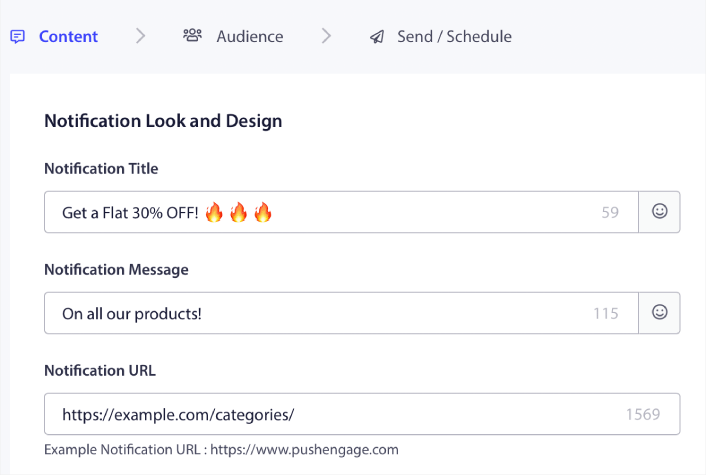
لاحظ استخدام الرموز التعبيرية في عنوان الإشعار. نوصي باستخدام الرموز التعبيرية في العنوان والرسالة لجميع إشعارات الدفع الخاصة بك للحصول على معدلات فتح أعلى. يمكنك اختبار إشعاراتك A/B أيضًا للحصول على أداء أفضل.
الخطوة #2: إضافة صورة كبيرة إلى إشعارك
من الصعب التميز بين مجموعة من الإشعارات في درج الإشعارات. لهذا السبب تحتاج إلى صورة كبيرة لجعل إشعاراتك تبرز:
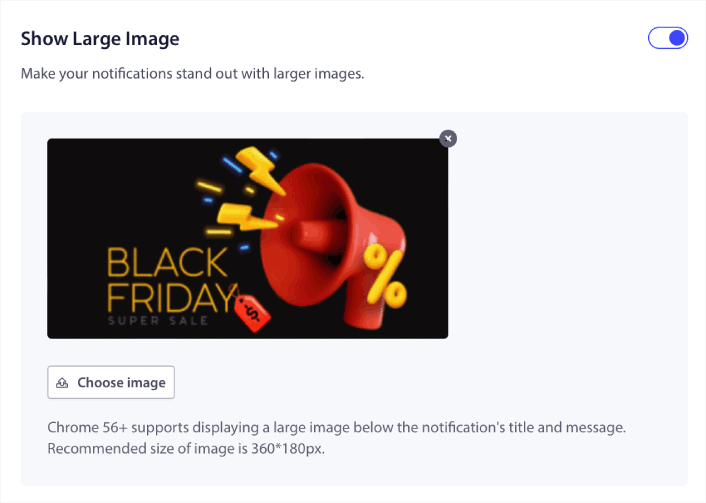
يمكنك استخدام تنسيقات PNG و JPEG للصور.
الخطوة #3: إضافة عبارات تحث المستخدم على اتخاذ إجراء (CTAs) لزيادة معدلات النقر
لقد رأينا أن استخدام أزرار مخصصة للدعوة إلى اتخاذ إجراء يزيد من معدلات النقر على إشعاراتك. لذلك، نوصي بشدة باستخدام خيار إشعار الإجراءات المتعددة لإنشاء دعوة مخصصة لاتخاذ إجراء:
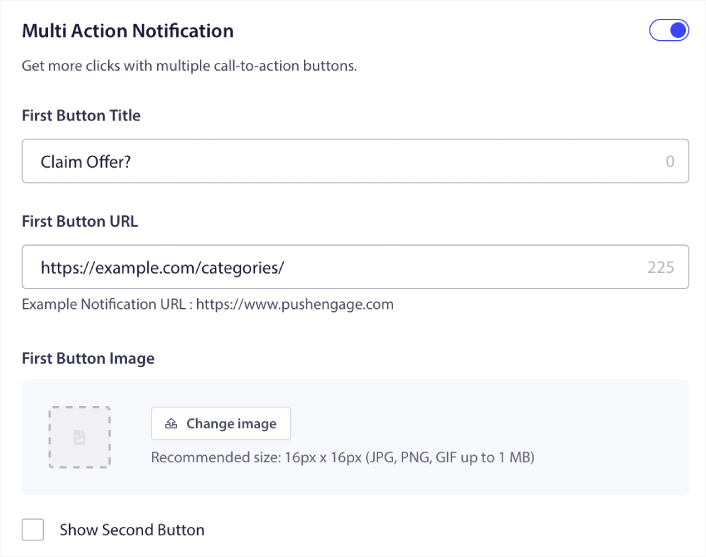
يمكنك إضافة ما يصل إلى اتنين من عبارات الحث على اتخاذ إجراء. إذا أردت، يمكنك إنشاء اختبار انقسامي بعبارة واحدة أو اثنتين. في تجربتنا، من الأفضل عادةً استخدام عبارات متعددة لاتخاذ إجراء ما لم تكن تركز بشكل كبير على إجراء واحد فقط.
هناك شيء واحد تريد توخي الحذر بشأنه وهو حدود أحرف إشعارات الدفع. كل شيء في إشعارات الدفع له حد أحرف بناءً على متصفح جهاز المشترك والجهاز. إذا كانت إشعاراتك مطولة جدًا، فلن تظهر بالطريقة الصحيحة.
الخطوة #4: تحديد مدة الإشعار
مدة الإشعار هي حد زمني تنتهي صلاحية إشعار الدفع الخاص بك بعده. بعد انتهاء الصلاحية، لن يتمكن المشترك من رؤية الإشعار حتى لو تم تسليمه إليه.
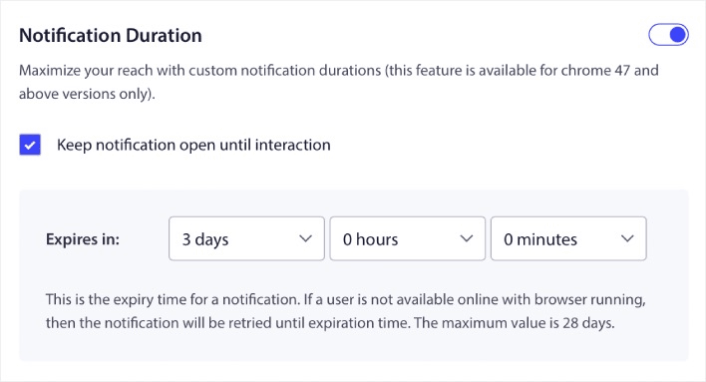
يعد تحديد مدة الإشعار ممارسة رائعة لجميع المبيعات. بهذه الطريقة، لن يغرق المشتركون لديك بالكثير من الإشعارات.
نصيحة احترافية: تأكد من تعيين المدة الصحيحة لبيع خاطف. إذا نقر المشتركون لديك على عرض انتهت صلاحيته بالفعل، فسيكونون غير راضين للغاية.
الخطوة #5: تحديد مجموعة الجمهور الخاصة بك
الآن بعد أن أصبح المحتوى الخاص بك جاهزًا، فقد حان الوقت للعثور على الجمهور المناسب لإشعاراتك.
كيفية إرسال إشعارك إلى جميع المشتركين
نريد أقصى وصول لـ 3 إشعارات:
- إعلان مبكر عن الجمعة السوداء
- تخفيضات الجمعة السوداء السريعة
- تخفيضات الاثنين السيبراني
لذلك، نرسل هذه الإشعارات الثلاثة إلى الجميع. في علامة التبويب الجمهور، حدد إرسال إلى جميع المشتركين:

كيفية إعادة استهداف المشتركين الذين لم ينقروا على البث إلى الجميع
إذا لم تكن ترسل الإشعار إلى جميع المشتركين، فستحتاج إلى إنشاء مجموعة جمهور.
انتقل إلى الجمهور » مجموعات الجمهور وانقر فوق إنشاء مجموعة جمهور جديدة:
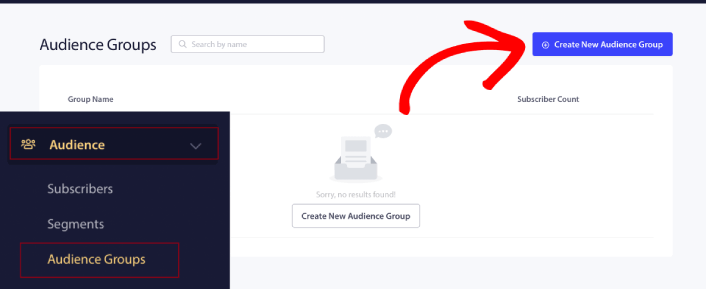
لاستهداف المشتركين الذين لم ينقروا على آخر إشعار، ستحتاج إلى التصفية حسب تاريخ آخر نقرة:
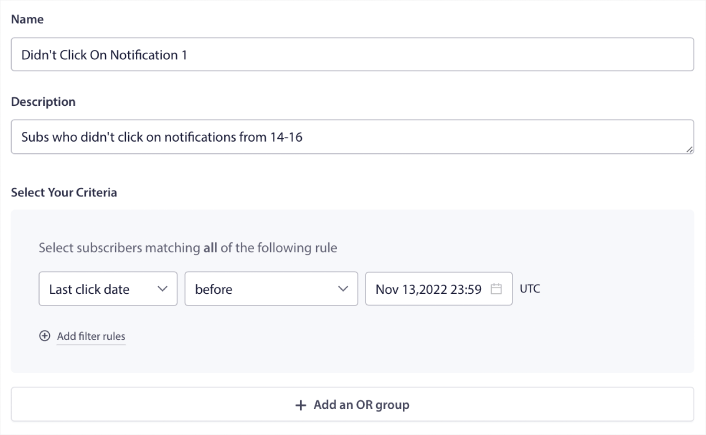
قم بالتصفية حسب تاريخ آخر نقرة قبل التاريخ الذي أرسلت فيه إشعارك السابق. لذا، إذا أرسلت آخر إشعار دفع في 14 نوفمبر، فقم بالتصفية للمشتركين الذين نقروا على الإشعارات فقط قبل 13 نوفمبر منتصف الليل.
ملاحظة: على عكس حملة البريد الإلكتروني، لا يمكنك فعليًا التصفية حسب نسبة النقر إلى الظهور على آخر إشعار. أقرب تقريب هو التصفية للنقرات في نطاق زمني.
عند الانتهاء، انقر فوق حفظ الإشعار.
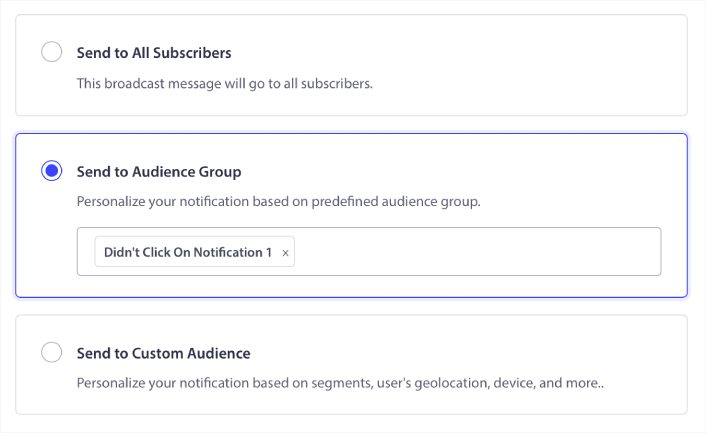
بعد ذلك، عد إلى بث إشعارات الدفع الخاصة بك وحدد إرسال إلى مجموعة جمهور. من القائمة المنسدلة، حدد مجموعتك:
كيفية إعادة استهداف المشتركين الذين نقروا على البث إلى الجميع
إذا كنت ترغب في استهداف المشتركين الذين نقروا على إشعارك الأخير، يمكنك إنشاء مجموعة جمهور أخرى.
قم بتصفية المشتركين حسب تاريخ آخر نقرة بعد التاريخ الذي أرسلت فيه إشعارك السابق وقبل التاريخ الذي تريد إرسال إشعارك التالي فيه:
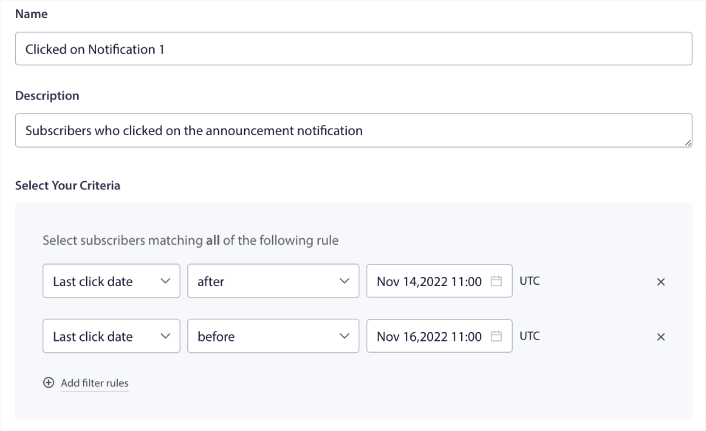
يمكنك إضافة معايير و إلى عامل التصفية الخاص بك عن طريق النقر فوق إضافة قواعد التصفية. عامل تصفية مثل هذا رائع لإشعارات الدفع للبيع المتقاطع.
الخطوة #6: جدولة إشعار الدفع الخاص بك
في علامة التبويب جدولة، حدد بدء الإرسال في يوم ووقت معين للحصول على خيارات جدولة دقيقة.
نحن نرسل الإشعار في الساعة 11:00 صباحًا. نظرًا لأن إشعارات الدفع عبر المتصفح تظهر بغض النظر عن وقت إرسال الإشعار فعليًا، يمكنك إرساله حتى قبل ذلك إذا أردت.
نظرًا لأن إعداد المنطقة الزمنية الافتراضي الخاص بي ليس في EST، فأنا أستخدم خيار إرسال الإشعارات في المنطقة الزمنية للمشتركين:
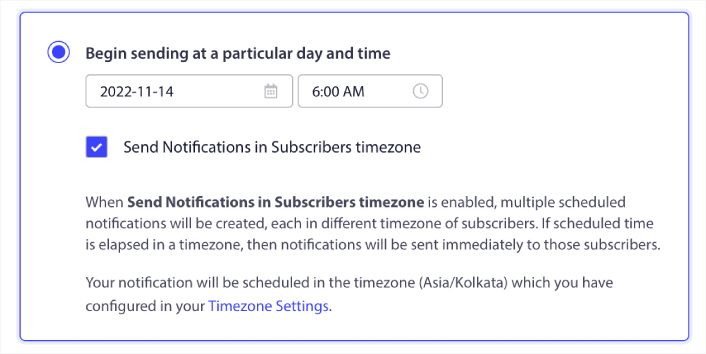
لا تنس اختبار إشعاراتك بالنقر فوق الزر اختبار الإشعار. عند الانتهاء، انقر فوق جدولة الإشعار.
ما هو الجدول الزمني المثالي لإشعارات الدفع في الجمعة السوداء
لا يوجد جدول زمني صحيح أو خاطئ واحد لحملات العطلات. لكننا نتبع جدولًا زمنيًا صارمًا للغاية وهو يعمل:
- 3 إشعارات لبيع مبكر في الجمعة السوداء
- 1 إشعار للجمعة السوداء
- 1 إشعار ليوم السبت للأعمال الصغيرة
- 1 إشعار لاثنين الإنترنت
- 1 إشعار لبيع اثنين الإنترنت الممتد
وإعادة استهداف إشعارات الدفع لاستهداف المشتركين الذين نقروا عليها أو لم ينقروا عليها. أخبرنا كيف يعمل ذلك معك. في غضون ذلك، تحقق من هذه الموارد:
- كيفية زيادة النقرات على إشعارات الدفع الخاصة بك بالفضول
- كيفية تخصيص كل إشعار دفع
- كيفية التميز بالوسائط الغنية في إشعارات الدفع الخاصة بك
- كيفية إعادة تنشيط المشتركين الخاملين في إشعارات الدفع
- كيفية استخدام إشعارات الدفع لإبقاء العملاء على اطلاع
- كيفية استخدام الرموز التعبيرية في إشعارات الدفع الخاصة بك لزيادة معدلات النقر
- كيفية زيادة التحويلات عن طريق خلق شعور بالإلحاح
وإذا لم تكن قد فعلت ذلك بالفعل، ابدأ مع PushEngage اليوم.


