مرحباً، يا مستخدمي Engagelings.
أخبار مثيرة: لقد أنشأنا للتو تكاملاً مع WooCommerce يجعل من السهل للغاية إطلاق حملات التجارة الإلكترونية وإدارتها وتتبعها وتحسينها لأي موقع WooCommerce.
يسمح لك كل مكون إضافي تقريبًا للإشعارات الفورية بإطلاق حملات التجارة الإلكترونية. لذا، ما الذي يميز هذا التكامل مع WooCommerce؟ حسنًا، مع هذا التكامل القوي الجديد لـ PushEngage، يمكنك الآن:
- إطلاق الحملات بسرعة بدون أي برمجة. لا حاجة لواجهات برمجة التطبيقات، فقط أشر وانقر.
- تشغيل حملات التخلي عن التصفح والسلة ببضع نقرات مع حملات المشغلات المعدة مسبقًا.
- إرسال حملات دفع مخصصة مع الشرائح التي ينشئها المكون الإضافي الخاص بنا تلقائيًا من فئات المنتجات.
وهذا ليس كل شيء. في الأشهر القادمة، نخطط لإضافة قوالب حملات التجارة الإلكترونية إلى مكتبة القوالب الواسعة لدينا بالفعل حتى تتمكن ببساطة من تعديل بعض الإشعارات والإطلاق بشكل أسرع!
على السطح، يبدو الأمر كتحديث بسيط. لكنه ليس كذلك. هناك الكثير مما يمكن استكشافه. لقد جعلناها أيضًا سهلة الاستخدام للغاية. لقد بذلنا الكثير من الجهد في هذا الترقية ونعتقد أنك ستحبها.
ملاحظة: تكامل WooCommerce الخاص بنا ليس إضافة مدفوعة. نحن نضيف تكاملات لتجربة PushEngage الخاصة بك مجانًا تمامًا. لإرسال حملات التجارة الإلكترونية، ستحتاج إلى خطة النمو أو أعلى. لذا، إذا لم تكن بالفعل على خطة النمو، فانتقل واحصل عليها الآن!
دعنا نتعمق.
لماذا يجب أن تهتم بتكامل WooCommerce الخاص بنا؟
يمكن أن يكون إطلاق حملات الدفع للتجارة الإلكترونية أمرًا مزعجًا. هناك الكثير من التفاصيل التي يجب عليك الاهتمام بها يدويًا مثل المتغيرات والعلامات التي تساعد في تشغيل الحملات. وبعد ذلك، سيتعين عليك إدراج التعليمات البرمجية يدويًا في تعليمات موقعك دون إتلافها.
ولكن إشعارات دفع التجارة الإلكترونية هي أدوات قوية بشكل لا يصدق لزيادة إيراداتك و متوسط قيمة الطلب بتكاليف منخفضة جدًا. ما لم تكن بحاجة إلى توظيف مطور للقيام بذلك نيابة عنك، بالطبع.
لذلك، قمنا ببناء تكامل WooCommerce حتى لا تحتاج إلى مطور لدمج واجهة برمجة التطبيقات الخاصة بنا في متجر WooCommerce الخاص بك بعد الآن. يمكن لأي شخص إنشاء وإطلاق حملات دفع التجارة الإلكترونية الآن.
لماذا أضفنا تكامل WooCommerce إلى PushEngage؟
لطالما حاول مطورونا في PushEngage بناء منتج مخصص للشركات الصغيرة التي لا تملك فريق تطوير كبير.
في السابق، أطلقنا تكاملًا مع WPCode للسماح لك بإطلاق حملات التجارة الإلكترونية باستخدام مقتطفات التعليمات البرمجية المعدة مسبقًا. مع مقتطفات التعليمات البرمجية الخاصة بنا في مكتبة WPCode، يمكننا الآن تقديم خيار إطلاق حملات دفع التجارة الإلكترونية ببضع نقرات بسيطة. وهذا يشمل:
- حملات عروض الترحيب
- حملات التخلي عن سلة التسوق
- حملات التخلي عن النماذج
- حملات التخلي عن التصفح
- حملات البيع المتقاطع
والمزيد. ناهيك عن أنه يمكنك أيضًا إعداد تتبع الأهداف لحملات الإشعارات الفورية الخاصة بك ببضع نقرات أيضًا. يمكنك حتى استخدام تكامل WPCode لإرسال إشعارات دفع التجارة الإلكترونية لمنصات التجارة الإلكترونية الأخرى مثل Easy Digital Downloads.
يعد تكامل WPCode رائعًا للحملات المخصصة حيث يمكنك تعديل الكود يدويًا حسب الحاجة. يمنحك تحكمًا لا يصدق في كود التكامل مع منحك قالبًا بسيطًا للتعديل بحيث تكون عمليتك أسرع وأبسط بكثير.
ولكن بالطبع، قد لا ترغب في تعديل الكود على الإطلاق. ماذا تفعل إذا كنت ترغب فقط في إطلاق زوج حملات بسيط للتخلي عن التصفح والسلة لاستعادة المبيعات المفقودة دون أي من الميزات الإضافية الرائعة؟
الآن، يمكنك استخدام تكامل WooCommerce السلس لدينا للقيام بذلك بالضبط!
كيفية إعداد حملات WooCommerce للإشعارات الفورية
من السهل جدًا إطلاق حملات WooCommerce للإشعارات الفورية الآن. إليك فيديو تعليمي سريع لمساعدتك على البدء:
أو، إذا كنت تفضل التعليمات المكتوبة خطوة بخطوة، يمكنك ببساطة المتابعة.
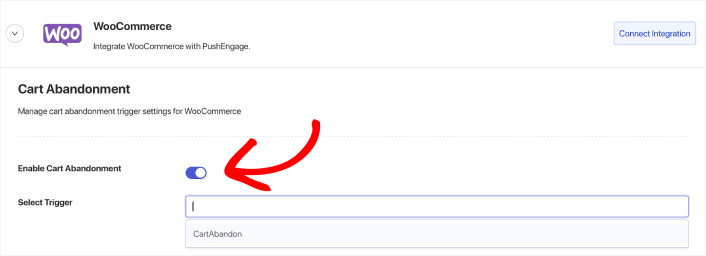
انتقل إلى الإعدادات » التكاملات » WooCommerce وقم بإعداد التكامل بنقرة واحدة عن طريق النقر على زر ربط التكامل. بعد ذلك، قم ببساطة بتمكين الحملة عن طريق تبديل زر تمكين التخلي عن سلة التسوق المحدد واختيار المشغل من القائمة المنسدلة تحديد المشغل.
ينطبق الشيء نفسه على حملة التخلي عن التصفح الخاصة بك. قم ببساطة بإنشاء المشغل ثم قم بتنشيط الحملة عن طريق تبديل زر تمكين التخلي عن سلة التسوق المحدد واختيار المشغل من القائمة المنسدلة تحديد المشغل.
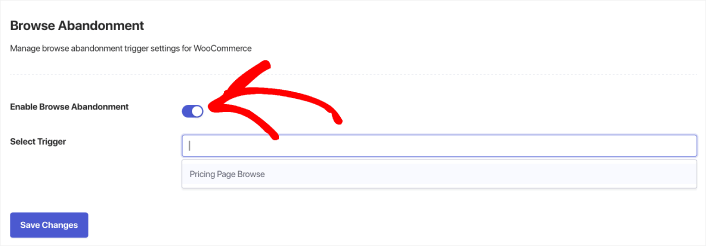
إذا لم يكن لديك حملة تخلي عن التصفح أو حملة تخلي عن عربة التسوق مُعدة، يمكنك المتابعة والقيام بذلك الآن.
مع أي مكون إضافي آخر لإشعارات WooCommerce، ستحتاج إلى مطور لإنشاء حملات التجارة الإلكترونية. لكن PushEngage يأتي مع تكامل مباشر لـ WooCommerce. كل ما عليك فعله هو إنشاء حملة جديدة ضمن المشغلات.
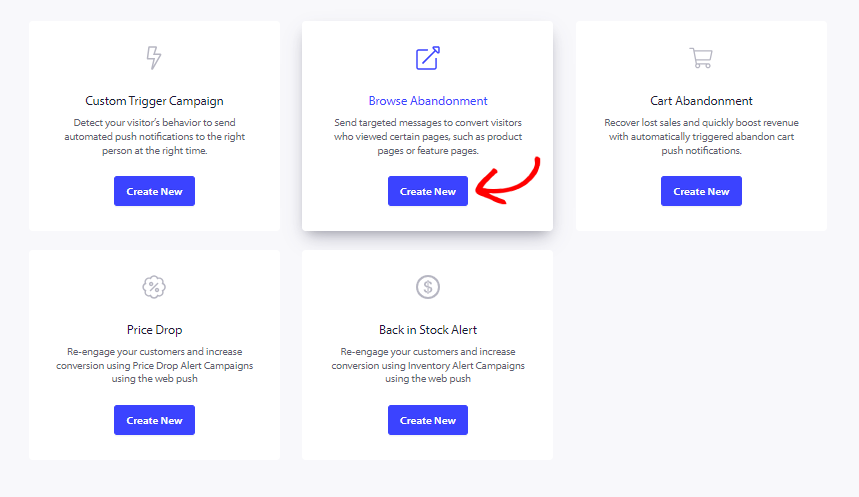
بعد ذلك، تابع وأنشئ حملات التخلي عن التصفح و التخلي عن عربة التسوق الخاصة بك.
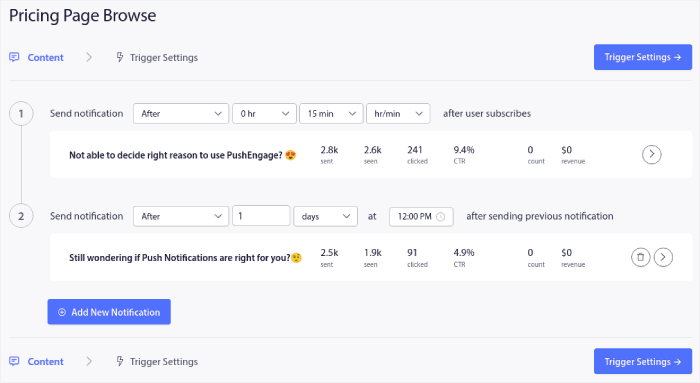
أخيرًا، اضغط على زر حفظ. وهذا كل شيء! سيقوم PushEngage تلقائيًا باستعادة مبيعاتك المفقودة لك الآن.
وهكذا انتهيت! سنقدم قريبًا بعض التحديثات المذهلة التي تتيح لك إرسال تنبيهات انخفاض الأسعار و تنبيهات العودة إلى المخزون أيضًا. لذا، ترقبوا المزيد من التحديثات.
ماذا أيضًا؟
نحن نعلم أن تنمية الأعمال التجارية عمل شاق. في PushEngage، نسعى دائمًا لتحسين منتجنا وتجربتك. لقد أطلقنا هذه الميزة الجديدة لمساعدتك في الحصول على قيمة أكبر من اشتراكك في PushEngage.
شكرًا جزيلاً لك على قراءة هذا الإعلان.
إذا كانت لديك أي أسئلة، فإن فريق نجاح العملاء لدينا هنا للمساعدة. ابدأ محادثة على الدردشة المباشرة أو تحقق من صفحة الاتصال الخاصة بنا.
وشكراً لاستخدامك PushEngage. سواء كنت تستخدم الإصدار المجاني أو إصدار المؤسسات، فأنت مهم بنفس القدر بالنسبة لنا. تهدف مقتطفات التعليمات البرمجية الجديدة إلى مساعدتك على النجاح ونتمنى لك كل التوفيق.
نحن بصدد تقديم المزيد من عمليات التكامل الرائعة لجعل حياتك أسهل. لذا، أخبرنا بآرائك في التعليقات أدناه. يمكنك طلب عمليات تكامل محددة ترغب في رؤيتها في المستقبل.
وإذا لم تكن قد فعلت ذلك بالفعل، ابدأ مع PushEngage اليوم!


