مرحباً، يا مستخدمي Engagelings.
أخبار مثيرة: نقوم بتجديد النوافذ المنبثقة لإشعارات الدفع لمساعدتك في الحصول على مشتركين في إشعارات الدفع بشكل أسرع.
النوافذ المنبثقة الجديدة في مرحلة تجريبية حاليًا. مما يعني أنها ليست متاحة للجميع. لكننا كنا نستخدم التحديثات على موقعنا الخاص وقد ساعدتنا في زيادة معدل الاشتراك لدينا بنسبة تزيد عن 1000٪ في أقل من أسبوع!
على السطح، يبدو الأمر كتحديث بسيط. لكنه ليس كذلك. هناك الكثير مما يمكن استكشافه. لقد جعلناها أيضًا سهلة الاستخدام للغاية. لقد بذلنا الكثير من الجهد في هذا الترقية ونعتقد أنك ستحبها.
وهناك أشياء في هذا التحديث لا يمكن لأي خدمة إشعارات دفع أخرى تقديمها لك.
دعنا نتعمق.
لماذا يجب أن تهتم بالنوافذ المنبثقة لإشعارات الدفع؟
المنبثقات الخاصة بإشعارات الدفع التي أطلقناها للتو ليست مجرد تجربة عشوائية. لدينا آلاف العملاء الذين يرسلون أكثر من 15 مليار إشعار دفع شهريًا باستخدام PushEngage.
نعم، هذا كثير من الإشعارات.
وقد درسنا جميع خيارات الاشتراك التي تعمل على PushEngage وابتكرنا طرقًا رائعة لزيادة فعاليتها.
ما الذي نقوم بتجديده بالضبط؟
هذا تحديث كبير، أيها السيدات والسادة.
لذا، استعدوا!
لقد حققنا زيادة تزيد عن 1000٪ في مشتركين الدفع في أقل من أسبوع!
إذًا، كيف فعلنا ذلك؟
فريق التطوير لدينا قد أبلى بلاءً حسنًا في الإصدار القادم.
هناك الكثير لتغطيته. وهناك أشياء في هذا التحديث. في التحديث الجديد، سترى نوعًا جديدًا تمامًا من خيارات الاشتراك في إشعارات الدفع.
نحن نسميه خيار اشتراك أنيق.
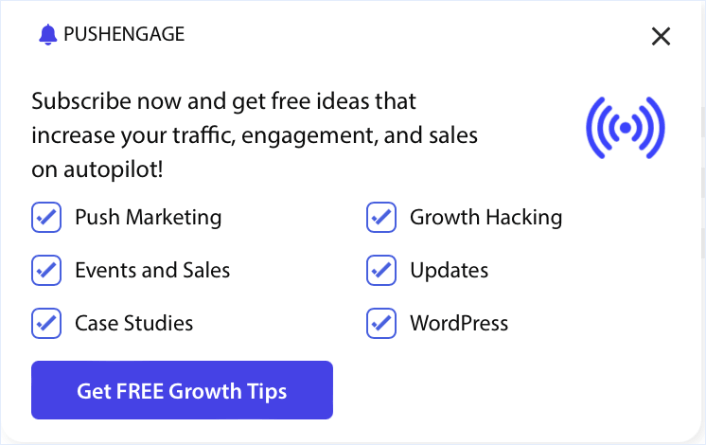
وكما يوحي الاسم، فهو أنيق للغاية وبسيط. على عكس النوافذ المنبثقة الأخرى لإشعارات الدفع، يمكنك عرضه عدة مرات في الجلسة حتى لو رفض زوارك النافذة المنبثقة أو أغلقوها.
لكن هذا ليس كل شيء.
كل خيار اشتراك الآن يسمح لك بتقسيم زوارك تلقائيًا.
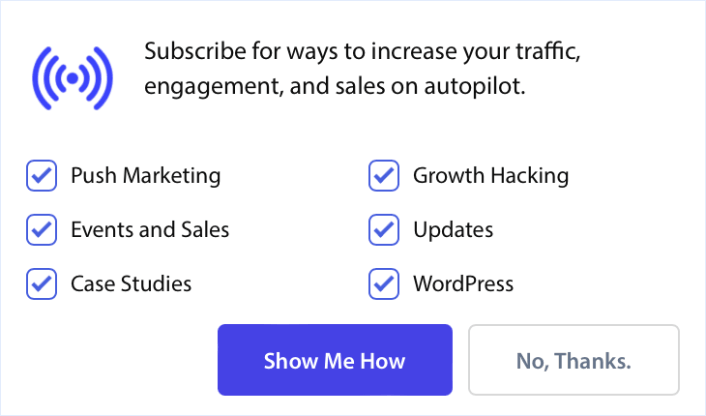
يمكنك بسهولة تضمين شرائح في خيارات الاشتراك الخاصة بك حتى يتمكن المشتركون من اختيار نوع المحتوى الذي يريدونه منك.
لجعل هذا أفضل، تم تجديد تصميم كل نافذة منبثقة.
كان أحد أكثر التغييرات تأثيرًا هو زر 'السماح' في كل نافذة منبثقة.
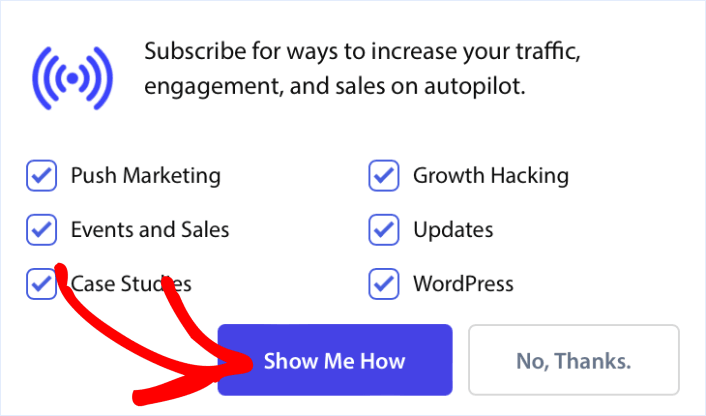
إنه الآن على اليسار بدلاً من اليمين.
لذلك، أصبح الأمر أسهل من أي وقت مضى لأي شخص يستخدم لغات من اليسار إلى اليمين (LTR) على موقعه لجمع مشتركين في الإشعارات.
بينما نناقش النوافذ المنبثقة، دعنا نراجع نافذة منبثقة قديمة. هل جربت استخدام شريط الجرس؟ إنه أيقونة جرس صغيرة تبقى على جانب واحد من موقعك.
الغرض منه هو استعادة الاشتراكات المفقودة في حالة قيام زوارك بإغلاق أو تعطيل نوافذك المنبثقة لإشعارات الدفع.
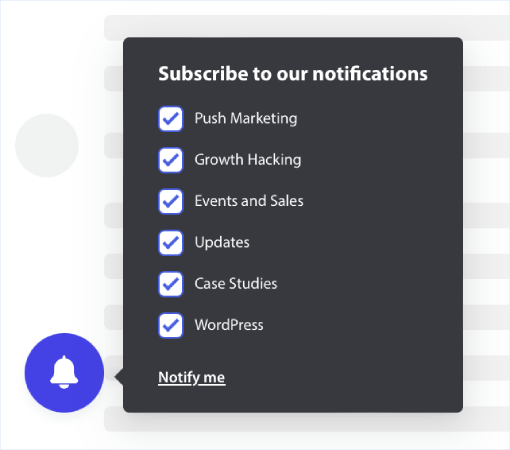
وهو مثالي لجمع مشتركين الدفع حتى خلال مبيعاتك ربع السنوية أو الموسمية مثل حملات الجمعة السوداء الخاصة بك لأنه لا يعيقك.
نصيحة احترافية: يمكنك إنشاء خيارات متعددة للموافقة على إشعارات الدفع باستخدام خيارات الاستهداف لكل خيار موافقة.
كيفية الوصول إلى الإصدار التجريبي
للأسف، لا يمكن للجميع الوصول إلى النسخة التجريبية. يمكنك ملء نموذج Google لإعلامنا باهتمامك. إذا تم اختيارك، فيمكنك الوصول إلى هذه الميزات واستخدامها على موقعك قبل الجميع بوقت طويل.
يستغرق ملء نموذج الطلب 10 ثوانٍ فقط. نحتاج فقط إلى معرف البريد الإلكتروني المسجل لديك وإجابة لسؤال سريع متعدد الخيارات.
إذا تمت الموافقة على حسابك، فستحصل على حق الوصول إلى لوحة تحكم تطبيق تجريبي تبدو تمامًا مثل لوحة تحكم التطبيق العادية لدينا. باستثناء أنك سترى الميزات الجديدة هناك.
وبمجرد أن نجهز لك، سيتم عكس أي تغييرات تجريها في التطبيق التجريبي على موقعك المباشر في غضون دقيقتين.
رائع جدًا، أليس كذلك؟
قدم الآن وسنتولى الباقي نيابة عنك.
ماذا أيضًا؟
نحن نعلم أن تنمية الأعمال التجارية عمل شاق. في PushEngage، نسعى دائمًا لتحسين منتجنا وتجربتك. لقد أطلقنا هذه الميزة الجديدة لمساعدتك في الحصول على قيمة أكبر من اشتراكك في PushEngage.
نأمل أن تنمي قائمة المشتركين لديك بنفس السرعة التي نميناها بها.
شكرًا جزيلاً لك على قراءة هذا الإعلان.
إذا كانت لديك أي أسئلة، فإن فريق نجاح العملاء لدينا هنا للمساعدة. ابدأ محادثة على الدردشة المباشرة أو تحقق من صفحة الاتصال الخاصة بنا.
وشكرًا لك على استخدام PushEngage. سواء كنت تستخدم الإصدار المجاني أو إصدار المؤسسة، فأنت مهم بالنسبة لنا بنفس القدر. القوالب الجديدة مصممة لمساعدتك على النجاح ونتمنى لك كل التوفيق.
أخبرنا برأيك في التعليقات أدناه وإذا لم تكن قد قمت بذلك بالفعل، ابدأ باستخدام PushEngage اليوم!


