مرحباً، يا مستخدمي Engagelings.
أخبار مثيرة: لقد أنشأنا للتو تكاملاً مع WPCode مما يجعل إطلاق حملات التجارة الإلكترونية وإدارتها وتتبعها وتحسينها لجميع مواقع ووردبريس أمرًا سهلاً للغاية.
إذا لم تسمع بها من قبل، فإن WPCode هو مكون إضافي قوي يسمح لك بإدراج مقتطفات التعليمات البرمجية في موقعك دون أي برمجة على الإطلاق. كل ما عليك فعله هو تحديد مقتطف تعليمات برمجية في مكتبته وتحديد المكان الذي تريد إدراجه فيه على موقعك. والمكون الإضافي يقوم بكل العمل نيابة عنك!
على السطح، يبدو الأمر كتحديث بسيط. لكنه ليس كذلك. هناك الكثير مما يمكن استكشافه. لقد جعلناها أيضًا سهلة الاستخدام للغاية. لقد بذلنا الكثير من الجهد في هذا الترقية ونعتقد أنك ستحبها.
دعنا نتعمق.
لماذا يجب أن تهتم بتكامل WPCode الخاص بنا؟
يمكن أن يكون إطلاق حملات الدفع للتجارة الإلكترونية أمرًا مزعجًا. هناك الكثير من التفاصيل التي يجب عليك الاهتمام بها يدويًا مثل المتغيرات والعلامات التي تساعد في تشغيل الحملات. وبعد ذلك، سيتعين عليك إدراج التعليمات البرمجية يدويًا في تعليمات موقعك دون إتلافها.
ولكن إشعارات الدفع للتجارة الإلكترونية هي أدوات قوية بشكل لا يصدق لزيادة إيراداتك ومتوسط قيمة الطلب بتكاليف منخفضة جدًا.
لذلك، ذهبنا وأزلنا العناء من إعداد هذه الحملات بمساعدة أصدقائنا في WPCode.
لماذا أضفنا مقتطفات تعليمات برمجية للتجارة الإلكترونية إلى WPCode؟
في الأسابيع القليلة الماضية، شهدنا تدفقًا هائلاً من العملاء الجدد. بالطبع، نحن متحمسون للغاية لهذا التطور. ولكن أحد الأسئلة التي تلقيناها في أغلب الأحيان كان: "ما نوع الحملات المناسب لشركتنا؟"
وهذا سؤال جيد حقًا.
الحقيقة هي أنه يمكنك استخدام جميع الحملات المختلفة بطرق متنوعة لتنمية أي عمل تجاري تقريبًا. لكن الأمر يتطلب بعض الخبرة والمعرفة بالتسويق لمعرفة حالات الاستخدام هذه. وآخر شيء يريده أي شخص هو تعلم تقنية جديدة قبل أن يتمكن من البدء.
لذلك، مع مقتطفات التعليمات البرمجية الخاصة بنا في مكتبة WPCode، يمكننا الآن تقديم خيار إطلاق حملات الدفع للتجارة الإلكترونية ببضع نقرات بسيطة. وهذا يشمل:
- حملات عروض الترحيب
- حملات التخلي عن سلة التسوق
- حملات التخلي عن النماذج
- حملات التخلي عن التصفح
- حملات البيع المتقاطع
والمزيد. ناهيك عن أنه يمكنك أيضًا إعداد تتبع الأهداف لحملات إشعارات الدفع الخاصة بك ببضع نقرات أيضًا.
والجزء الأروع هو أن حتى مستخدمينا المجانيين سيحصلون على وصول إلى بعض القوالب المجانية. بالطبع، يمكنك دائمًا ترقية حساب PushEngage الخاص بك
كيفية الوصول إلى مقتطفات التعليمات البرمجية
يمكنك تحديد مقتطف تعليمات برمجية من مكتبة مقتطفات تعليمات PushEngage البرمجية. انتقل إلى PushEngage » Code Snippets:
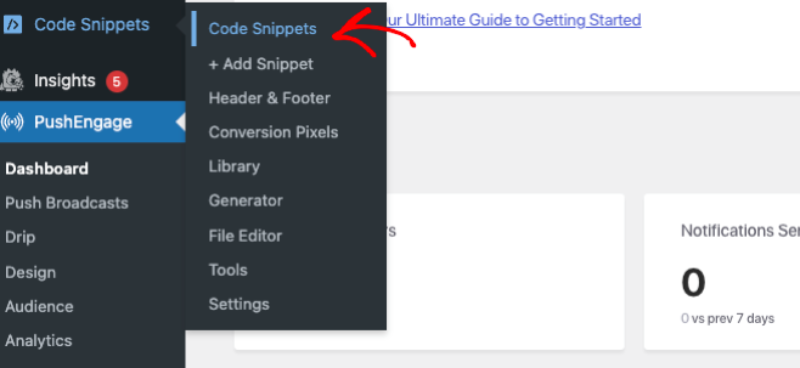
إذا لم يكن لديك المكون الإضافي WPCode مثبتًا ومفعلًا بالفعل، فسترى زر Activate WPCode. انقر فوق هذا لتنزيل المكون الإضافي المجاني WPCode. ستحتاج إلى تثبيت وتفعيل WPCode قبل أن تتمكن من المتابعة.
بمجرد الانتهاء من ذلك، يمكنك ببساطة التحقق من مقتطفات التعليمات البرمجية في المكتبة.
انقر فوق الزر Use Snippet لمقتطف تعليمات برمجية، وسيتم نقلك إلى شاشة Edit Snippet في WPCode، حيث يمكنك تخصيصه.
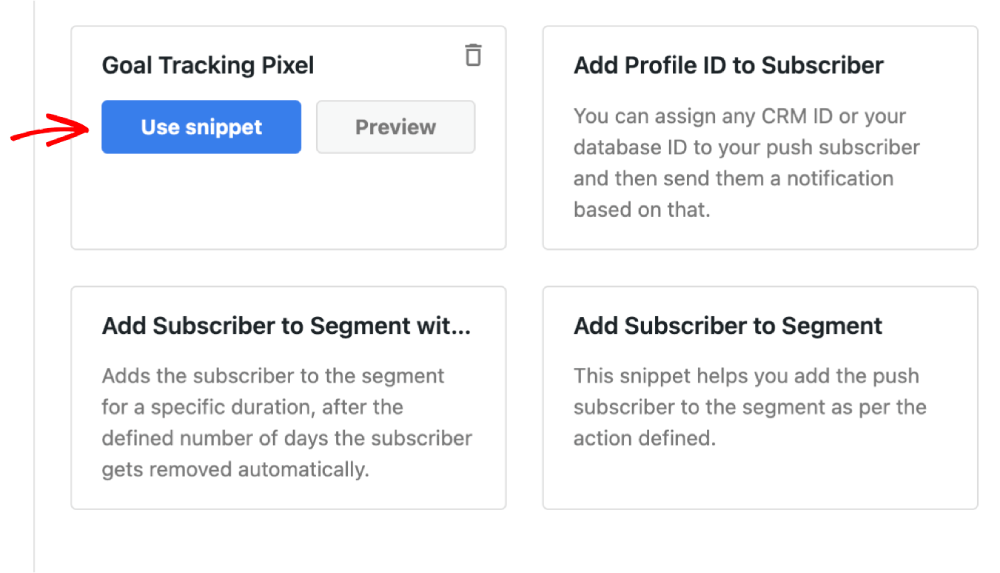
انتقل إلى الأمام وقم بتحرير المقتطف كما تراه مناسبًا.
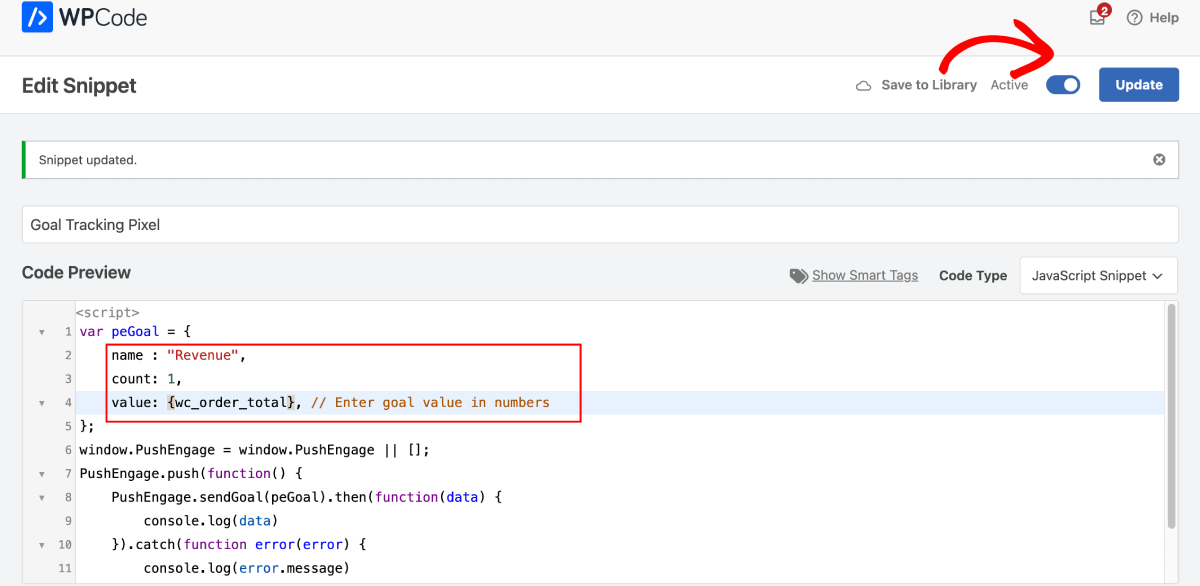
ثم انقر فوق Update لحفظ المقتطف. أخيرًا، قم بتمكين تبديل Activate لتثبيت المقتطف على موقعك.
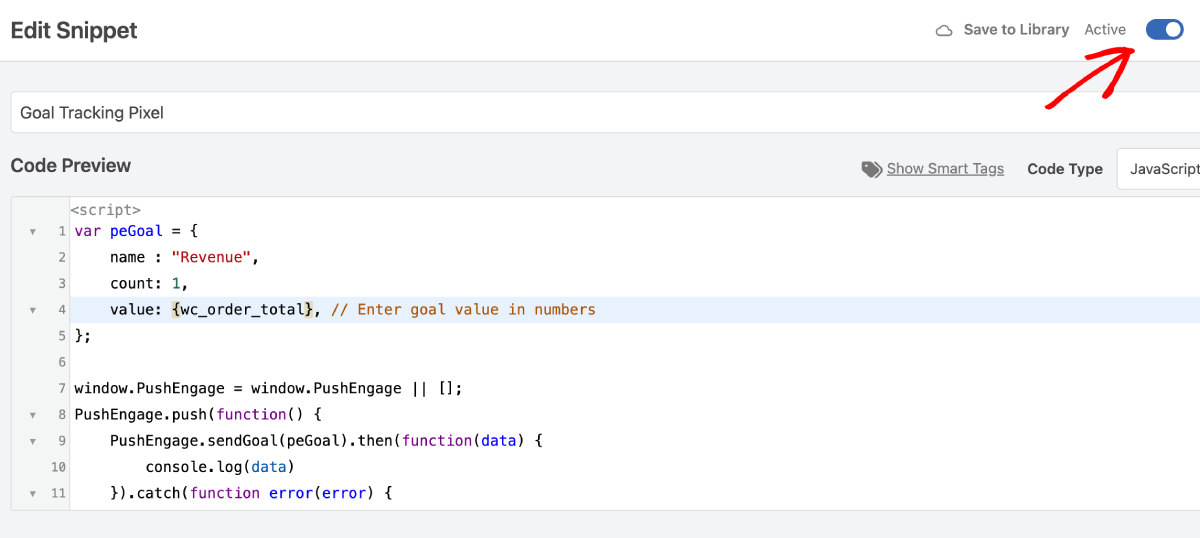
وأنت انتهيت!
ماذا يمكنك أن تفعل أيضًا باستخدام مقتطفات التعليمات البرمجية هذه؟
لقد أطلقنا مجموعة من مقتطفات التعليمات البرمجية هذه وندعوك للعب بها. يمكنك إنشاء حملات إشعارات الدفع للمواقع المبنية باستخدام WooCommerce و Easy Digital Downloads.
يجب عليك إلقاء نظرة على القائمة الكاملة لمقتطفات التعليمات البرمجية في مكتبة WPCode.
إلى جانب إنشاء حملات تجارة إلكترونية قوية، يمكنك أيضًا:
- إعداد بكسل لتتبع الأهداف لتتبع أداء إشعارات الدفع الخاصة بك
- إضافة مشتركين إلى شريحة لإرسال إشعارات الدفع تلقائيًا
- إضافة مشتركين إلى شريحة لمدة محددة، وإزالة مشتركين من شريحة
- إضافة معرف CRM لكل مشترك في إشعارات الدفع
كل مقتطفات التعليمات البرمجية هذه تجعل من السهل للغاية تنمية عملك باستخدام قنوات أخرى مثل إشعارات الدفع للتطبيقات أيضًا.
ماذا أيضًا؟
نحن نعلم أن تنمية الأعمال التجارية عمل شاق. في PushEngage، نسعى دائمًا لتحسين منتجنا وتجربتك. لقد أطلقنا هذه الميزة الجديدة لمساعدتك في الحصول على قيمة أكبر من اشتراكك في PushEngage.
شكرًا جزيلاً لك على قراءة هذا الإعلان.
إذا كانت لديك أي أسئلة، فإن فريق نجاح العملاء لدينا هنا للمساعدة. ابدأ محادثة على الدردشة المباشرة أو تحقق من صفحة الاتصال الخاصة بنا.
وشكراً لاستخدامك PushEngage. سواء كنت تستخدم الإصدار المجاني أو إصدار المؤسسات، فأنت مهم بنفس القدر بالنسبة لنا. تهدف مقتطفات التعليمات البرمجية الجديدة إلى مساعدتك على النجاح ونتمنى لك كل التوفيق.
أخبرنا برأيك في التعليقات أدناه وإذا لم تكن قد قمت بذلك بالفعل، ابدأ باستخدام PushEngage اليوم!


