مرحباً، يا مستخدمي Engagelings.
أخبار مثيرة: نحن نطلق ميزة جديدة تسمى أداة إدارة الاشتراكات.
لماذا؟ بسببك!
هذا صحيح، نحن نجعل تجربة المستخدم (المعروفة أيضًا باسم: تجربتك) أفضل بكثير. يمكنك الآن تقديم طريقة بسيطة لمشتركيك لإدارة:
- ما إذا كانوا يرغبون في تلقي إشعارات منك
- أنواع الإشعارات التي يهتمون بها
لقد جعلنا أيضًا من السهل جدًا عرض أداة إدارة الاشتراكات على PushEngage. نحن فخورون جدًا بهذه الميزة الجديدة الرائعة ونعتقد أنك ستحبها. وهي تحديث رئيسي، لذا هناك الكثير مما يجب استكشافه.
دعنا نتعمق.
لماذا تستخدم أداة إدارة الاشتراكات
واحدة من أكبر المشاكل مع برنامج الإشعارات الفورية هي أنه من الصعب جدًا عليك الحصول على إذن لإرسال أنواع معينة من الإشعارات من مشتركيك. ونتيجة لذلك، هناك خطر حقيقي لإرسال الكثير من الإشعارات الفورية أو إرسال رسائل غير ذات صلة.
نفس المشكلة موجودة في التسويق عبر البريد الإلكتروني. ولكن على الأقل، مع برنامج التسويق عبر البريد الإلكتروني، يمكنك إنشاء روابط مخصصة لإضافة المشتركين إلى شريحة قائمة بريد إلكتروني محددة. مع الإشعارات الفورية، هذه الميزة ببساطة غير متوفرة.
حسنًا... لم تكن متوفرة. حتى الآن.
لقد قمنا للتو ببناء الحل لمشكلة ضخمة لا يحاول أي شخص آخر معالجتها!
تضفي أداة إدارة الاشتراكات الطابع الديمقراطي على قائمة اشتراكات الإشعارات الفورية الخاصة بك. يمكن لزوارك الآن اختيار نوع الإشعارات التي يرغبون في تلقيها. سيحبك المشتركون للاستماع إلى ما يريدون ويمكنك كسب المزيد من المال عن طريق إرسال إشعارات فورية مستهدفة وذات صلة عالية.
ويمكنك تقليل تذاكر الدعم الخاصة بك من المشتركين غير الراضين الذين يحاولون إلغاء الاشتراك من الإشعارات الفورية.
ابدأ باستخدام أداة إدارة الاشتراكات بسهولة
للبدء، توجه إلى لوحة تحكم PushEngage الخاصة بك وانتقل إلى التصميم » الأدوات وقم بتمكين أداة إدارة الاشتراكات:

انقر على زر تحرير الأداة لتخصيص أداتك. ابدأ بتخصيص شكل ومظهر أداتك لتتناسب مع لغة تصميم علامتك التجارية ضمن الشكل والتصميم:
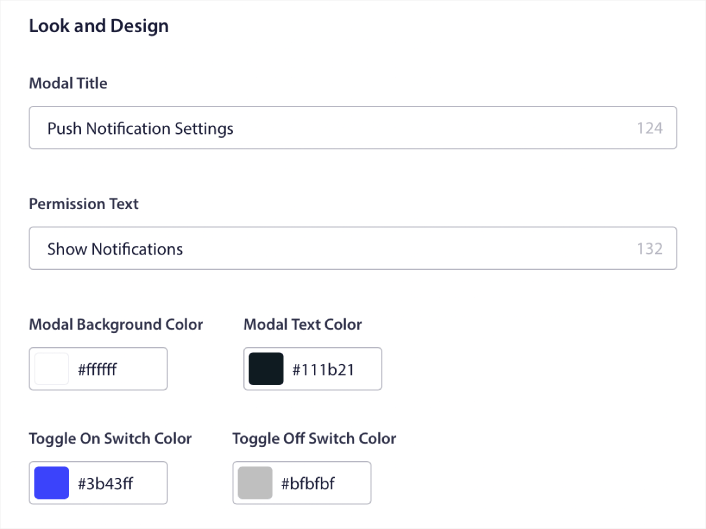
يمكنك إنشاء نافذة منبثقة مخصصة بالكامل تظل موجودة حتى عندما لا يشترك زوارك من خلال النافذة المنبثقة الافتراضية الخاصة بك. إذا كان حجم زر تشغيل النافذة المنبثقة يبدو غير مناسب لك، يمكنك تخصيص ذلك أيضًا ضمن زر التشغيل:
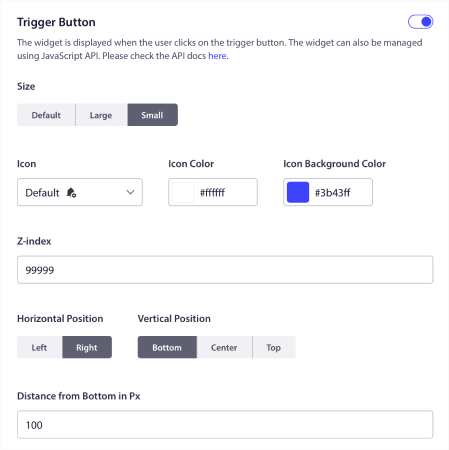
حدد مكان عرض أداة إدارة الاشتراكات
وأروع جزء هو أنه يمكنك أيضًا تحديد صفحات معينة لعرض الأداة ضمن قواعد عرض زر التشغيل:

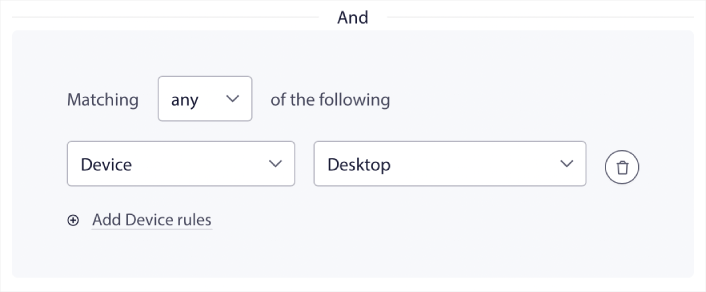
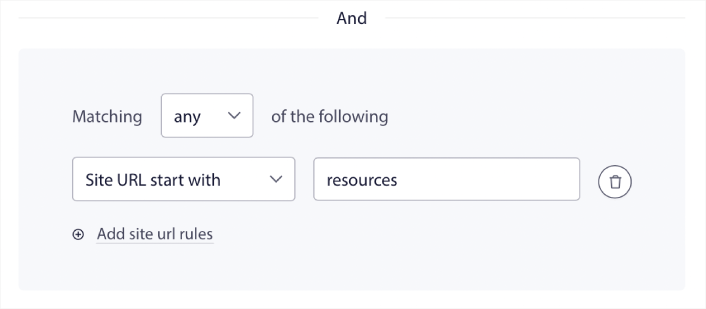
بشكل افتراضي، سيتم عرض الزر عبر جميع الصفحات. ولكن يمكنك إنشاء قواعد استهداف مخصصة لعرض إصدارات معينة من الأداة عن طريق استهداف:
المواقع:
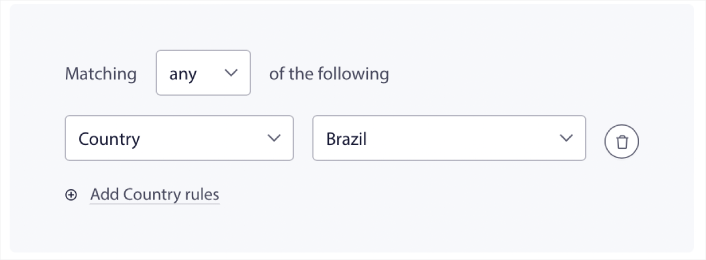
الأجهزة:
وعناوين URL على موقعك:
خيارات إلغاء الاشتراك السهلة
يمكنك أيضًا منح المشتركين طريقة سهلة لإلغاء الاشتراك من إشعاراتك الفورية ضمن خيار إلغاء الاشتراك:
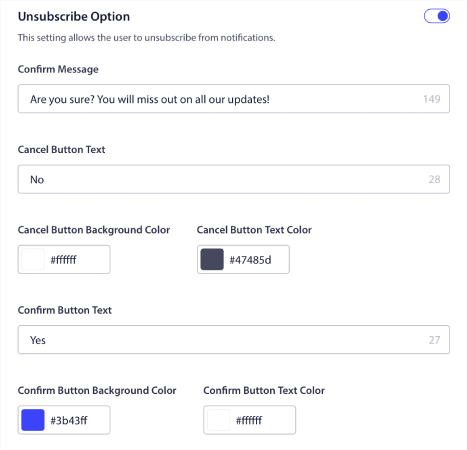
مرة أخرى، يمكنك تخصيص المظهر والتصميم بالكامل مع الرسائل لتناسب إرشادات علامتك التجارية. يمكن لأي زائر يلغي الاشتراك من إشعاراتك الفورية إعادة الاشتراك باستخدام أداة إدارة الاشتراكات.
اسمح للمشتركين بتعيين تفضيلات الإشعارات الفورية
لأخذ الأمور إلى المستوى التالي، يمكنك أيضًا السماح للمشتركين لديك بتحديد أنواع الإشعارات التي يرغبون في تلقيها ضمن تفضيلات الشرائح:
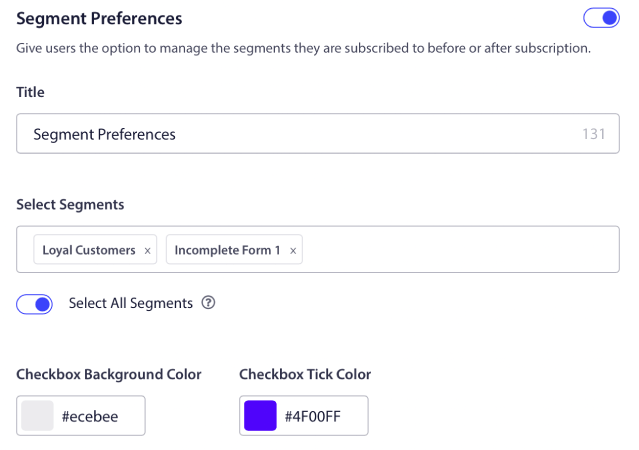
إذا قمت بتمكين تحديد الكل، فسيتم إضافة المشتركين تلقائيًا إلى جميع الشرائح المحددة افتراضيًا:
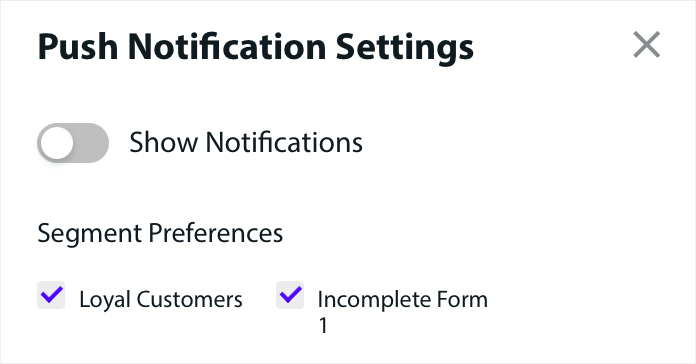
هذه ميزة قوية بشكل لا يصدق لمواقع الأخبار والمدونات.
اطلب الإذن لإرسال إشعارات فورية مخصصة
إذا كنت تدير إشعارات الدفع للتجارة الإلكترونية على موقعك، فسيكون الكثير منها إشعارات دفع مشغلة. وهذا يشمل:
- إشعارات الدفع للتخلي عن التصفح
- إشعارات الدفع للتخلي عن سلة التسوق
- تنبيهات انخفاض الأسعار
- تنبيهات عند نفاد المخزون
وحتى حملات إشعارات الدفع المخصصة المشغلة.
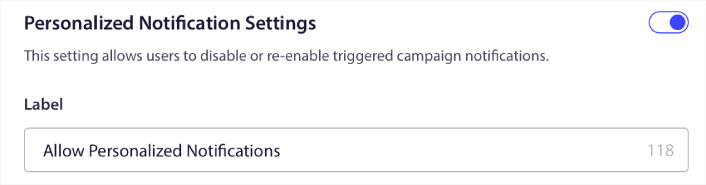
من خلال أداة إدارة الاشتراكات الجديدة الخاصة بنا، يمكنك الآن السماح لمشتركيك باختيار ما إذا كانوا يريدون رؤية إشعارات مخصصة:

فقط قم بتمكين الخيار ضمن إعدادات الإشعارات المخصصة:
ماذا أيضًا؟
نحن نعلم أن تنمية الأعمال التجارية عمل شاق. في PushEngage، نسعى دائمًا لتحسين منتجنا وتجربتك. لقد أطلقنا هذه الميزة الجديدة لمساعدتك في الحصول على قيمة أكبر من اشتراكك في PushEngage.
شكرًا جزيلاً لك على قراءة هذا الإعلان.
إذا كانت لديك أي أسئلة، فإن فريق نجاح العملاء لدينا هنا للمساعدة. ابدأ محادثة على الدردشة المباشرة أو تحقق من صفحة الاتصال الخاصة بنا.
وشكراً لاستخدامك PushEngage. سواء كنت تستخدم الإصدار المجاني أو إصدار المؤسسات، فأنت مهم بنفس القدر بالنسبة لنا. تم تصميم أداة إدارة الاشتراكات لمساعدتك على النجاح ونتمنى لك كل التوفيق.
أخبرنا برأيك في التعليقات أدناه وإذا لم تكن قد قمت بذلك بالفعل، ابدأ باستخدام PushEngage اليوم!


