مرحباً، يا مستخدمي Engagelings.
أخبار مثيرة: لقد قمنا للتو بتحديث أسعار تطبيق Shopify الخاص بنا وأضفنا بعض الميزات الجديدة المثيرة. وأصبح من الأسهل من أي وقت مضى تنمية أعمال التجارة الإلكترونية الخاصة بك بأسعار معقولة للغاية!
يبدو الأمر مثيرًا؟ هناك الكثير مما يمكن استكشافه هنا. لذا، دعنا نتعمق.
ما هي أسعار Shopify الجديدة لـ PushEngage؟
لدينا الآن خطتان تسعيريتان: خطة مجانية وخطة نمو.
الخطة المجانية مثالية لأعمال التجارة الإلكترونية الجديدة التي تحقق أقل من 100 دولار شهريًا من الأرباح. وهي مناسبة أيضًا لاختبار تجربة لوحة تحكم PushEngage.
أما خطة النمو، فتبدأ بسعر 4 دولارات شهريًا فقط لـ 5000 مشترك ويمكنك ترقية حسابك حتى 100,000 مشترك. لأي شيء يتجاوز 100,000 مشترك، يمكنك التحدث إلينا للحصول على حساب مؤسسي.
ولكن هناك المزيد لاستكشافه هنا. على سبيل المثال، نفرض عليك رسومًا بناءً على قائمة المشتركين لديك وليس على نقراتك وإرسالات رسائل الدفع. وهذا فرق كبير لأنه مع PushEngage، تحصل على:
- تكاليف يمكن التنبؤ بها: مع نموذج تسعير يعتمد على المشتركين، تعرف بالضبط مقدار ما ستدفعه بناءً على حجم قائمة المشتركين لديك. هذا يجعل الميزانية والتنبؤ بالتكاليف أسهل بكثير مقارنة بنموذج يعتمد على الظهور حيث يمكن أن تتقلب التكاليف بشكل غير متوقع.
- التركيز على الجودة فوق الكمية: عندما تدفع لكل ظهور، يكون هناك حافز لإرسال أكبر عدد ممكن من الإشعارات، حتى للمستخدمين غير المهتمين أو غير النشطين، للحصول على قيمة أكبر. مع التسعير القائم على المشتركين، يتحول التركيز إلى بناء قاعدة مشتركين عالية الجودة ومتفاعلة بدلاً من إغراق المستخدمين بالإشعارات.
- محاذاة أفضل مع الأهداف: الهدف الأساسي من إشعارات الدفع هو الوصول إلى قاعدة المشتركين لديك والتفاعل معها بفعالية. الدفع لكل مشترك يحاذي نموذج التسعير مباشرة مع هذا الهدف، بدلاً من ربط التكاليف بمقياس غامض للظهور.
- تجنب الرسوم الزائدة: مع التسعير القائم على الظهور، قد ينتهي بك الأمر بدفع ثمن إشعارات لا يراها المستخدمون أو يتفاعلون معها أبدًا، مما يؤدي إلى إنفاق ضائع. يضمن التسعير القائم على المشتركين أنك تدفع فقط مقابل جمهورك النشط والموافق.
- الشفافية والتحكم: معرفة أن تكاليفك تستند فقط إلى عدد المشتركين لديك يمنحك المزيد من الشفافية والتحكم في إنفاقك على إشعارات الدفع، بدلاً من أن يتم تحديد التكاليف بواسطة مقياس (مرات الظهور) يمكن أن تتأثر بالعديد من العوامل الخارجية.
بالإضافة إلى ذلك، يمكنك أيضًا تنظيف قائمة المشتركين لديك لإزالة المشتركين غير النشطين للدفع أقل وتعظيم حجم الإرسال الخاص بك (المزيد حول هذا لاحقًا).
كيفية إنشاء حملات Shopify الفورية
بمجرد الانتهاء من تثبيت تطبيق PushEngage Shopify، انتقل وابحث عنه في شريط بحث Shopify:

انقر على إشعارات PushEngage الفورية للانتقال إلى لوحة تحكم PushEngage.

هنا، يمكنك إنشاء أي حملة إشعارات فورية للتجارة الإلكترونية ترغب بها.
كيفية إرسال حملات Shopify عالية التحويل
حملات التجارة الإلكترونية هي المكان الذي يتألق فيه تكامل Shopify حقًا. إنه بسيط وسهل للغاية. انتقل إلى لوحة تحكم PushEngage الخاصة بك وانتقل إلى الحملات » الحملات المشغلة:
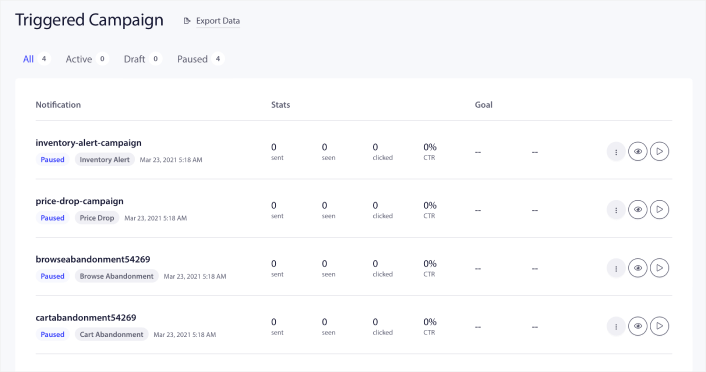
ستجد أن حسابك يأتي مع 4 حملات مشغلة مسبقة الإنشاء افتراضيًا:
- تنبيه انخفاض السعر
- تنبيه المخزون
- حملة التخلي عن التصفح
- حملة التخلي عن سلة التسوق
كل ما عليك فعله هو تعديل كل حملة وملء قسم المحتوى وتفعيلها. تأتي قوالب الحملات المعدة مسبقًا لديك بالفعل بنسخ عالية التحويل. لكننا نطلب من جميع عملائنا تعديل المحتوى ليناسب استراتيجيتهم التسويقية.
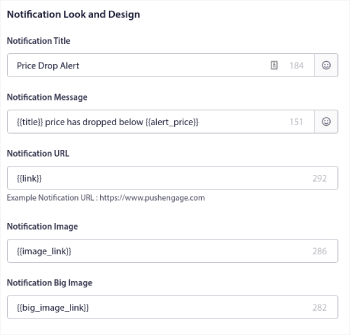
عند النقر على أي من إشعارات الدفع في التسلسل، يمكنك تخصيص الإشعار بالقدر الذي تريده:
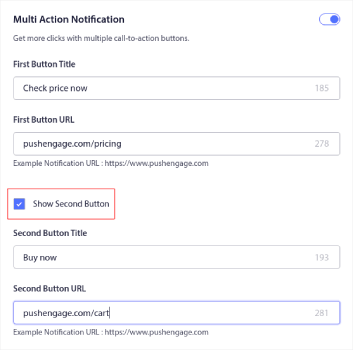
يمكنك أيضًا إضافة أزرار متعددة لتحويل أكثر سلاسة:
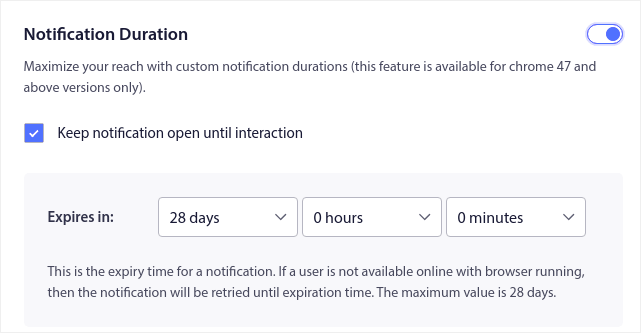
ويمكنك تعيين مدة إشعار مخصصة ضمن مدة الإشعار:
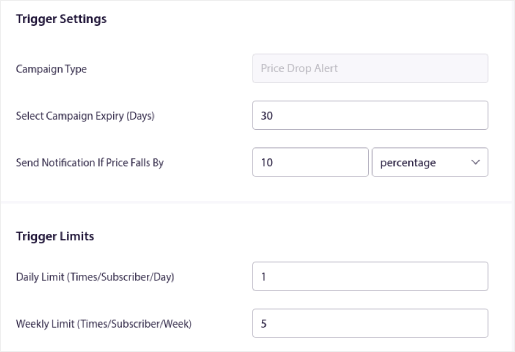
عند الانتهاء من علامة التبويب المحتوى ، انقر فوق الزر إعدادات المشغل وقم بتكوين وقت إرسال إشعارات الدفع الخاصة بك.
هذه العملية هي نفسها لجميع حملات التجارة الإلكترونية. كل ما عليك فعله هو تخصيص حملتك وتفعيلها. لا مفاتيح API، ولا عمليات تكامل برمجية يدوية، ولا عوائق للبدء في 10 دقائق أو أقل!
ملاحظة: بالنسبة لحملة التخلي عن سلة التسوق الخاصة بك، تحصل أيضًا على متتبع إيرادات مُعد مسبقًا سيبلغ عن التحويلات والإيرادات الناتجة عن حملتك. لا تحتاج إلى القيام بأي شيء لتمكين هذه الميزة. فقط قم بتشغيل حملة التخلي عن سلة التسوق الخاصة بك.
كيفية إرسال بث فوري
في بعض الأحيان، سترغب في البدء بإرسال بث دفعي للإعلان عن عروض وعروض ترويجية محددة بوقت محدود. انتقل إلى الحملات » بث وانقر فوق إنشاء بث دفعي جديد :

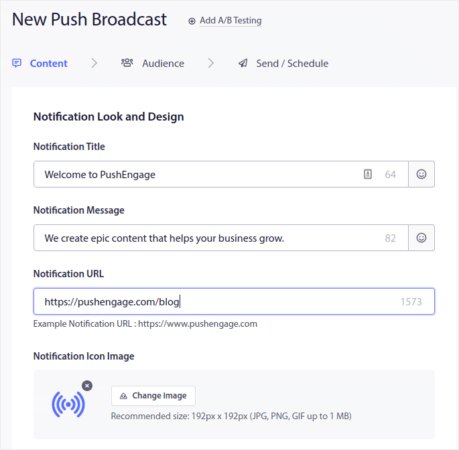
بعد ذلك، قم بإنشاء إشعار دفع جديد لإرساله. قم بتخصيص المحتوى ضمن علامة التبويب المحتوى :
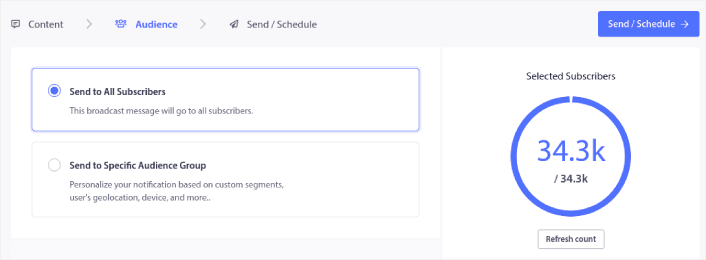
بعد ذلك، حدد جمهورك ضمن الجمهور :
وأخيرًا، ضمن إرسال/جدولة ، يمكنك جدولة الإشعار كإشعار دفع متكرر:

يمكنك بسهولة إنشاء أي جدول تريده لإشعارات الدفع الخاصة بك بما في ذلك الأيام والتواريخ والأوقات المخصصة.
كيفية إعداد حملات RSS الفورية التلقائية
يعد إنشاء المحتوى وإدارة المدونة باستمرار عملاً شاقًا. ولكن إذا كنت تدير عملًا تجاريًا جادًا، فأنت تعلم أن مجرد إنشاء المحتوى لا يكفي. يجب أن تكون قادرًا على الترويج لمحتواك أيضًا. ولكن كيفية زيادة إيرادات أعمال التجارة الإلكترونية من خلال الترويج للمحتوى تلقائيًا؟
وتعد الإشعارات الفورية طريقة رائعة لاكتساب المشتركين بطريقة فعالة من حيث التكلفة. ما يجعل الإشعارات الفورية جيدة جدًا كأداة تسويقية هو أنه يمكن أتمتتها بالكامل. هذا هو المكان الذي تأتي فيه إشعارات RSS الفورية في الصورة.
توجه إلى لوحة تحكم PushEngage الخاصة بك وانتقل إلى الحملات » دفع RSS تلقائي:
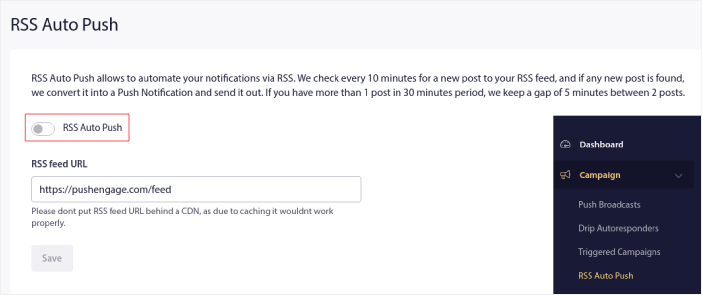
انقر على زر التبديل لتمكين دفع RSS تلقائي والصق عنوان URL لخلاصة RSS الخاصة بك. بمجرد الانتهاء من ذلك، انقر على التحقق من RSS للتأكد من قبول خلاصة RSS الخاصة بك. عندما تنتهي، اضغط ببساطة على حفظ.
الآن، في كل مرة تنشر فيها منشورًا جديدًا، سيتلقى مشتركوك في إشعارات الدفع تلقائيًا إشعار دفع حول محتواك الجديد.
كيفية تقليل تكاليف المشتركين في Shopify
يمكنك تقليل تكاليف خطة PushEngage الخاصة بك في Shopify عن طريق حذف المشتركين غير النشطين. نظرًا لأنك تدفع لكل مشترك، أردنا أيضًا أن نقدم لك خيار إزالة المشتركين غير المرغوب فيهم حتى لا تضخم تكاليفك دون أي سبب.
ما عليك سوى الانتقال إلى لوحة تحكم PushEngage والانتقال إلى الجمهور » المشتركون للحصول على نفس الخيارات. يمكنك إزالة المشتركين الذين لم يتلقوا أو يعرضوا أو ينقروا على إشعاراتك لأي عدد من الأيام.
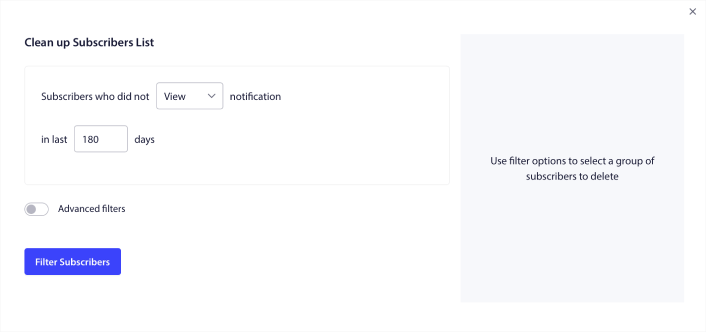
نوصي بحذف المشتركين الذين لم يشاهدوا إشعاراتك لمدة 240 يومًا. يمكنك أيضًا استخدام عوامل تصفية متقدمة لإجراء عمليات إزالة أكثر تحديدًا.
تشمل عوامل التصفية المتقدمة:
- السمات: حذف المشتركين الذين لديهم سمات محددة مثل المنصة أو بيانات تعريفية أخرى.
- الشرائح: حذف شريحة كاملة أو مجموعة من الشرائح
- المتصفح: حذف المشتركين من متصفح معين.
- الجهاز: حذف المشتركين الذين يتفاعلون من أجهزة سطح المكتب أو الأجهزة المحمولة.
- البلد: حذف المشتركين من بلد معين.
- الولاية: حذف المشتركين من ولاية معينة.
- المدينة: حذف المشتركين من مدينة معينة.
- تاريخ الاشتراك: استهداف أولئك الذين اشتركوا قبل أو بعد تاريخ معين. رائع لإعادة استهداف المشتركين الجدد غير المتفاعلين.
- آخر إرسال: استهداف المشتركين الذين تلقوا آخر إشعار قبل فترة زمنية محددة.
- آخر مشاهدة: استهداف المشتركين الذين شاهدوا آخر إشعار قبل فترة زمنية محددة.
- آخر نقرة: استهداف المشتركين الذين نقروا آخر مرة على إشعار قبل فترة زمنية محددة.
- إجمالي عدد مرات الإرسال: استهداف المشتركين الذين يقل إجمالي عدد الإشعارات التي تلقوها مدى الحياة عن عدد معين أو يساويه. رائع لاستهداف المشتركين الذين لم يعودوا يتلقون إشعاراتك الفورية
- إجمالي عدد المشاهدات: استهداف المشتركين الذين يقل إجمالي عدد مشاهدات الإشعارات مدى الحياة عن عدد معين أو يساويه. مخصص لاستهداف المشتركين الذين يتلقون إشعاراتك، ولكنهم لا يطلعون عليها حتى.
- إجمالي عدد النقرات: استهداف المشتركين الذين يقل إجمالي عدد النقرات على الإشعارات مدى الحياة عن عدد معين أو يساويه. تصفية المشتركين الذين لا ينقرون على إشعاراتك على الإطلاق.
- تجزئة المشترك: مخصص لإزالة مشترك معين من قائمتك. يشبه حذف بريد إلكتروني من قائمة.
بشكل فردي، قد لا يكون لهذه المرشحات معنى كبير. ولكن، يمكنك دمج مرشحات متعددة لتحديد أعضاء جمهور محددين. على سبيل المثال، لنفترض أنك تريد إزالة المشتركين الذين اشتركوا منذ أكثر من عام ولكنهم لم ينقروا أبدًا على إشعاراتك. يمكنك دمج مرشح تاريخ الاشتراك مع مرشح إجمالي عدد النقرات.
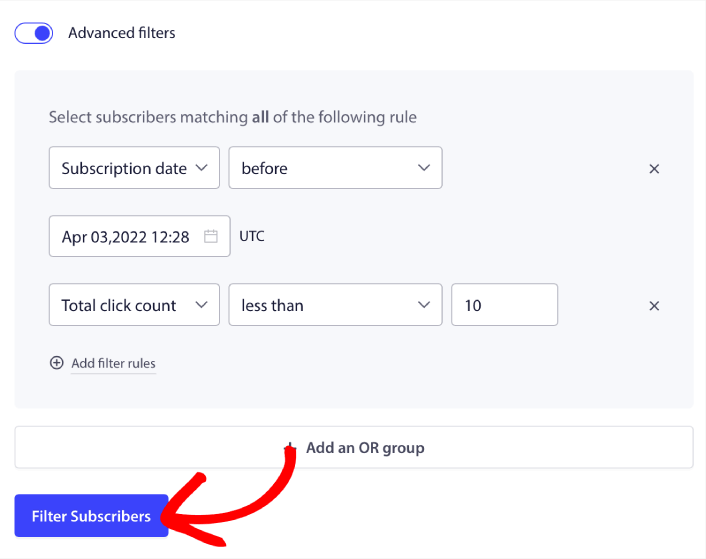
وإذا كنت ترغب في تصفية أنواع متعددة من المستخدمين غير النشطين، يمكنك النقر فوق الزر + إضافة مجموعة OR واستهداف أنواع متعددة من المستخدمين.
كيفية إنشاء أداة إدارة الاشتراكات في Shopify
تعد أداة إدارة الاشتراك ميزة فريدة في PushEngage تسمح لمشتركيك وحركة مرور الويب لديك بتحديد أنواع الإشعارات التي يرغبون في تلقيها.
توجه إلى لوحة تحكم PushEngage وانتقل إلى التصميم » الأدوات وقم بتمكين أداة إدارة الاشتراكات:

انقر فوق الزر تحرير الأداة لتخصيص أداتك. ابدأ بتخصيص شكل ومظهر أداتك لتتناسب مع لغة تصميم علامتك التجارية ضمن الشكل والتصميم :
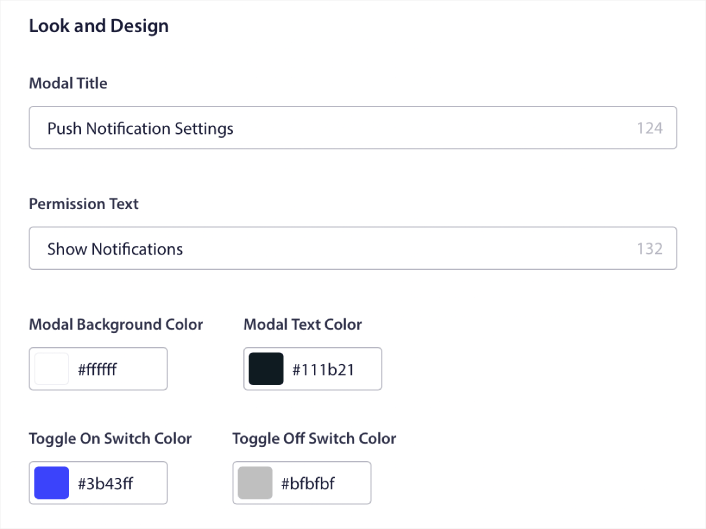
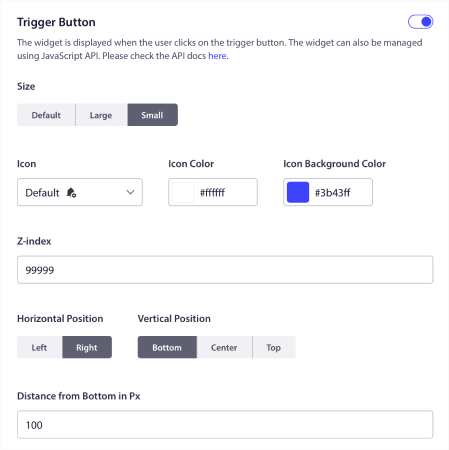
يمكنك إنشاء نافذة منبثقة مخصصة بالكامل تظل موجودة حتى عندما لا يشترك زوارك من خلال النافذة المنبثقة الافتراضية الخاصة بك النافذة المنبثقة. إذا كان حجم زر تشغيل النافذة المنبثقة يبدو غير مناسب لك، يمكنك تخصيصه أيضًا ضمن زر التشغيل :
وأفضل ما في الأمر هو أنه يمكنك أيضًا تحديد صفحات معينة لعرض الأداة تحت عنوان قواعد عرض زر التشغيل:

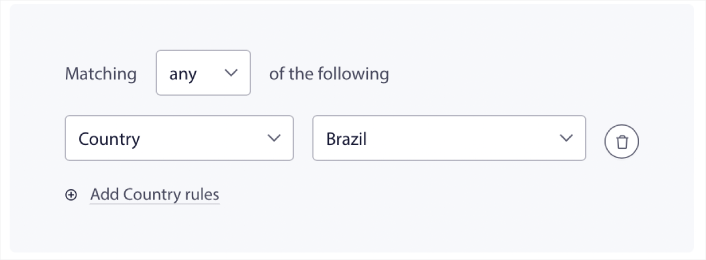
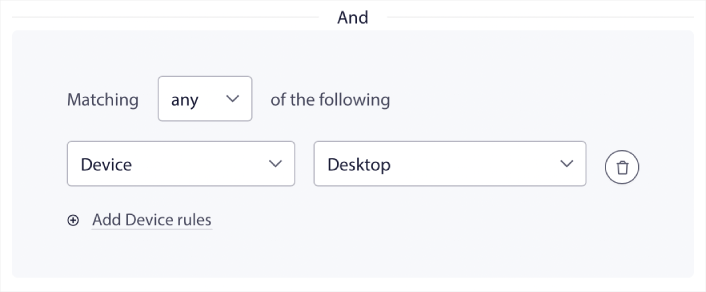
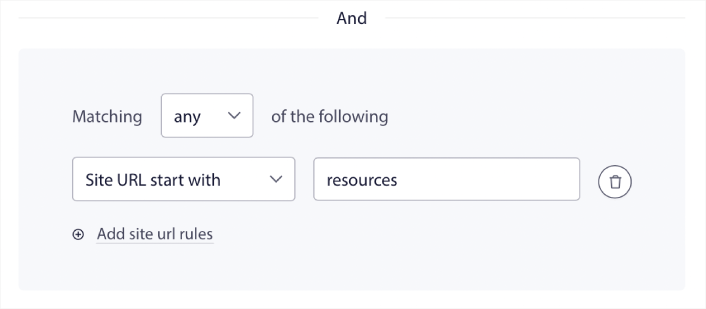
بشكل افتراضي، سيتم عرض الزر عبر جميع الصفحات. ولكن يمكنك إنشاء قواعد استهداف مخصصة لعرض إصدارات معينة من الأداة عن طريق استهداف:
المواقع:
الأجهزة:
وعناوين URL على موقعك:
لأخذ الأمور إلى المستوى التالي، يمكنك أيضًا السماح للمشتركين لديك بتحديد أنواع الإشعارات التي يرغبون في تلقيها تحت عنوان تفضيلات الشرائح:
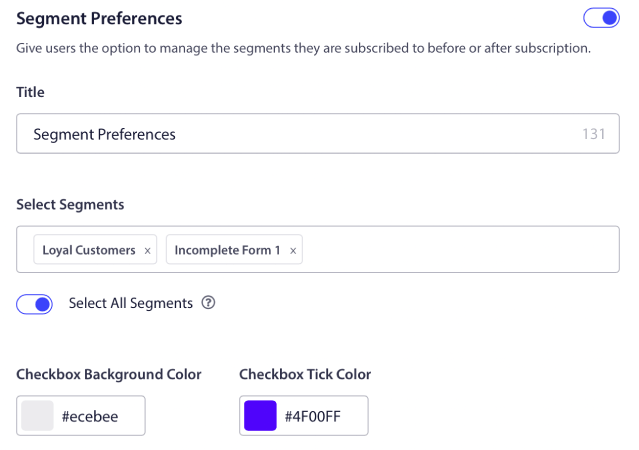
إذا قمت بتمكين تحديد الكل، فسيتم إضافة المشتركين لديك تلقائيًا إلى جميع الشرائح المحددة بشكل افتراضي:
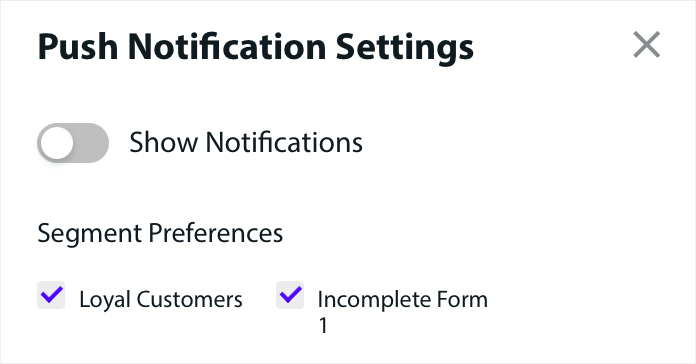
هذه طريقة رائعة لبناء قائمة إعادة استهداف.
إذا كنت تقوم بتشغيل أي إشعارات دفع للتجارة الإلكترونية على موقعك، فسيكون الكثير منها إشعارات دفع مشغلة. وهذا يشمل:
- إشعارات الدفع للتخلي عن التصفح
- إشعارات الدفع للتخلي عن سلة التسوق
- تنبيهات انخفاض الأسعار
- تنبيهات عند نفاد المخزون
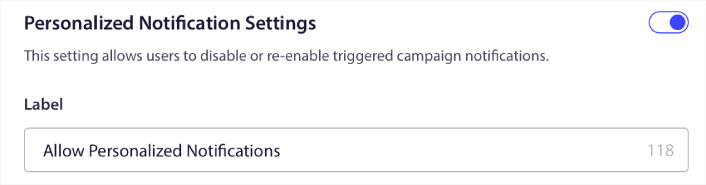
وحتى حملات إشعارات الدفع المخصصة. باستخدام أداة إدارة الاشتراكات الخاصة بنا، يمكنك الآن السماح للمشتركين لديك باختيار ما إذا كانوا يريدون رؤية إشعارات مخصصة:

فقط قم بتمكين الخيار تحت عنوان إعدادات الإشعارات المخصصة:
كيفية تنمية عملك باستخدام إشعارات التطبيقات الفورية
إذا كنت تقوم أيضًا بتشغيل تطبيق Android أو iOS أو حتى تطبيق ويب لمتجرك، فيمكنك زيادة مبيعاتك بشكل أسرع باستخدام إشعارات دفع تطبيقات الهاتف المحمول و إشعارات دفع تطبيقات الويب.
ملاحظة: يمكنك إضافة إشعارات دفع للهاتف المحمول إلى تطبيقات Android و iOS الخاصة بك باستخدام حزم تطوير البرامج (SDKs) القوية من PushEngage. لا حاجة لبناء وإدارة واجهة لإرسال وإدارة حملاتك. ويمكنك القيام بكل ذلك من نفس لوحة التحكم.
إشعارات الدفع لتطبيقات الجوال هي رسائل يتم إرسالها من تطبيق مباشرة إلى جهاز المستخدم المحمول، وتوفر تحديثات أو تذكيرات أو محتوى شخصي، حتى عندما لا يكون التطبيق قيد الاستخدام النشط. إنها تعزز تفاعل المستخدم من خلال تقديم معلومات في الوقت المناسب وذات صلة مباشرة إلى أطراف أصابع المستخدم.
بالطبع، هذا مفيد لك فقط إذا كان لديك تطبيق أو كنت في طور إصدار تطبيق جوال لعملك في المستقبل. إذا كنت مترددًا بشأن إصدار تطبيق لتنمية عملك، فقد يكون هذا هو الوقت المناسب لك. أحد أكبر التحديات التي تواجهها التطبيقات هو تفاعل العملاء. ويمكن لـ PushEngage الآن مساعدتك في التخلص من هذا العبء تمامًا.
لتحقيق تفاعل أعمق وأكثر تكرارًا، يفضل استخدام إشعارات التطبيقات. للتحديثات أو التنبيهات العرضية، تكون إشعارات الويب فعالة. ولهذا الغرض، تقدم حملات إشعارات التطبيقات وسائط غنية أفضل ومحتوى تفاعلي. تعتمد إشعارات الدفع للتطبيقات على بيانات لا يمكن لإشعارات الويب استخدامها في معظم الأوقات.
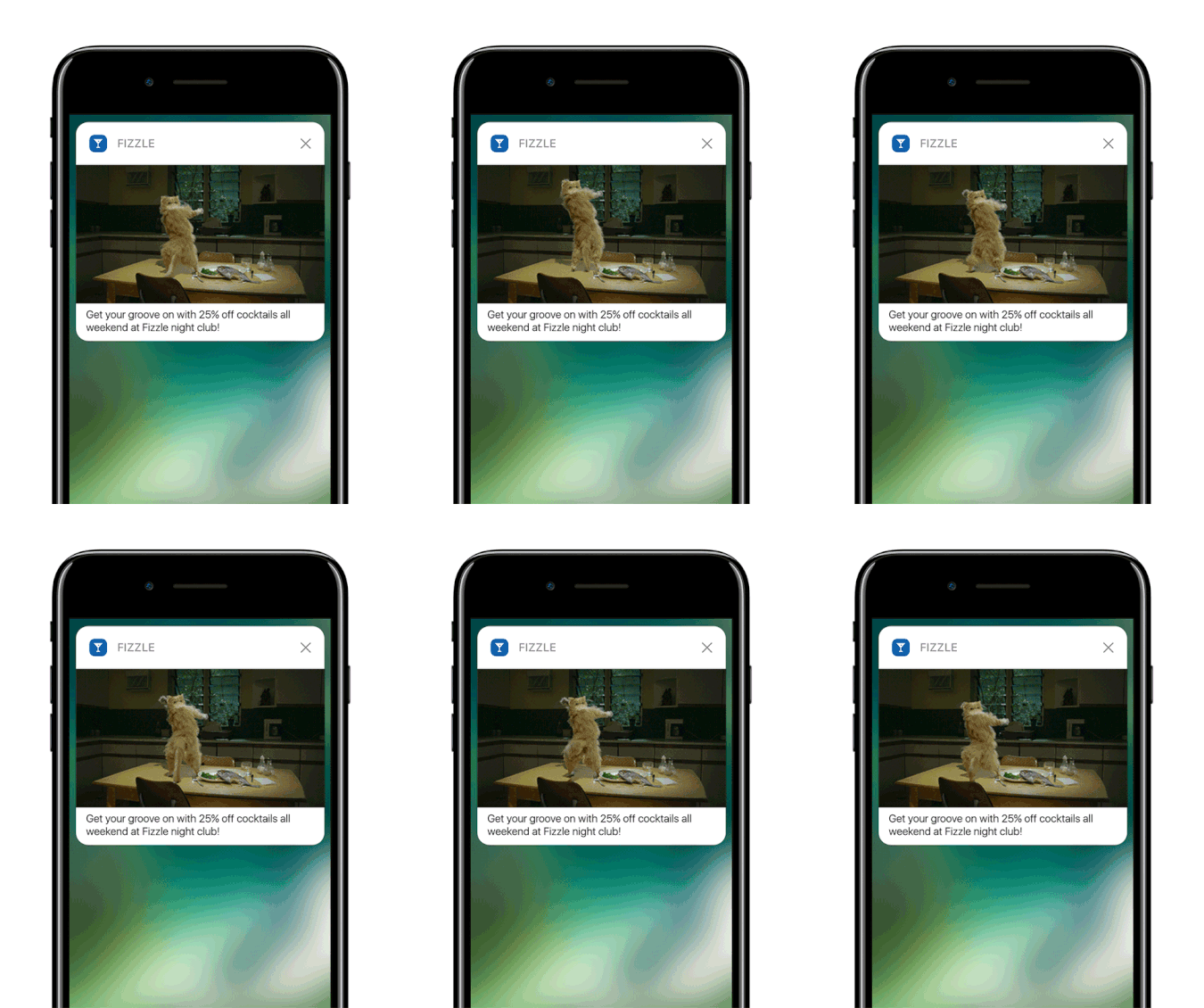
للمصداقية: يمكنك إنشاء إشعارات دفع ويب مخصصة. ولكن إشعارات التطبيقات يمكن أن تتعمق بشكل كبير في التخصيص.
تتجاوز إشعارات الدفع لتطبيقات الهاتف المحمول كونها مجرد أداة للتواصل؛ إنها آلية قوية لتعزيز تجربة المستخدم وزيادة المشاركة وبناء اتصال شخصي مع المستخدمين.
إنها تسمح بمستوى من التفاعل والتخصيص يمكن أن يساهم بشكل كبير في فعالية التطبيق في الاحتفاظ بالمستخدمين وإشراكهم.
- تعزيز تفاعل المستخدم:
- الملاءمة السياقية: يمكن أن تكون إشعارات الدفع للتطبيقات حساسة للسياق بشكل لا يصدق. إنها تستخدم بيانات المستخدم مثل الموقع والسلوك والتفضيلات لإرسال إشعارات في الوقت المناسب وذات صلة. على سبيل المثال، قد يرسل تطبيق لياقة بدنية رسالة تحفيزية في الوقت الذي تذهب فيه عادةً للجري.
- التحفيز السلوكي: يمكن تشغيل الإشعارات بواسطة إجراءات أو عدم إجراءات محددة للمستخدم. هذا يجعلها فعالة للغاية في تشجيع السلوكيات المرغوبة، مثل تذكير المستخدم بإكمال عملية شراء تركها في عربته.
- تجربة مستخدم غنية:
- التكامل متعدد الوسائط: على عكس الرسائل النصية الأساسية، يمكن لإشعارات التطبيق أن تتضمن الصور والصوت وحتى الفيديو. هذا التكامل الغني بالوسائط يجعلها أكثر جاذبية ومتعة.
- عناصر تفاعلية: تسمح بعض الإشعارات للمستخدمين بالتفاعل مباشرة من شاشة القفل أو منطقة الإشعارات. يمكن أن يشمل ذلك إجراءات مثل الرد على رسالة، أو الإعجاب بمنشور، أو حتى التحكم في تشغيل الموسيقى.
- التواصل الشخصي:
- محتوى مخصص: باستخدام تحليلات البيانات، يمكن للتطبيقات إرسال إشعارات مخصصة للغاية. يمكن أن يكون هذا بسيطًا مثل استخدام اسمك أو معقدًا مثل التوصية بمنتجات بناءً على سجل التصفح الخاص بك.
- التقسيم والاستهداف: يمكن للتطبيقات تقسيم مستخدميها بناءً على معايير مختلفة وإرسال إشعارات مستهدفة. هذا يضمن أن يتلقى المستخدمون إشعارات ذات صلة باهتماماتهم واحتياجاتهم.
- الاحتفاظ بالعملاء والولاء:
- المشاركة المنتظمة: من خلال إبقاء المستخدمين على اطلاع ومشاركين، يمكن لإشعارات التطبيق تحسين الاحتفاظ بالعملاء بشكل كبير.
- مكافآت الولاء: تعد الإشعارات طريقة فعالة لإبلاغ المستخدمين ببرامج الولاء والعروض الخاصة والمكافآت، مما يعزز ولاء العملاء.
- رؤى تحليلية:
- بيانات استجابة المستخدم: يمكن للتطبيقات تتبع كيفية تفاعل المستخدمين مع الإشعارات، مما يوفر رؤى قيمة حول تفضيلات المستخدم وسلوكه.
- اختبار A/B: يمكن استخدام هذه البيانات لإجراء اختبار A/B لاستراتيجيات الإشعارات المختلفة لمعرفة ما هو الأفضل، مما يؤدي إلى تواصل أكثر فعالية.
- الكفاءة التشغيلية:
- التواصل الآلي: يمكن أتمتة الإشعارات بناءً على معايير معينة، مما يقلل من الحاجة إلى التدخل اليدوي ويضمن التواصل في الوقت المناسب.
من خلال الاستفادة من بيانات المستخدم وسلوكه، يمكن لإشعارات الدفع للتطبيقات تحويل طريقة تفاعل الشركات مع عملائها، مما يجعل التواصل أكثر صلة وفي الوقت المناسب وفعالية. هذا العمق في المشاركة والتخصيص هو ما يميز إشعارات الدفع للتطبيقات ويجعلها رصيدًا قيمًا في استراتيجية الاتصال الرقمي لأي تطبيق جوال.
وإذا كنت بحاجة إلى دليل أكثر تفصيلاً، فيجب عليك الاطلاع على وثائقنا حول كيفية إعداد إشعارات دفع تطبيقات iOS و كيفية إعداد إشعارات دفع تطبيقات Android.
ماذا أيضًا؟
نحن نعلم أن تنمية الأعمال التجارية عمل شاق. في PushEngage، نسعى دائمًا لتحسين منتجنا وتجربتك. لقد أطلقنا هذه الميزة الجديدة لمساعدتك في الحصول على قيمة أكبر من اشتراكك في PushEngage.
شكرًا جزيلاً لك على قراءة هذا الإعلان.
إذا كانت لديك أي أسئلة، فإن فريق نجاح العملاء لدينا هنا للمساعدة. ابدأ محادثة على الدردشة المباشرة أو تحقق من صفحة الاتصال الخاصة بنا.
وشكراً لاستخدامك PushEngage. سواء كنت تستخدم الإصدار المجاني أو إصدار المؤسسات، فأنت مهم بنفس القدر بالنسبة لنا. تهدف مقتطفات التعليمات البرمجية الجديدة إلى مساعدتك على النجاح ونتمنى لك كل التوفيق.
نحن بصدد تقديم المزيد من عمليات التكامل الرائعة لجعل حياتك أسهل. لذا، أخبرنا بآرائك في التعليقات أدناه. يمكنك طلب عمليات تكامل محددة ترغب في رؤيتها في المستقبل.
وإذا لم تكن قد فعلت ذلك بالفعل، ابدأ مع PushEngage اليوم!


