ウェブサイトでアプリIDをキャプチャする方法

The App ID is crucial in PushEngage because it uniquely identifies your website or application within the PushEngage platform.

The App ID ensures that notifications and settings are associated with the correct site or app. When setting up push notifications, the App ID is used to configure the integration between your site or app and PushEngage. It’s essential to ensure that push notifications are sent to the right website.

This guide will help you locate the App ID for your website.

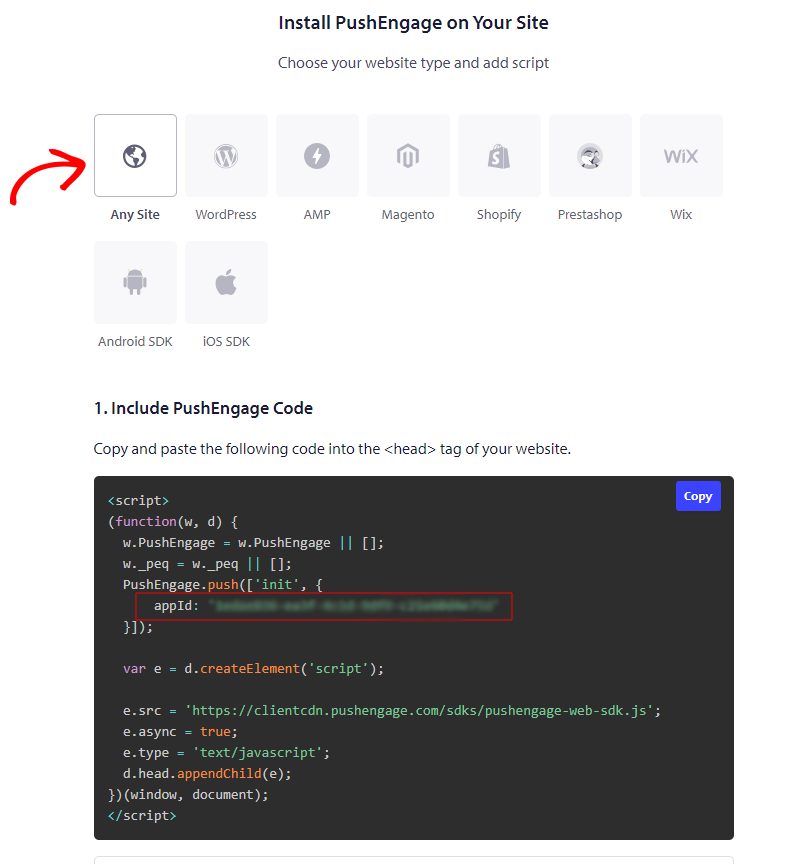
It’s simple. You just have to navigate to your dashboard Site Settings » Installation

Click on “Any Site” and scroll down.

You can refer to the image below.

With this method, we can easily capture the App Id for your Website if you need it for API integrations or App Push Notification Setup.

If you run into any issues, please feel free to contact us by clicking here. Our support team would be able to help you

最終更新日:2026年3月9日

ウェブサイトを離れた後も訪問者をエンゲージし、維持する

見逃せないプッシュ通知で、すべてのウェブ訪問の価値を高めましょう。

  • 永久無料プラン
  • 簡単なセットアップ
  • 5つ星サポート