Les boutiques WooCommerce excellent dans l'offre de produits diversifiés mais sont souvent confrontées à des défis liés à l'abandon de panier et de navigation. PushEngage offre une solution innovante, permettant des campagnes qui interagissent directement avec votre flux de produits et transforment les pertes potentielles en conversions avec l'aide de WPCode.
Ici, vous auriez besoin de deux extraits à modifier en fonction de votre campagne.
Avant de commencer
Voici quelques points à savoir avant de commencer :
- Notre intégration WooCommerce nécessite un abonnement PushEngage Growth pour créer une campagne d'abandon de panier et de navigation à l'aide de notre fonctionnalité de campagne déclenchée.
- Ce guide suppose que vous avez déjà installé les plugins WooCommerce et WPCode sur votre site Web WordPress.
Création d'une campagne déclenchée dans le tableau de bord PushEngage
Vous devez vous connecter à votre tableau de bord et naviguer vers Campagne » Campagnes déclenchées.
Sélectionnez la campagne d'abandon de panier/navigation, et cliquez sur Créer.
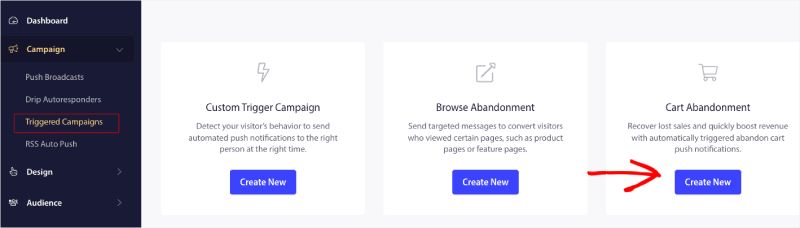
Vous pouvez maintenant entrer le Nom de la campagne.
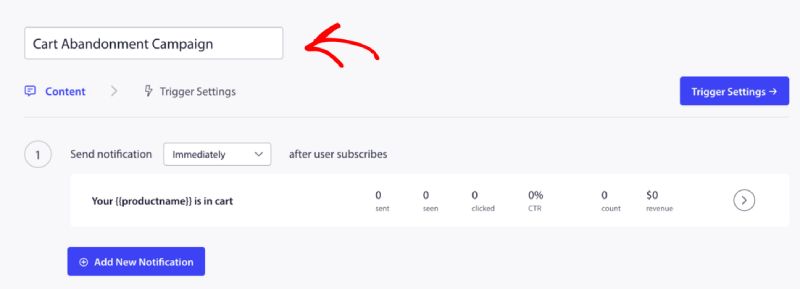
Ajout du contenu de la campagne
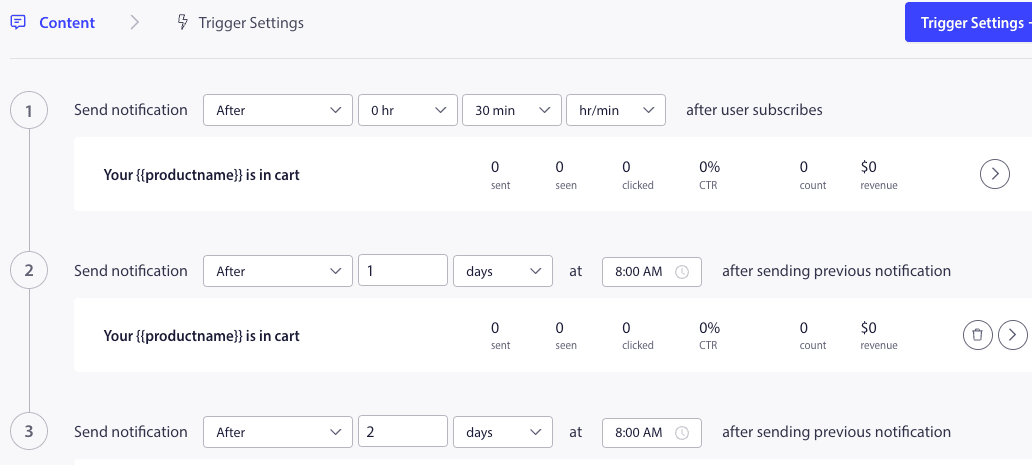
L'étape suivante consiste à configurer la planification du parcours – Vous pouvez sélectionner l'une des options immédiatement, après n heures et minutes, ou après un certain jour.
Généralement, nous ne recommandons pas de planifier immédiatement. Vous devriez prévoir un délai d'au moins 15 ou 30 minutes pour la première campagne de la série.
Lors de la configuration d'une série, vous pouvez avoir au moins trois campagnes. Vous pouvez personnaliser le titre et le message de chaque campagne de la série. Veuillez vous assurer de ne pas modifier les variables si vous souhaitez les utiliser dans la campagne.
Les variables par défaut ajoutées au code selon la campagne sont : {{productname}}, {{price}} et {{notificationurl}}
Gestion des paramètres de déclenchement
Une fois que vous avez ajouté le contenu de la notification, vous pouvez passer aux Paramètres de déclenchement.
Ici, les déclencheurs sont prédéfinis. La campagne démarre si une personne ajoute le produit au panier et ne finalise pas la commande. S'il finalise la commande, il ne recevra pas la notification d'abandon de panier. Mais ce ne sont que des événements définis ; ils ne peuvent pas être exécutés tant qu'ils ne sont pas placés sur le site web.
Les déclencheurs ici sont Démarrer la campagne si – ajouter au panier et Arrêter la campagne si – finaliser la commande.
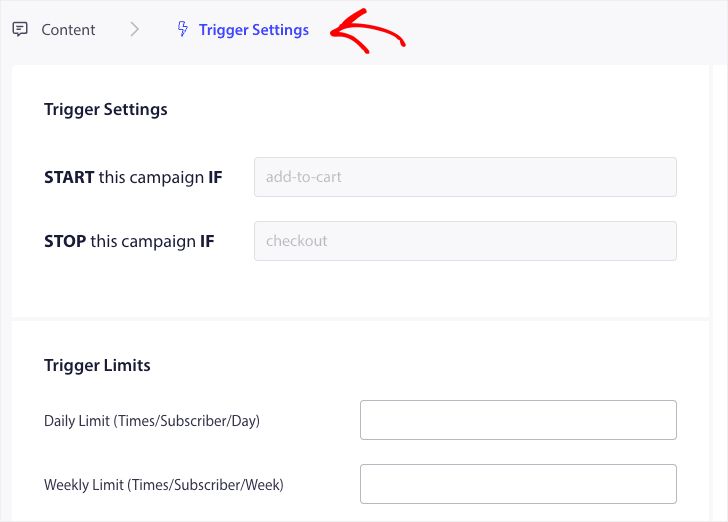
L'étape suivante consiste à ajouter les limites de déclenchement quotidiennes et hebdomadaires. Cela définira le nombre total de notifications qu'un abonné peut recevoir quotidiennement et hebdomadairement. Par exemple – Si 2 notifications sont quotidiennes, alors elles devraient être 14 hebdomadaires ; de cette façon, la fréquence sera plafonnée même si plus de deux produits sont abandonnés.
Modifier et activer un extrait dans WPCode
Pour commencer, visitez l'onglet Code Snippets dans votre tableau de bord WordPress.
Ici, vous auriez besoin de deux extraits à modifier en fonction de votre campagne.
- Pour la campagne d'abandon de panier – Lors de l'événement Ajouter au panier dans WooCommerce et Après l'événement de paiement dans WooCommerce.
- Pour la campagne d'abandon de navigation – Lors de la navigation sur les produits WooCommerce et Lors de l'événement Ajouter au panier dans WooCommerce
Choisissez en fonction de votre campagne et cliquez sur Utiliser l'extrait. Une fois que vous avez l'extrait ouvert dans l'éditeur.
Ajout du nom de la campagne
Veuillez vous assurer que le nom de campagne correct est ajouté pour les deux événements. Vous n'avez pas besoin de changer l'emplacement, laissez l'extrait être ajouté sur l'ensemble du site.
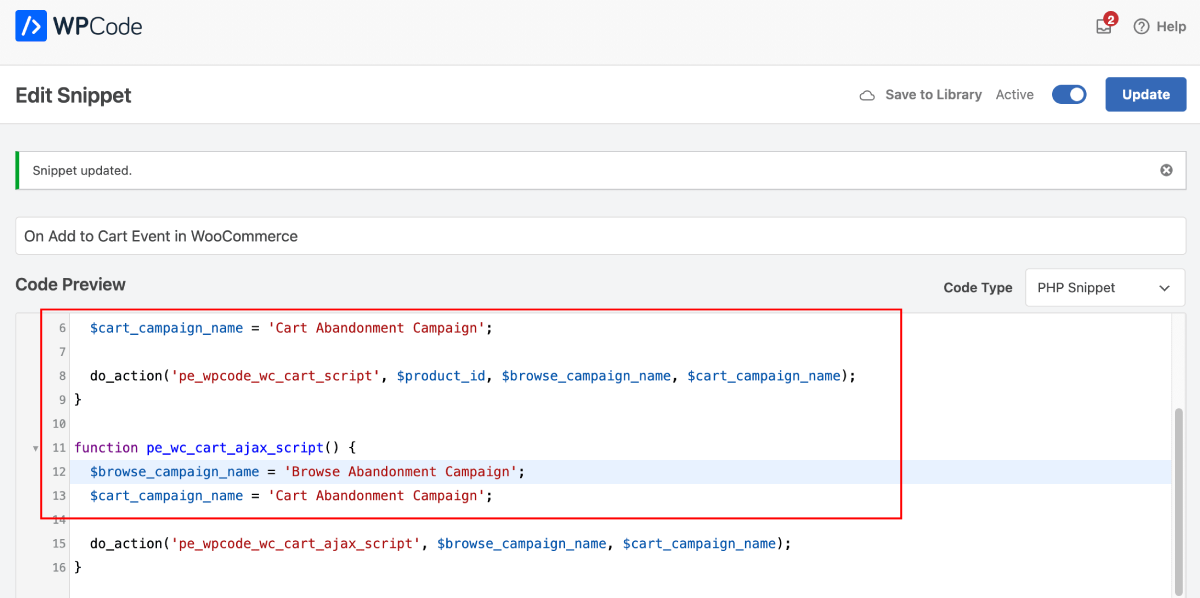
Une fois l'extrait finalisé, vous pouvez l'activer. Sans activation, l'extrait ne sera pas fonctionnel.
Dépannage des campagnes déclenchées
- Le nom de la campagne doit être le même dans le code et sur le tableau de bord PushEngage.
- Le code d'installation de PushEngage doit être présent là où le code de la campagne d'abandon de panier est présent, sinon les campagnes ne seront pas déclenchées sans lui.
- Assurez-vous que la campagne est active sur le tableau de bord après avoir placé le code sur votre site Web.
- Vous devez être un abonné aux notifications push Web de votre site Web ; sinon, vous ne pourrez pas tester si vous recevez les campagnes d'abandon de panier sur votre système.
C'est tout ! Vous avez maintenant activé une campagne d'abandon de panier/navigation sur votre boutique WooCommerce en utilisant WPCode.
Si vous rencontrez des problèmes, n'hésitez pas à nous contacter en cliquant ici. Notre équipe de support pourra vous aider.