Cet article vous aidera à savoir comment récupérer les visiteurs de votre site Web qui souhaitent s'abonner à vos notifications après les avoir initialement refusées. En activant le widget de récupération, vous pouvez donner une seconde chance aux visiteurs de redevenir abonnés qui ont cliqué sur le bloc lors de leur première visite sur le site Web.
Étape 1 : Accédez à Design » Widgets » Widgets de récupération.
Étape 2 : Sélectionnez le type de widget à afficher – Bouton ou Icône de cloche. Entrez le Texte, la couleur d'arrière-plan, la couleur de la cloche/du bouton et la position du widget selon vos besoins et cliquez sur Mettre à jour.
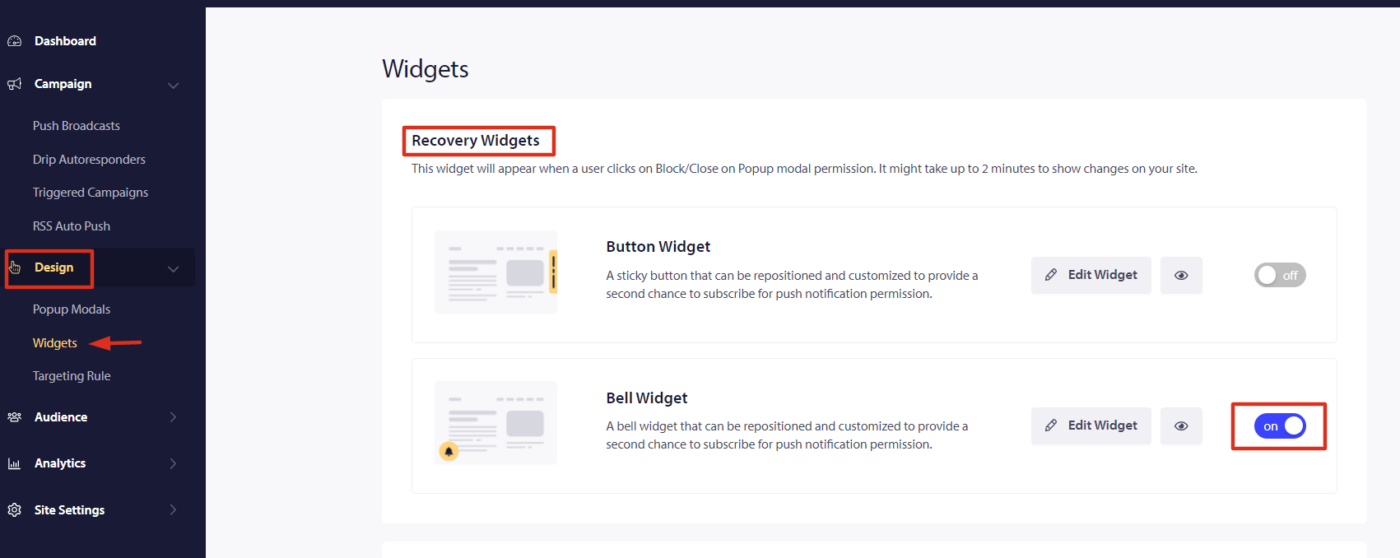
Remarque : Le widget apparaîtra lorsque les utilisateurs cliqueront sur refuser la permission de notification push. Veuillez attendre 2 minutes après la prise en compte de la modification.
Widgets Cloche et Bouton
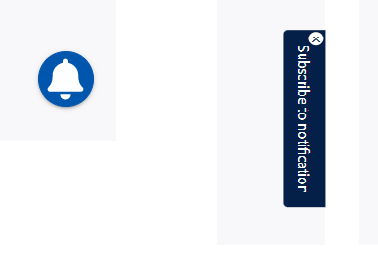
Vous pouvez choisir un widget Cloche ou Bouton. Sur l'un ou l'autre, les visiteurs de votre site peuvent s'abonner à vos notifications. Le widget Bouton est suggéré par rapport au widget Cloche car il n'est pas nécessaire de survoler l'icône pour voir le message texte que vous ajouterez pour les inciter à s'abonner à nouveau.
Voici un aperçu du widget de récupération.
Si vous rencontrez des problèmes, n'hésitez pas à nous contacter en cliquant ici. Notre équipe de support pourra vous aider.