Vous pouvez collecter des abonnés au chargement de la page en affichant l'option de souscription/permission, mais il existe également une option pour collecter des abonnés lors d'un clic sur un élément. L'élément HTML peut être un bouton/lien ou une image. L'avantage est que vous n'avez besoin que de connaître l'ID de l'élément, sans avoir à ajouter de code.
Dans ce guide, vous apprendrez comment faire depuis le tableau de bord lui-même.
Ajout du déclencheur d'option de souscription
Accédez à Design » Popup Modal, et cliquez sur le bouton Modifier la popup.
Vous pouvez faire défiler jusqu'à Activer le déclencheur d'option de souscription et l'activer.
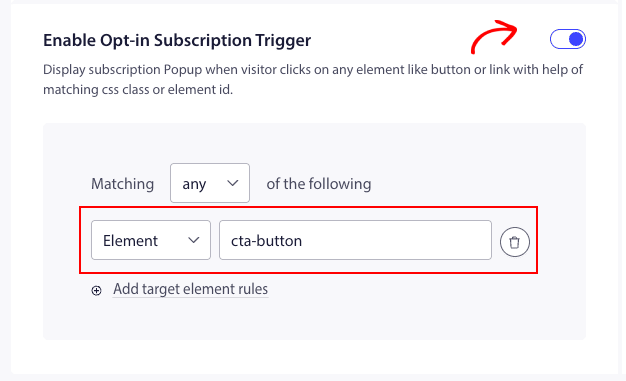
Vous devez maintenant récupérer l'ID de l'élément et l'ajouter au filtre des critères correspondants.
Une fois ajouté, vous pouvez cliquer sur Enregistrer et activer la popup.
Cela affichera l'option de souscription au clic d'un élément ou d'un bouton après le chargement de la page.
C'est tout, vous pouvez maintenant tester en cliquant sur cet élément sur votre site Web pour voir si la popup s'affiche.
Si vous rencontrez des problèmes, veuillez nous contacter en cliquant ici. Notre équipe de support sera en mesure de vous aider.