Hvad er push-beskeder?
Push-beskeder er korte, klikbare beskeder, der leveres til en abonnents enhed, selv når de er offline. Du kan nemt sende ethvert link for at promovere enhver del af din virksomhed ved hjælp af push-beskeder fra et simpelt, brugervenligt dashboard.
Her er den mest fantastiske del: Push-beskeder er en super nem måde at få gentagne besøgende til dit websted automatisk, selvom...
- Du lige er startet, og din fanbase stadig er lille
- Selv hvis… du driver en e-handelsbutik med hundredvis af kampagner hver måned
- Selv hvis... du har en mega-blog, der allerede genererer masser af SEO-trafik
I denne artikel vil vi vise dig, hvordan du får gentagne besøgende øjeblikkeligt, hver gang du udgiver:

Du kan komme i gang gratis lige nu. Når du begynder at få resultater fra en gratis push-notifikationssoftware, kan du skifte eller opgradere for at få flere funktioner, der hjælper dig med at vokse hurtigere.
Men lad os først forstå lidt mere om push-beskeder og hvordan de fungerer.
Hvad er push-beskeder?
En push-besked er en kort, klikbar popup, som du kan sende til en abonnent for at promovere tilbud og andet indhold:
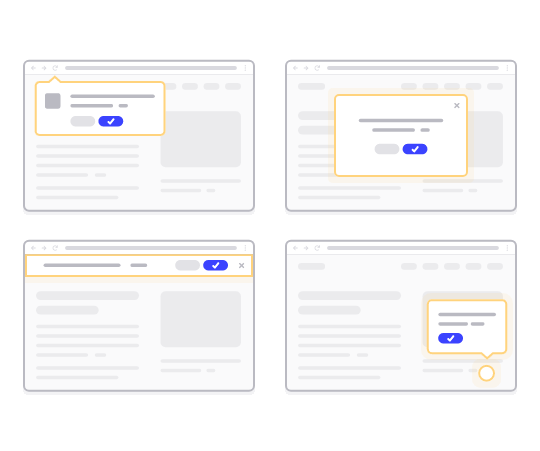
Det bedste er, at beskederne leveres, selvom din abonnent ikke bruger en browser. Det er som en e-mail-udsendelse, men med en web push-besked behøver dine abonnenter ikke at bruge en app for at se din besked. Og i modsætning til sociale medie-websteder er der ingen algoritme, der reducerer din rækkevidde for at få dig til at betale for annoncer.
Det sejeste ved web push-beskeder er, at du kan bruge dem til at supplere dine lead magnets og e-mail opt-in-formularer.
Vi anbefaler at bruge PushEngage til at komme i gang med push-beskeder gratis. Den simpleste push-besked, du kan sende gratis, er en RSS push-besked. I en RSS push sender PushEngage automatisk en udsendelsesbesked til alle dine abonnenter, hver gang du udgiver et blogindlæg.
Sådan tilføjer du push-beskeder til dit websted
Før du kommer i gang med push-beskedkampagner, skal du have en service til at sende push-beskeder.
Vi anbefaler, at du kommer i gang med PushEngage. PushEngage er et af de bedste push-notifikationsplugins til WordPress. Du når øjeblikkeligt op til 200 abonnenter med kun gratisniveauet. Hvis dit websted vokser til mere end 200 abonnenter, kan du hurtigt skalere ved at opgradere din plan.
Lad os se på, hvordan du kan bruge gratisversionen af PushEngage til at begynde at sende push-beskeder.
Trin #1: Opret en gratis PushEngage-konto
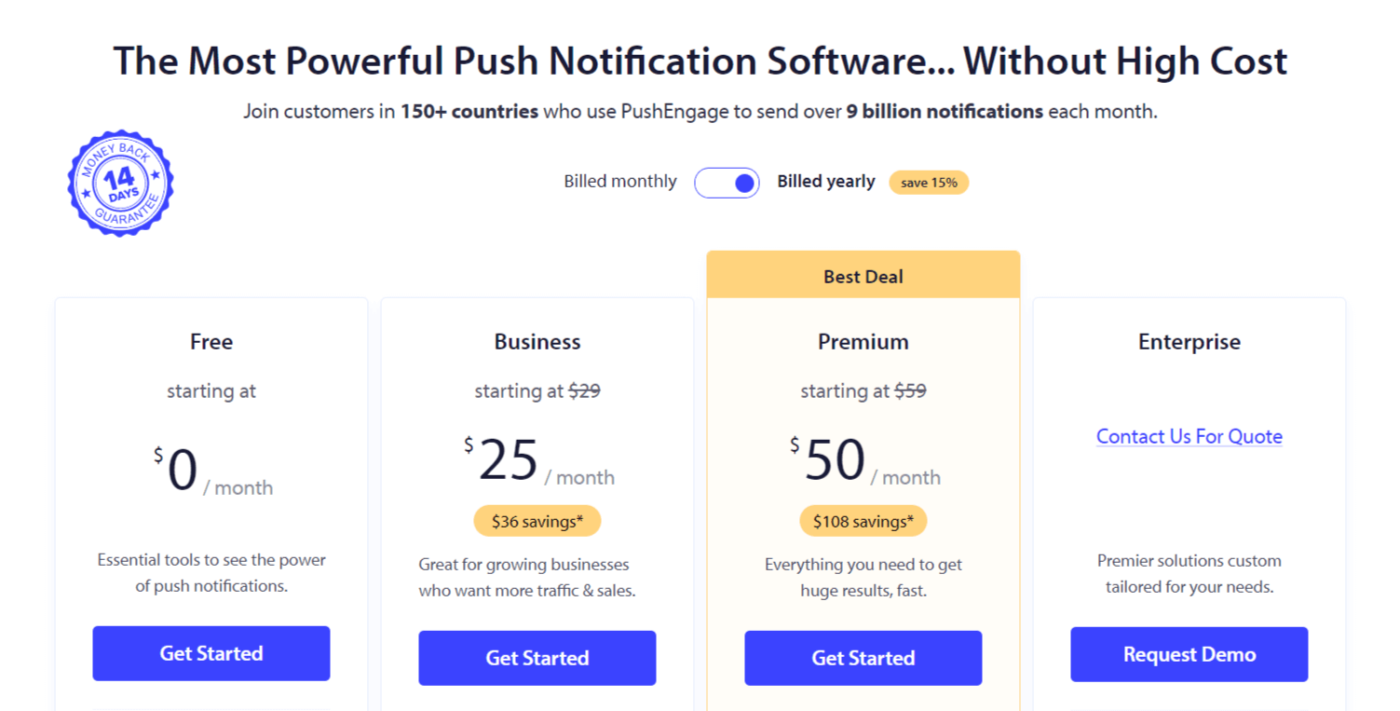
Gå til PushEngage og klik på Kom i gang:

Vælg derefter planen for din PushEngage-konto. Du kan komme i gang gratis, men hvis du er seriøs omkring at vækste din virksomhed, anbefaler vi at få en betalt plan for at låse op for mere avancerede kampagner.
Trin #2: Tilmeld dig PushEngage
Tilmeld dig plugin'et med dine brugeroplysninger eller dit Gmail ID eller din e-mail og adgangskode:
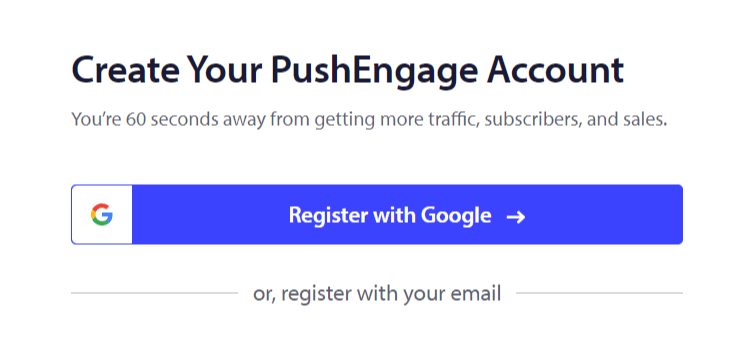
Og følg blot instruktionerne og afslut opsætningen af din konto.
Trin #3: Installer PushEngage på dit websted
Når du har tilmeldt dig, bliver du ført til PushEngage-dashboardet:
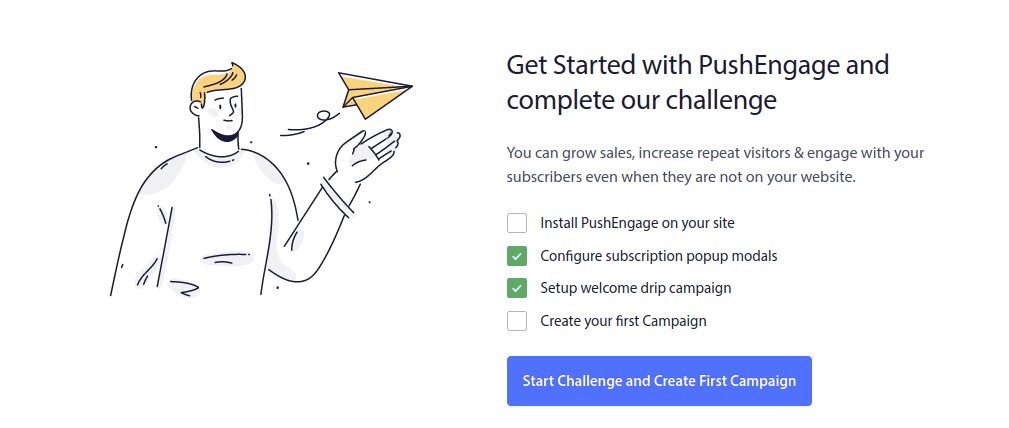
Processen for at tilføje push-beskeder til dit websted er forskellig for forskellige platforme. Så vi har lavet detaljerede, trin-for-trin-guides til de mest populære platforme for dig:
- Installer push-notifikationer på WordPress
- Installer push-notifikationer på WordPress (uden et plugin)
- Installer push-notifikationer på WooCommerce
- Installer push-notifikationer på Wix
- Installer push-notifikationer på Blogger
- Installer push-notifikationer på Zoho
- Installer push-notifikationer på Volusion
- Installer push-notifikationer på Weebly
- Installer push-notifikationer på ClickFunnels
- Installer push-notifikationer på PrestaShop
- Installer push-notifikationer på OpenCart
- Installer push-notifikationer på CS-Cart
- Installer push-notifikationer på Drupal
- Installer push-notifikationer på Squarespace
- Installer push-notifikationer på X-Cart
- Installer push-notifikationer på BigCommerce
- Installer push-notifikationer på Jimdo
Trin #4: Opsæt PushEngage Opt-In
Når du er færdig med at installere PushEngage på dit websted, skal du gå tilbage til PushEngage-dashboardet og gå til Design » Popup Modals og vælge en optin til at indsamle abonnenter:
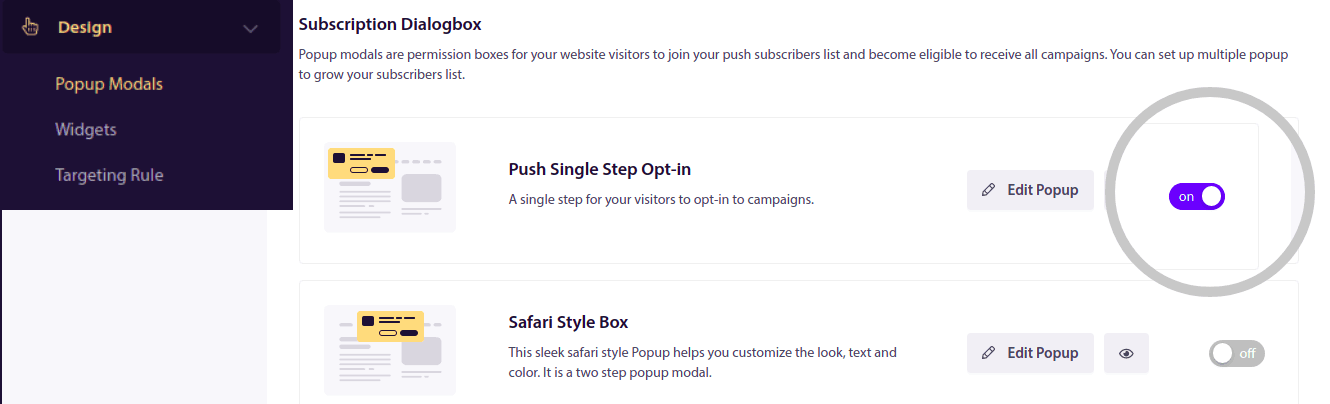
Herfra kan du tilpasse din opt-in til push-notifikationer. Hvis du har brug for hjælp til det, bør du tjekke denne artikel om hvordan man opretter en brugerdefineret opt-in til push-notifikationer.
Hvis du har brug for inspiration, kan du tjekke denne artikel om opt-ins til push-notifikationer med høj konvertering.
Husk: Du skal installere et SSL-certifikat på dit websted for at kunne bruge single opt-ins. Men du kan installere two-step opt-ins selv uden et sikkert websted. Så hvis du har et SSL-certifikat installeret, skal du bruge single opt-ins. Hvis ikke, så tjek denne artikel om hvordan man installerer et SSL-certifikat på WordPress-websteder.
Og det er alt!
Du har succesfuldt opsat push-beskeder på dit websted.
Hvordan fungerer push-beskeder?
Lad os se på, hvordan push-beskeder fungerer.
Den korte version er, at hver gang en ny besøgende kommer ind på dit websted, bliver de bedt om at blive abonnent på push-notifikationer.
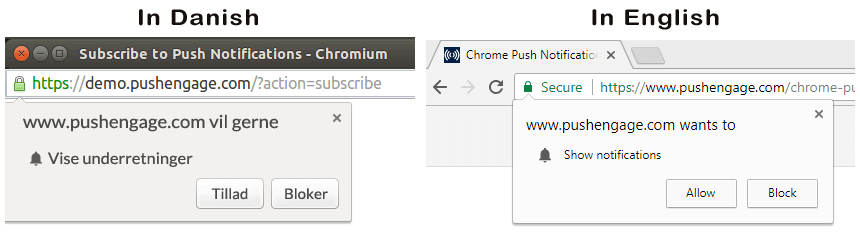
Derefter bruger du en web push-notifikationstjeneste som PushEngage til at oprette og planlægge de beskeder, du vil sende til dine abonnenter. Du kan enten sende en enkelt push-besked manuelt eller opsætte en automatiseret sekvens af push-beskeder:
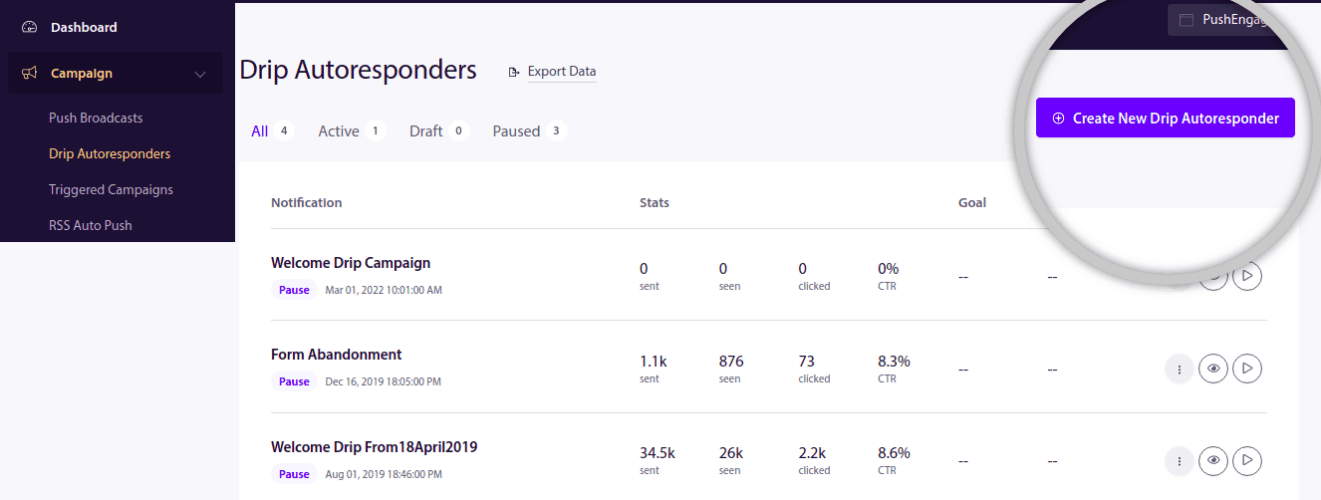
Du kan også vælge enten at sende den til alle abonnenter på din liste eller til specifikke segmenter af dine abonnenter. Endelig modtager dine abonnenter dine beskeder, når deres enhed kommer online, og udfører den foreslåede handling.
For PushEngage og vores servere er dine abonnenter et unikt hashnummer genereret baseret på din abonnents enhed og browser. Desuden kan serveren også gemme abonnenternes geolokation. Ingen personlige eller identificerbare data gemmes for nogen af dine abonnenter.
Det smukke ved det hele er, at du ikke behøver at vide noget om kodning eller hvordan man vedligeholder de originale servere. Vi tager os af alt det for dig. Alt, du skal bekymre dig om, er at opsætte dine kampagner og tjene penge!
Nu undrer du dig sandsynligvis over, hvordan personlige push-beskeder fungerer, hvis serverne kun gemmer et hashnummer og ingen personlige detaljer. Det er her, API'en til tjenesteudbyderen kommer ind i billedet. For dig ville det være PushEngage Javascript API. Du kan bruge denne API og forbinde den til enhver anden CRM eller database, du måtte have.
Dette giver dig mulighed for at bruge dine abonnenters personlige oplysninger til at sende dem personlige push-beskeder som denne:

Du kan også sende avancerede e-handelskampagner som f.eks. kampagner for forladte indkøbskurve uden at bruge PushEngage API'en.

Hvad er det næste?
Det var alt for denne gang.
Hvis du lige er begyndt med push-beskeder, kan du se, hvordan du opretter din første velkomstbesked ved hjælp af PushEngage. En velkomstbesked er god til genengagement og til at få gentagne besøgende tilbage til dit website.
Synes du, det er svært at finde på kampagneidéer? Tjek disse fantastiske ressourcer:
- 75 episke push-meddelelseseksempler, du kan stjæle lige nu
- Sådan bruges Form Abandonment Push-beskeder til at genvinde tabte leads
- Sådan sender du personlige push-notifikationer med dryp-attributter
- 10 eksempler på eCommerce-butikker, der bruger push-notifikationer godt
- 8 personlige push-notifikationer, der virker [understøttet af data]
Og hvis du ikke allerede har gjort det, kom i gang med PushEngage i dag!


