Leder du efter en måde at øge din gennemsnitlige ordreværdi?
Gennemsnitlig ordreværdi (AOV) er en af de enkleste e-handelsmålinger at se på for at analysere forretningsvækst. Men hvordan øger du den? Hjælper det rent faktisk din virksomhed at øge AOV?
I denne artikel vil vi se nærmere på, hvad gennemsnitlig ordreværdi er, hvorfor du bør optimere den, og nogle virkelig nemme måder at øge din AOV på.
Lyder godt? Lad os dykke ned.
PushEngage er det #1 push-notifikationsplugin i verden. Få det gratis!
- Hvad er gennemsnitlig ordreværdi?
- Er gennemsnitlig ordreværdi den bedste e-handelsmåling?
- Måder at øge din butiks gennemsnitlige ordreværdi
- #1. Opret en minimumsordreværdi for gratis fragt
- #2. Bundt produkter og opret pakker
- #3. Sælg op og sælg komplementære produkter på tværs
- #4. Øg gennemsnitlig ordreværdi ved hjælp af loyalitetsprogrammer
- #5. Tilføj en live chat til din side
- #6. Brug segmentering af målgrupper til at øge konverteringer
- #7. Sælg tilføjelser ned
- #8. Brug en exit-intent popup til højere salg
- #9. Tilføj en klik-for-at-abonnere-knap til din popup
- #10. Opret en velkomstkampagne
- #11. Opret tidsbegrænsede tilbud
- #12. Tilbyd social proof gennem checkout-flowet
- #13. Tilføj flere betalingsmuligheder
- Hvad skal du gøre efter at have øget din gennemsnitlige ordreværdi
Hvad er gennemsnitlig ordreværdi?
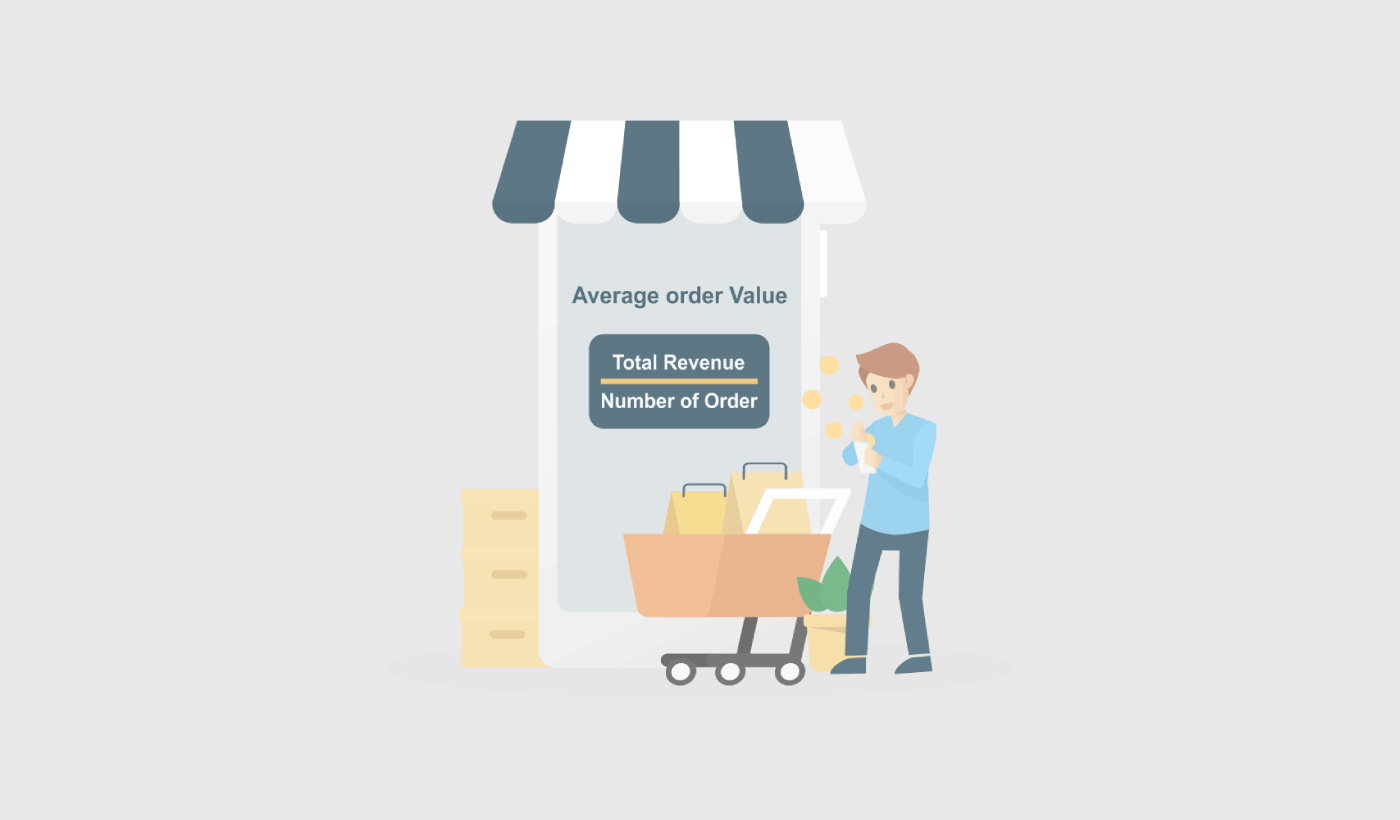
Gennemsnitlig ordreværdi (AOV) er en måling, der måler det gennemsnitlige beløb, der bruges pr. ordre på et websted eller i en e-handelsbutik. Du kan beregne den ved at dividere den samlede omsætning med antallet af ordrer.
For eksempel, hvis en butik havde 100 ordrer og en samlet omsætning på 10.000 USD, ville AOV være 100 USD (10.000 USD / 100 ordrer).
AOV er en vigtig måling for din virksomhed, fordi den kan hjælpe dig med at forstå værdien af din kundebase og identificere muligheder for at øge salget. Ved at øge AOV kan din virksomhed generere mere omsætning fra hver kunde, hvilket kan hjælpe dem med at øge din samlede omsætning og rentabilitet.
Der er flere strategier, du kan bruge til at øge deres AOV, såsom at tilbyde pakkedrabatter, sælge relaterede produkter og bruge pakkepriser. Ved effektivt at implementere disse strategier kan du drive mere salg og øge deres AOV over tid. Vi vil tale om det mere detaljeret snart.
Er gennemsnitlig ordreværdi den bedste e-handelsmåling?
Selvom det at øge den gennemsnitlige ordreværdi (AOV) kan være en nyttig måde at vækste en virksomhed på, er der et par potentielle ulemper at overveje. At øge din AOV kan:
- Føre til højere kundeanskaffelsesomkostninger: For at øge AOV kan du være nødt til at investere mere i marketing- og kundeanskaffelsesindsatsen. Dette kan øge omkostningerne ved at anskaffe nye kunder, hvilket kan påvirke virksomhedens samlede rentabilitet.
- Ikke være bæredygtig på lang sigt: At øge AOV er måske ikke en bæredygtig strategi på lang sigt, da kunderne til sidst kan nå et punkt, hvor de ikke er villige til at bruge mere på hver ordre. Så det er bedst at fokusere på AOV, når du kører et sæsonbestemt udsalg.
- Føre til kundemisfornøjelse: Hvis du fokuserer for meget på at øge AOV, kan du irritere dine kunder ved at presse dem til at købe flere produkter, end de har brug for eller ønsker. Dette kan føre til kundemisfornøjelse og potentielt skade din virksomheds omdømme.
- Ikke muligt for alle virksomheder: Afhængigt af din virksomheds art og dens produkter, er det muligvis ikke muligt at øge AOV. For eksempel, hvis du sælger produkter til lave priser, kan du have sværere ved at øge AOV end virksomheder, der sælger produkter til højere priser.
Samlet set er det vigtigt omhyggeligt at overveje de potentielle ulemper ved at øge AOV og tage en afbalanceret tilgang. Kortvarig vækst kan tvinge dig til at miste loyale kunder, som ellers ville have haft en varig indvirkning på din virksomhed.
Måder at øge din butiks gennemsnitlige ordreværdi
Nu hvor du forstår, hvad Gennemsnitlig Ordreværdi er, og hvorfor du bør bekymre dig om det, er det tid til at se på, hvordan du kan øge din AOV. Husk, at næsten alle vores tips kræver et eller andet marketingværktøj. Før du begynder at optimere din AOV, skal du være 100% sikker på, at du overhovedet behøver at fokusere på den.
#1. Opret en minimumsordreværdi for gratis fragt
Gratis fragt kan give dig mange salg. Men hvis du ønsker at øge din gennemsnitlige ordreværdi, skal du stoppe med at give den væk for dine billigere produkter. En måde at gøre det på er at have en Minimum Ordreværdi for gratis fragt.

Minimum ordreværdi (MOV) for gratis fragt er det mindste beløb, en kunde skal bruge i din butik for at få gratis fragt på deres ordre. Du kan bruge denne marketingstrategi til at opmuntre kunder til at bruge flere penge på din hjemmeside.
Når du indstiller en minimum ordreværdi, reducerer det det beløb, du skal bruge på hver ordre til fragt og håndtering. Den reducerede omkostning gør det lettere at opretholde rentabiliteten.
En anden grund til at implementere en Minimum Ordreværdi for gratis fragt er at skubbe dine kunder til at købe flere varer i en enkelt ordre. Dette kan øge den Gennemsnitlige Ordreværdi ret nemt.
#2. Bundt produkter og opret pakker
Bundling af produkter er en almindelig strategi til at øge den gennemsnitlige ordreværdi (AOV) for en virksomhed. Ved at samle produkter og sælge dem som en pakke, kan du ofte sælge flere produkter til en højere pris, end hvis du solgte dem individuelt.
Her er et par tips til at bruge produktbundling til at øge din AOV:
- Vælg komplementære produkter.
- Tilbyd bundle-rabatter.
- Brug bundle-priser.
Hvis du holder dig til disse tre grundlæggende principper, kan du skabe pakker, der sælger som varmt brød. Det er en fantastisk måde at øge din Gennemsnitlige Ordreværdi på.
#3. Sælg op og sælg komplementære produkter på tværs
Ifølge Amazon kommer 35% af deres salg fra mersalg. Mersalgs push-notifikationer er kampagner, der automatisk mersælger produkter til dine kunder. Mersalgs push-notifikationer hjælper dig med at øge salget, da du har 60-70% større sandsynlighed for at sælge til en eksisterende kunde.
Upselling er en metode til at få brugere til at opgradere til et dyrere produkt eller en bedre version af et produkt, de allerede køber. Cross-selling er at sælge relaterede eller komplementære produkter til en kunde.
Cross-selling og upselling er de mest effektive metoder til markedsføring. Du kan nemt øge din Gennemsnitlige Ordreværdi (AOV) ved hjælp af cross-selling og upselling-kampagner. En nem måde at gøre det på er at oprette cross-selling push-notifikationer som denne:
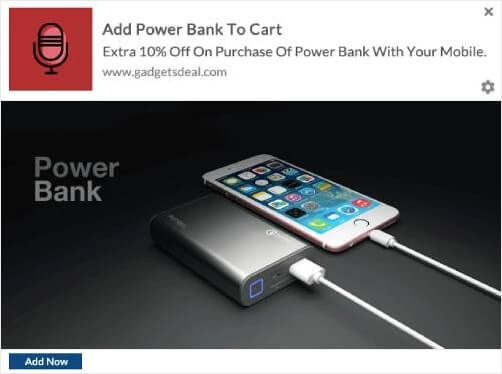
Se denne artikel for en trin-for-trin guide til hvordan man opretter cross-selling push-notifikationer. Du kan bruge den samme teknik til at oprette upselling-notifikationer også.
#4. Øg gennemsnitlig ordreværdi ved hjælp af loyalitetsprogrammer
Realitetstjek: Det er billigere at fastholde en eksisterende kunde end at få og onboarde en ny kunde. Hvis du konstant fokuserer på at få nye kunder, kan det være en god idé også at bruge en del af dit budget og din tid på at fastholde dine eksisterende kunder.
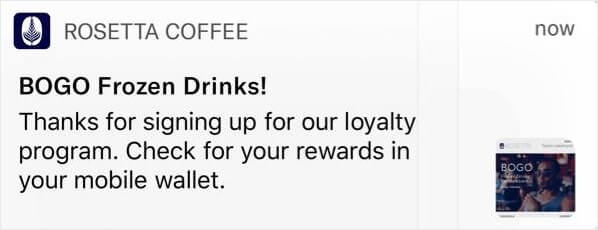
Så, hvad kan du gøre? En virkelig enkel måde at få dine kunder til at føle sig vigtige og værdsatte på er at oprette et loyalitetsprogram. Og nej, loyalitetsprogrammer er ikke kun for flyselskaber. Næsten alle store mærker har et belønningsprogram nu. En nem måde at gøre det på er at bruge push-notifikationer som denne:
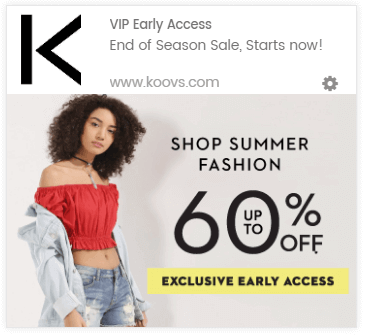
Og hvis du vil tage det et skridt videre, kan du belønne dine loyale kunder på forskellige måder.
Hvis du er ny til loyalitetsprogrammer og aldrig har sat et op før, så prøv at bruge Yotpo. Yotpo hjælper dig med at oprette øjeblikkelige loyalitetsprogrammer til dit website. Og du behøver slet ikke at kunne noget kode for at implementere det.
#5. Tilføj en live chat til din side
At have en live chatboks på din side kan være et virkelig effektivt værktøj til engagement på hjemmesiden. Ved at bruge et live chat-værktøj på din side kan du nemt opsætte chatboks-triggere for:
- Kunder, der bruger meget tid på produkt- eller checkout-siden
- Kunder, der tilføjer produkter til deres kurv, men ikke kan betale for det
- Kunder med høj kurv værdi for at tilbyde en kupon eller rabat
Dette er alle automatiserede triggere, der kan hjælpe dig med at konvertere mange potentielle kunder meget hurtigt. Vi anbefaler at bruge LiveChat.
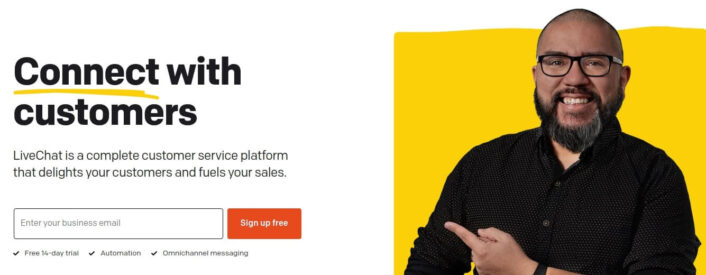
LiveChat er et live chat-værktøj til konverteringsmarkedsføring og salg. Hvis du sælger produkter online eller indsamler leads til et bureau, anbefaler vi kraftigt at bruge dette plugin.
Chatboksen vil give dine kunder besked, når en af de automatiserede triggere udløses. Og derfra kan du lade en kundeservicemedarbejder overtage og hjælpe kunderne med at træffe en købsbeslutning.
#6. Brug segmentering af målgrupper til at øge konverteringer
Segmentering af dit publikum efter interesser og adfærd gør dine kampagner mere klikværdige. Hvis du sender tilbud og kampagner, der er mere relevante for dit publikum, vil dine konverteringer skyde i vejret.
For eksempel, hvis du segmenterer dine push-notifikationsabonnenter, vil du få langt bedre klik på dem.
Automatisk segmentering af dine abonnenter gør det super nemt for dig at sende personlige push-notifikationskampagner. På den måde kan du forbedre klik på push-notifikationer, hvilket igen driver mere tilbagevendende trafik til dit websted.
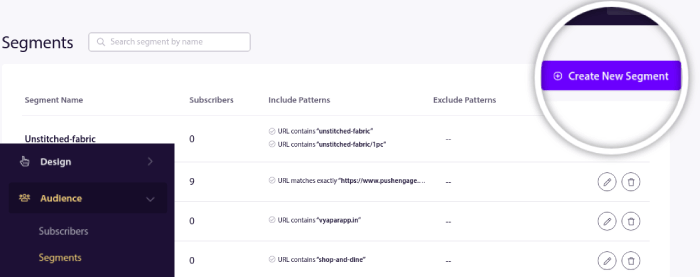
Og dette er super nemt at opsætte med PushEngage. Normalt skulle du bruge en Javascript API til at oprette segmenter. Med PushEngage har du stadig den mulighed, men den nemmeste måde at gøre det på er fra dit PushEngage dashboard. Gå til Audience » Segments og klik på Create a New Segment:
Og opret en regel, der automatisk segmenterer dine abonnenter baseret på de URL'er, de browser:
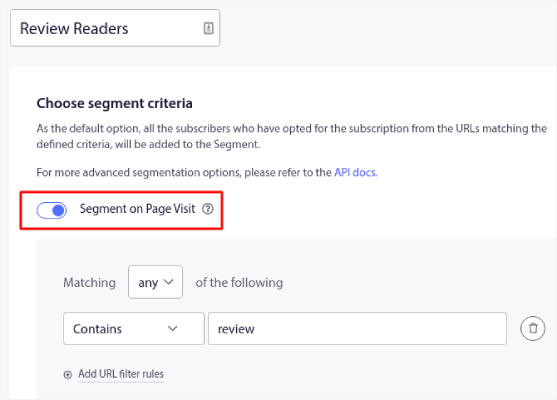
I eksemplet har vi oprettet et segment kaldet "Sample Segment", der automatisk segmenterer abonnenter, når de besøger URL'er på dit websted med ordet "examples" i sig. Du kan stort set bruge ethvert nøgleord, du ønsker, her.
Når du er tilfreds med reglen, skal du klikke på Create.
#7. Sælg tilføjelser ned
Downselling er en salgsteknik, hvor du forsøger at overtale en kunde til at købe et billigere produkt eller en billigere service i stedet for det, de oprindeligt ønskede. Dette kan gøres af en række årsager, såsom hvis kunden ikke har budgettet til den dyrere mulighed, eller hvis den billigere mulighed opfylder deres behov lige så godt.
Tænk på en butik, der har slik og cigaretter ved kassen. Downselling virker bedst på impulskøb og tilføjelser. Der er et par strategier, du kan bruge, når du ned sælger tilføjelser:
- Forklar værdien af den billigere mulighed: Forklar, hvordan den billigere tilføjelse stadig opfylder kundens behov og giver værdi.
- Fremhæv ulemperne ved den dyrere mulighed: Peg på eventuelle ulemper eller unødvendige funktioner ved den dyrere tilføjelse, som kunden måske ikke har brug for.
- Tilbyd alternativer: Foreslå andre muligheder eller tilføjelser, der måske er mere egnede til kundens behov og budget.
- Brug knaphed eller hastværk: Skab en følelse af hastværk ved at nævne begrænset tilgængelighed eller et tidsbegrænset tilbud på den billigere mulighed.
Det er vigtigt at være ærlig og gennemsigtig over for kunden og aldrig presse dem til at træffe en beslutning. Fokuser i stedet på at hjælpe dem med at træffe et informeret valg, der bedst opfylder deres behov og budget.
#8. Brug en exit-intent popup til højere salg
Exit-intent popups er en type marketingværktøj, der er designet til at fange opmærksomheden hos webstedsbesøgende, der er ved at forlade webstedet. Disse popups vises typisk, når en besøgende flytter markøren uden for browser vinduet eller ruller til bunden af siden, hvilket indikerer, at de er ved at forlade.
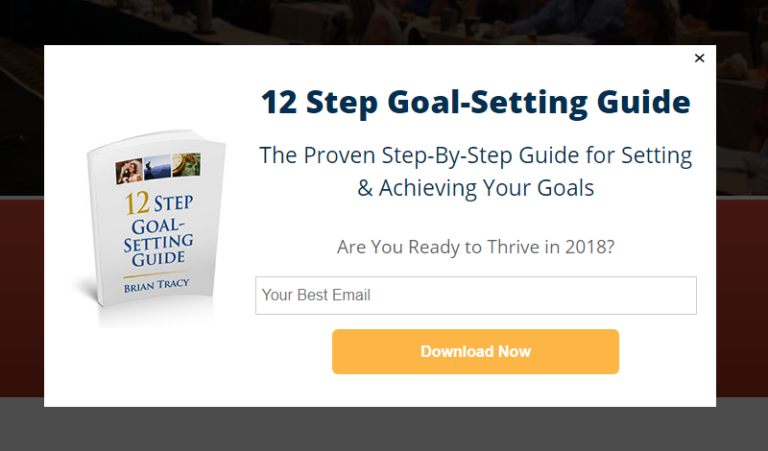
Exit-intent popups er en type marketingværktøj, der er designet til at fange opmærksomheden hos webstedsbesøgende, der er ved at forlade webstedet. Disse popups vises typisk, når en besøgende flytter markøren uden for browser vinduet eller ruller til bunden af siden, hvilket indikerer, at de er ved at forlade.
Exit-intent popups kan bruges til at forsøge at overtale besøgende til at blive på webstedet og foretage et køb eller udføre en anden ønsket handling. Det er vigtigt at bruge exit-intent popups sparsomt og på en måde, der respekterer den besøgendes oplevelse. Overdreven brug af popups eller brug af dem på en måde, der er påtrængende eller irriterende, kan føre til en negativ brugeroplevelse og i sidste ende skade dine salgsindsatser.
#9. Tilføj en klik-for-at-abonnere-knap til din popup
Push-notifikationer hjælper dig med at øge din webtrafik og dit engagement automatisk. Og hvis du driver en onlinebutik, hjælper PushEngage dig også med at øge dit salg ved at hjælpe dig med at oprette automatiserede e-handels-push-notifikationer.
Du kan komme i gang gratis, men hvis du er seriøs omkring at vækste din forretning, bør du købe en betalt plan. Før du køber en push-notifikationstjeneste, bør du også se denne guide til priser på push-notifikationer.
Her er et hurtigt overblik over, hvad du får med PushEngage:
- Højt konverterende automatiserede kampagner
- Flere målretnings- og kampagneplanlægningsmuligheder
- Målsporing og avanceret analyse
- Smart A/B-test
- En dedikeret succesmanager
Du vil se, at PushEngage uden tvivl er det bedste valg, hvis du vil opbygge trafik, engagement og salg for din virksomhed. Og hvis du har et stramt budget, kan du altid være lidt kreativ med dine push-notifikationer.
Tilføj først en HTML-blok til din popup fra sidepanelet i OptinMonster.
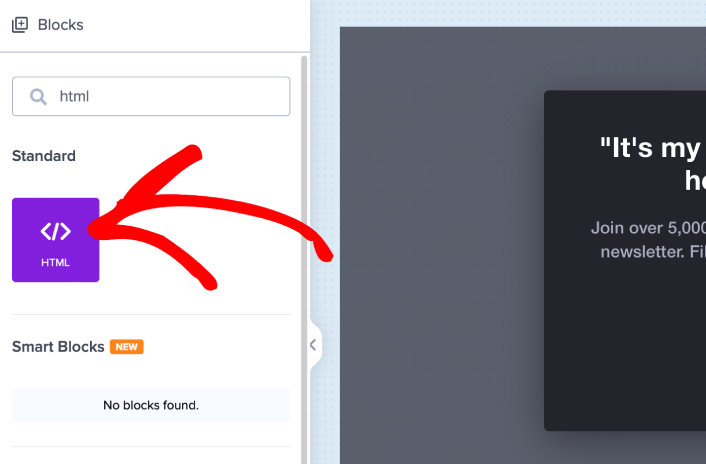
Her er, hvor vi skal tilføje koden til at indsamle push-notifikationsabonnenter. Indsæt først følgende kode for at oprette en klikbar knap:
<button onclick="subscribeOnClickButton()" style="border: none; width: 100%; padding-left: 15%; padding-right:15%; text-align: center; display: inline-block; color: white;">Get Updates via Push Notifications</button>Indsæt koden, hvor der står, at du kan tilføje HTML:
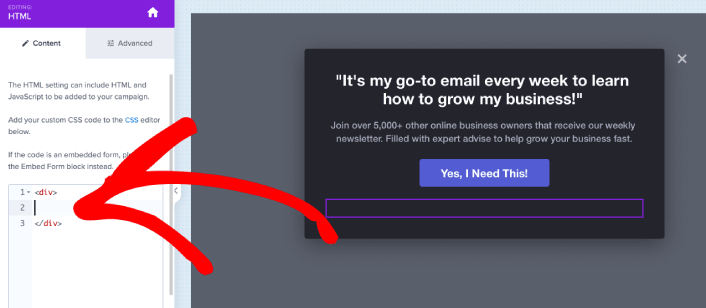
Selvfølgelig kan du lege med stilarterne for at gøre den mere tiltalende. Dernæst vil vi få knappen til at indsamle push-notifikationsabonnenter, når der klikkes på den.
Gå til PushEngage hjemmeside og klik på knappen Kom i gang :

Vælg derefter gratisplanen for at prøve PushEngage, eller vælg en betalt plan, hvis du er seriøs omkring at udvide din virksomhed. De betalte planer kommer med flere kampagnemuligheder og muligheden for at opbygge endnu større abonnentlister.
På dit PushEngage dashboard skal du gå til Sideindstillinger » Sideoplysninger og klikke på knappen Klik her for opsætningsinstruktioner. Under Enhver side får du din installationskode:
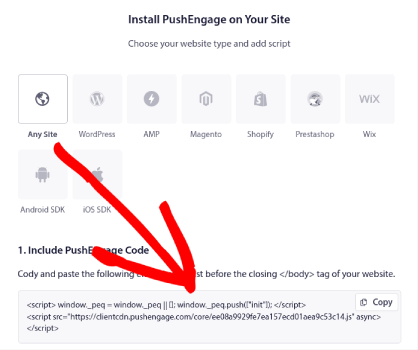
ADVARSEL: Du skal kopiere den kode, du får fra dit dashboard. Koden er unik for hver PushEngage-bruger. Du kan ikke kopiere koden på billedet og indsamle push-notifikationsabonnenter.
Når du har koden i dit PushEngage-dashboard, skal du tage det andet script og tilføje lidt ekstra kode til det. Din endelige kode skal se nogenlunde sådan ud:
<script src="https://clientcdn.pushengage.com/core/02a6e92667ae2279fcba8932356c1d93.js" async></script>
<script> window._peq = window._peq || [];
function subscribeOnClickButton(){
window._peq.push(['subscribe',{}.pe,function(res){
console.log(res);
}]);
}
</script>
Tilføj denne kode til HTML-blokken i OptinMonster lige efter koden til din knap og mellem <div></div> kodeblokken, og du er færdig!
#10. Opret en velkomstkampagne
En velkomstbesked på webstedet er en perfekt måde at genengagere sig med dit publikum uden at være påtrængende. Dine abonnenter vil ØNSKE en måde at bekræfte, at de virkelig er tilmeldt dine e-mails og push-notifikationer. Oprettelse af en automatiseret sekvens af velkomst push-notifikationer er den perfekte måde at onboarde webstedsbesøgende på.
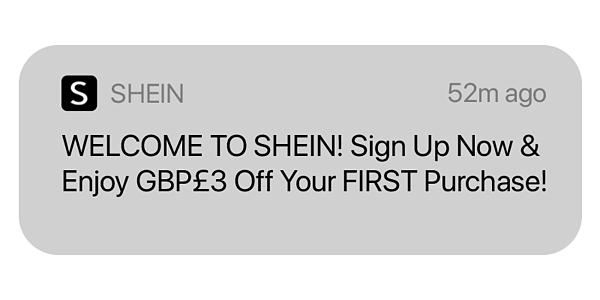
Vi vil udforske præcis, hvor meget du kan gøre med denne simple kampagne, mens vi gennemgår vores eksempler.
Men indtil videre skal du bare vide, at hvis du endnu ikke har oprettet din velkomst til webstedet, skal du virkelig begynde lige nu. Det er heller ikke sådan, at du kun kan bruge e-mails og push-notifikationer. Hvis du bruger popups på dit websted, bør du tjekke velkomst-måtter.
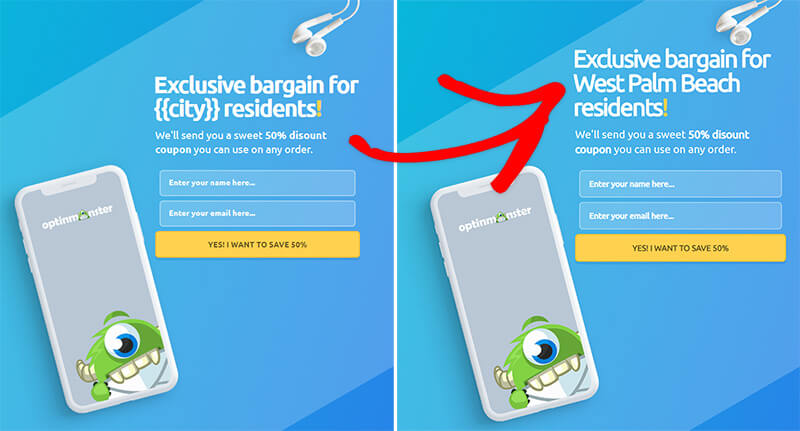
Hvis du forsøger at oprette episke popups med velkomstbeskeder, bør du komme i gang med OptinMonster. OptinMonster er verdens bedste værktøj til konverteringsoptimering, og det er super nemt at oprette popups for at konvertere flere webstedsbesøgende til e-mail-abonnenter.
Du får en masse avancerede muligheder, såsom at bruge den besøgendes brugernavn, placering, datoer og mere til at personalisere dine velkomst-popups. Og det bedste er, at du kan målrette nye og tilbagevendende besøgende med forskellige kampagner for at konvertere dem på en mere organisk måde.
#11. Opret tidsbegrænsede tilbud
Hvis du har en salgsfremstød på vej, skal du simpelthen tilføje en nedtællingstimer til dit websted. Vi har testet animerede timere for at øge vores eget salg, og resultaterne er utrolige.
Brug af en nedtællingstimer kan være en effektiv måde at øge salget på ved at skabe en følelse af hastværk og opfordre kunderne til at foretage et køb, før timeren løber ud.
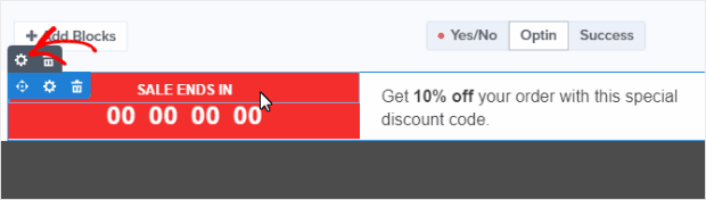
Varigheden af din nedtællingstimer bør være passende for din tilbuds karakter. Hvis du tilbyder en tidsbegrænset rabat, kan en timer, der tæller ned fra et par timer eller en dag, være passende. For et mere betydningsfuldt tilbud kan du ønske at bruge en timer, der tæller ned fra en uge eller mere.
#12. Tilbyd social proof gennem checkout-flowet
Social proof er praksis med at fortælle dine hjemmesidebesøgende, at andre mennesker stoler på din virksomhed og køber fra dig. Der er flere former for social proof, som du kan inkludere på din hjemmeside, såsom:
- Casestudier
- Udtalelser
- Anmeldelser
- Instagram-feeds
- Twitter-omtaler
- YouTube-videoer
Og mere. Vi anbefaler at bruge TrustPulse til at oprette pop-ups som denne til social proof:
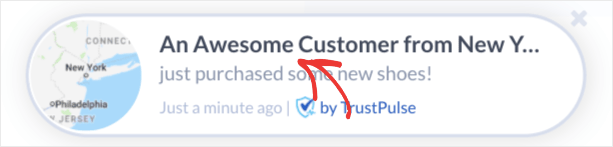
For dem af jer, der lige opdager, hvad TrustPulse er, her er det væsentlige...
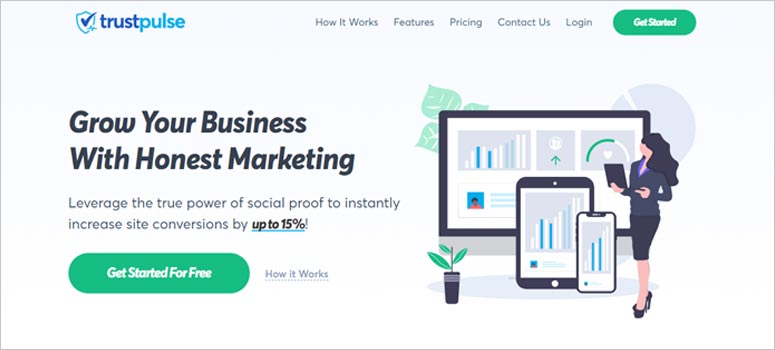
TrustPulse er en social proof software, som du kan tilføje til enhver side. Den skaber social proof popups, der hjælper med at øge sidekonverteringer øjeblikkeligt. TrustPulse er fantastisk til sider, der sælger et produkt online. Men den er så enkel, kraftfuld og nem at bruge, at du også kan installere TrustPulse på en blogside for at øge dit engagement.
Se vores fulde anmeldelse af TrustPulse for at få en bedre idé om, hvordan du kan bruge det til at skabe social proof for dit websted.
#13. Tilføj flere betalingsmuligheder
Stripe tillader kreditkortbetalinger på din WordPress-side. Det bedste er, at betalingsgatewayen tillader flere betalingsformater, herunder tilbagevendende betalinger.
For at være klar: Dine kunder behøver ikke en Stripe-konto for at betale med kreditkort. De kan simpelthen købe fra dit websted, som de ville gøre med enhver kreditkortprocessor.
Det bruges også af nogle af de største navne i verden, herunder Target, Lyft og UNICEF. Så du ved, at du kan stole på, at dine betalinger altid bliver behandlet.
Men årsagen #1 til, at vi kan lide Stripe så meget, er deres gennemsigtighed. Der er ingen skjulte gebyrer. Hvis du har brugt PayPal til at acceptere betalinger før, ved du, hvor stort et problem skjulte gebyrer kan være med andre betalingsprocessorer og gateways. Vi anbefaler at bruge WP Simple Pay til at behandle dine betalinger.
WP Simple Pay er præcis, hvad det lyder som. Det gør onlinebetalinger enkle på dit WordPress-websted. Det er nemt at bruge, yderst pålideligt og kræver ingen kodning for at opsætte.
Det bedste? WP Simple Pay hjælper dig med at fokusere på at skabe produkter og sælge dem uden at skulle bekymre dig om at acceptere betalinger fra hele verden. Det er også et af de bedste WordPress Stripe-plugins i verden.
Alle kunde- og betalingsoplysninger gemmes på din Stripe-konto, ikke på din WordPress-hjemmeside. Som et resultat vil plugin'et ikke belaste din side som andre alternativer. WP Simple Pay tilbyder den simpleste måde at tilføje Stripe-betalinger til din WordPress-side.
Og opsætning af WP Simple Pay er super simpelt.
Her er et hurtigt overblik over de bedste funktioner i WP Simple Pay Pro:
- Betalingsformularbygger
- Stripe Checkout Betalingssidebygger
- Betalinger med brugerdefineret beløb
- Brugerdefinerede abonnementsmuligheder
- Rabat med kuponkoder
- Alternative betalingsmetoder
- Brugerdefineret betalingsbekræftelsesflow
Og mere! Du kan få et nærmere kig på funktionerne i vores anmeldelse af WP Simple Pay Pro.
Hvad skal du gøre efter at have øget din gennemsnitlige ordreværdi
Nu hvor du ved, hvordan du øger din gennemsnitlige ordreværdi, bør du også se på andre vigtige e-handelsmetrikker. En af de nemmeste måder at vækste en e-handelsvirksomhed på er at bruge push-notifikationer. Tjek vores artikel om e-handels push-notifikationer, efter du har implementeret taktikkerne i denne artikel.
Push-notifikationer er et kraftfuldt marketingværktøj, der kan hjælpe dig med at få mere trafik, engagement og salg. Ikke overbevist? Tjek disse episke ressourcer for at komme i gang:
- Sådan opsættes push-meddelelser om forladte indkøbskurve (nem vejledning)
- Sådan installeres et WordPress-plugin til webmeddelelser på dit websted
- Sådan udføres A/B-test af push-meddelelser (bedste praksis)
- 7 bedste praksisser for push-meddelelser for at få øjeblikkelig trafik
- 21 bedste e-handels WordPress-plugins (gratis og betalte)
Vi anbefaler at bruge PushEngage til at sende dine push-notifikationer. Når du har gennemgået alle disse ressourcer, vil du indse, at PushEngage er den #1 push-notifikationssoftware på markedet. Så hvis du ikke allerede har gjort det, kom i gang med PushEngage i dag!


