Leder du efter en m sde at s ge dit salg p uden at skulle bruge mere p annoncer? Du b orde ops s salg push-notifikationer med det samme.
Ifølge Amazon kommer 35% af deres salg fra mersalg. Mersalgs push-notifikationer er kampagner, der automatisk mersælger produkter til dine kunder. Mersalgs push-notifikationer hjælper dig med at øge salget, da du har 60-70% større sandsynlighed for at sælge til en eksisterende kunde.
Det er fantastisk! Men hvordan ops s salg push-notifikationer? Er det sv rt? Har du brug for en udvikler til at ops s det for dig? Hvor dyrt er det? Hvor hurtigt kan du se resultaterne?
I denne artikel vil vi besvare alle disse sp rgsm L og mere til. Vi vil ogs ogs kke p , hvordan du kan ops s salg push-notifikationer uden kode og p 10 minutter.
Lad os dykke ned.
Hvad er krydssalg?
Krydssalg er at sælge relaterede eller komplementære produkter til en kunde. Det er en af de mest effektive metoder til markedsføring. Du kan nemt øge din gennemsnitlige ordreværdi (AOV) ved hjælp af krydssalgskampagner.
En af de enkleste måder at øge dit salg på er at øge din gennemsnitlige ordreværdi (AOV). Hvis det beløb, hver kunde bruger på din side, stiger, vil din omsætning fordoble sig selv med meget lidt indsats.
Nogle eksempler på krydssalg ville være:
- Salg af et computercover, en mus og skærmrenseservietter til en kunde, der lige har købt en ny bærbar computer
- Tilbyde lejeforsikring til kunder, der køber bilforsikring
- Salg af en udvidet garanti på en ny brødrister, du lige har købt
- Tilbyde rabat på en pakke med tre sæbestykker, når du lige har købt ansigtsvask
Og så videre. Du kan tilbyde krydssalg på enhver type produkt. Det bedste er, at du ikke nødvendigvis behøver at krydssælge et fysisk produkt. Du kan krydssælge en e-bog om, hvordan man starter cosplay for begyndere, når du sælger et cosplay-kit. Så længe du krydssælger et produkt, der tilføjer værdi til din eksisterende kunde, vil du opnå en masse ekstra salg.
Krydsalg fejler kun som en salgsstrategi, når du har utilstrækkelige data om dine kunder. Med push-notifikationer er det ikke et problem, fordi du kan indsamle en masse data om en kunde, selv mens du er fuldstændig GDPR-kompatibel.
Hvad er krydssalgs push-notifikationer?
Krydsalg af push-notifikationer er e-handels push-notifikationer, der automatisk forsøger at sælge dine kunder produkter baseret på deres købsvaner. En krydssalgs push-notifikationskampagne vil automatisk målrette specifikke kunder for at forsøge at få dem til at købe andre produkter, de måtte have brug for.
Her er et eksempel:
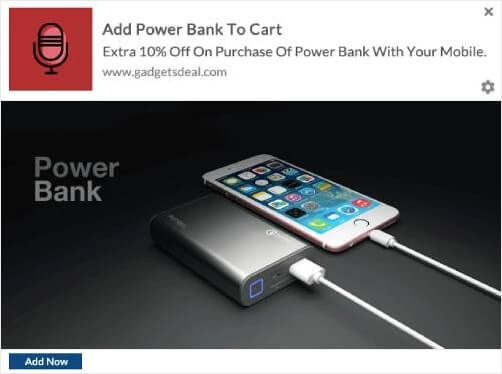
Typisk er et krydssalg, når du forsøger at sælge et produkt i samme prisklasse som de produkter, dine kunder allerede køber. Så hvis du forstår de typer af relaterede produkter, dine kunder sandsynligvis er interesserede i, er krydssalg nemt.
Pro Tip: Tænk over taktikker, der skal inkluderes i din kuponmarketingstrategi for at øge dine konverteringer på krydssalg af push-notifikationer.
Sådan opsætter du krydssalgs push-notifikationer
Det er super nemt at opsætte en krydssalgs-kampagne for din eCommerce-side ved hjælp af push-notifikationer.
- Opret segmenter baseret på produktkategorier, og tilføj en kunde til det relevante segment, når de foretager et køb
- Identificer produkter til krydspromovering under hvert segment
- Opret en dryp-notifikation for hvert segment, og send det relevante produkt eller produktliste til krydspromovering
Det er lige s simpelt som det. Lad os tage det trin for trin.
Trin #1: Vælg en Push-notifikationstjeneste
Vi anbefaler at bruge PushEngage til krydssalgs push-notifikationer.

PushEngage er det #1 push-notifikations-plugin i verden.
Push-notifikationer hjælper dig med at øge din webtrafik og dit engagement automatisk. Og hvis du driver en onlinebutik, hjælper PushEngage dig også med at øge dit salg ved at hjælpe dig med at oprette automatiserede e-handels-push-notifikationer.
Du kan komme i gang gratis, men hvis du er seriøs omkring at vækste din forretning, bør du købe en betalt plan. Tjek også denne guide til omkostninger ved push-notifikationer, før du køber en push-notifikationstjeneste.
Hvis du er ny til push-notifikationer, bør du tjekke vores artikel om de bedste push-notifikationstjenester i verden. Du vil se, hvorfor vi anbefaler PushEngage så kraftigt.
Her er et hurtigt overblik over, hvad du får med PushEngage:
- Højt konverterende automatiserede kampagner
- Flere målretnings- og kampagneplanlægningsmuligheder
- Målsporing og avanceret analyse
- Smart A/B-test
- En dedikeret succesmanager
PushEngage er uden tvivl det bedste valg, hvis du vil opbygge trafik, engagement og salg til din virksomhed. Og hvis du har et stramt budget, kan du altid være lidt kreativ med dine push-notifikationer.
Trin #2: Opret målgruppesegmenter
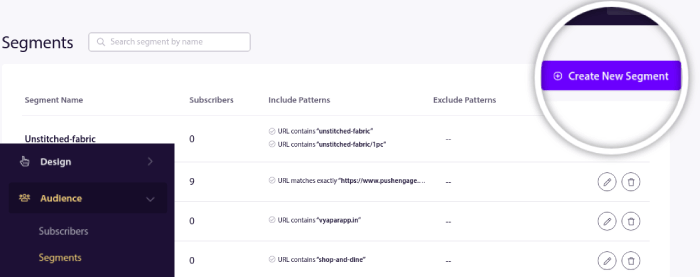
Gå til dit PushEngage-dashboard og gå til Audience » Segments og klik på Create New Segment for at oprette dine segmenter:
Du vil gerne segmentere dine besøgende, når de besøger et produkt i en bestemt kategori:
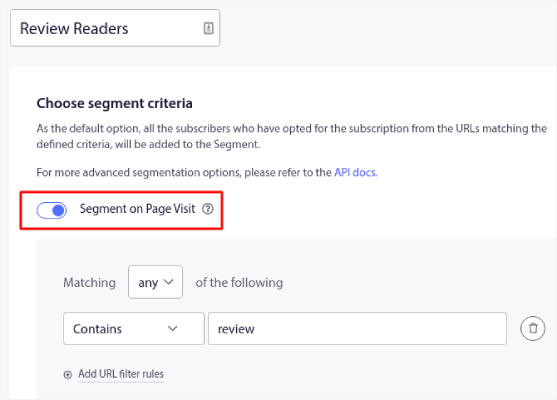
Segmentering ved sidebesøg er en god måde at forstå, hvad dine besøgende er interesserede i. Du kan oprette segmenter baseret på hver produktkategori ved hjælp af URL'erne for kategorisiderne.
Når dine segmenter er sat op, er det super nemt at oprette personaliserede push-notifikationer såsom cross-selling-kampagner.
Trin #3: Opret krydssalgs push-notifikationer
Find derefter et produkt til cross-selling for hvert segment. Du kan udelukke det produkt, du forsøger at cross-selle, fra dine segmenter. På denne måde spammer du ikke dine kunder med tilbud, som de ikke behøver længere.
Denne del af processen er den mest tidskrævende. Men når du først har fundet ud af, hvilke produkter du vil promovere til hvert segment, er resten af processen ret nem. Til sidst skal vi oprette drip-autoresponders for at promovere hvert produkt.
Start med ét produkt og opret en automatiseret kampagne omkring det.
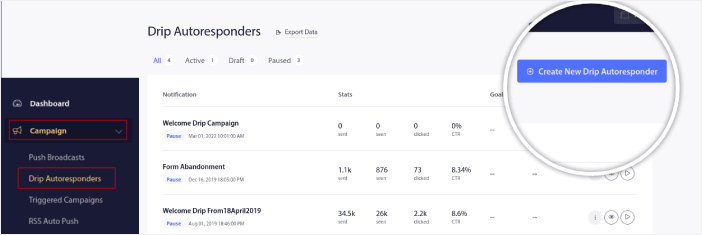
Gå til dit PushEngage-dashboard og gå til Kampagne » Drip Autoresponders » Opret Ny Drip Autoresponder:
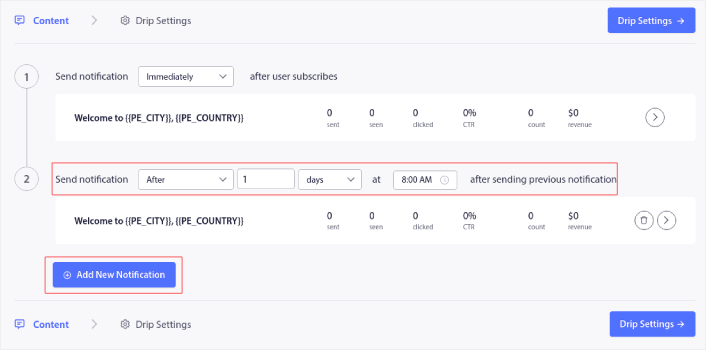
Under fanen Indhold, opret din serie af push-notifikationer for at cross-selle et produkt efter eget valg:
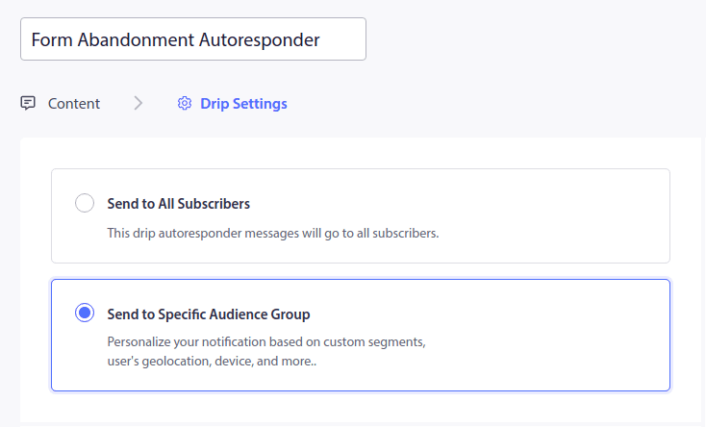
Til sidst, under Drip-indstillinger, kan du vælge din målgruppe ved hjælp af de segmenter, du tidligere har oprettet:
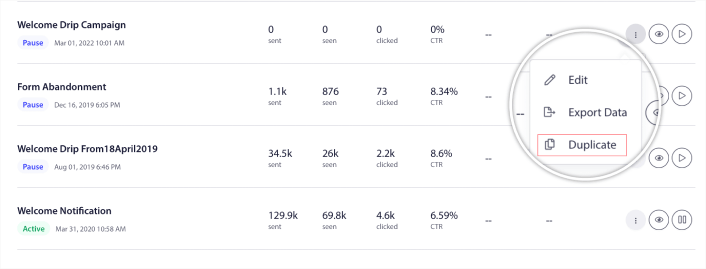
Når du er færdig med at oprette kampagnen, kan du enten oprette en ny fra bunden. Eller du kan duplikere kampagnen og bruge den som en skabelon til at oprette dine andre cross-selling push-notifikationer.
Og du er færdig! Du har succesfuldt oprettet cross-selling push-notifikationer.
Hvad skal du g re, n r du har oprettet krydssalg push-notifikationer
Nu hvor du kender kraften i e-handels push-notifikationer, er det tid til, at du begynder at oprette dine egne kampagner. Men før du går i gang med kampagnerne, bør du først studere nogle gode eksempler på push-notifikationer.
Og hvis du er ny til push-notifikationer, bør du tjekke vores artikel om bedste praksis for push-notifikationer, før du begynder at oprette kampagner. Nogle af de bedste praksisser, som vi aktivt anbefaler, inkluderer:
- Boost klik med nysgerrighed
- Personliggør hver push-notifikation
- Skil dig ud med rigt medieindhold
- Genaktiver inaktive push-abonnenter
- Hold kunderne informeret
- Brug emojis, hvor du kan
- Skab en følelse af hastværk
Pro Tip: Hvis du er ny inden for e-handels push-notifikationer, bør du også tjekke denne artikel om hvordan du får flere anmeldelser.
Vi anbefaler at bruge PushEngage til at oprette dine push-notifikationskampagner. PushEngage er den førende push-notifikationssoftware på markedet, og dine kampagner vil være i sikre hænder.
Så hvis du ikke allerede har gjort det, så kom i gang med PushEngage i dag.


