Hej, Engagelings.
Spændende nyheder: Vi har netop oprettet en integration med WooCommerce, der gør det super nemt at lancere, administrere, spore og optimere e-handelskampagner for ethvert WooCommerce-websted.
Næsten alle push-notifikationsplugins under solen giver dig mulighed for at lancere e-handelskampagner. Så hvad er så specielt ved denne WooCommerce-integration? Nå, med denne kraftfulde nye integration til PushEngage kan du nu:
- Start hurtigt kampagner med NUL kodning. Ingen API'er nødvendige, bare peg og klik.
- Aktivér kampagner for opgivne browsing- og indkøbskurve med et par klik med forudbyggede udløserkampagner.
- Send personlige push-kampagner med de segmenter, som vores plugin opretter automatisk ud fra produktkategorier.
Og det er ikke alt. I de kommende måneder planlægger vi at tilføje e-handelskampagne-skabeloner til vores allerede omfattende skabelonbibliotek, så du blot kan redigere et par notifikationer og lancere endnu hurtigere!
På overfladen ser det ud til at være en mindre opdatering. Men det er det ikke. Der er meget at pakke ud. Vi har også gjort det super nemt at bruge. Der er lagt meget arbejde i denne opgradering, og vi tror, at du vil elske den.
BEMÆRK: Vores WooCommerce-integration er ikke et betalt add-on. Vi tilføjer integrationer til din PushEngage-oplevelse helt gratis. For at sende e-handelskampagner skal du bruge en Growth-plan eller højere. Så hvis du ikke allerede er på Growth-planen, så få den NU!
Lad os dykke ned.
Hvorfor skal du bekymre dig om vores WooCommerce-integration?
Lancering af e-handels-push-kampagner kan være en plage. Der er masser af detaljer, du skal tage dig af manuelt, såsom variabler og tags, der hjælper med at udløse kampagnerne. Og så skal du manuelt indsætte koden i dit websteds kode uden at ødelægge den.
Men e-handels push-notifikationer er utroligt kraftfulde værktøjer til at øge din omsætning og gennemsnitlig ordreværdi til meget lave omkostninger. Medmindre du skal hyre en udvikler til at gøre det for dig, selvfølgelig.
Så vi byggede en WooCommerce-integration, så du ikke længere behøver en udvikler til at integrere vores API i din WooCommerce-butik. Alle kan nu oprette og lancere e-handels push-kampagner.
Hvorfor tilføjede vi WooCommerce-integration til PushEngage?
Vores udviklere hos PushEngage har altid forsøgt at bygge et produkt, der er beregnet til små virksomheder uden et stort udviklingsteam.
Tidligere lancerede vi en integration med WPCode for at give dig mulighed for at lancere e-handelskampagner ved hjælp af forudbyggede kodestykker. Med vores kodestykker i WPCode-biblioteket kan vi nu tilbyde muligheden for at lancere e-handels push-kampagner med et par enkle klik. Dette inkluderer:
- Velkomsttilbudskampagner
- Kampagner for forladte indkøbskurve
- Kampagner for forladte formularer
- Kampagner for forladt browsing
- Krydssalgskampagner
Og mere. Ikke at forglemme, du kan også opsætte målsporing for dine push-notifikationskampagner med et par klik. Du kan endda bruge WPCode-integrationen til at sende e-handels push-notifikationer til andre e-handelsplatforme som f.eks. Easy Digital Downloads.
WPCode-integrationen er fantastisk til brugerdefinerede kampagner, hvor du manuelt kan redigere koden efter behov. Den giver dig utrolig kontrol over integrationskoden, samtidig med at den giver dig en simpel skabelon at redigere, så din proces bliver meget hurtigere og enklere.
Men selvfølgelig vil du måske slet ikke redigere koden. Hvad gør du, hvis du bare vil starte en simpel kampagne for opgivne indkøbskurve for at genvinde tabt salg uden alle de fancy dikkedarer?
Nu kan du bruge vores problemfri WooCommerce-integration til netop det!
Sådan opsætter du WooCommerce Push-kampagner
Det er super nemt at starte WooCommerce Push-kampagner nu. Her er en hurtig video-tutorial, der hjælper dig i gang:
Eller, hvis du foretrækker skriftlige trin-for-trin instruktioner, kan du blot følge med.
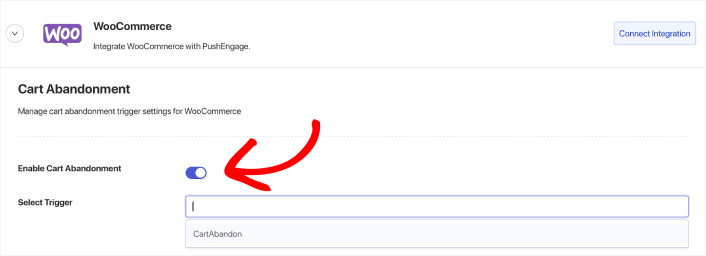
Gå til Indstillinger » Integrationer » WooCommerce og opsæt integrationen med et enkelt klik ved at klikke på knappen Forbind Integration. Aktivér derefter blot kampagnen ved at skifte til Aktivér Kampagne ved Opgivelse-knappen og vælge udløseren fra rullemenuen Vælg Udløser.
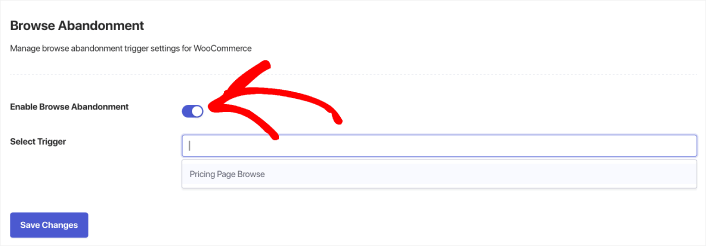
Det samme gælder for din Browse Abandonment-kampagne. Opret blot udløseren og aktiver derefter kampagnen ved at skifte til Aktivér forladt indkøbskurv-knappen og vælge udløseren fra rullemenuen Vælg udløser.
Hvis du ikke har en kampagne for opgivne browsing-besøg eller en kampagne for opgivne indkøbskurve, kan du gå i gang med det nu.
Med ethvert andet WooCommerce push-notifikationsplugin skal du bruge en udvikler til at oprette e-handelskampagner. Men PushEngage leveres med en direkte WooCommerce-integration. Alt, du skal gøre, er at oprette en ny kampagne under Udløsere.
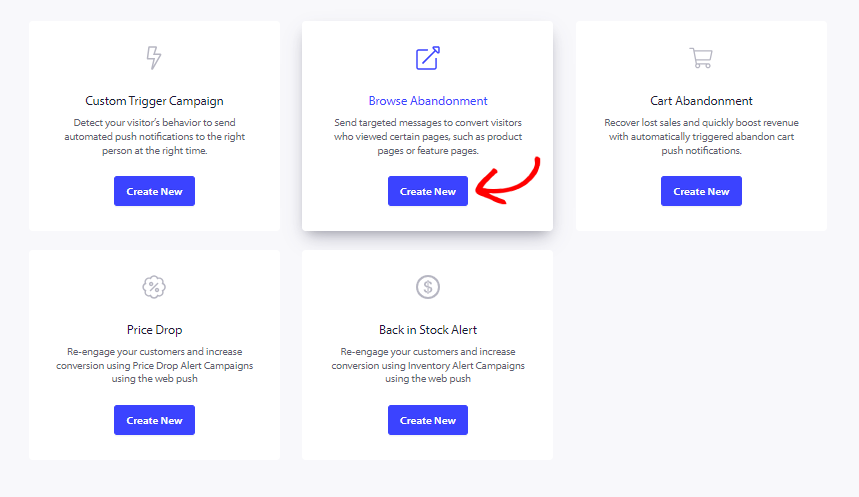
Dernæst kan du gå i gang med at oprette dine kampagner for opgivne browsing-besøg og kampagner for opgivne indkøbskurve.
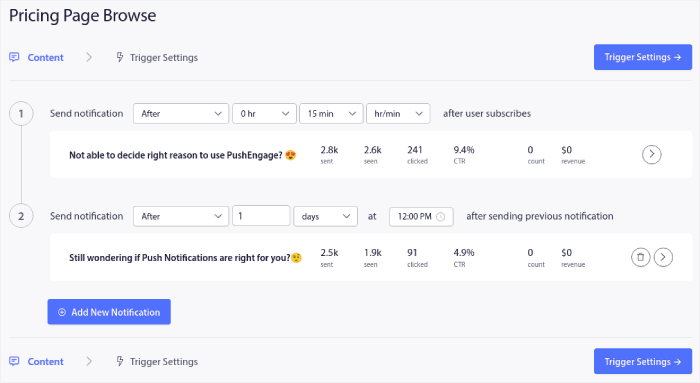
Til sidst skal du klikke på knappen Gem. Og det er det! PushEngage vil automatisk genvinde dit tabte salg for dig nu.
Og du er færdig! Vi får snart nogle virkelig episke opdateringer, der giver dig mulighed for at sende prisfaldsalarmer og tilbage på lager-alarmer. Så hold øje med flere opdateringer.
Hvad ellers?
Vi ved, at det er hårdt arbejde at vækste en virksomhed. Hos PushEngage søger vi altid at forbedre vores produkt og din oplevelse. Vi har lanceret denne nye funktion for at hjælpe dig med at få endnu mere værdi ud af dit PushEngage-abonnement.
Mange tak for at læse denne meddelelse.
Hvis du har spørgsmål, er vores Customer Success-team her for at hjælpe. Start blot en samtale på Live Chat eller tjek vores kontaktside.
Og tak fordi du bruger PushEngage. Uanset om du bruger gratisversionen eller Enterprise-versionen, er du lige så vigtig for os. De nye kodestykker er beregnet til at hjælpe dig med at få succes, og vi ønsker dig alt det bedste.
Vi er ved at udvikle endnu flere episke integrationer for at gøre dit liv enklere. Så lad os vide dine tanker i kommentarerne herunder. Du kan anmode om specifikke integrationer, som du gerne vil se i fremtiden.
Og hvis du ikke allerede har gjort det, kom i gang med PushEngage i dag!


