Hej, Engagelings.
Spændende nyheder: vi lancerer en ny funktion kaldet Subscription Management Widget.
Hvorfor? På grund af dig!
Det er rigtigt, vi gør brugeroplevelsen (også kendt som: din oplevelse) meget bedre. Du kan nu tilbyde en enkel måde for dine abonnenter at administrere:
- Om de vil modtage notifikationer fra dig
- Typerne af notifikationer, de er interesserede i
Vi har også gjort det super nemt at vise Subscription Management Widget på PushEngage. Vi er super stolte af denne seje nye funktion, og vi tror, at du vil elske den. Og det er en stor opdatering, så der er MEGET mere at pakke ud.
Lad os dykke ned.
Hvorfor bruge en abonnementsstyringswidget
Et af de største problemer med push-notifikationssoftware er, at det er super svært for dig at få tilladelse til at sende specifikke typer notifikationer fra dine abonnenter. Som et resultat er der en reel risiko for at sende for mange push-notifikationer eller sende irrelevante beskeder.
Det samme problem eksisterer med e-mailmarkedsføring. Men i det mindste, med e-mailmarketingsoftware, kan du oprette brugerdefinerede links til at tilføje abonnenter til et specifikt e-mailsegment. Med push-notifikationer er denne funktion simpelthen ikke tilgængelig.
Nå... det var den ikke. Indtil nu.
Vi har lige bygget løsningen på et massivt problem, som ingen andre engang forsøger at adressere!
Subscription Management Widget demokratiserer din push-notifikationsabonnementsliste. Dine besøgende kan nu vælge, hvilken slags notifikationer de vil modtage. Dine abonnenter vil elske dig for at lytte til, hvad de ønsker, og du kan tjene LANGT flere penge ved at sende målrettede og yderst relevante push-notifikationer.
Og du kan reducere dine supportbilletter fra utilfredse abonnenter, der forsøger at afmelde push-notifikationer.
Kom i gang med Subscription Management Widget nemt
For at komme i gang skal du gå til dit PushEngage-dashboard og gå til Design » Widgets og aktiver Subscription Management Widget:

Klik på knappen Rediger widget for at tilpasse din widget. Start med at tilpasse udseendet og følelsen af din widget, så den matcher dit brands designsprog under Udseende og design:
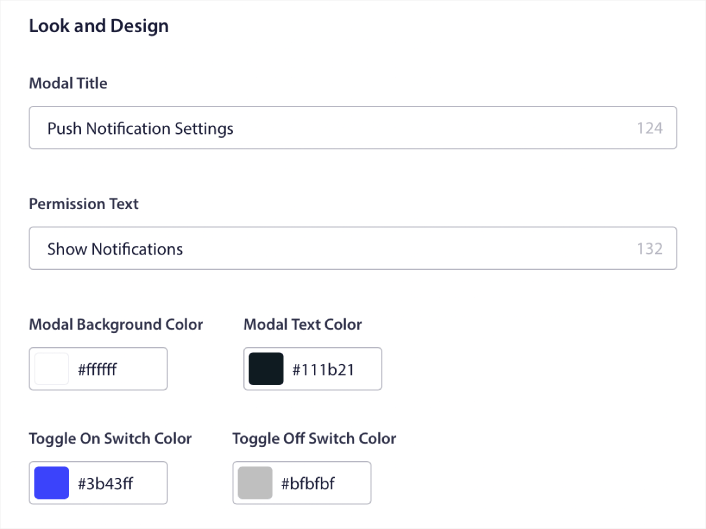
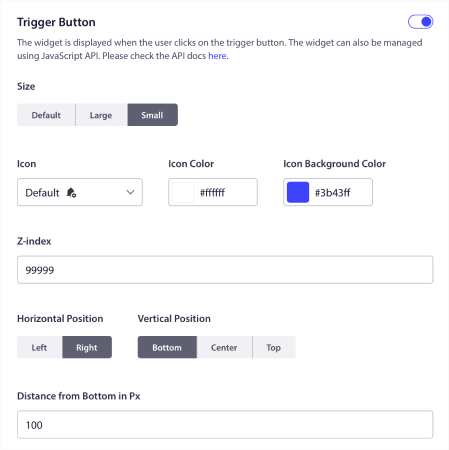
Du kan oprette en helt brugerdefineret popup-modal, der bliver ved, selv når dine besøgende ikke abonnerer fra din standard popup-modal. Hvis størrelsen på popup-triggerknappen føles forkert for dig, kan du også tilpasse den under Triggerknap:
Vælg hvor du vil vise Subscription Management Widget
Og det fedeste er, at du også kan vælge specifikke sider til at vise widgetten under Regler for visning af triggerknap:

Som standard vises knappen på alle sider. Men du kan oprette brugerdefinerede målretningsregler for at vise specifikke versioner af widgetten ved at målrette specifikke:
Steder:
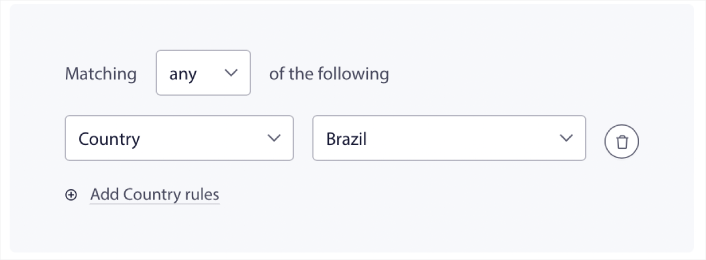
Enheder:
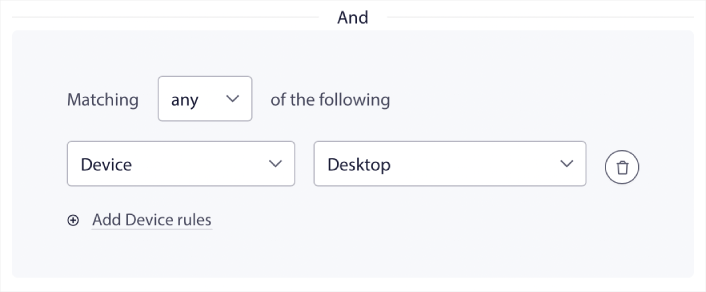
Og URL'er på dit websted:
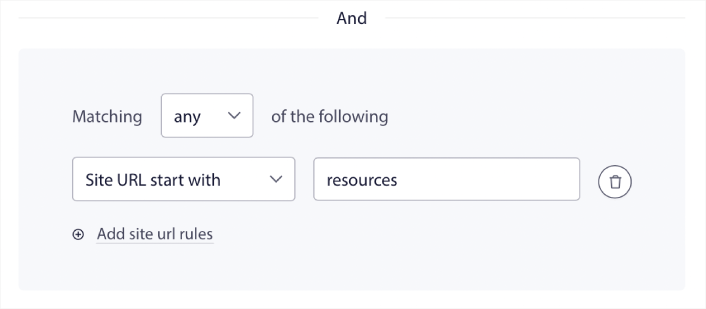
Nemme afmeldingsmuligheder
Du kan også give dine abonnenter en nem måde at afmelde dine push-notifikationer under Afmeldingsmulighed:
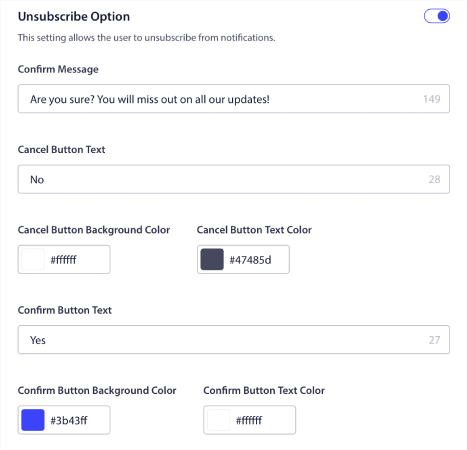
Igen, du kan fuldt ud tilpasse udseendet og følelsen af designet sammen med beskederne, så de passer til dine brandretningslinjer. Enhver besøgende, der afmelder sig dine push-notifikationer, kan også gen-tilmelde sig ved hjælp af abonnementsstyringswidgetten.
Tillad abonnenter at indstille præferencer for push-notifikationer
For at tage det til næste niveau kan du også give dine abonnenter mulighed for at vælge, hvilke typer meddelelser de vil modtage under Segmentpræferencer:
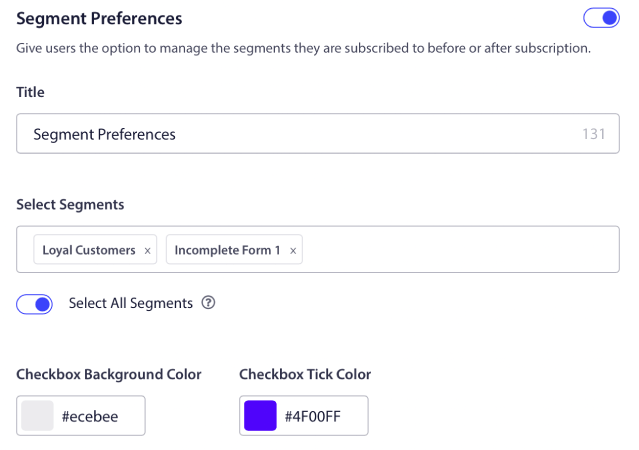
Hvis du aktiverer Vælg alle segmenter, bliver dine abonnenter automatisk tilføjet til alle de valgte segmenter som standard:
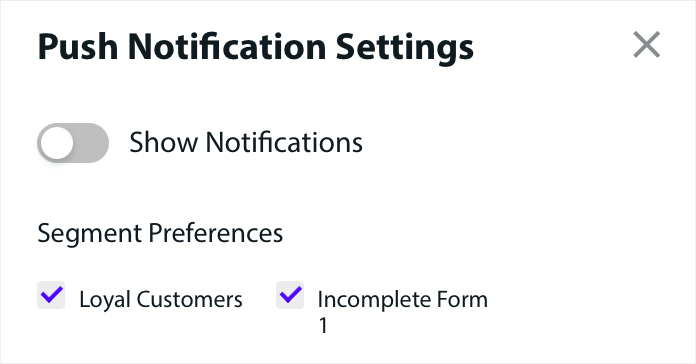
Dette er en utroligt kraftfuld funktion for nyhedswebsteder og blogwebsteder.
Bed om tilladelse til at sende personlige push-notifikationer
Hvis du kører eCommerce push-meddelelser på dit websted, vil mange af dem være udløste push-meddelelser. Dette inkluderer:
- Push-notifikationer om forladte indkøbskurve
- Push-notifikationer ved forladt indkøbskurv
- Prisfaldsalarmer
- Besked om lagerpåfyldning
Og endda brugerdefinerede udløste push-meddelelseskampagner.
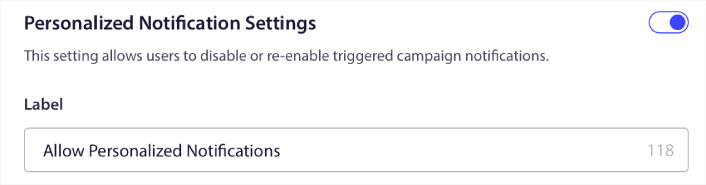
Med vores nye abonnementsstyrings-widget kan du nu lade dine abonnenter vælge, om de vil se personlige notifikationer:

Aktivér blot indstillingen under Personaliserede notifikationsindstillinger:
Hvad ellers?
Vi ved, at det er hårdt arbejde at vækste en virksomhed. Hos PushEngage søger vi altid at forbedre vores produkt og din oplevelse. Vi har lanceret denne nye funktion for at hjælpe dig med at få endnu mere værdi ud af dit PushEngage-abonnement.
Mange tak for at læse denne meddelelse.
Hvis du har spørgsmål, er vores Customer Success-team her for at hjælpe. Start blot en samtale på Live Chat eller tjek vores kontaktside.
Og tak fordi du bruger PushEngage. Uanset om du bruger gratisversionen eller Enterprise-versionen, er du lige så vigtig for os. Widgetten til abonnementsstyring er beregnet til at hjælpe dig med at få succes, og vi ønsker dig alt det bedste.
Giv os din mening i kommentarerne nedenfor, og hvis du endnu ikke har gjort det, kom i gang med PushEngage i dag!


