Hej, Engagelings.
Spændende nyheder: Vi har netop opdateret vores Shopify-app-priser og inkluderet nogle spændende nye funktioner. Og det er nemmere end nogensinde at vækste din e-handelsvirksomhed til super overkommelige priser!
Lyder det spændende? Der er meget at dykke ned i her. Så lad os komme i gang.
Hvad er de nye Shopify-priser for PushEngage?
Vi har nu to prisplaner: En gratis plan og en vækstplan.
Den gratis plan er perfekt til nye e-handelsvirksomheder, der tjener mindre end $100/måned i overskud. Den er også fin til at teste PushEngage-dashboardoplevelsen.
Vækstplanen, derimod, starter fra kun $4/måned for 5.000 abonnenter, og du kan opgradere din konto op til 100.000 abonnenter. For alt ud over 100.000 abonnenter kan du tale med os for en Enterprise-konto.
Men der er meget mere at dykke ned i her. For det første opkræver vi dig baseret på din abonnentliste og ikke på dine klik og push-beskedafsendelser. Og det er en stor forskel, fordi med PushEngage får du:
- Forudsigelige omkostninger: Med en abonnentbaseret prismodel ved du præcis, hvor meget du vil betale baseret på størrelsen af din abonnentliste. Dette gør budgettering og omkostningsprognoser meget lettere sammenlignet med en impressionsbaseret model, hvor omkostningerne kan svinge uforudsigeligt.
- Fokus på kvalitet frem for kvantitet: Når du betaler pr. visning, er der et incitament til at sende så mange notifikationer som muligt, selv til uengagerede eller inaktive brugere, for at få mere værdi. Med abonnentbaseret prissætning skifter fokus til at opbygge en højkvalitets, engageret abonnentbase i stedet for at mætte brugere med notifikationer.
- Bedre overensstemmelse med mål: Hovedmålet med push-notifikationer er at nå og engagere din abonnentbase effektivt. Betaling pr. abonnent bringer prismodellen direkte i overensstemmelse med dette mål, i stedet for at basere omkostninger på den uklare metrik af visninger.
- Undgå overopkrævning: Med impressionsbaseret prissætning kan du ende med at betale for notifikationer, der aldrig faktisk ses eller interageres med af brugere, hvilket fører til spildt forbrug. Abonnentbaseret prissætning sikrer, at du kun betaler for dit aktive, samtykkende publikum.
- Gennemsigtighed og kontrol: At vide, at dine omkostninger udelukkende er baseret på dit abonnentantal, giver dig mere gennemsigtighed og kontrol over dine push-notifikationsudgifter, snarere end at omkostningerne bestemmes af en metrik (visninger), der kan påvirkes af mange eksterne faktorer.
Ud over dette kan du også rense din abonnentliste for at fjerne inaktive abonnenter for at betale mindre og maksimere dit sendingsvolumen (mere om dette senere).
Sådan opretter du Shopify Push-kampagner
Når du er færdig med at installere PushEngage Shopify-appen, skal du søge efter den i Shopify-søgefeltet:

Klik på PushEngage Push Notifications for at gå til PushEngage-dashboardet.

Her kan du oprette enhver eCommerce push-notifikationskampagne, du ønsker.
Sådan sender du højkonverterende Shopify-kampagner
eCommerce-kampagner er, hvor Shopify-integrationen virkelig skinner. Det er super simpelt og nemt. Gå til dit PushEngage-dashboard og gå til Kampagner » Udløste kampagner:
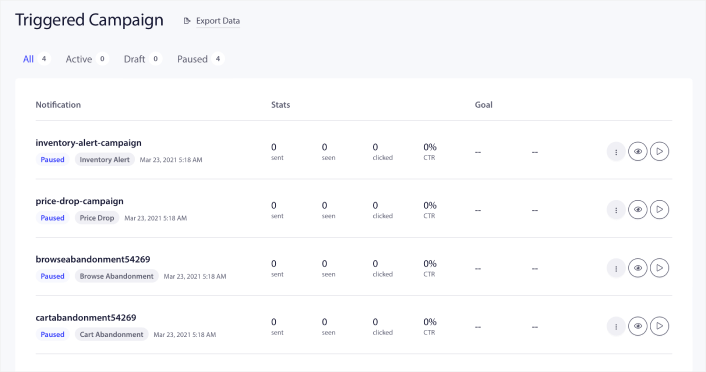
Du vil se, at din konto som standard leveres med 4 forudbyggede udløste kampagner:
- Besked om prisfald
- Lageropdatering
- Browse abandonment kampagne
- Kampagne for forladt indkøbskurv
Alt, du behøver at gøre, er at redigere hver kampagne og udfylde Indhold -sektionen og aktivere dem. Dine forudbyggede kampagne-skabeloner leveres allerede med ret konverterende tekst. Men vi beder alle vores kunder om at redigere indholdet, så det passer til deres marketingstrategi.
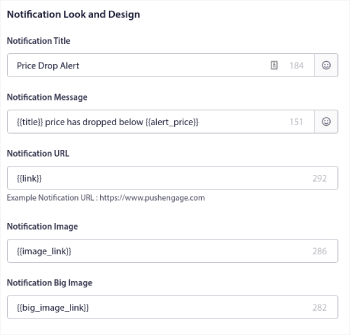
Når du klikker på en af push-meddelelserne i sekvensen, kan du tilpasse meddelelsen i enhver grad, du ønsker:
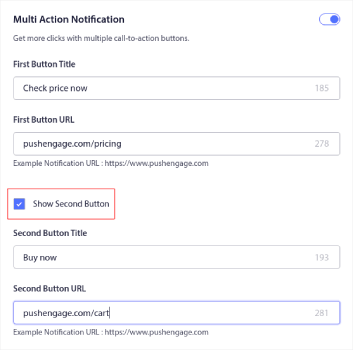
Du kan også tilføje flere knapper for en glattere konvertering:
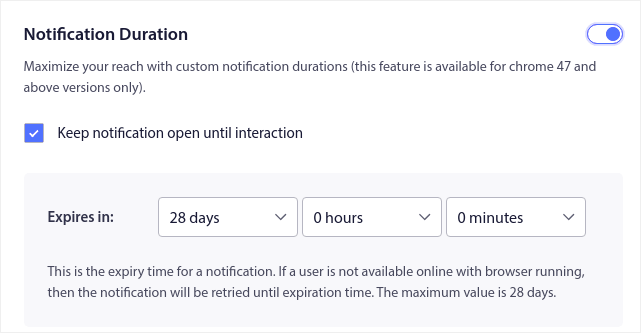
Og du kan indstille en brugerdefineret notifikationsvarighed under Notifikationsvarighed:
Når du er færdig med Indhold -fanen, skal du klikke på Udløserindstillinger -knappen og konfigurere, hvornår dine push-notifikationer sendes.
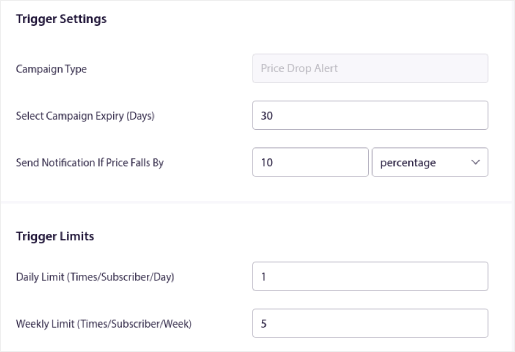
Denne proces er den samme for alle eCommerce-kampagner. Alt, du behøver at gøre, er at tilpasse din kampagne og aktivere den. Ingen API-nøgler, ingen manuelle kodeintegrationer og ingen barrierer for at komme i gang på 10 minutter eller mindre!
BEMÆRK: For din kampagne for forladt indkøbskurv får du også en forudbygget omsætningsmåler, der rapporterer konverteringer og omsætning genereret fra din kampagne. Du behøver ikke at gøre noget for at aktivere denne funktion. Kør blot din kampagne for forladt indkøbskurv.
Sådan sender du Push-udsendelser
Nogle gange vil du gerne starte med at sende en push-udsendelse for at annoncere specifikke tidsbegrænsede tilbud og kampagner. Gå til Kampagner » Udsendelse og klik på Opret ny push-udsendelse:

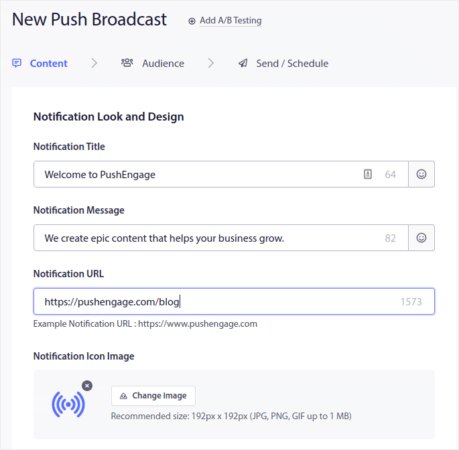
Opret derefter en ny push-notifikation, der skal sendes. Tilpas indholdet under Indhold -fanen:
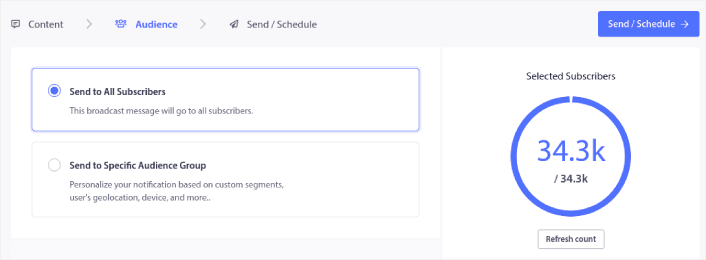
Vælg derefter din målgruppe under Målgruppe:
Og endelig, under Send/Planlæg, kan du planlægge notifikationen som en tilbagevendende push-notifikation:

Du kan nemt oprette enhver tidsplan, du ønsker, for dine push-notifikationer, inklusive brugerdefinerede dage, datoer og tidspunkter.
Sådan opsætter du RSS Auto Push-kampagner
Konstant at skabe indhold og administrere en blog er hårdt arbejde. Men hvis du driver en seriøs forretning, ved du, at det ikke er nok bare at skabe indhold. Du skal også kunne promovere dit indhold. Men hvordan skalerer man eCommerce-forretningsomsætning ved at promovere indhold automatisk?
Og push-beskeder er en fantastisk måde at få abonnenter på på en omkostningseffektiv måde. Det, der gør push-beskeder så gode som et marketingværktøj, er, at de kan automatiseres fuldstændigt. Det er her RSS push-beskeder kommer ind i billedet.
Gå til dit PushEngage-dashboard og gå til Kampagne » RSS Auto Push:
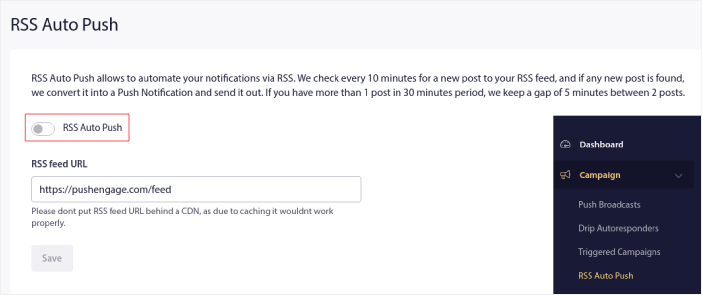
Klik på afbryderknappen for at aktivere RSS Auto Push og indsæt din RSS-feed-URL. Når det er gjort, skal du klikke på Bekræft RSS for at bekræfte, at dit RSS-feed er blevet accepteret. Når du er færdig, skal du blot trykke på Gem.
Nu, hver gang du udgiver et nyt indlæg, vil dine push-notifikationsabonnenter automatisk modtage en push-notifikation om dit nye indhold.
Sådan reducerer du dine abonnentomkostninger i Shopify
Du kan reducere dine PushEngage-planomkostninger i Shopify ved at slette dine inaktive abonnenter. Da du betaler pr. abonnent, ville vi også give dig mulighed for at fjerne uønskede abonnenter, så du ikke ender med at puste dine omkostninger op uden grund.
Gå blot til PushEngage-dashboardet og gå til Målgruppe » Abonnenter for at få de samme muligheder. Du kan fjerne abonnenter, der ikke har modtaget, vist eller klikket på dine beskeder i et vilkårligt antal dage.
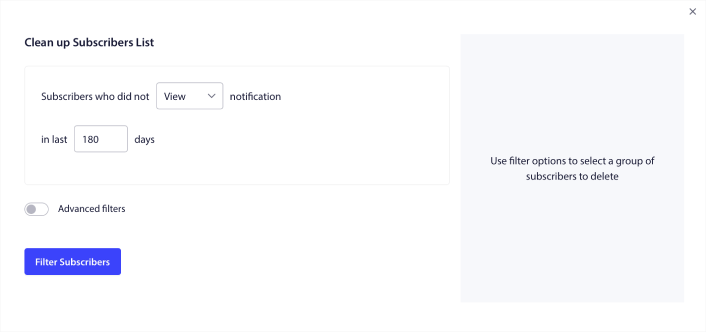
Vi anbefaler at slette abonnenter, der ikke har set dine notifikationer i 240 dage. Du kan også bruge avancerede filtre til endnu mere specifikke fjernelser.
Avancerede filtre inkluderer:
- Attributter: Slet abonnenter med specifikke attributter såsom platform eller andre identificerende data.
- Segmenter: Slet et helt segment eller et sæt af segmenter
- Browser: Slet abonnenter fra en specifik browser.
- Enhed: Slet abonnenter, der interagerer fra desktop- eller mobile enheder.
- Land: Slet abonnenter fra et specifikt land.
- Stat: Slet abonnenter fra en specifik stat.
- By: Slet abonnenter fra en specifik by.
- Abonnementsdato: Målret dem, der abonnerede før eller efter en bestemt dato. Fantastisk til at retargete nye abonnenter, der ikke er engagerede.
- Sidst sendt: Målret abonnenter, der sidst modtog en notifikation før en bestemt tidsgrænse.
- Sidst set: Målret abonnenter, der sidst så en notifikation før en bestemt tidsgrænse.
- Sidst klikket: Målret abonnenter, der sidst klikkede på en notifikation før en bestemt tidsgrænse.
- Samlet antal sendte: Målret abonnenter, hvis samlede antal modtagne notifikationer i levetiden er mindre end eller lig med et specifikt antal. Fantastisk til at målrette abonnenter, der slet ikke modtager dine push-notifikationer længere
- Samlet antal sete: Målret abonnenter, hvis samlede antal sete notifikationer i levetiden er mindre end eller lig med et specifikt antal. Beregnet til at målrette abonnenter, der modtager dine notifikationer, men ikke engang tjekker dem ud.
- Samlet antal klik: Målret abonnenter, hvis samlede antal klik på notifikationer i levetiden er mindre end eller lig med et specifikt antal. Filtrer abonnenter, der slet ikke klikker på dine notifikationer.
- Abonnent-hash: Bruges til at fjerne en bestemt abonnent fra din liste. Det svarer til at slette en e-mail fra en liste.
Individuelt giver disse filtre måske ikke meget mening. Men du kan kombinere flere filtre for at vælge specifikke målgruppemedlemmer. Lad os for eksempel sige, at du vil fjerne abonnenter, der har været tilmeldt i over et år, men aldrig har klikket på dine meddelelser. Du kan kombinere filteret Tilmeldingsdato med filteret Samlet antal klik.
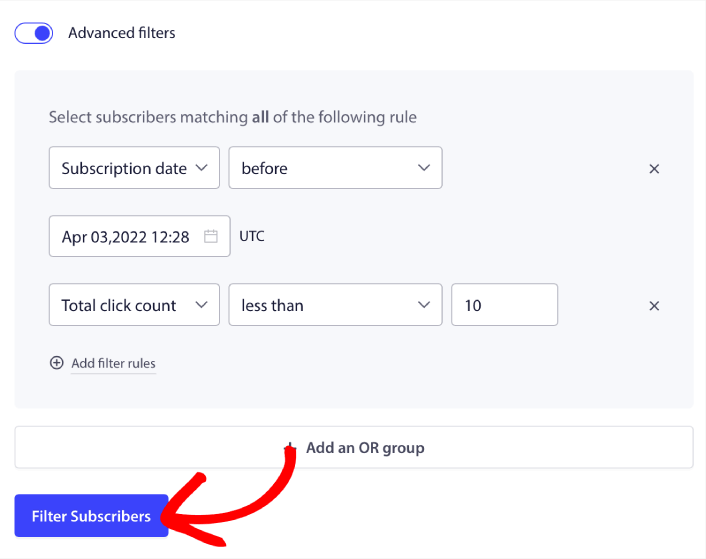
Og hvis du vil filtrere flere typer inaktive brugere, kan du klikke på knappen + Tilføj en ELLER-gruppe og målrette flere typer brugere.
Sådan opretter du en widget til abonnementsstyring i Shopify
Abonnementswidgetten er en unik funktion i PushEngage, der giver dine abonnenter og webtrafik mulighed for at vælge, hvilken slags beskeder de vil modtage.
Gå til PushEngage-dashboardet og gå til Design » Widgets og aktiver Abonnementsstyrings-widgetten:

Klik på knappen Rediger widget for at tilpasse din widget. Start med at tilpasse udseendet og følelsen af din widget, så den matcher dit brands designsprog under Udseende og design:
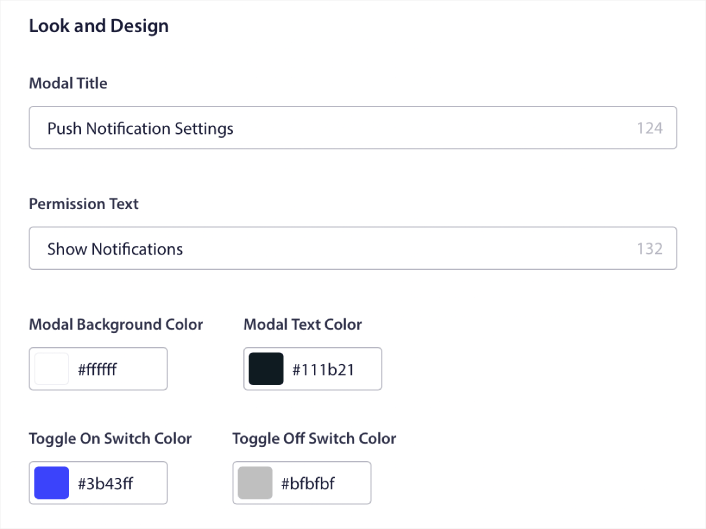
Du kan oprette en fuldstændig brugerdefineret popup-modal, der bliver hængende, selv når dine besøgende ikke abonnerer fra din standard popup-modal. Hvis størrelsen på popup-triggerknappen føles forkert for dig, kan du også tilpasse den under Triggerknap:
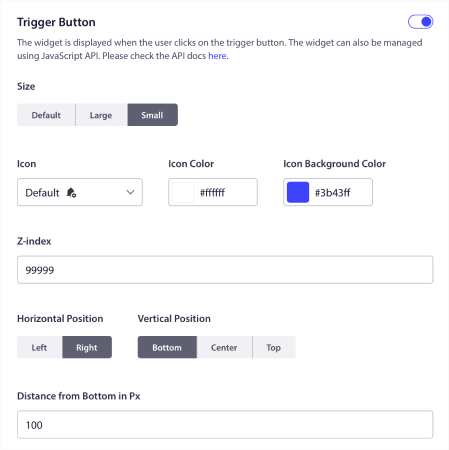
Og det fedeste er, at du også kan vælge specifikke sider til at vise widgetten under Regler for visning af triggerknap:

Som standard vises knappen på alle sider. Men du kan oprette brugerdefinerede målretningsregler for at vise specifikke versioner af widgetten ved at målrette specifikke:
Steder:
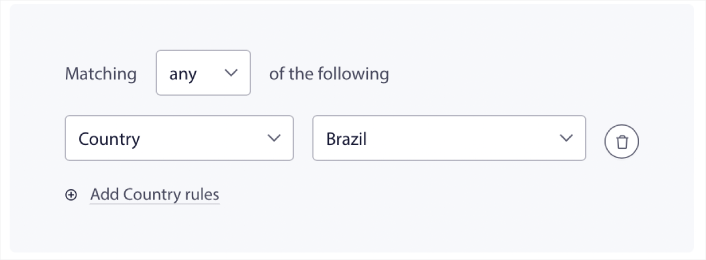
Enheder:
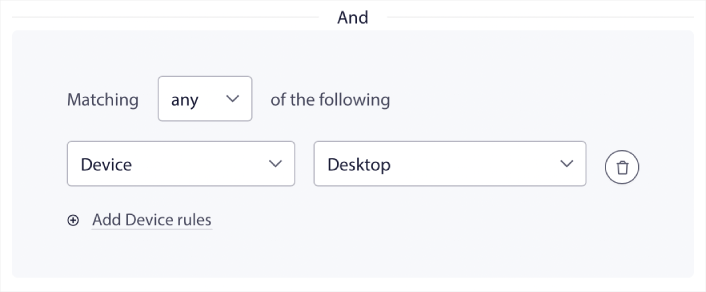
Og URL'er på dit websted:
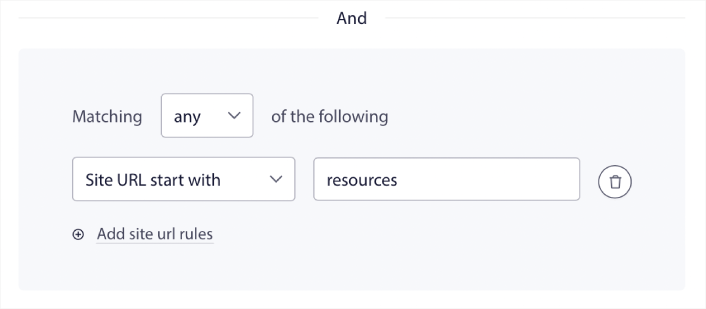
For at tage det til næste niveau kan du også lade dine abonnenter vælge, hvilke typer beskeder de vil modtage under Segmentpræferencer:
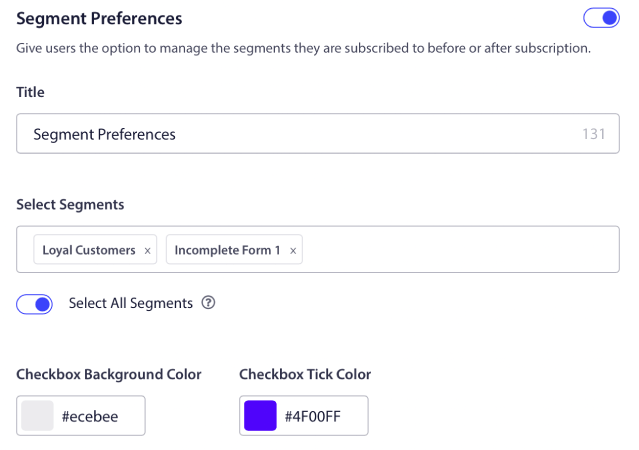
Hvis du aktiverer Vælg alle segmenter, bliver dine abonnenter automatisk tilføjet til alle de valgte segmenter som standard:
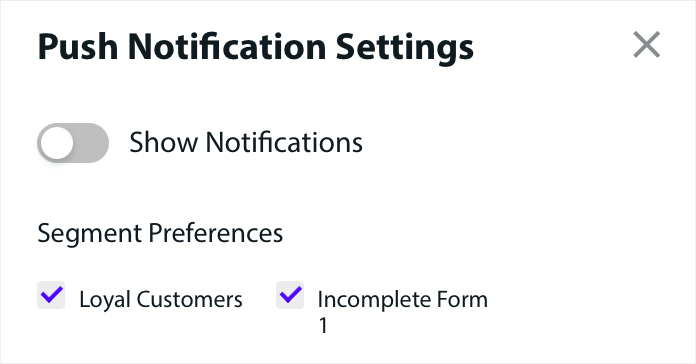
Dette er en fantastisk måde at opbygge en retargeting-liste på.
Hvis du kører nogen eCommerce push-beskeder på dit websted, vil mange af dem være udløste push-beskeder. Dette inkluderer:
- Push-notifikationer om forladte indkøbskurve
- Push-notifikationer ved forladt indkøbskurv
- Prisfaldsalarmer
- Besked om lagerpåfyldning
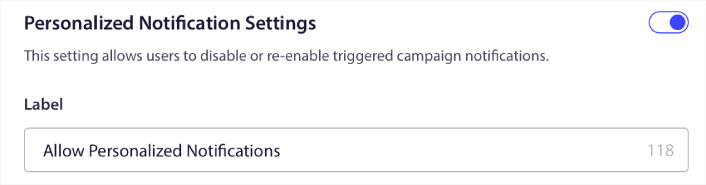
Og endda brugerdefinerede udløste push-beskedkampagner. Med vores abonnementswidget kan du nu lade dine abonnenter vælge, om de vil se personlige beskeder:

Aktivér blot indstillingen under Indstillinger for personlige beskeder:
Sådan vækster du din virksomhed med App Push-notifikationer
Hvis du også kører en Android- eller iOS-app eller endda en webapp til din butik, kan du øge dit salg endnu hurtigere ved hjælp af push-beskeder til mobilapps og push-beskeder til webapps.
BEMÆRK: Du kan også tilføje push-beskeder til mobil til dine Android- og iOS-apps ved hjælp af PushEngages kraftfulde SDK'er. Der er ingen grund til at bygge og administrere en grænseflade til at sende og administrere dine kampagner. Og du kan gøre det hele fra det samme dashboard.
Push-notifikationer til mobilapps er beskeder, der sendes fra en app direkte til en brugers mobile enhed, og som giver opdateringer, påmindelser eller personligt indhold, selv når appen ikke er aktivt i brug. De forbedrer brugerengagement ved at levere rettidig og relevant information lige ved brugerens fingerspidser.
Selvfølgelig er dette kun nyttigt for dig, hvis du har en app eller er i gang med at udgive en mobilapp til din virksomhed i fremtiden. Hvis du har været i tvivl om at udgive en app til at vækste din virksomhed, kan dette lige være det rette tidspunkt for dig. En af de største udfordringer, som apps står over for, er kundeengagement. Og PushEngage kan nu hjælpe dig med at fjerne den smerte fuldstændigt.
For dybere, hyppigere engagement er app-pushes at foretrække. For lejlighedsvise opdateringer eller advarsler er web-pushes effektive. Til dette formål tilbyder app-notifikationskampagner bedre rich media og interaktivt indhold. App-push-notifikationer er afhængige af data, som web-push-notifikationer simpelthen ikke kan bruge det meste af tiden.
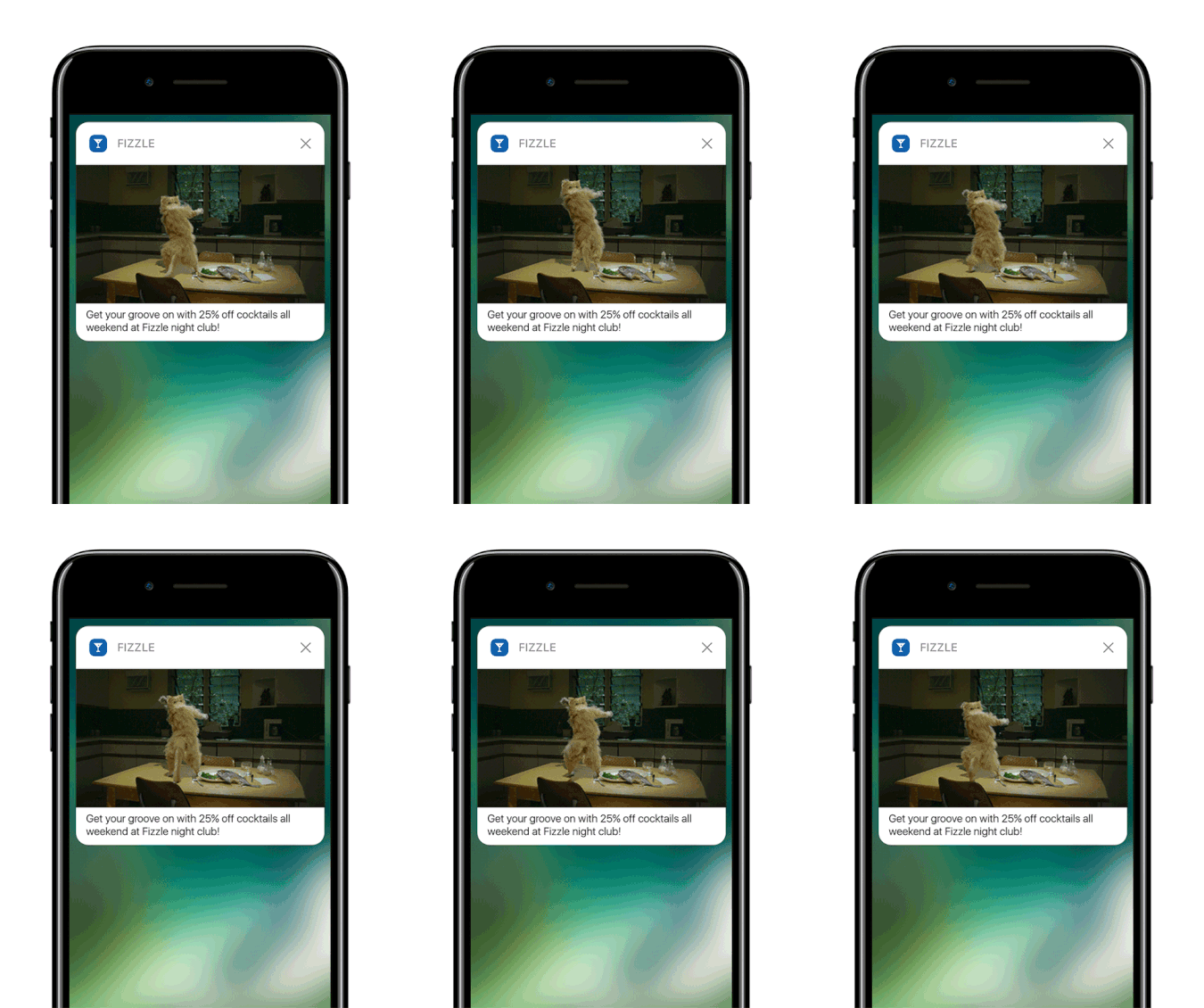
For at være fair: Du kan oprette personlige web-push-notifikationer. Men app-pushes kan gå LANGT dybere ind i personalisering.
Mobilapp-push-notifikationer går ud over blot at være et kommunikationsværktøj; de er en kraftfuld mekanisme til at forbedre brugeroplevelsen, drive engagement og opbygge en personlig forbindelse med brugerne.
De tillader et niveau af interaktivitet og personalisering, der markant kan bidrage til en apps effektivitet med at fastholde og engagere sine brugere.
- Forbedret brugerengagement:
- Kontekstuel relevans: App-push-notifikationer kan være utroligt kontekstfølsomme. De udnytter brugerdata som placering, adfærd og præferencer til at sende rettidige og relevante notifikationer. For eksempel kan en fitness-app sende en motiverende besked lige, når du normalt plejer at løbe.
- Adfærdsmæssig udløsning: Notifikationer kan udløses af specifikke brugerhandlinger eller undladelser. Dette gør dem yderst effektive til at fremme ønsket adfærd, såsom at minde en bruger om at gennemføre et køb, de efterlod i deres indkøbskurv.
- Rig brugeroplevelse:
- Multimedieintegration: I modsætning til basale tekstbeskeder kan app-notifikationer indeholde billeder, lyd og endda video. Denne integration af rige medier gør dem mere engagerende og fornøjelige.
- Interaktive elementer: Nogle notifikationer giver brugerne mulighed for at interagere direkte fra låseskærmen eller notifikationsområdet. Dette kan omfatte handlinger som at svare på en besked, like et opslag eller endda styre musikafspilning.
- Personlig kommunikation:
- Skræddersyet indhold: Ved hjælp af dataanalyse kan apps sende notifikationer, der er yderst personlige. Dette kan være så simpelt som at bruge dit navn eller så komplekst som at anbefale produkter baseret på din browserhistorik.
- Segmentering og målretning: Apps kan segmentere deres brugere baseret på forskellige kriterier og sende målrettede notifikationer. Dette sikrer, at brugerne modtager notifikationer, der er relevante for deres interesser og behov.
- Kunderetention og loyalitet:
- Regelmæssig engagement: Ved at holde brugerne informeret og engageret kan app-notifikationer forbedre kunderetention markant.
- Loyalitetsbelønninger: Notifikationer er en effektiv måde at informere brugere om loyalitetsprogrammer, særlige tilbud og belønninger, hvilket forbedrer kundeloyaliteten.
- Analytiske indsigter:
- Brugerresponsdata: Apps kan spore, hvordan brugere interagerer med notifikationer, hvilket giver værdifuld indsigt i brugerpræferencer og adfærd.
- A/B-test: Disse data kan bruges til at A/B-teste forskellige notifikationsstrategier for at se, hvad der virker bedst, hvilket fører til mere effektiv kommunikation.
- Operationel effektivitet:
- Automatiseret kommunikation: Notifikationer kan automatiseres baseret på visse kriterier, hvilket reducerer behovet for manuel intervention og sikrer rettidig kommunikation.
Ved at udnytte brugerdata og adfærd kan app push-notifikationer transformere den måde, virksomheder interagerer med deres kunder på, hvilket gør kommunikationen mere relevant, rettidig og effektiv. Denne dybde af engagement og personalisering er det, der adskiller app push-notifikationer og gør dem til en værdifuld ressource i den digitale kommunikationsstrategi for enhver mobilapplikation.
Og hvis du har brug for en mere detaljeret vejledning, bør du tjekke vores dokumentation om opsætning af push-notifikationer til iOS-apps og opsætning af push-notifikationer til Android-apps.
Hvad ellers?
Vi ved, at det er hårdt arbejde at vækste en virksomhed. Hos PushEngage søger vi altid at forbedre vores produkt og din oplevelse. Vi har lanceret denne nye funktion for at hjælpe dig med at få endnu mere værdi ud af dit PushEngage-abonnement.
Mange tak for at læse denne meddelelse.
Hvis du har spørgsmål, er vores Customer Success-team her for at hjælpe. Start blot en samtale på Live Chat eller tjek vores kontaktside.
Og tak fordi du bruger PushEngage. Uanset om du bruger gratisversionen eller Enterprise-versionen, er du lige så vigtig for os. De nye kodestykker er beregnet til at hjælpe dig med at få succes, og vi ønsker dig alt det bedste.
Vi er ved at udvikle endnu flere episke integrationer for at gøre dit liv enklere. Så lad os vide dine tanker i kommentarerne herunder. Du kan anmode om specifikke integrationer, som du gerne vil se i fremtiden.
Og hvis du ikke allerede har gjort det, kom i gang med PushEngage i dag!


