Chat isn’t the problem.
The inbox
is.
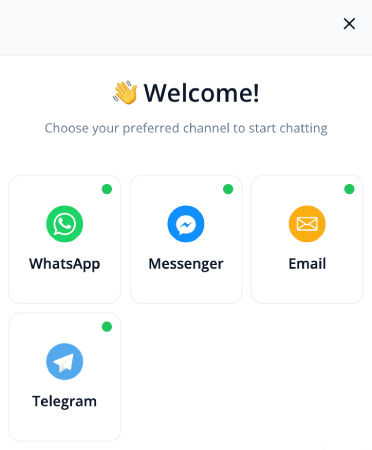
The PushEngage chat widget routes visitors to WhatsApp, Messenger, Telegram, email, or SMS: the channels your team already answers. No new dashboard, no agents camping online, no per-seat pricing.

“We are able to reach our customer base in almost an instant. Email would have been too slow to put together in an emergency.” John Smith · CEO
75,000+ businesses Set up in minutes, no engineering ticket 14-day money-back guarantee

Trusted by 75,000+ businesses in 150+ countries








Why it works
A traffic router for intent, not another tool to manage.
Contact forms get ignored and live-chat inboxes need staffing. The inboxless widget sends each conversation where your team already lives.
Route, don’t queue
Visitors tap the widget and land in WhatsApp, Messenger, Telegram, or email instantly. Questions get captured without real-time pressure on your team.
Looks built in-house
Custom icons, branded avatars, vertical or horizontal layouts, full color and gradient control, and custom CSS for power users.
No per-seat pricing
Chat tools charge per agent and grow costs instead of outcomes. The WhatsApp widget is free forever; upgrades price the widget, not your headcount.
How it works
From anonymous visitor to conversation your team can win.

Design control past the color picker
Most chat tools offer a color swatch and call it branding. This widget matches your site down to the font, whether you run a fashion store or a SaaS dashboard.
- Custom icons, avatars, and CTA buttons
- Vertical or horizontal layouts, fonts, and gradients
- Custom CSS when you want pixel-level control
Targeting that understands context
Not every visitor should see the same widget. Show WhatsApp on product pages, support channels on docs, and different options by country, device, or business hours.
- Page-level and geo targeting rules
- Device targeting and business-hours schedules
- Route to booking links, CRMs, or onboarding flows
What’s included
Exactly what you’re buying, on one dashboard.
The chat widget is the conversation bridge of the same platform: push brings visitors back after they leave; the widget routes the ones still on the page to the messaging app you already answer.
Inboxless routing, 22+ channels
Visitors pick their channel and land directly in your WhatsApp, Messenger, email, or SMS. You reply from the inbox you already check, with no new dashboard to learn.
See how routing worksPage-level targeting
Show a sales WhatsApp button on product pages and a support email option on your docs pages, using per-URL rules configured from the dashboard with no code needed.
Read about page targetingCustom styling and icons
Custom icons, branded colors, and layout controls make the widget look built in-house, down to the icon set and font. Fits any site from a fashion store to a SaaS dashboard.
See styling optionsMulti-agent routing
Route buyers to sales and support questions to the right teammate, by page and language. The conversation goes where the answer lives, with no inbox to staff.
Set up multi-agent routingAgent scheduling and business hours
Set business hours per channel and per agent so the widget only shows options that are live right now. Nothing goes unanswered because no option appeared.
Configure business hoursWhatsApp in the widget
High-intent buyers who tap the widget during research land straight in your WhatsApp, mid-decision. One tap starts a conversation in the channel they already use daily.
Add WhatsApp to your widgetChat and push, one dashboard
The visitor who chats today becomes the push subscriber you re-engage after they leave. Both channels share one dashboard and one active-subscriber pricing line.
Explore web pushThe four-channel platform
Web push, app push, WhatsApp, and chat share one dashboard and one active-subscriber pricing model. Add a channel without adding a vendor.
See the platform overviewSetup and integrations
Installs wherever you run your site. One snippet, any platform.
One-click install on WordPress and WooCommerce. Shopify embed included. Paste one line of JS to add the widget anywhere else.
WordPress plugin
Install the PushEngage plugin and the chat widget is ready in minutes, right from your WordPress admin. No code, no dev ticket, no configuration file to edit.
Get the WordPress plugin
Shopify and Shopify Plus
Native embed, no code required. The widget goes live on your storefront the same afternoon.
Shopify Plus app
WooCommerce
Installed alongside the PushEngage WooCommerce plugin. Chat and push share one setup flow.
WooCommerce setupAny site, one JS snippet
Not on WordPress or Shopify? Paste one line of JS into your site’s head and the widget is live. Works on any CMS or custom build.
See all setup options22+ chat channels
WhatsApp, Messenger, Telegram, Instagram, email, SMS, and 17 more. Visitors pick their channel and your team replies from the inbox they already use.
See all channelsThe numbers
Conversations that convert, without the queue.
“PushEngage is quick and easy to implement. The ability to tailor your target audience is particularly impressive as you are able to increase your engagement rates as you use the software.”
 Alex Avery
Database Marketing Executive
Alex Avery
Database Marketing Executive
Chat family
More from the chat toolkit.
Page-level chat targeting
Serve the right channel on the right page, by URL rule, with no code required.
Read the guideWhatsApp chat widget
Route on-site visitors to a WhatsApp conversation, where the reply lives in the app they already check.
Set up WhatsApp chatMulti-agent chat routing
Assign conversations to the right teammate by page and language, with no inbox to staff.
Set up multi-agent routingChat widget styling
Custom icons, brand colors, and layout controls that make the widget look built in-house.
Explore styling optionsFAQ
Questions, answered.
How is this different from Intercom or Tawk.to?
It’s a different category. Those are hosted inboxes your team has to staff. The PushEngage widget is inboxless: it routes each visitor to WhatsApp, Messenger, email, or SMS, where the conversation continues on channels you already answer.
Is it really free?
The WhatsApp click-to-chat widget is free forever and embeds in one click. Paid tiers unlock 20+ channels, deeper design control, and targeting rules, with no per-seat pricing.
Will it look like our brand?
Yes: custom icons, branded avatars, layouts, full color and gradient control, fonts, and custom CSS. It blends in like it was built in-house.
Do we need developers to install it?
No. One-click embed on any website, and targeting rules configure from the dashboard. It works alongside the rest of PushEngage or on its own.
Turn conversations into conversions.
Set up in minutes. If PushEngage isn’t the best fit within 14 days, we refund 100%. No questions asked.
Free plan available Set up in minutes Pay only for active subscribers