إذا كانت معدلات فتح البريد الإلكتروني تتراجع ومنشوراتك الاجتماعية تُدفن، فقد حان الوقت لتجربة شيء مختلف. قد تكون حملة إشعارات دفع الويب هي ما تحتاجه بالضبط.
دفع الويب سريع ومباشر ويظهر عندما يكون مشتركك متصلاً بالإنترنت. لا صندوق وارد. لا خوارزمية. مجرد رسالة سريعة تعيد الأشخاص إلى موقعك عندما يكون الأمر الأكثر أهمية.
في هذا الدليل، سأوضح لك كيفية إعداد حملة إشعارات دفع الويب الأولى باستخدام PushEngage. الأمر أسهل مما قد تعتقد، وسترى كيف يمكن لحملة بسيطة أن تحقق نتائج حقيقية.
يبدو جيدًا؟ دعنا نتعمق في الأمر.
أرسل إشعارات دفع الويب اليوم!
تعد إشعارات الدفع أداة تسويقية فعالة للغاية ومنخفضة التكلفة لمساعدتك على زيادة حركة المرور المتكررة والمشاركة والمبيعات تلقائيًا.
لماذا يعمل دفع الويب (حتى عندما لا تعمل القنوات الأخرى)
تقطع إشعارات دفع الويب الضوضاء بطريقة لا تستطيعها رسائل البريد الإلكتروني والمنشورات الاجتماعية.
- لا تحتاج إلى رقم هاتف أو عنوان بريد إلكتروني لتنمية قائمتك
- تظهر الرسائل أثناء تصفح مشتركك بنشاط
- يمكنك أتمتة كل شيء - من استعادة سلة التسوق إلى إسقاط المنتجات
- يعمل عبر الأجهزة والمتصفحات (لا يلزم وجود تطبيق)
إنه مثل امتلاك قناة مرور خاصة بك... قناة يتم ملاحظتها بالفعل. فكر في الأمر... متى كانت آخر مرة تجاهلت فيها إشعار المتصفح الذي ظهر باسمك وعنوان رئيسي جذاب ودعوة إلى اتخاذ إجراء تهتم به؟
⚡ رؤية فورية: على عكس رسائل البريد الإلكتروني التي تظل غير مقروءة لأيام، تصل إشعارات الدفع فورًا. مباشرة على شاشة المستخدم. سطح المكتب، الهاتف المحمول، لا يهم. أنت لا تنتظر منهم فتح صندوق الوارد. أنت تظهر بالضبط عندما يكون الأمر مهمًا.
🧠 لا يلزم ذاكرة: لا يحتاج المستخدمون إلى تذكر موقعك على الويب. أو منتجك. أو حتى تسجيل الدخول الخاص بهم.
بمجرد الاشتراك، يمكنك إعادة إشراكهم في أي وقت - لا نماذج، لا احتكاك، لا ضجة. إنه مثل وجود مسار سريع مباشرة إلى فترة انتباههم.
📈 معدلات مشاركة عالية جدًا: غالبًا ما تكون نسبة النقر إلى الظهور لدفع الويب 2-3 أضعاف البريد الإلكتروني. لماذا؟ لأنه قصير. غير متوقع. وأصلي لكيفية تصفح الأشخاص. بالإضافة إلى ذلك، لا أحد صندوق الوارد يغرق بإشعارات الدفع (حتى الآن). لذا فأنت تبرز.
💸 أنت تملك القناة: لا خوارزميات. لا مزايدات. لا حيل في خلاصات التواصل الاجتماعي. المشتركون في الدفع هم ملكك. أنت تقرر ما يرونه ومتى. إنها جمهورك، وليس مستأجرًا من Meta أو Google.
🧪 مثالي للاختبار: هل تحتاج إلى معرفة ما إذا كان عنوان رئيسي يعمل؟ إذا كان الناس يهتمون بميزة جديدة؟ الدفع هو أسرع أداة اختبار A/B لم تكن تعرف أن لديك. أرسل تنويعًا للعنوان الرئيسي. انظر أيها يحصل على المزيد من النقرات. تعلم بسرعة. تحرك أسرع.
دفع الويب هو القناة النادرة التي تكون رخيصة وعالية التحويل وفعالة بشكل صارخ عند استخدامها بشكل صحيح.
والأفضل من ذلك كله... يستغرق الأمر أقل من 10 دقائق لإطلاق حملتك الأولى.
لنقم ببناء واحدة.
الخلاصة: تصل إشعارات الويب الفورية إلى المشتركين على شاشاتهم في اللحظة التي تضغط فيها على إرسال، دون وجود صندوق وارد أو خوارزمية أو تثبيت تطبيق يقف بينكم.
تحليل لأنواع حملات إشعارات دفع الويب
بالمعنى الأوسع، هناك 3 أنواع من حملات إشعارات دفع الويب:
الإشعارات الجماعية هي إشعارات فورية ترسلها كوحدة إشعار واحدة. يمكنك جدولتها، ولكنها ستُرسل مرة واحدة فقط. تتضمن الحملات المُشغّلة إعداد إشعار فوري، وتحديد مشغّل لتفعيله، وسير عمل للتحكم في جدولة الإشعارات. إشعارات التنقيط الآلية هي سلسلة من الإشعارات التي تُرسل تلقائيًا في أوقات محددة أو عند استيفاء شروط معينة.
لجميع الأغراض العملية، تبدو الحملات المُشغّلة وحملات التنقيط الآلية متشابهة من الخارج. الفرق الحاسم هو أن الحملات المُشغّلة أكثر مرونة وقابلية للتخصيص. إذا كنت تعتبر أن تكلفة الإشعارات الفورية أقل بكثير من معظم القنوات الأخرى، فمن المنطقي تمامًا استخدام مزيج من الثلاثة لنمو عملك.
إذا كنت جديدًا في مجال الإشعارات الفورية، فإننا نوصي بشدة ببدء رحلتك باستخدام القوالب المثبتة.
ملاحظة: تتطلب معظم الحملات المُشغّلة بعض الخبرة في التطوير. ستحتاج إلى استخدام واجهة برمجة التطبيقات (API) للاستفادة القصوى من الإشعارات المُشغّلة. ومع ذلك، هناك بعض الإشعارات المُشغّلة التي يمكنك إرسالها مباشرة. إذا كنت فضوليًا، تحقق من مقالتنا حول إشعارات الدفع للتجارة الإلكترونية للحصول على فكرة أفضل.
أفضل خدمة لإرسال حملة إشعارات فورية عبر الويب
لنبدأ بالقول إن معظم "خدمات الإشعارات الفورية المجانية" المتاحة هي في الواقع تجارب مجانية. بعض مقدمي الخدمة الذين أدرجناهم هنا هم برامج تجريبية، بينما يمتلك البعض الآخر خطة مجانية دائمة يمكنك الاختيار من بينها.
هناك بعض الخيارات المجانية الأخرى، مثل Firebase Cloud Messaging (FCM)، ولكن هذا ليس خيارًا جيدًا على الإطلاق. يمكنك قراءة المزيد حول سبب عدم قدرة FCM على المنافسة مع مزود خدمة مثل PushEngage. ولكن في الوقت الحالي، خذ كلمتنا واذهب إلى الخيارات الأفضل.
نوصي باستخدام PushEngage.

PushEngage هو المكون الإضافي رقم 1 لإشعارات الدفع في العالم.
تساعدك إشعارات الدفع على زيادة حركة مرور موقعك الإلكتروني ومشاركتك تلقائيًا. وإذا كنت تدير متجرًا عبر الإنترنت، فإن PushEngage يساعدك أيضًا على زيادة مبيعاتك من خلال مساعدتك في إنشاء إشعارات دفع آلية للتجارة الإلكترونية.
يمكنك البدء مجانًا، ولكن إذا كنت جادًا بشأن تنمية عملك، فيجب عليك شراء خطة مدفوعة. أيضًا، قبل شراء أي خدمة إشعارات دفع، يجب عليك الاطلاع على هذا الدليل حول تكاليف إشعارات الدفع.
إليك نظرة سريعة على ما تحصل عليه مع PushEngage:
- حملات آلية عالية التحويل
- خيارات استهداف متعددة وجدولة حملات
- تتبع الأهداف والتحليلات المتقدمة
- اختبار A/B ذكي
- قوالب حملات الدفع
- خيارات تقسيم قوية
- مدير نجاح مخصص
وهذا بالكاد يخدش السطح. تحقق من القائمة الكاملة لميزات PushEngage قبل المتابعة.
ولكن الجزء الأكثر جاذبية في PushEngage هو أنه يمكنك البدء بخطة مجانية دائمة. ويمكنك استخدامه لتنمية عملك بالفعل باستخدام خيارات تخصيص متعددة.
سترى أن PushEngage هو الخيار الأفضل بلا منازع إذا كنت ترغب في زيادة حركة المرور والمشاركة والمبيعات لعملك. وإذا كانت ميزانيتك محدودة، يمكنك دائمًا أن تكون مبدعًا بعض الشيء مع إشعارات الدفع الخاصة بك.
ملاحظة: إذا كنت تدير موقع WordPress، فيجب عليك تثبيت وتفعيل إضافة PushEngage لـ WordPress.
تسمح النسخة المجانية بما يصل إلى 200 مشترك و 30 إشعارًا مدى الحياة. هذا جيد بما يكفي للوصول بعملك إلى نقطة يمكنك فيها تحمل خطط مدفوعة بسهولة. تبدأ من 9 دولارات شهريًا للسنة الأولى (1000 مشترك، يتم فوترتها سنويًا) وتتوسع مع عدد المشتركين لديك؛ 100000 مشترك هي خطة Premium، والأرقام الحالية موجودة على صفحة الأسعار.

ولا تقلق إذا كنت لا تعرف شيئًا على الإطلاق عن البرمجة. يمكنك تثبيت PushEngage باستخدام أحد أدلة التثبيت العديدة لأي موقع ويب ونظام إدارة محتوى.
يساعدك التحسين المدعوم بالذكاء الاصطناعي من PushEngage في صياغة عناوين ورسائل أفضل، مما يؤدي إلى زيادة التفاعل ونجاح الحملة. هل تمنيت يومًا أن تكتب إشعاراتك الفورية بنفسها؟ حسنًا، الآن يمكنها ذلك!
على الأرجح، يمكنك تقليل وقت إنشاء الحملة للإشعارات الجماعية وحملات التنقيط والحملات المُشغّلة تلقائيًا بنسبة تصل إلى 50% مع تحسين جودة كتابتك.
يستخدم ذكاء PushEngage الاصطناعي الحملات عالية الأداء كنقطة مرجعية لجميع الكتابات وسيلتزم دائمًا بأفضل الممارسات افتراضيًا.
وأفضل جزء هو أنه يعمل لإشعارات الويب، والإشعارات الأصلية لنظام Android، والإشعارات الأصلية لنظام iOS، وإشعارات Flutter، وإشعارات React Native من نفس لوحة التحكم!
يمكنك استخدام توليد النصوص بالذكاء الاصطناعي لأي نوع من الحملات. في هذا المثال، أستخدم إشعارًا جماعيًا لتوضيح القدرات. ولكن إذا كنت ترغب في رؤية إمكاناته الكاملة أثناء العمل، شاهد هذا الفيديو!
أنشئ حملة جديدة أو اختر أيًا من القوالب. يمكنك بعد ذلك النقر فوق الزر إنشاء نص.
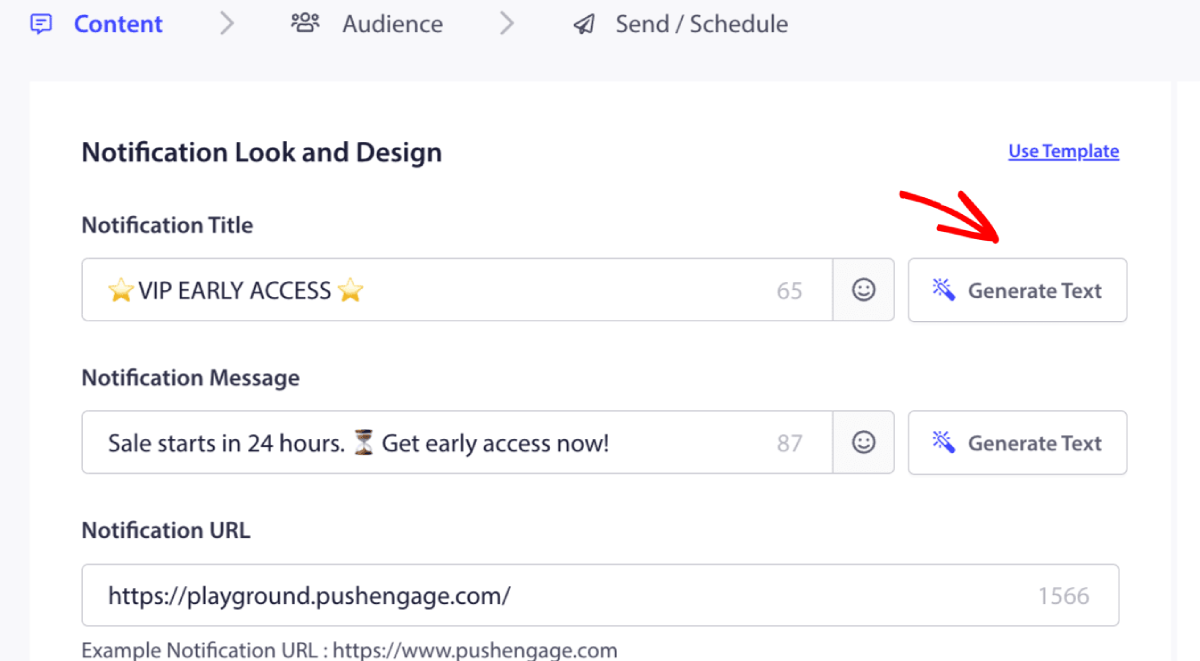
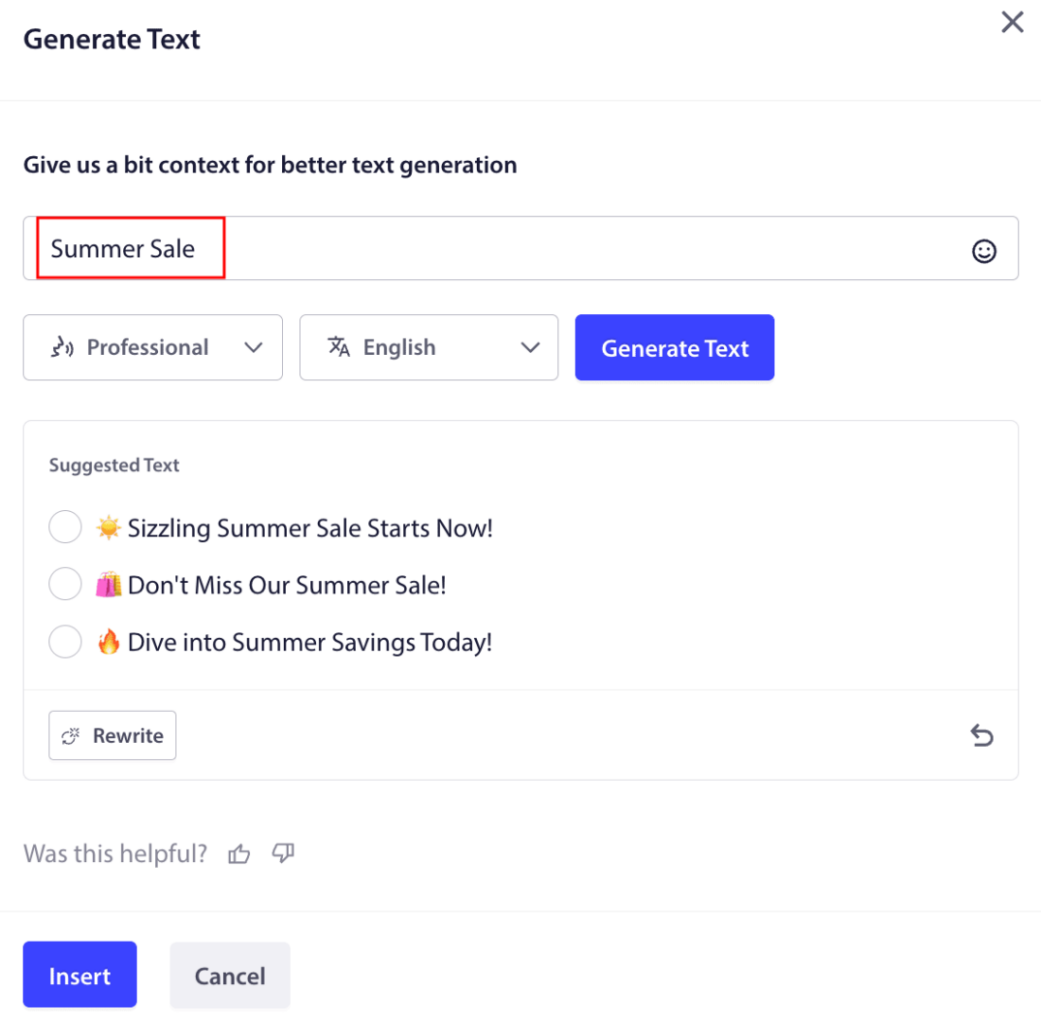
سيفتح نافذة صغيرة لعنوان ورسالة حملة إشعارات الويب. يمكنك البدء بإضافة أي كلمات مفتاحية ستعمل كمنبه للذكاء الاصطناعي. يمكن أن يكون المنبه مفصلاً كما تريد.
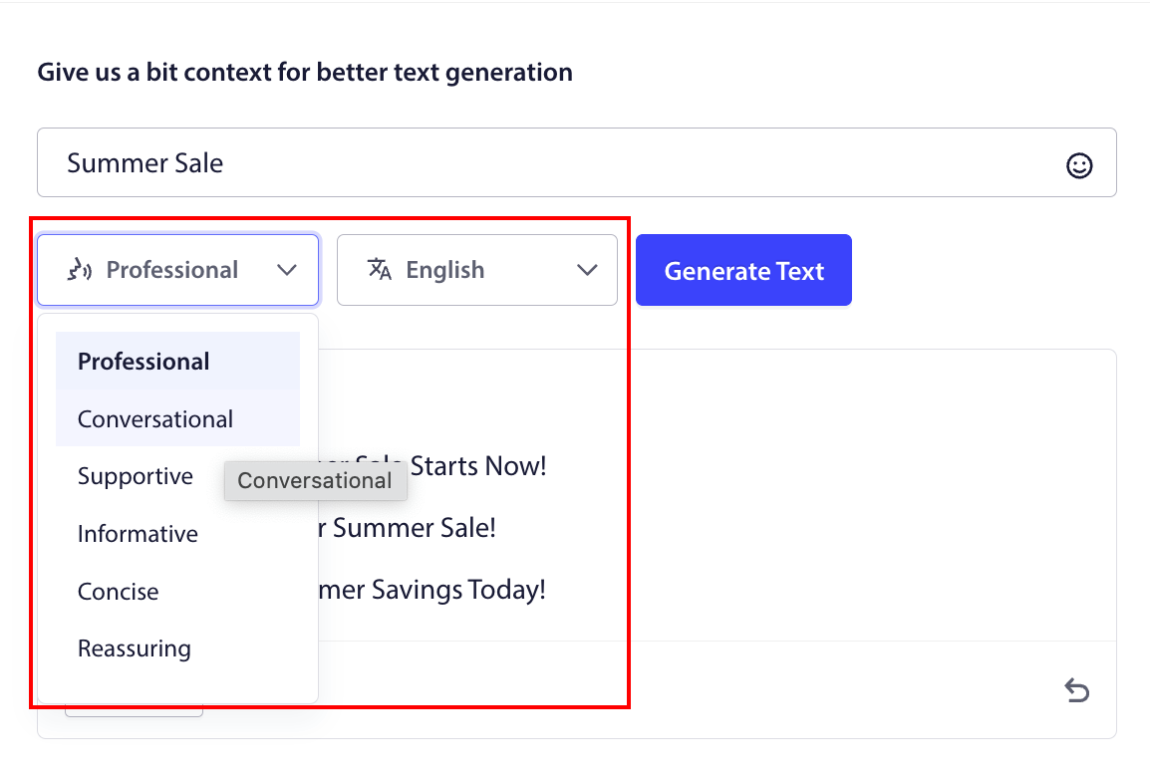
يمكنك أيضًا ضبط نبرة عنوان أو رسالة حملة إشعارات الويب. نبرة المحادثة مهمة جدًا في تحديد نوع الحملة التي سيتم إنشاؤها. تأكد من أنها تتوافق مع أسلوب علامتك التجارية.
بمجرد ضبطه، يمكنك النقر فوق الزر إنشاء نص. غير راضٍ عن النص الذي تم إنشاؤه؟ ببساطة انقر فوق الزر إعادة الكتابة!
يمكنك بالفعل صياغة نصوص بأي لغة!
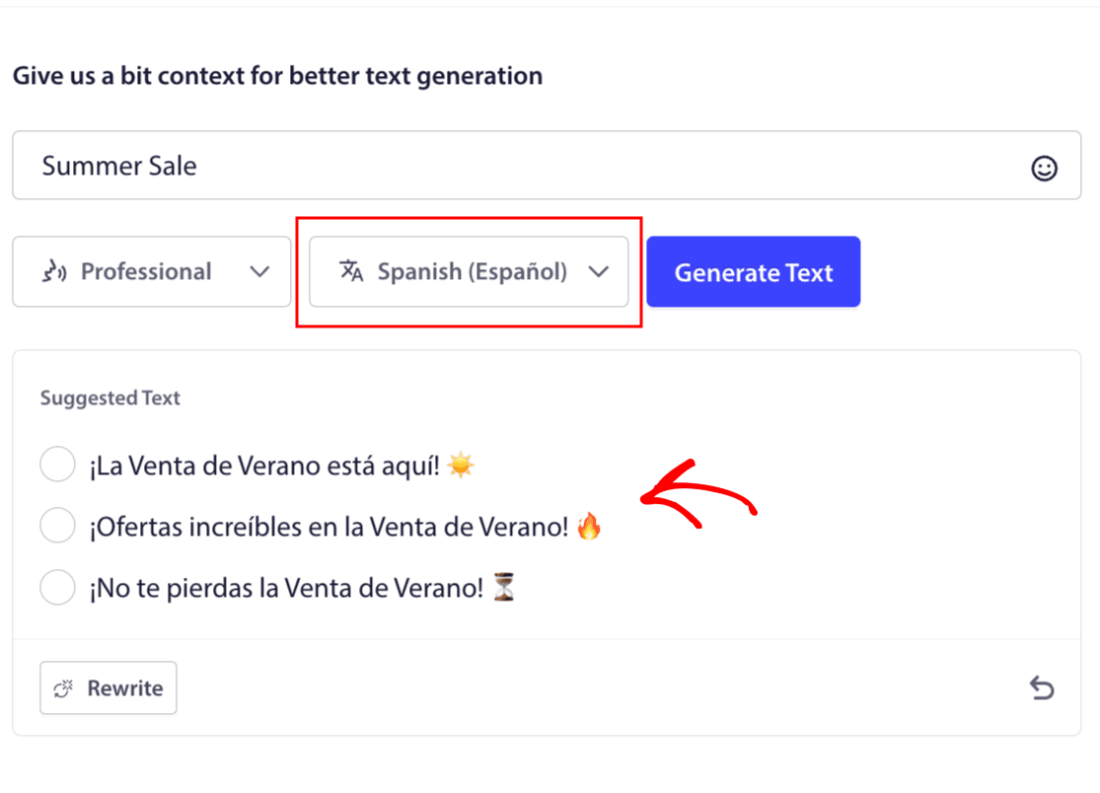
هذا المستوى من دعم اللغات المتعددة المدمج غير موجود ببساطة في أي برنامج آخر لإشعارات الدفع. ولا تقلق، الترجمات دقيقة للغاية! لذلك، يمكنك إرسال حملات خاصة بالموقع الجغرافي بسهولة بالغة الآن. حدد مجموعة الجمهور المناسبة، وحدد اللغة، ودع الذكاء الاصطناعي الخاص بنا يقوم بسحره.
كيفية إرسال حملة إشعارات الويب
الآن بعد أن عرفت ما هي حملة إشعارات الويب وما هي الخدمة التي تحتاجها لإرسالها، فقد حان الوقت للتحقق من كيفية إرسال الإشعارات المختلفة.
إليك كيف تبدو حملات إشعارات الويب في الواقع:
🛒 التجارة الإلكترونية:
- خصم ترحيبي: "شكرًا للاشتراك! إليك خصم 10%."
- تنبيه انخفاض السعر: "السترة التي أعجبتك؟ لقد تم تخفيض سعرها أخيرًا."
- إصدارات المنتجات الجديدة: "وصلت منتجات جديدة للتو. كن أول من يتسوق."
📚 الناشرون والمدونون:
- تنبيه منشور جديد: "لا تفوت تحليل هذا الأسبوع حول [الموضوع]."
- ملخص أسبوعي: "قائمة قراءتك ليوم الجمعة هنا."
- تسليم مغناطيس الرصاص: "إليك دليلك المجاني. أخبرنا برأيك."
💼 برامج SaaS والأدوات:
- تحديثات الميزات: "لقد أطلقنا شيئًا جديدًا للتو. جربه مجانًا."
- تذكيرات التجربة: "تنتهي تجربتك المجانية غدًا."
- المتخلى عنهم: "لا تزال تفكر في الأمر؟ إليك خصم 20% لتجربتنا."
ابدأ صغيرًا. انسخ هذه. قم بتعديلها لتناسب نبرتك. تم.
لأغراض عملية، نحن لا نتحدث عن حملات مخصصة يتم تشغيلها يمكنك إنشاؤها باستخدام خدمة API هنا. إذا كنت مهتمًا بالإشعارات المخصصة، فيجب عليك الاطلاع على وثائقنا.
#1. حملة إشعارات الترحيب عبر الويب
حملة إشعارات الترحيب عبر الويب هي إشعار دفع بسيط يهدف إلى الترحيب بأي مشترك جديد.
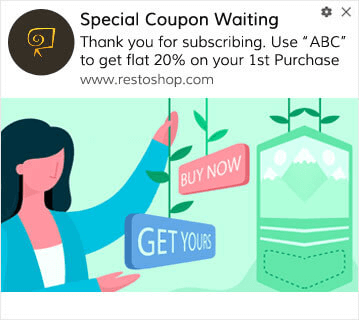
يمكنك أيضًا إرسال عرض أو هدية للاشتراك في إشعارات الدفع الخاصة بك. هذا شائع جدًا مع العديد من عملائنا. يمكنك استخدام إشعارات الترحيب الخاصة بك لـ:
- مشاركة كوبون ترحيبي
- تقديم ميزات مميزة
- إرسال توصيل مجاني
- تقديم هدايا مجانية
- توجيه المشترك الخاص بك من خلال جولة تعريفية
الآن، دعنا نعدّ إشعار الدفع الترحيبي الأول الخاص بك باستخدام PushEngage.
إليك كيفية تمكين إشعارات الترحيب في PushEngage. انتقل إلى لوحة تحكم PushEngage وتوجه إلى الحملة » الردود الآلية المتسلسلة وانقر فوق إنشاء رد آلي متسلسل جديد:

بعد ذلك، قم بتسمية حملتك (نقترح شيئًا مثل رسالة ترحيب متسلسلة)، وتحت المحتوى، حدد الخيار الذي يقول، “إرسال إشعار فور اشتراك المستخدم“):

في هذه المرحلة، يمكنك النقر فوق السهم بجوار الإشعار لتعديل محتوى إشعارك. إذا كان لديك خطة Premium أو Enterprise مع PushEngage، فستتمكن من إضافة أكثر من إشعار واحد لإنشاء سلسلة من رسائل الترحيب الآلية. فقط انقر فوق إضافة إشعار جديد وقم بتحرير المحتوى.
بمجرد الانتهاء، انقر فوق إعدادات الحملة التلقائية وحدد الخيار لإرسال حملة الترحيب الخاصة بك إلى جميع المشتركين:

بعد ذلك، قم بالتمرير لأسفل لتعيين معلمات UTM الخاصة بك لـ تتبع الإشعارات الفورية:
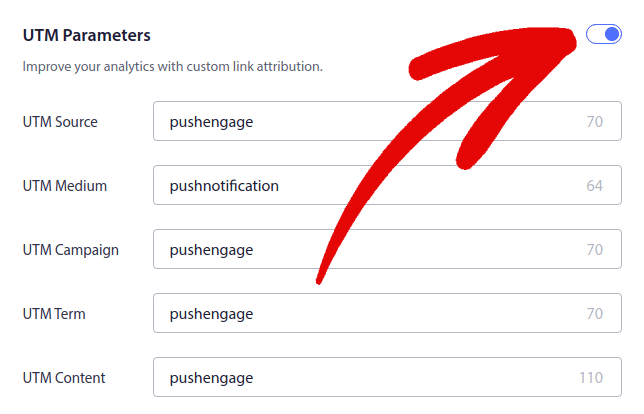
وعندما تنتهي، قم بالتمرير لأعلى مرة أخرى وانقر فوق الزر تفعيل الرد الآلي:

الآن أنت تعرف لماذا يعد إعداد حملة إشعارات ترحيب عبر الويب أمرًا مهمًا. أنت تعرف أيضًا كيفية إعدادها. انطلق وقم بتنشيط إشعارات الترحيب لإعادة إشراك المشتركين الجدد، أو تحقق من هذه المقالة حول رسائل الترحيب على الويب للإلهام.
#2. حملة إشعارات الدفع عبر الويب لسلة التسوق المهجورة
يحدث التخلي عن سلة التسوق عندما يضيف عميل محتمل منتجًا إلى سلة التسوق ولا يكمل عملية الدفع.
وظيفتك هي تقليل التخلي عن سلة التسوق قدر الإمكان.
إحدى طرق استعادة مبيعاتك المفقودة هي استخدام حملة إشعارات الدفع عبر الويب لسلة التسوق المهجورة. تستهدف حملات استعادة سلة التسوق المهجورة المشتركين الذين لديهم سلة تسوق مهجورة وترسل لهم متابعات وتذكيرات وعروضًا وقسائم وخصومات.
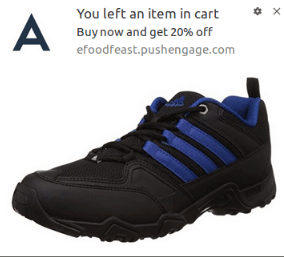
فكرة بسيطة: اجعل أكبر عدد ممكن من الأشخاص يشترون شيئًا.
لإشعارات الدفع الخاصة بالتخلي عن سلة التسوق تأثير حقيقي جدًا على أرباحك. على سبيل المثال، تحقق WickedWeasel ما بين 2000 دولار و 4000 دولار أسبوعيًا من المبيعات الإضافية من حملة إشعارات الدفع الخاصة بالتخلي عن سلة التسوق.
الآن، دعنا نقم بإعداد أول حملة تخلي عن سلة التسوق الخاصة بك مع PushEngage.
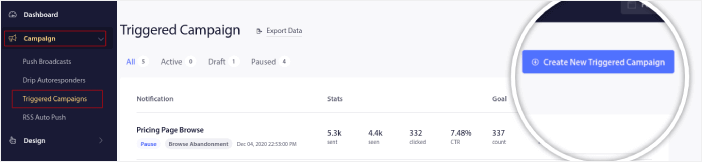
انتقل إلى لوحة تحكم PushEngage وتوجه إلى الحملات » الحملات المشغلة، وانقر على إنشاء حملة مشغلة جديدة:
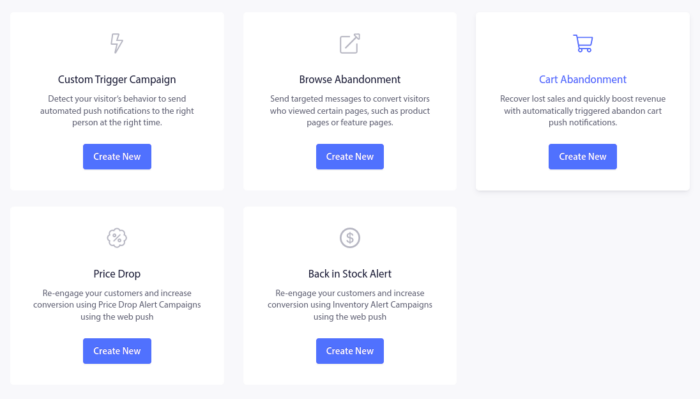
ثم، حدد قالب Cart Abandonment وانقر على Create New:
ويمكنك البدء في صياغة رد آلي لسلة التسوق المهجورة. ضمن علامة التبويب المحتوى، يمكنك إنشاء سلسلة من إشعارات الدفع:
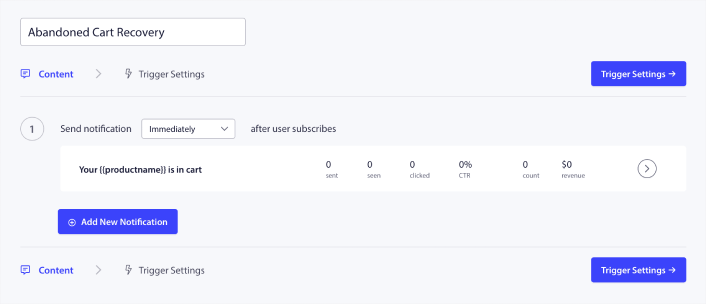
لتعديل إشعار، ما عليك سوى النقر على السهم المجاور له، ويمكنك تخصيص إشعار الدفع:
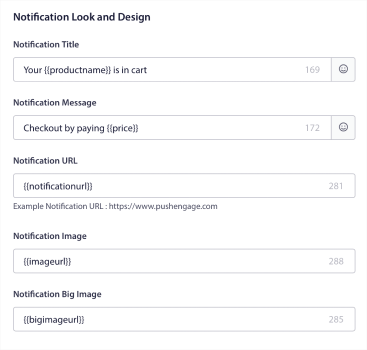
لمزيد من الدروس التعليمية، تحقق من هذه المقالة حول كيفية إعداد إشعارات الدفع لسلة التسوق المهجورة.
#3. حملات إشعارات الدفع عبر الويب لتصفح التخلي
التخلي عن التصفح هو بالضبط ما يبدو عليه. يحدث عندما يتصفح زائر موقعك الإلكتروني ثم يقرر المغادرة فجأة. تُعرف هذه الحوادث أيضًا باسم التخلي عن مسار التحويل من قبل بائعين آخرين.
يعد التخلي عن التصفح حدثًا شائعًا جدًا في كل الصناعات تقريبًا.
ومن الصعب جدًا تقليله أو التحكم فيه لأنه لا توجد طريقة لتحفيز مستخدم عشوائي للبقاء على موقعك الإلكتروني. هذا هو المكان الذي تكون فيه حملات التخلي عن التصفح قوية جدًا.
إليك مثال على إشعارات الدفع الخاصة بالتخلي عن التصفح لناشر:
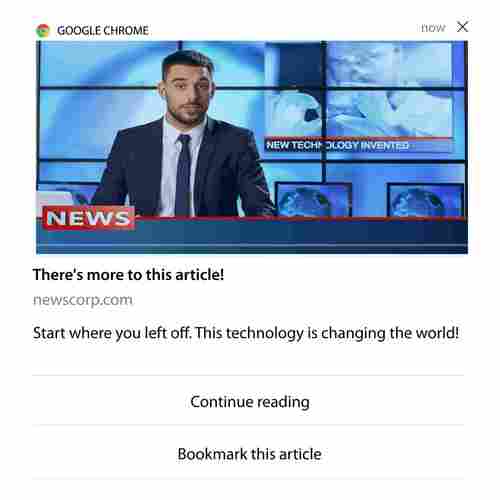
الجزء المثير للإعجاب في PushEngage هو أنه يمكنك إعداد حملات لأي صناعة تقريبًا. لذلك، يمكنك إرسال إشعارات دفع خاصة بالتخلي عن التصفح لمواقع SaaS والسفر أيضًا.
إذًا، كيف تقوم بإعداد حملات التخلي عن التصفح؟
مع التخلي عن سلة التسوق، يوجد معيار واضح جدًا لتشغيل إشعارات الدفع الخاصة بك. بالنسبة للتخلي عن التصفح، قد ترغب في النظر في معايير مثل:
- تمت إضافة المنتج إلى قائمة الرغبات
- تم النظر في نفس المنتج أكثر من X مرات
- تم تصفح أكثر من X منتجات في نفس الفئة
- بحثوا في الموقع عن منتج معين
- البقاء على الموقع لمدة X دقائق على الأقل قبل المغادرة
الفكرة وراء هذه الحملة لموقع تجارة إلكترونية هي جعل المشترك يضيف المنتج إلى سلة التسوق الخاصة به. بالنسبة للناشرين، يمكن أن يكون نقرة أو تنزيلًا للمقال الذي كانوا يقرؤونه.
توجه إلى لوحة تحكم PushEngage مرة أخرى وانتقل إلى الحملة » الحملات المشغلة لإنشاء حملة مشغلة جديدة:

بعد ذلك، قم بإنشاء حملة تصفح مهجورة جديدة بالنقر فوق الزر إنشاء جديد:

بعد ذلك، ستتمكن من إعداد تسلسل إشعارات الدفع بالكامل مع تأخير بين كل إشعار:
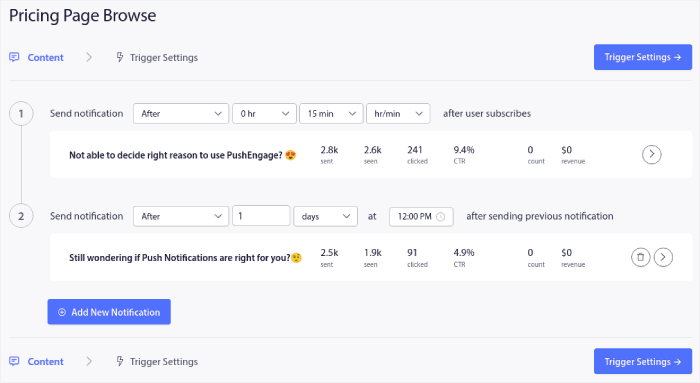
إذا كنت جديدًا على الإشعارات الفورية، فيجب عليك الاطلاع على مقالتنا حول أفضل ممارسات الإشعارات الفورية. عندما تكون راضيًا عن محتوى إشعارك الفوري، انقر فوق إعدادات المشغل. سترى أن الشروط الخاصة بحملة التخلي عن التصفح قد تم تكوينها مسبقًا في التسلسل.
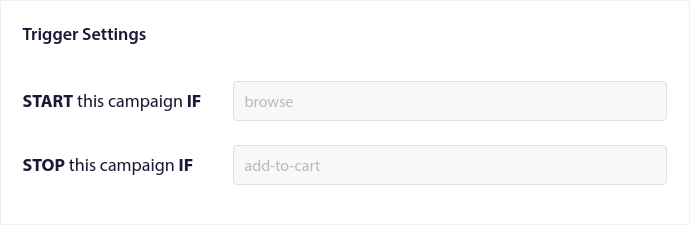
انقر فوق الزر رمز التكامل للحصول على مقتطف الرمز الذي تحتاجه لتضمين حملة التخلي عن التصفح على موقعك.
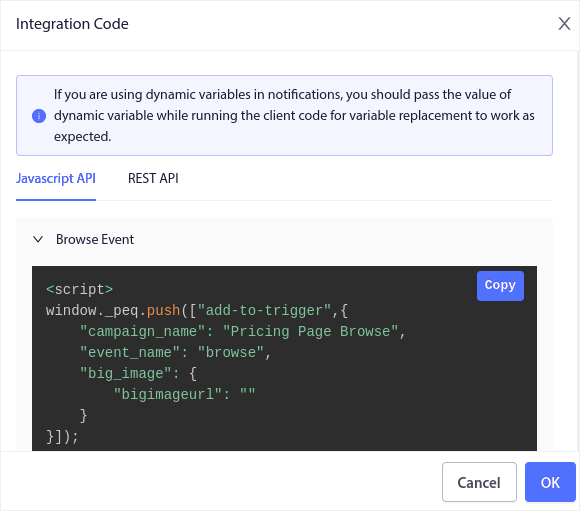
بعد ذلك، انسخ الرمز والصقه في موقعك. تريد لصق هذا الرمز في قسم <head> في HTML للصفحة التي تريد تتبعها. أخيرًا، انقر فوق الزر تفعيل الحملة المشغلة:
وأنت انتهيت!
#4. حملة إشعارات الدفع عبر الويب لملف RSS
يتيح لك RSS Auto Push أتمتة إشعاراتك عبر RSS.
يتحقق PushEngage كل 10 دقائق من وجود منشور جديد مضاف إلى موجز RSS الخاص بك. إذا تم العثور على منشور جديد، يقوم PushEngage بتحويله إلى إشعار دفع ويرسله إلى جميع المشتركين لديك. أفضل جزء هو أن هذا يحدث تلقائيًا بالكامل.
حملات موجز RSS مثالية للناشرين ومواقع الأخبار:
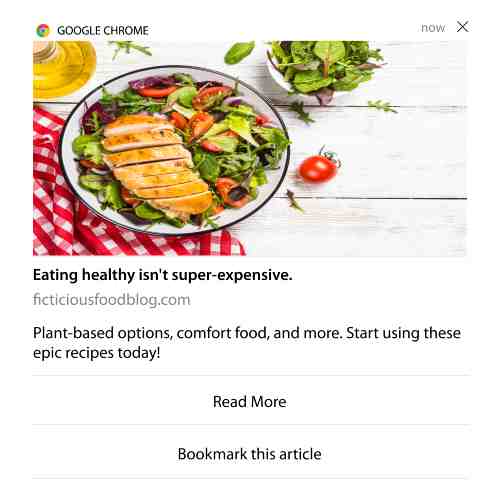
إذا كنت ناشرًا كبيرًا وتنشر أكثر من منشور واحد كل 30 دقيقة، فإن PushEngage يحتفظ بفاصل زمني قدره 5 دقائق بين إشعاري منشورين.
قبل أن ننتقل إلى أي شيء آخر، يجب عليك الاطلاع على هذه المقالة حول كيفية استخدام خلاصات RSS لمزيد من النصائح والحيل الرائعة.
الآن، دعنا نقم بإعداد حملة إشعارات دفع عبر الويب لملف RSS على PushEngage.
إنشاء حملة إشعارات دفع جديدة عبر الويب لملف RSS
بمجرد تثبيت PushEngage على موقعك، توجه إلى لوحة تحكم PushEngage وانتقل إلى الحملات » دفع RSS تلقائي وانقر على إنشاء حملة جديدة:
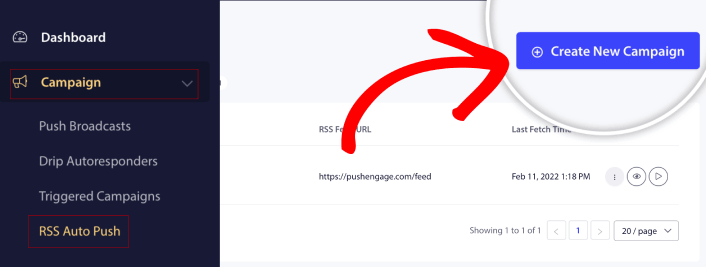
سيؤدي هذا إلى إنشاء حملة إشعارات دفع عبر الويب لملف RSS جديدة تمامًا. يمكنك إعداد حملات متعددة لملفات RSS في PushEngage. ابدأ بإعطاء حملتك اسمًا وصفيًا. ثم، الصق عنوان URL لملف RSS الخاص بك:
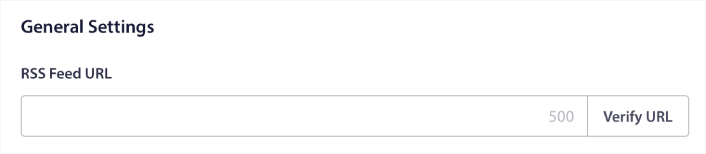
إعداد إعدادات إشعارات RSS
بعد ذلك، تريد تعيين تكرار الحملة:
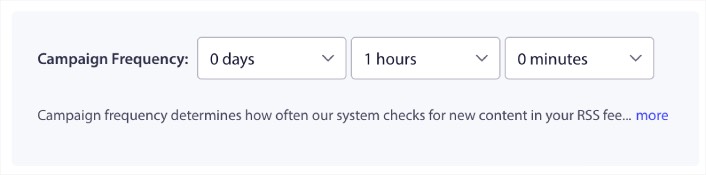
إن تكرار الحملة هو عدد المرات التي يبحث فيها حملة إشعارات الدفع عبر الويب لملف RSS عن محتوى جديد في مدونتك لإرسال إشعار دفع تلقائي. الحد الأدنى للقيمة هو 15 دقيقة، والحد الأقصى للقيمة هو 7 أيام.
نوصي بالبحث عن محتوى للترويج له مرة كل يومين ما لم تكن وكالة أنباء. بالنسبة لوكالات الأنباء، يجب أن تبقيه عند 15 دقيقة. ضع في اعتبارك أن PushEngage سيبحث فقط عن محتوى جديد بعد إعداد ونشر حملة موجز RSS الخاصة بك.
تحديد المنشورات للترويج لها
يمكنك تحديد المنشورات التي سيتم الترويج لها. يمكنك الاختيار بين أحدث عنصر فقط أو جميع العناصر. إذا قمت بإعداد إشعارات دفع RSS لاختيار أحدث عنصر فقط، فإن PushEngage يرسل المنشور الأخير فقط:
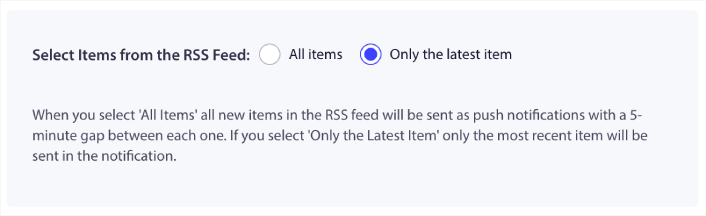
أو، يمكنك تحديد خيار جميع العناصر. في هذه الحالة، ستختار الحملة جميع المنشورات على موقعك وترسل حملة إشعارات دفع عبر الويب لكل منها بفارق 5 دقائق بينها.
تعيين أيقونة إشعارات دفع RSS
تحدد أيقونة إشعار الدفع هوية علامتك التجارية في إشعارات دفع RSS الخاصة بك. نوصي باستخدام علامة علامتك التجارية حتى يعرف المشتركون على الفور أن الإشعار من علامتك التجارية.
الآن، هناك خياران هنا. يمكنك إما تحميل أيقونة الإشعار يدويًا:
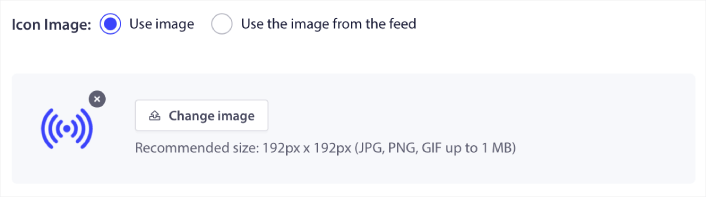
وهذا بسيط جدًا. ما عليك سوى النقر على تغيير الصورة وتحميل أيقونة الإشعار الخاصة بك. أو، يمكنك جلبها من ملف RSS الخاص بك:
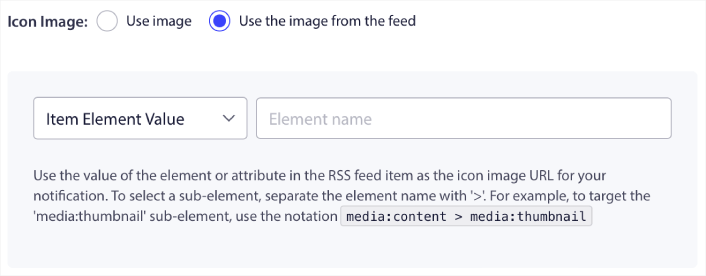
يمكنك إما تحديد عنصر العنصر أو السمة داخل عنصر لتحديد أيقونة الإشعار الخاصة بك ديناميكيًا من الموجز. عادةً، تحتفظ معظم موجزات RSS بأيقونة الموقع داخل عنصر media:content. وبشكل أكثر تحديدًا، عادةً ما تكون داخل السمة media:thumbnail لعنصر media:content.
لتحديد العنصر، يمكنك تحديد خيار قيمة عنصر العنصر وتعيينها إلى media:content. أو، يمكنك تحديد خيار قيمة سمة العنصر وتعيينها إلى media:content > media:thumbnail.
ملاحظة: نوصي باستخدام هذا الخيار فقط إذا كنت تعرف كيفية قراءة XML. قد لا تحتوي خلاصات RSS على أيقونة الموقع في نفس علامات XML مثل مثالنا. لذلك، إذا لم تكن متأكدًا من كيفية جلب أيقونة الإشعار من خلاصات RSS، فنحن نوصي بتحميلها يدويًا بدلاً من ذلك.
تحديد صورة كبيرة لإشعارات RSS
الآن، سنقوم بتحديد الصورة الكبيرة لإشعارات الويب الخاصة بخلاصات RSS الخاصة بك. مرة أخرى، هناك طريقتان للقيام بذلك. يمكنك السماح لـ PushEngage بالعثور تلقائيًا على الصورة من خلاصات RSS:

أو، يمكنك يدويًا تحديد الصورة التي تريدها من الموجز:
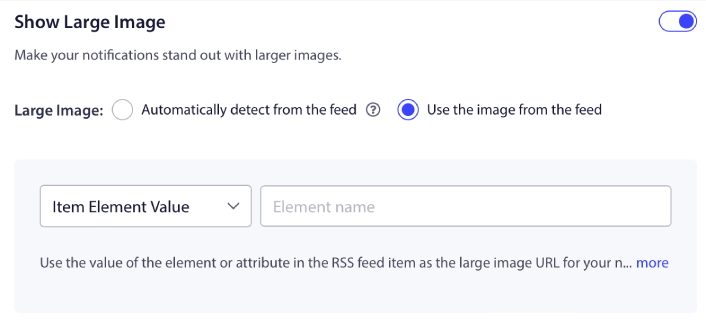
هذا هو نفس تحديد أيقونة الإشعار من موجز RSS بالضبط. يمكنك مرة أخرى، تحديد الصورة من عنصر XML الذي يحتوي عليها أو يمكنك تحديد السمة المحددة التي تحتوي على صورتك المفضلة.
ملاحظة: نوصي فقط بتحديد عنوان URL من خلاصات RSS الخاصة بك إذا كنت تعرف كيفية قراءة XML. إذا لم تكن متأكدًا من كيفية قراءة XML، فمن الأفضل السماح لـ PushEngage بالعثور على أفضل صورة لإشعاراتك.
تعيين مدة حملة إشعارات الويب
مدة حملة إشعارات الويب هي المدة التي يبقى فيها الإشعار في علبة إشعارات مشتركك قبل حذفه تلقائيًا.
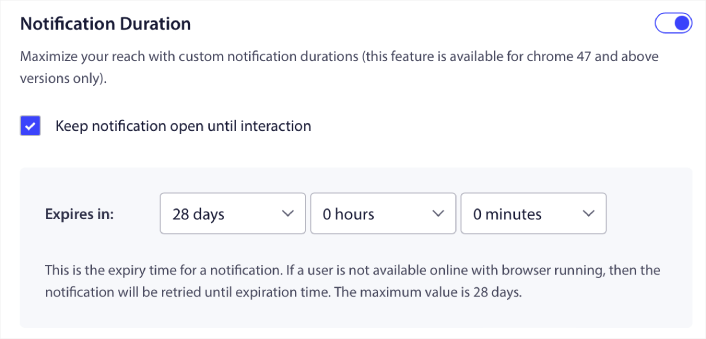
إذا كنت لا ترغب في إرهاق مشتركيك بالكثير من الإشعارات غير المقروءة، فمن الأفضل ترك الإشعارات الفورية تنتهي صلاحيتها في غضون يومين.
على عكس الإشعارات المذاعة أو حتى إشعارات الويب الآلية الأخرى، لا يمكنك جدولة إشعارات RSS. لذلك، لديك دائمًا خيار إبقاء الإشعار مفتوحًا حتى يتفاعل معه مشتركك، حتى ضمن حد الانتهاء.
تعيين معلمات UTM
لقد انتهينا تقريبًا. قم بالتمرير لأسفل لتعيين معلمات UTM الخاصة بك لـ تتبع الإشعارات الفورية:
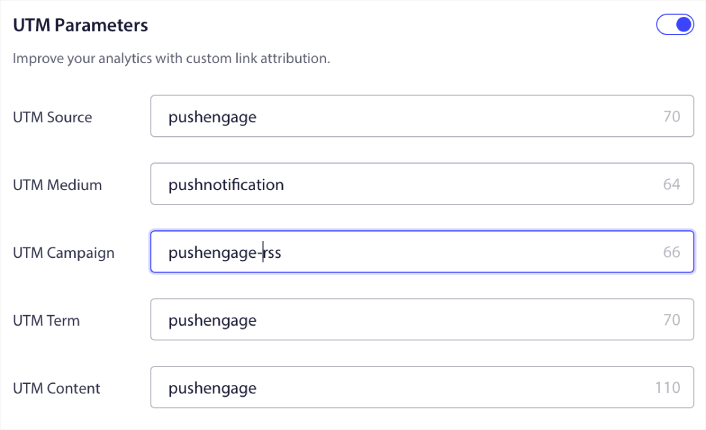
بهذه الطريقة، يمكنك بسهولة تحديد مصدر الزيارات من هذه الإشعارات الفورية في تحليلات جوجل.
تحديد مجموعة الجمهور
أخيرًا، سنقوم بتحديد مجموعة جمهور لإرسال حملة إشعارات الويب الخاصة بخلاصات RSS الخاصة بك. يمكنك إما إرسال حملة خلاصات RSS إلى جميع المشتركين لديك، أو يمكنك إنشاء مجموعات جمهور لإرسال إشعارات دفع مخصصة حتى من خلاصات RSS الخاصة بك.
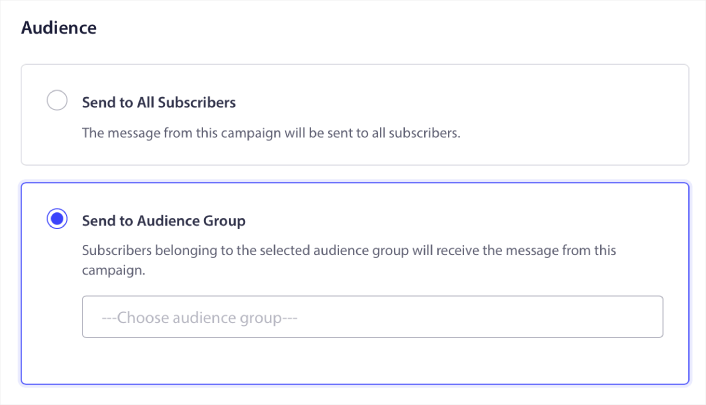
وهذا كل شيء! هذا حقًا كل ما في الأمر.
الآن، في كل مرة تنشر فيها منشورًا جديدًا، سيتلقى أي مشتركين في الإشعارات الفورية في مجموعة الجمهور المحددة تلقائيًا إشعارًا فوريًا حول المحتوى الجديد الخاص بك.
هذا كل شيء! لقد تم إعدادك. في كل مرة تنشر فيها منشورًا جديدًا، سيتم إرساله تلقائيًا إلى جميع المشتركين لديك.
#5. إشعارات إعادة المشاركة الآلية
يمكنك إعداد حملات إعادة مشاركة آلية للمشتركين الذين لم يتفاعلوا مع المحتوى الخاص بك لفترة.
ولكن لماذا قد تفعل ذلك في المقام الأول؟
ماذا عن هذا:
- تكلفة اكتساب عملاء جدد تزيد بـ 5 مرات عن تكلفة الاحتفاظ بالعملاء الحاليين
- من السهل استهداف وإعادة تسويق جمهور معروف نفهم تفضيلاته الشخصية بالفعل.
- على المدى الطويل، يقدم العملاء المتفاعلون المزيد من الأعمال للشركة مقارنة بشخص بالكاد يتواصل مع علامتك التجارية.
تمكنت Ofertia من زيادة المستخدمين المتكررين بنسبة 39% باستخدام إشعارات الدفع التي تقدم عروضًا مخصصة. هم ليسوا الوحيدين أيضًا. يمكنك استخدام هذا لموقع تجارة إلكترونية لتحقيق تأثير كبير:
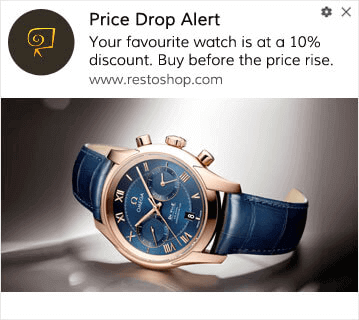
هناك العديد من الطرق لإعادة إشراك المشتركين لديك.
تخيل هذا:
- يزور المستخدم موقعك. يرى خيار اشتراك خفي. ينقر على "السماح".
- يحصل فورًا على إشعار ترحيبي بخصم أو الخطوة التالية.
- يغادر موقعك...
- لاحقًا في ذلك اليوم، يرون تذكيرًا: "هل ما زلت تفكر في الأمر؟"
- ينقرون، يعودون، ويشترون.
هذا هو مسار تحويل أساسي للدفع - ولم ترفع إصبعًا بمجرد تشغيله.
الآن، تخيل إضافة التجزئة والحملات الآلية. عندها يصبح الأمر ممتعًا. باستخدام الشرائح الديناميكية، يمكنك معرفة الكثير عن مشتركيك وإرسال محتوى مخصص لهم سيحبونه.
في لوحة تحكم PushEngage الخاصة بك، توجه إلى التجزئة وأنشئ شريحة جديدة:
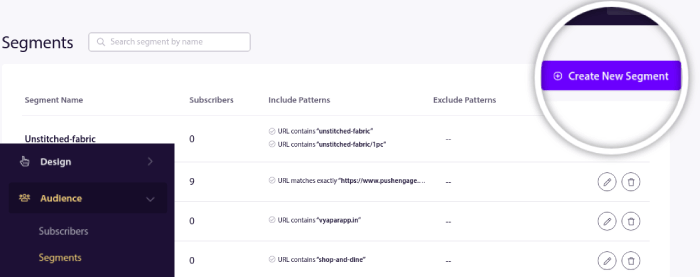
يتيح لك هذا إنشاء شرائح بناءً على سلوك وأنماط التصفح. يمكنك بالفعل إعداد تسلسل من عمليات AND/OR التي تحدد متى تتلقى شرائح معينة إشعارات فورية آلية.
يمكنك حتى تقسيم المستخدمين عند اشتراكهم في الإشعارات الفورية. توجه إلى التصميم » نوافذ منبثقة وحدد نمط سفاري كبير مع شريحة.
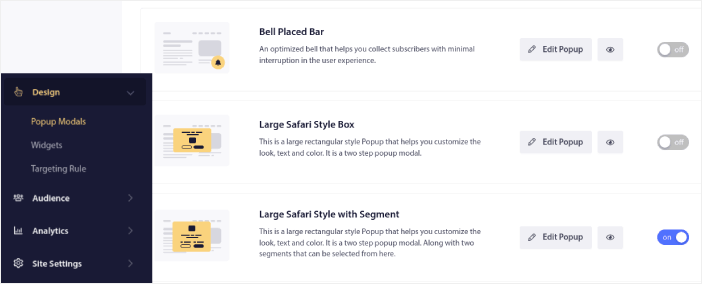
إذا كنت بحاجة إلى المزيد من الطرق لتقسيم المستخدمين لديك، يمكنك إنشاء شرائح مخصصة بناءً على إجراءات المستخدم باستخدام واجهة برمجة تطبيقات JavaScript الخاصة بـ PushEngage.
#6. حملة إشعارات الويب لزيارة الصفحة
مشغلات زيارة الصفحة هي امتداد لشرائح إشعارات الدفع. كل ما عليك فعله هو إنشاء شريحة عندما يتصفح زائر الويب عنوان URL يحتوي على عبارة أو نمط معين.
بعد ذلك، توجه ببساطة إلى الجمهور » الشرائح واضبط جمهورك على شريحة معينة:
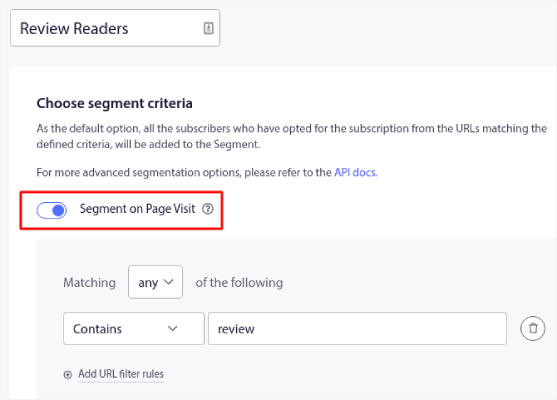
يتيح لك هذا إنشاء إشعارات دفع مخصصة وآلية حقًا.
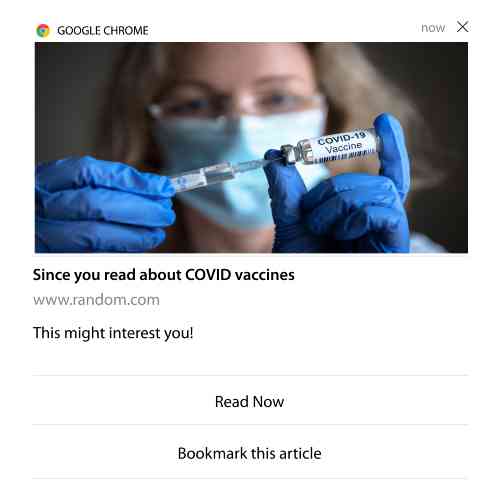
وأفضل جزء هو أنه يمكنك إنشاء شرائح مخصصة في PushEngage في غضون دقيقتين.
#7. إشعارات فورية آلية من النقرات
لا يمكنك إنشاء إشعارات دفع يتم تشغيلها عندما ينقر المشتركون على إشعار تم تسليمه باستخدام PushEngage.
ولكن هناك حل بديل ذكي جدًا.
يمكنك إنشاء شريحة بناءً على عنوان URL الذي تؤدي إليه إشعار معين. في كل مرة يصل فيها شخص ما إلى عنوان URL هذا، تتم إضافته إلى الشريحة، ويمكنك استخدام هذه الشريحة لإرسال إشعارات مستهدفة.
تعد حملات النقر على إشعارات الدفع امتدادًا لتقسيم الجمهور القياسي لـ حملات التنقيط.
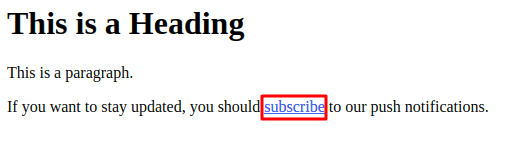
اطلع على هذا البرنامج التعليمي حول كيفية إنشاء زر للنقر للاشتراك.
#8. إشعارات فورية آلية متكررة
تخيل أن لديك...
- بيع أسبوعي لسوق السلع المستعملة؛
- أو بيع نهاية الأسبوع؛
- أو بيع لتصفية المخزون؛
- أو بيع فلاش شهري.
ما مدى عدم ملاءمة إنشاء إشعارات دفع لكل حدث يدويًا؟
لحسن الحظ، يمكنك تعيين إشعارات متكررة مع PushEngage.
الإشعارات المتكررة هي إشعارات دفع مجدولة وآلية لحدث متكرر. يمكنك إعدادها مرة واحدة، وتحديد جدول زمني، وتنتهي.
هذه مجرد إحدى الطرق التي يستخدم بها MyDeal إشعارات الدفع. تأكد من قراءة دراسة الحالة الكاملة!
توجه إلى الحملة وأضف إشعارًا آليًا في لوحة تحكم PushEngage الخاصة بك. ثم، قم بالتمرير لأسفل إلى قسم الجدولة وانتقل إلى علامة التبويب إرسال/جدولة:

فقط قم بإعداد التوقيت وانتهيت!
#9. إشعارات المنطقة الزمنية للمشترك
إشعارات المنطقة الزمنية للمشترك هي بالضبط ما تبدو عليه. ترسل إشعارات دفع آلية إلى مشتركيك في منطقتهم الزمنية.
لماذا هذا أمر مهم جدًا؟
تحصل إشعارات المنطقة الزمنية للمشترك على معدلات فتح أعلى. عادةً، يتم تسليم أي إشعار دفع حتى لو كان مشتركك غير متصل بالإنترنت. تتراكم هذه الإشعارات بعد ذلك ويتم تجاهلها عندما يتصل مشتركك بالإنترنت أخيرًا.
من ناحية أخرى، سيتم تسليم حملة إشعارات الويب في المنطقة الزمنية للمشترك عندما تعرف أن مشتركك من المرجح أن يكون متصلاً بالإنترنت.
نصيحة احترافية: استخدم اختبار A/B لمعرفة الوقت المثالي لإرسال إشعار دفع لمشتركيك.
تبدو إشعارات المنطقة الزمنية للمشترك أكثر تخصيصًا. وإذا كنت ذكيًا بشأن ذلك، يمكنك دمجها مع بيانات تحديد الموقع الجغرافي لتخصيص إشعاراتك بشكل أكبر. هذا بالضبط ما فعله Phooto عندما استخدموا اللغات المحلية لزيادة معدلات الفتح لديهم بشكل كبير.
لنقم بإعداد إشعارات المنطقة الزمنية للمشترك في PushEngage الآن.
عند إنشاء إشعار جديد، توجه إلى خيارات الجدولة وانقر فوق مربع الاختيار الذي يقول إرسال الإشعارات في المنطقة الزمنية للمشترك:
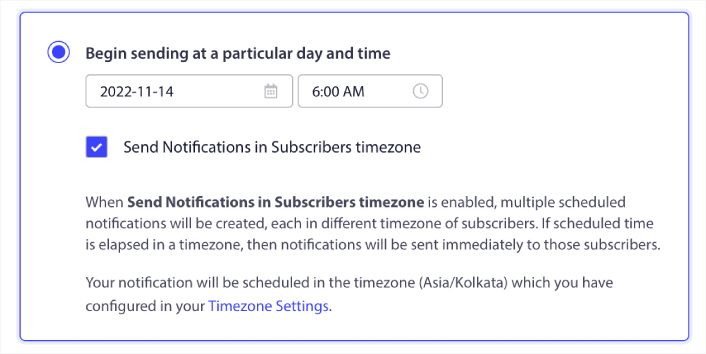
هذا كل شيء! سيتعين عليك القيام بنفس الشيء لحملات التنقيط الخاصة بك أيضًا، ولكن النتائج تستحق الجهد المبذول للنقر على زر واحد لكل حملة.
ابدأ برسالة أو رسالتين في الأسبوع. زد العدد بمجرد أن ترى ما ينجح.
إليك إيقاع بسيط للبدء به:
- الأسبوع الأول: رسالة ترحيب + دفعة منتج أو محتوى واحدة
- الأسبوع الثاني: تذكير أو متابعة بخصم
- الأسبوع الثالث: إصدار جديد، منشور مدونة، أو تسليط الضوء على ميزة
إذا توقف المستخدمون عن النقر، تراجع. إذا استمروا في النقر؟ ضاعف جهودك.
نصيحة احترافية: كانت آخر تكتيكين تدور حول جدولة إشعارات الدفع. ولكن هاتين الطريقتين ليستا الوحيدتين لجدولة إشعارات الدفع الآلية. اطلع على مقالتنا حول كيفية جدولة إشعارات الدفع لمزيد من الحيل الرائعة.
#10. إشعارات الاشتراك عبر البريد الإلكتروني
لطالما كان التسويق عبر البريد الإلكتروني هو أفضل طريقة لتوليد العملاء المحتملين ورعايتهم. أفضل ما في الإشعارات الفورية الآلية هو أنه يمكنك من خلالها جذب المزيد من المشتركين في البريد الإلكتروني.
إنه بسيط حقًا في الإعداد، واستخدام مزيج من حملات البريد الإلكتروني والإشعارات الفورية عبر الويب أكثر فعالية من استخدام أحدهما أو الآخر.
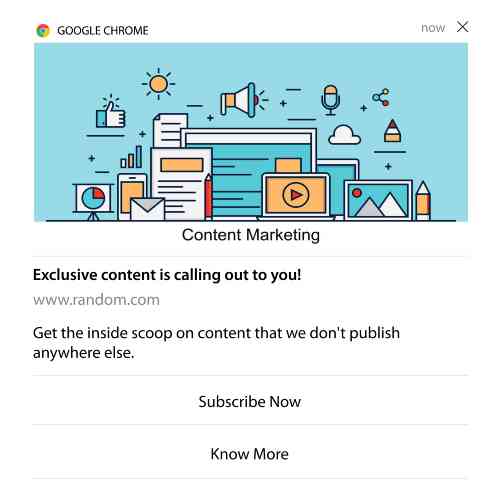
كل ما عليك فعله هو إرسال إشعار مشغل يطلب من المستخدم الاشتراك في إشعارات البريد الإلكتروني.
ما عليك سوى إنشاء زر دعوة مخصصة للإجراء (CTA) وإدراج رابط اشتراك كعنوان URL للزر. هذا كل ما تحتاجه حقًا. إذا لم تكن متأكدًا من كيفية الحصول على زر اشتراك، فما عليك سوى المتابعة.
في أي إشعار، يمكنك التمرير لأسفل وتشغيل الأزرار متعددة الإجراءات:
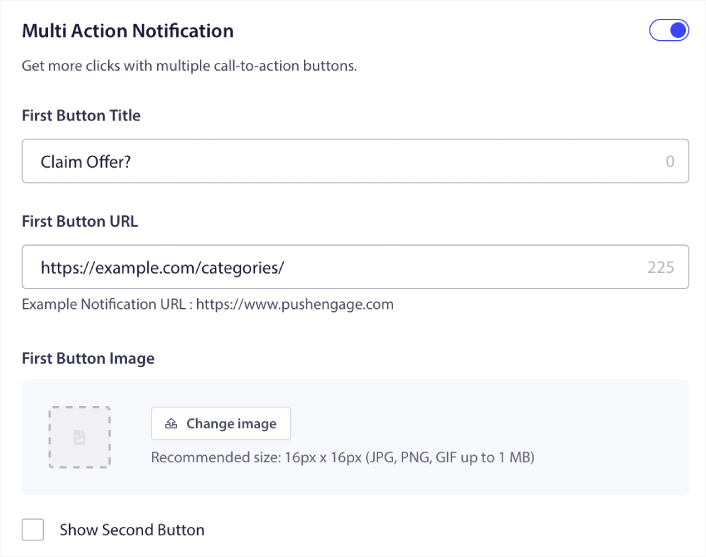
يجب أن يكون عنوان URL رابطًا إلى نموذج اشتراك البريد الإلكتروني. يمكنك إنشاء واحد باستخدام أي مزود خدمة بريد إلكتروني تقريبًا مثل Drip. كل ما عليك فعله هو النقر على خيارات المشاركة لنموذج الاشتراك ونسخ عنوان URL هذا. ثم، الصقه في عنوان URL للزر الخاص بإشعار الدفع الخاص بك.
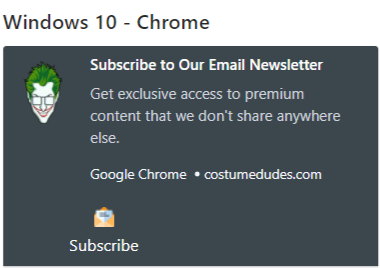
اطلع على برنامجنا التعليمي حول الأزرار متعددة الإجراءات لمزيد من التفاصيل. يمكنك حتى إضافة أيقونة بريد إلكتروني إلى زر الخاص بك لجعله واضحًا جدًا أنك تطلب من المستخدمين الاشتراك في إشعارات البريد الإلكتروني الخاصة بك:
نصيحة احترافية: يمكنك استخدام نفس الفكرة لتنمية قناة YouTube الخاصة بك أيضًا. فقط أضف ‘?sub_confirmation=1’ في نهاية عنوان URL الخاص بقناتك والصقه في عنوان URL لزر إشعار الدفع الخاص بك.
في كل مرة ينقر فيها شخص ما على زر الاشتراك في إشعار الدفع الخاص بك، سيتم إعادة توجيهه إلى قناة YouTube الخاصة بك وسيتم مطالبتهم بالاشتراك فيها.
أفكار شرائح يمكنك سرقتها
الشرائح هي طريقة رائعة حقًا لإرسال حملات دفع مستهدفة. ويجب أن تكون جزءًا كبيرًا من استراتيجية التسويق عبر الإشعارات الفورية الخاصة بك. ولكن كيف تبدأ؟ ما أنواع الشرائح التي يجب أن تنشئها؟
للبدء، لا ينبغي أن تركز على إنشاء نوع واحد فقط من الشرائح. سنرشدك خلال الأنواع المختلفة من التقسيم التي وجدنا أنها الأكثر تأثيرًا.
إليك بعض الشرائح عالية التأثير التي تستحق الإعداد:
- المتسوقون المتفاعلون: الأشخاص الذين نقروا على إشعارين أو أكثر في الأسبوع الماضي
- المتخلون عن سلة التسوق: الأشخاص الذين زاروا منتجًا ولكن لم يشتروا
- عشاق الفئات: المستخدمون الذين يواصلون تفقد فئة منتج معينة (مثل "عشاق الأحذية الرياضية")
- مستهدفة جغرافيًا: تخصيص الرسائل بناءً على البلد أو المدينة
كلما أصبحت أكثر تحديدًا، زادت النقرات التي ستكسبها. إذا كنت مسوقًا متقدمًا، يجب عليك صياغة الشرائح بالطريقة التي تفعلها لحملة بريد إلكتروني باستخدام نماذج تقسيم مختلفة:
- الشرائح الجغرافية
- الشرائح السلوكية
- الشرائح القائمة على المناسبات
- الشرائح الثقافية
- الشرائح الديموغرافية
- الشرائح النفسية
الشرائح الديناميكية تتيح لك التحدث إلى المشتركين كأشخاص حقيقيين... وليس مجرد إحصائيات حركة مرور.
وإذا كنت ترغب في تخصيص رسائلك بشكل أكبر، يمكنك استخدام مجموعات الجمهور.
كيفية إنشاء مجموعة جمهور للإشعارات الفورية
للبدء، توجه إلى لوحة تحكم PushEngage الخاصة بك وانتقل إلى الجمهور » مجموعات الجمهور وانقر فوق الزر إنشاء مجموعة جمهور جديدة:
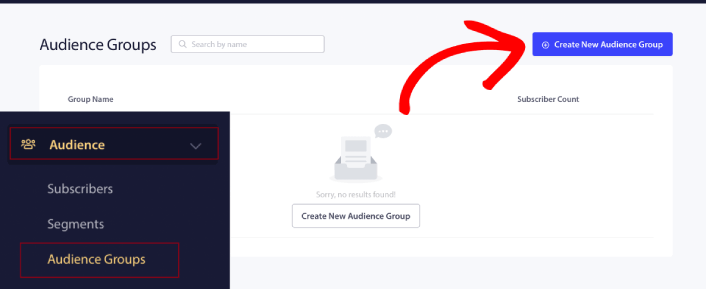
قبل أن تتمكن من استخدام مجموعات الجمهور الخاصة بك لإرسال بث إشعارات مستهدف، ستحتاج إلى إنشاء مجموعة جمهور بقواعد لإنشاء تلك المجموعة. يمكنك البدء باسم ووصف لمجموعة الجمهور الخاصة بك.
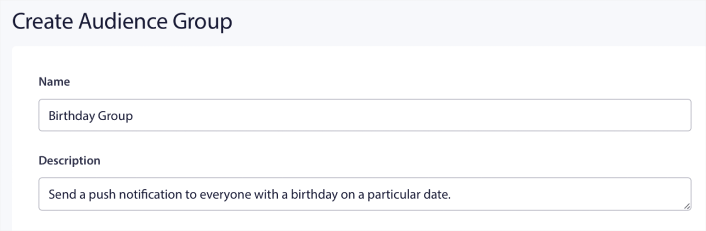
إنشاء معايير اختيار
بعد ذلك، قم بإنشاء معيار اختيار لتصفية واستهداف الجمهور المناسب:
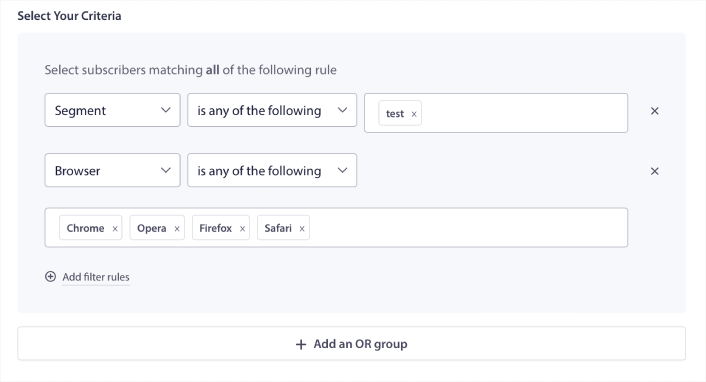
يمكنك النقر فوق إضافة قواعد تصفية لتحديد المشتركين الذين يطابقون جميع قواعد التصفية، أو يمكنك النقر فوق إضافة مجموعة OR لإنشاء تصفية حيث يستوفي المشتركون معيار اختيار واحد على الأقل.
سلوك المستخدم هو الطريقة الأساسية لاستهداف مشتركي إشعارات الدفع الخاصة بك. كما ذكرنا سابقًا، عادةً ما تجمع شرائح المشتركين الزوار الذين يحبون تصفح محتوى مشابه. ولكن حتى ضمن هذه المجموعة من المشتركين الذين يحبون نفس المحتوى، هناك تخصيصات صغيرة يمكنك إجراؤها.
والأهم من ذلك، يمكنك تجميع شرائح متعددة من المشتركين لإرسال رسالة مشتركة وذات صلة إليهم.
التصفية حسب شريحة المشترك
إذا لم تكن قد قمت بذلك بالفعل، فيجب عليك البدء في تقسيم مشتركي الإشعارات الفورية على الفور. وإلا، فلن تعمل هذه التصفية. ولكن إذا كان لديك بالفعل شرائح، فيمكنك تحديد شرائح متعددة كأساس لمجموعة جمهورك.

بعد ذلك، يمكنك إضافة عوامل تصفية أخرى لتحسين استهدافك.
التصفية حسب سمة المشترك
بينما السمات مخصصة في الغالب لإشعارات الدفع المتتابعة، يمكنك استخدامها لبث الإشعارات الفورية أيضًا. الآن، سمات الإشعارات الفورية مفيدة في الغالب لمواقع التجارة الإلكترونية. ولكن يمكنك أيضًا استخدامها لإرسال إشعارات فورية مخصصة إذا كان لديك أداة إدارة علاقات العملاء (CRM).
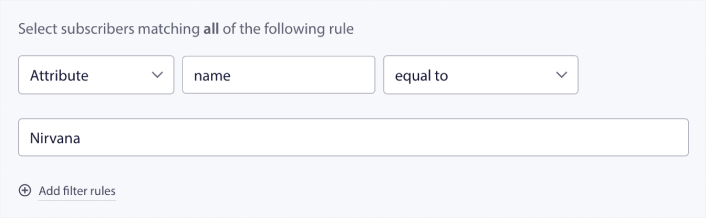
يمكن للسمات الاحتفاظ بمعلومات شخصية مثل أسماء المشتركين، تاريخ الميلاد، وأي معلومات أخرى تخزنها في نظام إدارة علاقات العملاء الخاص بك لحملات التسويق المخصصة.
التصفية حسب جهاز المشترك ومتصفحه
في كثير من الحالات، من الضروري معرفة كيف يتلقى المشتركون رسائلك.
هناك قصة رائعة حقًا عن مايكل جاكسون. في كل مرة يسجل فيها أغنية، كان يستمع إليها عبر الراديو. ليس في جناح التسجيل الخاص به الذي تبلغ قيمته مليون دولار بجودة صوت فائقة، بل عبر راديو رخيص مثل معظم جمهوره لاحقًا. إذا أحب كيف بدت الأغنية حتى على أرخص جهاز في السوق، فإنه يوافق على إصدار الأغنية.
لا عجب أن Billie Jean حققت بلاتينية 29 مرة!
بالنسبة لإشعارات الدفع الخاصة بك، فالأمر لا يختلف.
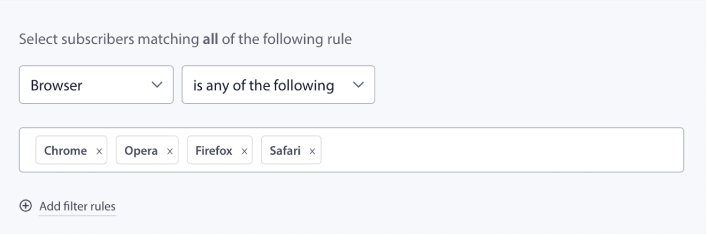
التصفية حسب متصفح المشترك
تختلف المتصفحات في حدود الأحرف لإشعارات الدفع. لذلك، عند إرسال بث دفع، تحتاج إلى الانتباه لهذه الحدود. الشيء الرائع هو أنه يمكنك حفظ مجموعات جمهور مختلفة لإعادة استهداف متصفحات مختلفة. لا تحتاج إلى إنشاء شرائح في كل مرة.
التصفية حسب جهاز المشترك
هناك اختلاف في أنواع إشعارات الدفع الغنية التي يمكنك إرسالها إلى أجهزة iOS و Android و Windows. لذلك، لن تبدو كل حملة ترسلها بنفس الشكل على جميع الأجهزة. في الواقع، العديد من أنواع إشعارات الدفع لن تظهر على جميع الأجهزة. تختلف أحجام شاشات الأجهزة أيضًا. لذلك، قد ترغب في تحسين شكل إشعارات الدفع الخاصة بك قبل إرسالها.
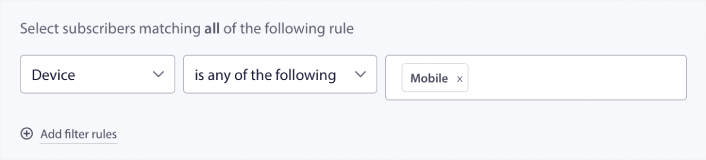
ولكن الآن بعد أن أصبح بإمكانك تصفية جمهورك حسب أجهزتهم، فلا ينبغي أن تكون هذه مشكلة بعد الآن.
كيفية التصفية حسب الموقع الجغرافي
يمكنك أيضًا التصفية حسب الموقع الجغرافي لتخصيص حملاتك بشكل أكبر. يسمح لك الفلتر بتحديد مجموعة جمهور حسب البلد والمدينة والولاية:
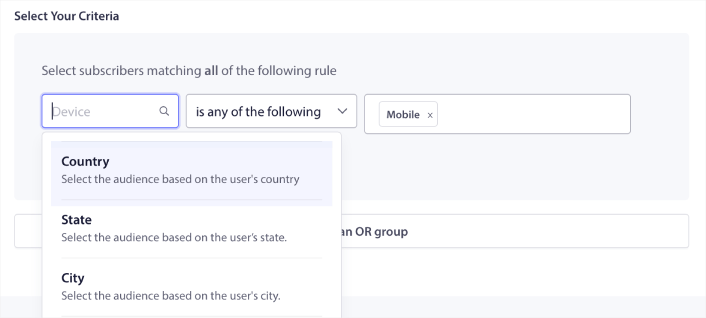
استخدمت Phooto تحديد الموقع الجغرافي لإرسال إشعارات الدفع باللغات المحلية. وساعدهم ذلك على زيادة معدلات التفاعل لديهم بسرعة. اقرأ دراسة الحالة كاملة.
كيفية التصفية حسب مقاييس التفاعل
واحدة من أفضل الأشياء في مجموعات الجمهور هي أنها يمكن أن تساعدك في إنشاء حملات إعادة استهداف باستخدام إشعارات الدفع. يمكنك تصفية جمهورك حسب:
- تاريخ الاشتراك
- تاريخ آخر إرسال
- تاريخ آخر نقرة
- تاريخ آخر مشاهدة
يمكن أن يساعدك استخدام هذه المقاييس في إعادة استهداف المشتركين ذوي معدلات التفاعل المنخفضة أو البيع للمشتركين ذوي معدلات التفاعل العالية.
أو، يمكنك تصفية الجمهور حسب:
- إجمالي عدد مرات الإرسال
- إجمالي عدد المشاهدات
- إجمالي عدد النقرات
يمكن أن تساعدك هذه الأرقام في العثور على المشتركين الذين يتلقون أقل عدد من الرسائل منك حتى تتمكن من إيجاد طرق أفضل لتخصيص الإشعارات. يمكنك أيضًا العثور على المشتركين الذين يتفاعلون مع إشعارات الدفع الخاصة بك في أغلب الأحيان.
نصيحة احترافية: اجمع بين فلترين أو أكثر للعثور على أفضل الطرق لإعادة التفاعل مع المشتركين لديك. على سبيل المثال، المشتركون الذين لديهم عدد مشاهدات إجمالي مرتفع وعدد نقرات إجمالي مرتفع سيعطونك مشتركين يتفاعلون معك منذ فترة. هؤلاء هم المشتركون المخلصون الذين يستحقون مكافأة.
كيفية التصفية حسب المعرفات
المعرفات هي الطريقة التي تحدد بها PushEngage المشتركين لديك. نظرًا لأن PushEngage متوافق مع اللائحة العامة لحماية البيانات افتراضيًا، فإن برنامجنا لا يخزن أبدًا أي بيانات تعريف شخصية لأي من المشتركين لديك. بدلاً من ذلك، نقوم بتعيين معرف ملف تعريف ومعرف تجزئة للمشترك لكل مشترك.
ضع في اعتبارك أنك ستستخدم معرفات الملف الشخصي وتجزئات المشتركين في الغالب كجزء من الحملات المتقدمة. بعبارة أخرى، ستحتاج إلى استخدام واجهة برمجة تطبيقات PushEngage لإنشاء حملات مخصصة تستخدم هذه المعرفات.
المعرفات مذهلة لإرسال إشعارات الدفع للمعاملات مثل هذا:
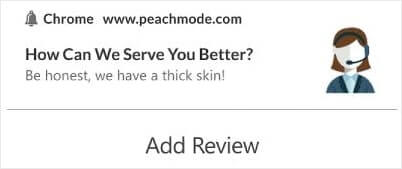
إنها رائعة لإشعارات الدفع المخصصة للتجارة الإلكترونية. لذلك، لا نوصي حقًا باستخدامها لأي شيء بخلاف اختبار بث الدفع من لوحة التحكم.
ماذا تفعل بعد إعداد حملات إشعارات الدفع عبر الويب
لن يضمن إطلاق حملة إشعارات دفع عبر الويب النجاح. كما هو الحال مع أي أداة تسويق، تحتاج إلى اختبار وتحسين رسائلك وشرائحك.
لا تضيع في التفاصيل. ركز على ثلاثة أرقام:
- نسبة النقر إلى الظهور (CTR): هل يتفاعل الناس؟
- معدل الاشتراك: هل يعمل طلبك؟
- إلغاء الاشتراكات: هل ترسل كثيرًا؟
مكافأة إذا كنت تتتبع الإيرادات لكل إرسال - ولكن حتى بدونها، تمنحك نسبة النقر إلى الظهور ومعدل الاشتراك حلقة تغذية راجعة سريعة. للأسف، لا يمكنك اختبار A/B للإشعارات الآلية مباشرة. ولكن هذه الموارد ستساعدك على الانطلاق بسرعة:
- كيفية تثبيت إضافة ووردبريس للإشعارات على موقعك
- كيفية إجراء اختبارات A/B لإشعارات الدفع (أفضل الممارسات)
- 7 من أفضل ممارسات الإشعارات الفورية للحصول على زيارات فورية
- 21 أفضل إضافات ووردبريس للتجارة الإلكترونية في عام 2022 (مجانية ومدفوعة)
- 7 أفضل إضافات ووردبريس للأخبار في عام 2022 (مقارنة)
أيضًا، يأتي PushEngage مع نصيبه العادل من التكاملات. يمكنك حتى إعداد بعض المشغلات المخصصة باستخدام Zapier. هذه حملات متقدمة إلى حد ما، ونوصي بإعدادها فقط بمجرد أن تكون على دراية بأتمتة أخرى مدمجة لدينا.
يجب أن تعرف أيضًا أن واجهة برمجة تطبيقات JavaScript الخاصة بـ PushEngage مرنة للغاية، ويمكنك إعداد مشغلات مخصصة لأي إجراء تقريبًا على موقعك.
بمجرد مرورك بكل هذه الموارد، ستدرك أن PushEngage هو البرنامج رقم 1 لإشعارات الدفع في السوق.
لذا، إذا لم تكن قد فعلت ذلك بالفعل، ابدأ مع PushEngage اليوم!


