هل تبحث عن دليل لإنشاء حملات الدفع المتتالية؟
تحظى إشعارات الدفع المتتالية بشعبية كبيرة هذه الأيام. لفترة طويلة، لم يكن بإمكانك سوى إرسال حملات البريد الإلكتروني المتتالية. ولكن الآن، يمكنك إعادة إنشاء نفس الحملات الفعالة واستخدام خيارات الاستهداف في برامج إشعارات الدفع لإرسال إشعارات الدفع المتتالية.
ولكن كيف تبدأ؟ هل تحتاج إلى خبرة في الحملات المتتالية؟ هل تحتاج إلى أي خبرة في إعداد حملات إشعارات الدفع؟
في هذه المقالة، سنساعدك في إنشاء حملات الدفع المتتالية باستخدام مثال. سنجيب أيضًا على جميع أسئلتك حول إشعارات الدفع المتتالية.
يبدو جيدًا؟ دعنا نتعمق.
ما هي حملات الدفع المتتالية؟
حملة الدفع المتتالية هي نوع من حملات الإعلانات للأجهزة المحمولة. تعمل بهذه الطريقة: ترسل إشعارات الدفع إلى مجموعة من الأشخاص، ولكن ليس جميعهم دفعة واحدة. بدلاً من ذلك، ترسل الإشعار أولاً إلى الأشخاص الأكثر احتمالاً للتفاعل مع الإشعار واتخاذ الإجراء الذي تريده منهم.
إذا لم يستجب هؤلاء الأشخاص، تنتقل إلى المجموعة التالية من الأشخاص، وهكذا.
الفكرة هي الحصول على أكبر عدد ممكن من الأشخاص للتفاعل مع الإشعار مع إنفاق أقل قدر ممكن من المال. يُطلق عليها "متتالية" لأنها تشبه سلسلة من الخطوات التي تمر بها الشبكة، وتستهدف مجموعات مختلفة من الأشخاص في كل خطوة.
دعني أشرح.
مع أي عمل تجاري تديره، سترى مجموعة من المشتركين شديدي التفاعل. يشترون أي شيء تبيعه، ويقدمون بكل سرور شهادات ومراجعات، ويحيلون إليك عملاء جدد.
ثم مرة أخرى، سترى مشتركين غير مهتمين ببساطة بأي شيء يتعلق بعملك.
تأتي حملات إشعارات الدفع مع تحليلات مفصلة. لذلك، يمكنك رؤية كلا المجموعتين بوضوح في قائمة المشتركين لديك. والشيء الرائع هو أنه يمكنك إنشاء مجموعات جمهور في PushEngage لإعادة استهداف كلا النوعين من المشتركين.
بعد ذلك، يمكنك إنشاء خيارات استهداف لإشعارات الدفع الخاصة بك لإعادة استهداف سلوك محدد في كل إشعار ترسله. بمجرد الدخول في مثالنا، سترى بشكل أوضح كيف يؤثر استهداف السلوك على حملة الدفع المتتالية. في الوقت الحالي، يجب أن تعرف أن جميع حملات الدفع المتتالية لها مكونان أساسيان:
- مجموعة من إشعارات الدفع بهدف مشترك
- مجموعات جمهور لإعادة استهداف أنواع مختلفة من المشتركين
دعنا نتحقق من سبب فعالية حملات الدفع المتتالية بعد ذلك.
لماذا ترسل حملات الدفع المتتالية؟
هناك العديد من المزايا لاستخدام حملات الدفع المتتالية لتنمية علامتك التجارية:
- استخدام فعال لميزانية الإعلانات: من خلال استهداف المستخدمين الأكثر قيمة أولاً، ثم الانتقال إلى قائمة الأولوية، يمكن لحملة الدفع المتتالية المساعدة في زيادة عائد الاستثمار (ROI) لإنفاقك الإعلاني. هذا يضمن استخدام ميزانية الإعلانات الخاصة بك بأكبر قدر ممكن من الفعالية.
- معدلات تفاعل أعلى: من خلال استهداف المستخدمين الأكثر احتمالاً للتفاعل مع الإعلان، فإنك تزيد من فرص الحصول على معدل نقر إلى ظهور ومعدل تحويل أعلى، مما قد يؤدي إلى زيادة الإيرادات.
- استهداف قابل للتخصيص: باستخدام حملة دفع متتالية، يمكنك إنشاء شرائح مختلفة من المستخدمين بناءً على التركيبة السكانية والسلوك وعوامل أخرى. يتيح لك ذلك تخصيص رسائلك لكل مجموعة وزيادة احتمالية النجاح.
- تحسين في الوقت الفعلي: باستخدام حملة دفع متتالية، يمكنك تتبع أداء كل شريحة في الوقت الفعلي وتعديل استراتيجية الاستهداف الخاصة بك وفقًا لذلك. يضمن ذلك أنك تقوم دائمًا بالتحسين للحصول على أفضل النتائج الممكنة.
بشكل عام، يمكن أن تكون حملات الدفع المتتالية طريقة فعالة للوصول إلى جمهورك المستهدف وزيادة التفاعل والتحويلات، مع تقليل الإنفاق الإعلاني الضائع.
كيفية إرسال إشعارات الدفع المتتالية
الآن بعد أن عرفنا ما هي حملة الدفع المتتالية ولماذا يجب عليك إنشاؤها، دعنا نلقي نظرة على مثال حقيقي مع تعليمات خطوة بخطوة لإنشاء واحدة.
قبل أن تبدأ في إرسال إشعارات الدفع المتتالية، تحتاج إلى تحديد خدمة إشعارات الدفع. نوصي باستخدام PushEngage.
الخطوة رقم 1: إنشاء حساب PushEngage مجاني
توجه إلى PushEngage وانقر على ابدأ الآن مجانًا:

يمكنك البدء بالخطة المجانية. ولكن إذا كنت تبحث عن أقوى إشعارات المتصفح، فيجب عليك اختيار خطة مدفوعة بناءً على احتياجات عملك:
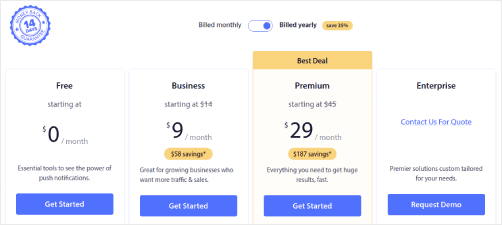
بمجرد معرفة الخطة التي تريدها، انقر على ابدأ لإنشاء حساب PushEngage الخاص بك.
الخطوة رقم 2: التسجيل في PushEngage
الآن، حان وقت إنشاء حساب PushEngage الخاص بك. ابدأ بالتسجيل باستخدام عنوان بريد إلكتروني أو معرف Gmail:

ثم، املأ تفاصيل حسابك:

وأضف معلومات بطاقتك الائتمانية لشراء خطتك:

إذا اخترت الحساب المجاني، فلن يتم خصم أي أموال من بطاقتك الائتمانية حتى تختار ترقية خطتك. والآن، أنت جاهز للوصول إلى لوحة تحكم PushEngage الخاصة بك. فقط انقر على إكمال التسجيل والحصول على وصول فوري.
إذا كنت قد استخدمت OneSignal أو PushAlert من قبل، فسترى أن PushEngage يمنحك تجربة أنظف بكثير من لوحة التحكم. لوحة تحكم OneSignal ليست مخصصة للحملات المتقدمة. لهذا الغرض، ستحتاج إلى واجهة برمجة التطبيقات (API) أكثر من إضافة OneSignal.
الخطوة رقم 3: تثبيت إضافة ووردبريس للإشعارات عبر الويب
لقد انتهيت من إنشاء حسابك. لذا، توجه إلى لوحة تحكم PushEngage واتبع الخطوات التالية:

انقر على إعدادات الموقع » تفاصيل الموقع وانقر على زر انقر هنا للحصول على تعليمات الإعداد:

انقر على علامة التبويب WordPress وانقر على زر تثبيت إضافة PushEngage لـ WordPress لتثبيت الإضافة على موقعك.

الجزء الرائع هنا: عندما أنشأت حساب PushEngage الخاص بك، قمت بالفعل بمزامنة موقعك مع حساب PushEngage الخاص بك. لذا، انقر على رابط التثبيت في لوحة تحكم PushEngage لتثبيت إضافة PushEngage WordPress تلقائيًا على موقعك.
الخطوة رقم 4: ربط موقع WordPress الخاص بك بـ PushEngage
عند الانتهاء من تثبيت وتفعيل إضافة PushEngage لـ WordPress، سترى معالج الإعداد لـ PushEngage:

المعالج مباشر إلى حد ما. إذا كنت مستخدمًا جديدًا، فانقر على جديد؟ احصل على حسابك المجاني. وإذا كنت قد سجلت بالفعل، فانقر على ربط حسابك الحالي.
بعد ذلك، يمكنك تحديد موقعك من القائمة المنسدلة تحديد موقع ضمن ربط موقع مسجل إذا كنت قد سجلت موقعًا بالفعل أثناء التسجيل:

أو، يمكنك النقر على تسجيل موقع جديد لإضافة موقع جديد إذا كان لديك خطة تسعير مميزة أو أعلى. في الخطوة التالية، سيطلب منك معالج الإعداد تثبيت إضافات WordPress أخرى ضرورية.

إذا اتبعت كل خطوة بشكل صحيح، فسترى رسالة النجاح هذه من المعالج:

أنت الآن جاهز لإنشاء الحملات.
الخطوة رقم 5: إنشاء حملات الدفع المتتالية
أخيرًا، حان الوقت لمثالنا. لإظهار حالة استخدام حقيقية لحملات الدفع المتتالية، سنأخذ مثال عروض الجمعة السوداء. هدفنا هو زيادة التحويلات إلى أقصى حد على عرض الجمعة السوداء الخاص بنا.
لإعادة استهداف المشتركين بناءً على سلوكهم، سنرسل بثًا لجميع المشتركين لدينا. بعد ذلك، بناءً على مستويات تفاعلهم، سنقوم بإنشاء مجموعات جمهور مختلفة لإعادة الاستهداف.
كيفية إرسال إشعارك إلى جميع المشتركين
نريد أقصى وصول لـ 3 إشعارات:
- إعلان مبكر عن الجمعة السوداء
- تخفيضات الجمعة السوداء السريعة
- تخفيضات الاثنين السيبراني
لذلك، نرسل هذه الإشعارات الثلاثة إلى الجميع. في علامة التبويب الجمهور، حدد إرسال إلى جميع المشتركين:

كيفية إعادة استهداف المشتركين الذين لم ينقروا على البث إلى الجميع
إذا كنت لا ترسل الإشعار إلى جميع المشتركين، فستحتاج إلى إنشاء مجموعة جمهور. على سبيل المثال، إذا كنت ترغب في استهداف المشتركين الذين لم ينقروا على البث إلى الجميع، فستحتاج إلى إنشاء مجموعة جمهور جديدة.
في لوحة تحكم ووردبريس الخاصة بك، انتقل إلى الجمهور » مجموعات الجمهور وانقر فوق إنشاء مجموعة جمهور جديدة:
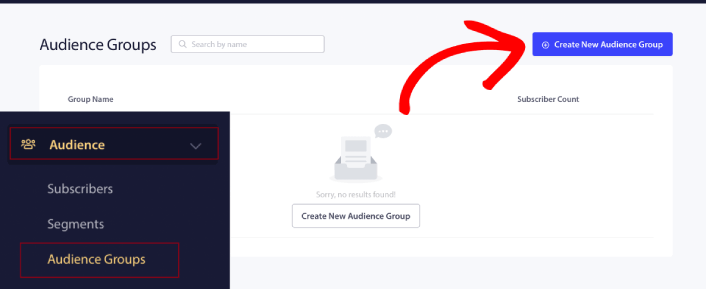
لاستهداف المشتركين الذين لم ينقروا على آخر إشعار، ستحتاج إلى التصفية حسب تاريخ آخر نقرة:
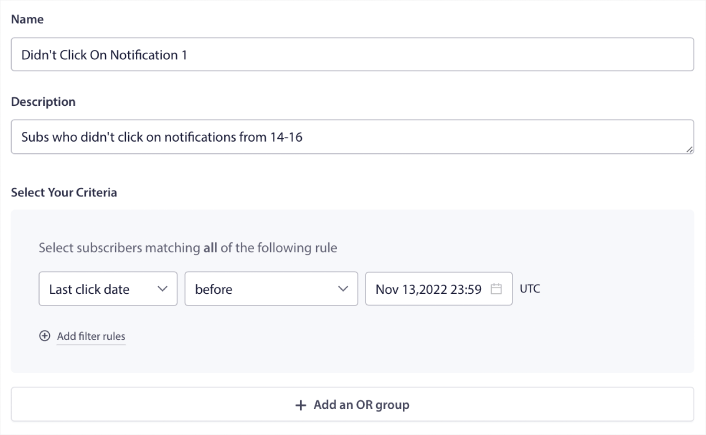
قم بالتصفية حسب تاريخ آخر نقرة قبل التاريخ الذي أرسلت فيه إشعارك السابق. لذا، إذا أرسلت آخر إشعار دفع في 14 نوفمبر، فقم بالتصفية للمشتركين الذين نقروا على الإشعارات فقط قبل 13 نوفمبر منتصف الليل.
ملاحظة: على عكس حملة البريد الإلكتروني، لا يمكنك فعليًا التصفية حسب نسبة النقر إلى الظهور على آخر إشعار. أقرب تقريب هو التصفية للنقرات في نطاق زمني.
عند الانتهاء، انقر فوق حفظ الإشعار.
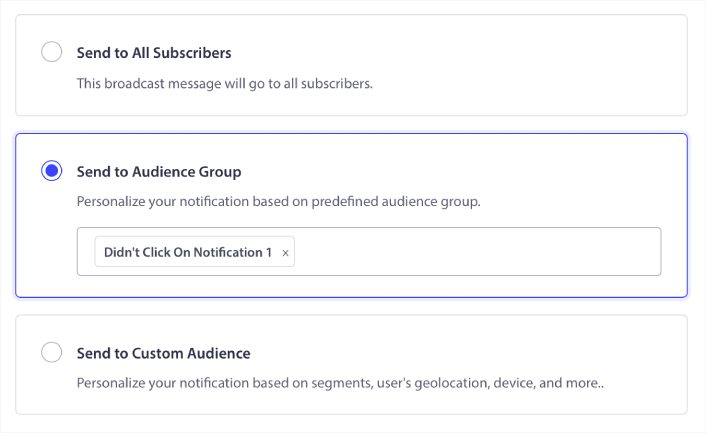
بعد ذلك، عد إلى بث إشعارات الدفع الخاصة بك وحدد إرسال إلى مجموعة جمهور. من القائمة المنسدلة، حدد مجموعتك:
كيفية إعادة استهداف المشتركين الذين نقروا على البث إلى الجميع
إذا كنت ترغب في استهداف المشتركين الذين نقروا على آخر إشعار لك، يمكنك إنشاء مجموعة جمهور أخرى.
قم بتصفية المشتركين حسب تاريخ آخر نقرة بعد التاريخ الذي أرسلت فيه إشعارك السابق وقبل التاريخ الذي تريد إرسال إشعارك التالي فيه:
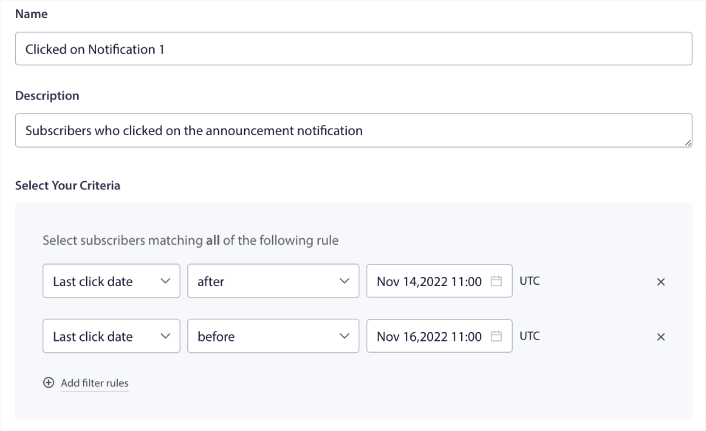
يمكنك إضافة معايير و إلى عامل التصفية الخاص بك عن طريق النقر فوق إضافة قواعد التصفية. عامل تصفية مثل هذا رائع لإشعارات الدفع للبيع المتقاطع.
نتيجة مجموعات الجمهور هذه هي استهداف أكثر تفصيلاً. لذلك، في كل مرة، يمكنك إرسال عروض مختلفة لتحسين معدلات التحويل الخاصة بك.
ماذا تفعل بعد إنشاء حملات الدفع المتتالية
أحد أهم الأشياء التي يجب تذكرها حول حملات الدفع المتتالية هو أنه يمكنك استخدام هذه المنهجية فقط على إشعارات الدفع المذاعة. حملات التنقيط في إشعارات الدفع لا تحتوي على خيارات استهداف بهذه الدقة بعد.
لذلك، تأكد من اختبار A/B لإشعارات الدفع الخاصة بك. نقترح أيضًا أن تأخذ بعض الوقت لقراءة مقالاتنا ومعرفة كيفية تعزيز إشعارات الدفع الآلية الخاصة بك. ابدأ بمقالنا حول أفضل ممارسات إشعارات الدفع.
إذا كنت جديدًا في مجال الإشعارات الفورية، فيجب عليك اتباع عملية اختبار الإشعارات الفورية كاملة قبل أن تبدأ. سيساعدك ذلك في استكشاف المشكلات الشائعة وإصلاحها قبل أن يراها زوارك ويبدأوا في الشكوى من تجربة مستخدم معطلة. وبالتأكيد يجب عليك إعداد Google Analytics لـ تتبع الإشعارات الفورية.
إعادة استهداف إشعارات الدفع لاستهداف المشتركين الذين نقروا عليها أو لم ينقروا عليها. أخبرنا كيف يعمل ذلك معك. في غضون ذلك، تحقق من هذه الموارد:
- كيفية زيادة النقرات على إشعارات الدفع الخاصة بك بالفضول
- كيفية تخصيص كل إشعار دفع
- كيفية التميز بالوسائط الغنية في إشعارات الدفع الخاصة بك
- كيفية إعادة تنشيط المشتركين الخاملين في إشعارات الدفع
- كيفية استخدام إشعارات الدفع لإبقاء العملاء على اطلاع
- كيفية استخدام الرموز التعبيرية في إشعارات الدفع الخاصة بك لزيادة معدلات النقر
- كيفية زيادة التحويلات عن طريق خلق شعور بالإلحاح
وإذا لم تكن قد فعلت ذلك بالفعل، ابدأ مع PushEngage.


