
هل تبحث عن دليل لإنشاء حملات التنقيط لزيادة مبيعاتك؟
التسويق غير مكتمل اليوم بدون أتمتة. بالتأكيد، يمكنك جمع المشتركين وإرسال إشعارات فورية ورسائل بريد إلكتروني. ماذا بعد؟ استمر في بيعهم لعملك مع كل نشرة إخبارية والأمل في أن يتحول المشتركون لديك؟
لا توجد طريقة لـ:
- تخصيص حملاتك
- الحصول على عملاء جدد تلقائيًا
- الاحتفاظ بالعملاء الحاليين بمحتواك
- بيع منتجات إضافية أو بيع منتجات مكملة
- استعادة المبيعات المفقودة
إلا إذا... استخدمت حملات التنقيط التي تحقق التحويل.
في هذا المقال، سنوضح لك كيفية إعداد حملات التنقيط وتحقيق أقصى استفادة منها. أفضل جزء؟ لا تحتاج إلى أي خبرة سابقة.
يبدو جيدًا؟ دعنا نتعمق.
ما هي حملات التنقيط؟
فكر في حملات التنقيط كإعداد مجموعة من رسائل البريد الإلكتروني أو حتى الإشعارات الفورية ليتم إرسالها تلقائيًا، نوعًا ما مثل نظام الري بالرش لحديقتك. بدلاً من سقي النباتات، أنت ترسل رسائل للأشخاص المهتمين بما لديك لتقوله أو تبيعه.
إليك كيفية عمل ذلك:
- إنها ليست سحرًا، إنها مؤتمتة: بمجرد إعدادها، تستمر هذه الرسائل في الإرسال بنفسها. لا يتعين عليك الاستمرار في إرسالها يدويًا.
- يمكنك التحدث إلى الأشخاص المناسبين: يمكنك إرسال رسائل مختلفة لمجموعات مختلفة من الأشخاص. على سبيل المثال، قد يتلقى شخص قام بالتسجيل للتو رسالة ترحيب ودية، بينما قد يتلقى شخص آخر كان موجودًا لفترة طويلة عروضًا خاصة أو تحديثات.
- إنها شخصية: يمكن لهذه الرسائل استخدام اسم الشخص أو التحدث عن الأشياء التي أظهر اهتمامًا بها. يجعلهم يشعرون وكأنك تتحدث إليهم حقًا، وليس مجرد إرسال نفس الشيء للجميع.
- التوقيت هو كل شيء: يتم إرسال الرسائل في الأوقات الأكثر منطقية - مثل مباشرة بعد تسجيل شخص ما أو إلقاء نظرة على شيء ما في موقعك.
- كل رسالة لها مهمة: كل بريد إلكتروني أو إشعار مخصص للقيام بشيء محدد، مثل مساعدة الأشخاص على التعرف على منتجك بشكل أفضل أو تذكيرهم بشيء نظروا إليه ولكن لم يشتروه.
- يمكنك رؤية كيف تسير الأمور: يمكنك التحقق من أشياء مثل عدد الأشخاص الذين يفتحون الرسائل أو ينقرون على الروابط بداخلها. هذا يساعدك على معرفة ما إذا كانت رسائلك تعمل بشكل جيد.
حملات التنقيط ليست فقط للبريد الإلكتروني - فهي تعمل مع إشعارات الدفع للتطبيقات و إشعارات الدفع للويب أيضًا. إنها رائعة للبقاء على اتصال مع الأشخاص المهتمين بما لديك، دون إرهاقهم. إنها طريقة ذكية للحفاظ على تفاعل الأشخاص واهتمامهم بما تفعله.
أنواع حملات التنقيط
دعنا نتعمق في الأنواع المختلفة لحملات التنقيط. تمامًا مثلما يأتي الآيس كريم بجميع أنواع النكهات، فإن حملات التنقيط لها أنواع مختلفة أيضًا. كل نوع مصمم لغرض أو جمهور محدد. إليك بعض الأنواع الأكثر شيوعًا:
- سلسلة الترحيب: هذا مثل قول "مرحباً!" لشخص جديد. عندما يشترك شخص ما في رسائلك الإلكترونية أو إشعاراتك، ترسل له بضع رسائل ودية لتعريفه بعلامتك التجارية أو خدمتك. إنه مثل فرش السجادة الحمراء لضيوفك الجدد.
- حملات الإعداد: فكر في هذا كدليل مفيد. عندما يشتري شخص ما منتجًا أو يشترك في خدمة، ترشده هذه الرسائل خلال كيفية استخدامه، أو تقدم له نصائح مفيدة، أو تعرض له أشياء قد لا يعرفها. إنه مثل القيام بجولة لشخص جديد في المدينة.
- تذكيرات سلة التسوق المهجورة: هل سبق لك أن وضعت شيئًا في سلة التسوق عبر الإنترنت ثم نسيته؟ هذه الحملات هي مجرد تذكيرات لطيفة للأشخاص حول الأشياء التي كانوا مهتمين بها ولكنهم لم يشتروها. إنه مثل نقرة لطيفة على الكتف تقول: "مرحباً، هل نسيت هذا؟"
- حملات إعادة المشاركة: هذه مخصصة للتواصل مع الأشخاص الذين كانوا يتفاعلون مع علامتك التجارية ولكنهم لم يفعلوا ذلك منذ فترة. إنه مثل الاتصال بصديق قديم والقول: "مرحباً، دعنا نتواصل!" قد تقدم لهم صفقة خاصة أو تذكرهم فقط بعلامتك التجارية.
- المحتوى التعليمي: هنا، الهدف هو تعليم جمهورك شيئًا ذا قيمة يتعلق بمنتجك أو صناعتك. إنه مثل دورة مصغرة، يتم تقديمها في رسائل صغيرة وسهلة الفهم. فكر في الأمر كسلسلة من الدروس الممتعة والمفيدة.
- تحديثات المنتج: هل لديك شيء جديد أو محسّن؟ يبقي هذا النوع من الحملات جمهورك على اطلاع دائم بالميزات أو المنتجات أو الخدمات الجديدة. إنه مثل عرض أحدث أدواتك للأصدقاء.
- دعوات الفعاليات: هل تستضيف ندوة عبر الإنترنت، أو ورشة عمل، أو فعالية أخرى؟ تدور هذه الحملات حول إثارة حماس الأشخاص والتسجيل في فعالياتك. إنه مثل إرسال دعوات رائعة لحفلة.
- الحملات الموسمية: ترتبط هذه الحملات بأوقات معينة من العام، مثل العطلات أو المواسم أو المناسبات الخاصة. إنه مثل تزيين متجرك لعيد الميلاد أو إقامة تخفيضات صيفية.
لكل نوع من حملات التنقيط سحره وغرضه الخاص. من خلال مطابقة النوع المناسب من الحملات مع جمهورك وأهدافك، يمكنك إنشاء اتصالات ذات مغزى والحفاظ على تفاعل جمهورك بطريقة تبدو طبيعية وغير مفرطة في البيع.
كيفية إنشاء حملات التنقيط للإشعارات الفورية
تثبيت الإشعارات الفورية على موقع ويب ليس بالأمر الصعب. ولكنه يتضمن بعض الخطوات وستحتاج إلى اتباع هذا الدليل خطوة بخطوة.
لا تقفز إلى الأمام في أي وقت وستكون بخير.
قبل إنشاء حملة إشعارات فورية ترحيبية، تحتاج إلى تحديد خدمة إشعارات فورية. خدمة الإشعارات الفورية هي برنامج يسمح لك بإنشاء حملات فورية دون أي ترميز.
نوصي باستخدام PushEngage.

PushEngage هو المكون الإضافي رقم 1 لإشعارات الدفع في العالم.
تساعدك إشعارات الدفع على زيادة حركة مرور موقعك الإلكتروني ومشاركتك تلقائيًا. وإذا كنت تدير متجرًا عبر الإنترنت، فإن PushEngage يساعدك أيضًا على زيادة مبيعاتك من خلال مساعدتك في إنشاء إشعارات دفع آلية للتجارة الإلكترونية.
يمكنك البدء مجانًا، ولكن إذا كنت جادًا بشأن تنمية عملك، فيجب عليك شراء خطة مدفوعة. أيضًا، قبل شراء أي خدمة إشعارات دفع، يجب عليك الاطلاع على هذا الدليل حول تكاليف إشعارات الدفع.
إليك نظرة سريعة على ما تحصل عليه مع PushEngage:
- حملات آلية عالية التحويل
- خيارات استهداف وجدولة حملات متعددة
- تتبع الأهداف وتحليلات متقدمة
- اختبار A/B ذكي
- مدير نجاح مخصص
سترى أن PushEngage هو الخيار الأفضل بلا منازع إذا كنت ترغب في زيادة حركة المرور والمشاركة والمبيعات لعملك. وإذا كانت ميزانيتك محدودة، يمكنك دائمًا أن تكون مبدعًا بعض الشيء مع إشعارات الدفع الخاصة بك.
ملاحظة: إذا كنت تدير موقع WordPress، فيجب عليك تثبيت وتفعيل إضافة PushEngage لـ WordPress.
هيا بنا!
الخطوة رقم 1: إنشاء حساب PushEngage مجاني
توجه إلى PushEngage وانقر على ابدأ مجانًا الآن:
يمكنك البدء بالخطة المجانية. ولكن إذا كنت تتطلع إلى إرسال إشعارات فورية مستهدفة، فيجب عليك اختيار خطة النمو (Growth Plan). بمجرد معرفة الخطة التي تريدها، انقر على ابدأ لإنشاء حساب PushEngage الخاص بك.
الخطوة رقم 2: التسجيل في PushEngage
الآن، حان وقت إنشاء حساب PushEngage الخاص بك. ابدأ بالتسجيل باستخدام عنوان بريد إلكتروني أو معرف Gmail:

ثم، املأ تفاصيل حسابك:

وأضف معلومات بطاقتك الائتمانية لشراء خطتك:

إذا اخترت الحساب المجاني، فلن يتم خصم أي أموال من بطاقتك الائتمانية حتى تختار ترقية خطتك. والآن، أنت جاهز للوصول إلى لوحة تحكم PushEngage الخاصة بك. فقط انقر على إكمال التسجيل والحصول على وصول فوري.
إذا كنت قد استخدمت OneSignal أو PushAlert من قبل، فسترى أن PushEngage يمنحك تجربة أنظف بكثير من لوحة التحكم. لوحة تحكم OneSignal ليست مخصصة للحملات المتقدمة. لهذا الغرض، ستحتاج إلى واجهة برمجة التطبيقات (API) أكثر من إضافة OneSignal.
الخطوة رقم 3: تثبيت إضافة ووردبريس للإشعارات عبر الويب
ملاحظة: إذا لم تكن تدير موقعًا على ووردبريس، فيجب عليك الاطلاع على أدلة التثبيت للبدء.
لقد انتهيت من إنشاء حسابك. لذا، توجه إلى لوحة تحكم PushEngage واتبع الخطوات:

انقر على إعدادات الموقع » تفاصيل الموقع وانقر على الزر انقر هنا للحصول على تعليمات الإعداد:

انقر على علامة التبويب WordPress وانقر على الزر تثبيت المكون الإضافي لـ PushEngage لـ WordPress لتثبيت المكون الإضافي على موقعك.

الجزء الرائع هنا: عندما أنشأت حساب PushEngage الخاص بك، قمت بالفعل بمزامنة موقعك مع حساب PushEngage الخاص بك. لذا، انقر على رابط التثبيت في لوحة تحكم PushEngage لتثبيت إضافة PushEngage WordPress تلقائيًا على موقعك.
الخطوة رقم 4: ربط موقع WordPress الخاص بك بـ PushEngage
عند الانتهاء من تثبيت وتفعيل إضافة PushEngage لـ WordPress، سترى معالج الإعداد لـ PushEngage:

المعالج سهل الاستخدام للغاية. إذا كنت مستخدمًا جديدًا، فانقر على جديد؟ احصل على حسابك المجاني. وإذا كنت قد سجلت بالفعل، فانقر على ربط حسابك الحالي.
بعد ذلك، يمكنك تحديد موقعك من القائمة المنسدلة تحديد موقع ضمن ربط موقع مسجل إذا كنت قد سجلت موقعًا بالفعل أثناء التسجيل:

أو، يمكنك النقر على تسجيل موقع جديد لإضافة موقع جديد إذا كان لديك خطة تسعير مميزة أو أعلى. في الخطوة التالية، سيطلب منك معالج الإعداد تثبيت إضافات WordPress الضرورية الأخرى.

إذا اتبعت كل خطوة بشكل صحيح، فسترى رسالة النجاح هذه من المعالج:

أنت الآن جاهز لإنشاء الحملات ونوافذ المنبثقة للإشعارات الفورية.
الخطوة 4: إرسال حملات تنقيط مخصصة
قبل إنشاء حملة، يجب عليك إعداد شرائح ومجموعات جمهور لإرسال رسائل فورية مخصصة.
لا شيء يضاهي مستوى التخصيص الذي يمكنك الحصول عليه عن طريق إنشاء شرائح ومجموعات جمهور لمشتركي إشعارات الدفع الخاصة بك. انتقل إلى PushEngage » الجمهور وابدأ في إنشاء الشرائح ومجموعات الجمهور على الفور.
ضمن علامة التبويب الشرائح، يمكنك إنشاء شرائح جديدة أو تعديل الشرائح الحالية:
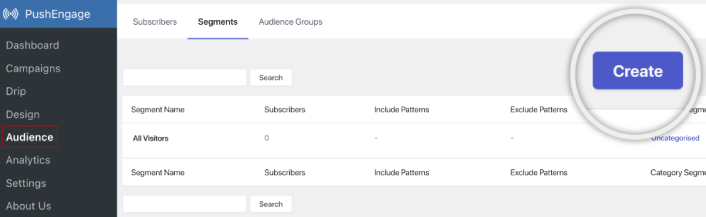
وإذا كنت بحاجة إلى تخصيص أعمق، فأنشئ مجموعة جمهور في علامة التبويب مجموعات الجمهور:
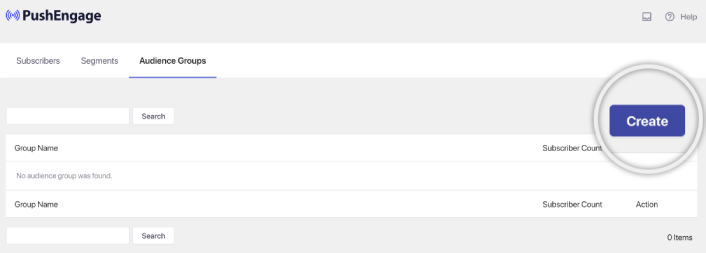
إذا كنت جديدًا على شرائح إشعارات الدفع و إشعارات الدفع المخصصة، فيجب عليك الاطلاع على مقالتنا حول كيفية إنشاء الشرائح وإعلاننا حول تجميع الجمهور المتقدم.
الخطوة رقم 5: إنشاء حملة إشعارات الدفع التلقائية
انتقل إلى لوحة تحكم PushEngage وتوجه إلى Campaign » Drip Autoresponders وانقر على Create New Drip Autoresponder:

بعد ذلك، قم بتسمية حملتك (نقترح شيئًا مثل Welcome Drip)، وتحت Content، حدد الخيار الذي يقول “Send notification immediately after user subscribes“):

في هذه المرحلة، يمكنك النقر على السهم بجوار الإشعار لتعديل محتوى إشعارك.
إذا كان لديك خطة Premium أو Enterprise مع PushEngage، فستتمكن من إضافة أكثر من إشعار واحد لإنشاء سلسلة من رسائل الترحيب الآلية. فقط انقر على Add New Notification وقم بتحرير المحتوى.
بمجرد الانتهاء، انقر على Drip Settings وحدد الخيار لإرسال حملة الترحيب الخاصة بك إلى جميع المشتركين:

بعد ذلك، قم بالتمرير لأسفل لتعيين معلمات UTM الخاصة بك لتتبع إشعارات الدفع:
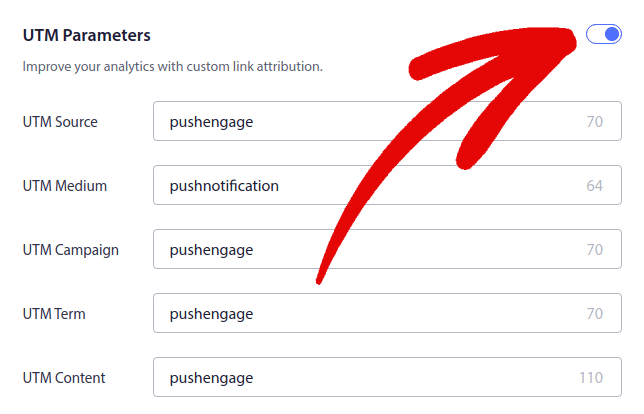
وعندما تنتهي، قم بالتمرير للأعلى وانقر على زر Activate Autoresponder:

وأنت انتهيت!
كيفية إنشاء حملات البريد الإلكتروني التلقائية
هل تقوم بإعداد حملات البريد الإلكتروني التلقائية الرائعة هذه في ووردبريس؟ يمكنك القيام بذلك بسهولة باستخدام أداة تسويق عبر البريد الإلكتروني. تابع بقية هذا الدليل وستكون جاهزًا!
الخطوة رقم 1: اختيار خدمة البريد الإلكتروني التلقائي
نقترح تجربة Constant Contact. إنها مثل النجم الساطع لخدمات التسويق عبر البريد الإلكتروني. سهلة الاستخدام للغاية وتأتي مع ميزة السحب والإفلات لإنشاء رسائل البريد الإلكتروني.

Constant Contact هي أفضل خدمة تسويق عبر البريد الإلكتروني لإعداد الردود الآلية لعملك. إنها سهلة الاستخدام للغاية وتقدم الكثير من ميزات الأتمتة لتحسين حملات البريد الإلكتروني الخاصة بك.
إليك ما يجعل Constant Contact خيارًا رائعًا لإعداد حملات التسويق عبر البريد الإلكتروني:
- منشئ سحب وإفلات سهل لإنشاء رسائل البريد الإلكتروني
- مئات من قوالب البريد الإلكتروني المصممة مسبقًا
- رسائل الترحيب، عروض عيد الميلاد، والردود الآلية لسلات التسوق المهجورة
- أدوات بناء القوائم ونماذج الاشتراك لتنمية جمهورك
- اختبار A/B للبريد الإلكتروني المستهدف
- تكامل مع أنظمة إدارة علاقات العملاء (CRMs) والخدمات الخارجية
- دعم ممتاز عبر الدردشة الحية والهاتف
ناهيك عن أن Constant Contact لديها إضافة نماذج لـ WordPress يمكنك استخدامها لتوليد العملاء المحتملين. يمكنك أيضًا رعاية العملاء المحتملين وإغلاقهم باستخدام الردود الآلية.
ولكن مهلاً، هذا ليس الخيار الوحيد المتاح. معظم خدمات التسويق عبر البريد الإلكتروني الكبيرة، مثل Brevo (قد تعرفها باسم Sendinblue)، و HubSpot، وغيرها، لديها هذه الإمكانية السحرية للبريد الإلكتروني التلقائي أيضًا.
بنقرات قليلة، يمكنك إطلاق هذه رسائل البريد الإلكتروني الآلية لمشتركيك. بالإضافة إلى ذلك، يتكامل Constant Contact بشكل جيد مع إضافات ووردبريس مثل WPForms و OptinMonster. وإذا كنت تعمل في مجال التجارة الإلكترونية، باستخدام WooCommerce أو Shopify، فإنه يلبي احتياجاتك للتواصل مع العملاء الجدد أو تذكير الأشخاص بالعناصر التي تركوها في عربات التسوق الخاصة بهم.
هل أنت مستعد لتجربتها؟ تفضل بزيارة موقع Constant Contact، قم بالتسجيل، وخمّن ماذا؟ يمكنك تجربتها مع فترة تجريبية مجانية لمدة 60 يومًا. إنها مثل تجربة قيادة سيارة ولكن للتسويق عبر البريد الإلكتروني. بهذه الطريقة، يمكنك معرفة ما إذا كانت مناسبة لك قبل أن تقرر الاشتراك في خطة مدفوعة.
الخطوة رقم 2: إنشاء قائمة بريد إلكتروني
بعد إنشاء حساب، يمكنك زيارة لوحة تحكم Constant Contact لإنشاء قائمة جهات اتصال.
سيكون Constant Contact قد أنشأ لك قائمة افتراضية بالفعل. ومع ذلك، يمكنك إنشاء قائمتك الخاصة عن طريق الانتقال إلى علامة التبويب Contacts في القائمة العلوية ثم النقر على زر Create List.

يمكنك ربط نموذج الاشتراك في ووردبريس الخاص بك بـ Constant Contact والبدء في بناء قائمة بريد إلكتروني. يجب عليك أيضًا الاطلاع على منشور مدونتنا حول كيفية إضافة أداة اشتراك لمدونة ووردبريس.
الخطوة رقم 3: إنشاء حملات البريد الإلكتروني التلقائية التسويقية
الآن بعد أن أضفت مشتركين إلى قائمة Constant Contact الخاصة بك، فإن الخطوة التالية هي إنشاء حملة تنقيط آلية. انتقل إلى علامة التبويب Marketing Campaigns ثم انقر فوق الزر Create.

سيعرض لك Constant Contact خيارات متعددة لإنشاء حملة. تابع وحدد حملة Automations.

من هنا، يمكنك الاختيار من بين العديد من قوالب الحملات المعدة مسبقًا لإعداد حملة تنقيط. يمكنك إنشاء Custom Automation للبدء من الصفر، أو يمكنك البدء بسرعة باستخدام أي من قوالب الحملات.
في هذا البرنامج التعليمي، سنختار قالب Create custom path للبدء. حدد خيار Subscribes for email ثم انقر فوق الزر Next.

امنح المسار المخصص الخاص بك اسمًا وها أنت ذا! سيؤدي هذا القالب إلى تشغيل حملة تنقيط في كل مرة يشترك فيها شخص جديد في قائمة البريد الإلكتروني الخاصة بك. لذا، فهو مثالي لحملة ترحيب. إذا كنت تتطلع إلى إنشاء حملة تعريفية، يمكنك استخدام العلامات لوضعهم في حملة تنقيط منفصلة.
الخطوة #4: إنشاء تدفق حملة
ومع ذلك، يمكنك ببساطة سحب الإجراءات والقواعد من القائمة على اليسار إلى المسار. على سبيل المثال، يمكنك إضافة إجراءات مختلفة مثل إرسال بريد إلكتروني أو إرسال رسالة نصية قصيرة إلى سير عملك.
هناك أيضًا قواعد مختلفة تساعدك على تخصيص الأتمتة الخاصة بك. يمكنك إضافة تأخير زمني وتحديد وقت إرسال البريد الإلكتروني التالي. وبالمثل، هناك خيار تقسيم شرطي يتيح لك تعيين شروط نعم ولا وتقسيم المسار.

تعديل سير العمل الآلي الخاص بك أمرًا سهلاً أيضًا. ما عليك سوى تحديد أيقونة النقاط الثلاث والنقر عليها. اختر Edit لإجراء التغييرات. لنفترض أنك تريد تغيير إجراء Send an email.
بمجرد القيام بذلك، تظهر نافذة منبثقة. هنا يمكنك إما إنشاء بريد إلكتروني جديد تمامًا أو استخدام بريد إلكتروني قمت بإنشائه بالفعل.
نظرًا لأن هذه هي المرة الأولى التي تقوم فيها بإعداد سير العمل هذا، تابع واختر Create a new email. أدخل اسمًا رائعًا لبريدك الإلكتروني، ثم اضغط على Continue. وفقط هكذا، أنت في طريقك لتخصيص سير عمل البريد الإلكتروني الخاص بك!
الخطوة #5: إنشاء حملة البريد الإلكتروني الخاصة بك
يمكنك البحث عن قالب بناءً على المناسبة أو استخدام قالب فارغ لإنشاء بريد إلكتروني من البداية.

بمجرد تحديد قالب، سيتم تشغيل محرر البريد الإلكتروني.

عند الانتهاء، اضغط على زر Save & Close في الأعلى. سينقلك هذا مرة أخرى إلى Path Builder في Constant Contact. تابع وأكمل مسار الأتمتة الخاص بك عن طريق إضافة أكبر عدد ممكن من الإجراءات والقواعد إلى مسارك وتعديل كل منها.

بعد إنشاء سير عمل آلي، يمكنك ببساطة النقر فوق الزر Activate في الأعلى. وها أنت ذا!
ماذا تفعل بعد إنشاء حملة تنقيط
هذا كل شيء لهذا اليوم أيها الأصدقاء!
إذا وجدت هذا المقال مفيدًا، فتأكد من ترك تعليق أدناه.
قد يبدو البدء في حملات التنقيط أمرًا شاقًا. ولكن إذا راقبت تتبع الأهداف والتحليلات، فستكون على ما يرام. والأهم من ذلك، ستحقق ربحًا أكبر بكثير بمساعدة حملات الإشعارات الفورية. إليك بعض الموارد الرائعة لتبدأ بها:
- كيفية استخدام إشعارات الدفع لإعادة الاستهداف لمضاعفة إيراداتك
- كيفية فرز إشعارات الدفع الخاصة بك والعثور على الحملات الناجحة
- كيفية تنظيف قوائم المشتركين في الإشعارات الفورية (سهل)
- كيفية إرسال إشعارات دفع RSS تلقائيًا
- كيفية استخدام الإشعارات الفورية للترويج لموقع إخباري
- كيفية استخدام إشعارات البيع المتقاطع الفورية لمضاعفة مبيعاتك
- كيفية استخدام إشعارات الدفع للتخلي عن التصفح (4 خطوات)
إذا كنت جديدًا في مجال إشعارات الدفع، فيجب عليك تجربة PushEngage. PushEngage هو البرنامج رقم 1 لإشعارات الدفع في السوق. وستكون حملاتك في أيد أمينة.
لذا، إذا لم تكن قد فعلت ذلك بالفعل، فابدأ باستخدام PushEngage اليوم!


