هل تحاول استخدام أنواع مختلفة من الإشعارات لزيادة تفاعل موقعك على الويب إلى أقصى حد؟
تخيل الحصول على حركة مرور مجانية تلقائيًا في كل مرة تنشر فيها مقالة مدونة جديدة دون حملات تحسين محركات البحث التي تستغرق وقتًا طويلاً. إذا كنت تدير موقعًا لـ WordPress، فأنت تعلم بالفعل مقدار العمل المطلوب للترويج لمحتواك والحفاظ على عودة القراء إلى محتواك.
في هذه المقالة، سنوضح لك كيفية الحصول على زوار متكررين وتفاعل ومبيعات في كل مرة تنشر فيها. وسنفعل ذلك باستخدام أنواع مختلفة من الإشعارات حتى لا تضطر إلى الاعتماد بشكل صارم على الإعلانات المدفوعة وتحسين محركات البحث.
يبدو جيدًا؟ دعنا نتعمق.
فهم أنواع الإشعارات المختلفة
قبل الخوض في التفاصيل الدقيقة لكيفية استخدام أنواع مختلفة من الإشعارات بنجاح، دعنا نلقي نظرة على أساسيات استراتيجية تسويق إشعارات الدفع. سنجعل الأمر بسيطًا وسهلًا بالنسبة لك. لذا، لا تقلق إذا لم تكن لديك خبرة سابقة مع إشعارات الدفع.
ما هي الإشعارات الفورية؟
الإشعار الفوري هو رسالة منبثقة قصيرة وقابلة للنقر تظهر على جهاز المشترك وتعيد توجيه المشترك إلى المحتوى الخاص بك بنقرة واحدة:
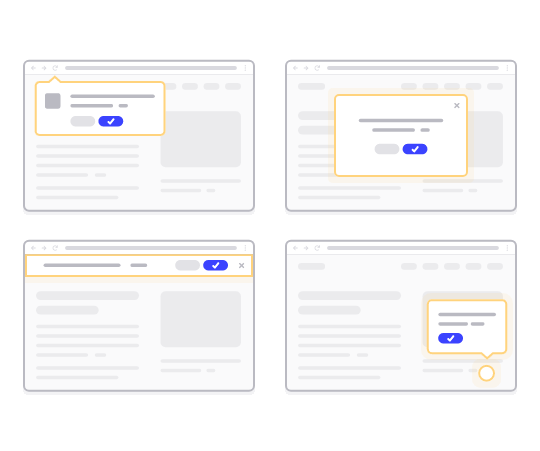
أفضل ما في الأمر هو أن أنواعًا مختلفة من الإشعارات يتم تسليمها حتى لو لم يكن المشترك يستخدم متصفحًا. الأمر أشبه بإرسال بريد إلكتروني جماعي، ولكن مع إشعار دفع عبر الويب، لا يحتاج المشتركون إلى استخدام تطبيق لرؤية رسالتك.
باختصار: إشعار الدفع الفوري لـ WordPress هو طريقة بسيطة لإرسال رابط قابل للنقر إلى المحتوى الخاص بك لأي شخص اختار تلقيها من نافذة منبثقة للإشعارات الفورية الخاصة بك.
مع تسلسلات الإشعارات الفورية، لم يعد لدى جمهورك أي عذر لتجاهلك. وعلى عكس مواقع التواصل الاجتماعي، لا يوجد خوارزمية تحد من وصولك لدفعك إلى الدفع مقابل الإعلانات.
أروع ما في إشعارات الدفع الفورية على الويب هو أنه يمكنك استخدامها لتكملة مغناطيسات جذب العملاء المحتملين و نماذج الاشتراك عبر البريد الإلكتروني. يمكنك حتى استخدام النوافذ المنبثقة لجمع مشتركين في الإشعارات الفورية.
فوائد استخدام الإشعارات الفورية
دعنا نتحدث عن سبب أهمية الإشعارات الفورية لعملك.
كم مرة تنشئ محتوى وتنتظر أن ينجح؟ إذا كنت تنتظر محركات البحث ووسائل التواصل الاجتماعي لتنمية حركة المرور على موقعك بشكل كبير، يجب أن تعلم:
- تحسين محركات البحث لا يجلب لك نموًا كبيرًا. تحسين محركات البحث يجلب نموًا ثابتًا بمرور الوقت.
- إعلانات البحث والشبكات الاجتماعية هي "الدفع مقابل اللعب". يمكنك فقط الحصول على زيادات مفاجئة في حركة المرور. لإعادة استهداف حركة المرور هذه، ستحتاج إلى الدفع أكثر.
- الانتشار الفيروسي على وسائل التواصل الاجتماعي صعب. ولا توجد طريقة لمعرفة ما إذا كان سيحدث على الإطلاق.
إذًا، إذا كان الحصول على حركة المرور صعبًا جدًا، فكيف تزيد مبيعاتك؟ انسَ المبيعات، كيف تزيد تفاعل موقعك بشكل يمكن التنبؤ به؟
الإجابة هي حملات الإشعارات الفورية. إليك بعض الفوائد الرئيسية لحملات الإشعارات الفورية:
- تحسين تفاعل المستخدم
- الاحتفاظ بالعملاء والمشتركين
- زيادة معدلات التحويل
- استهداف المستخدمين المناسبين
- تتبع المقاييس القابلة للتنفيذ
- تحسين استراتيجية خدمة العملاء الخاصة بك
- تعزيز اتساق العلامة التجارية
على مدار هذا المقال، سنشرح بالتفصيل كيف يمكنك استخدام هذه الفوائد لصالحك. إذا كنت تفضل الاطلاع على أمثلة حقيقية، فيجب عليك الاطلاع على هذا المقال حول فوائد الإشعارات الفورية.
أنواع الإشعارات المختلفة التي يمكنك استخدامها للتسويق
تعد الإشعارات أداة قوية في التسويق للتفاعل مع جمهورك، وزيادة التحويلات، وإبقاء العملاء على اطلاع. هناك أنواع مختلفة من الإشعارات يمكنك استخدامها لأغراض التسويق. دعنا نتحقق منها.
إشعارات البريد الإلكتروني
البريد الإلكتروني مقابل إشعارات الدفع: أيهما أفضل؟ اعتمادًا على استراتيجية التسويق الشاملة الخاصة بك، نوصي بشدة باستخدام كل من التسويق عبر البريد الإلكتروني وتسويق إشعارات الدفع في نفس الوقت. يمكنك استخدام إشعارات البريد الإلكتروني لإرسال:
- رسائل البريد الإلكتروني الترويجية: أرسل رسائل بريد إلكتروني للترويج للمنتجات والخصومات والعروض الخاصة.
- رسائل البريد الإلكتروني للمعاملات: رسائل التأكيد وتحديثات الطلبات وإعادة تعيين كلمات المرور هي أمثلة على إشعارات المعاملات.
بالإضافة إلى ذلك، يمكنك أيضًا إرسال نشرات إخبارية لتثقيف جمهورك. مكان جيد للبدء هو اختيار خدمة تسويق عبر البريد الإلكتروني وإعداد أداة اشتراك في المدونة على موقعك. يمكنك حتى استخدام الإشعارات للترويج لـ بودكاست الخاص بك.
إشعارات الدفع
يبلغ متوسط معدل الاشتراك في إشعارات الدفع عبر الويب أكثر من 6٪. هذا ما يقرب من 3 أضعاف معدل الاشتراك لحملات البريد الإلكتروني. بشكل عام، هناك نوعان من إشعارات الدفع يمكنك إرسالهما:
- إشعارات الدفع للجوال: تظهر هذه على جهاز المستخدم المحمول، حتى عندما يكون التطبيق مغلقًا.
- إشعارات الدفع عبر الويب: يتم تسليمها عبر متصفحات الويب، ويمكنها الوصول إلى المستخدمين على أجهزة الكمبيوتر المكتبية والأجهزة المحمولة.
تعد الإشعارات داخل التطبيق طريقة رائعة لزيادة التفاعل وتحسين أرقام الاحتفاظ بالعملاء.
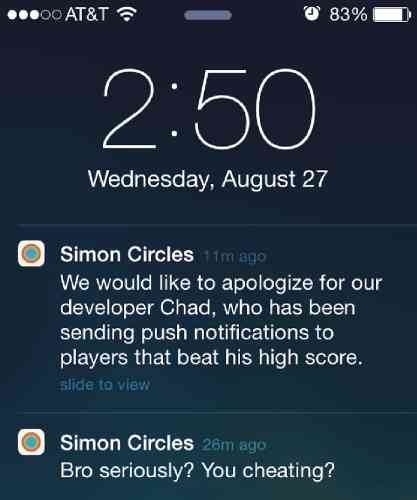
إنها طريقة رائعة لزيادة المبيعات داخل التطبيق أيضًا. يمكنك إرسال إشعارات Android و iOS و iPadOS. بالطبع، كل هذا بافتراض أن لديك تطبيقًا لعملك. ومع ذلك، إذا كنت تدير موقعًا إلكترونيًا فقط وليس تطبيقًا، يمكنك إرسال إشعارات الدفع عبر الويب.
على عكس الإشعارات داخل التطبيق، ستحتاج إلى الحصول على موافقة صريحة لإرسال العديد من أنواع الإشعارات المختلفة. هذا هو المكان الذي يلعب فيه منبثق إشعار الدفع دورًا.
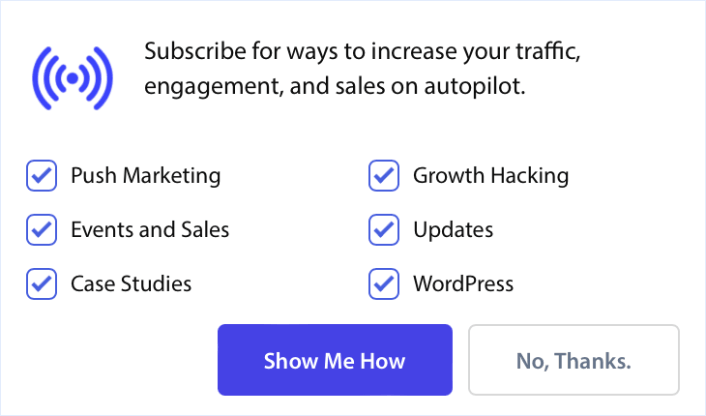
وبمجرد جمع مشتركين في إشعارات الدفع، يمكنك حتى إرسال حملات دفع آلية تجلب لك المال حتى أثناء نومك!
إشعارات الرسائل القصيرة
يمكنك إرسال رسائل نصية إلى العملاء لتزويدهم بالتحديثات أو العروض الترويجية أو التذكيرات. حملات الرسائل القصيرة ليست رائعة للرسائل متعددة الوسائط. في الواقع، كل ما يمكنك إرساله في رسالة نصية قصيرة هو رابط نصي قابل للنقر.
إليك مثال على رسالة ترحيب نصية قصيرة:
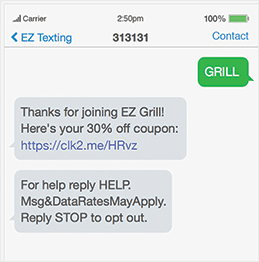
من ناحية أخرى، تتميز إشعارات الدفع بمرونة كبيرة في استخدام أنواع وسائط مختلفة للتعبير عن أنواع مختلفة من الرسائل. ألقِ نظرة على هذا المثال لحملة إشعارات دفع ترحيبية:
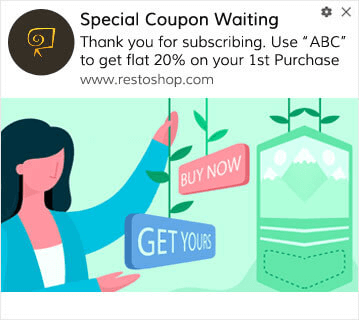
هل يمكنك رؤية الفرق بين الرسالتين؟ مع حملة إشعارات الدفع، لديك مساحة كبيرة لاستكشاف الأفكار الإبداعية والتواصل بفعالية أكبر بكثير. بالطبع، إذا كان لديك كاتب محتوى من الدرجة الأولى لكتابة حملات الرسائل القصيرة الخاصة بك، فيمكنك القيام بالكثير بمجرد النص.
إشعارات وسائل التواصل الاجتماعي
إشعارات وسائل التواصل الاجتماعي هي رسائل أو تنبيهات تُرسل للمستخدمين على منصات التواصل الاجتماعي لإبقائهم على اطلاع ومشاركين ومتصلين بمحتوى وأنشطة المنصة. تلعب هذه الإشعارات دورًا مهمًا في تفاعل المستخدمين، حيث تُعلم المستخدمين بالأنشطة والتحديثات والتفاعلات المختلفة المتعلقة بملفاتهم الشخصية على وسائل التواصل الاجتماعي والحسابات التي يتابعونها.
يمكنك إرسال:
- منشورات وسائل التواصل الاجتماعي: شارك التحديثات والعروض الترويجية والأخبار على ملفاتك الشخصية على وسائل التواصل الاجتماعي.
- رسائل مباشرة: أرسل رسائل خاصة للتفاعل مع العملاء شخصيًا.
يمكن أن يساعد الاستخدام الفعال للإشعارات الأفراد والشركات على بناء علاقات والحفاظ عليها، ومشاركة المحتوى، والمشاركة في المجتمعات عبر الإنترنت.
إشعارات الدردشة
يمكن أن يكون وجود صندوق دردشة مباشر على موقعك فعالاً للغاية للتفاعل مع موقعك. باستخدام برنامج دردشة مباشر، يمكنك بسهولة إعداد صندوق دردشة مع مشغلات لـ:
- العملاء الذين يقضون الكثير من الوقت في صفحة المنتج أو صفحة الدفع
- العملاء الذين يضيفون منتجات إلى سلة التسوق الخاصة بهم، ولكنهم غير قادرين على الدفع
- العملاء ذوو قيمة سلة التسوق العالية لتقديم قسيمة أو خصم
يمكنك إنشاء كل هذه المشغلات الآلية لإرسال إشعارات الدردشة وتحويل الكثير من العملاء المحتملين بسرعة كبيرة. سيقوم مربع الدردشة بتنبيه عملائك عند تشغيل أي من المشغلات الآلية. ومن هناك، يمكنك أن يتولى ممثل خدمة العملاء زمام الأمور ومساعدة العملاء في اتخاذ قرار الشراء.
تحقق من مقالتنا حول أفضل برامج الدردشة الحية للبدء في استخدام إشعارات الدردشة.
الإشعارات المستندة إلى الموقع
إشعارات الدفع المستندة إلى الموقع الجغرافي هي إشعارات دفع آلية يتم تشغيلها بناءً على موقع مشتركك. تعد إشعارات الموقع الجغرافي رائعة للعروض الترويجية والتحديثات المعلوماتية والإشعارات المعاملاتية على حد سواء.
إشعارات الدفع المستندة إلى الموقع هي إشعارات يتم إرسالها إلى المشتركين الذين يعيشون في هذا الموقع. ومن السهل جدًا استهداف المشتركين عن طريق تقسيمهم بناءً على بلدهم أو ولايتهم أو مدينتهم أو حتى منطقتهم باستخدام PushEngage.
في لوحة تحكم PushEngage، يمكنك رؤية البلدان التي يتواجد فيها المشتركون لديك ضمن نظرة عامة ديموغرافية.
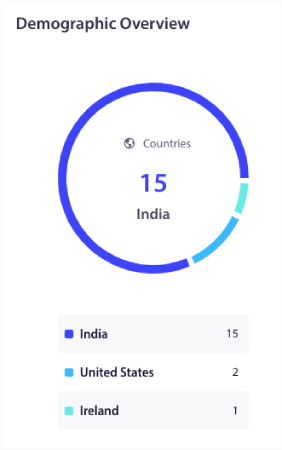
يمكنك استخدام قائمة البلدان هذه لإنشاء شرائح جغرافية. التجزئة الجغرافية تسمح لك بـ:
- إرسال حملات الدفع في المناطق الزمنية للمشتركين لديك لتحسين التفاعل
- تشغيل عروض محلية ذات صلة فقط بشريحة العملاء تلك لتحقيق معدلات تحويل أعلى
- إنشاء حملات باللغات المحلية لزيادة معدلات النقر
أفضل ما في الأمر هو أنك لست بحاجة حتى إلى إنشاء شريحة في PushEngage. كلما أنشأت حملة جديدة، انتقل إلى علامة التبويب الجمهور وحدد البلدان التي تريد استهدافها ضمن الإرسال إلى جمهور مخصص.
لنفترض أنك تريد إرسال بث دفعي. انتقل إلى لوحة تحكم PushEngage وتوجه إلى الحملات » بث الدفعات وانقر على زر إنشاء بث دفعي جديد:
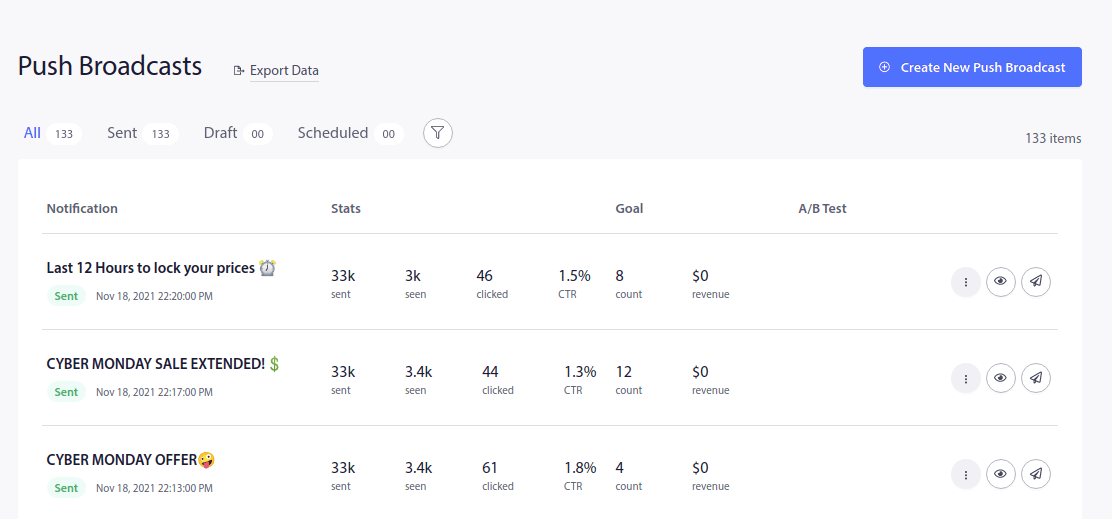
بعد ذلك، قم بإنشاء إشعار الدفع الخاص بك:
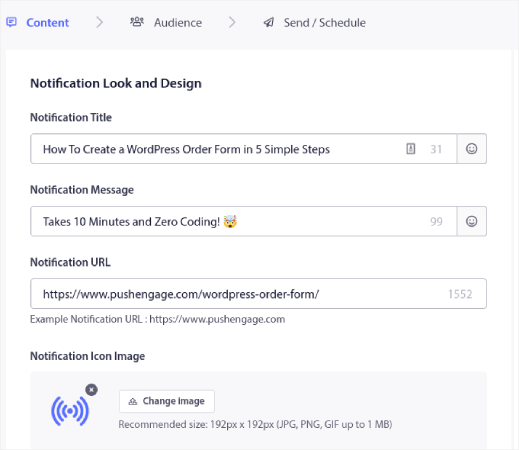
انتقل إلى علامة التبويب الجمهور وقم بالتمرير لأسفل إلى الإرسال إلى جمهور مخصص. أخيرًا، قم بتعيين قاعدة الاستهداف على البلد وحدد البلدان التي تريد استهدافها:
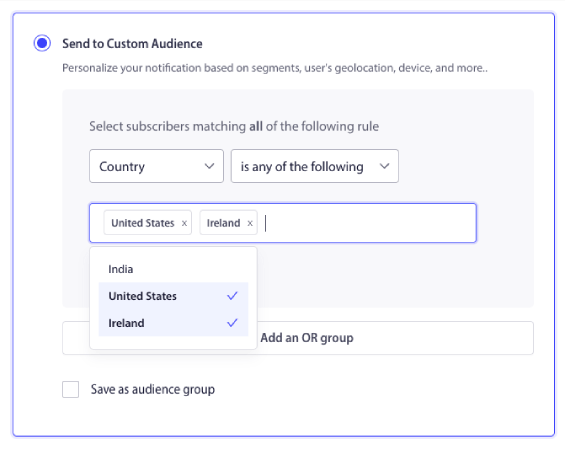
يسرد PushEngage فقط البلدان التي لديك فيها مشتركين. لذلك، من السهل جدًا إعادة استهداف المشتركين حسب الموقع الجغرافي. والآن، يمكنك إرسال أنواع مختلفة من الإشعارات بناءً على الموقع وحده!
إشعارات الأحداث
يمكنك إرسال إشعارات بناءً على إجراءات المستخدم المحددة أو المعالم، مثل الوصول إلى مستوى في برنامج الولاء. هذه حملات أكثر تقدمًا، ولكن يمكنك القيام بذلك باستخدام حلول مخصصة و واجهة برمجة تطبيقات الإشعارات. تشمل بعض حالات الاستخدام الشائعة الأخرى:
- تذكيرات الأحداث: قم بإعلام العملاء بالأحداث القادمة أو الندوات عبر الإنترنت أو المبيعات.
- تحديثات الأحداث: أرسل تحديثات في الوقت الفعلي أثناء الأحداث أو المؤتمرات.
تُستخدم إشعارات الأحداث بشكل شائع في سياقات مختلفة، مثل التقويمات الشخصية وأدوات جدولة الأعمال ومنصات الشبكات الاجتماعية وتطبيقات إدارة الأحداث. ولكن يمكن استخدامها أيضًا للترويج لحدث متكرر مثل تخفيضات أسبوعية.
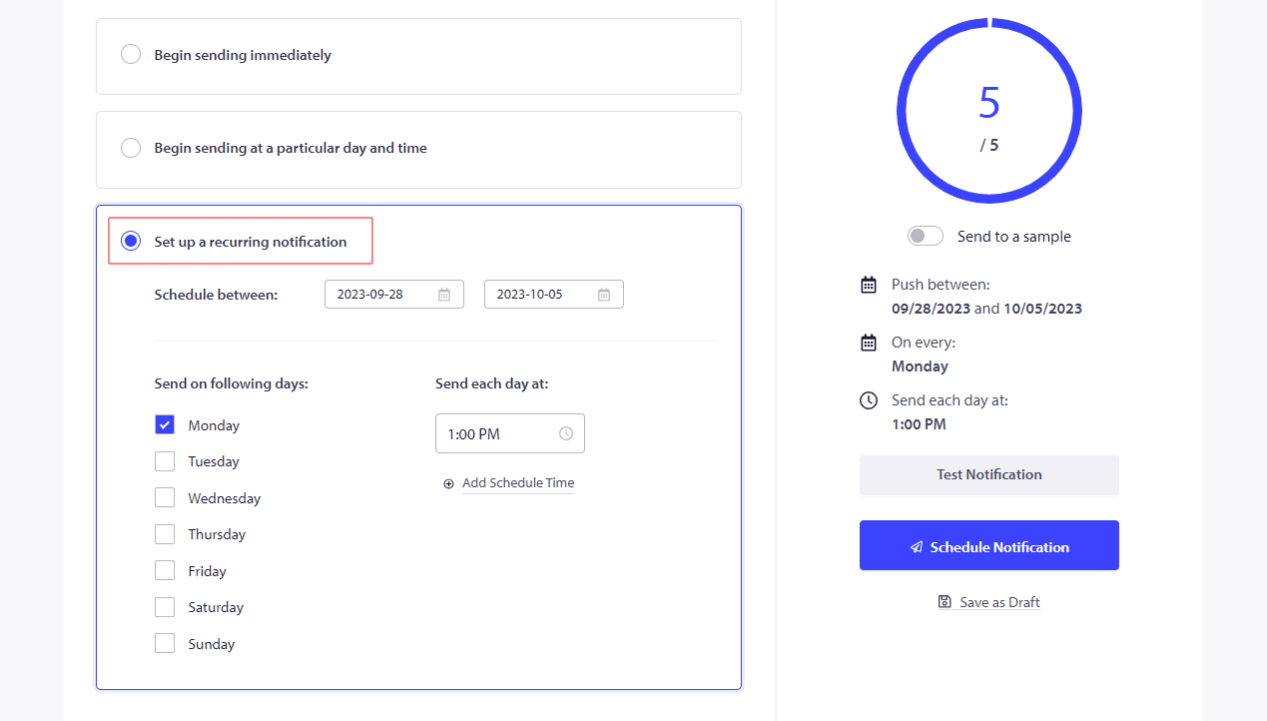
يمكنك جدولة إشعارات الدفع ليتم إرسالها على فترات زمنية ثابتة بالكامل تلقائيًا.
إشعارات سلة التسوق المهجورة
تخلي سلة التسوق في WooCommerce يحدث عندما يضيف عملاؤك المحتملون منتجاتك إلى السلة ولكنهم لا يشترونها لسبب ما. بمصطلحات مسار التجارة الإلكترونية، لقد بدأوا عملية الدفع ولكنهم لم يكملوها أبدًا.
يمكنك تذكير المستخدمين بالعناصر المتروكة في سلة التسوق الخاصة بهم وتشجيعهم على إكمال عملية الشراء.
بالطبع، يمكنك إنشاء أنواع مختلفة من الإشعارات لاستعادة سلال التسوق المهجورة. ولكن جميع إشعارات سلة التسوق المهجورة هي حملات مشغلة يتم إرسالها تلقائيًا. لذلك، ما عليك سوى إعدادها مرة واحدة. بعد ذلك، تستمر في استعادة المبيعات المفقودة إلى الأبد. إليك دليل سريع حول كيفية إعداد إشعارات التخلي عن سلة التسوق.
طلبات المراجعة والتعليقات
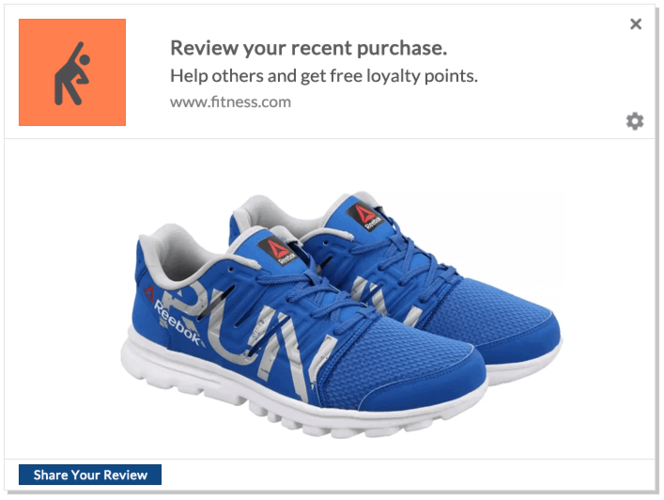
لا يمكنك الانتظار على أمل أن يترك عملاؤك مراجعة. الشيء الذكي الذي يجب فعله هو ببساطة طلب مراجعة.
ولكن بالطبع، قد يكون من المؤلم حقًا الذهاب وطلب التقييم يدويًا إذا كان لديك عدد كبير من العملاء الجدد كل يوم. هذا هو السبب بالضبط الذي يجعل حملة إشعارات الدفع لآراء المنتجات مفيدة جدًا. إنها مؤتمتة بالكامل وإذا قمت بذلك بشكل صحيح، فإن حملات آراء المنتجات تعمل حقًا:
نوصي باستخدام PushEngage لإرسال أنواع مختلفة من الإشعارات. PushEngage هو البرنامج رقم 1 لإشعارات الدفع عبر الويب في السوق وهو مصمم لمساعدة الشركات الصغيرة على النجاح.
من لوحة تحكم PushEngage الخاصة بك، توجه إلى الحملات » الحملات المشغلة وانقر على إنشاء حملة مشغلة جديدة:

من قائمة قوالب الحملات، انتقل وانقر على حملة مشغلة مخصصة:

امنح حملتك اسمًا يمكنك التعرف عليه. ثم، قم بإنشاء محتوى حملة إشعار الدفع الخاصة بك:
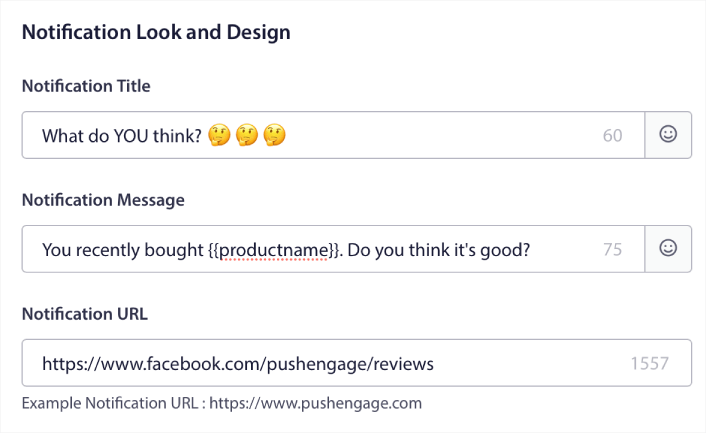
نظرًا لأنها حملة مشغلة، يمكنك إنشاء العديد من المتابعات كما تريد حتى تحصل على تقييم من عملائك.
بعد ذلك، انتقل إلى علامة التبويب إعدادات المشغل لإعداد مشغلات الحملة:
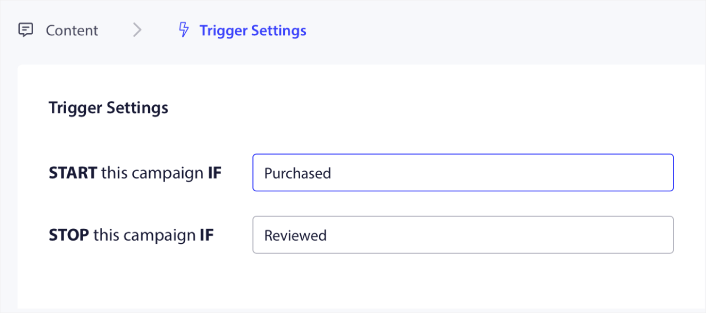
قم بتعيين الحملة لتبدأ عندما يشتري العميل منتجك وتتوقف عندما يترك مراجعة. ستحتاج إلى استخدام واجهة برمجة تطبيقات PushEngage لتحديد أحداث الشراء و المراجعة.
وأخيرًا، قم بدمج الرمز مع موقعك الإلكتروني. يمكنك الحصول على الرمز الخاص بـ حدث بدء الحملة، و حدث إيقاف الحملة، و تتبع الأهداف بالنقر فوق الزر رمز التكامل.
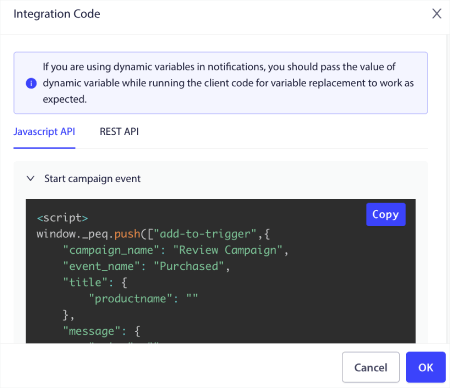
هذا كل شيء! في كل مرة يشتري فيها شخص ما منتجًا على موقعك الإلكتروني، سيتم تشغيل حملة آلية تطلب تقييمات. يمكنك أيضًا استخدام طرق أخرى للحصول على المزيد من التقييمات. لكن إرسال الإشعارات هو مكان جيد للبدء.
إشعارات الإحالة
تلعب الإشعارات الفورية دورًا محوريًا في التسويق بالعمولة أيضًا. فهي لا تقتصر على زيادة المبيعات والترويج للمنتجات فحسب؛ بل تساعد أيضًا في بناء الثقة وتعزيز سمعة العلامة التجارية. شجع العملاء على إحالة الأصدقاء وكافئهم على الإحالات الناجحة.
عندما تدمج الإشعارات الفورية في استراتيجية التسويق بالعمولة الخاصة بك، فإنك تفتح طريقة ديناميكية للتواصل مع جمهورك وزيادة تحويلاتك.
إليك تفصيل للاعتبارات الرئيسية:
- عزز الاحتفاظ بالعملاء بإشعارات دفع مستهدفة: إشعارات الدفع هي تذكرة ذهبية للاحتفاظ بالعملاء. تتيح لك هذه الرسائل الموجزة التحدث مباشرة إلى جمهورك. أبقهم على اطلاع دائم بالمنتجات الجديدة والعروض الترويجية والصفقات الحصرية. من خلال القيام بذلك، ستشجع على تكرار عمليات الشراء وتنمية ولاء العلامة التجارية.
- أبلغ وأغري برسائل في الوقت المناسب: إشعارات الدفع هي سلاحك السري لإبلاغ العملاء بسرعة بالمنتجات الجديدة والتحديثات والعروض محدودة الوقت. صمم رسائل تلفت انتباههم وتشعرهم بأنها شخصية. هذا لن يجذب اهتمامهم فحسب، بل سيدفعهم أيضًا إلى اتخاذ إجراء، مما يؤدي إلى زيادة مبيعات العمولة.
- استفد من منصات إشعارات الدفع سهلة الاستخدام: أنت محظوظ بوجود مجموعة من منصات إشعارات الدفع سهلة الاستخدام مثل PushEngage. تم تصميم هذه المنصات لتجعل حياتك أسهل. تسمح لك بجمع العملاء المحتملين، وتقسيم جمهورك، وإرسال إشعارات الدفع بسهولة. النتيجة؟ تصبح حملات التسويق بالعمولة الخاصة بك أقوى من أي وقت مضى.
- استغل سحر إشعارات المتصفح: لا تقلل من قوة إشعارات المتصفح - تلك الرسائل الصغيرة التي تظهر في متصفح المستخدم. إنها اتصال مباشر وفي الوقت الفعلي بجمهورك. استخدمها لتوجيه جمهورك نحو عروض العمولة الخاصة بك وزيادة معدلات التحويل الخاصة بك.
من خلال دمج إشعارات الدفع في استراتيجية التسويق بالعمولة الخاصة بك، ستعزز تفاعل العملاء، وترفع معدلات النقر إلى الظهور، وفي النهاية ستمنح مبيعات العمولة الخاصة بك دفعة كبيرة.
لقد كتبنا دليلًا كاملاً حول إشعارات التسويق بالعمولة الفورية. تحقق من ذلك بعد ذلك!
الإشعارات المخصصة
تستخدم الإشعارات المخصصة بيانات العملاء لإرسال توصيات مخصصة وعروض شخصية وتهاني عيد ميلاد.
سمات إشعارات الدفع هي متغيرات تجلب تفاصيل المشترك تلقائيًا وتخصص رسائل الإشعارات الخاصة بك. يمكنك تخصيص حملة التنقيط الخاصة بك عن طريق إضافة بيانات مثل:
- الاسم الأول للمستخدم
- هواياتهم
- موقعهم
والمزيد، اعتمادًا على نوع الحملة التي تديرها.
حتى بدون استخدام سمات الإشعارات الفورية، يتيح لك PushEngage إرسال أنواع مختلفة من الإشعارات باستخدام اسم البلد والمدينة لمشتركيك. إذا أردت، يمكنك إرسال سلسلة إشعارات فورية متتابعة لجميع مشتركيك أو لشريحة مخصصة. يمكنك حتى تشغيل حملات متتابعة مع تجزئة جغرافية في PushEngage.
ولكن إذا كنت ترغب في الارتقاء بالأمر إلى مستوى أعلى، يمكنك تقديم مستوى مختلف تمامًا من التخصيص باستخدام واجهة برمجة تطبيقات سمات PushEngage.
إشعارات الاستعجال والندرة
تعد حملات انخفاض الأسعار و حملات تنبيه المخزون من أقوى الحملات لدى جميع عملائنا.
مثل هذا:
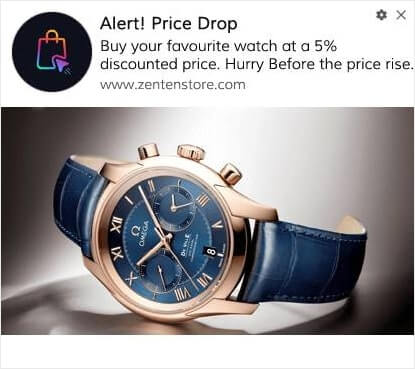
إذا كنت جديدًا في حملات إشعارات التجارة الإلكترونية الفورية، فيجب عليك بالتأكيد الاطلاع على هذا المقال حول كيفية إنشاء تنبيهات انخفاض الأسعار.
إنه منقذ حقيقي للحياة.
وبينما أنت في ذلك، يجب عليك أيضًا الاطلاع على كيفية إنشاء تنبيه للمخزون لإعلام عملائك بأن منتجهم المفضل سينفد قريبًا.
إشعارات الإثبات الاجتماعي
يمكن أن يؤدي إضافة الدليل الاجتماعي إلى رسائلك إلى تحقيق المزيد من المبيعات.
أحد الاستخدامات الرائعة هو جعل الأشخاص يشترون المنتجات الموجودة في قائمة أمنياتهم.
ألقِ نظرة على هذا المثال هنا:
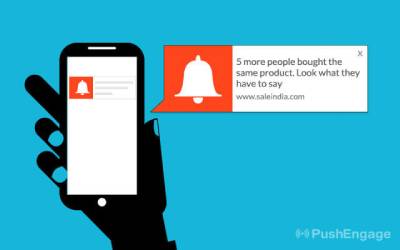
يمكن لهذا الإشعار البسيط مرة أخرى أن يثير الخوف من فوات الفرصة (FOMO) لدى عملائك ويدفعهم لشراء منتج يرغبون فيه بالفعل. اعرض إشعارات تعرض عمليات الشراء الأخيرة أو التقييمات الإيجابية لبناء الثقة. أو، يمكنك البدء بالاطلاع على أفضل إضافات الإثبات الاجتماعي.
إشعارات المحتوى
أبلغ المشتركين بالمقالات الجديدة أو مقاطع الفيديو أو المحتوى الآخر. بالنسبة للعديد من مواقع الأخبار والناشرين، تعد عائدات الإعلانات من حركة المرور المصدر الأساسي للدخل. إذا كان هذا هو حالك، فإن إعادة تنشيط المشتركين الخاملين يمكن أن يولد الكثير من الإيرادات الإضافية في وقت قصير جدًا.
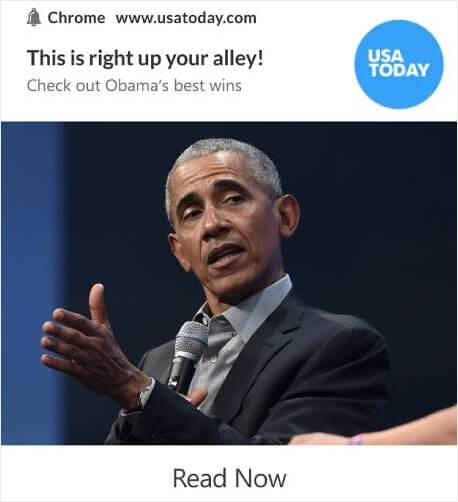
ويمكنك القيام بذلك باستخدام أنواع مختلفة من الإشعارات.
نصيحة احترافية: لا تُعدّ الاعتماد على مصدر دخل واحد من المحتوى فكرة جيدة أبدًا. إذا كنت تعتمد بشكل كبير على عائدات الإعلانات، فراجع هذه المقالة حول بدائل Google AdSense التي يمكن أن تدر عليك المزيد من المال.
إشعارات البيع المتقاطع والبيع الإضافي
يُعدّ البيع المتقاطع أحد أسهل الطرق لزيادة قيمة الطلب لأي عميل. البيع المتقاطع هو عندما تطلب من العميل شراء منتج ذي صلة بالمنتج الذي يشتريه بالفعل.
عادةً، يكون المنتج الأصلي والمنتج المقترح ضمن نفس النطاق السعري.
بالطبع، يمكنك تشغيل حملة بيع متقاطع كما تفعل Gadgetsdeal:
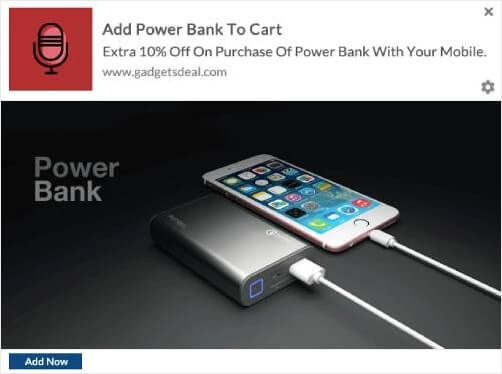
في كل مرة يضيف فيها شخص ما هاتفًا محمولاً إلى سلته، تقوم Gadgetsdeal ببيع بنك طاقة بشكل متقاطع مع خصم إضافي. إنها صفقة رائعة للعميل وتحقق Gadgetsdeal المزيد من المال على الفور من خلال إشعار واحد!
عند استخدام الإشعارات للتسويق، من الضروري مراعاة تفضيلات المستخدم والتوقيت والملاءمة لتجنب إرسال رسائل غير مرغوب فيها أو إزعاج جمهورك. يمكن لاستراتيجية الإشعارات المدروسة جيدًا تعزيز تفاعل العملاء ودفع عجلة نمو الأعمال.
اختيار خدمة لإرسال الإشعارات
قبل إنشاء حملة إشعارات فورية، تحتاج إلى اختيار خدمة إشعارات فورية. خدمة الإشعارات الفورية هي برنامج يتيح لك إنشاء حملات فورية دون أي ترميز.
نوصي باستخدام PushEngage لإرسال أنواع مختلفة من الإشعارات.

PushEngage هو المكون الإضافي رقم 1 لإشعارات الدفع في العالم.
تساعدك إشعارات الدفع على زيادة حركة مرور موقعك الإلكتروني ومشاركتك تلقائيًا. وإذا كنت تدير متجرًا عبر الإنترنت، فإن PushEngage يساعدك أيضًا على زيادة مبيعاتك من خلال مساعدتك في إنشاء إشعارات دفع آلية للتجارة الإلكترونية.
يمكنك البدء مجانًا، ولكن إذا كنت جادًا بشأن تنمية عملك، فيجب عليك شراء خطة مدفوعة. أيضًا، قبل شراء أي خدمة إشعارات دفع، يجب عليك الاطلاع على هذا الدليل حول تكاليف إشعارات الدفع.
إليك نظرة سريعة على ما تحصل عليه مع PushEngage:
- حملات آلية عالية التحويل
- خيارات استهداف وجدولة حملات متعددة
- تتبع الأهداف وتحليلات متقدمة
- اختبار A/B ذكي
- مدير نجاح مخصص
سترى أن PushEngage هو الخيار الأفضل بلا منازع إذا كنت ترغب في زيادة حركة المرور والمشاركة والمبيعات لعملك. وإذا كانت ميزانيتك محدودة، يمكنك دائمًا أن تكون مبدعًا بعض الشيء مع إشعارات الدفع الخاصة بك.
ملاحظة: إذا كنت تدير موقع WordPress، فيجب عليك تثبيت وتفعيل المكون الإضافي لـ PushEngage لـ WordPress.
هيا بنا!
الخطوة رقم 1: إنشاء حساب PushEngage مجاني
توجه إلى PushEngage وانقر على ابدأ مجانًا الآن:
يمكنك البدء بالخطة المجانية. ولكن إذا كنت تتطلع إلى إرسال إشعارات فورية مستهدفة، فيجب عليك اختيار خطة النمو (Growth Plan). بمجرد معرفة الخطة التي تريدها، انقر على ابدأ لإنشاء حساب PushEngage الخاص بك.
الخطوة رقم 2: التسجيل في PushEngage
الآن، حان وقت إنشاء حساب PushEngage الخاص بك. ابدأ بالتسجيل باستخدام عنوان بريد إلكتروني أو معرف Gmail:

ثم، املأ تفاصيل حسابك:

وأضف معلومات بطاقتك الائتمانية لشراء خطتك:

إذا اخترت الحساب المجاني، فلن يتم خصم أي أموال من بطاقتك الائتمانية حتى تختار ترقية خطتك. والآن، أنت جاهز للوصول إلى لوحة تحكم PushEngage الخاصة بك. فقط انقر على إكمال التسجيل والحصول على وصول فوري.
إذا كنت قد استخدمت OneSignal أو PushAlert من قبل، فسترى أن PushEngage يمنحك تجربة أنظف بكثير من لوحة التحكم. لوحة تحكم OneSignal ليست مخصصة للحملات المتقدمة. لهذا الغرض، ستحتاج إلى واجهة برمجة التطبيقات (API) أكثر من إضافة OneSignal.
الخطوة رقم 3: تثبيت إضافة ووردبريس لإرسال أنواع مختلفة من الإشعارات
ملاحظة: إذا كنت لا تدير موقع WordPress، فيجب عليك الاطلاع على أدلة التثبيت الخاصة بنا للبدء.
لقد انتهيت من إنشاء حسابك. لذا، توجه إلى لوحة تحكم PushEngage حيث يمكنك تتبع معدلات التفاعل مع الإشعارات الفورية واتبع معنا:

انقر على إعدادات الموقع » تفاصيل الموقع وانقر على الزر انقر هنا للحصول على تعليمات الإعداد:

انقر على علامة التبويب WordPress وانقر على الزر تثبيت المكون الإضافي لـ PushEngage لـ WordPress لتثبيت المكون الإضافي على موقعك.

الجزء الرائع هنا: عندما أنشأت حساب PushEngage الخاص بك، قمت بالفعل بمزامنة موقعك مع حساب PushEngage الخاص بك. لذا، انقر على رابط التثبيت في لوحة تحكم PushEngage لتثبيت إضافة PushEngage WordPress تلقائيًا على موقعك.
الخطوة رقم 4: ربط موقع WordPress الخاص بك بـ PushEngage
عند الانتهاء من تثبيت وتفعيل إضافة PushEngage لـ WordPress، سترى معالج الإعداد لـ PushEngage:

المعالج سهل الاستخدام للغاية. إذا كنت مستخدمًا جديدًا، فانقر على جديد؟ احصل على حسابك المجاني. وإذا كنت قد سجلت بالفعل، فانقر على ربط حسابك الحالي.
بعد ذلك، يمكنك تحديد موقعك من القائمة المنسدلة تحديد موقع ضمن ربط موقع مسجل إذا كنت قد سجلت موقعًا بالفعل أثناء التسجيل:

أو، يمكنك النقر على تسجيل موقع جديد لإضافة موقع جديد إذا كان لديك خطة تسعير مميزة أو أعلى. في الخطوة التالية، سيطلب منك معالج الإعداد تثبيت إضافات WordPress الضرورية الأخرى.

إذا اتبعت كل خطوة بشكل صحيح، فسترى رسالة النجاح هذه من المعالج:

أنت الآن جاهز لإنشاء الحملات ونوافذ المنبثقة للإشعارات الفورية.
صياغة المحتوى لأنواع مختلفة من الإشعارات
إليك سر صغير لا يريد كتاب المحتوى أن يخبروك به...
الكتابة الإعلانية مدفوعة في الغالب بأنماط قياسية. ما يبدو إبداعيًا من الخارج هو في الواقع مجرد نمط معروف جيدًا. والحصول على محتوى مقنع يمنحك المزيد من الزيارات والمشاركة والمبيعات بشكل متكرر.
دعنا نلقي نظرة على الأجزاء المختلفة للمحتوى للحملات الأكثر نجاحًا.
صياغة رسائل جذابة لأنواع مختلفة من الإشعارات
نتفليكس هي ملكة المحتوى الذي يدفعك للمشاهدة المتواصلة. وإشعاراتها الفورية ملحمية.
ولكن كيف يفعلون ذلك؟
ترسل نتفليكس إشعارات دفع مخصصة بنفس القدر الذي ترسل به توصيات المحتوى المخصصة لك:
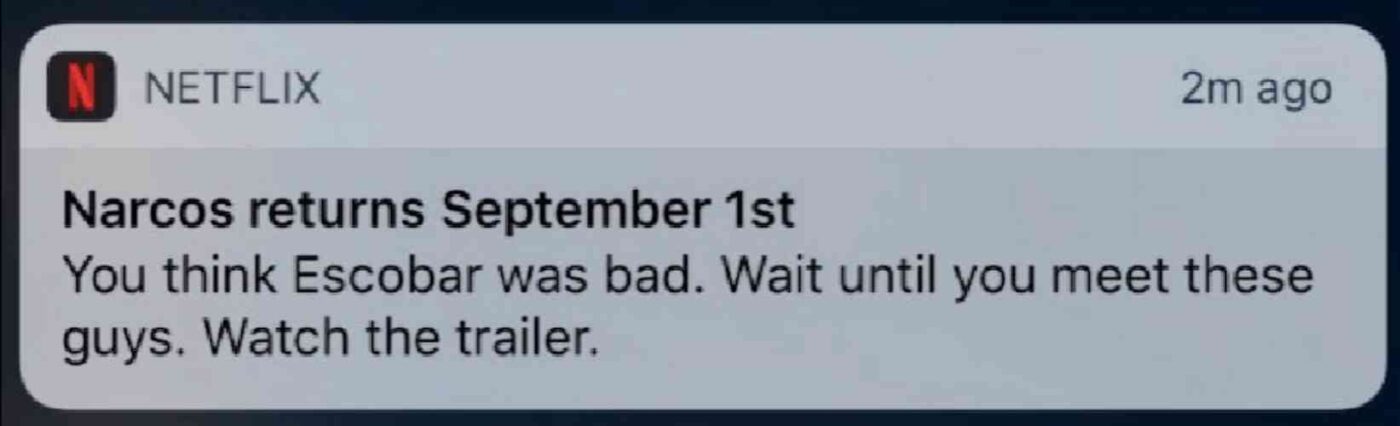
أي من محبي ناركوس يعرف ما تعنيه تلك الإشعارات. النسخ مثل هذا يثير حماسهم على الفور لأن النسخ يعتمد على قاعدة جماهيرية موجودة بالفعل على دراية بقصة ناركوس.
إذًا، ما هو الدرس الرئيسي هنا؟
توصيات مخصصة + نص مدفوع بالقصة = تفاعل عالٍ.
ولا يهم إذا لم يكن لديك قاعدة بيانات حالية من المعجبين المتحمسين. هذه الطريقة تعمل أيضًا مع الشركات الصغيرة التي لديها قائمة صغيرة من المشتركين. تحقق من هذه أمثلة على نسخ إشعارات الدفع للحصول على المزيد من الإلهام.
الاستفادة من التخصيص
تجعل الإشعارات الفورية المخصصة المشتركين يشعرون بأنها صُممت خصيصًا لهم. وأفضل ما في الأمر؟ يحصل عملاؤنا على معدلات تحويل تبلغ حوالي 8٪ للحملات المخصصة.
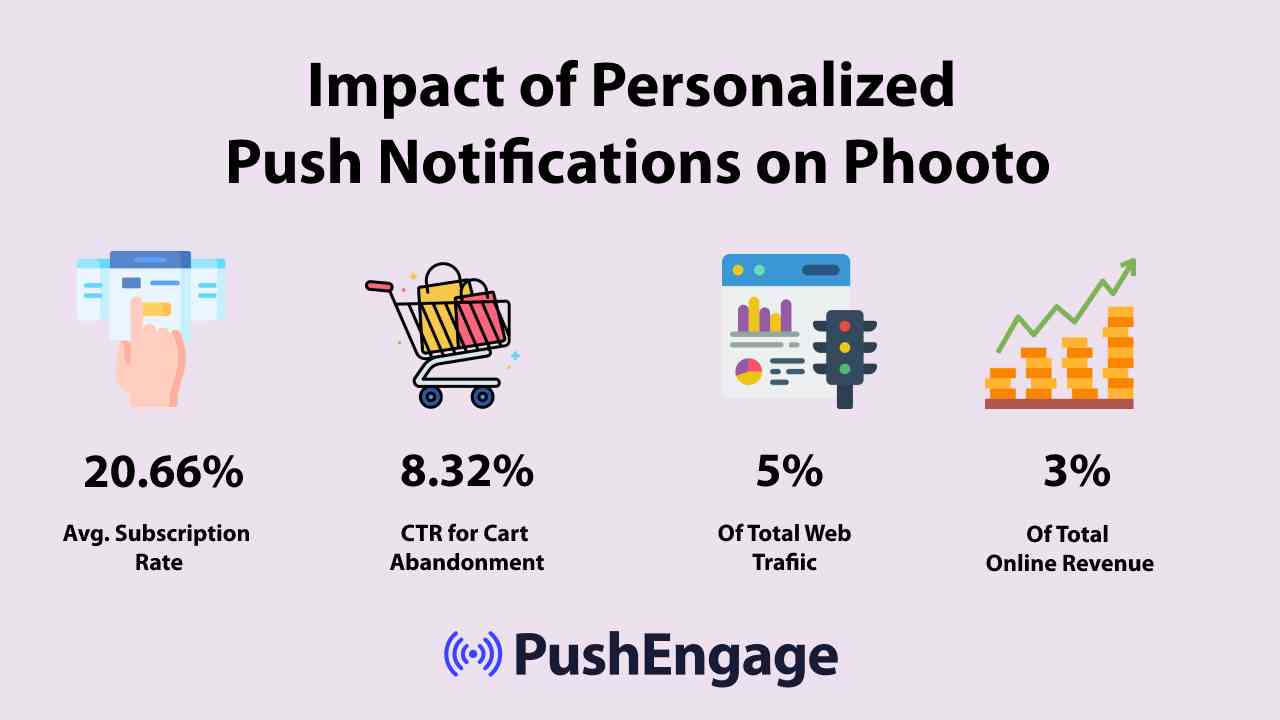
من الواضح أن إشعارات الدفع المخصصة يمكن أن تغير طريقة عملك عبر الإنترنت.
ولكن وفقًا لدراسة، تحدث 70٪ من تجارب التخصيص على موقع التجارة الإلكترونية فقط عندما يسجل المستخدم الدخول إلى الحساب. ولكن من الناحية المثالية، سترغب في تقديم تجربة مخصصة حتى عندما لا يكونون مسجلين الدخول.
- حملات التخلي عن التصفح
- تنبيهات المخزون
- تنبيهات انخفاض الأسعار
- التخصيص حسب الموقع
- حملات التخلي عن عربة التسوق
- حملات مراجعة المنتجات
- تذكيرات وتحديثات الأحداث المباشرة
تساعدك الإشعارات الفورية أيضًا في الوصول إلى عملائك كلما كانوا متصلين بالإنترنت، بغض النظر عما إذا كانوا على موقعك أم لا.
استخدام سمات محتوى مختلفة لأنواع مختلفة من الإشعارات
تعد سمات المحتوى طريقة رائعة لجعل الأشخاص يشتركون في إشعاراتك الفورية. يمكنك استخدام مناسبات مختلفة مثل الجمعة السوداء كسمات للمحتوى:
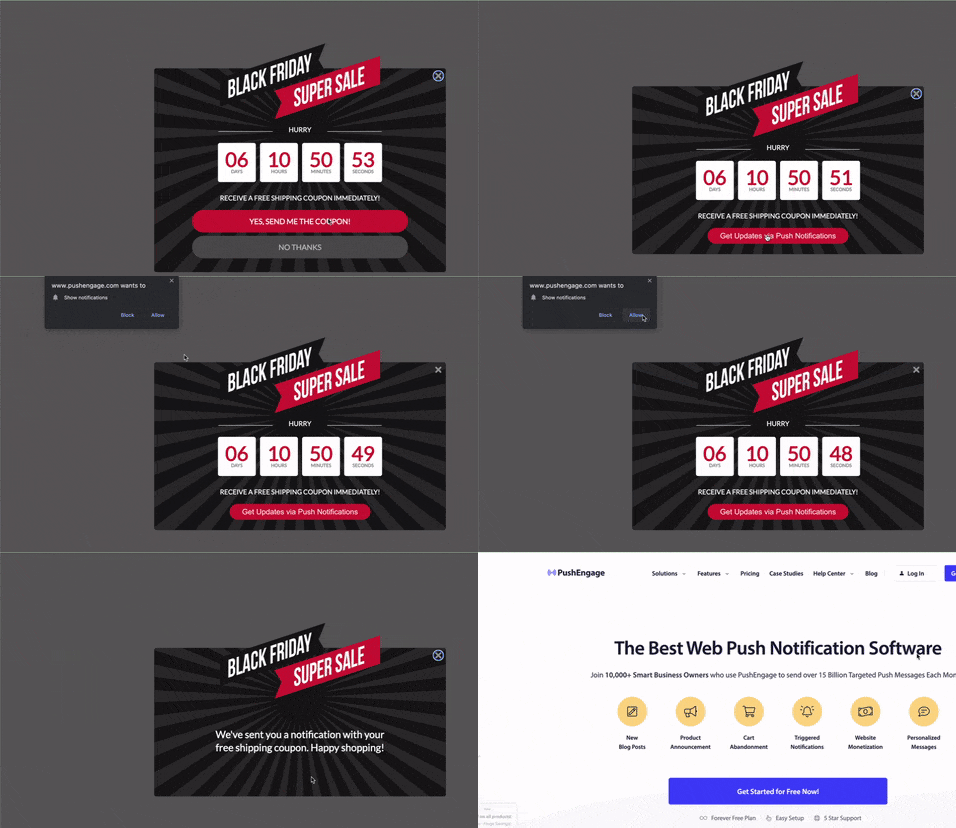
يمكنك أيضًا استخدام التجزئة المستندة إلى المناسبات لإرسال أنواع مختلفة من حملات الدفع المستهدفة. والأفضل من ذلك، يمكنك استخدام هذه الشرائح لإنشاء أدوات اشتراك على موقعك:

تسمح لك أداة إدارة الاشتراكات لزوارك باختيار نوع الإشعارات الفورية التي يرغبون في تلقيها منك.

ويمكنك حتى إنشاء نوافذ منبثقة للإشعارات الفورية تقوم تلقائيًا بتجزئة المشتركين لديك عند الاشتراك.
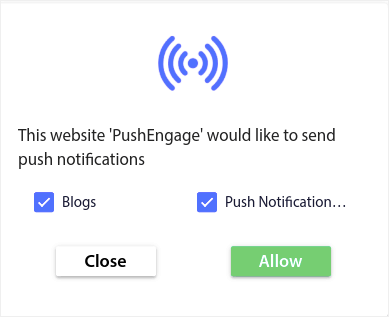
تسمح لك سمات المحتوى بإرسال محتوى ذي صلة فقط إلى المشتركين لديك. سيساعدك هذا على زيادة معدلات اشتراكك وحتى معدلات تفاعلك.
نصيحة احترافية: تذكر تنويع سمات المحتوى الخاصة بك. يمكنك إنشاء خيارات متعددة للاشتراك في الإشعارات الفورية لاستهداف أنواع مختلفة من المستخدمين. يعد إنشاء خيارات مخصصة متعددة طريقة رائعة لزيادة مشتركين الإشعارات الفورية من المحتوى الحالي الخاص بك.
بناء استراتيجية اشتراك للحصول على الموافقات
يُعدّ المحتوى المخصص أحد أسهل الطرق للاستفادة القصوى من أنواع مختلفة من الإشعارات. ولكن هذا ليس كل ما يتطلبه الأمر. ستحتاج أيضًا إلى استراتيجية واضحة لمواصلة تنمية قائمة المشتركين لديك. دعنا نلقي نظرة فاحصة على بعض الأجزاء الأكثر أهمية في استراتيجية الاشتراك.
تنفيذ دعوة واضحة لاتخاذ إجراء
يعد زر الدعوة لاتخاذ إجراء أبسط طريقة لجعل زوار موقعك يشتركون. بشكل افتراضي، تطلب نوافذ الإشعارات الفورية المنبثقة من زوارك الاشتراك. ولكن يمكنك تغيير النص إلى أي شيء تريده.
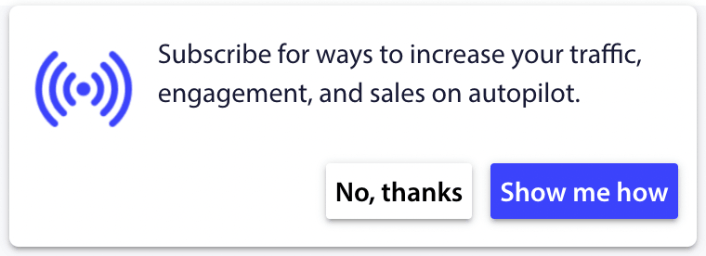
والأكثر من ذلك هو أنه يمكنك تخصيص مظهره بما في ذلك ألوان علامتك التجارية.
نصيحة احترافية: يمكنك استخدام أزرار الإجراءات في إشعاراتك الفورية للحصول على المزيد من النقرات.
توقيت وتكرار الإشعارات
هناك شيء يسمى الكثير جدًا من الإشعارات الفورية.
يعتمد عدد الإشعارات الفورية التي يجب عليك إرسالها على مجال عملك. ومع ذلك، فإن أفضل ما يمكنك فعله هو إرسال إشعارين لعملائك كحد أقصى في اليوم. ولا يزيد عن 5 في الأسبوع.
متوسط إشعار واحد يوميًا يعمل بشكل أفضل.
ما لم يكن لديك شيء مهم حقًا لإخبار مشتركيك به، بالطبع:
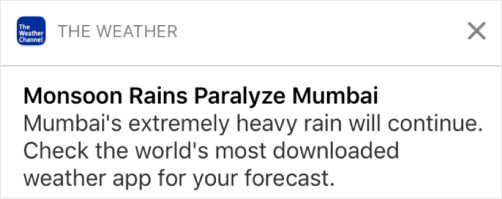
يمكن أن تبدو عدوانيًا للغاية وتزعج المشتركين لديك. هذه طريقة رائعة لخسارة مشتركي الإشعارات الفورية. لكن سيتعين عليك التواصل مع عملائك. وتحتاج إلى إرسال إشعارات ترويجية ومعاملات لهم.
تحقق من هذه المقالة حول عدد الإشعارات الفورية التي يجب عليك إرسالها للحصول على المزيد من النصائح.
يمكنك أيضًا جدولة إشعاراتك الفورية بطرق مختلفة.

من السهل جدًا جدولة الإشعارات الفورية لإرسالها:
- فورًا
- في تاريخ ووقت معينين
- كحدث متكرر
معرفة عدد الإشعارات التي يجب إرسالها ومتى يتم إرسال الإشعارات الفورية سيقلل من معدلات إلغاء الاشتراك لديك بشكل كبير.
نصيحة احترافية: إذا وصلت إلى نقطة لا يتفاعل فيها مشتركوك عبر الإشعارات الفورية معك، يمكنك إطلاق حملة إعادة استهداف لإعادة التفاعل معهم. إذا لم ينجح ذلك، يمكنك دائمًا تنظيف قائمة المشتركين لديك.
اختبار A/B لأنواع مختلفة من الإشعارات
يُعدّ اختبار الانقسام طريقة جيدة للاختيار بين أنواع مختلفة من الإشعارات. إنها طريقة رائعة لفهم ما ينجح معك. ولكن ما الذي يمكنك اختباره في إشعار دفع؟
مقاييس الأداء الأكثر شيوعًا للإشعارات الفورية هي:
- معدل النقر: معدل النقر على إشعار فوري هو عدد المرات التي شاهد فيها المشتركون إشعارك الفوري ثم نقروا عليه.
- معدل المشاهدة: معدل مشاهدة الإشعار الفوري هو عدد المرات التي تلقى فيها المشترك إشعارك الفوري وشاهده قبل انتهاء صلاحيته.
- تحويلات الهدف: يمكنك تعيين أهداف لحملتك وإعداد تتبع الأهداف لحملاتك. تحويلات الهدف هي مقياس لعدد المرات التي حققت فيها هدفك.
لزيادة معدلات المشاهدة لديك، تريد استخدام صورة كبيرة في إشعاراتك الفورية. استخدام الصور في إشعاراتك يجعله جذابًا على الفور.
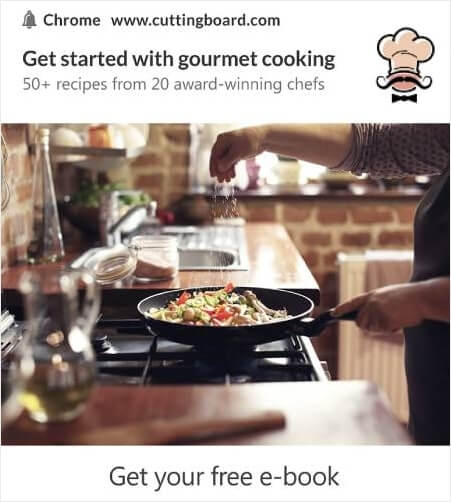
يمكنك أيضًا التجربة مع الكلمات القوية في عنوان إشعارك الفوري.
لذلك، يمكنك اختبار A/B للإشعارات بصور وبدون صور. يمكنك أيضًا اختبار معدلات المشاهدة عن طريق اختبار الإشعارات الفورية مع وبدون كلمات قوية في العنوان.
إذا كنت تتطلع إلى تحسين معدل النقر لديك، فأنت تريد التركيز على الرسالة الأساسية والعمل على جعلها ذات صلة فائقة. في الغالب، يتعلق هذا بأحد أمرين:
ولا يوجد شيء لاختبار A/B في هذا المجال. ولكن يمكنك اختبار معدلات النقر الخاصة بك باستخدام أزرار الدعوة إلى اتخاذ إجراء (CTA) في إشعاراتك الفورية. جرب اختبار A/B للإشعارات الفورية مع زر دعوة واحد أو بدون أزرار مقابل زرين للدعوة.
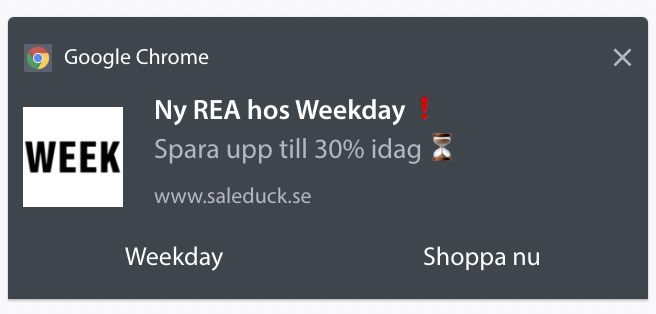
إذا لم تكن متأكدًا من كيفية إنشاء أزرار دعوة متعددة، فتحقق من هذه المقالة حول كيفية إضافة أزرار إلى إشعاراتك الفورية.
مع تحويلات الأهداف، فإن الأمر يتعلق في الغالب بإعداد إشعارات دفع التجارة الإلكترونية ذات الصلة. لذا، مرة أخرى، لا يوجد الكثير لاختبار الانقسام هنا. ومع ذلك، إذا كان بإمكانك تحسين إشعاراتك الفورية للحصول على نقرات أفضل لعرض جيد حقًا، فستزداد تحويلات أهدافك.
تحسين النتائج على أنواع مختلفة من الإشعارات
بمرور الوقت، يمكنك تحسين معدلات الاشتراك للنوافذ المنبثقة للإشعارات الفورية الخاصة بك. مع أي خدمة إشعارات فورية جيدة، تحصل على تحليلات اشتراك مفصلة.
كل مجموعة أدوات تحويل تحت الشمس تأتي مع تحليلات النوافذ المنبثقة الخاصة بها. لذا، لماذا يجب أن تكون النوافذ المنبثقة للإشعارات الفورية مختلفة؟
إليك ما هو ملحمي...
يمكنك الحصول على تحليلات ليس فقط لحملات الإشعارات الفورية الخاصة بك ولكن أيضًا لخيارات الاشتراك الخاصة بك!
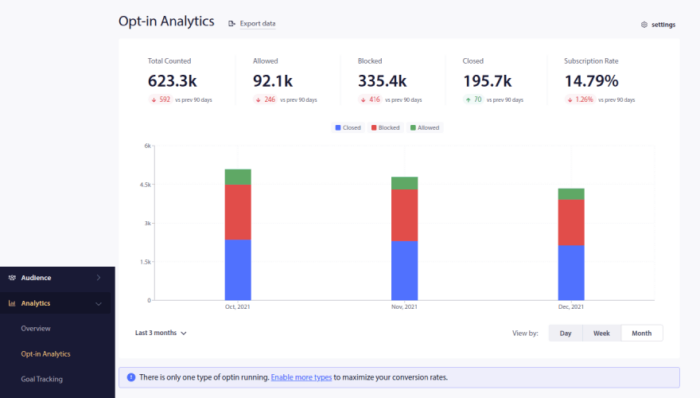
الاهتمام بتحليلات الاشتراك هو طريقة جيدة للحصول على مشتركين في إشعارات الدفع. في الوقت نفسه، نوصي أيضًا بالحصول على ملاحظات من المشتركين لديك حول حملات إشعارات الدفع الخاصة بك.
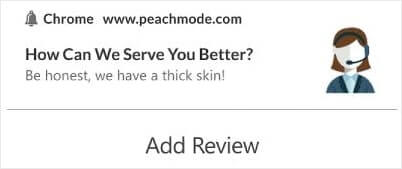
يمكنك إنشاء صفحة هبوط بسيطة مع نموذج لجمع المراجعات والملاحظات حول حملاتك.
مخاوف الخصوصية مع أنواع مختلفة من الإشعارات
وفقًا للائحة العامة لحماية البيانات، يجب عليك الحصول على موافقة صريحة قبل جمع أو معالجة أي معلومات شخصية لمقيم أو مواطن في الاتحاد الأوروبي.
الآن، إشعارات الدفع تشبه إلى حد كبير رسائل البريد الإلكتروني ولكنها مقيدة أكثر. يمكنك فقط إرسال إشعارات الدفع إلى المشتركين لديك. على عكس رسائل البريد الإلكتروني، لا يمكنك إرسال إشعار دفع واحد بشكل عشوائي لشخص غير مشترك.
حيث تلتقي اللائحة العامة لحماية البيانات ببرنامج إشعارات الدفع هو أنك سترسل أنواعًا مختلفة من الإشعارات. لذلك، ستقوم بجمع بيانات المستهلك.
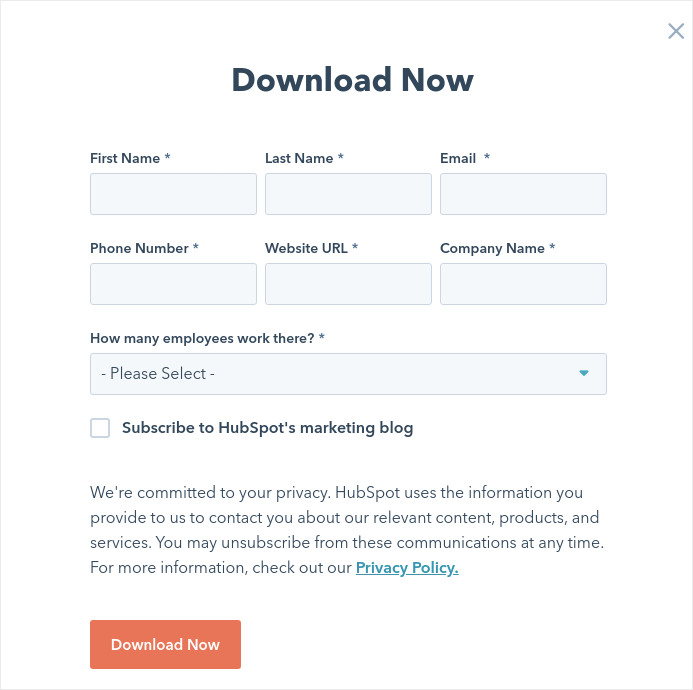
بالطبع، الأمر ليس مثل الاشتراك في البريد الإلكتروني. مع الاشتراك في البريد الإلكتروني، عليك التقاط عنوان البريد الإلكتروني، ولكن يمكنك التقاط الكثير من البيانات الإضافية. ألق نظرة على هذا من HubSpot:
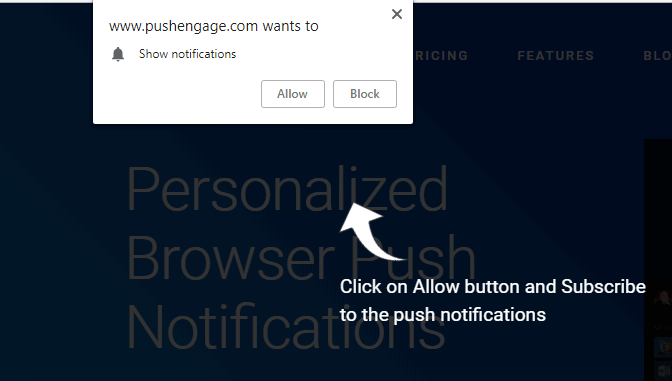
ولكن مع إشعارات الدفع، تلتقط مزيجًا من الجهاز وعنوان IP لإنشاء مفتاح فريد لجهاز العميل. هذا ما يحدث عندما يختار الأشخاص إشعارات الدفع الخاصة بك بالنقر فوق 'السماح':
بالإضافة إلى ذلك، يمكن لـ PushEngage تخزين الموقع الجغرافي لمشتركيك حتى تتمكن من إنشاء حملات إشعارات دفع مخصصة. وهذا يشمل البلد والولاية والمدينة وقت الاشتراك.
ولكن كما يمكنك أن تفهم على الأرجح، فإن هذا يعتمد بالكامل على الموافقة. عندما يختار شخص ما تلقي الإشعارات الفورية، فإنه يمنحك الموافقة على إرسال إشعارات تسويقية إليه. لذلك، فإن الإشعارات الفورية متوافقة بالفعل مع اللائحة العامة لحماية البيانات بحكم تعريفها لأنها تعمل وفقًا لنموذج الموافقة أولاً.
ماذا تفعل بعد إعداد أنواع مختلفة من الإشعارات
الآن بعد أن عرفت كيفية إرسال أنواع مختلفة من الإشعارات، فقد حان الوقت لبدء بناء حملاتك. ابدأ بالاطلاع على المزيد من الأمثلة حول كيفية استخدام إشعارات الدفع بفعالية:
- 21 أفضل أمثلة لرسائل الترحيب بالموقع يمكنك استخدامها
- كيفية إضافة مكون إضافي لإشعارات الويب لـ WordPress إلى موقعك
- 75 مثالاً ملحمياً لإشعارات الدفع يمكنك سرقتها الآن
- 15 مثالاً لنص إشعار فوري لإلهامك
- 7 أمثلة على نماذج اشتراك إشعارات الدفع ذات التحويل العالي (2022)
- 11 مثالاً إبداعياً لإشعارات الدفع يمكنك سرقتها الآن!
يجب عليك أيضًا الاطلاع على مقالتنا حول أفضل ممارسات إشعارات الدفع لتحقيق أقصى استفادة من حملات إشعارات الدفع الخاصة بك.
لكن لن يؤثر أي من هذا على علامتك التجارية ما لم تبدأ في إرسال إشعارات الدفع.
لذا، إذا لم تكن قد فعلت ذلك بالفعل، ابدأ مع PushEngage اليوم!


