
Siteniz için en iyi WordPress harita eklentisini mi arıyorsunuz?
Güçlü bir Google harita eklentisiyle harita temalarını değiştirebilir, birden çok konum ekleyebilir, özel işaretçiler oluşturabilir ve çok daha fazlasını yapabilirsiniz. Elbette, sitenize bir harita yerleştirmek için HTML kullanabilirsiniz. Ancak bunun kendi sınırlamaları vardır.
Yani asıl soru şu: Siteniz için doğru WordPress harita eklentisi hangisi? Ücretli bir eklentiye mi ihtiyacınız var? Ücretsiz eklentiler yeterince iyi mi? Ve pazar yerindeki yüzlerce WordPress eklentisi arasından birini nasıl seçersiniz?
Bu makalede, WordPress sitenize harita yerleştirmek için en iyi eklentileri sunacağız. Hatta en iyi seçimimizi de vereceğiz.
Kulağa hoş geliyor? Hadi dalalım.
En İyi WordPress Harita Eklentileri
Burada ücretsiz ve ücretli harita eklentileri ekledik, böylece işletmeniz için en uygun olanı seçebilirsiniz. Pazardaki en iyi WordPress harita eklentilerine bakalım. Bunlardan bazıları süper popüler eklentilerdir ve en iyi WordPress eklentileri listemizin bir parçasıdır.
#1. WPForms
WPForms en iyi WordPress form oluşturucu eklentisidir. WordPress için bir sürü form eklentisini test ettik ve hiçbiri WPForms'un işlevselliğine veya kullanım kolaylığına yaklaşamadı.
WPForms'ta şunları oluşturmak ve yayınlamak için sürükle ve bırak form oluşturucusunu kullanabilirsiniz:
- Anketler ve Yoklamalar
- Çok Adımlı Formlar
- Koşullu Mantık Formları
- Form Terk Etme Kampanyaları
- Form Açılış Sayfaları
- Form Şablonları
- Çevrimdışı Formlar
- Sohbet Formları
WPForms'un Pro sürümü, özel HTML kodu olmadan web sitesi iletişim formlarınıza harita eklemenizi sağlayan güçlü bir Coğrafi Konum Eklentisi ile birlikte gelir. Tek yapmanız gereken onu Google Places veya Mapbox'a bağlamak.
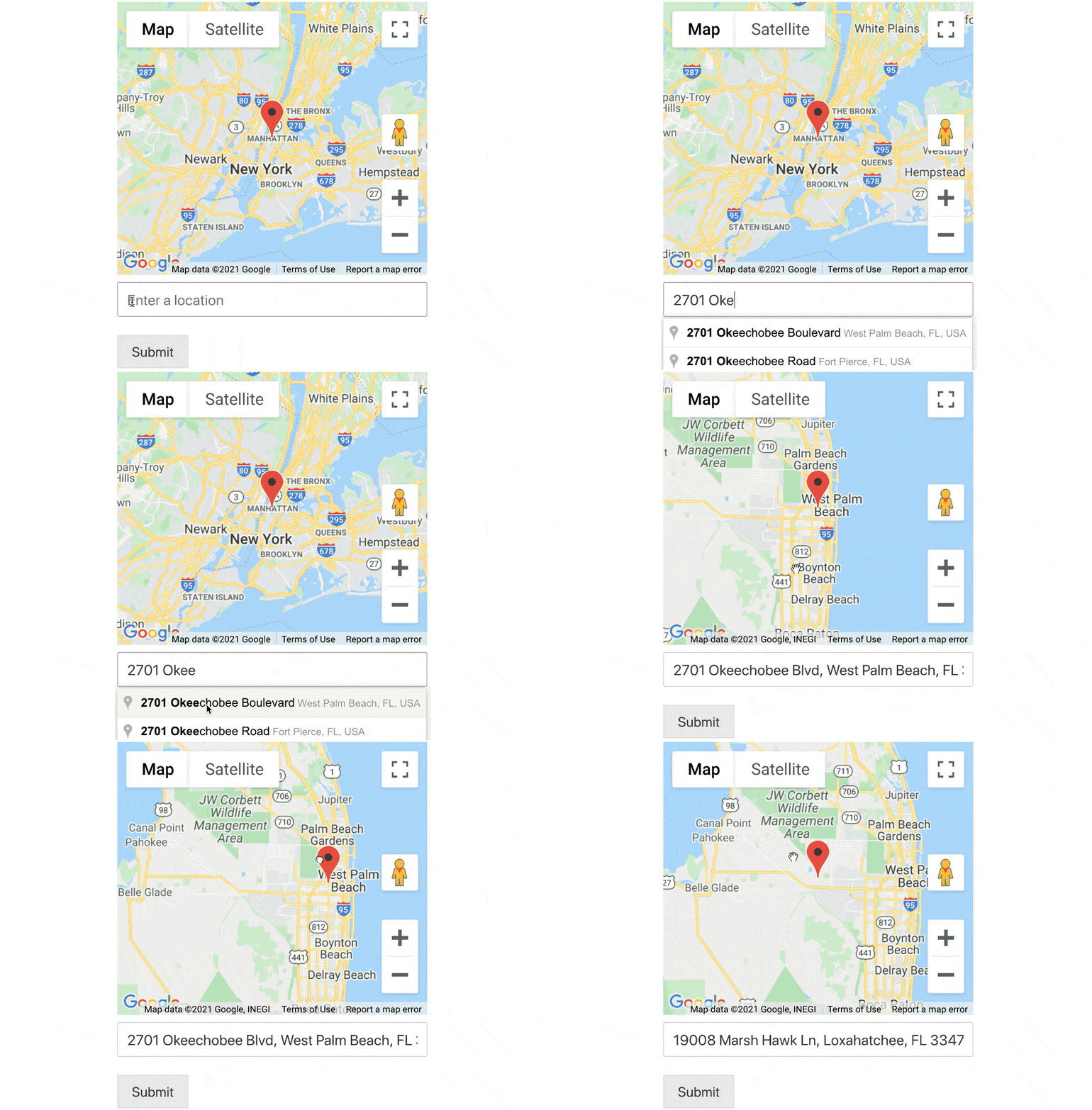
WordPress'te otomatik tamamlama adres formları bile oluşturabilirsiniz. WPForms ile bir WordPress formu oluşturun ve eklentiyi neden bu kadar çok sevdiğimizi hemen anlayacaksınız.
#2. SeedProd

SeedProd, dönüşüm sağlayan açılış sayfaları oluşturmak için en iyi WordPress eklentisidir.
E-ticaret sayfaları ve açılış sayfaları oluşturmak için seçeneklerle dolu, sürükle ve bırak açılış sayfası oluşturucusu elde edersiniz. WordPress web sitesi oluşturucularının aksine, gezinme menüleri, altbilgiler ve stiller dahil olmak üzere açılış sayfanızın her santimini özelleştirebilirsiniz. SeedProd ayrıca herhangi bir WordPress temasıyla çalışır ve mobil uyumlu açılış sayfaları oluşturur.
SeedPreed ile, anında yayınlayabileceğiniz yüksek dönüşümlü açılış sayfaları için önceden oluşturulmuş şablonlar elde edersiniz. Bu, şunlar için şablonları içerir:
- Satış sayfaları
- Yakında gelecek sayfalar
- 404 sayfaları
- Bakım sayfaları
- Sıkıştırma sayfaları
- Giriş sayfaları
- Teşekkür sayfaları
- Web semineri sayfaları
- Video sayfaları
Ve çok daha fazlası! SeedProd Google Haritalar Bloğunu kullanmanın en büyük avantajı, web sayfalarınızda haritaları görüntülemek için herhangi bir kısa kodu kopyalayıp yapıştırmanız gerekmemesidir. Google harita bloğunu sürükleyip bırakabilir, konumunuzu ekleyebilir, harita ayarlarını özelleştirebilir ve işiniz biter!
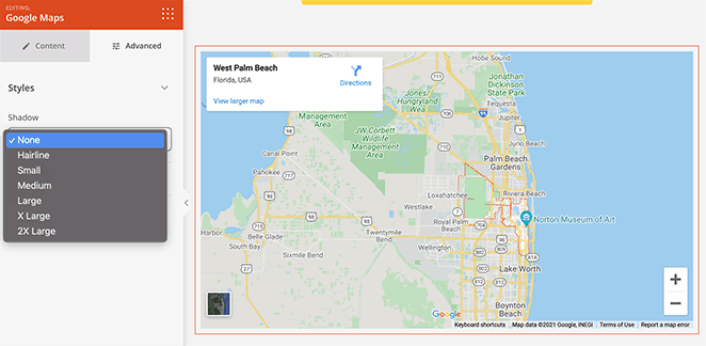
SeedProd kullanmayı seviyoruz ve hatta SeedProd eklentisinin ayrıntılı bir incelemesini yazdık. Devam edin ve göz atın!
#3. Maps Marker Pro

Maps Marker Pro, WordPress için premium bir Google haritaları eklentisidir. Birden çok konuma ve özel işaretçilere sahip bir harita oluşturmanıza olanak tanır. Google Haritalar sizin için değilse, Bing Mapbox ve OpenStreetMap'i de kullanabilirsiniz.
Eklenti, bazı süper güçlü özelliklerle birlikte gelir, bunlar:
- Birden çok harita türü
- Farklı coğrafi kodlama destek türleri
- Kolay harita navigasyonu için filtreler
- Her harita için animasyonlu işaretçi kümeleri
- GPX takibi
- Tarihe, ada ve mesafeye göre işaretçi sıralaması
- QR kodları aracılığıyla haritaları çevrimdışı paylaşma seçenekleri
Ayrıca WPML çevirisi ve diğer WordPress çeviri eklentileriyle uyumludur. Böylece birden çok dilde kolayca haritalar oluşturabilirsiniz.
#4. WP Go Maps

WP Go Maps, WordPress'e Google haritaları eklemek için popüler bir eklentidir. Web sitelerinizde özelleştirilmiş Google haritaları oluşturmak için birçok güçlü özelliğe sahip ücretsiz bir eklentidir.
Ücretsiz sürümüyle birden çok işaretçiye sahip bir Google haritası oluşturabilirsiniz. Ancak aşağıdaki gibi daha gelişmiş özelliklere sahip Pro sürümünü kullanmanızı öneririz:
- Arazi, yol haritası, hibrit ve uydu haritaları
- Harita rengini, yüksekliğini, genişliğini, hizalamasını ve yakınlaştırma düzeyini özelleştirme ayarları
- Mağaza bulucular ve yön haritaları için önceden oluşturulmuş harita şablonları
- Elementor sayfa oluşturucu için Harita bloğu
- Kendi harita temanızı ekleme seçenekleri
- Harita işaretçilerine açıklama, bağlantı ve resim ekleme ayarları
- Haritalarınızı sınıflandırmak için gelişmiş filtrelemeli Kategori ayarları
- Tüm harita işaretçileri için CSV içe ve dışa aktarma
Ancak, yalnızca sitenizin iletişim sayfasına bir harita yerleştirmek istiyorsanız, ücretsiz eklenti de sizin için harika bir seçenektir.
#5. Mapify Pro

Mapify Pro, müşterilerinden birine göre dünyanın "en seksi" harita yazılımıdır. Seksilik konusunda emin değiliz ama kesinlikle güçlü. Eklenti hem Lite hem de Pro sürümleriyle birlikte gelir.
MapifyLite ile resimler, videolar ve özel harita işaretçileri içeren standart haritalar oluşturabilirsiniz ve daha gelişmiş harita özellikleri için Pro sürümünü kullanmayı deneyebilirsiniz. İşte ücretli sürümden bekleyebileceklerinize hızlı bir bakış:
- Herhangi bir haritaya video ve fotoğraf galerisi ekleyin
- Birden çok konum için Küme özelliği
- Özelleştirilmiş harita araç ipuçlarını görüntüleyin
- Harita konumlarını sosyal medyada paylaşma seçeneği sunar
- Daha iyi etkileşim için haritanın altında bir konum dizini ekleyin
- Araç ipuçları ve açılır pencereler için stil seçeneği
- 100% duyarlı haritalar
MapifyPro, kendine özgü bir haritalama API'si kullanır. Başka bir deyişle, haritaları WordPress'te görüntülemek için Google Haritalar API'sine bağlı değildir. Sonuç olarak, Google'ın sık sık yaptığı politika değişikliklerinden etkilenmez ve sitenizdeki haritalar ne olursa olsun çalışmaya devam eder.
Hangisi En İyi WordPress Harita Eklentisi?
Tartışmasız, SeedProd en iyi WordPress Instagram eklentisidir. Fiyat, performans ve özellikler arasındaki dengeyi göz önünde bulundurursanız, gerçekten rakipsizdir. Hemen sitenize haritalar yerleştirmeye başlamanızı öneririz.
Bu yapıldıktan sonra, tek yapmanız gereken sitenize trafik çekmek.
Bunu yapmanın basit bir yolu anlık bildirimleri kullanmaya başlamaktır. Anlık bildirim göndermek, siteniz için tekrar eden trafik oluşturmanın harika bir yoludur. Eğer ilgilendiğiniz bir şey varsa, bu makalelere de göz atmalısınız:
- Anlık Bildirim Maliyeti: Gerçekten Ücretsiz mi? (Fiyat Analizi)
- WordPress Blogunuza Nasıl Daha Fazla Trafik Çekilir (9 Kolay Yol)
- Web Anlık Bildirim Opt-In Oranınızı Nasıl Artırırsınız (7 Yol)
- Sitenize Bir Web Bildirimleri WordPress Eklentisi Nasıl Eklenir
Anlık bildirimlerinizi göndermek için PushEngage'ı kullanmanızı öneririz. PushEngage, dünyadaki 1 numaralı anlık bildirim yazılımıdır. Bu nedenle, henüz yapmadıysanız, bugün PushEngage ile başlayın.


