
Her ziyaretçi web sitenize indiği anda sohbet etmeye hazır değildir. Aslında, bir sohbet penceresini çok erken göstermek genellikle daha düşük etkileşim ve daha yüksek hemen çıkma oranlarına yol açar.
Daha akıllı bir yaklaşım, sohbeti yalnızca ziyaretçi sayfanın %50'sini kaydırdığında tetiklemektir; bu, etkileşimde bulunduğunun, ilgilendiğinin ve etkileşim kurma olasılığının daha yüksek olduğunun bir işaretidir.
PushEngage'in sohbet penceresi bunu inanılmaz derecede kolaylaştırır.
Bu hızlı kılavuz, kaydırma tabanlı tetikleyicilerin neden çalıştığını ve yalnızca birkaç tıklamayla nasıl ayarlanacağını size gösterecektir.
Çok Kanallı Mesajlar Gönderin Bugün!
Push ve WhatsApp mesajlaşması, tekrar eden trafiğinizi, etkileşiminizi ve satışlarınızı otomatik pilotta büyütmenize yardımcı olacak süper etkili, düşük maliyetli pazarlama araçlarıdır.
- Neden %50 Kaydırma Tetikleyicisi Çalışır
- PushEngage Kaydırma Tabanlı Sohbet Tetikleyicilerini Nasıl Ele Alır
- Sohbet Pencerenizi %50 Kaydırmada Nasıl Tetiklersiniz (Adım Adım)
- Profesyonel İpucu: Kaydırma Tetikleyicisini + Sayfa Hedeflemesi ile Birleştirin
- %50 Kaydırma Sohbet Tetikleyicileri İçin En İyi Uygulamalar
- Sohbet Widget'ları Kurduktan Sonra Ne Yapmalı
Neden %50 Kaydırma Tetikleyicisi Çalışır
Bir sayfanın %50'sine ulaşan bir ziyaretçi açık bir niyet göstermiştir. Zaman ayırmış, içeriğinizi özümsemiş ve merakını belirtmiştir.
Bir %50 tetikleyicisi şunları yapmanıza yardımcı olur:
- Okuyucuları çok erken kesintiye uğratmaktan kaçının
- Ziyaretçileri tamamen ısındıklarında yakalayın
- Sohbet açılma oranlarını artırın
- Potansiyel müşteri kalitesini iyileştirin
- Düşük niyetli sohbetlerden kaynaklanan temsilci iş yükünü azaltın
Bu özellikle şunlar için etkilidir:
- Uzun blog gönderileri
- Ürün karşılaştırma sayfaları
- Nihai kılavuzlar
- SSS sayfaları
- Öğreticiler
PushEngage Kaydırma Tabanlı Sohbet Tetikleyicilerini Nasıl Ele Alır
PushEngage, sohbet pencereleri için yerleşik Davranış Kuralları içerir. Bu kurallar, ziyaretçi eylemlerine göre bir sohbet penceresinin ne zaman görüneceğini belirler.
En kullanışlılarından biri şudur: Ziyaretçi %X Kaydırdığında Göster
Bu, bilgi veya içerik açısından zengin sayfalar için en iyi performans gösteren ayarlardan biri olan %50'yi seçtiğiniz herhangi bir kaydırma eşiğine kadar widget'ı geciktirmenize olanak tanır.
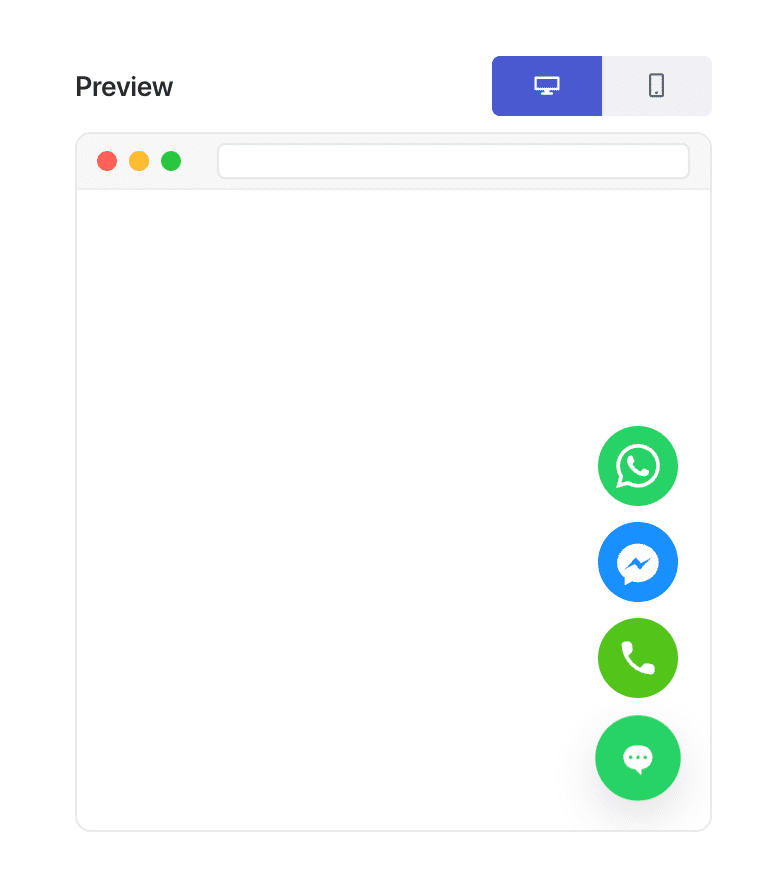
Bu esneklik, “sayfa türüne göre kişiselleştirme”yi mümkün kılan şeydir.
Sohbet Pencerenizi %50 Kaydırmada Nasıl Tetiklersiniz (Adım Adım)
Adım 1: Bir Sohbet Penceresi Oluşturun veya Düzenleyin
WordPress kontrol panelinizde:
PushEngage » Sohbet Widget'ları'na gidin ve Yeni Widget Oluştur'a veya mevcut birini Düzenle'ye tıklayın.
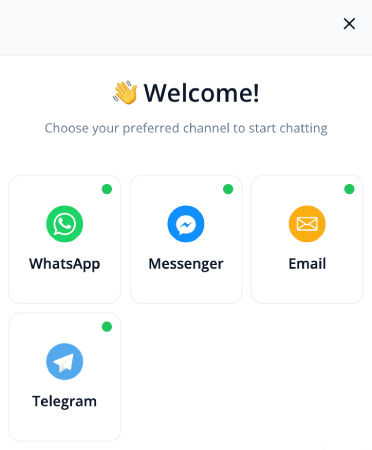
Mesajınızı, kanallarınızı ve tasarımınızı her zamanki gibi ayarlayın.
Adım 2: Davranış Sekmesini Açın
Widget düzenleyicisinin içinde Tetikleyiciler'e gidin. Bu, widget'ın ne zaman görüneceğini kontrol eder.
Tetikleyici açılır menüsünden kaydırma % sonra göster'i seçin:
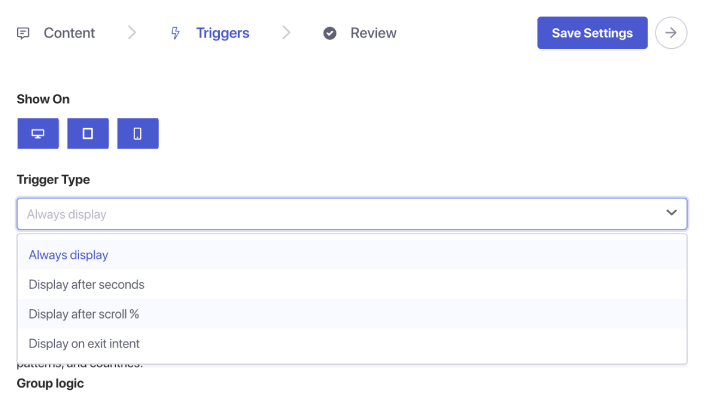
Bir yüzde giriş kutusu görünecektir. Kaydırma derinliğini %50 olarak ayarlayın. Bu, PushEngage'a sohbet widget'ını göstermeden önce kullanıcının sayfanın yarısına kadar kaydırmasını beklemesini söyler.
Adım 3: Kaydedin ve Yayınlayın
Widget'ı Kaydet'e tıklayın.
Ardından widget'ın etkin olduğundan ve istediğiniz sayfalara hedeflendiğinden emin olun. Sohbet widget'ınız artık atanan her sayfada tam olarak %50 kaydırma noktasında tetiklenecektir.
Profesyonel İpucu: Kaydırma Tetikleyicisini + Sayfa Hedeflemesi ile Birleştirin
Kaydırma tabanlı tetikleyiciler, hedefleme kurallarıyla eşleştirildiğinde daha da güçlü hale gelir.
Widget'ı şunlarda gösterebilirsiniz:
- Yalnızca blog gönderilerinde
- Yalnızca WooCommerce ürün kategorilerinde
- Yalnızca uzun biçimli içeriklerde
- Yalnızca geri dönen ziyaretçiler için
- Yalnızca fiyatlandırma sayfalarında
Sadece Tetikleyiciler sekmesine gidin ve sayfa koşullarını ayarlayın.
%50 Kaydırma Sohbet Tetikleyicileri İçin En İyi Uygulamalar
En iyi sonuçları almak için:
1. %50 kaydırmayı anında tetikleyicilerle birleştirmeyin
Niyet tabanlı etkileşim amacını boşa çıkarır.
2. Mesajı zorlayıcı değil, yardımcı tutun
Örnekler:
- “Bu sayfayı anlamada yardıma mı ihtiyacınız var?”
- “Kişiselleştirilmiş öneriler ister misiniz?”
- “Bir sorunuz mu var? Yardım etmek için buradayım!”
3. Aynı anda birden fazla kaydırmayla tetiklenen pencere kullanmaktan kaçının
Sayfa başına bir widget, deneyimi temiz tutar.
4. Hem mobil hem de masaüstünde test edin
Kaydırma derinliği cihazlarda farklı hissedilebilir.
Sohbet Widget'ları Kurduktan Sonra Ne Yapmalı
Bir %50 kaydırma tetikleyicisi, sohbeti mükemmel anda göstermenin en basit yollarından biridir - ziyaretçi etkileşim kurduktan sonra ancak ayrılmadan önce.
PushEngage'ın davranış kurallarıyla bunu ayarlamak bir dakikadan az sürer ve gelen sohbetlerin kalitesini ve niyetini anında iyileştirir.
PushEngage ile bunu dakikalar içinde kurabilir ve hemen daha iyi etkileşim, daha yüksek dönüşüm oranları ve daha verimli acente iş yükleri görmeye başlayabilirsiniz.
- Müşteriler her zaman birini çevrimiçi görür
- Yanıt süreleri düşer
- Satın alma öncesi dönüşümler artar
- Destek daha hızlı ve daha güvenilir hissettirir
- Mağazanız küresel kullanıma hazır hissettirir
Programlar ayarlandıktan sonra ekibiniz daha verimli çalışabilir ve müşterileriniz bekledikleri deneyimi yaşar.
Henüz PushEngage'de temsilci profilleri ve programları ayarlamadıysanız, şimdi tam zamanı.
İkna olmadınız mı? Çok kanallı pazarlama kampanyaları hakkında bu harika kaynaklara göz atın:
- Düşük Sezonda Otel Satışlarını Artırma Yolları
- 2026'da Oteller İçin Çok Kanallı Pazarlama Nasıl Yapılır
- Aboneleri Web Anlık Bildirimleri Kullanarak Alıcılara Dönüştürme
- Yeni WordPress Gönderilerinden Aboneleri Haberdar Etme
- Daha Fazla Satış Elde Etmek İçin Stokta Kalmayan Ürün Bildirimleri Gönderme
- Anlık Bildirim Aboneli Listelerini Temizleme (Kolay)
- Otomatik Olarak RSS Anlık Bildirimleri Gönderme
- Bir Haber Sitesini Tanıtmak İçin Anlık Bildirimleri Kullanma
- Satışlarınızı 2 Katına Çıkarmak İçin Çapraz Satış Anlık Bildirimlerini Kullanma
- Göz Atma Terk Etme Anlık Bildirimlerini Kullanma (4 Adım)


