Anında ve kolay bir şekilde anlık bildirimleri sıralayıp en iyi performans gösteren kampanyalarınızı bulmak mı istiyorsunuz?
Anlık bildirim kampanyalarınızı performans metriklerine göre sıralamak, neyin işe yarayıp neyin yaramadığını anlamanıza yardımcı olur. Daha da önemlisi, en iyi kampanyalarınızı yeni kampanyalar için temel olarak kullanabilirsiniz.
Sıralama özelliği tüm anlık bildirim hizmetlerinde standart değildir. Özelliğe sahip olsanız bile, API hizmetlerini kullanmadan kullanamayabilirsiniz. Bu da sizin için bunu yapacak bir geliştiriciye ihtiyacınız olacağı anlamına gelir.
Şirket içi bir geliştiriciniz varsa, sorun değil. Ancak yoksa, PushEngage'a geçmenizi şiddetle tavsiye ederiz. PushEngage, kampanyalarınızı birkaç basit tıklamayla filtrelemenizi sağlar.
Bu makalede, anlık bildirimleri nasıl sıralayacağınızı ve en iyi kampanyalarınızı nasıl bulacağınızı adım adım göstereceğiz.
Neden Anlık Bildirimleri Filtrelemek ve Sıralamak İstersiniz?
En iyi performans gösteren kampanyaları veya en kötü performans gösteren kampanyalarınızı bulmak için anlık bildirimleri filtreleyebilir ve sıralayabilirsiniz.
Bu filtrelerin harika yanı şunları görebilmenizdir:
- En çok gönderdiğiniz anlık bildirim türleri
- Belirli bildirim türlerinin ne kadar iyi performans gösterdiği
- Kampanya performansındaki mevsimsel eğilimleri belirleyin
- Hangi tür kampanyaların hemen optimize edilmesi gerektiği
Ve bunu birkaç basit tıklamayla yapabilirsiniz!
Anlık bildirimleri ayrıca En Son Oluşturulan veya En Eski Oluşturulan'a göre de sıralayabilirsiniz. Bu şekilde, bir tarih aralığına göre filtreledikten sonra bile belirli kampanyaları bulmak çok kolaylaşır.
Anlık Bildirim Hizmetiniz Kampanya Sıralamasına İzin Veriyor mu?
Her anlık bildirim hizmeti, anlık bildirimleri filtrelemenize ve sıralamanıza izin vermez. En azından doğrudan değil. Bazen API hizmetlerini kullanarak yapabilirsiniz. Ancak şirket içi bir geliştiriciniz yoksa bunu yapmak zordur.
Doğrulamanın iyi bir yolu, hizmet sağlayıcınıza bir temizleme seçeneği olup olmadığını sormaktır. Ancak büyük olasılıkla erişilebilir seçenekleri olan bir tane olmayacaktır.
Hemen PushEngage'a geçmenizi öneririz.

PushEngage, dünyanın en iyi anlık bildirim hizmetidir. Ve sadece ücretsiz sürümünden bahsetmiyoruz. Ziyaretçiler sitenizden ayrıldıktan sonra hedefli anlık mesajlarla onlarla bağlantı kurmanıza olanak tanır.
PushEngage, anlık bildirim hizmetleri ve araçları için ilk tercihimizdir çünkü:
- Kullanımı çok kolay
- HTTP ve HTTPS sitelerinde etkilidir
- Kurulum için çok az veya hiç kodlama gerektirmeyen görsel bir oluşturucu ile birlikte gelir
- Herhangi bir site türü için tamamen otomatik anlık bildirim kampanyaları kurulumunu kolayca yapın
- Daha yüksek tıklama oranları için kişiselleştirilmiş anlık bildirimler göndermek üzere birden fazla seçeneğe sahiptir
- Özel hedef takibi, UTM parametreleri ve gelişmiş analizlerle donatılmıştır
Ve bu sadece yüzeyin bir kısmı. Devam etmeden önce PushEngage'in özellikler tam listesini kontrol edin.
PushEngage ile ilgili en inanılmaz şey, bir satın alma kararı vermeden önce deneyebileceğiniz sonsuza dek ücretsiz bir plana sahip olmasıdır.
PushEngage’ın ücretsiz planı, işletmenizi ücretli planları rahatlıkla karşılayabileceğiniz bir noktaya getirmek için yeterlidir. Bunlar ilk yıl için ayda 9 ABD dolarından başlar (1.000 abone, yıllık faturalandırılır) ve abone sayınıza göre ölçeklenir; 100.000 abone Premium plandır ve mevcut rakamlar fiyatlandırma sayfasındadır.
Genel geçiş maliyeti oldukça düşüktür. Bu nedenle, hemen PushEngage'e geçmenizi şiddetle tavsiye ederiz. Temizleme özelliği, bir PushEngage planı satın almanız için tek neden değildir. Diğer push bildirim araçlarının basitçe sunmadığı birçok gelişmiş özellik elde edersiniz.
Bildirimleri Hızlı Bir Şekilde Nasıl Filtreleyip Sıralarsınız
PushEngage'e geçtiğinize göre, push bildirimleri aboneli listenizi temizleme zamanı.
Anlık bildirim performansını izlemeye yeni başlıyorsanız, sizin için harika haberlerimiz var. Anlık yayınlarınızı kolayca sıralayabilir ve filtreleyebilirsiniz.
PushEngage kontrol panelinize gidin ve Anlık Yayınlar'a gidin:

Burada bir filtre seçeneği olduğunu fark edeceksiniz:
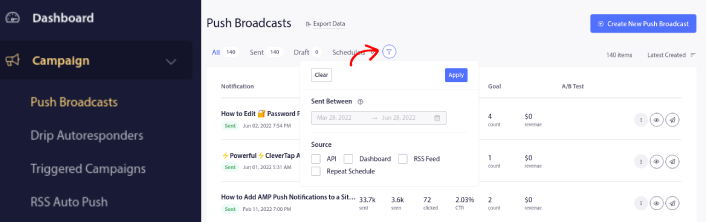
Gönderdiğiniz anlık yayınları tarihe ve kaynağa göre filtreleyebilirsiniz:
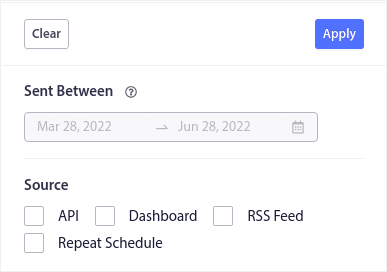
Diyelim ki birden fazla gün süren bir Kara Cuma anlık bildirim kampanyanız var.
Şimdi, hangi bildirimlerin en iyi performansı gösterdiğini ve hangilerinin pek iyi performans göstermediğini net bir şekilde görebilirsiniz. Ve bu bilgi, mevcut yayınlarınızı ve kampanyalarınızı optimize etmenize yardımcı olabilir.
Anlık bildirimleri kullanmaya yeni başlıyorsanız, yalnızca anlık yayınları A/B testi yapabileceğinizi bilmelisiniz. Ancak sıralama ve filtreleme seçeneklerini, otomatikleştirilmiş kampanyalarınız için bile optimizasyonlar uygulamak üzere kullanabilirsiniz. Sektörünüz ve markanız için anlık bildirim en iyi uygulamalarını ayarlamanın gerçekten harika bir yolu.
Anlık Bildirimleri Sıraladıktan Sonra Ne Yapmalı?
Anlık bildirimlerinizi sıraladıktan sonra, ayrıntılı analizlere bakabilir ve ardından anlık bildirim kampanyalarınızı optimize etmeye ve işletmenizi büyütmeye geri dönebilirsiniz.
Ayrıca makalelerimizi okumak ve otomatik anlık bildirimlerinizi nasıl güçlendireceğinizi öğrenmek için biraz zaman ayırmanızı öneririz. Anlık bildirim en iyi uygulamaları hakkındaki makalemizle başlayın.
Anlık bildirimlere yeni başlıyorsanız, yayına almadan önce kapsamlı bir anlık bildirim testi sürecini izlemelisiniz. Bu, ziyaretçileriniz bunları görmeden ve bozuk bir kullanıcı deneyiminden şikayet etmeye başlamadan önce yaygın sorunları gidermenize yardımcı olacaktır. Ve kesinlikle Google Analytics'i anlık bildirimleri izlemek için ayarlamalısınız.
Tıklayan veya tıklamayan aboneleri hedeflemek için anlık bildirimleri yeniden hedefleme. Bunun sizin için nasıl çalıştığını bize bildirin. Bu arada, bu kaynaklara göz atın:
- Merak Uyandırarak Anlık Bildirimlerinizdeki Tıklamaları Nasıl Artırırsınız
- Her Anlık Bildirimi Nasıl Kişiselleştirirsiniz
- Anlık Bildirimlerinizde Zengin Medya ile Nasıl Öne Çıkarsınız
- Dormant Anlık Bildirim Abonelerini Nasıl Yeniden Aktifleştirirsiniz
- Müşterileri Bilgilendirmek İçin Anlık Bildirimleri Nasıl Kullanırsınız
- Daha Yüksek Tıklama Oranları İçin Anlık Bildirimlerinizde Emojileri Nasıl Kullanırsınız
- Aciliyet Hissi Yaratarak Dönüşümleri Nasıl Artırırsınız
Ve henüz yapmadıysanız, PushEngage ile başlayın.


