Ortalama Sipariş Değerinizi Artırmanın Bir Yolunu mu Arıyorsunuz?
Ortalama Sipariş Değeri (OSD), işletme büyümesini analiz etmek için bakılabilecek en basit e-ticaret metriklerinden biridir. Peki, onu nasıl artırırsınız? OSD'yi artırmak işletmenize gerçekten yardımcı olur mu?
Bu makalede, ortalama sipariş değerini, neden optimize etmeniz gerektiğini ve OSD'nizi artırmanın gerçekten kolay yollarını daha derinlemesine inceleyeceğiz.
Kulağa hoş geliyor? Hadi dalalım.
PushEngage, dünyada 1 numaralı anlık bildirim eklentisidir. Ücretsiz alın!
- Ortalama Sipariş Değeri Nedir?
- Ortalama Sipariş Değeri En İyi E-ticaret Metriği midir?
- Mağazanızın Ortalama Sipariş Değerini Artırma Yolları
- #1. Ücretsiz Kargo İçin Minimum Sipariş Değeri Oluşturun
- #2. Ürünleri Paketleyin ve Setler Oluşturun
- #3. Tamamlayıcı Ürünleri Yükseltin ve Çapraz Satış Yapın
- #4. Sadakat Programları Kullanarak Ortalama Sipariş Değerini Artırın
- #5. Sitenize Canlı Sohbet Ekleyin
- #6. Dönüşümleri Artırmak İçin Kitle Segmentasyonunu Kullanın
- #7. Eklentileri Düşük Fiyatla Satın
- #8. Daha Yüksek Satışlar İçin Çıkış Niyeti Pop-up'ı Kullanın
- #9. Pop-up'ınıza Abone Olmak İçin Tıkla Düğmesi Ekleyin
- #10. Bir Hoş Geldiniz Kampanyası Oluşturun
- #11. Zamana Duyarlı Teklifler Oluşturun
- #12. Ödeme Akışı Aracılığıyla Sosyal Kanıt Sunun
- #13. Birden Fazla Ödeme Seçeneği Ekleyin
- Ortalama Sipariş Değerinizi Artırdıktan Sonra Ne Yapmalısınız?
Ortalama Sipariş Değeri Nedir?
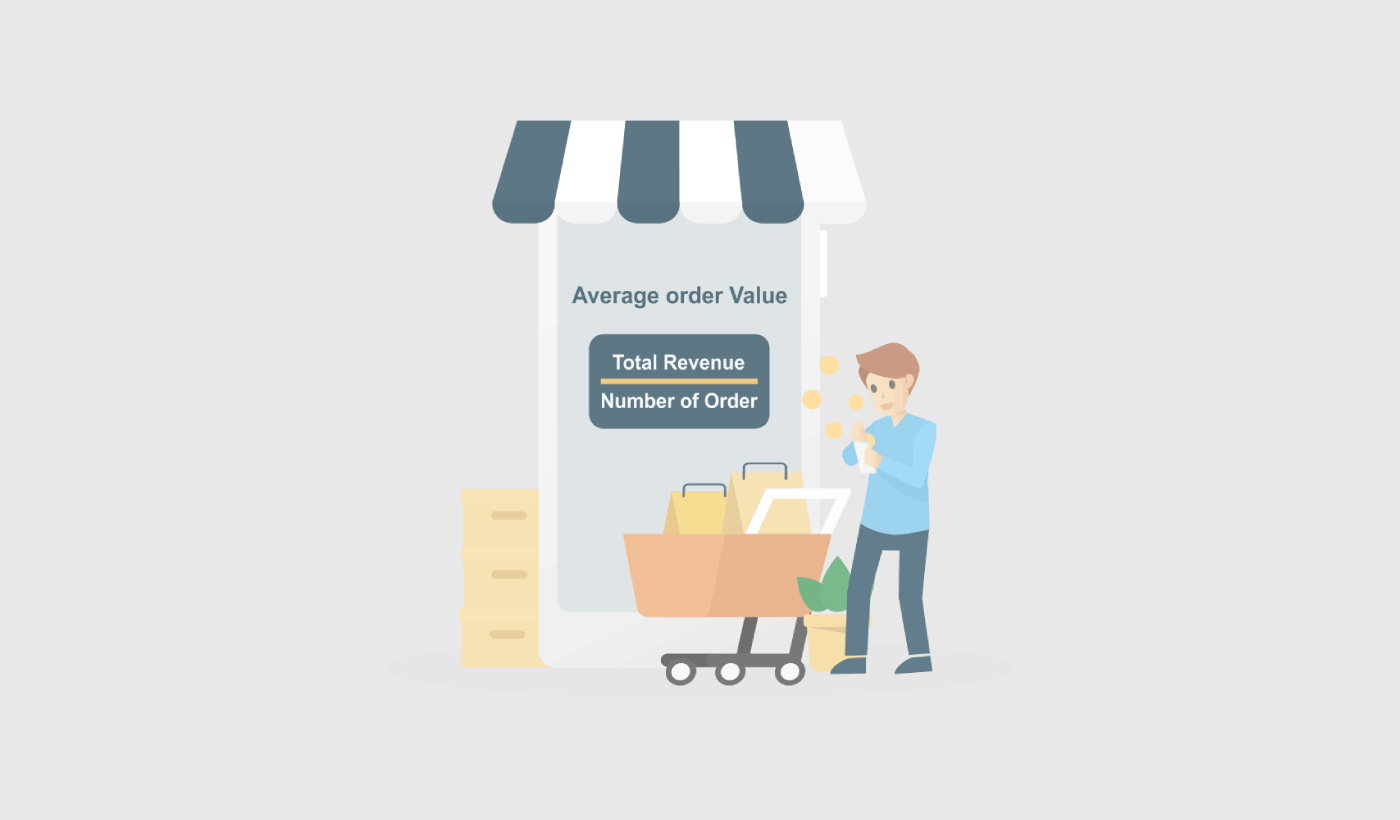
Ortalama sipariş değeri (OSD), bir web sitesinde veya e-ticaret mağazasında sipariş başına harcanan ortalama para miktarını ölçen bir metriktir. Toplam geliri sipariş sayısına bölerek hesaplayabilirsiniz.
Örneğin, bir mağazada 100 sipariş ve toplam 10.000 ABD doları gelir varsa, OSD 100 ABD doları olur (10.000 ABD doları / 100 sipariş).
OSD, işletmeniz için önemli bir metriktir çünkü müşteri tabanınızın değerini anlamanıza ve satışları artırma fırsatlarını belirlemenize yardımcı olabilir. OSD'yi artırarak, işletmeniz her müşteriden daha fazla gelir elde edebilir, bu da genel satışlarınızı ve karlılığınızı artırmanıza yardımcı olabilir.
OSD'lerini artırmak için kullanabileceğiniz paket indirimleri sunmak, ilgili ürünleri yükseltmek ve paket fiyatlandırması kullanmak gibi çeşitli stratejiler vardır. Bu stratejileri etkili bir şekilde uygulayarak, daha fazla satış yapabilir ve zamanla OSD'lerini artırabilirsiniz. Yakında daha ayrıntılı konuşacağız.
Ortalama Sipariş Değeri En İyi E-ticaret Metriği midir?
Ortalama sipariş değerini (OSD) artırmak bir işletmeyi büyütmek için faydalı bir yol olsa da, dikkate alınması gereken birkaç potansiyel dezavantaj vardır. OSD'nizi artırmak şunlara yol açabilir:
- Daha yüksek müşteri edinme maliyetleri: OSD'yi artırmak için pazarlama ve müşteri edinme çabalarına daha fazla yatırım yapmanız gerekebilir. Bu, yeni müşteriler edinme maliyetini artırabilir ve bu da işletmenin genel karlılığını etkileyebilir.
- Uzun vadede sürdürülebilir olmayabilir: Müşteriler nihayetinde her siparişte daha fazla harcamak istemeyecekleri bir noktaya ulaşabileceğinden, OSD'yi artırmak uzun vadede sürdürülebilir bir strateji olmayabilir. Bu nedenle, mevsimsel bir indirim yaparken OSD'ye odaklanmak en iyisidir.
- Müşteri memnuniyetsizliğine yol açabilir: OSD'yi artırmaya çok fazla odaklanırsanız, müşterilerinizi ihtiyaç duyduklarından veya istediklerinden daha fazla ürün satın almaya zorlayarak rahatsız edebilirsiniz. Bu, müşteri memnuniyetsizliğine yol açabilir ve işletmenizin itibarına zarar verebilir.
- Tüm işletmeler için uygun olmayabilir: İşletmenizin ve ürünlerinin doğasına bağlı olarak, ortalama sipariş değerini (AOV) artırmak mümkün olmayabilir. Örneğin, düşük fiyatlı ürünler satıyorsanız, daha yüksek fiyatlı ürünler satan işletmelere göre AOV'yi artırmakta daha fazla zorlanabilirsiniz.
Genel olarak, AOV'yi artırmanın potansiyel dezavantajlarını dikkatlice değerlendirmek ve dengeli bir yaklaşım benimsemek önemlidir. Kısa vadeli büyüme, işletmeniz üzerinde kalıcı bir etkiye sahip olacak sadık müşterilerinizi kaybetmenize neden olabilir.
Mağazanızın Ortalama Sipariş Değerini Artırmanın Yolları
Ortalama Sipariş Değerinin ne olduğunu ve neden önemli olduğunu anladığınıza göre, AOV'nizi nasıl artıracağınıza bakma zamanı. İpuçlarımızın neredeyse tamamının bir veya diğer pazarlama aracını gerektirdiğini unutmayın. AOV'nizi optimize etmeye başlamadan önce, gerçekten buna odaklanmanız gerekip gerekmediğinden %100 emin olmanız gerekir.
#1. Ücretsiz Kargo İçin Minimum Sipariş Değeri Oluşturun
Ücretsiz kargo size çok satış getirebilir. Ancak ortalama sipariş değerinizi artırmak istiyorsanız, daha ucuz ürünleriniz için bunu vermeyi bırakmanız gerekir. Bunu yapmanın bir yolu, ücretsiz kargo için Minimum Sipariş Değeri belirlemektir.

Ücretsiz kargo için Minimum sipariş değeri (MOV), müşterinin siparişi için ücretsiz kargo alabilmesi için mağazanızda harcaması gereken minimum para miktarıdır. Müşterileri web sitenizde daha fazla para harcamaya teşvik etmek için bu pazarlama stratejisini kullanabilirsiniz.
Minimum sipariş değeri belirlediğinizde, nakliye ve elleçleme için her siparişte harcamanız gereken para miktarını azaltırsınız. Azalan maliyet, karlılığı sürdürmeyi kolaylaştırır.
Ücretsiz kargo için Minimum Sipariş Değeri uygulamanın bir diğer nedeni de müşterilerinizi tek bir siparişte daha fazla ürün satın almaya teşvik etmektir. Bu, Ortalama Sipariş Değerini oldukça kolay bir şekilde artırabilir.
#2. Ürünleri Paketleyin ve Setler Oluşturun
Ürünleri paketlemek, bir işletmenin ortalama sipariş değerini (AOV) artırmak için yaygın bir stratejidir. Ürünleri bir araya getirip paket olarak satarak, bireysel olarak satmaktan daha fazla ürünü daha yüksek bir fiyata satabilirsiniz.
AOV'nizi artırmak için ürün paketlemeyi kullanmaya yönelik birkaç ipucu:
- Tamamlayıcı ürünler seçin.
- Paket indirimleri sunun.
- Paket fiyatlandırması kullanın.
Bu üç temel prensibe bağlı kalırsanız, kapış kapış gidecek paketler oluşturabilirsiniz. Ortalama Sipariş Değerinizi artırmak için harika bir yoldur.
#3. Tamamlayıcı Ürünleri Yükseltin ve Çapraz Satış Yapın
Amazon'a göre satışlarının %35'i çapraz satıştan geliyor. Çapraz satış anlık bildirimleri, müşterilerinize otomatik olarak ürün çapraz satışı yapan kampanyalardır. Mevcut bir müşteriye satış yapma olasılığınız %60-70 daha fazla olduğu için çapraz satış anlık bildirimleri satışlarınızı artırmanıza yardımcı olur.
Yukarı satış (Upselling), kullanıcıları zaten satın almakta oldukları ürünün daha pahalı bir ürününe veya daha iyi bir sürümüne yükseltmeye ikna etme yöntemidir. Çapraz satış (Cross-selling) ise müşteriye ilgili veya tamamlayıcı ürünler satmaktır.
Çapraz satış ve yukarı satış, en etkili pazarlama yöntemleridir. Çapraz satış ve yukarı satış kampanyaları kullanarak Ortalama Sipariş Değerinizi (AOV) kolayca artırabilirsiniz. Bunu yapmanın kolay bir yolu, bunun gibi çapraz satış anlık bildirimleri oluşturmaktır:
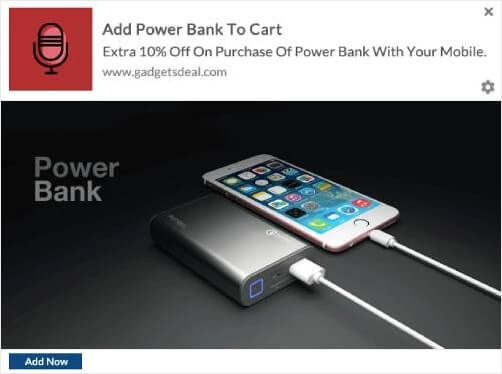
Çapraz satış anlık bildirimlerinin nasıl oluşturulacağına dair adım adım bir kılavuz için bu makaleye göz atın. Yukarı satış bildirimleri oluşturmak için de aynı tekniği kullanabilirsiniz.
#4. Sadakat Programları Kullanarak Ortalama Sipariş Değerini Artırın
Gerçekleri kontrol edin: Mevcut bir müşteriyi elde tutmak, yeni bir müşteri edinip işe almaktan daha ucuzdur. Sürekli olarak yeni müşteriler edinmeye odaklanıyorsanız, bütçenizin ve zamanınızın bir kısmını mevcut müşterilerinizi elde tutmak için harcamak iyi bir fikir olabilir.
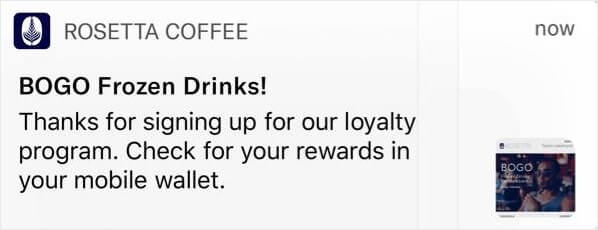
Peki, ne yapabilirsiniz? Müşterilerinizi önemli ve değerli hissettirmenin gerçekten basit bir yolu bir sadakat programı oluşturmaktır. Ve hayır, sadakat programları sadece havayolları için değildir. Neredeyse her büyük marka artık bir ödül programına sahip. Bunu yapmanın kolay bir yolu, bunun gibi anlık bildirimler kullanmaktır:
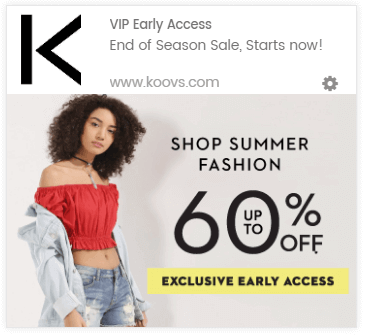
Ve bir adım daha ileri gitmek isterseniz, sadık müşterilerinizi farklı yollarla ödüllendirebilirsiniz.
Sadakat programlarına yeniyseniz ve daha önce hiç kurmadıysanız, Yotpo'yu kullanmayı deneyin. Yotpo, web siteniz için anında sadakat programları oluşturmanıza yardımcı olur. Ve uygulamak için hiç kod bilmenize gerek yok.
#5. Sitenize Canlı Sohbet Ekleyin
Sitenizde canlı bir sohbet kutusuna sahip olmak, web sitesi etkileşimi için gerçekten etkili bir araç olabilir. Sitenizde canlı sohbet aracı kullanarak, sohbet kutusu tetikleyicilerini şunlar için kolayca ayarlayabilirsiniz:
- Müşterilerin ürün veya ödeme sayfasında çok zaman harcaması
- Müşterilerin sepetlerine ürün eklemesi ancak ödeme yapamaması
- Müşterilere kupon veya indirim sunmak için yüksek sepet değerine sahip müşteriler
Bunların hepsi, potansiyel müşterilerin çoğunu çok hızlı bir şekilde dönüştürmeye yardımcı olabilecek otomatik tetikleyicilerdir. LiveChat kullanmanızı öneririz.

LiveChat, konuşmaya dayalı pazarlama ve satışlar için bir canlı sohbet aracıdır. Çevrimiçi ürün satıyorsanız veya bir ajans için potansiyel müşteri topluyorsanız, bu eklentiyi kullanmanızı şiddetle tavsiye ederiz.
Sohbet kutusu, otomatik tetikleyicilerden herhangi biri tetiklendiğinde müşterilerinize bir uyarı gönderecektir. Ve oradan, bir Müşteri Hizmetleri temsilcisinin devralıp müşterilerin satın alma kararı vermelerine yardımcı olmasını sağlayabilirsiniz.
#6. Dönüşümleri Artırmak İçin Kitle Segmentasyonunu Kullanın
Hedef kitlenizi ilgi alanlarına ve davranışlarına göre segmentlere ayırmak, kampanyalarınızı daha tıklanabilir hale getirir. Hedef kitlenizle daha alakalı teklifler ve promosyonlar gönderirseniz, dönüşümleriniz tavan yapacaktır.
Örneğin, anlık bildirim abonelerinizi segmentlere ayırırsanız, onlara çok daha iyi tıklamalar alırsınız.
Abonelerinizi otomatik olarak segmentlere ayırmak, kişiselleştirilmiş anlık bildirim kampanyaları göndermenizi çok kolaylaştırır. Bu şekilde, anlık bildirimlere tıklamaları iyileştirebilir ve sitenize daha fazla geri dönen trafik sağlayabilirsiniz.
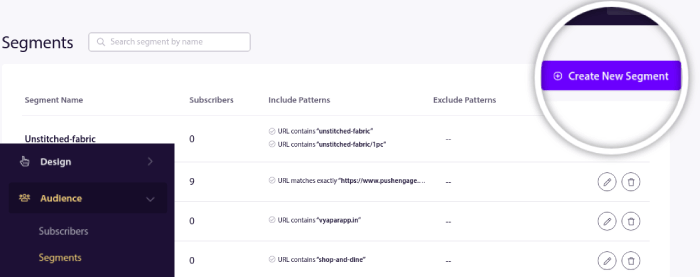
Ve bu PushEngage ile kurulumu çok kolaydır. Normalde, segmentler oluşturmak için bir Javascript API kullanmanız gerekir. PushEngage ile hala bu seçeneğiniz var, ancak bunu yapmanın en kolay yolu PushEngage kontrol panelinizden. Kitle » Segmentler bölümüne gidin ve Yeni Bir Segment Oluştur'a tıklayın:
Ve abonelerinizi gezdikleri URL'lere göre otomatik olarak segmentlere ayıran bir kural oluşturun:
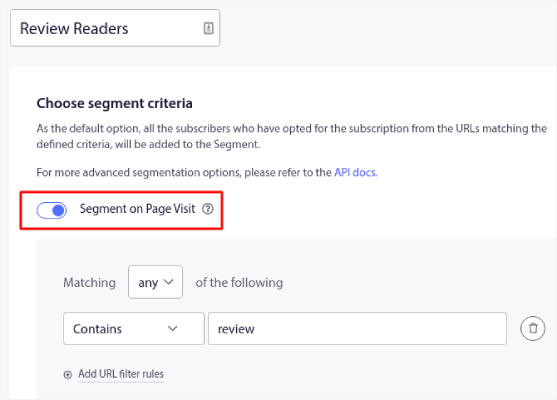
Örnekte, "örnekler" kelimesini içeren sitenizdeki URL'leri ziyaret ettiklerinde aboneleri otomatik olarak segmentlere ayıran "Örnek Segment" adlı bir segment oluşturduk. Burada istediğiniz herhangi bir anahtar kelimeyi kullanabilirsiniz.
Kuraldan memnun kaldığınızda, Create'e tıklayın.
#7. Eklentileri Düşük Fiyatla Satın
Downselling, müşteriyi başlangıçta istediklerinin yerine daha ucuz bir ürün veya hizmet satın almaya ikna etmeye çalıştığınız bir satış tekniğidir. Bu, müşterinin daha pahalı seçenek için bütçesi olmadığında veya daha ucuz seçeneğin ihtiyaçlarını aynı derecede karşıladığı durumlarda çeşitli nedenlerle yapılabilir.
Kasadaki şeker ve sigara stoklayan bir mağaza düşünün. Downselling, dürtüsel satın alımlar ve ek ürünlerde en iyi sonucu verir. Ek ürünleri downselling yaparken kullanabileceğiniz birkaç strateji vardır:
- Daha ucuz seçeneğin değerini açıklayın: Daha düşük fiyatlı ek ürünün hala müşterinin ihtiyaçlarını nasıl karşıladığını ve değer sağladığını açıklayın.
- Daha pahalı seçeneğin dezavantajlarını vurgulayın: Müşterinin ihtiyaç duymayabileceği daha pahalı ek ürünün herhangi bir olumsuzluğunu veya gereksiz özelliklerini belirtin.
- Alternatifler sunun: Müşterinin ihtiyaçlarına ve bütçesine daha uygun olabilecek diğer seçenekleri veya ek ürünleri önerin.
- Kıtlık veya aciliyet kullanın: Daha ucuz seçenek için sınırlı kullanılabilirlik veya sınırlı süreli bir tekliften bahsederek bir aciliyet hissi yaratın.
Müşteriye karşı dürüst ve şeffaf olmak ve onları asla bir karar vermeye zorlamamak önemlidir. Bunun yerine, ihtiyaçlarına ve bütçelerine en uygun bilinçli bir seçim yapmalarına yardımcı olmaya odaklanın.
#8. Daha Yüksek Satışlar İçin Çıkış Niyeti Pop-up'ı Kullanın
Çıkış niyeti açılır pencereleri, siteyi terk etmek üzere olan web sitesi ziyaretçilerinin dikkatini çekmek için tasarlanmış bir pazarlama aracı türüdür. Bu açılır pencereler genellikle bir ziyaretçi imlecini tarayıcı penceresinin dışına taşıdığında veya sayfanın altına kaydırdığında, ayrılmak üzere olduklarını göstererek görünür.
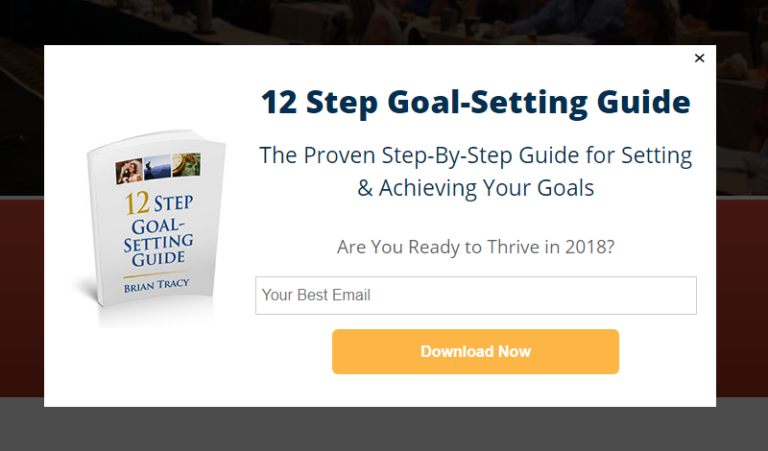
Çıkış niyeti açılır pencereleri, siteyi terk etmek üzere olan web sitesi ziyaretçilerinin dikkatini çekmek için tasarlanmış bir pazarlama aracı türüdür. Bu açılır pencereler genellikle bir ziyaretçi imlecini tarayıcı penceresinin dışına taşıdığında veya sayfanın altına kaydırdığında, ayrılmak üzere olduklarını göstererek görünür.
Çıkış niyeti açılır pencereleri, ziyaretçileri sitede kalmaya ve bir satın alma işlemi yapmaya veya başka bir istenen eylemi gerçekleştirmeye ikna etmek için kullanılabilir. Çıkış niyeti açılır pencerelerini idareli ve ziyaretçinin deneyimine saygılı bir şekilde kullanmak önemlidir. Açılır pencereleri aşırı kullanmak veya müdahaleci veya can sıkıcı bir şekilde kullanmak olumsuz bir kullanıcı deneyimine yol açabilir ve nihayetinde satış çabalarınıza zarar verebilir.
#9. Pop-up'ınıza Abone Olmak İçin Tıkla Düğmesi Ekleyin
Anlık bildirimler, web sitesi trafiğinizi ve etkileşiminizi otomatik olarak artırmanıza yardımcı olur. Ve bir çevrimiçi mağaza işletiyorsanız, PushEngage ayrıca otomatik e-ticaret anlık bildirimleri oluşturmanıza yardımcı olarak satışlarınızı artırmanıza da yardımcı olur.
Ücretsiz başlayabilirsiniz, ancak işletmenizi büyütme konusunda ciddiyseniz, ücretli bir plan satın almalısınız. Ayrıca, herhangi bir anlık bildirim hizmeti satın almadan önce, anlık bildirim maliyetleri hakkındaki bu kılavuza göz atmalısınız.
PushEngage ile nelerin geldiğine hızlı bir bakış:
- Yüksek dönüşüm sağlayan otomatik kampanyalar
- Birden fazla hedefleme ve kampanya zamanlama seçeneği
- Hedef takibi ve gelişmiş analizler
- Akıllı A/B testi
- Özel Bir Başarı Yöneticisi
İşletmeniz için trafik, etkileşim ve satış oluşturmak istiyorsanız, PushEngage'in tartışmasız en iyi seçenek olduğunu göreceksiniz. Ve bütçeniz kısıtlıysa, anlık bildirimlerinizle biraz yaratıcı olabilirsiniz.
Öncelikle, OptinMonster'daki kenar çubuğundan açılır pencerenize bir HTML bloğu ekleyin.
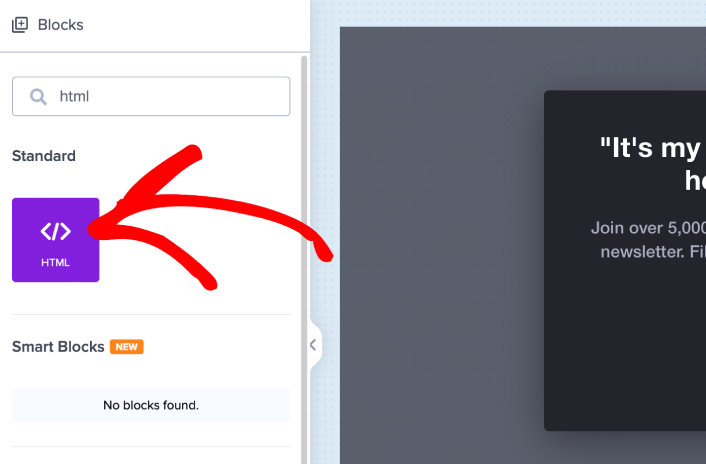
Burada anlık bildirim abonelerini toplamak için kodu ekleyeceğiz. Öncelikle, tıklanabilir bir düğme oluşturmak için aşağıdaki kodu yapıştırın:
<button onclick="subscribeOnClickButton()" style="border: none; width: 100%; padding-left: 15%; padding-right:15%; text-align: center; display: inline-block; color: white;">Get Updates via Push Notifications</button>Kodu, HTML ekleyebileceğinizi söylediği yere yapıştırın:
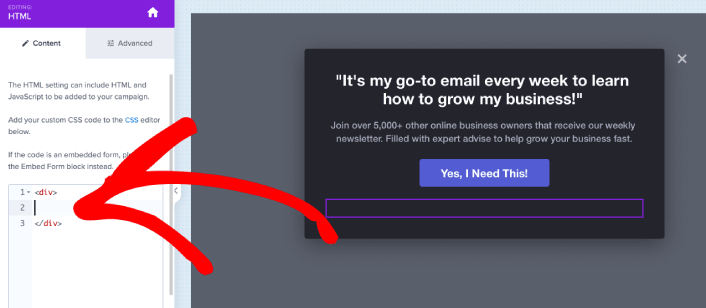
Elbette, daha çekici görünmesini sağlamak için stillerle oynayabilirsiniz. Ardından, düğmeye tıklandığında anlık bildirim abonelerini toplayacağız.
PushEngage ana sayfasına gidin ve Başlayın düğmesine tıklayın:

Ardından, PushEngage'i denemek için ücretsiz planı seçmek isteyeceksiniz veya işletmenizi büyütme konusunda ciddiyseniz ücretli bir planı seçin. Ücretli planlar daha fazla kampanya seçeneği ve daha büyük abone listeleri oluşturma olanağı sunar.
PushEngage kontrol panelinizde, Site Ayarları » Site Detayları bölümüne gidin ve Kurulum Talimatları İçin Buraya Tıklayın düğmesine tıklayın. Herhangi Bir Site altında, kurulum kodunuzu alacaksınız:
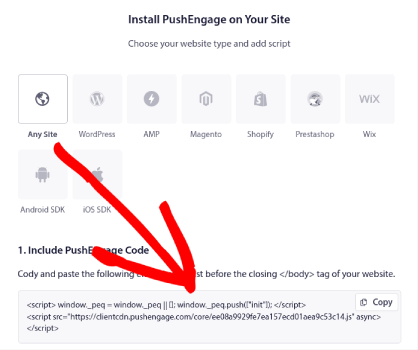
UYARI: Kontrol panelinizden aldığınız kodu kopyalamanız gerekir. Kod, her PushEngage kullanıcısı için benzersizdir. Görüntüdeki kodu kopyalayarak anlık bildirim aboneleri toplayamazsınız.
Kodunuzu PushEngage kontrol panelinizde aldıktan sonra, ikinci betiği alın ve ona ek kod ekleyin. Nihai kodunuz şuna benzer olmalıdır:
<script src="https://clientcdn.pushengage.com/core/02a6e92667ae2279fcba8932356c1d93.js" async></script>
<script> window._peq = window._peq || [];
function subscribeOnClickButton(){
window._peq.push(['subscribe',{}.pe,function(res){
console.log(res);
}]);
}
</script>
Bu kodu, düğmeniz için olan kodun hemen ardından ve <div></div> kod bloğunun arasına OptinMonster'daki HTML bloğuna ekleyin ve işiniz bitti!
#10. Bir Hoş Geldiniz Kampanyası Oluşturun
Bir web sitesi karşılama mesajı, müdahaleci olmadan hedef kitlenizle yeniden etkileşim kurmanın mükemmel bir yoludur. Aboneleriniz, e-postalarınıza ve anlık bildirimlerinize gerçekten abone olduklarını doğrulamak için bir yol İSTEYECEKTİR. Otomatik bir karşılama anlık bildirimleri dizisi oluşturmak, web sitesi ziyaretçilerini dahil etmenin mükemmel bir yoludur.
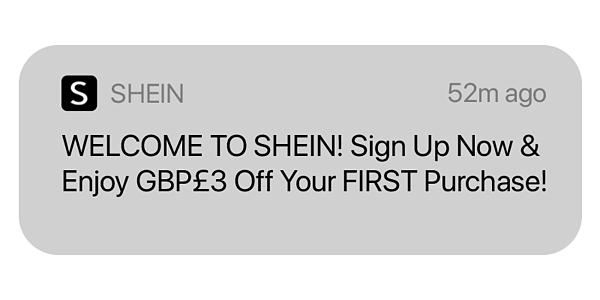
Örneklerimizi gözden geçirirken bu basit kampanyayla ne kadar çok şey yapabileceğinizi tam olarak keşfedeceğiz.
Ancak şimdilik, web sitenizin karşılama mesajını henüz oluşturmadıysanız, gerçekten şimdi başlamanız gerektiğini bilin. Sadece e-posta ve anlık bildirimleri kullanamazsınız. Web sitenizde açılır pencereler kullanıyorsanız, karşılama paspaslarını incelemelisiniz.
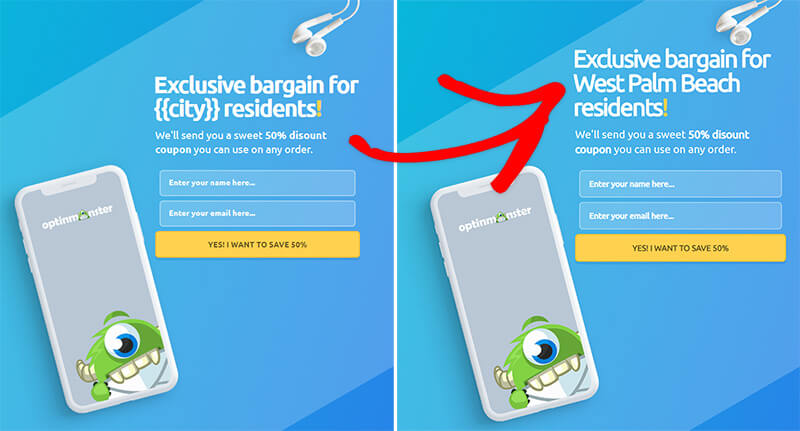
Karşılama mesajlarıyla harika açılır pencereler oluşturmaya çalışıyorsanız OptinMonster ile başlamalısınız. OptinMonster, dünyanın en iyi dönüşüm optimizasyon araç setidir ve web sitesi ziyaretçilerini daha fazla e-posta abonesine dönüştürmek için açılır pencereler oluşturmak çok kolaydır.
Ziyaretçinin kullanıcı adını, konumunu, tarihlerini ve daha fazlasını kullanarak karşılama açılır pencerelerinizi kişiselleştirmek için tonlarca gelişmiş seçeneğe sahip olursunuz. Ve en iyi yanı, onları daha organik bir şekilde dönüştürmek için farklı kampanyalarla yeni ve geri dönen ziyaretçileri hedefleyebilirsiniz.
#11. Zamana Duyarlı Teklifler Oluşturun
Yaklaşan bir satış promosyonunuz varsa, sitenize bir geri sayım sayacı eklemelisiniz. Kendi satışlarımızı artırmak için animasyonlu zamanlayıcıları test ettik ve sonuçlar inanılmaz.
Bir geri sayım sayacı kullanmak, bir aciliyet hissi yaratarak ve müşterileri sayaç dolmadan satın almaya teşvik ederek satışları artırmanın etkili bir yolu olabilir.
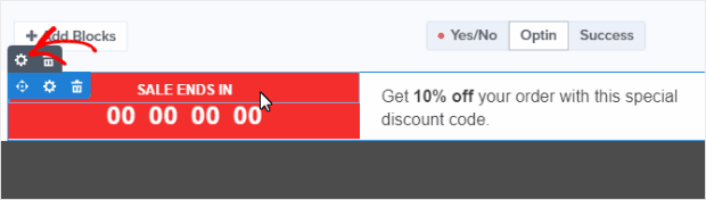
Geri sayım sayacınızın süresi, teklifinizin doğasına uygun olmalıdır. Sınırlı süreli bir indirim sunuyorsanız, birkaç saat veya bir günden geri sayan bir zamanlayıcı uygun olabilir. Daha önemli bir teklif için, bir haftadan veya daha fazladan geri sayan bir zamanlayıcı kullanmak isteyebilirsiniz.
#12. Ödeme Akışı Aracılığıyla Sosyal Kanıt Sunun
Sosyal kanıt, web sitesi ziyaretçilerinize başka insanların işletmenize güvendiğini ve sizden alım yaptığını söyleme pratiğidir. Web sitenize ekleyebileceğiniz sosyal kanıtın birkaç biçimi vardır, örneğin:
- Vaka çalışmaları
- Referanslar
- Yorumlar
- Instagram akışları
- Twitter bahsedilmeleri
- YouTube videoları
Ve daha fazlası. Sosyal kanıt için bunun gibi açılır pencereler oluşturmak üzere TrustPulse kullanmanızı öneririz:

TrustPulse'ın ne olduğunu yeni keşfedenler için, işte özet...

TrustPulse, herhangi bir siteye ekleyebileceğiniz bir sosyal kanıt yazılımıdır. Site dönüşümlerini anında artırmaya yardımcı olan sosyal kanıt açılır pencereleri oluşturur. TrustPulse, çevrimiçi ürün satan siteler için harikadır. Ancak o kadar basit, güçlü ve kullanımı kolaydır ki, etkileşiminizi artırmak için TrustPulse'ı bir blog sitesine de yükleyebilirsiniz.
Siteniz için sosyal kanıt oluşturmak üzere bunu nasıl kullanabileceğiniz hakkında daha iyi bir fikir edinmek için TrustPulse'ın tam incelemesine göz atın.
#13. Birden Fazla Ödeme Seçeneği Ekleyin
Stripe, WordPress sitenizde kredi kartı ödemelerine olanak tanır. En iyi yanı, ödeme ağ geçidinin yinelenen ödemeler de dahil olmak üzere birden çok ödeme biçimine izin vermesidir.
Açıklık getirmek gerekirse: Müşterilerinizin kredi kartı kullanarak ödeme yapmaları için bir Stripe hesaplarına ihtiyacı yoktur. Herhangi bir kredi kartı işlemcisiyle yapacakları gibi sitenizden kolayca alışveriş yapabilirler.
Ayrıca Target, Lyft ve UNICEF gibi dünyanın en büyük isimlerinden bazıları tarafından da kullanılıyor. Yani ödemelerinizin her zaman işleneceğine güvenebileceğinizi biliyorsunuz.
Ancak Stripe'ı bu kadar çok sevmemizin 1 numaralı nedeni şeffaflıklarıdır. Gizli ücret yoktur. Daha önce ödeme kabul etmek için PayPal kullandıysanız, diğer ödeme işlemcileri ve ağ geçitleriyle gizli ücretlerin ne kadar sorun olabileceğini bilirsiniz. Ödemelerinizi işlemek için WP Simple Pay kullanmanızı öneririz.
WP Simple Pay tam olarak adından da anlaşılacağı gibi. WordPress sitenizde çevrimiçi ödemeleri basitleştirir. Kullanımı kolaydır, oldukça güvenilirdir ve kurulumu için sıfır kodlama gerektirir.
En iyi yanı? WP Simple Pay, dünyanın dört bir yanından ödeme kabul etme endişesi duymadan ürünler oluşturmaya ve satmaya odaklanmanıza yardımcı olur. Ayrıca dünyanın en iyi WordPress Stripe eklentilerinden biridir.
Tüm müşteri ve ödeme bilgileri WordPress web sitenizde değil, Stripe hesabınızda saklanır. Sonuç olarak, eklenti diğer alternatifler gibi sitenizi şişirmeyecektir. WP Simple Pay, WordPress sitenize Stripe ödemeleri eklemenin en basit yolunu sunar.
Ve WP Simple Pay'i kurmak çok basittir.
İşte WP Simple Pay Pro'daki en iyi özelliklere hızlı bir bakış:
- Ödeme Formu Oluşturucu
- Stripe Checkout Ödeme Sayfaları Oluşturucu
- Özel Tutar Ödemeleri
- Özel Abonelik Seçenekleri
- Kupon Kodları ile İndirimler
- Alternatif Ödeme Yöntemleri
- Özelleştirilmiş Ödeme Onay Akışı
Ve daha fazlası! WP Simple Pay Pro incelememizde özelliklere daha yakından bakabilirsiniz.
Ortalama Sipariş Değerinizi Artırdıktan Sonra Ne Yapmalısınız?
Ortalama Sipariş Değerinizi nasıl artıracağınızı artık bildiğinize göre, diğer önemli e-ticaret metriklerine de bakmalısınız. Bir e-ticaret işletmesini büyütmenin en kolay yollarından biri anlık bildirimleri kullanmaktır. Bu makaledeki taktikleri uyguladıktan sonra e-ticaret anlık bildirimleri hakkındaki makalemize göz atın.
Anlık bildirimler, daha fazla trafik, etkileşim ve satış elde etmenize yardımcı olabilecek güçlü bir pazarlama aracıdır. İkna olmadınız mı? Başlamak için bu harika kaynaklara göz atın:
- Terk Edilmiş Sepet Anlık Bildirimleri Nasıl Ayarlanır (Kolay Eğitim)
- Sitenize Bir Web Bildirimleri WordPress Eklentisi Nasıl Kurulur
- Anlık Bildirim A/B Testi Nasıl Yapılır (En İyi Uygulamalar)
- Anında Trafik Almak İçin 7 Anında İletme Bildirimi En İyi Uygulaması
- En İyi 21 E-ticaret WordPress Eklentisi (Ücretsiz ve Ücretli)
Anlık bildirimlerinizi göndermek için PushEngage kullanmanızı öneririz. Tüm bu kaynakları inceledikten sonra, PushEngage'ın piyasadaki 1 numaralı anlık bildirim yazılımı olduğunu fark edeceksiniz. Bu nedenle, henüz yapmadıysanız, bugün PushEngage ile başlayın!


